display VOLVO S80 2008 Workshop Manual
[x] Cancel search | Manufacturer: VOLVO, Model Year: 2008, Model line: S80, Model: VOLVO S80 2008Pages: 275, PDF Size: 7.17 MB
Page 169 of 275
![VOLVO S80 2008 Workshop Manual Thumb wheel. Turn this wheel until Driver Alert is displayed. The second line shows the alternative Off,
Unavailable , or [-----], i.e., the number of bars.
READ button. Confirms and erases a me](/img/45/59287/w960_59287-168.png "VOLVO S80 2008 Workshop Manual Thumb wheel. Turn this wheel until Driver Alert is displayed. The second line shows the alternative Off,
Unavailable , or [-----], i.e., the number of bars.
READ button. Confirms and erases a me")
Thumb wheel. Turn this wheel until Driver Alert is displayed. The second line shows the alternative Off,
Unavailable , or [-----], i.e., the number of bars.
READ button. Confirms and erases a message in the display.
Activating DAC
In the center instrument panel, go to Car settings
Driver Alert . Select On.
The function is activated when the vehicle exceeds a speed of 40 mph (65 km/h). The display will
show level markings of 1-5 bars, where a low number of bars indicates erratic driving. A high number
of bars indicates stable driving.
If the vehicle is being driven erratically, the driver will be alerted by an audible signal and the message Driver Alert,
Time for a break is displayed. The warning will be repeated after a short time if the driving pattern remains the same.
WARNING
An alert should be taken seriously since it is sometimes difficult for a driver to realize that he/she is fatigued.
In the event of a warning or if the driver feels fatigued, stop as soon as possible in a safe place and rest.
173 04 Comfort and driving pleasure
Driver Alert System -option
Symbols and messages in the display
Page 170 of 275
174 04 Comfort and driving pleasure
Driver Alert System -option
Lane Departure Warning (LDW)-general information
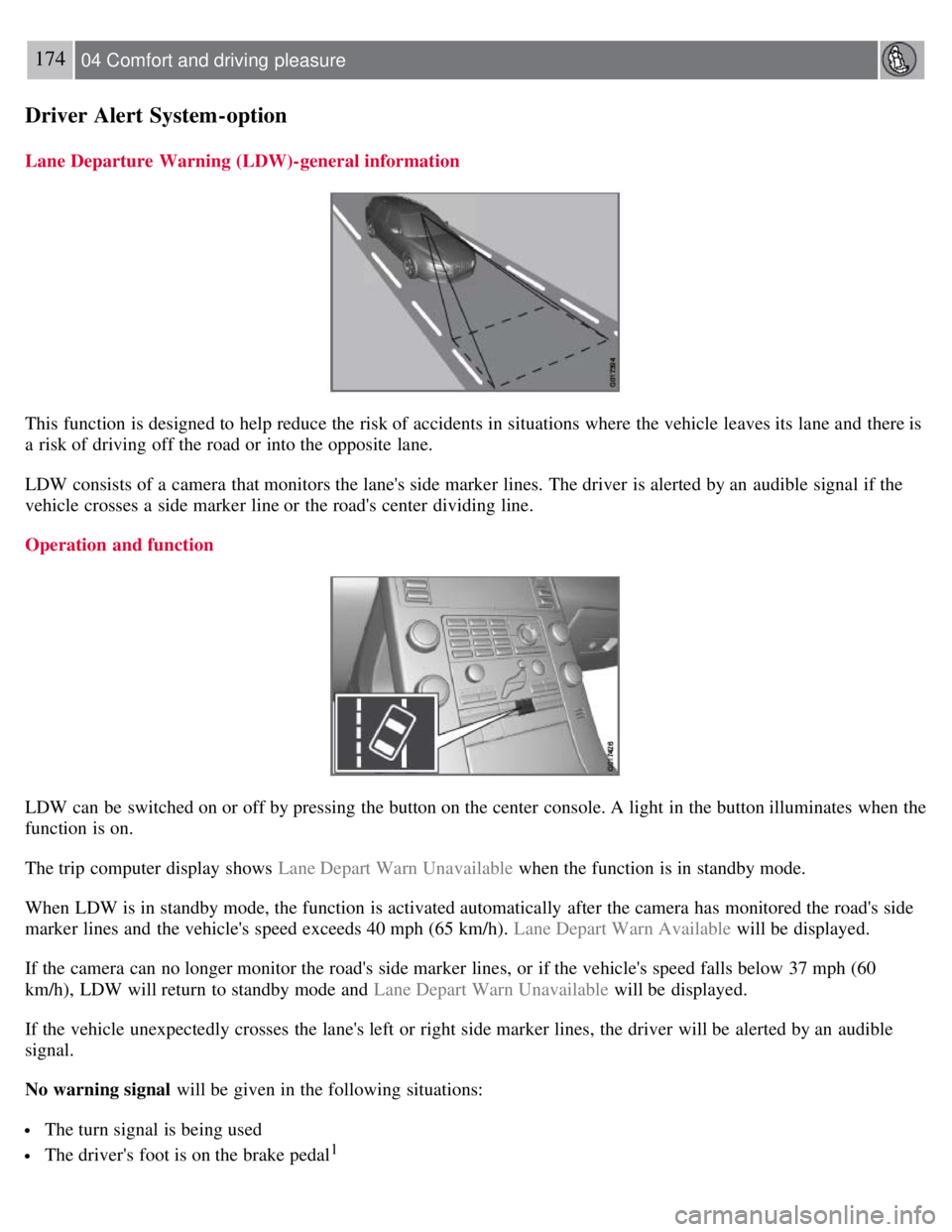
This function is designed to help reduce the risk of accidents in situations where the vehicle leaves its lane and there is
a risk of driving off the road or into the opposite lane.
LDW consists of a camera that monitors the lane's side marker lines. The driver is alerted by an audible signal if the
vehicle crosses a side marker line or the road's center dividing line.
Operation and function
LDW can be switched on or off by pressing the button on the center console. A light in the button illuminates when the
function is on.
The trip computer display shows Lane Depart Warn Unavailable when the function is in standby mode.
When LDW is in standby mode, the function is activated automatically after the camera has monitored the road's side
marker lines and the vehicle's speed exceeds 40 mph (65 km/h). Lane Depart Warn Available will be displayed.
If the camera can no longer monitor the road's side marker lines, or if the vehicle's speed falls below 37 mph (60
km/h), LDW will return to standby mode and Lane Depart Warn Unavailable will be displayed.
If the vehicle unexpectedly crosses the lane's left or right side marker lines, the driver will be alerted by an audible
signal.
No warning signal will be given in the following situations:
The turn signal is being used
The driver's foot is on the brake pedal1
Page 171 of 275
The throttle pedal is pressed quickly
If the steering wheel is moved quickly
In sharp turns that cause the vehicle's body to sway.
The camera also has certain limitations. See page 168
for information.
WARNING
The driver will only be warned once for each time the wheels cross a marker line. No alarm will be given if a marker
line is between the wheels.
1A warning will be given even when Increased sensitivity has been selected. See page 123 for more information
175 04 Comfort and driving pleasure
Driver Alert System -option
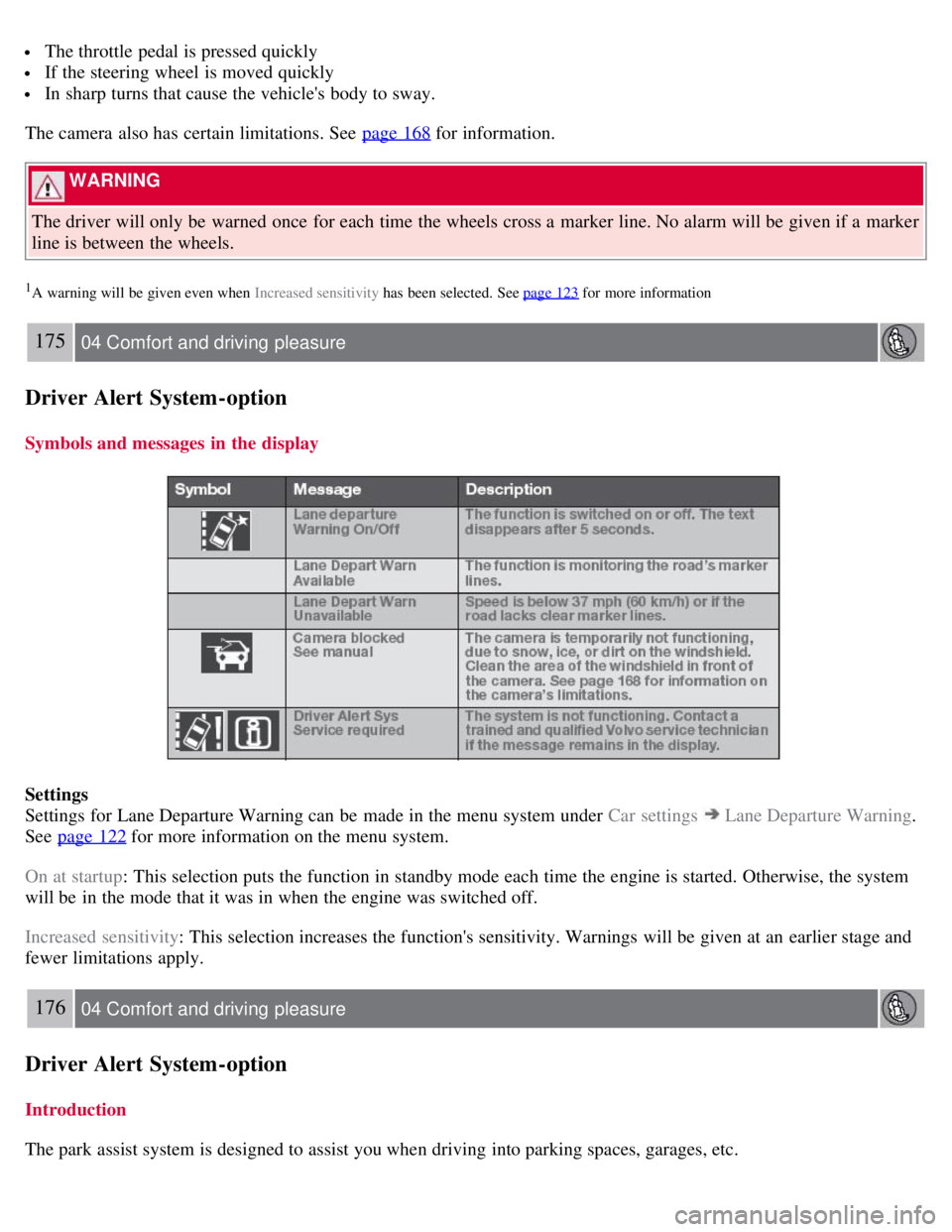
Symbols and messages in the display
Settings
Settings for Lane Departure Warning can be made in the menu system under Car settings
Lane Departure Warning.
See page 122
for more information on the menu system.
On at startup : This selection puts the function in standby mode each time the engine is started. Otherwise, the system
will be in the mode that it was in when the engine was switched off.
Increased sensitivity : This selection increases the function's sensitivity. Warnings will be given at an earlier stage and
fewer limitations apply.
176 04 Comfort and driving pleasure
Driver Alert System -option
Introduction
The park assist system is designed to assist you when driving into parking spaces, garages, etc.
Page 172 of 275
This system is available in the rear bumper only, or in both the front and rear bumpers.
Park assist utilizes four ultrasound sensors in the bumper(s) to measure the distance to a vehicle, object, or a person
who may be close to the front or rear of your vehicle. An audible signal and symbols in the audio system's display
indicate the distance to the object.
WARNING
Park Assist is an information system, NOT a safety system. This system is designed to be a supplementary aid when
parking the vehicle. It is not, however, intended to replace the driver's attention and judgement.
Function
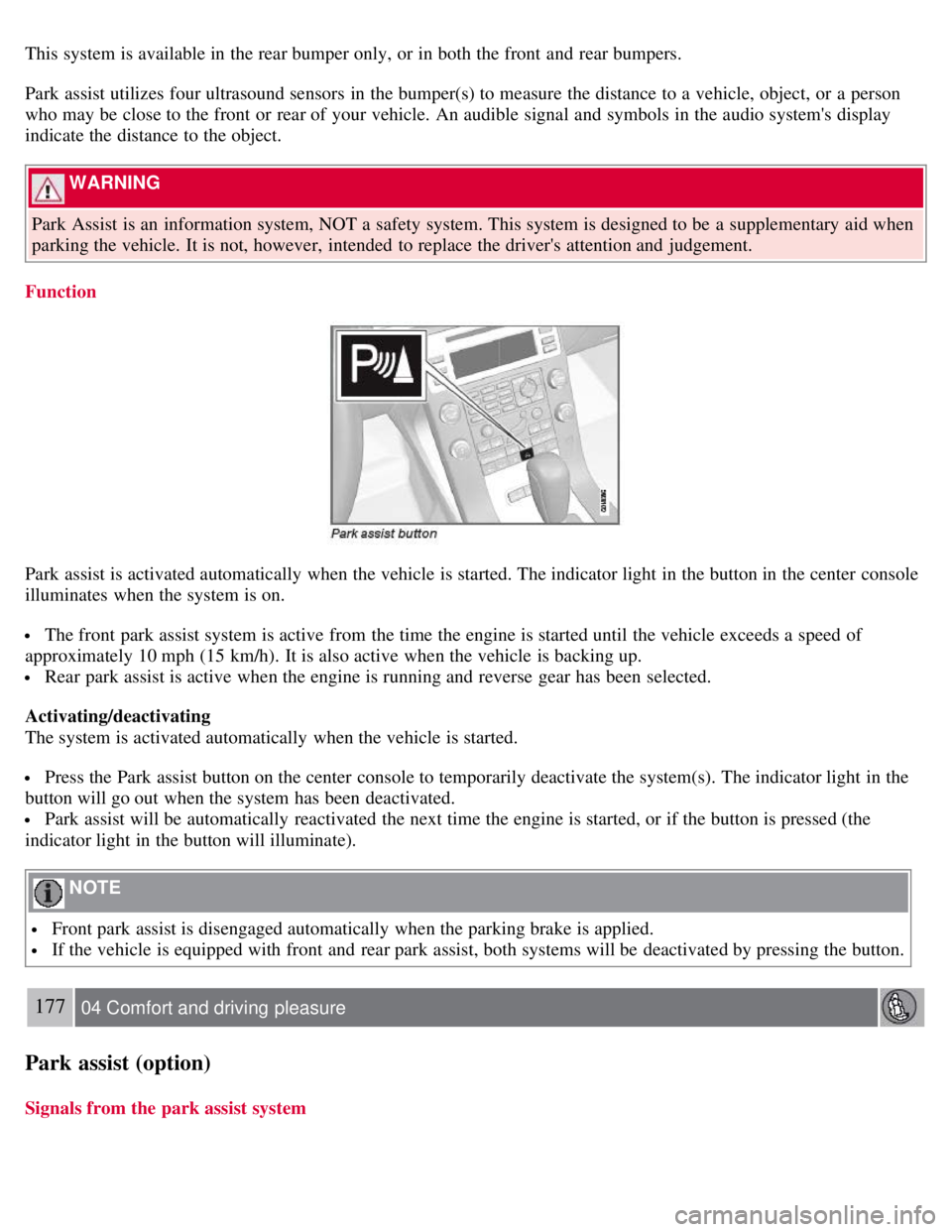
Park assist is activated automatically when the vehicle is started. The indicator light in the button in the center console
illuminates when the system is on.
The front park assist system is active from the time the engine is started until the vehicle exceeds a speed of
approximately 10 mph (15 km/h). It is also active when the vehicle is backing up.
Rear park assist is active when the engine is running and reverse gear has been selected.
Activating/deactivating
The system is activated automatically when the vehicle is started.
Press the Park assist button on the center console to temporarily deactivate the system(s). The indicator light in the
button will go out when the system has been deactivated.
Park assist will be automatically reactivated the next time the engine is started, or if the button is pressed (the
indicator light in the button will illuminate).
NOTE
Front park assist is disengaged automatically when the parking brake is applied.
If the vehicle is equipped with front and rear park assist, both systems will be deactivated by pressing the button.
177 04 Comfort and driving pleasure
Park assist (option)
Signals from the park assist system
Page 173 of 275
Visual indicator
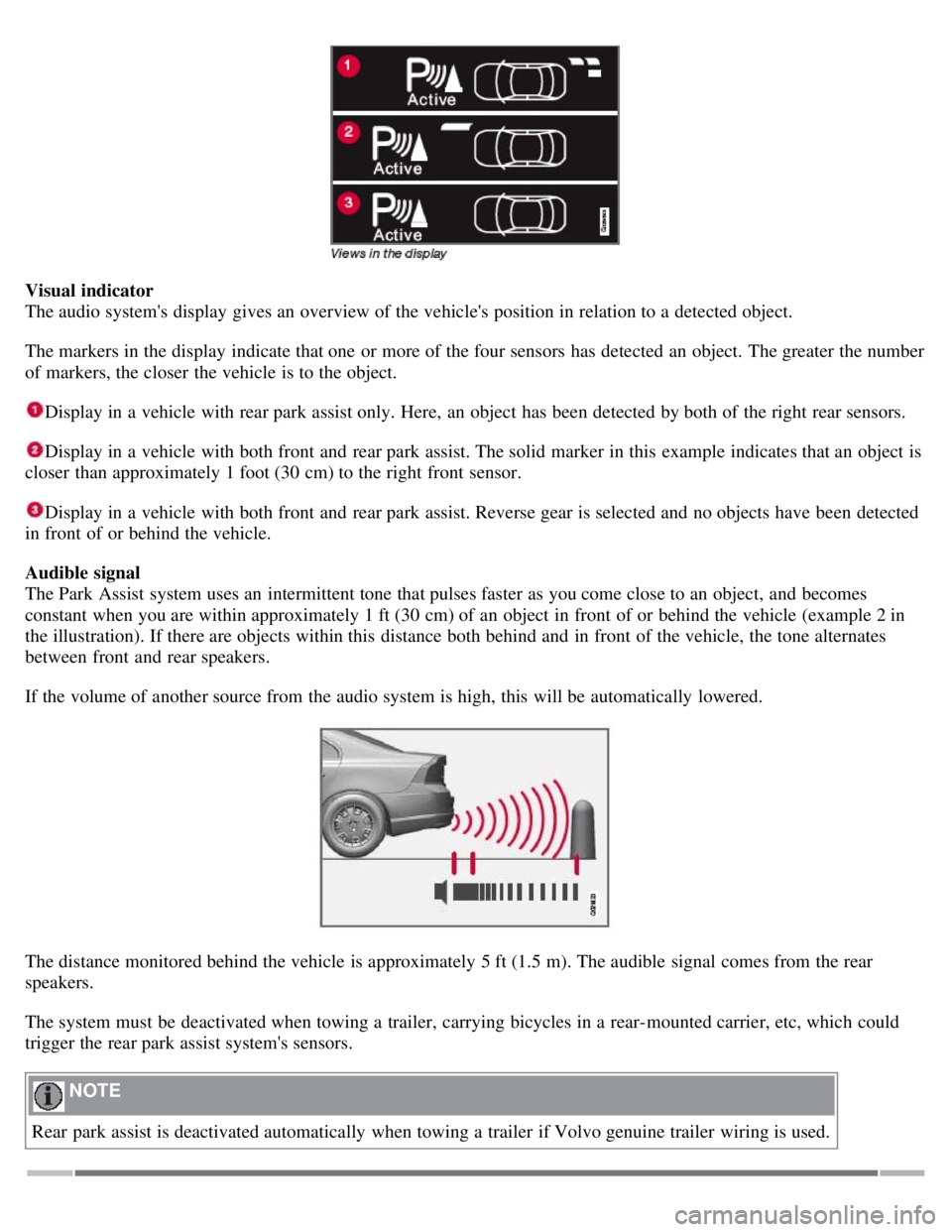
The audio system's display gives an overview of the vehicle's position in relation to a detected object.
The markers in the display indicate that one or more of the four sensors has detected an object. The greater the number
of markers, the closer the vehicle is to the object.
Display in a vehicle with rear park assist only. Here, an object has been detected by both of the right rear sensors.
Display in a vehicle with both front and rear park assist. The solid marker in this example indicates that an object is
closer than approximately 1 foot (30 cm) to the right front sensor.
Display in a vehicle with both front and rear park assist. Reverse gear is selected and no objects have been detected
in front of or behind the vehicle.
Audible signal
The Park Assist system uses an intermittent tone that pulses faster as you come close to an object, and becomes
constant when you are within approximately 1 ft (30 cm) of an object in front of or behind the vehicle (example 2 in
the illustration). If there are objects within this distance both behind and in front of the vehicle, the tone alternates
between front and rear speakers.
If the volume of another source from the audio system is high, this will be automatically lowered.
The distance monitored behind the vehicle is approximately 5 ft (1.5 m). The audible signal comes from the rear
speakers.
The system must be deactivated when towing a trailer, carrying bicycles in a rear-mounted carrier, etc, which could
trigger the rear park assist system's sensors.
NOTE
Rear park assist is deactivated automatically when towing a trailer if Volvo genuine trailer wiring is used.
Page 174 of 275
178 04 Comfort and driving pleasure
Park assist (option)
Front park assist
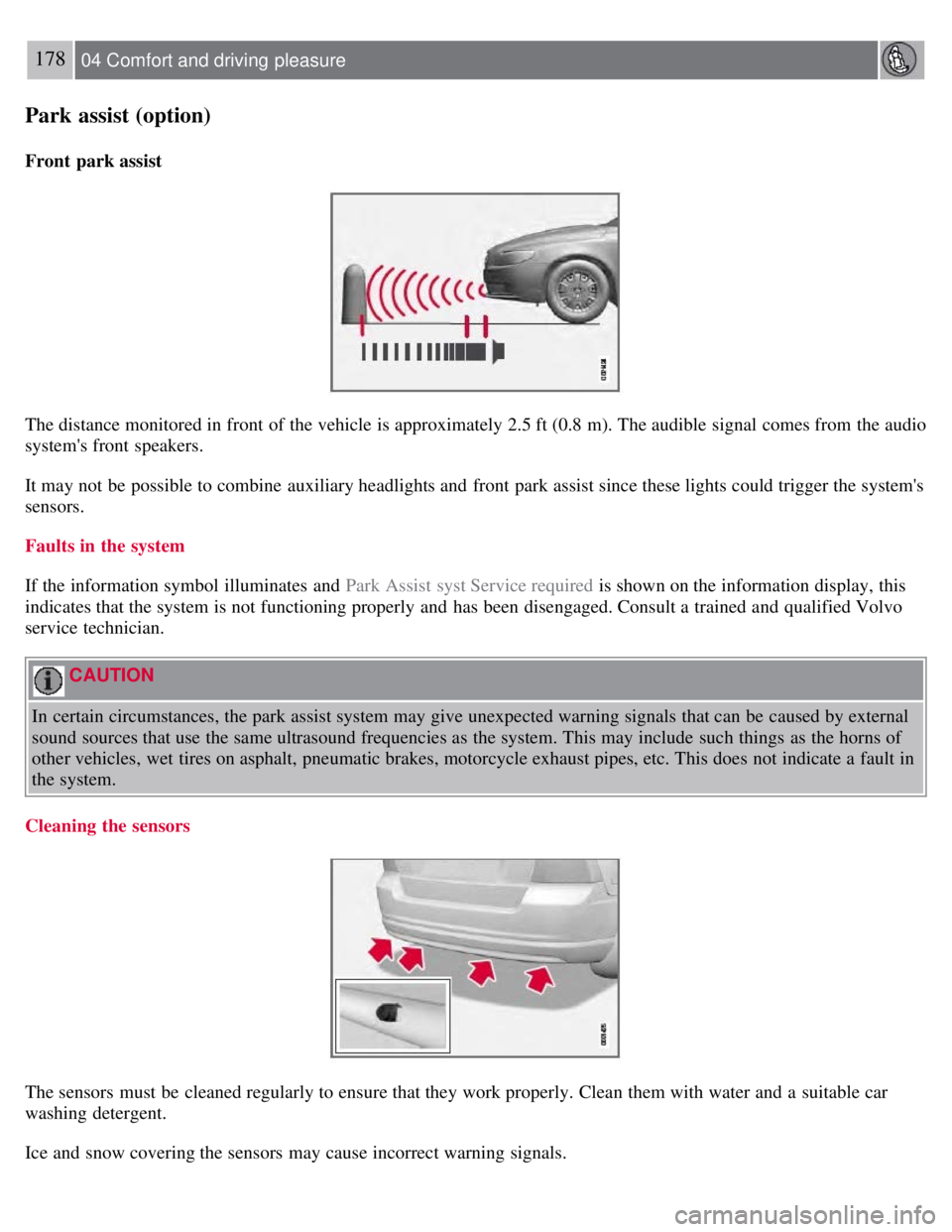
The distance monitored in front of the vehicle is approximately 2.5 ft (0.8 m). The audible signal comes from the audio
system's front speakers.
It may not be possible to combine auxiliary headlights and front park assist since these lights could trigger the system's
sensors.
Faults in the system
If the information symbol illuminates and Park Assist syst Service required is shown on the information display, this
indicates that the system is not functioning properly and has been disengaged. Consult a trained and qualified Volvo
service technician.
CAUTION
In certain circumstances, the park assist system may give unexpected warning signals that can be caused by external
sound sources that use the same ultrasound frequencies as the system. This may include such things as the horns of
other vehicles, wet tires on asphalt, pneumatic brakes, motorcycle exhaust pipes, etc. This does not indicate a fault in
the system.
Cleaning the sensors
The sensors must be cleaned regularly to ensure that they work properly. Clean them with water and a suitable car
washing detergent.
Ice and snow covering the sensors may cause incorrect warning signals.
Page 176 of 275
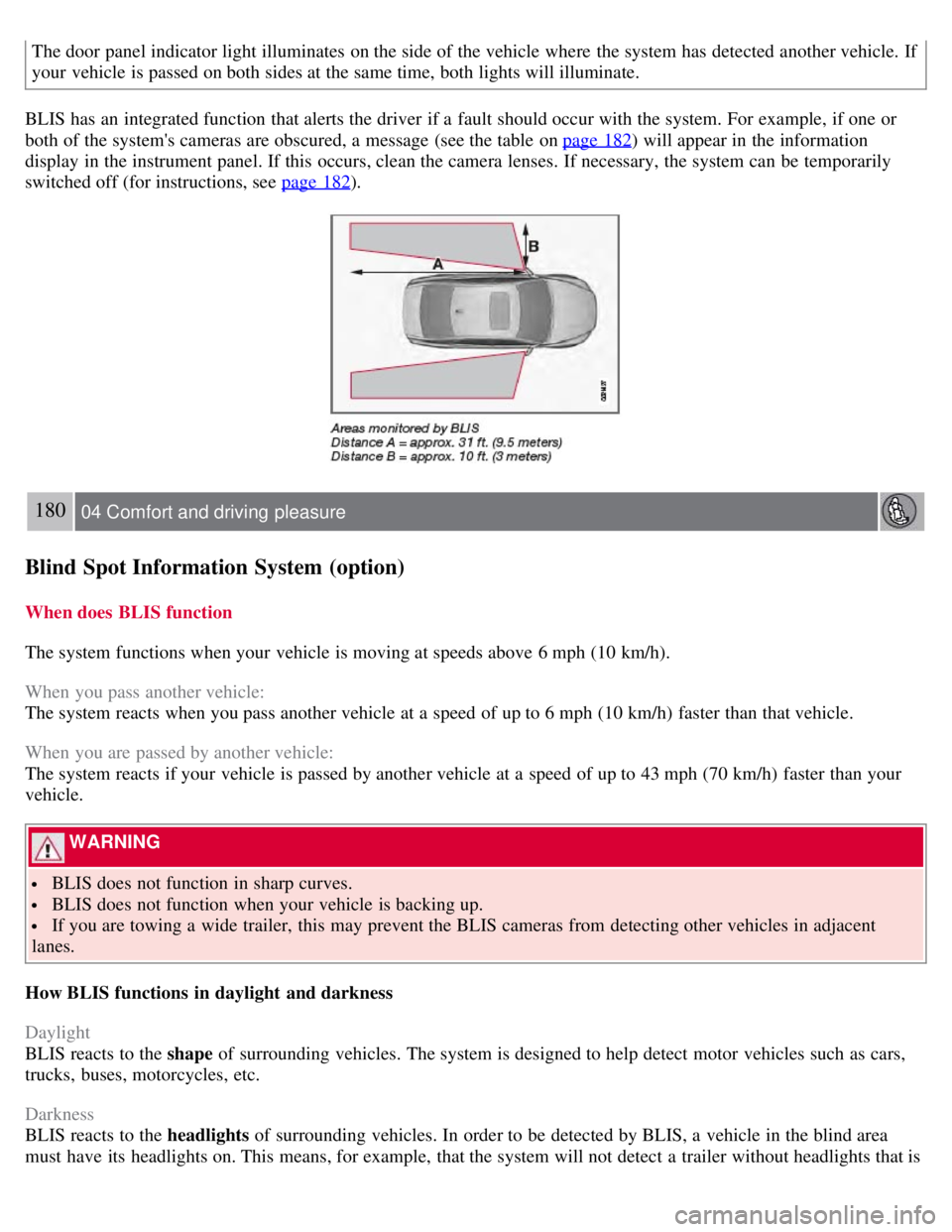
The door panel indicator light illuminates on the side of the vehicle where the system has detected another vehicle. If
your vehicle is passed on both sides at the same time, both lights will illuminate.
BLIS has an integrated function that alerts the driver if a fault should occur with the system. For example, if one or
both of the system's cameras are obscured, a message (see the table on page 182
) will appear in the information
display in the instrument panel. If this occurs, clean the camera lenses. If necessary, the system can be temporarily
switched off (for instructions, see page 182
).
180 04 Comfort and driving pleasure
Blind Spot Information System (option)
When does BLIS function
The system functions when your vehicle is moving at speeds above 6 mph (10 km/h).
When you pass another vehicle:
The system reacts when you pass another vehicle at a speed of up to 6 mph (10 km/h) faster than that vehicle.
When you are passed by another vehicle:
The system reacts if your vehicle is passed by another vehicle at a speed of up to 43 mph (70 km/h) faster than your
vehicle.
WARNING
BLIS does not function in sharp curves.
BLIS does not function when your vehicle is backing up.
If you are towing a wide trailer, this may prevent the BLIS cameras from detecting other vehicles in adjacent
lanes.
How BLIS functions in daylight and darkness
Daylight
BLIS reacts to the shape of surrounding vehicles. The system is designed to help detect motor vehicles such as cars,
trucks, buses, motorcycles, etc.
Darkness
BLIS reacts to the headlights of surrounding vehicles. In order to be detected by BLIS, a vehicle in the blind area
must have its headlights on. This means, for example, that the system will not detect a trailer without headlights that is
Page 177 of 275
being towed behind a car or truck.
WARNING
BLIS does not react to cyclists or mopeds.
BLIS does not react to vehicles that are standing still.
The function of the BLIS cameras may be affected by intense light, or when driving at night in areas where there
are no external sources of light (e.g., street lights, other vehicles, etc.). In such cases, the system may react as if the
cameras were obscured.
In both of the above mentioned conditions, a message will appear in the information display.
When driving in such conditions, the system's function will be limited or it may be temporarily switched off. See
page 182
for instructions.
When the message is no longer displayed, BLIS will return to normal function.
The BLIS cameras have the same limitation as the human eye. In other words, their "vision is impaired" by
adverse weather conditions such as heavy snowfall, dense fog, etc.
181 04 Comfort and driving pleasure
Blind Spot Information System (option)
Limitations
In certain situations, the BLIS indicator light(s) may illuminate even when there are no other vehicles in the area
monitored by the system.
NOTE
If the BLIS indicator lights illuminate occasionally even when there are no other vehicles in the blind area, this does
not indicate a fault in the system. In the event of a fault, Blind spot syst. service required will be displayed.
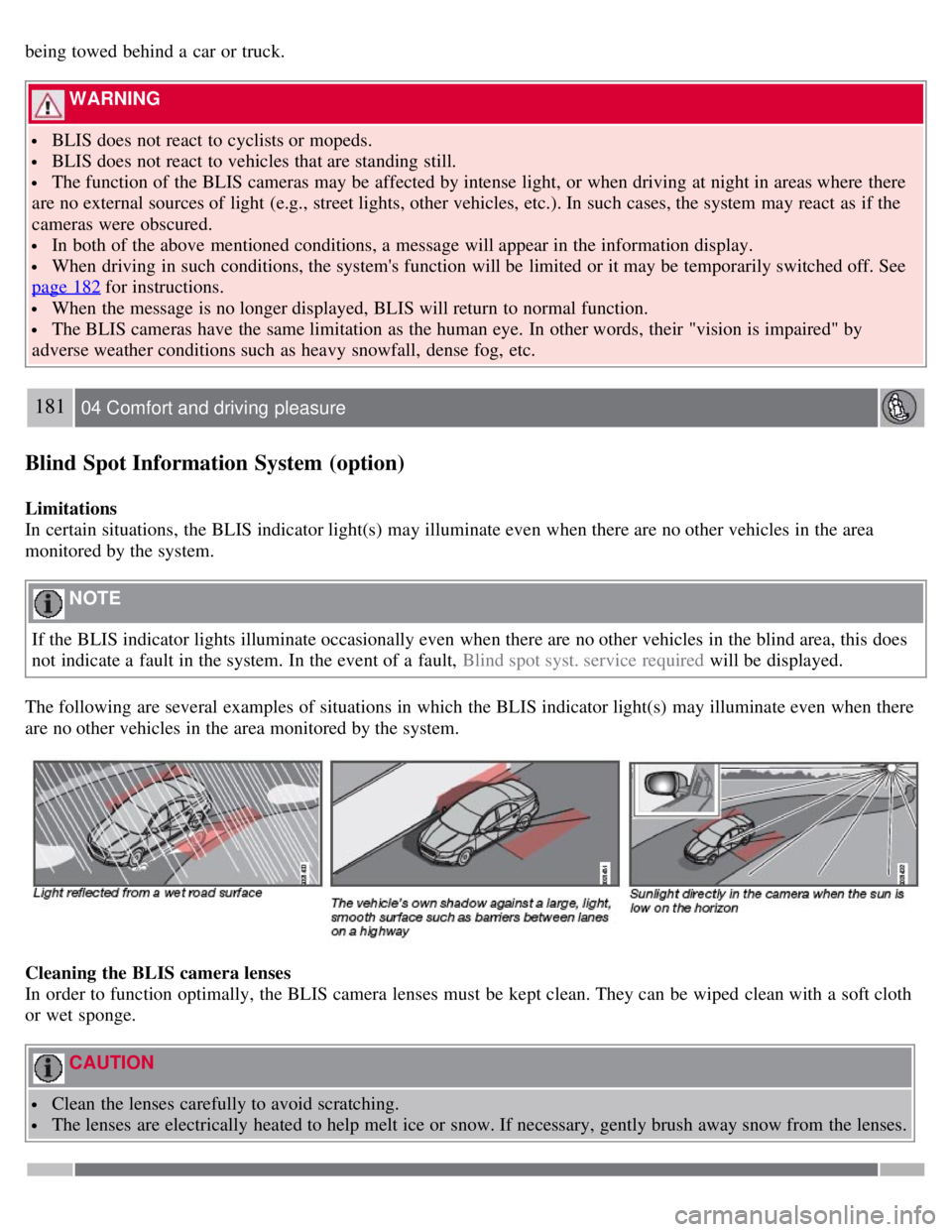
The following are several examples of situations in which the BLIS indicator light(s) may illuminate even when there
are no other vehicles in the area monitored by the system.
Cleaning the BLIS camera lenses
In order to function optimally, the BLIS camera lenses must be kept clean. They can be wiped clean with a soft cloth
or wet sponge.
CAUTION
Clean the lenses carefully to avoid scratching.
The lenses are electrically heated to help melt ice or snow. If necessary, gently brush away snow from the lenses.
Page 178 of 275
182 04 Comfort and driving pleasure
Blind Spot Information System (option)
Switching BLIS on and off
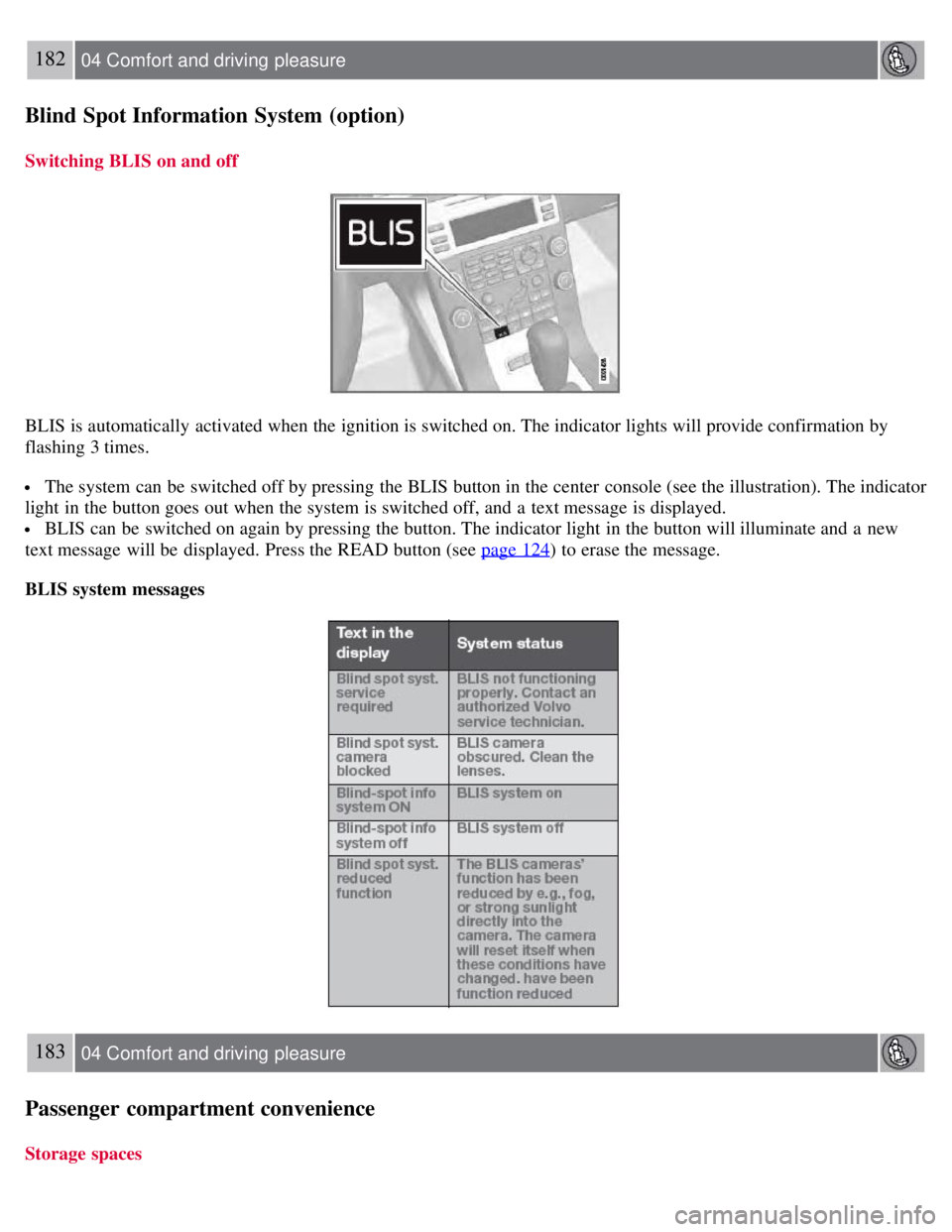
BLIS is automatically activated when the ignition is switched on. The indicator lights will provide confirmation by
flashing 3 times.
The system can be switched off by pressing the BLIS button in the center console (see the illustration). The indicator
light in the button goes out when the system is switched off, and a text message is displayed.
BLIS can be switched on again by pressing the button. The indicator light in the button will illuminate and a new
text message will be displayed. Press the READ button (see page 124
) to erase the message.
BLIS system messages
183 04 Comfort and driving pleasure
Passenger compartment convenience
Storage spaces
Page 188 of 275
With the exception of gas line antifreeze during winter months, do not add solvents, thickeners, or other store -bought
additives to your vehicle's fuel, cooling, or lubricating systems. Overuse may damage your engine, and some of these
additives contain organically volatile chemicals. Do not needlessly expose yourself to these chemicals.
194 05 During your trip
Refueling
WARNING
Never carry a cell phone that is switched on while refueling your vehicle. If the phone rings, this may cause a spark
that could ignite gasoline fumes, resulting in fire and injury.
WARNING
Carbon monoxide is a poisonous, colorless, and odorless gas. It is present in all exhaust gases. If you ever smell
exhaust fumes inside the vehicle, make sure the passenger compartment is ventilated, and immediately return the
vehicle to a trained and qualified Volvo service technician for correction.
Opening/closing the fuel filler door
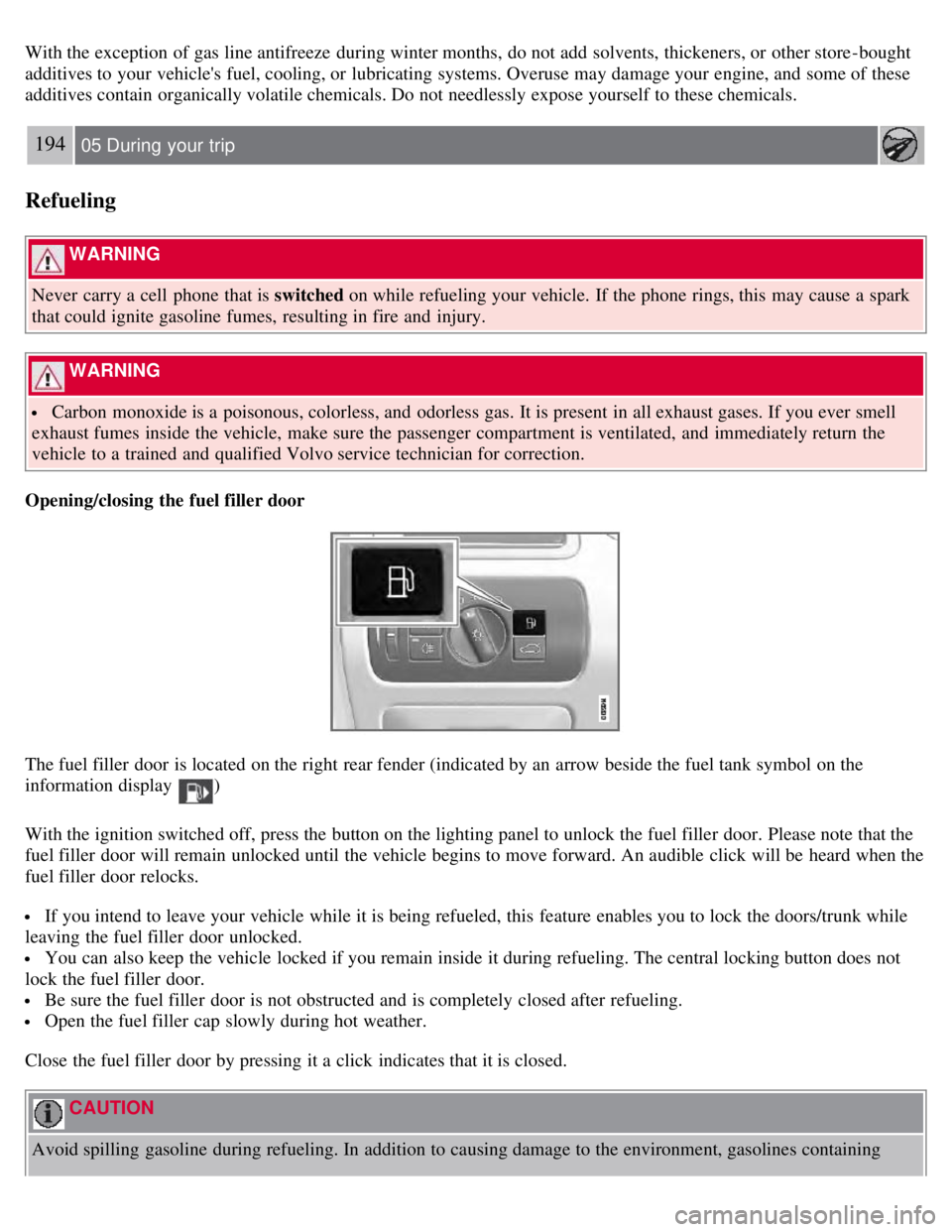
The fuel filler door is located on the right rear fender (indicated by an arrow beside the fuel tank symbol on the
information display
)
With the ignition switched off, press the button on the lighting panel to unlock the fuel filler door. Please note that the
fuel filler door will remain unlocked until the vehicle begins to move forward. An audible click will be heard when the
fuel filler door relocks.
If you intend to leave your vehicle while it is being refueled, this feature enables you to lock the doors/trunk while
leaving the fuel filler door unlocked.
You can also keep the vehicle locked if you remain inside it during refueling. The central locking button does not
lock the fuel filler door.
Be sure the fuel filler door is not obstructed and is completely closed after refueling.
Open the fuel filler cap slowly during hot weather.
Close the fuel filler door by pressing it a click indicates that it is closed.
CAUTION
Avoid spilling gasoline during refueling. In addition to causing damage to the environment, gasolines containing