key VOLVO S80 2008 Service Manual
[x] Cancel search | Manufacturer: VOLVO, Model Year: 2008, Model line: S80, Model: VOLVO S80 2008Pages: 275, PDF Size: 7.17 MB
Page 110 of 275
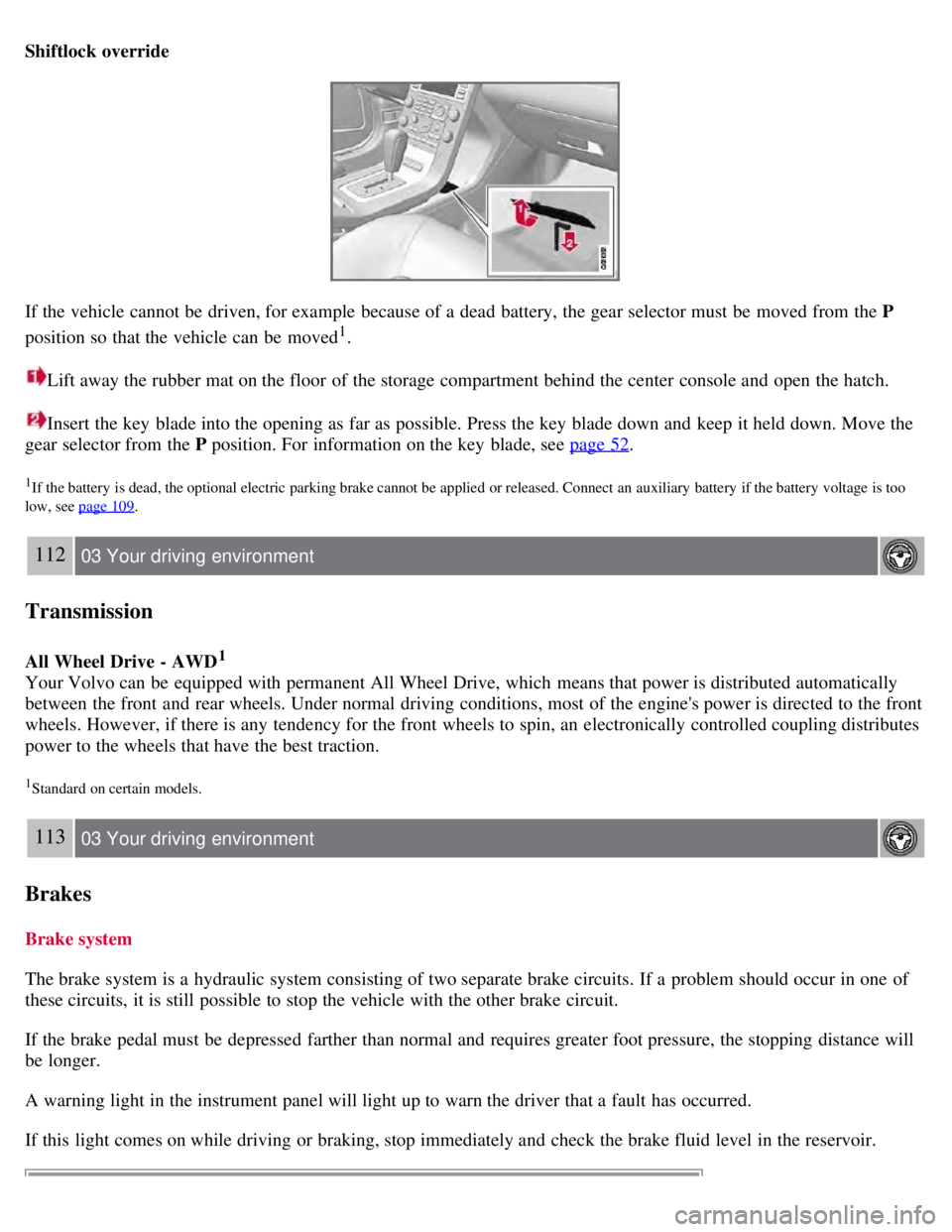
Shiftlock override
If the vehicle cannot be driven, for example because of a dead battery, the gear selector must be moved from the P
position so that the vehicle can be moved
1.
Lift away the rubber mat on the floor of the storage compartment behind the center console and open the hatch.
Insert the key blade into the opening as far as possible. Press the key blade down and keep it held down. Move the
gear selector from the P position. For information on the key blade, see page 52
.
1If the battery is dead, the optional electric parking brake cannot be applied or released. Connect an auxiliary battery if the battery voltage is too
low, see page 109
.
112 03 Your driving environment
Transmission
All Wheel Drive - AWD1
Your Volvo can be equipped with permanent All Wheel Drive, which means that power is distributed automatically
between the front and rear wheels. Under normal driving conditions, most of the engine's power is directed to the front
wheels. However, if there is any tendency for the front wheels to spin, an electronically controlled coupling distributes
power to the wheels that have the best traction.
1Standard on certain models.
113 03 Your driving environment
Brakes
Brake system
The brake system is a hydraulic system consisting of two separate brake circuits. If a problem should occur in one of
these circuits, it is still possible to stop the vehicle with the other brake circuit.
If the brake pedal must be depressed farther than normal and requires greater foot pressure, the stopping distance will
be longer.
A warning light in the instrument panel will light up to warn the driver that a fault has occurred.
If this light comes on while driving or braking, stop immediately and check the brake fluid level in the reservoir.
Page 115 of 275
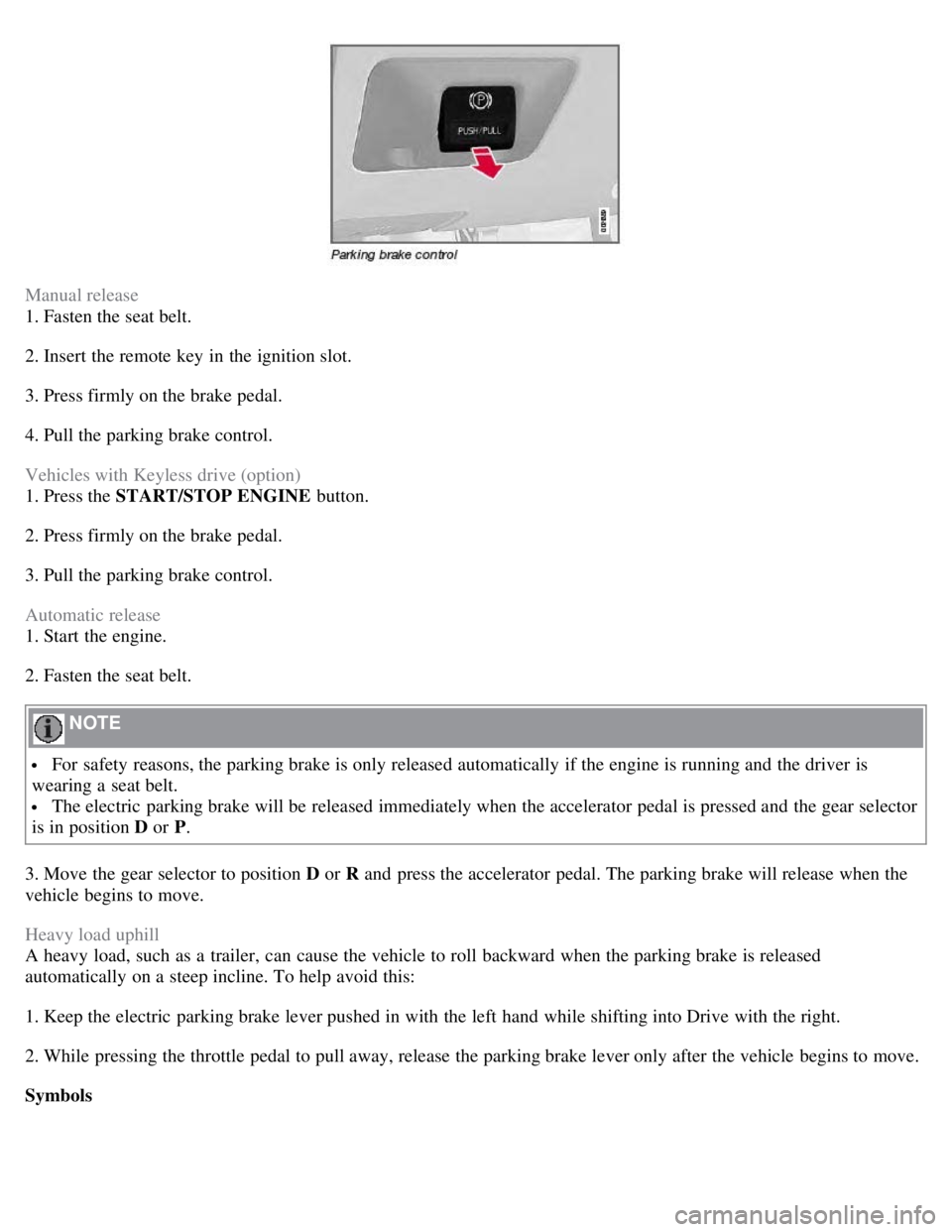
Manual release
1. Fasten the seat belt.
2. Insert the remote key in the ignition slot.
3. Press firmly on the brake pedal.
4. Pull the parking brake control.
Vehicles with Keyless drive (option)
1. Press the START/STOP ENGINE button.
2. Press firmly on the brake pedal.
3. Pull the parking brake control.
Automatic release
1. Start the engine.
2. Fasten the seat belt.
NOTE
For safety reasons, the parking brake is only released automatically if the engine is running and the driver is
wearing a seat belt.
The electric parking brake will be released immediately when the accelerator pedal is pressed and the gear selector
is in position D or P.
3. Move the gear selector to position D or R and press the accelerator pedal. The parking brake will release when the
vehicle begins to move.
Heavy load uphill
A heavy load, such as a trailer, can cause the vehicle to roll backward when the parking brake is released
automatically on a steep incline. To help avoid this:
1. Keep the electric parking brake lever pushed in with the left hand while shifting into Drive with the right.
2. While pressing the throttle pedal to pull away, release the parking brake lever only after the vehicle begins to move.
Symbols
Page 118 of 275
2 0 0 8
VOLVO S80
120 04 Comfort and driving pleasure
Menus and messages 122
Climate system126
Audio system134
Trip computer147
Compass149
Stability system151
Active chassis system-Four C153
Cruise control154
Adaptive Cruise Control-ACC156
Distance Alert163
Collision Warning with Auto-brake (option)166
Driver Alert System -option171
Park assist (option)176
Blind Spot Information System (option)179
Passenger compartment convenience183
121 04 Comfort and driving pleasure
122 04 Comfort and driving pleasure
Menus and messages
Center console
Certain functions are controlled from the center console via the menu system or from the optional keypad in the
steering wheel. Each function is described under its respective section.
The current menu level is shown at the top right of display in the center console.
Page 119 of 275
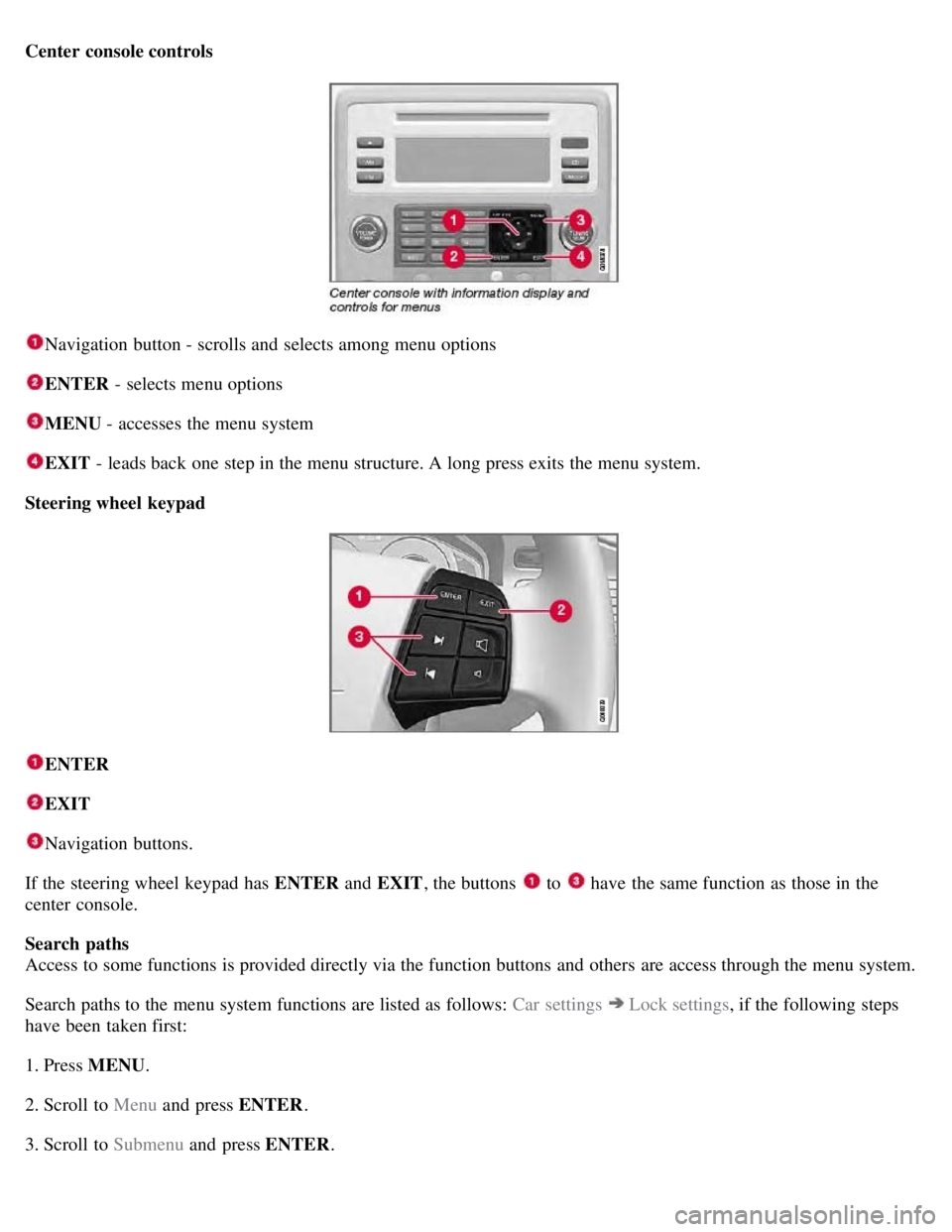
Center console controls
Navigation button - scrolls and selects among menu options
ENTER - selects menu options
MENU - accesses the menu system
EXIT - leads back one step in the menu structure. A long press exits the menu system.
Steering wheel keypad
ENTER
EXIT
Navigation buttons.
If the steering wheel keypad has ENTER and EXIT, the buttons
to have the same function as those in the
center console.
Search paths
Access to some functions is provided directly via the function buttons and others are access through the menu system.
Search paths to the menu system functions are listed as follows: Car settings
Lock settings , if the following steps
have been taken first:
1. Press MENU .
2. Scroll to Menu and press ENTER .
3. Scroll to Submenu and press ENTER.
Page 120 of 275
The navigation button can be used instead of ENTER and EXIT when navigating the menu hierarchy. The right arrow
is equal to ENTER and the left arrow to EXIT .
The menu options are numbered and can also be selected directly with the numerical keypad (1-9 only).
123 04 Comfort and driving pleasure
Menus and messages
Menu overview
Car key memory
Seat & mirror positions
Car settings
Fold mirr. when locking (option on certain markets only)
Collision warning settings (option)
Light settings
Lock settings
Parking camera settings (accessory)
Steering force level (option)
Information
Climate settings
Automatic blower adjust
Recirculation timer
Auto. rear defroster
Reset climate settings
Main menu AM
Audio settings
1
Sound stage
Equalizer, front
Equalizer, rear
Auto. volume control
Resets all audio settings.
Page 131 of 275
133 04 Comfort and driving pleasure
Climate system
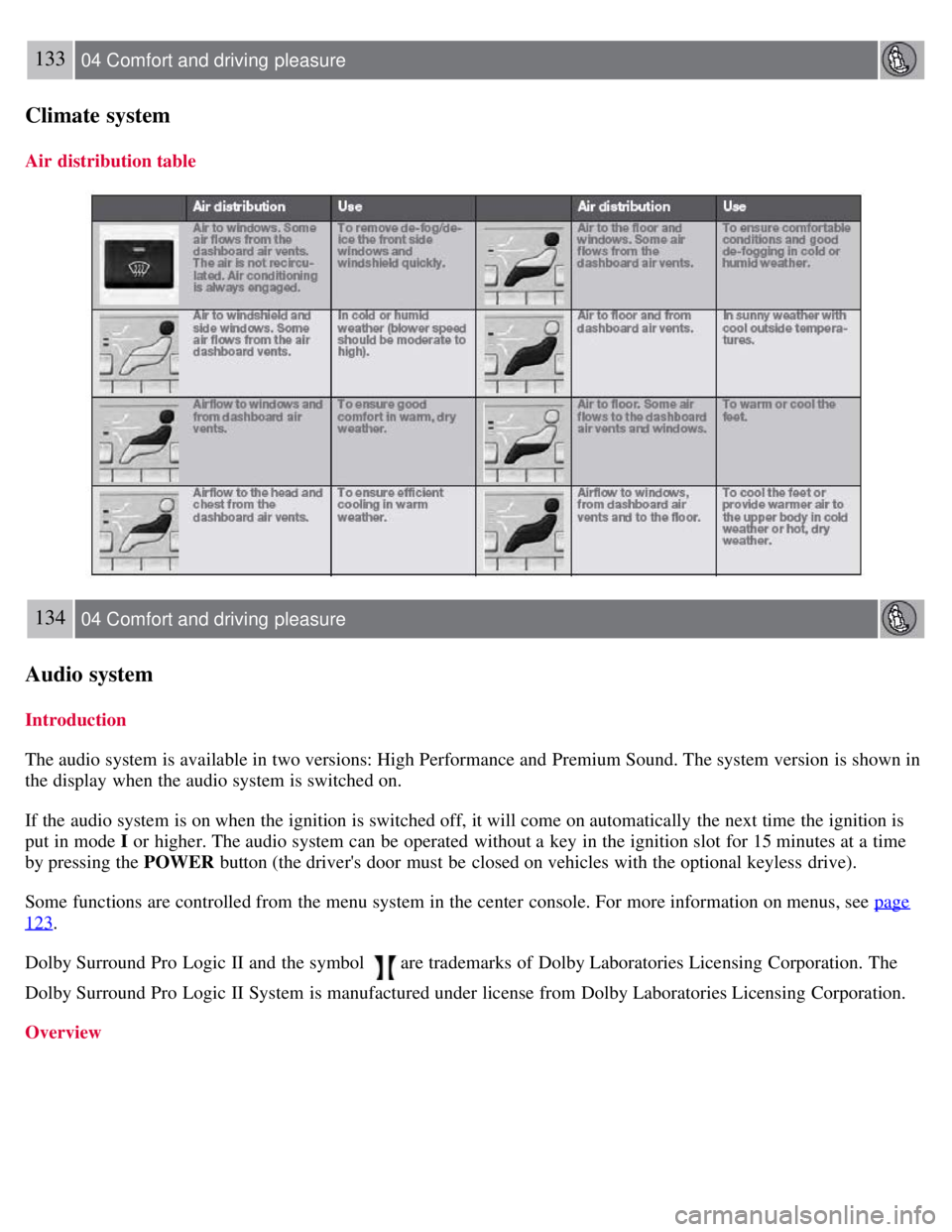
Air distribution table
134 04 Comfort and driving pleasure
Audio system
Introduction
The audio system is available in two versions: High Performance and Premium Sound. The system version is shown in
the display when the audio system is switched on.
If the audio system is on when the ignition is switched off, it will come on automatically the next time the ignition is
put in mode I or higher. The audio system can be operated without a key in the ignition slot for 15 minutes at a time
by pressing the POWER button (the driver's door must be closed on vehicles with the optional keyless drive).
Some functions are controlled from the menu system in the center console. For more information on menus, see page
123.
Dolby Surround Pro Logic II and the symbol
are trademarks of Dolby Laboratories Licensing Corporation. The
Dolby Surround Pro Logic II System is manufactured under license from Dolby Laboratories Licensing Corporation.
Overview
Page 132 of 275
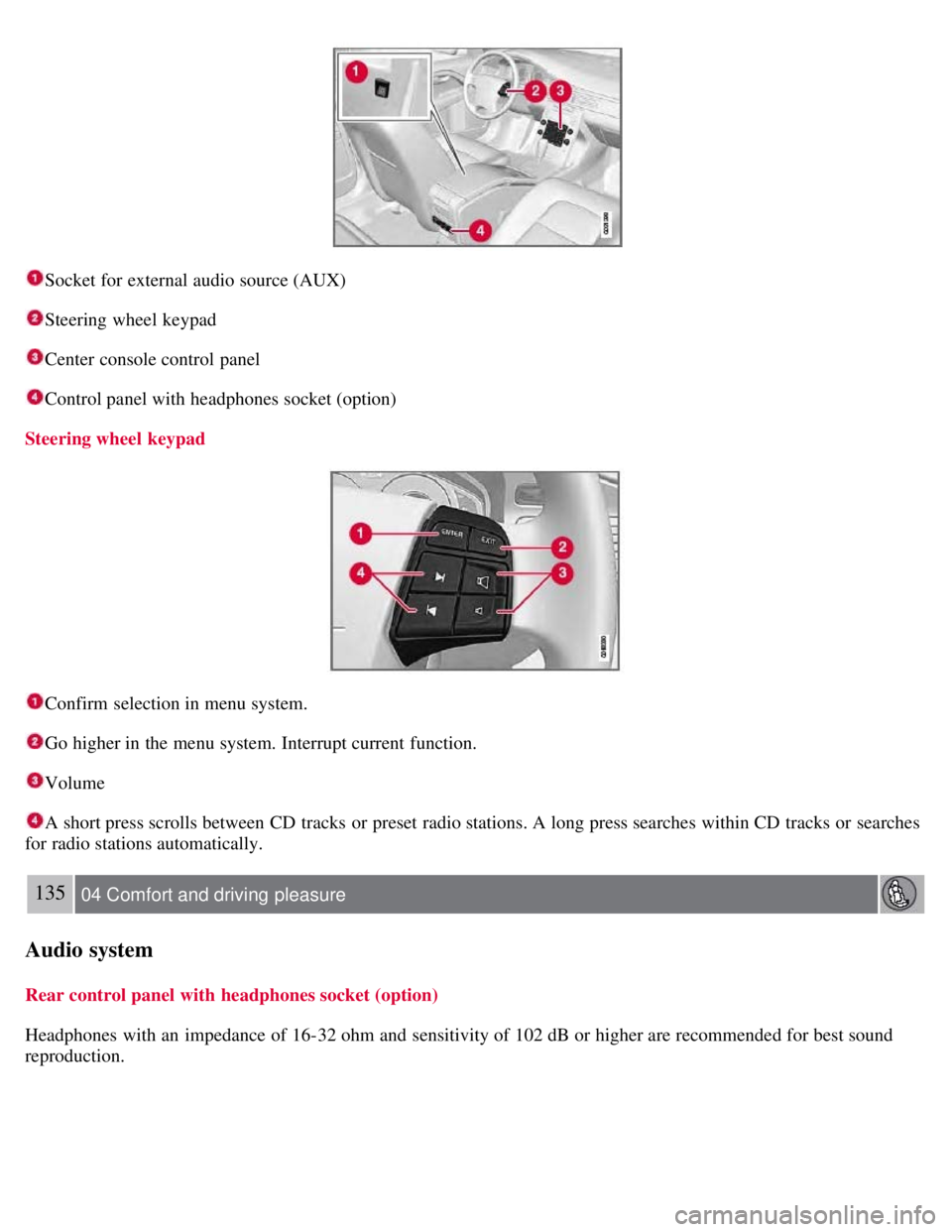
Socket for external audio source (AUX)
Steering wheel keypad
Center console control panel
Control panel with headphones socket (option)
Steering wheel keypad
Confirm selection in menu system.
Go higher in the menu system. Interrupt current function.
Volume
A short press scrolls between CD tracks or preset radio stations. A long press searches within CD tracks or searches
for radio stations automatically.
135 04 Comfort and driving pleasure
Audio system
Rear control panel with headphones socket (option)
Headphones with an impedance of 16-32 ohm and sensitivity of 102 dB or higher are recommended for best sound
reproduction.
Page 133 of 275
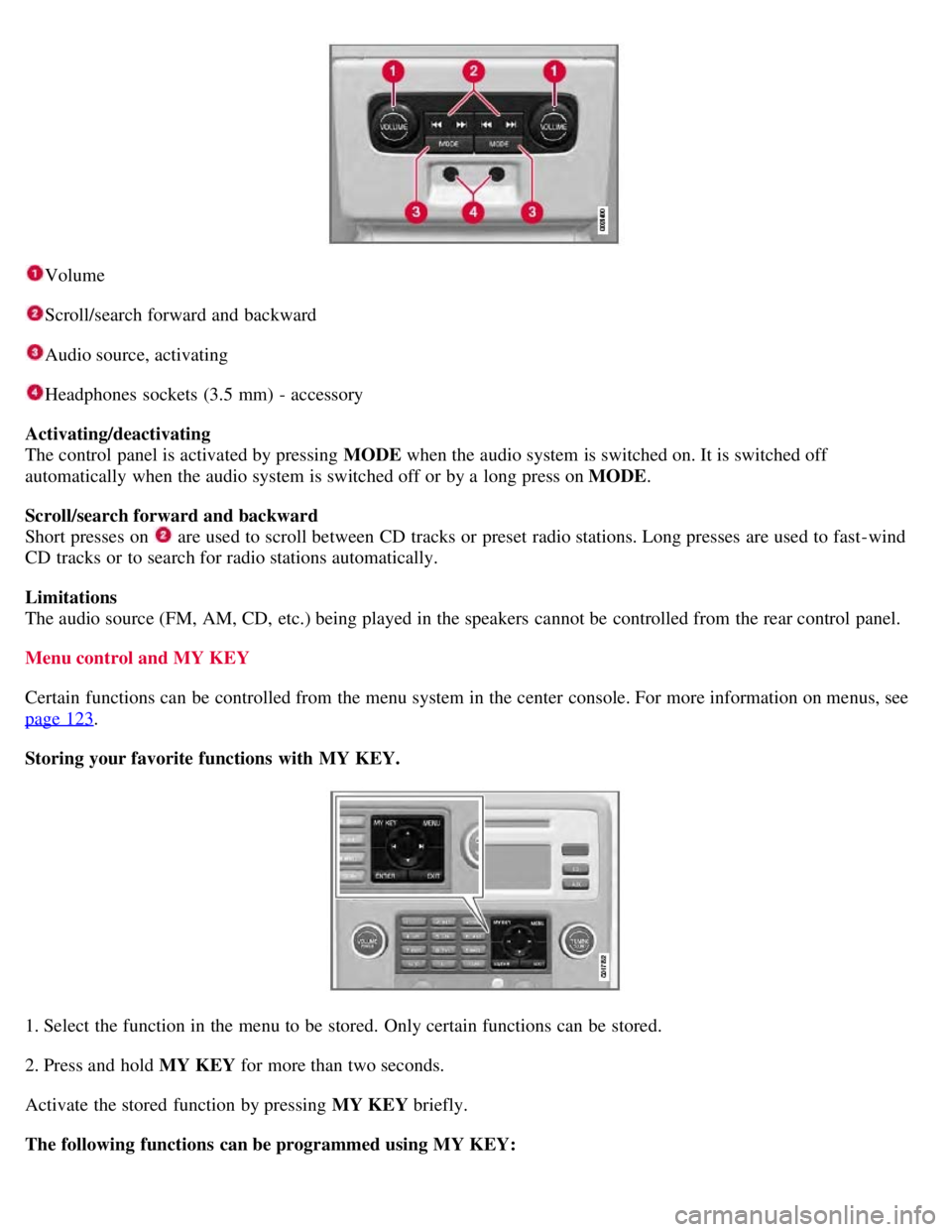
Volume
Scroll/search forward and backward
Audio source, activating
Headphones sockets (3.5 mm) - accessory
Activating/deactivating
The control panel is activated by pressing MODE when the audio system is switched on. It is switched off
automatically when the audio system is switched off or by a long press on MODE .
Scroll/search forward and backward
Short presses on
are used to scroll between CD tracks or preset radio stations. Long presses are used to fast -wind
CD tracks or to search for radio stations automatically.
Limitations
The audio source (FM, AM, CD, etc.) being played in the speakers cannot be controlled from the rear control panel.
Menu control and MY KEY
Certain functions can be controlled from the menu system in the center console. For more information on menus, see
page 123
.
Storing your favorite functions with MY KEY.
1. Select the function in the menu to be stored. Only certain functions can be stored.
2. Press and hold MY KEY for more than two seconds.
Activate the stored function by pressing MY KEY briefly.
The following functions can be programmed using MY KEY:
Page 138 of 275
Fast-forward/change CD tracks and sound files
Short presses
/ on the navigation button are used to scroll between CD tracks/sound files. Long presses are used
to search within CD tracks/sound files. TUNING (or the steering wheel keypad) can also be used for this purpose.
Scan CD
This function plays the first ten seconds of each CD track/sound file. Press SCAN to activate. Interrupt with EXIT or
SCAN to continue playing the current CD track/sound file.
Random
This function plays the tracks in random order (shuffle). The random CD tracks/sound files can be scrolled through in
the normal way.
NOTE
It is only possible to scroll between random CD tracks on the current disc.
Different messages are displayed depending on which random function has been selected:
RANDOM means that the tracks from only one music CD are played
RND ALL means that all tracks on all music CDs in the optional CD changer are played.
RANDOM FOLDER means that the sound files in a directory on the current CD are played.
CD player
If a normal music CD is being played, activate/deactivate under Random .
If a disc with sound files is being played, activate/deactivate under Random
Folder .
140 04 Comfort and driving pleasure
Audio system
CD changer
If a normal music CD is being played under Random
Single disc or Random All discs. The option All discs only
applies to the music CDs in the changer.
If a CD with sound files is being played, activate/deactivate instead under Random
Folder . If you select another CD
the function is deactivated.
Disc text
If title information is stored on a music CD it can be shown on the display
1. Activate/deactivate in CD mode under CD
settings
Disc text.
1Only applies to the CD changer.
141 04 Comfort and driving pleasure
Audio system
Radio functions
Page 141 of 275
2. Press the MODE button repeatedly until Sirius 1 or 2 is displayed.
Activating Sirius radio
1. Tune to a satellite channel that has no audio, which means that the channel is unsubscribed and the text "Call 888-
539- SIRIUS TO SUBSCRIBE" is displayed (see also "Selecting a channel".
2. Call Sirius at 1-888-539-SIRIUS (7474).
3. When asked for the Sirius ID number press AUTO to display this number. It is also possible to retrieve the Sirius ID
from the menu.
4. UPDATING SUBSCRIPTION will be displayed while the subscription is being updated, after which the display
will return to the normal view.
SIRIUS ID
The SIRIUS ID is required when contacting the Sirius Call Center. It is used to activate your account and when making
any account transactions. The SIRIUS ID is sometimes referred to as the Electronic Serial Number (ESN).
Selecting a channel category
1. Select Sirius radio mode as described above.
2. Press ENTER .
3. Use the up/down arrow keys to scroll through the list of categories.
4. Press ENTER or the right arrow key to select a category.
The first channel in the selected category will then be played.
NOTE
The category ALL is default, which enables you to scroll through the entire list of available satellite channels.
The channel categories are automatically updated several times a year. This takes approximately two minutes and
will interrupt normal broadcasting. A message will be displayed while updating is in progress. Information on
channel or feature updates is available at www.sirius.com.
Selecting a channel
There are three ways of tuning in a channel:
Using the left and right arrow keys
By turning the tuning control
Through direct channel entry.
NOTE
The numbers of skipped or locked channels will not be displayed.
If a channel is locked, the access code must be entered before the channel can be selected. See "Unlocking a
channel" on page 145
.
144 04 Comfort and driving pleasure
Audio system