center console VOLVO S80 2014 Owner´s Manual
[x] Cancel search | Manufacturer: VOLVO, Model Year: 2014, Model line: S80, Model: VOLVO S80 2014Pages: 380, PDF Size: 10.83 MB
Page 255 of 380
06 Infotainment
Bluetooth®
hands-free connection
06
253
Introduction
This feature makes it possible to set up a wireless connection between a Bluetooth ®
-
enabled cell phone or other device and the vehicle’s infotainment system. This enablesthe infotainment system to function as ahands-free connection and allows you toremote-control a number of the phone’s func-tions. The microphone used by this system islocated near the driver's side sun visor (2).The buttons and other controls on the cellphone can always be used regardless ofwhether or not the phone is connected to thehands-free system.
NOTE
Not all cell phones are fully compatible with the hands-free system. A list of com-patible phones is available at your Volvoretailer or at www.volvocars.us
WARNING
Never use the hands-free feature or any other device in your vehicle in a way thatdistracts you from the task of drivingsafely. Distraction can lead to a seriousaccident.
Compliance
FCC/IC common sentenceThis device complies with Part 15 of FCC Rules and RSS-Gen of IC Rules and IndustryCanada license-exempt RSS standard(s).Operation is subject to the following two con-ditions: (1) this device may not cause interfer-ence, and (2) this device must accept anyinterference, including interference that maycause undesired operation of this device. USA: FCC ID A269ZUA134USA: FCC ID A269ZUA135FCC WARNINGChanges or modifications not expressly approved by the party responsible for compli-ance could void the user’s authority to oper-ate the equipment.
IC RSS-GenThis equipment complies with FCC/IC radia- tion exposure limits set forth for an uncontrol-led environment and meets the FCC radio fre-quency (RF) Exposure Guidelines in Supple-ment C to OET65 and RSS-102 of the ICradio frequency (RF) Exposure rules. Thisequipment has very low levels of RF energythat it deemed to comply without maximumpermissive exposure evaluation (MPE). But itis desirable that it should be installed andoperated keeping the radiator at least 8 in. (20 cm) or more away from person’s body(excluding extremities: hands, wrists, feet andankles). Canada: IC 700BIAM2103Canada: IC 700BIAM2104
Menu navigationTEL
menu selections can be made from the
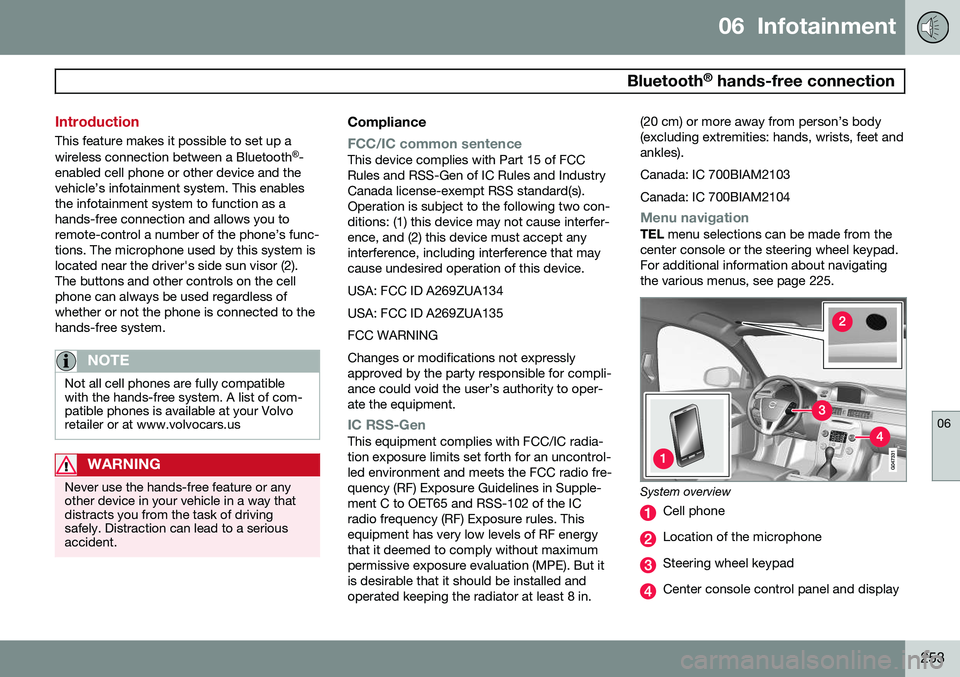
center console or the steering wheel keypad. For additional information about navigatingthe various menus, see page 225.
System overview
Cell phone
Location of the microphone
Steering wheel keypad
Center console control panel and display
Page 256 of 380
06 Infotainment
Bluetooth®
hands-free connection
06
254
Bluetooth ®
functions in the center
console control panel
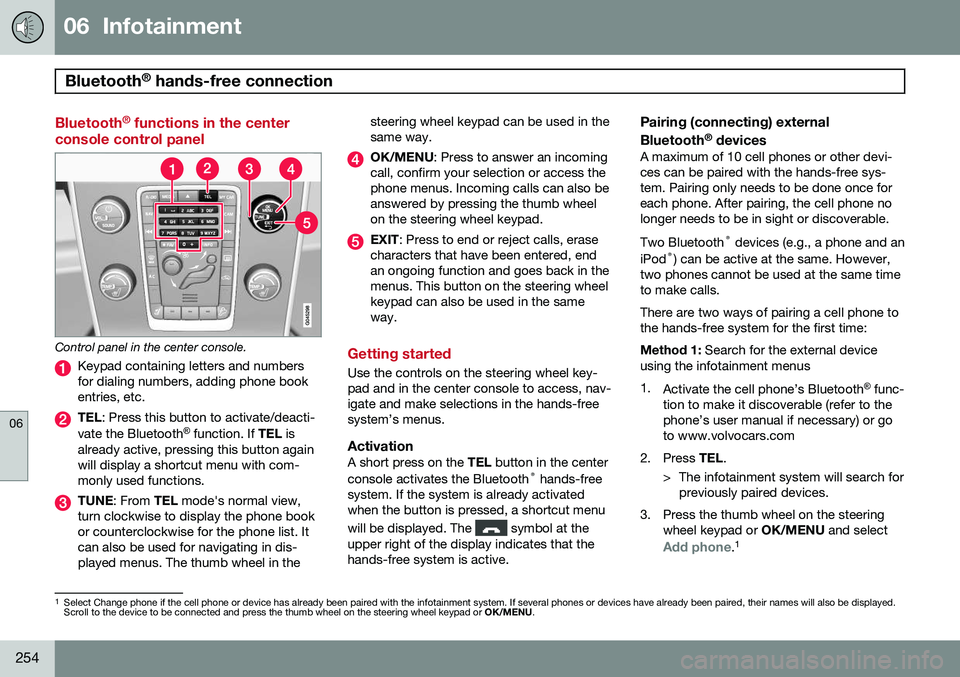
Control panel in the center console.
Keypad containing letters and numbers for dialing numbers, adding phone bookentries, etc.
TEL : Press this button to activate/deacti-
vate the Bluetooth ®
function. If TEL is
already active, pressing this button again will display a shortcut menu with com-monly used functions.
TUNE : From TEL mode's normal view,
turn clockwise to display the phone book or counterclockwise for the phone list. Itcan also be used for navigating in dis-played menus. The thumb wheel in the steering wheel keypad can be used in thesame way.
OK/MENU
: Press to answer an incoming
call, confirm your selection or access the phone menus. Incoming calls can also beanswered by pressing the thumb wheelon the steering wheel keypad.
EXIT : Press to end or reject calls, erase
characters that have been entered, end an ongoing function and goes back in themenus. This button on the steering wheelkeypad can also be used in the sameway.
Getting started
Use the controls on the steering wheel key- pad and in the center console to access, nav-igate and make selections in the hands-freesystem’s menus.
ActivationA short press on the TEL button in the center
console activates the Bluetooth ®
hands-free
system. If the system is already activatedwhen the button is pressed, a shortcut menu will be displayed. The
symbol at the
upper right of the display indicates that the hands-free system is active.
Pairing (connecting) external Bluetooth ®
devices
A maximum of 10 cell phones or other devi- ces can be paired with the hands-free sys-tem. Pairing only needs to be done once foreach phone. After pairing, the cell phone nolonger needs to be in sight or discoverable. Two Bluetooth ®
devices (e.g., a phone and an
iPod ®
) can be active at the same. However,
two phones cannot be used at the same time to make calls. There are two ways of pairing a cell phone to the hands-free system for the first time: Method 1: Search for the external device
using the infotainment menus1. Activate the cell phone’s Bluetooth ®
func-
tion to make it discoverable (refer to the phone’s user manual if necessary) or goto www.volvocars.com
2. Press TEL.
> The infotainment system will search for previously paired devices.
3. Press the thumb wheel on the steering wheel keypad or OK/MENU and select
Add phone.1
1
Select Change phone if the cell phone or device has already been paired with the infotainment system. If several phones or devices have already been paired, their names will also be displayed. Scroll to the device to be connected and press the thumb wheel on the steering wheel keypad or OK/MENU.
Page 257 of 380
06 Infotainment
Bluetooth®
hands-free connection
06
}}
255
4. With the cell phone in discoverable mode,
press OK/MENU .
> The infotainment system will search for cell phones or devices that are in range, which takes approximately 30seconds. Any phones detected will be displayed using their Bluetooth ®
names. The hands-free system’sBluetooth ®
name will appear in the cell
phone’s display as My Volvo Car.
5. Turn the thumb wheel or TUNE to select
one of the cell phones shown in the cen- ter console display and press the thumbwheel or OK/MENU .
6. Using the cell phone’s keypad, enter the digits (PIN code) shown in the center con-sole display and press the button on thecell phone used to confirm a choice.
The external device is now paired and can becontrolled from the infotainment system. If the connection failed: Press EXIT and con-
nect with method 2 below.Method 2: Search for the vehicle using the
external device’s Bluetooth ®
function.
1. Press TEL. If a phone or external device
is already connected, disconnect it. > The Bluetooth ®
function will search for
previously paired devices. 2. Make the vehicle discoverable by press-
ing the thumb wheel or OK/MENU and
selecting
Phone settingsDiscoverable.
3. Search for the vehicle using the phone or external device's Bluetooth ®
function.
Refer to its user manual if necessary.
4. Select
My Volvo Car on the phone or
external device’s screen and follow the directions provided.
5. Enter a PIN code of your choice in the external device and press its button topair the device. When prompted, enterthe same PIN code in the vehicle usingthe center console keypad.
6. Pair
My Volvo Car from the external
device.
When the external device has been paired, its Bluetooth ®
name appear in the center con-
sole display. This device can now be con- trolled from the infotainment system.
Connect automaticallyWhen the hands-free system is active and the most recently connected cell phone is withinrange, it will be connected automatically. Ifthis phone is not within range, the hands-freesystem will attempt to connect one of theother paired cell phones. When the infotain-ment system searches for the most recently connected phone, its name appears in thedisplay.
Connect manuallyTo connect a phone other than the one that was most recently connected or to switchbetween cell phones that are already pairedwith the hands-free system, go to
Phone
menu
Change phone.
Changing phones or devicesMore than one device can be used in the vehicle as long as this device has beenpaired. To do so, see page 254. Changing devices:
1. Check that the external device is discov- erable.
2. Press TEL and select
Change phone.
> The infotainment system will search for previously paired devices. Those that are detected will be displayed on thescreen.
3. Select the desired device by turning the thumb wheel or TUNE and confirm by
pressing the thumb wheel or OK/MENU.
> The device will be connected.
Page 258 of 380
06 Infotainment
Bluetooth®
hands-free connection
06
256
Making a call1. Ensure that is shown at the top of
the center console display and that the hands-free function is in telephone mode.
2. Dial the desired phone number using the center console keypad or use the speeddial function (see page 260). In normalview (see page see page 225 for informa-tion about the various display views), it isalso possible to turn TUNE clockwise to
access the phone book and then counter-clockwise for the call list. See page 261for more information about the phonebook.
3. Press the thumb wheel or OK/MENU.
End or reject a call by pressing EXIT.
Disconnecting the cell phoneThe cell phone is automatically disconnectedfrom the infotainment system if it is movedout of range. The cell phone can be manually disconnected from the hands-free system by pressing andholding TEL or in phone mode, going to
Phone menuDisconnect phone. See also
page 257 for more information about con- nections. The hands-free system is also deactivatedwhen the ignition is switched off (or if thedriver’s door is opened). When the cell phone is disconnected from the hands-free system, a call in progress can becontinued using the cell phone’s own speakerand microphone. Even if the cell phone has been disconnected manually, some phones may reconnect auto-matically, for example when a new call is initi-ated.
Removing a paired deviceA paired phone or device can be removedfrom the list. To do so:
1. Press
TEL.
2. Select
Phone menuRemove
Bluetooth device.
Handling calls
Incoming calls–Press OK/MENU (or the thumb wheel on
the steering wheel keypad) to answer a call, even if the infotainment system is currently in another mode (e.g.,
RADIO orMEDIA).
Press EXIT to reject a call.
Auto answerThis function means that incoming calls will be answered automatically. Activate or deac-tivate the function in the menu system under
Phone menuCall optionsAuto
answer.
Call settingsWhile a call is in progress, press OK/MENU
or the thumb wheel on the steering wheel keypad to access the following functions:
•
Mute: mute the infotainment system’s
microphone.
•
Mobile phone: transfer the call from
hands-free to the cell phone. On certain cell phones, the connection will be bro-ken, which is normal. The hands-freefunction will ask if you would like toreconnect.
•
Dial number: dial a third party during an
ongoing call using the keypad (the current call will be put on hold).
Call listsCall lists are copied to the hands-free func- tion each time a cell phone is connected andthe lists are updated while the phone is con-nected. In normal view, turn TUNE counter-
clockwise to see the
All calls list.
Page 260 of 380
06 Infotainment
Bluetooth®
hands-free connection
06
258
connected when the contact is saved. These contacts will be displayed regard-less of the cell phone that is connected. Ifa contact has been saved in the infotain- ment system, the
symbol will be
displayed next to it.
NOTE
Changes made from the infotainment sys- tem to a contact in the cell phone's phonebook will result in a new contact beingadded to the infotainment system's phonebook. However, this contact will not besaved in the cell phone's phone book. Theinfotainment system's display will showduplicate contacts with different icons. Please also note that if a speed dial num- ber is saved or if a contact's information isedited, this will result in a new contact inthe infotainment system's phone book.
The symbol must be displayed before
the phone book can be used and the hands- free function must be in phone mode. The infotainment system saves a copy of each paired cell phone's phone book. Thisphone book can be copied each time thephone is connected.
–Activate/deactivate this function in phone mode in
Phone menuPhone settings
Download phone book.
If the phone book contains information about someone who is trying to call you, this infor-mation will be shown in the display.
Contact shortcutsA quick way of searching the phone book forcontacts in normal view is to turn TUNE
clockwise to access the phone book and thencounter-clockwise to select a contact fromthe list. Press OK/MENU to call.
Each name in the phone book has a default phone number. If the
symbol is displayed
to the right of it, this indicates that there are additional phone numbers for this contact. Touse a phone number other than the default one, press the
button on the center
console control panel. Turn TUNE to select a
different phone number and press OK/MENU
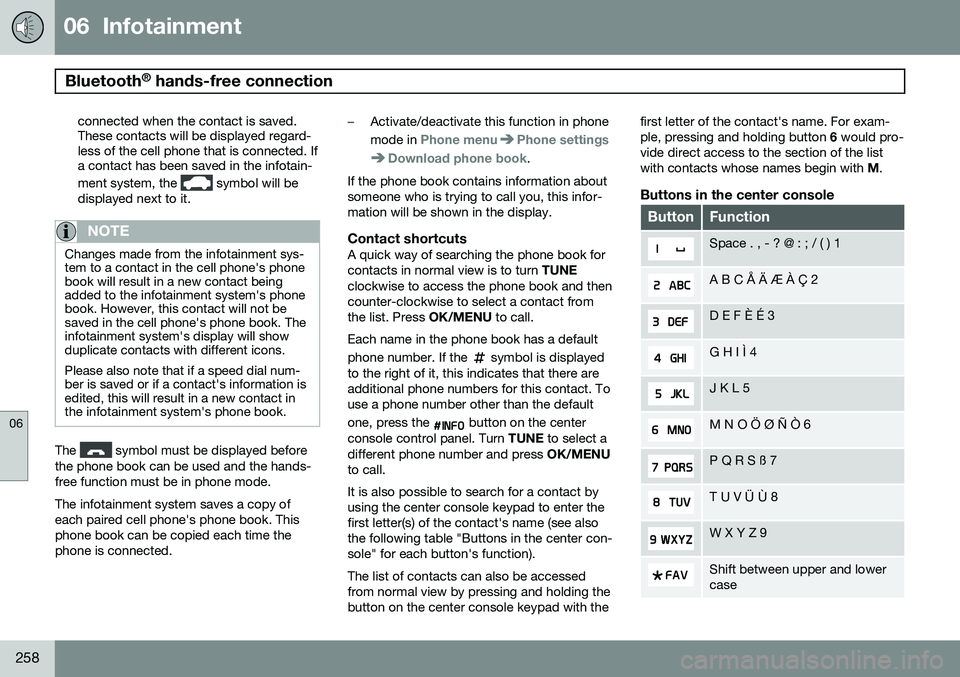
to call. It is also possible to search for a contact by using the center console keypad to enter thefirst letter(s) of the contact's name (see alsothe following table "Buttons in the center con-sole" for each button's function). The list of contacts can also be accessed from normal view by pressing and holding thebutton on the center console keypad with the first letter of the contact's name. For exam-ple, pressing and holding button
6 would pro-
vide direct access to the section of the listwith contacts whose names begin with M.
Buttons in the center console
ButtonFunction
Space . , - ? @ : ; / ( ) 1
A B C Å Ä Æ À Ç 2
D E F È É 3
G H I Ì 4
J K L 5
M N O Ö Ø Ñ Ò 6
P Q R S ß 7
T U V Ü Ù 8
W X Y Z 9
Shift between upper and lower case
Page 261 of 380
06 Infotainment
Bluetooth®
hands-free connection
06
}}
259
ButtonFunction
+ 0 p w
# *
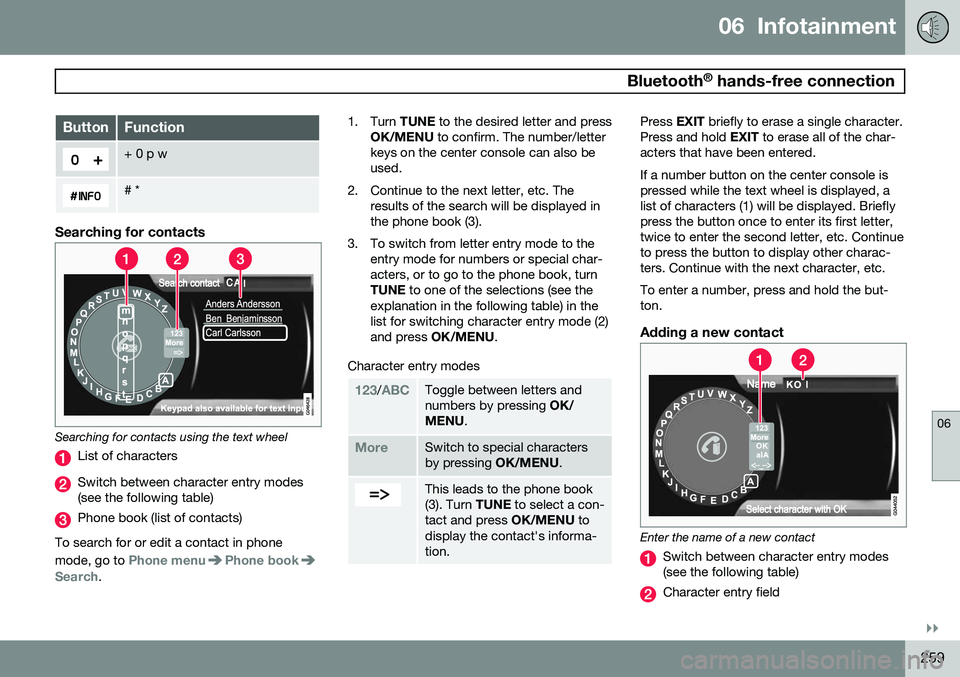
Searching for contacts
Searching for contacts using the text wheel
List of characters
Switch between character entry modes (see the following table)
Phone book (list of contacts)
To search for or edit a contact in phone mode, go to
Phone menuPhone bookSearch. 1. Turn
TUNE to the desired letter and press
OK/MENU to confirm. The number/letter
keys on the center console can also be used.
2. Continue to the next letter, etc. The results of the search will be displayed inthe phone book (3).
3. To switch from letter entry mode to the entry mode for numbers or special char-acters, or to go to the phone book, turnTUNE to one of the selections (see the
explanation in the following table) in thelist for switching character entry mode (2)and press OK/MENU .
Character entry modes
123/ABCToggle between letters and numbers by pressing OK/
MENU .
MoreSwitch to special characters by pressing OK/MENU.
This leads to the phone book (3). Turn TUNE to select a con-
tact and press OK/MENU to
display the contact's informa-tion.
Press EXIT briefly to erase a single character.
Press and hold EXIT to erase all of the char-
acters that have been entered. If a number button on the center console is pressed while the text wheel is displayed, alist of characters (1) will be displayed. Brieflypress the button once to enter its first letter,twice to enter the second letter, etc. Continueto press the button to display other charac-ters. Continue with the next character, etc. To enter a number, press and hold the but- ton.
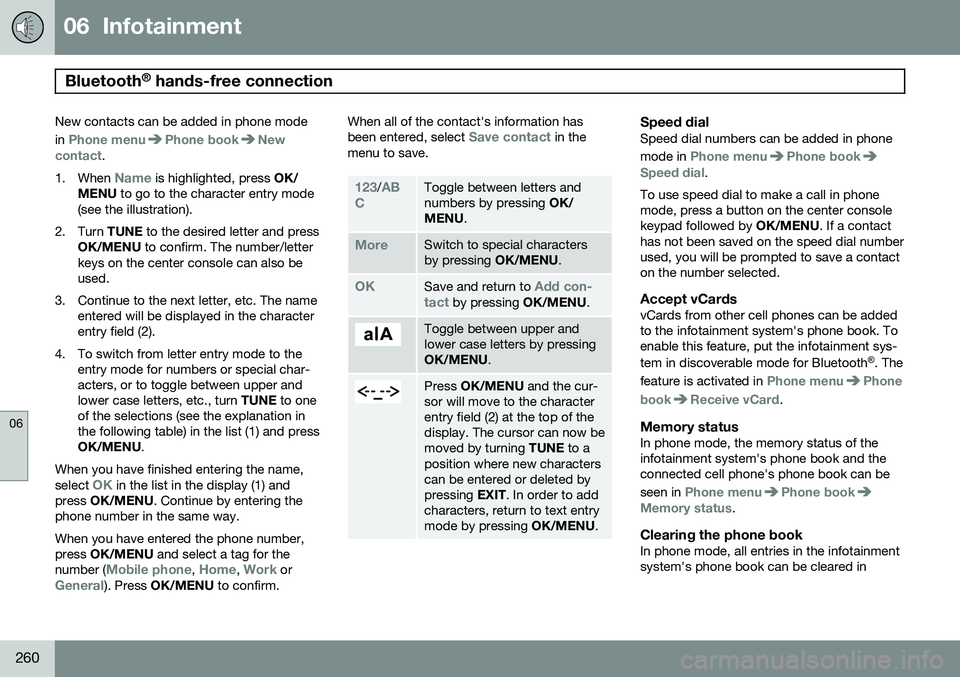
Adding a new contact
Enter the name of a new contact
Switch between character entry modes (see the following table)
Character entry field
Page 262 of 380
06 Infotainment
Bluetooth®
hands-free connection
06
260
New contacts can be added in phone mode in
Phone menuPhone bookNew
contact.
1. When
Name is highlighted, press OK/
MENU to go to the character entry mode
(see the illustration).
2. Turn TUNE to the desired letter and press
OK/MENU to confirm. The number/letter
keys on the center console can also be used.
3. Continue to the next letter, etc. The name entered will be displayed in the characterentry field (2).
4. To switch from letter entry mode to the entry mode for numbers or special char-acters, or to toggle between upper andlower case letters, etc., turn TUNE to one
of the selections (see the explanation inthe following table) in the list (1) and pressOK/MENU .
When you have finished entering the name, select
OK in the list in the display (1) and
press OK/MENU . Continue by entering the
phone number in the same way. When you have entered the phone number, press OK/MENU and select a tag for the
number (
Mobile phone, Home, Work orGeneral). Press OK/MENU to confirm. When all of the contact's information has been entered, select
Save contact in the
menu to save.
123/AB
CToggle between letters and numbers by pressing OK/
MENU .
MoreSwitch to special characters by pressing OK/MENU.
OKSave and return to Add con-
tact by pressing OK/MENU.
Toggle between upper and lower case letters by pressingOK/MENU.
Press OK/MENU and the cur-
sor will move to the character entry field (2) at the top of thedisplay. The cursor can now bemoved by turning TUNE to a
position where new characterscan be entered or deleted bypressing EXIT. In order to add
characters, return to text entrymode by pressing OK/MENU.
Speed dialSpeed dial numbers can be added in phone mode in
Phone menuPhone bookSpeed dial.
To use speed dial to make a call in phone mode, press a button on the center consolekeypad followed by OK/MENU. If a contact
has not been saved on the speed dial numberused, you will be prompted to save a contacton the number selected.
Accept vCardsvCards from other cell phones can be addedto the infotainment system's phone book. Toenable this feature, put the infotainment sys- tem in discoverable mode for Bluetooth ®
. The
feature is activated in
Phone menuPhone
book
Receive vCard.
Memory statusIn phone mode, the memory status of the infotainment system's phone book and theconnected cell phone's phone book can be seen in
Phone menuPhone bookMemory status.
Clearing the phone bookIn phone mode, all entries in the infotainment system's phone book can be cleared in
Page 265 of 380
06 Infotainment
Cell phone voice control*
06
* Option/accessory, for more information, see Introduction.263
Getting started
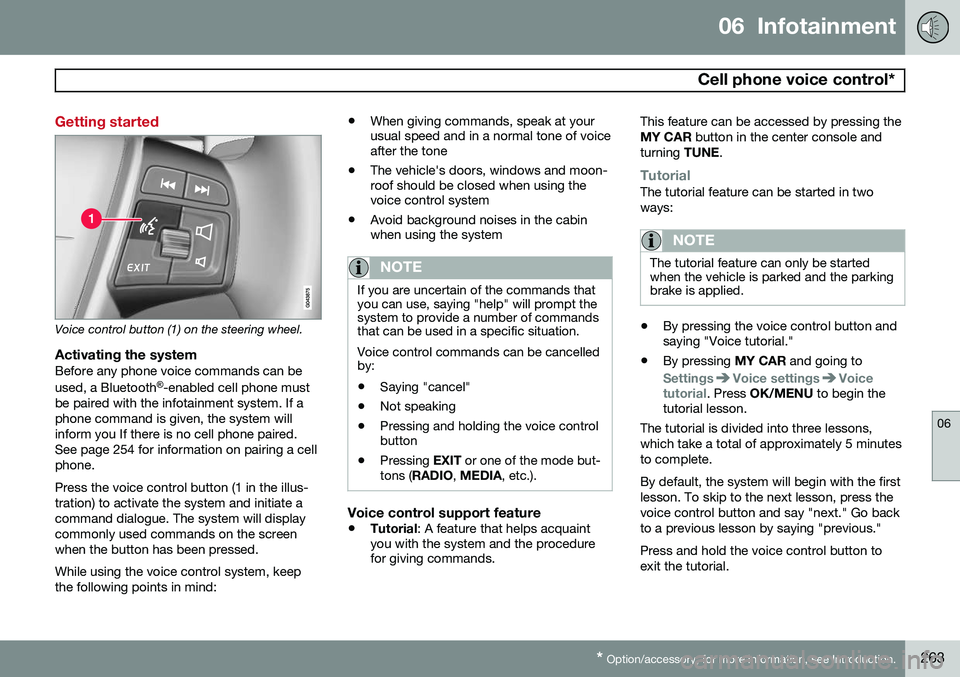
Voice control button (1) on the steering wheel.
Activating the systemBefore any phone voice commands can be used, a Bluetooth ®
-enabled cell phone must
be paired with the infotainment system. If a phone command is given, the system willinform you If there is no cell phone paired.See page 254 for information on pairing a cellphone. Press the voice control button (1 in the illus- tration) to activate the system and initiate acommand dialogue. The system will displaycommonly used commands on the screenwhen the button has been pressed. While using the voice control system, keep the following points in mind: •
When giving commands, speak at your usual speed and in a normal tone of voiceafter the tone
• The vehicle's doors, windows and moon-roof should be closed when using thevoice control system
• Avoid background noises in the cabinwhen using the system
NOTE
If you are uncertain of the commands that you can use, saying "help" will prompt thesystem to provide a number of commandsthat can be used in a specific situation. Voice control commands can be cancelled by:
• Saying "cancel"
• Not speaking
• Pressing and holding the voice control button
• Pressing
EXIT or one of the mode but-
tons ( RADIO , MEDIA , etc.).
Voice control support feature
•Tutorial
: A feature that helps acquaint
you with the system and the procedure for giving commands. This feature can be accessed by pressing the MY CAR
button in the center console and
turning TUNE.
TutorialThe tutorial feature can be started in two ways:
NOTE
The tutorial feature can only be started when the vehicle is parked and the parkingbrake is applied.
•By pressing the voice control button and saying "Voice tutorial."
• By pressing
MY CAR and going to
SettingsVoice settingsVoice
tutorial. Press OK/MENU to begin the
tutorial lesson.
The tutorial is divided into three lessons, which take a total of approximately 5 minutesto complete. By default, the system will begin with the first lesson. To skip to the next lesson, press thevoice control button and say "next." Go backto a previous lesson by saying "previous." Press and hold the voice control button to exit the tutorial.
Page 304 of 380
08 Wheels and tires
Tire Sealing System*
08
302* Option/accessory, for more information, see Introduction.
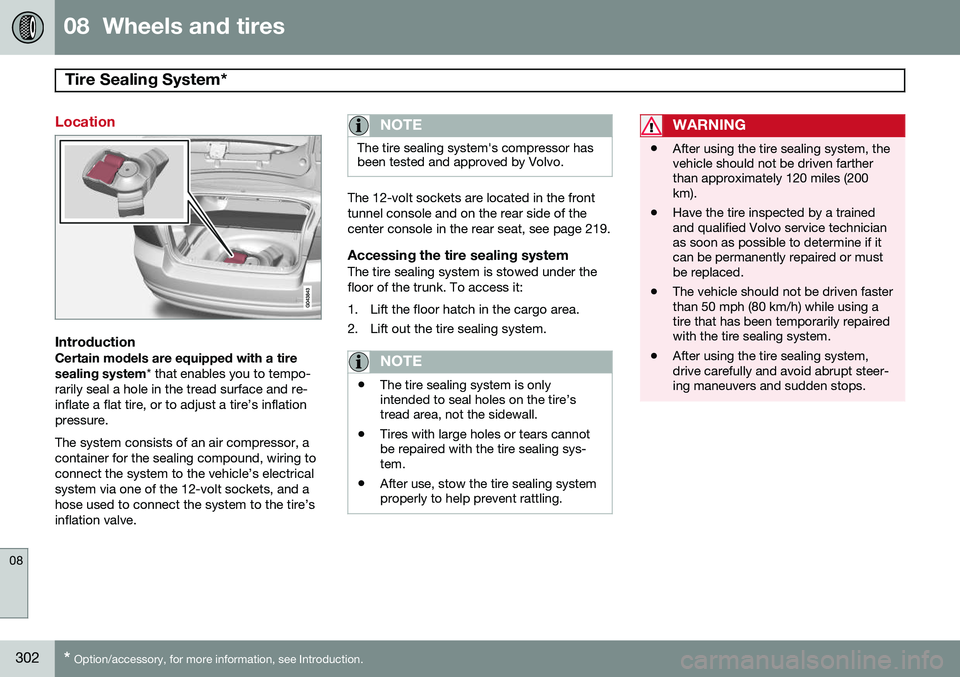
Location
IntroductionCertain models are equipped with a tire sealing system * that enables you to tempo-
rarily seal a hole in the tread surface and re- inflate a flat tire, or to adjust a tire’s inflationpressure. The system consists of an air compressor, a container for the sealing compound, wiring toconnect the system to the vehicle’s electricalsystem via one of the 12-volt sockets, and ahose used to connect the system to the tire’sinflation valve.
NOTE
The tire sealing system's compressor has been tested and approved by Volvo.
The 12-volt sockets are located in the front tunnel console and on the rear side of thecenter console in the rear seat, see page 219.
Accessing the tire sealing systemThe tire sealing system is stowed under thefloor of the trunk. To access it:
1. Lift the floor hatch in the cargo area.
2. Lift out the tire sealing system.
NOTE
• The tire sealing system is only intended to seal holes on the tire’stread area, not the sidewall.
• Tires with large holes or tears cannotbe repaired with the tire sealing sys-tem.
• After use, stow the tire sealing systemproperly to help prevent rattling.
WARNING
• After using the tire sealing system, the vehicle should not be driven fartherthan approximately 120 miles (200km).
• Have the tire inspected by a trainedand qualified Volvo service technicianas soon as possible to determine if itcan be permanently repaired or mustbe replaced.
• The vehicle should not be driven fasterthan 50 mph (80 km/h) while using atire that has been temporarily repairedwith the tire sealing system.
• After using the tire sealing system,drive carefully and avoid abrupt steer-ing maneuvers and sudden stops.
Page 367 of 380
10 Specifications
Overview of information and warning symbols
10
}}
* Option/accessory, for more information, see Introduction.365
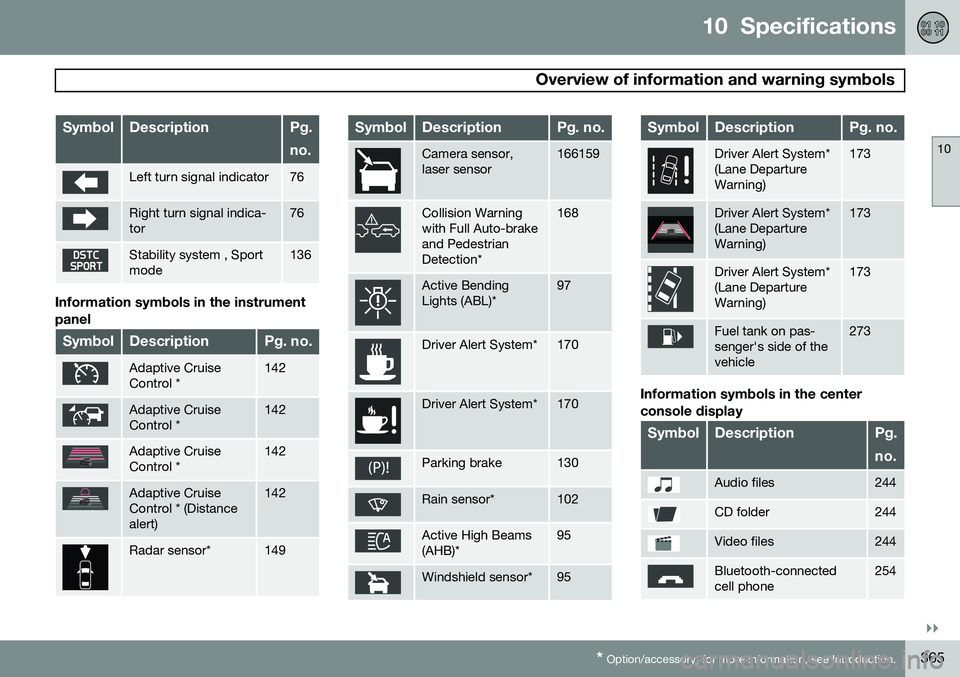
SymbolDescriptionPg. no.
Left turn signal indicator76
Right turn signal indica- tor76
Stability system , Sport mode136
Information symbols in the instrument panel
SymbolDescriptionPg. no.
Adaptive Cruise Control *142
Adaptive Cruise Control *142
Adaptive Cruise Control *142
Adaptive Cruise Control * (Distancealert)142
Radar sensor*149
SymbolDescriptionPg. no.
Camera sensor, laser sensor166159
Collision Warning with Full Auto-brakeand PedestrianDetection*168
Active Bending Lights (ABL)*97
Driver Alert System*170
Driver Alert System*170
Parking brake130
Rain sensor*102
Active High Beams (AHB)*95
Windshield sensor*95
SymbolDescriptionPg. no.
Driver Alert System* (Lane DepartureWarning)173
Driver Alert System* (Lane DepartureWarning)173
Driver Alert System* (Lane DepartureWarning)173
Fuel tank on pas- senger's side of thevehicle273
Information symbols in the center console display
SymbolDescriptionPg. no.
Audio files244
CD folder244
Video files244
Bluetooth-connected cell phone254