light VOLVO S80 2015 Owner´s Manual
[x] Cancel search | Manufacturer: VOLVO, Model Year: 2015, Model line: S80, Model: VOLVO S80 2015Pages: 392, PDF Size: 10.66 MB
Page 58 of 392
02 Locks and alarm
Remote key and key blade
02
56
•To activate visual confirmation: go to
SettingsCar settingsLight
settings and select Door lock
confirmation light and/or Unlock
confirmation light by pressing OK/
MENU .
• To activate audible confirmation: go to
SettingsCar settingsLock
settings and select Audible
confirmation by pressing OK/MENU.
See page 201 for a description of the menu system.
Immobilizer (start inhibitor)Each of the keys supplied with your vehiclecontains a coded transponder. The code inthe key is transmitted to an antenna in theignition slot where it is compared to the codestored in the start inhibitor module. The vehi-cle will start only with a properly coded key. Ifyou misplace a key, take the other keys to atrained and qualified Volvo service technicianfor reprogramming as an anti-theft measure.The following messages (which may appearin the instrument panel display) are related tothe immobilizer:
MessageMeaning
Insert car keyRemote key not recognized during start. Try to start thevehicle again.
Car key not foundPCC with keyless drive only. Remote key not recognizedduring start. Try to start thevehicle again. If the problem continues, insert the remote key intothe ignition slot and try tostart the vehicle again.
Immobil- izer TrystartagainRemote key fault during start. Contact an authorizedVolvo workshop.
CAUTION
Never use force when inserting the remote key in the ignition slot. The vehicle cannotbe started if the transponder is damaged.
USA–FCC ID: LTQWFS 125VO This device complies with part 15 of the FCC rules. Operation is subject to the followingcondition: (1) This device may not causeharmful interference, and (2) this device must accept any interference received, includinginterference that may cause undesired opera-tion. Canada–IC: 3659A-WFS125VOOperation is subject to the following condi- tions: (1) this device may not cause interfer-ence, and (2) this device must accept anyinterference, including interference that maycause undesired operation of the device. See page 116 for information on starting the vehicle.
Replacing the battery in the remote keyThe batteries should be replaced if:
• The information symbol illuminates and
Low battery in remote control. Please change batteries. is shown in the dis-
play and/or
• if the locks do not react after several attempts to unlock or lock the vehicle.
NOTE
The remote key's range is normally approximately 60 ft (20 m) from the vehi-cle.
See page 61 for information about replacing the battery.
Page 59 of 392
02 Locks and alarm
Remote key and key blade
02
}}
* Option/accessory, for more information, see Introduction.57
Remote key/Personal Car Communicator (PCC)* - commonfunctions
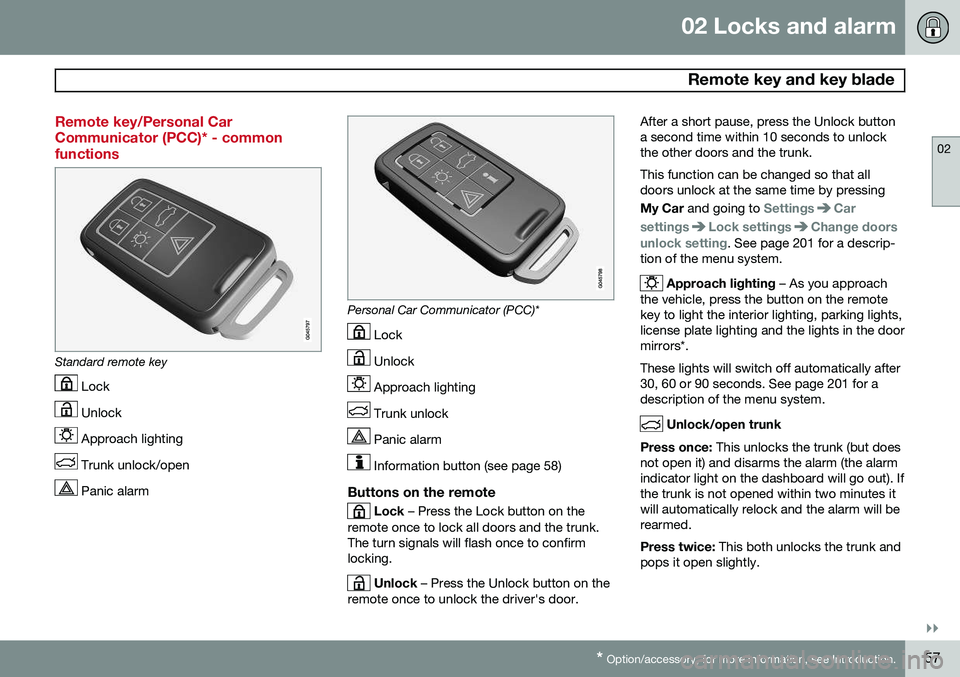
Standard remote key
Lock
Unlock
Approach lighting
Trunk unlock/open
Panic alarm
Personal Car Communicator (PCC)*
Lock
Unlock
Approach lighting
Trunk unlock
Panic alarm
Information button (see page 58)
Buttons on the remote
Lock – Press the Lock button on the
remote once to lock all doors and the trunk. The turn signals will flash once to confirmlocking.
Unlock – Press the Unlock button on the
remote once to unlock the driver's door. After a short pause, press the Unlock button a second time within 10 seconds to unlockthe other doors and the trunk. This function can be changed so that all doors unlock at the same time by pressing My Car
and going to
SettingsCar
settings
Lock settingsChange doors
unlock setting. See page 201 for a descrip-
tion of the menu system.
Approach lighting – As you approach
the vehicle, press the button on the remote key to light the interior lighting, parking lights,license plate lighting and the lights in the doormirrors*. These lights will switch off automatically after 30, 60 or 90 seconds. See page 201 for adescription of the menu system.
Unlock/open trunk
Press once: This unlocks the trunk (but does
not open it) and disarms the alarm (the alarm indicator light on the dashboard will go out). Ifthe trunk is not opened within two minutes itwill automatically relock and the alarm will berearmed. Press twice: This both unlocks the trunk and
pops it open slightly.
Page 60 of 392
02 Locks and alarm
Remote key and key blade
02
58* Option/accessory, for more information, see Introduction.
NOTE
Any excess weight (snow, etc.) on the trunk lid may prevent it from opening.
See also page 68 for information on open- ing the trunk from the passenger compart-ment. After closing, the trunk will not automatically relock. Press Lock to relock it and rearm thealarm.
Panic alarm – This button can be used
to attract attention during emergency situa- tions. To activate the panic alarm, press and hold this button for at least 3 seconds or press ittwice within 3 seconds. The turn signals andhorn will be activated. The panic alarm willstop automatically after 2 minutes and45 seconds. To deactivate, wait approximately 5 seconds and press the button again. The Panic alarm button will not unlock the vehicle.
RangeThe remote key has a range of approximately60 ft. (20 m) from the vehicle.
NOTE
Buildings or other obstacles may interfere with the function of the remote key. Thevehicle can also be locked or unlockedwith the key blade, see page 60.
If the remote key is removed from the vehicle while the engine is running or if the ignition isin mode I or II and all of the doors are closed,
a message will appear in the instrument paneldisplay and there will be an audible signal. When the remote key is returned to the vehi- cle, the message will be erased and the audi-ble signal will stop after one of the followinghas been done: • The remote key is inserted in the ignition slot
• The vehicle's speed exceeds 20 mph(30 km/h)
• The
OK button on the left steering wheel
lever is pressed
Unique functions—PCC*
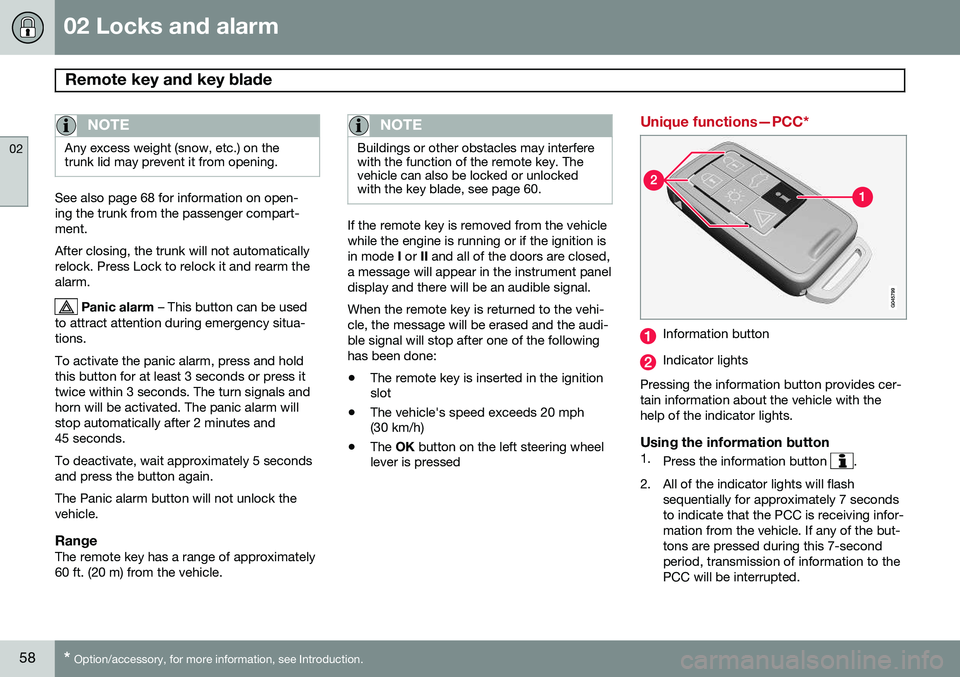
Information button
Indicator lights
Pressing the information button provides cer- tain information about the vehicle with thehelp of the indicator lights.
Using the information button1. Press the information button .
2. All of the indicator lights will flash sequentially for approximately 7 seconds to indicate that the PCC is receiving infor-mation from the vehicle. If any of the but-tons are pressed during this 7-secondperiod, transmission of information to thePCC will be interrupted.
Page 61 of 392
02 Locks and alarm
Remote key and key blade
02
}}
59
NOTE
If none of the indicator lights flash when the information button has been pressedseveral times from different places in rela-tion to the vehicle, contact an authorizedVolvo service technician.
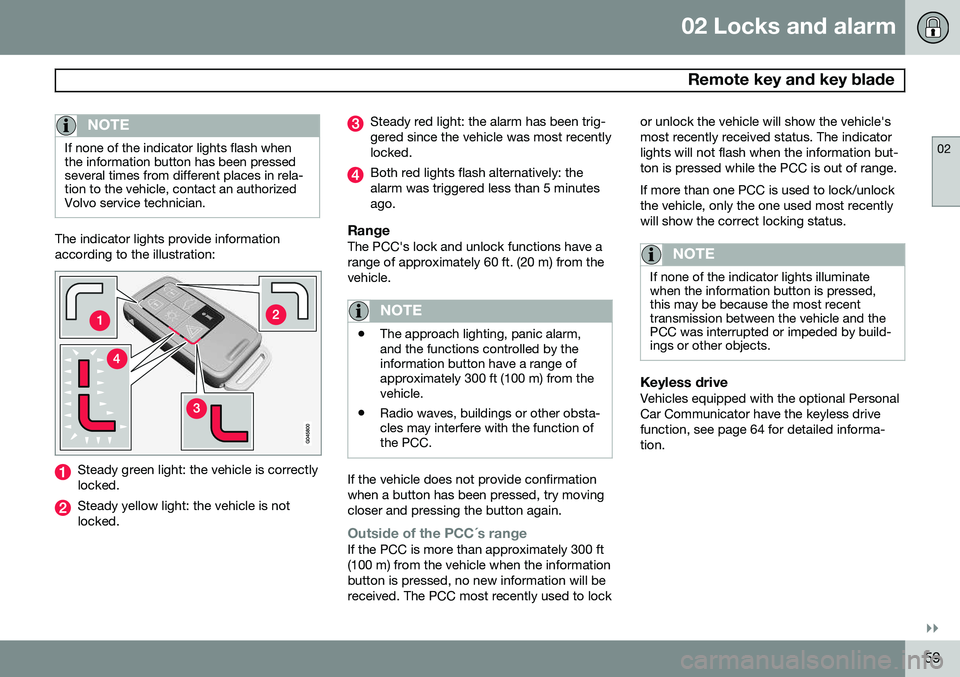
The indicator lights provide information according to the illustration:
Steady green light: the vehicle is correctly locked.
Steady yellow light: the vehicle is not locked.
Steady red light: the alarm has been trig- gered since the vehicle was most recentlylocked.
Both red lights flash alternatively: the alarm was triggered less than 5 minutesago.
RangeThe PCC's lock and unlock functions have arange of approximately 60 ft. (20 m) from thevehicle.
NOTE
•The approach lighting, panic alarm, and the functions controlled by theinformation button have a range ofapproximately 300 ft (100 m) from thevehicle.
• Radio waves, buildings or other obsta-cles may interfere with the function ofthe PCC.
If the vehicle does not provide confirmation when a button has been pressed, try movingcloser and pressing the button again.
Outside of the PCC´s rangeIf the PCC is more than approximately 300 ft (100 m) from the vehicle when the informationbutton is pressed, no new information will bereceived. The PCC most recently used to lock or unlock the vehicle will show the vehicle'smost recently received status. The indicatorlights will not flash when the information but-ton is pressed while the PCC is out of range. If more than one PCC is used to lock/unlock the vehicle, only the one used most recentlywill show the correct locking status.
NOTE
If none of the indicator lights illuminate when the information button is pressed,this may be because the most recenttransmission between the vehicle and thePCC was interrupted or impeded by build-ings or other objects.
Keyless driveVehicles equipped with the optional Personal Car Communicator have the keyless drivefunction, see page 64 for detailed informa-tion.
Page 63 of 392
02 Locks and alarm
Remote key and key blade
02
}}
61
3. Insert the key blade as far as possible in
the driver's door lock. Turn the key blade to unlock the driver's door. This will trig-
ger the alarm .
4. To turn off the alarm , insert the remote
key in the ignition slot. This also appliesto vehicles equipped with the optionalkeyless drive.
5. Press the cover back into place after the door has been unlocked.
Replacing batteries in the remote key/PCC
The battery/batteries in the remote key/PCC should be replaced if: •The information symbol lights up and a text appears in the information display.
and/or
• the vehicle's locks repeatedly do notreact when a button on the remotekey/PCC is pressed within approximately60 ft (20 m) from the vehicle.
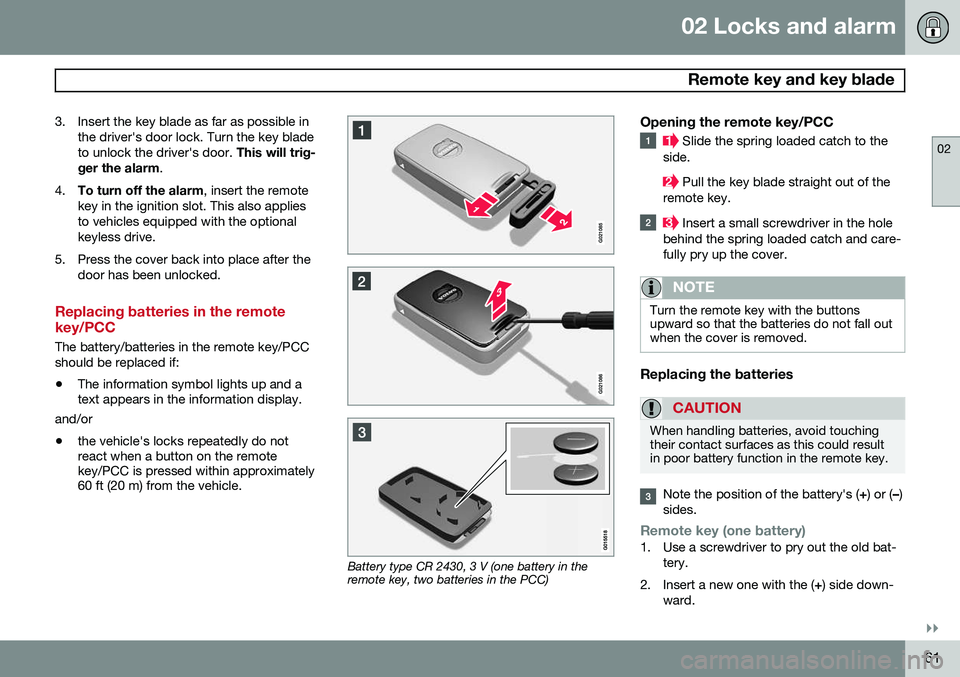
Battery type CR 2430, 3 V (one battery in the remote key, two batteries in the PCC)
Opening the remote key/PCC
Slide the spring loaded catch to the
side.
Pull the key blade straight out of the
remote key.
Insert a small screwdriver in the hole
behind the spring loaded catch and care- fully pry up the cover.
NOTE
Turn the remote key with the buttons upward so that the batteries do not fall outwhen the cover is removed.
Replacing the batteries
CAUTION
When handling batteries, avoid touching their contact surfaces as this could resultin poor battery function in the remote key.
Note the position of the battery's ( +) or ( –)
sides.
Remote key (one battery)1. Use a screwdriver to pry out the old bat- tery.
2. Insert a new one with the ( +) side down-
ward.
Page 70 of 392
02 Locks and alarm
Locks
02
68
Automatic relockingIf the doors are unlocked, the locks will auto- matically reengage (re-lock) and the alarm willrearm after 2 minutes unless a door or thetrunk has been opened.
Automatic lockingWhen the vehicle starts to move, the doorsand trunk can be locked automatically. Thisfeature can be turned on or off by pressing MY CAR and going to
Car settingsLock
settings
Automatic door locking. See
page 201 for a description of the menu sys- tem.
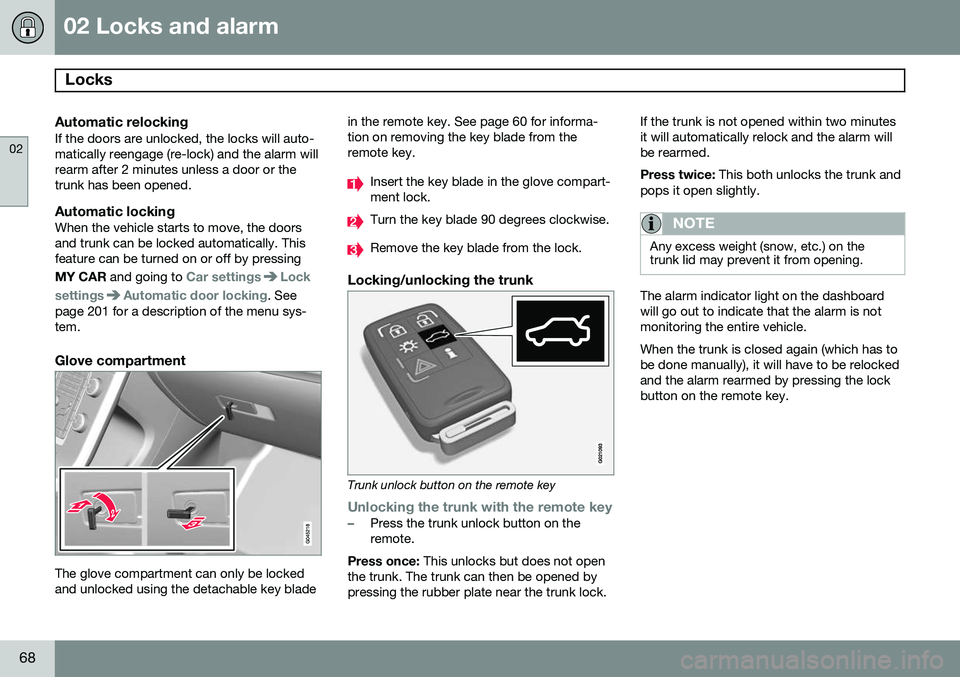
Glove compartment
The glove compartment can only be locked and unlocked using the detachable key blade in the remote key. See page 60 for informa-tion on removing the key blade from theremote key.
Insert the key blade in the glove compart- ment lock.
Turn the key blade 90 degrees clockwise.
Remove the key blade from the lock.
Locking/unlocking the trunk
Trunk unlock button on the remote key
Unlocking the trunk with the remote key–Press the trunk unlock button on the remote.
Press once: This unlocks but does not open
the trunk. The trunk can then be opened bypressing the rubber plate near the trunk lock. If the trunk is not opened within two minutesit will automatically relock and the alarm willbe rearmed. Press twice:
This both unlocks the trunk and
pops it open slightly.
NOTE
Any excess weight (snow, etc.) on the trunk lid may prevent it from opening.
The alarm indicator light on the dashboard will go out to indicate that the alarm is notmonitoring the entire vehicle. When the trunk is closed again (which has to be done manually), it will have to be relockedand the alarm rearmed by pressing the lockbutton on the remote key.
Page 71 of 392
02 Locks and alarm
Locks
02
69
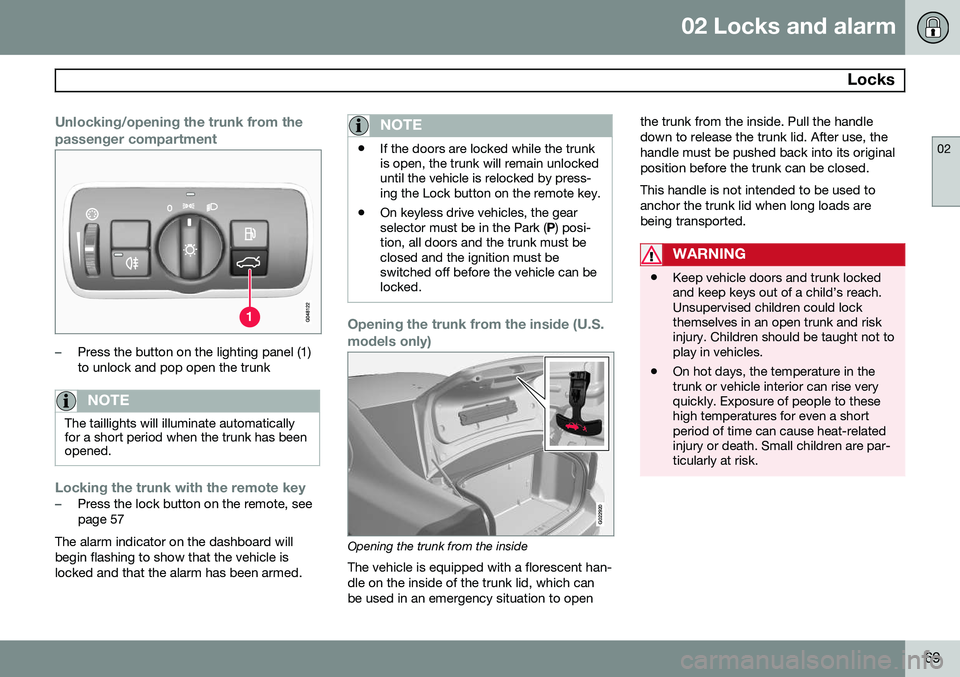
Unlocking/opening the trunk from the passenger compartment
–Press the button on the lighting panel (1) to unlock and pop open the trunk
NOTE
The taillights will illuminate automatically for a short period when the trunk has beenopened.
Locking the trunk with the remote key–Press the lock button on the remote, see page 57
The alarm indicator on the dashboard willbegin flashing to show that the vehicle islocked and that the alarm has been armed.
NOTE
• If the doors are locked while the trunk is open, the trunk will remain unlockeduntil the vehicle is relocked by press-ing the Lock button on the remote key.
• On keyless drive vehicles, the gearselector must be in the Park (
P) posi-
tion, all doors and the trunk must beclosed and the ignition must beswitched off before the vehicle can belocked.
Opening the trunk from the inside (U.S. models only)
G022920
Opening the trunk from the inside
The vehicle is equipped with a florescent han- dle on the inside of the trunk lid, which canbe used in an emergency situation to open the trunk from the inside. Pull the handledown to release the trunk lid. After use, thehandle must be pushed back into its originalposition before the trunk can be closed. This handle is not intended to be used to anchor the trunk lid when long loads arebeing transported.
WARNING
•
Keep vehicle doors and trunk locked and keep keys out of a child’s reach.Unsupervised children could lockthemselves in an open trunk and riskinjury. Children should be taught not toplay in vehicles.
• On hot days, the temperature in thetrunk or vehicle interior can rise veryquickly. Exposure of people to thesehigh temperatures for even a shortperiod of time can cause heat-relatedinjury or death. Small children are par-ticularly at risk.
Page 72 of 392
02 Locks and alarm
Alarm
02
70
The alarm system
The alarm is automatically armed whenever the vehicle is locked with the remote key oroptional Personal Car Communicator. When armed, the alarm continuously moni- tors a number of points on the vehicle. Thefollowing conditions will trigger the alarm:• The hood is forced open.
• The trunk is forced open
• A door is forced open.
• The ignition slot is tampered with.
• An attempt is made to start the vehicle with a non-approved key (a key notcoded to the car's ignition).
• The battery is disconnected (while thealarm is armed).
• The siren is disconnected when the alarmis disarmed.
A message will appear in the information dis- play if a fault should occur in the alarm sys-tem. Contact a trained and qualified Volvoservice technician.
NOTE
Do not attempt to repair any of the compo- nents in the alarm system yourself. Thiscould affect the insurance policy on thevehicle.
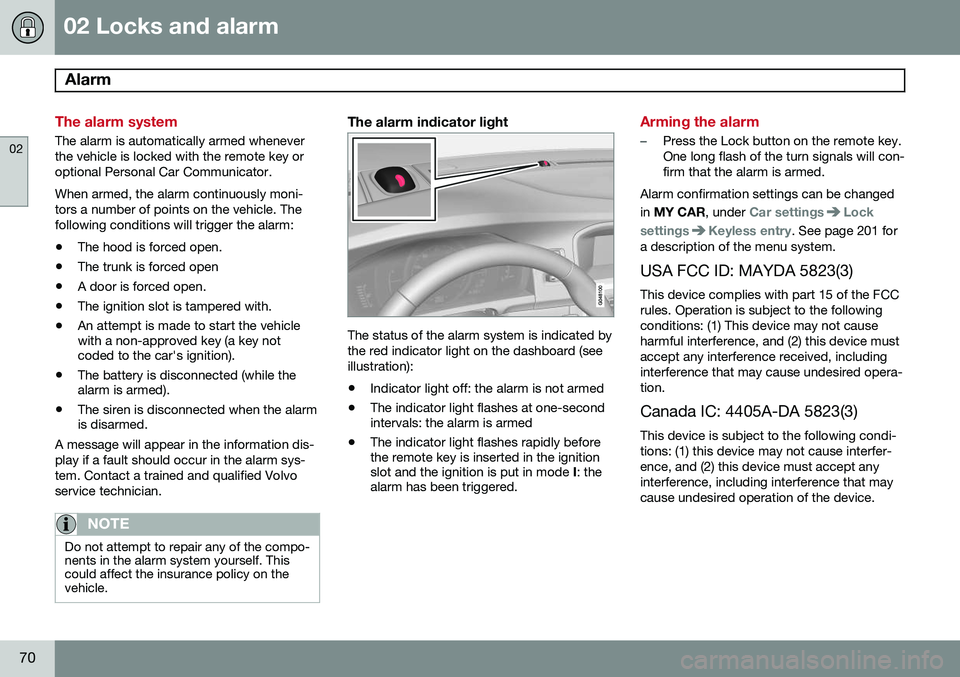
The alarm indicator light
The status of the alarm system is indicated by the red indicator light on the dashboard (seeillustration):
• Indicator light off: the alarm is not armed
• The indicator light flashes at one-second intervals: the alarm is armed
• The indicator light flashes rapidly beforethe remote key is inserted in the ignitionslot and the ignition is put in mode
I: the
alarm has been triggered.
Arming the alarm
–Press the Lock button on the remote key. One long flash of the turn signals will con-firm that the alarm is armed.
Alarm confirmation settings can be changed in MY CAR , under
Car settingsLock
settings
Keyless entry. See page 201 for
a description of the menu system.
USA FCC ID: MAYDA 5823(3) This device complies with part 15 of the FCC rules. Operation is subject to the followingconditions: (1) This device may not causeharmful interference, and (2) this device mustaccept any interference received, includinginterference that may cause undesired opera-tion. Canada IC: 4405A-DA 5823(3)
This device is subject to the following condi- tions: (1) this device may not cause interfer-ence, and (2) this device must accept anyinterference, including interference that maycause undesired operation of the device.
Page 74 of 392
72* Option/accessory, for more information, see Introduction. Instruments and controls........................................................................ 74 Ignition modes........................................................................................ 84Seats....................................................................................................... 86Steering wheel........................................................................................ 92Lighting................................................................................................... 94
Wipers and washers.............................................................................. 102Windows............................................................................................... 104Mirrors................................................................................................... 106
Digial compass*.................................................................................... 109
Power moonroof................................................................................... 111 HomeLink
®
Wireless Control System*.................................................. 113
Starting the engine................................................................................ 116 Transmission......................................................................................... 121
Eco Guide* and Power Meter*.............................................................. 126Eco* ...................................................................................................... 128Start/Stop* ........................................................................................... 131Brakes................................................................................................... 135Parking brake........................................................................................ 138
Page 77 of 392
03 Your driving environment
Instruments and controls
03
}}
* Option/accessory, for more information, see Introduction.75
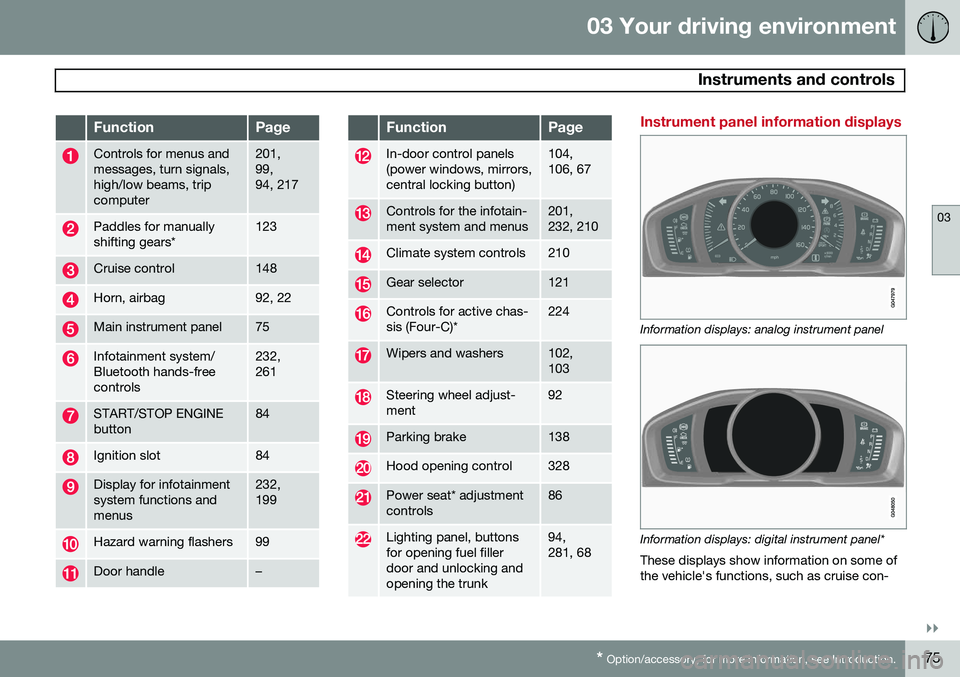
FunctionPage
Controls for menus and messages, turn signals,high/low beams, tripcomputer201, 99,94, 217
Paddles for manually shifting gears*123
Cruise control148
Horn, airbag92, 22
Main instrument panel75
Infotainment system/ Bluetooth hands-freecontrols232, 261
START/STOP ENGINE button84
Ignition slot84
Display for infotainment system functions andmenus232, 199
Hazard warning flashers99
Door handle–
FunctionPage
In-door control panels (power windows, mirrors,central locking button)104, 106, 67
Controls for the infotain- ment system and menus201, 232, 210
Climate system controls210
Gear selector121
Controls for active chas- sis (Four-C)*224
Wipers and washers102, 103
Steering wheel adjust- ment92
Parking brake138
Hood opening control328
Power seat* adjustment controls86
Lighting panel, buttons for opening fuel fillerdoor and unlocking andopening the trunk94, 281, 68
Instrument panel information displays
Information displays: analog instrument panel
Information displays: digital instrument panel* These displays show information on some of the vehicle's functions, such as cruise con-