seats VOLVO S80 2015 Owner´s Manual
[x] Cancel search | Manufacturer: VOLVO, Model Year: 2015, Model line: S80, Model: VOLVO S80 2015Pages: 392, PDF Size: 10.66 MB
Page 92 of 392
03 Your driving environment
Seats
03
90
The center head restraint should be adjusted according to the passenger's height. Therestraint should be carefully adjusted to sup-port the occupant's head.
• Pull the head restraint up as required.
• To lower, press the button at the base of the head restraint’s left support whilepressing the head restrain down carefully.
WARNING
The center rear seat head restraint should only be in its lowest position when thisseat is NOT occupied. When the centerposition is occupied, the head restraintshould be correctly adjusted to the pas-senger’s height. The upper edge of thehead restraint should be at least on a levelwith the upper-most point of the seatoccupant's ear.
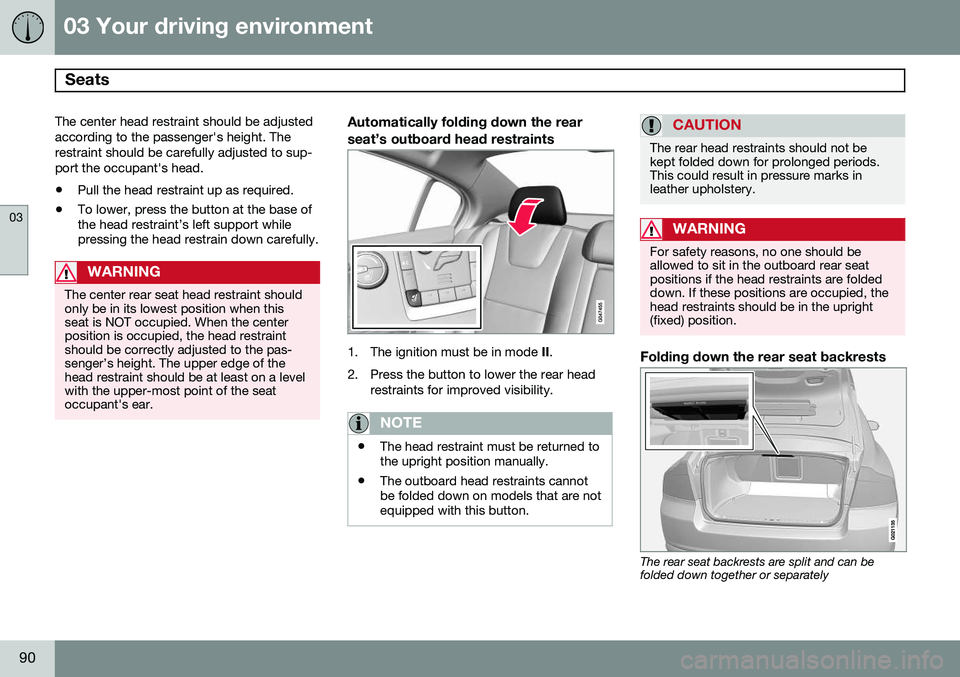
Automatically folding down the rear seat’s outboard head restraints
1. The ignition must be in mode
II.
2. Press the button to lower the rear head restraints for improved visibility.
NOTE
•The head restraint must be returned to the upright position manually.
• The outboard head restraints cannotbe folded down on models that are notequipped with this button.
CAUTION
The rear head restraints should not be kept folded down for prolonged periods.This could result in pressure marks inleather upholstery.
WARNING
For safety reasons, no one should be allowed to sit in the outboard rear seatpositions if the head restraints are foldeddown. If these positions are occupied, thehead restraints should be in the upright(fixed) position.
Folding down the rear seat backrests
The rear seat backrests are split and can be folded down together or separately
Page 93 of 392
03 Your driving environment
Seats
03
91
1. Pull the release control handle(s).
2. Fold the backrest forward. Adjust the
center seat head restraint if necessary.
NOTE
When the backrests are folded down, move the outboard head restraints forwardslightly so that they do not catch on theseat cushion.
CAUTION
To help avoid damage to the upholstery, there should be no objects on the rear seatand the seat belt should not be buckledwhen the backrest is folded down.
WARNING
•Keep vehicle doors and trunk locked and keep keys out of a child’s reach.Unsupervised children could lockthemselves in an open trunk and riskinjury. Children should be taught not toplay in vehicles.
• On hot days, the temperature in thetrunk or vehicle interior can rise veryquickly. Exposure of people to thesehigh temperatures for even a shortperiod of time can cause heat-relatedinjury or death. Small children are par-ticularly at risk.
WARNING
•When one or more sections of the backrest is returned to the uprightposition, check that it is properlylocked in place by pushing and pullingit.
• Return the outboard head restraints tothe upright position.
• Long loads should always be securelyanchored to help avoid injury in theevent of a sudden stop.
• Always turn the engine off and applythe parking brake when loading/unloading the vehicle.
• Place the transmission in the Park (
P)
position to help prevent inadvertentmovement of the gear selector.
• On hot days, the temperature in thevehicle interior can rise very quickly.Exposure of people to these high tem-peratures for even a short period oftime can cause heat-related injury ordeath. Small children are particularly atrisk.
Page 100 of 392
03 Your driving environment
Lighting
03
98
The intensity of the instrument lighting is adjusted with the thumb wheel.
"Theater" lightingWhen the overhead courtesy lighting hasgone out and the engine is running, severalLEDs located near the roof console illuminateto provide faint lighting for the occupants ofthe front seats. This lighting goes out justafter the overhead courtesy lighting when thevehicle is locked.
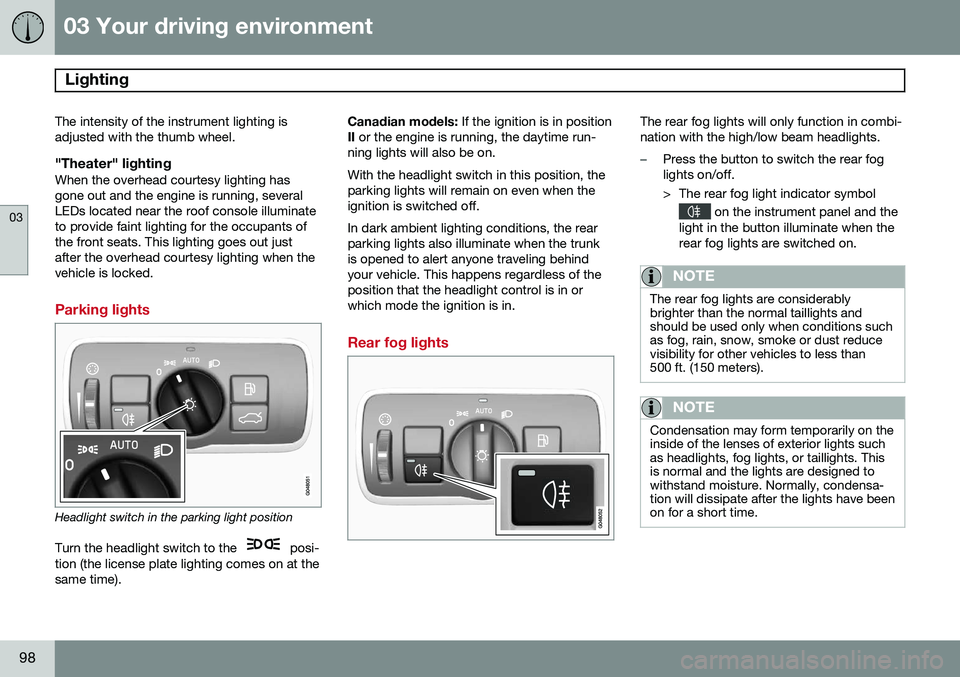
Parking lights
Headlight switch in the parking light position
Turn the headlight switch to the
posi-
tion (the license plate lighting comes on at the same time). Canadian models:
If the ignition is in position
II or the engine is running, the daytime run-
ning lights will also be on. With the headlight switch in this position, the parking lights will remain on even when theignition is switched off. In dark ambient lighting conditions, the rear parking lights also illuminate when the trunkis opened to alert anyone traveling behindyour vehicle. This happens regardless of theposition that the headlight control is in orwhich mode the ignition is in.
Rear fog lights
The rear fog lights will only function in combi- nation with the high/low beam headlights.
–Press the button to switch the rear fog lights on/off.
> The rear fog light indicator symbol
on the instrument panel and the
light in the button illuminate when the rear fog lights are switched on.
NOTE
The rear fog lights are considerably brighter than the normal taillights andshould be used only when conditions suchas fog, rain, snow, smoke or dust reducevisibility for other vehicles to less than500 ft. (150 meters).
NOTE
Condensation may form temporarily on the inside of the lenses of exterior lights suchas headlights, fog lights, or taillights. Thisis normal and the lights are designed towithstand moisture. Normally, condensa-tion will dissipate after the lights have beenon for a short time.
Page 212 of 392
05 Comfort and driving pleasure
Climate system
05
210* Option/accessory, for more information, see Introduction.
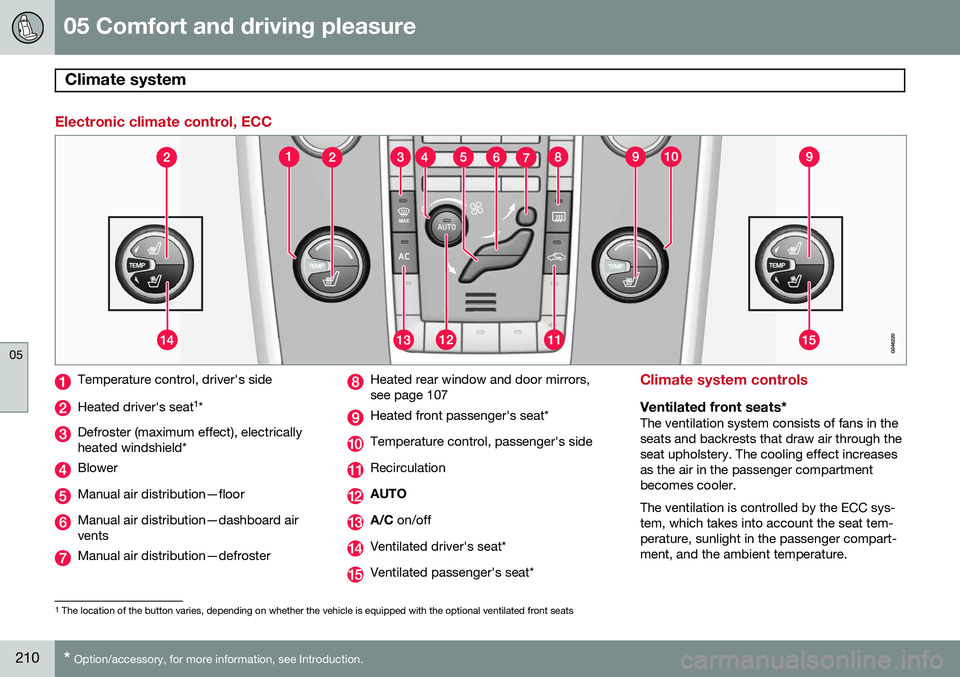
Electronic climate control, ECC
Temperature control, driver's side
Heated driver's seat 1
*
Defroster (maximum effect), electrically heated windshield*
Blower
Manual air distribution—floor
Manual air distribution—dashboard air vents
Manual air distribution—defroster
Heated rear window and door mirrors, see page 107
Heated front passenger's seat*
Temperature control, passenger's side
Recirculation
AUTO
A/C on/off
Ventilated driver's seat*
Ventilated passenger's seat*
Climate system controls
Ventilated front seats*The ventilation system consists of fans in the seats and backrests that draw air through theseat upholstery. The cooling effect increasesas the air in the passenger compartmentbecomes cooler. The ventilation is controlled by the ECC sys- tem, which takes into account the seat tem-perature, sunlight in the passenger compart-ment, and the ambient temperature.
1
The location of the button varies, depending on whether the vehicle is equipped with the optional ventilated front seats
Page 213 of 392
05 Comfort and driving pleasure
Climate system
05
}}
* Option/accessory, for more information, see Introduction.211
The ventilation can be used at the same time as seat heating. The ventilation system can be activated when the engine is running. There are three comfortlevels that produce different cooling anddehumidifying effects:
• Level three: press the button once for maximum output – three indicator lightscome on.
• Level two: press the button twice for alower output – two indicator lights comeon.
• Level one: press the button three timesfor the lowest output – one indicator lightcomes on.
• Press the button a fourth time to switchoff the function – the indicator light will goout.
Heated front seats*
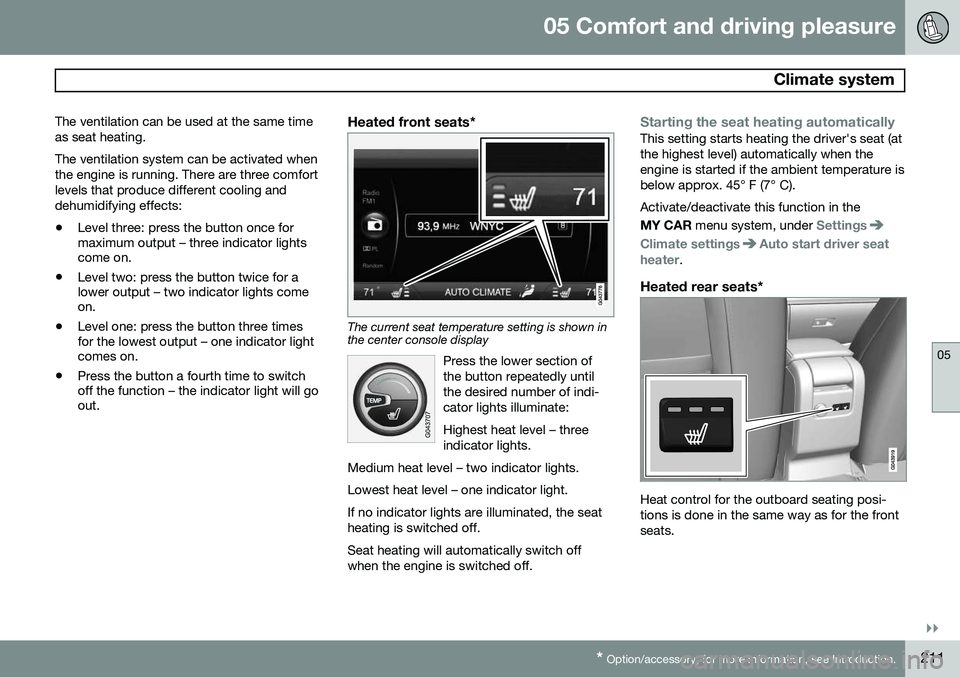
The current seat temperature setting is shown in the center console display
Press the lower section of the button repeatedly untilthe desired number of indi-cator lights illuminate: Highest heat level – three indicator lights.
Medium heat level – two indicator lights. Lowest heat level – one indicator light.If no indicator lights are illuminated, the seat heating is switched off.
Seat heating will automatically switch off when the engine is switched off.
Starting the seat heating automaticallyThis setting starts heating the driver's seat (at the highest level) automatically when theengine is started if the ambient temperature isbelow approx. 45° F (7° C). Activate/deactivate this function in the MY CAR menu system, under
Settings
Climate settingsAuto start driver seat
heater.
Heated rear seats*
Heat control for the outboard seating posi- tions is done in the same way as for the frontseats.
Page 240 of 392
06 Infotainment
Introduction
06
238
•DPL II centre level/3 channel centre
level3 : Volume for the center speaker.
•
DPL II surround level3 /4
: Surround level.
Advanced sound settings
EqualizerSound levels for different frequencies can be adjusted separately using this feature. To do so:1. Press OK/MENU to access
Audio
settings and select Equalizer
2. Turn TUNE to select one of the frequen-
cies and press OK/MENU.
3. Turn TUNE to adjust the sound setting
and confirm the change by pressing OK/
MENU . Do the same for the other fre-
quencies.
4. When you have finished making your set- tings, press EXIT to save and return to
normal view.
For general information regarding menu navi- gation, see page 235 and menu overview seepage 239.
Sound stage 5The sound experience can be optimized forthe driver's seat, both front seats or the rearseat. If the front and rear seats are occupied, the sound stage setting
Front seats is rec-
ommended. Select one of the options under
Audio settingsSound stage.
Audio volume and automatic volume
control
The infotainment system compensates for disrupting noises in the passenger compart-ment by increasing the volume according tothe speed of the vehicle. The level of soundcompensation can be set at low, medium,high or off. Select the level under
Audio
settings
Volume compensation.
External audio source volumeIf an external device such as an MP3 player or an iPod ®
is connected to the AUX socket,
the device's volume may be different than the volume of the internal sound sources such asthe disc player or the radio. If the externalsound source's volume is too high, the qualityof the sound may be impaired. To help pre-vent this, adjust the input volume of the exter-nal audio source:
NOTE
Sound quality may be affected if the MP3 player is being charged while the system isin AUX mode. To help prevent this, avoidcharging the MP3 player in a 12-voltsocket while it is being played.
1. Press MEDIA and turn TUNE to AUX.
Press OK/MENU or the thumb wheel on
the steering wheel keypad.
2. Press OK/MENU and turn TUNE to
AUX
input volume. Confirm by pressing OK/
MENU .
3. Turn TUNE to adjust the volume.
Optimal sound reproductionThe infotainment system is pre-calibrated for optimal sound reproduction using digital sig-nal processing. This calibration takes into account factors such as the speakers, amplifier, cabin acous-tics, the listeners' seating positions, etc., foreach combination of vehicle/infotainmentsystem.
3
Premium Sound Multimedia only
4 Only when Surround is on.
5
Premium Sound Multimedia only
Page 258 of 392
06 Infotainment
AUX/USB sockets
06
256
Connecting external devices
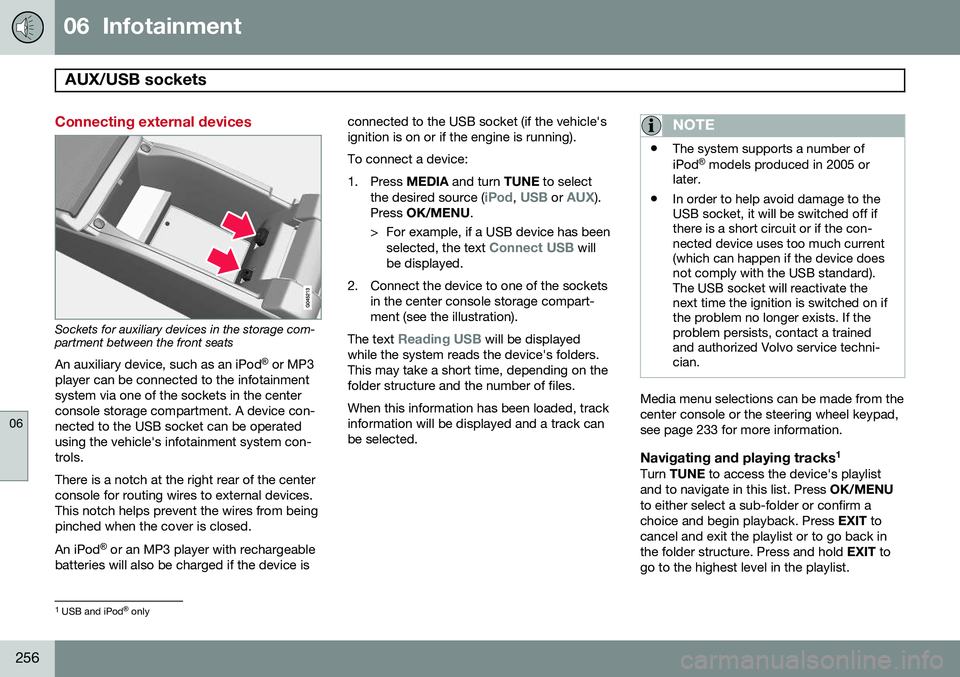
Sockets for auxiliary devices in the storage com- partment between the front seatsAn auxiliary device, such as an iPod ®
or MP3
player can be connected to the infotainment system via one of the sockets in the centerconsole storage compartment. A device con-nected to the USB socket can be operatedusing the vehicle's infotainment system con-trols. There is a notch at the right rear of the center console for routing wires to external devices.This notch helps prevent the wires from beingpinched when the cover is closed. An iPod ®
or an MP3 player with rechargeable
batteries will also be charged if the device is connected to the USB socket (if the vehicle's ignition is on or if the engine is running). To connect a device:
1. Press
MEDIA and turn TUNE to select
the desired source (
iPod, USB or AUX).
Press OK/MENU .
> For example, if a USB device has been selected, the text
Connect USB will
be displayed.
2. Connect the device to one of the sockets in the center console storage compart- ment (see the illustration).
The text
Reading USB will be displayed
while the system reads the device's folders. This may take a short time, depending on thefolder structure and the number of files. When this information has been loaded, track information will be displayed and a track canbe selected.
NOTE
• The system supports a number of iPod ®
models produced in 2005 or
later.
• In order to help avoid damage to the USB socket, it will be switched off ifthere is a short circuit or if the con-nected device uses too much current(which can happen if the device doesnot comply with the USB standard).The USB socket will reactivate thenext time the ignition is switched on ifthe problem no longer exists. If theproblem persists, contact a trainedand authorized Volvo service techni-cian.
Media menu selections can be made from the center console or the steering wheel keypad,see page 233 for more information.
Navigating and playing tracks 1Turn
TUNE to access the device's playlist
and to navigate in this list. Press OK/MENU
to either select a sub-folder or confirm achoice and begin playback. Press EXIT to
cancel and exit the playlist or to go back inthe folder structure. Press and hold EXIT to
go to the highest level in the playlist.
1 USB and iPod ®
only
Page 356 of 392
09 Maintenance and specifications
Fuses 09
354* Option/accessory, for more information, see Introduction.
PosFunctionA
Alarm, On-board diagnostic system5
-
Airbag system, occupant weight sensor10
Collision warning system*5
Accelerator pedal sensor, auto-dim mirror function,heated rear seats*7.5
-
Brake lights5
Power moonroof*20
Immobilizer5
Page 383 of 392
11 Index
11
381
fluid..................................................... 373
general information............................. 135
Bulbs headlights........................... 334, 335, 336
introduction......................................... 334
license plate lights.............................. 338
side marker lights............................... 337
specifications...................................... 339
trunk lighting....................................... 339
C
Camera, Park Assist................................ 189
Capacity weight....................................... 304
Catalytic converter................................... 282
Cell phone, hands-free connection......... 261
Cell phone voice control.......................... 270
Central locking system, introduction......... 54
Chains...................................................... 307
Check Engine warning light....................... 78Child restraintsrecalls and registration......................... 39
Child restraint systems.............................. 40 booster cushions.................................. 47
convertible seats.................................. 44 infant seats........................................... 42
ISOFIX/LATCH anchors........................ 48
top tether anchors................................ 50
Child safety................................................ 37 booster cushions.................................. 47
child restraint systems.......................... 40
convertible seats.................................. 44
infant seats........................................... 42
Child safety locks...................................... 51
City safety................................................ 164
Climate system........................................ 213 air distribution............................. 208, 216
air vents.............................................. 209
Interior Air Quality System.................. 208
introduction......................................... 207
passenger compartment filter............ 208
refrigerant........................................... 207
Clock, setting............................................. 82
Cold weather driving................................ 278
Collision warning system................. 170, 171
Compass in rearview mirror..................... 109
Conserving electrical current................... 277
Controls, center console.......................... 233
Convertible seats....................................... 44
Coolant............................................ 332, 373 Cooling system, general information....... 277
Courtesy lighting................................ 99, 100
Crash event data......................................... 9
Crash mode............................................... 35
Cruise control.................................. 148, 149
adaptive.............................................. 150
Curb weight............................................. 304
Current, conserving................................. 277
Cyclist detection...................................... 170D
Daytime running lights............................... 94
Defroster.................................................. 213
Detachable key blade.......................... 60, 63Disconnecting the front passenger’s air-
bag....................................................... 26, 27
Distance Alert.......................................... 161
Dome lighting..................................... 99, 100
Door mirrors............................................. 106
Driver alert............................................... 180 Lane Departure Warning..................... 182
Driver distraction warning.......................... 13
Page 384 of 392
11 Index
11
382
Driving economically................................ 276
Driving in cold weather............................ 278
Driving through water.............................. 277
E
ECC......................................... 210, 212, 214
Eco (driving function)............................... 128
Eco coast................................................. 128
Eco guide................................................. 126
Economical driving.................................. 276
Electrically heated steering wheel............. 93
Electric parking brake.............................. 138
Electronic Climate Control....... 210, 212, 214air distribution table............................ 216
Interior Air Quality System.................. 214
ventilated seats................................... 210
Emergency locking retractor...................... 38
Emergency starting.................................. 119
Emergency towing................................... 289
Emission inspection readiness................ 326Engine overheating........................................... 80
specifications...................................... 370 Start/Stop........................................... 131
starting................................................ 116
switching off....................................... 119
Engine compartment overview................ 328
Engine oil................................................. 371 checking............................................. 330
low pressure warning light.................... 79
volumes.............................................. 372
Engine remote start (ERS)........................ 118
Environment............................................... 12
Eyelets for anchoring loads..................... 284
F
Federal Clean Air Act............................... 324 Flat tires repairing with tire sealing system....... 309
Floor mats cleaning.............................................. 361
placing correctly................................. 116
Fluid specifications.................................. 373
Fog lights................................................... 79 rear........................................................ 98
Four C (active chassis system)................ 224 Front airbags.............................................. 22
disconnecting passenger’s side air-
bag.................................................. 26, 27
Front park assist.............................. 185, 187
Front seats........................................... 86, 88 heated................................................. 210
Fuel filler cap........................................... 282
Fuel filler door, opening........................... 281
Fuel level warning light.............................. 79
Fuel requirements............................ 279, 280
Fuel tank volume..................................... 373
Fuses............................... 347, 348, 352, 355G
Garage door opener HomeLink ®
Wireless Control System. 113
Gasoline requirements............................. 280
Gas tank volume...................................... 373
Gauges...................................................... 75
Geartronic................................................ 122
Geartronic automatic transmission.......... 122
Generator warning light............................. 80