alarm VOLVO S80 2016 Owner´s Manual
[x] Cancel search | Manufacturer: VOLVO, Model Year: 2016, Model line: S80, Model: VOLVO S80 2016Pages: 380, PDF Size: 9.45 MB
Page 148 of 380
06 Locks and alarm
06
146
Detachable key blade – unlocking
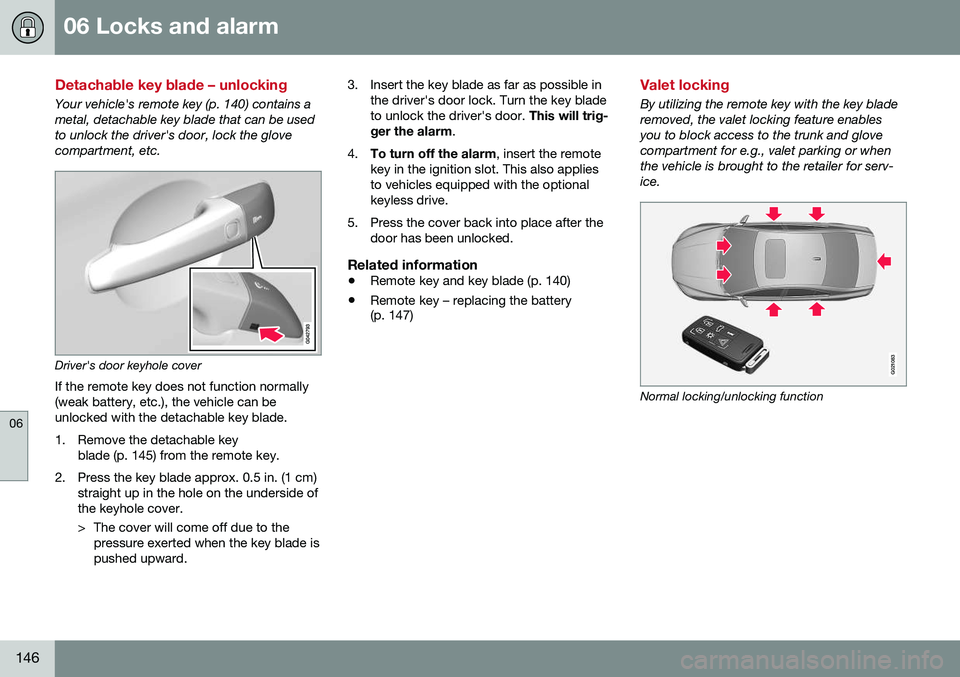
Your vehicle's remote key (p. 140) contains a metal, detachable key blade that can be usedto unlock the driver's door, lock the glovecompartment, etc.
Driver's door keyhole coverIf the remote key does not function normally (weak battery, etc.), the vehicle can beunlocked with the detachable key blade.
1. Remove the detachable key blade (p. 145) from the remote key.
2. Press the key blade approx. 0.5 in. (1 cm) straight up in the hole on the underside of the keyhole cover.
> The cover will come off due to thepressure exerted when the key blade is pushed upward. 3. Insert the key blade as far as possible in
the driver's door lock. Turn the key bladeto unlock the driver's door. This will trig-
ger the alarm .
4. To turn off the alarm , insert the remote
key in the ignition slot. This also appliesto vehicles equipped with the optionalkeyless drive.
5. Press the cover back into place after the door has been unlocked.
Related information
• Remote key and key blade (p. 140)
• Remote key – replacing the battery (p. 147)
Valet locking
By utilizing the remote key with the key blade removed, the valet locking feature enablesyou to block access to the trunk and glovecompartment for e.g., valet parking or whenthe vehicle is brought to the retailer for serv-ice.
G021083
Normal locking/unlocking function
Page 149 of 380
06 Locks and alarm
06
}}
147
G021084
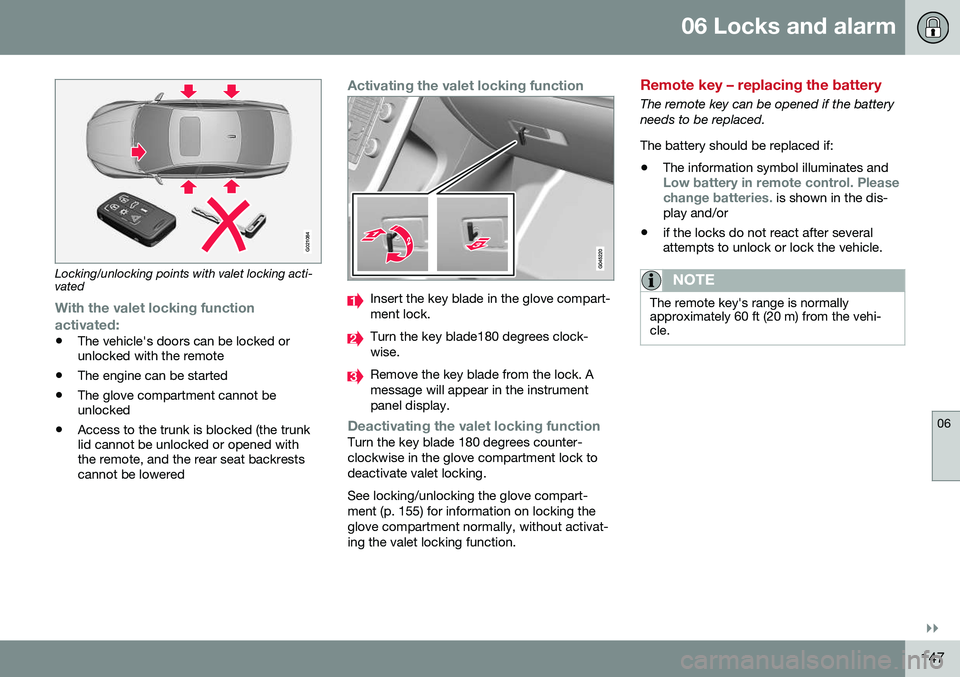
Locking/unlocking points with valet locking acti- vated
With the valet locking function
activated:
• The vehicle's doors can be locked or unlocked with the remote
• The engine can be started
• The glove compartment cannot beunlocked
• Access to the trunk is blocked (the trunklid cannot be unlocked or opened withthe remote, and the rear seat backrestscannot be lowered
Activating the valet locking function
Insert the key blade in the glove compart- ment lock.
Turn the key blade180 degrees clock- wise.
Remove the key blade from the lock. A message will appear in the instrumentpanel display.
Deactivating the valet locking functionTurn the key blade 180 degrees counter- clockwise in the glove compartment lock todeactivate valet locking. See locking/unlocking the glove compart- ment (p. 155) for information on locking theglove compartment normally, without activat-ing the valet locking function.
Remote key – replacing the battery
The remote key can be opened if the battery needs to be replaced. The battery should be replaced if:
• The information symbol illuminates and
Low battery in remote control. Please change batteries. is shown in the dis-
play and/or
• if the locks do not react after several attempts to unlock or lock the vehicle.
NOTE
The remote key's range is normally approximately 60 ft (20 m) from the vehi-cle.
Page 150 of 380
||
06 Locks and alarm
06
148
Opening the remote key
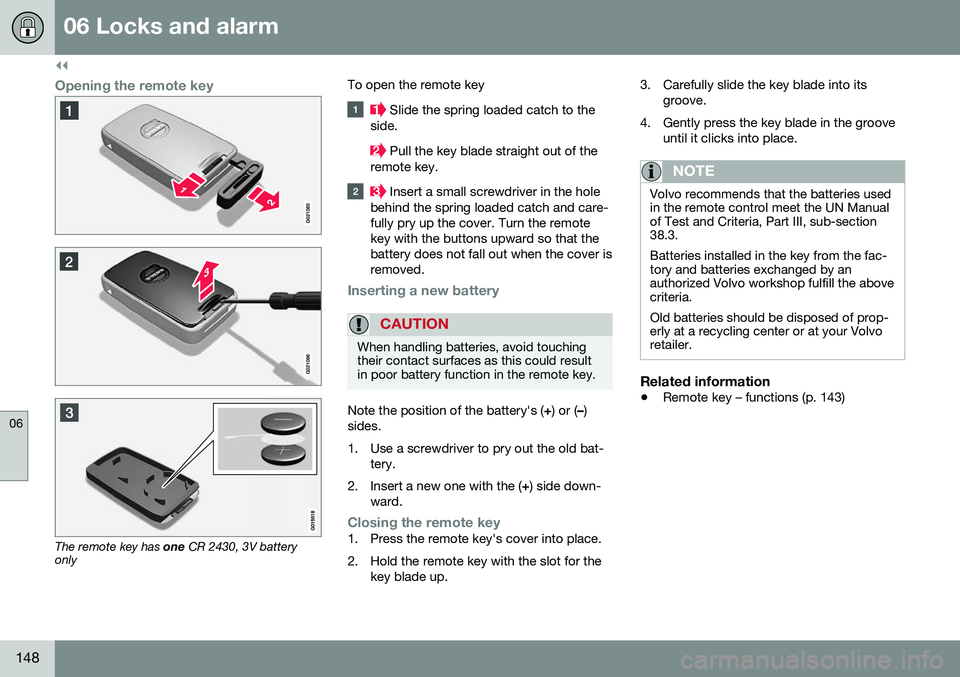
The remote key has one CR 2430, 3V battery
only To open the remote key
Slide the spring loaded catch to the
side.
Pull the key blade straight out of the
remote key.
Insert a small screwdriver in the hole
behind the spring loaded catch and care- fully pry up the cover. Turn the remotekey with the buttons upward so that thebattery does not fall out when the cover isremoved.
Inserting a new battery
CAUTION
When handling batteries, avoid touching their contact surfaces as this could resultin poor battery function in the remote key.
Note the position of the battery's ( +) or ( –)
sides.
1. Use a screwdriver to pry out the old bat- tery.
2. Insert a new one with the ( +) side down-
ward.
Closing the remote key1. Press the remote key's cover into place.
2. Hold the remote key with the slot for the key blade up. 3. Carefully slide the key blade into its
groove.
4. Gently press the key blade in the groove until it clicks into place.
NOTE
Volvo recommends that the batteries used in the remote control meet the UN Manualof Test and Criteria, Part III, sub-section38.3. Batteries installed in the key from the fac- tory and batteries exchanged by anauthorized Volvo workshop fulfill the abovecriteria. Old batteries should be disposed of prop- erly at a recycling center or at your Volvoretailer.
Related information
• Remote key – functions (p. 143)
Page 151 of 380
06 Locks and alarm
06
* Option/accessory, for more information, see Introduction.149
Keyless drive*– locking/unlocking
This system makes it possible to unlock and lock the vehicle without having to press anybuttons on the remote key. It is only neces-sary to have a keyless drive remote key inyour possession to operate the central lockingsystem.
G020577
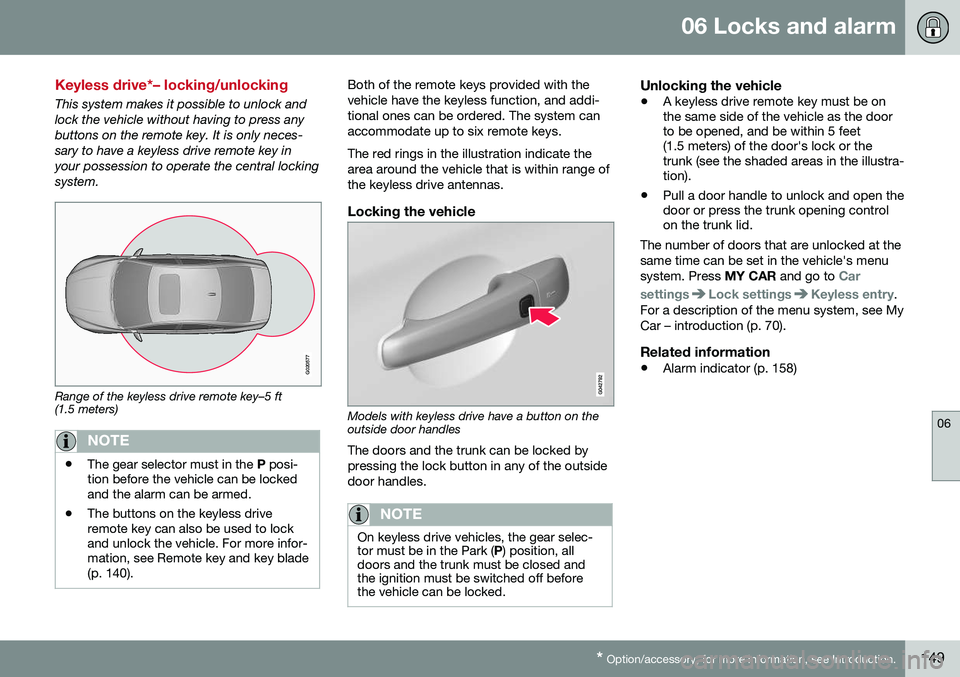
Range of the keyless drive remote key–5 ft (1.5 meters)
NOTE
• The gear selector must in the
P posi-
tion before the vehicle can be locked and the alarm can be armed.
• The buttons on the keyless driveremote key can also be used to lockand unlock the vehicle. For more infor-mation, see Remote key and key blade(p. 140).
Both of the remote keys provided with the vehicle have the keyless function, and addi-tional ones can be ordered. The system canaccommodate up to six remote keys. The red rings in the illustration indicate the area around the vehicle that is within range ofthe keyless drive antennas.
Locking the vehicle
Models with keyless drive have a button on the outside door handles
The doors and the trunk can be locked by pressing the lock button in any of the outsidedoor handles.
NOTE
On keyless drive vehicles, the gear selec- tor must be in the Park ( P) position, all
doors and the trunk must be closed andthe ignition must be switched off beforethe vehicle can be locked.
Unlocking the vehicle
• A keyless drive remote key must be on the same side of the vehicle as the doorto be opened, and be within 5 feet(1.5 meters) of the door's lock or thetrunk (see the shaded areas in the illustra-tion).
• Pull a door handle to unlock and open thedoor or press the trunk opening controlon the trunk lid.
The number of doors that are unlocked at the same time can be set in the vehicle's menusystem. Press MY CAR and go to
Car
settings
Lock settingsKeyless entry.
For a description of the menu system, see My Car – introduction (p. 70).
Related information
• Alarm indicator (p. 158)
Page 152 of 380
06 Locks and alarm
06
150* Option/accessory, for more information, see Introduction.
Keyless drive* – unlocking with key blade
If the remote key does not function normally (weak battery, etc.), the vehicle can beunlocked with the detachable key blade.
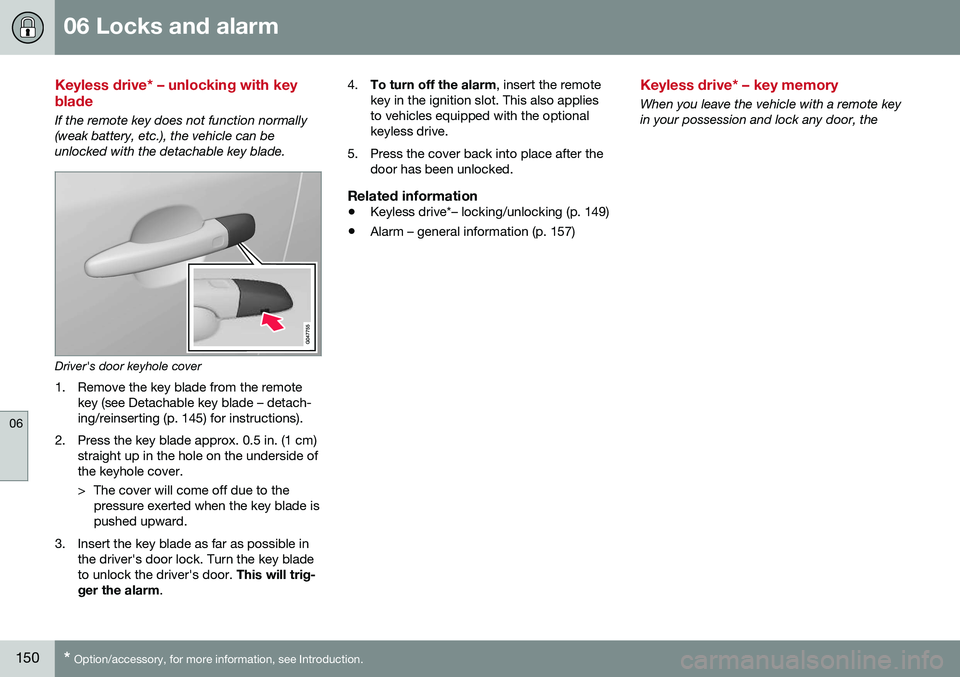
Driver's door keyhole cover
1. Remove the key blade from the remote key (see Detachable key blade – detach- ing/reinserting (p. 145) for instructions).
2. Press the key blade approx. 0.5 in. (1 cm) straight up in the hole on the underside ofthe keyhole cover.
> The cover will come off due to thepressure exerted when the key blade is pushed upward.
3. Insert the key blade as far as possible in the driver's door lock. Turn the key bladeto unlock the driver's door. This will trig-
ger the alarm . 4.
To turn off the alarm , insert the remote
key in the ignition slot. This also appliesto vehicles equipped with the optionalkeyless drive.
5. Press the cover back into place after the door has been unlocked.
Related information
• Keyless drive*– locking/unlocking (p. 149)
• Alarm – general information (p. 157)
Keyless drive* – key memory
When you leave the vehicle with a remote key in your possession and lock any door, the
Page 153 of 380
06 Locks and alarm
06
}}
* Option/accessory, for more information, see Introduction.151
position of the driver's seat
2
and door mirrors
will be stored in the remote key's memory. The next time a door is opened by a person with the same remote key in his/her posses-
sion, the driver's seat and door mirrors willautomatically move to the position that theywere in when the door was most recentlylocked.
NOTE
If several people carrying remote keys approach the vehicle at the same time, thedriver's seat and door mirrors will assumethe positions they were in for the personwho opens the driver's door.
See also power seats (p. 75) for information on adjusting and storing the seat's position inthe seat memory.
NOTE
If the vehicle is locked by pressing the but- ton on one of the door handles or bypressing the lock button on the remotekey, or if it is left unlocked for more than30 minutes, the key memory function willbe deactivated. To reactivate the key's memory: • Unlock the vehicle by pulling a door handle with the remote key in yourpossession or by pressing the unlockbutton on the remote key.
Related information
•
Keyless drive*– locking/unlocking (p. 149)
• Remote key – functions (p. 143)
Keyless drive* – messages
If all of the remote keys are removed from the vehicle while the engine is running or if theignition modes (p. 73) is in mode
II and all of
the doors are closed, a message will appearin the instrument panel display and an audiblesignal will sound. When at least one remote key has been returned to the car, the message will beerased in the display and the audible signalwill stop when:
• A door has been opened and closed
• The remote key has been inserted in the ignition slot
• The
OK button has been pressed. For the
location of this button, see Informationdisplay – menu controls (p. 106)
2 Power seats only
Page 154 of 380
06 Locks and alarm
06
152* Option/accessory, for more information, see Introduction.
CAUTION
• Keyless drive remote keys should never be left in the vehicle. In the eventof a break-in, a remote found in thevehicle could make it possible to startthe engine.
• Electromagnetic fields or metalobstructions can interfere with thekeyless drive system. The remote keyshould never be placed closer thanapproximately 4-6 in. (10-15 cm) tocell phones, metallic objects or e.g.,stored in a metal briefcase.
USA – FCC ID:KR55WK48952, KR55WK48964 NOTEThis device complies with part 15 of the FCC Rules. Operation is subject to the followingtwo conditions: (1) This device may not causeharmful interference, and (2) this device mustaccept interference received, including inter-ference that may cause undesired operation. CAUTIONChanges or modifications not expressly approved by the manufacturer could void theuser's authority to operate the equipment. Siemens VDO5WK48891Tested To Comply With FCC Standards For Automobile UseCanada – IC:267T-5WK48952, 267T-5WK48964, 267T-5WK48891 NOTEThis device complies with RSS -210 of Indus- try Canada. Operation is subject to the fol-lowing two conditions: (1) This device maynot cause harmful interference, and (2) thisdevice must accept interference received,including interference that may cause unde-sired operation. CAUTIONChanges or modifications not expressly approved by the manufacturer could void theuser's authority to operate the equipment.
Keyless drive* – antenna locations
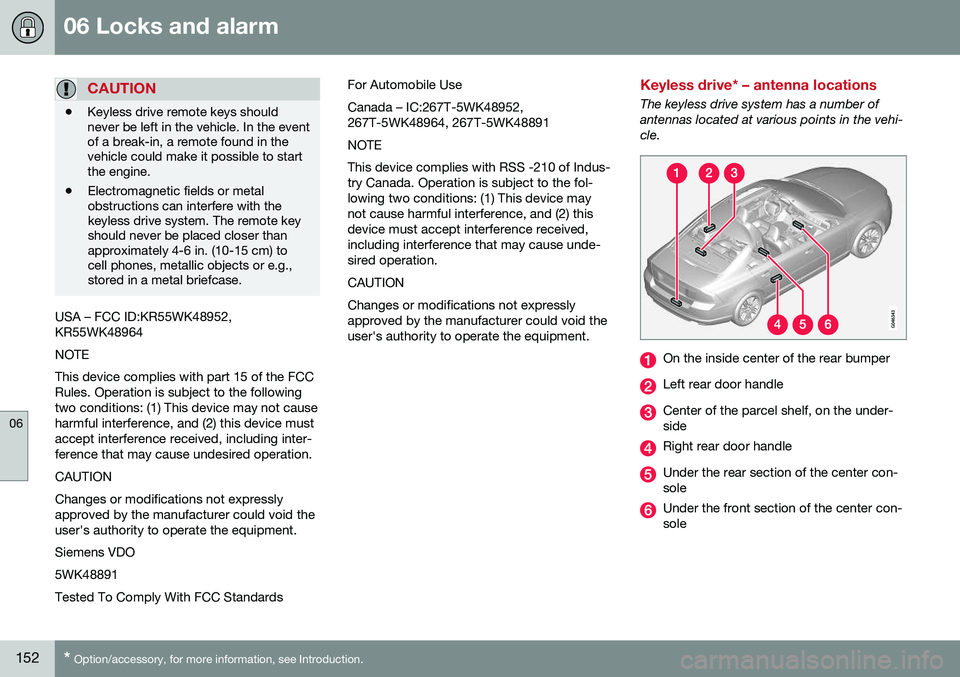
The keyless drive system has a number of antennas located at various points in the vehi-cle.
On the inside center of the rear bumper
Left rear door handle
Center of the parcel shelf, on the under- side
Right rear door handle
Under the rear section of the center con- sole
Under the front section of the center con- sole
Page 155 of 380
06 Locks and alarm
06
* Option/accessory, for more information, see Introduction.153
WARNING
People with implanted pacemakers should not allow the pacemaker to come closerthan 9 inches (22 cm) to any of the keylessdrive system's antennas. This is to helpprevent interference between the pace-maker and the keyless drive system.
Related information
• Keyless drive*– locking/unlocking (p. 149)
Locking/unlocking – from the outside
The remote key (p. 140) is used to lock/unlock all of the doors and the trunk at the sametime. Different settings for unlocking the vehi-cle can be selected, see Remote key – func-tions (p. 143). Before the vehicle can be locked from the outside with the remote key, the driver's doormust be closed. If the trunk or any other dooris open, it will be locked and the alarm will bearmed.
NOTE
Be sure the remote key is outside of the vehicle before the other doors/trunk areclosed to help avoid locking the remoteinside the vehicle.
If the vehicle is equipped with the optional keyless drive system, all doors/trunk must beclosed before the vehicle can be locked. The first press on the unlock button unlocks the driver's door and a second press unlocksthe other doors and the trunk (see alsoremote key and key blade (p. 140)). This set-ting can be changed in the menu system. SeeMY CAR
(p. 70) for a description.
If the locks repeatedly do not react when theunlock button is pressed, it may be necessaryto replace the battery in the remote, seeRemote key – replacing the battery (p. 147). In this case the vehicle can be unlocked withthe detachable key blade (p. 146).
Related information
•
Locking/unlocking – from inside (p. 154)
Page 156 of 380
06 Locks and alarm
06
154
Manual locking
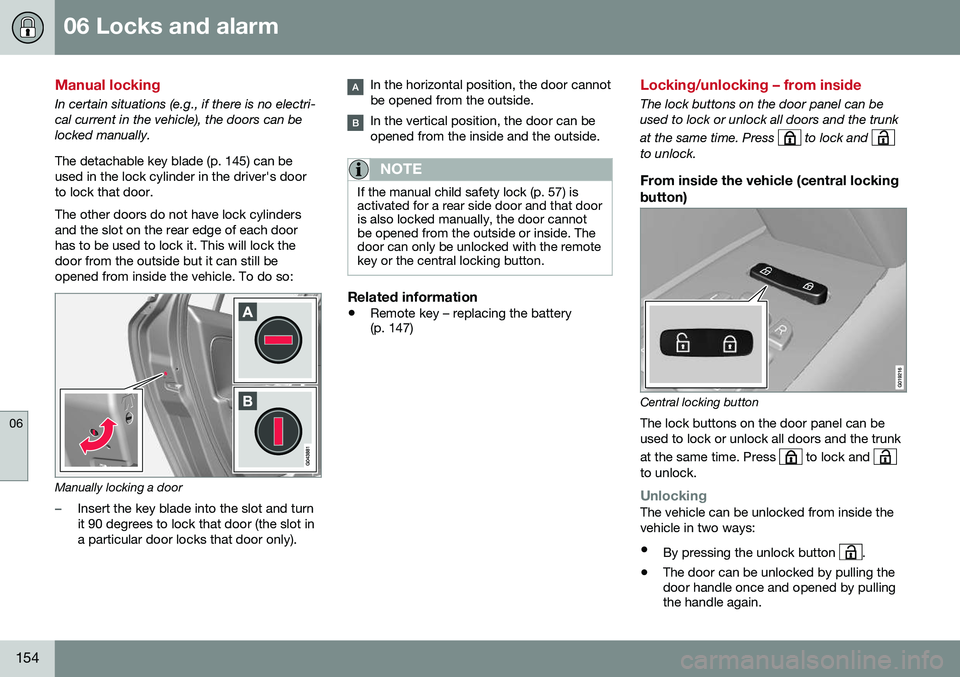
In certain situations (e.g., if there is no electri- cal current in the vehicle), the doors can belocked manually. The detachable key blade (p. 145) can be used in the lock cylinder in the driver's doorto lock that door. The other doors do not have lock cylinders and the slot on the rear edge of each doorhas to be used to lock it. This will lock thedoor from the outside but it can still beopened from inside the vehicle. To do so:
Manually locking a door
–Insert the key blade into the slot and turn it 90 degrees to lock that door (the slot ina particular door locks that door only).
In the horizontal position, the door cannot be opened from the outside.
In the vertical position, the door can be opened from the inside and the outside.
NOTE
If the manual child safety lock (p. 57) is activated for a rear side door and that dooris also locked manually, the door cannotbe opened from the outside or inside. Thedoor can only be unlocked with the remotekey or the central locking button.
Related information
•Remote key – replacing the battery (p. 147)
Locking/unlocking – from inside
The lock buttons on the door panel can be used to lock or unlock all doors and the trunk at the same time. Press
to lock and to unlock.
From inside the vehicle (central locking button)
Central locking button
The lock buttons on the door panel can be used to lock or unlock all doors and the trunk at the same time. Press
to lock and to unlock.
UnlockingThe vehicle can be unlocked from inside the vehicle in two ways:
• By pressing the unlock button
.
• The door can be unlocked by pulling the door handle once and opened by pullingthe handle again.
Page 157 of 380
06 Locks and alarm
06
155
Locking
•Press the lock button after the front
doors have been closed.
• Each door can be locked individually with the lock button on the respective doors.The door must be closed first.
Alternative locking when parkingThe central locking button on the driver's door can also be used to lock the vehiclewhen you leave it. To do so:
1. Open the door.
2. Press the lock section of the button.
3. Close the door. This will lock the vehicle
completely and arm the alarm.
NOTE
Please be aware that locking the vehicle in this way makes it possible to lock theremote key in the passenger compartment.To help avoid this, lock the vehicle fromthe outside by pressing the lock button onthe remote key. If the vehicle is locked using the central locking button, be sure that the remote keyis in your possession before closing thedoor.
Automatic relockingIf the doors are unlocked, the locks will auto- matically reengage (re-lock) and the alarm willre-arm after 2 minutes unless a door or thetrunk has been opened.
Automatic lockingWhen the vehicle starts to move, the doorsand trunk can be locked automatically. Thisfeature can be turned on or off by pressing MY CAR and going to
Car settingsLock
settings
Automatic door locking.
Related information
• Locking/unlocking – from the outside (p. 153)
• Alarm – general information (p. 157)
• Remote key – functions (p. 143)
Locking/unlocking – glove compartment
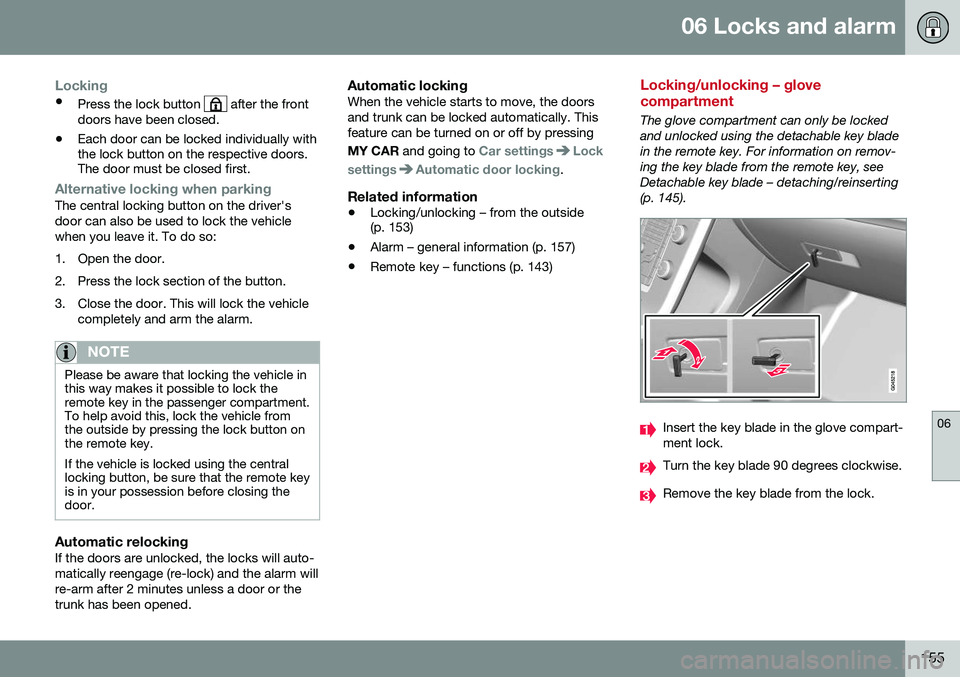
The glove compartment can only be locked and unlocked using the detachable key bladein the remote key. For information on remov-ing the key blade from the remote key, seeDetachable key blade – detaching/reinserting(p. 145).
Insert the key blade in the glove compart- ment lock.
Turn the key blade 90 degrees clockwise.
Remove the key blade from the lock.