center console VOLVO S80 2016 Owner´s Manual
[x] Cancel search | Manufacturer: VOLVO, Model Year: 2016, Model line: S80, Model: VOLVO S80 2016Pages: 380, PDF Size: 9.45 MB
Page 187 of 380
07 Driver support
07
}}
185
Distance Alert – introduction
Distance Alert is part of Adaptive Cruise Con- trol and is a function that provides informationabout the time interval to the vehicle ahead.
IntroductionDistance Alert is active at speeds aboveapproximately 18 mph (30 km/h). Time inter-val information is only given for a vehicle thatis driving ahead of your vehicle in the samedirection. No information is provided for vehi-cles driving toward you, moving very slowly,or at a standstill.
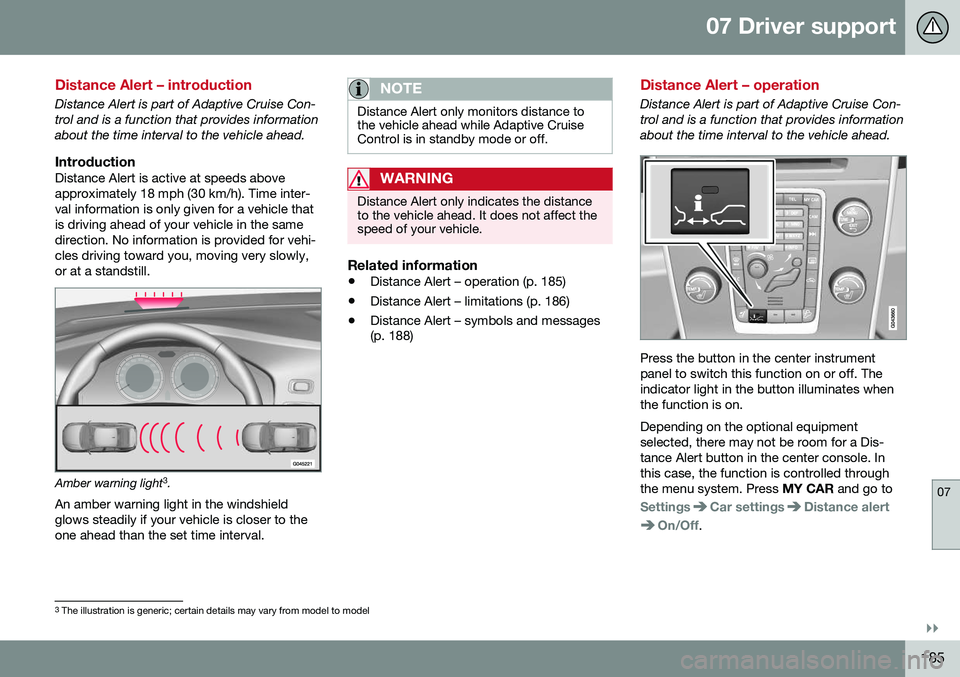
Amber warning light3
.
An amber warning light in the windshield glows steadily if your vehicle is closer to theone ahead than the set time interval.
NOTE
Distance Alert only monitors distance to the vehicle ahead while Adaptive CruiseControl is in standby mode or off.
WARNING
Distance Alert only indicates the distance to the vehicle ahead. It does not affect thespeed of your vehicle.
Related information
• Distance Alert – operation (p. 185)
• Distance Alert – limitations (p. 186)
• Distance Alert – symbols and messages (p. 188)
Distance Alert – operation
Distance Alert is part of Adaptive Cruise Con- trol and is a function that provides informationabout the time interval to the vehicle ahead.
Press the button in the center instrument panel to switch this function on or off. Theindicator light in the button illuminates whenthe function is on. Depending on the optional equipment selected, there may not be room for a Dis-tance Alert button in the center console. Inthis case, the function is controlled throughthe menu system. Press
MY CAR and go to
SettingsCar settingsDistance alert
On/Off.
3
The illustration is generic; certain details may vary from model to model
Page 193 of 380
07 Driver support
07
}}
191
City Safety – operation
Using City Safety™
NOTE
The City Safety™ function is activated automatically each time the engine hasbeen switched off and restarted.
On and OffIn certain situations, it may be desirable to switch City Safety™ off, such as when drivingin close quarters where leaves, branches, etc.may obscure the hood and windshield. When the engine is running, City Safety™ can be switched off as follows: Press My Car in the center console control
panel and go to
SettingsCar settings
Driver support systemsCity Safety.
Select
Off.
If the engine is switched off, City Safety™ will reactivate when the engine is restarted.
WARNING
The laser sensor emits light when the igni- tion is in mode II or higher, even if City
Safety™ has been switched off.
To switch City Safety™ on again:
• Follow the same procedure as for switch- ing City Safety™ off but select
On.
Related information
•City Safety – introduction (p. 189)
• City Safety – function (p. 190)
• City Safety – limitations (p. 191)
• City Safety – troubleshooting (p. 192)
• City Safety – symbols and messages (p. 194)
• City Safety – Laser sensor (p. 195)
• My Car – introduction (p. 70)
City Safety – limitations
Limitations
WARNING
The laser sensor has certain limitations and its function may be reduced (or it maynot function at all) in conditions such asheavy rain or snowfall, or by dense fog orthick, blowing dust or snow. Condensa-tion, dirt, ice or snow on the windshieldmay also interfere with the sensor’s func-tion.
The sensor used by City Safety™ is designed to detect cars and other larger motor vehiclesahead of your vehicle in both daylight anddarkness. Objects such as warning flags hanging from long objects on the roof or accessories suchas auxiliary lights or protective arches on thefront of the vehicle that are higher than thehood may also impede the sensor’s function. Braking distance to the vehicle ahead increa- ses on slippery road surfaces, which mayreduce City Safety’s capacity to avoid a colli-sion. In situations like this, the stability sys-tem (see Stability system – introduction(p. 162)) will help provide the best possiblebraking capacity and stability. City Safety™ emits a laser beam and meas- ures the way in which the light is reflected.
Page 201 of 380
07 Driver support
07
}}
* Option/accessory, for more information, see Introduction.199
Collision warning* – operation
Settings are made by pressing MY CAR on
the center console control panel and using the menus displayed.
Activating/deactivating both warning
signals
To switch the system's audible and visual
signals on or off at the same time, press MY
CAR on the center console control panel and
go to
SettingsCar settingsDriver
support systems
Collision Warning. If
Pedestrian and Cyclist Detection with Full Auto Brake is on, the system will perform aself-test each time the engine is started bybriefly illuminating the warning light. See MyCar – introduction (p. 70) for a description ofthe menu system. When the engine is switched on, the system setting that was being used when it wasswitched off will be the default setting.
NOTE
The auto-brake and pedestrian/cyclist detection features are always on, even ifthe audible and visual warning signalshave been deactivated.
Activating/deactivating the audible warning signal only
The audible warning signal can be activated/ deactivated by pressing MY CAR on the cen- ter console control panel and going to
SettingsCar settingsDriver support
systems
Warning sound if risk of
collision.
Setting a warning distanceThis setting determines the distance at which the visual and audible warnings are triggered. Select
Long, Normal or Short by pressing
MY CAR on the center console control panel
and going to
SettingsCar settings
Driver support systemsCollision
Warning
Warning distance.
The warning distance determines the level of sensitivity used by the system. The warning distance
Long provides an earlier warning.
Begin by using Long and if the system gives
too many warnings, try changing to Normal.
WARNING
• The setting Short should only be used
in situations where traffic is light and moving at low speeds.
• Pedestrian and Cyclist Detection withFull Auto Brake alerts the driver to therisk of a collision but this function can-not reduce the driver’s reaction time.
• For the system to be as effective aspossible, it is recommended that Dis-tance Alert be set to 4 or 5, see Dis-tance Alert – operation (p. 185).
NOTE
•When Adaptive Cruise Control is used, the warning light and signal will beused by that function, even if thewarnings provided by Pedestrian andCyclist Detection with Full Auto Brakehave been deactivated by the driver.
• In situations where traffic is moving atconsiderably different speeds, or if thevehicle ahead brakes suddenly, warn-ings may be considered to be late, even if the setting
Long has been
selected.
Checking settingsThe current system settings can be checked by pressing MY CAR on the center console
control panel and going to
SettingsCar
settings
Driver support systemsCollision Warning.
Related information
• Collision warning – introduction (p. 196)
• Collision warning* – function (p. 198)
• Collision warning* – Pedestrian detection (p. 201)
• Collision warning* – Cyclist detection(p. 200)
• Collision warning* – limitations (p. 202)
• The camera’s limitations (p. 204)
Page 212 of 380
07 Driver support
07
210
•Driver Alert System (p. 209)
• Lane Departure Warning (LDW) – intro- duction (p. 214)Driver Alert Control (DAC) – operation
Operating DACSettings are made using menu system and the display in the center console. See My Car– introduction (p. 70) for more information onthe menu system.
On/OffTo put Driver Alert in standby mode:
• In the
MY CAR menu, scroll to
Car
settings
Driver support systemsDriver Alert and check the box. If the box
is not checked, the function is off.
Related information
• Driver Alert Control (DAC) – introduction (p. 209)
• Driver Alert Control (DAC) – function(p. 210)
• Driver Alert Control (DAC) – limitations(p. 211)
• Driver Alert Control (DAC) – symbols andmessages (p. 212)
• Driver Alert Control (DAC) – introduction(p. 209)
• Lane Departure Warning (LDW) – intro-duction (p. 214)
Driver Alert Control (DAC) – function
FunctionDriver Alert is activated when the vehicle exceeds a speed of 40 mph (65 km/h) and willremain active as long as the speed is overapprox. 37 mph (60 km/h).
If the vehicle is being driven errati-cally, the driver will be alerted by anaudible signal and the message
Driver Alert Time for a break is
displayed. The warning will be repeated after a short time if the driving pattern remains thesame. Press the OK button to erase a message.
WARNING
• An alert should be taken seriously since it is sometimes difficult for adriver to realize that he/she is fatigued.
• In the event of a warning or if thedriver feels fatigued, stop as soon aspossible in a safe place and rest.
Related information
•
Driver Alert Control (DAC) – introduction (p. 209)
• Driver Alert Control (DAC) – operation(p. 210)
• Driver Alert Control (DAC) – limitations(p. 211)
Page 214 of 380
07 Driver support
07
212
Driver Alert Control (DAC) – symbols and messages
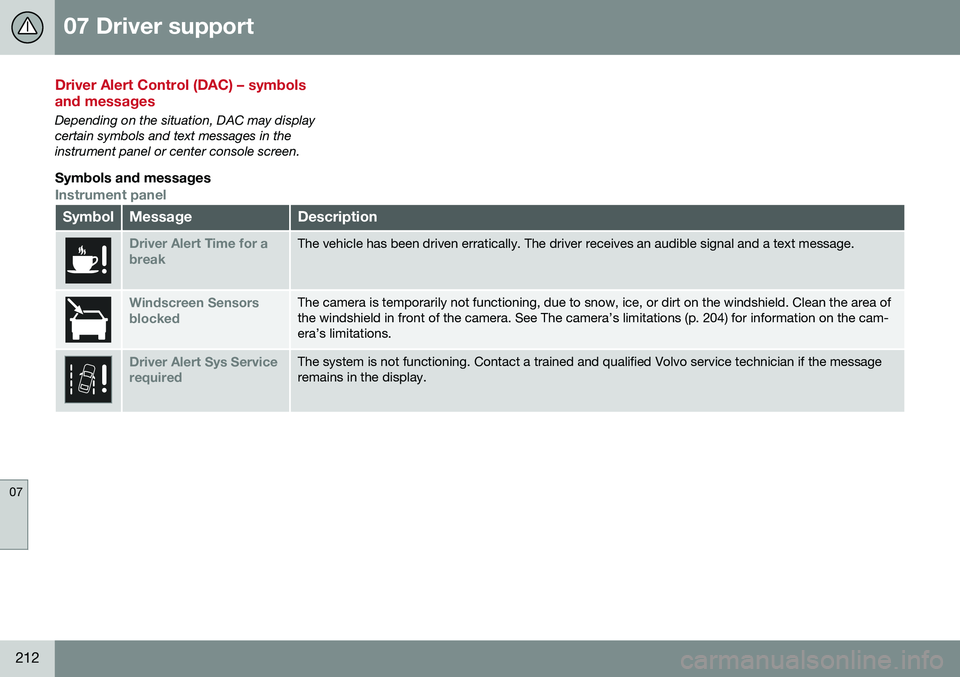
Depending on the situation, DAC may display certain symbols and text messages in theinstrument panel or center console screen.
Symbols and messages
Instrument panel
SymbolMessageDescription
Driver Alert Time for a breakThe vehicle has been driven erratically. The driver receives an audible signal and a text message.
Windscreen Sensors blockedThe camera is temporarily not functioning, due to snow, ice, or dirt on the windshield. Clean the area of the windshield in front of the camera. See The camera’s limitations (p. 204) for information on the cam-era’s limitations.
Driver Alert Sys Service requiredThe system is not functioning. Contact a trained and qualified Volvo service technician if the message remains in the display.
Page 215 of 380
07 Driver support
07
213
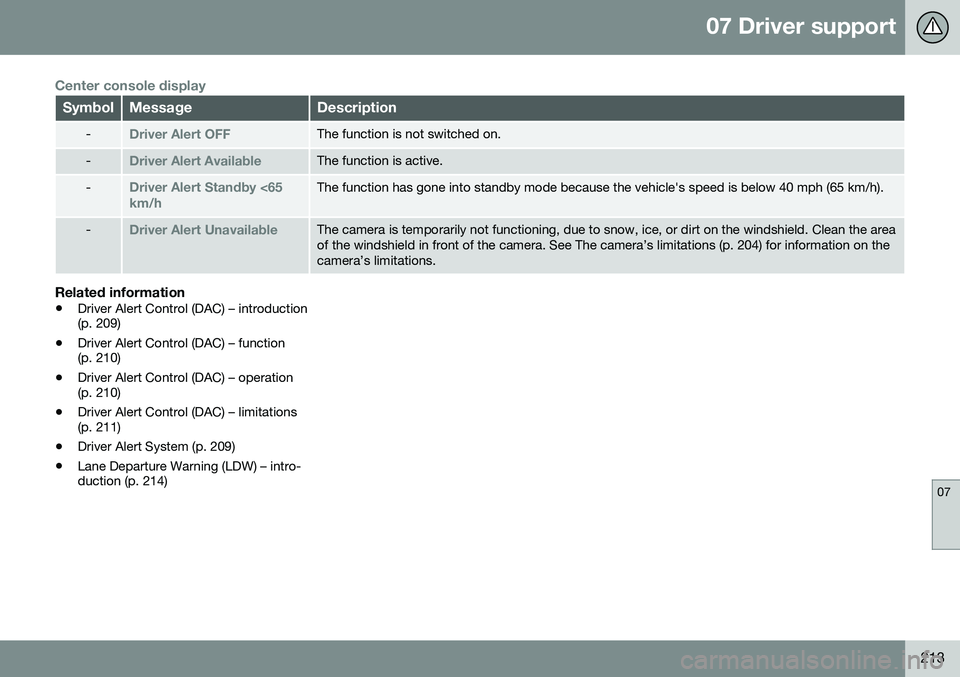
Center console display
SymbolMessageDescription
-Driver Alert OFFThe function is not switched on.
-Driver Alert AvailableThe function is active.
-Driver Alert Standby <65 km/hThe function has gone into standby mode because the vehicle's speed is below 40 mph (65 km/h).
-Driver Alert UnavailableThe camera is temporarily not functioning, due to snow, ice, or dirt on the windshield. Clean the area of the windshield in front of the camera. See The camera’s limitations (p. 204) for information on thecamera’s limitations.
Related information
•Driver Alert Control (DAC) – introduction (p. 209)
• Driver Alert Control (DAC) – function(p. 210)
• Driver Alert Control (DAC) – operation(p. 210)
• Driver Alert Control (DAC) – limitations(p. 211)
• Driver Alert System (p. 209)
• Lane Departure Warning (LDW) – intro-duction (p. 214)
Page 216 of 380
07 Driver support
07
214
Lane Departure Warning (LDW) – introduction
The LDW function is designed to help reduce the risk of accidents in situations where thevehicle unintentionally leaves its lane andthere is a risk of driving off the road or into theopposite lane.
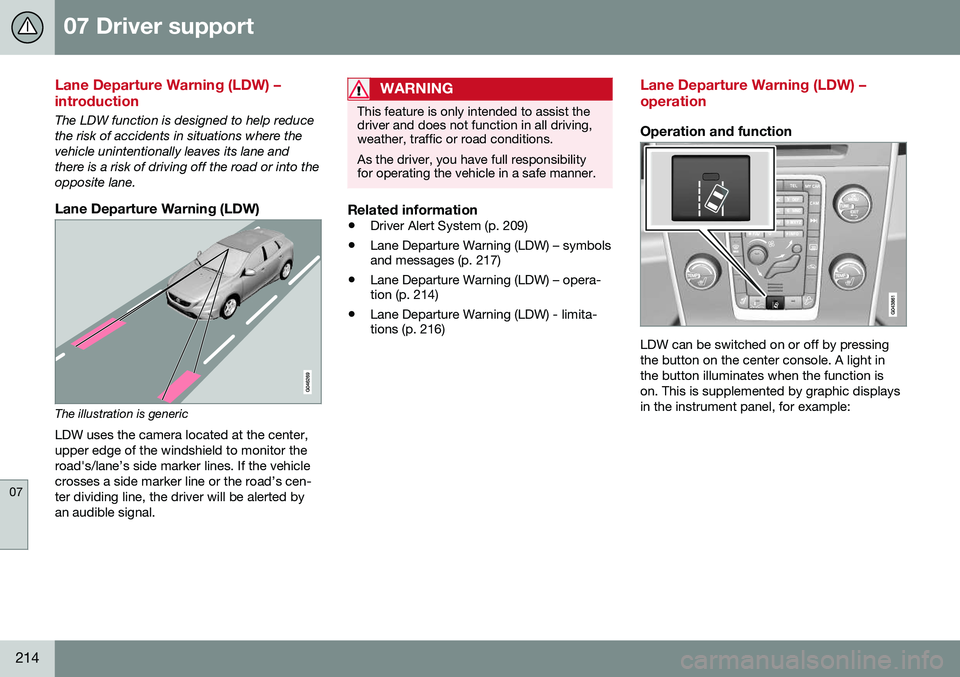
Lane Departure Warning (LDW)
The illustration is genericLDW uses the camera located at the center, upper edge of the windshield to monitor theroad's/lane’s side marker lines. If the vehiclecrosses a side marker line or the road’s cen-ter dividing line, the driver will be alerted byan audible signal.
WARNING
This feature is only intended to assist the driver and does not function in all driving,weather, traffic or road conditions. As the driver, you have full responsibility for operating the vehicle in a safe manner.
Related information
• Driver Alert System (p. 209)
• Lane Departure Warning (LDW) – symbols and messages (p. 217)
• Lane Departure Warning (LDW) – opera-tion (p. 214)
• Lane Departure Warning (LDW) - limita-tions (p. 216)
Lane Departure Warning (LDW) – operation
Operation and function
LDW can be switched on or off by pressing the button on the center console. A light inthe button illuminates when the function ison. This is supplemented by graphic displaysin the instrument panel, for example:
Page 223 of 380
07 Driver support
07
}}
221
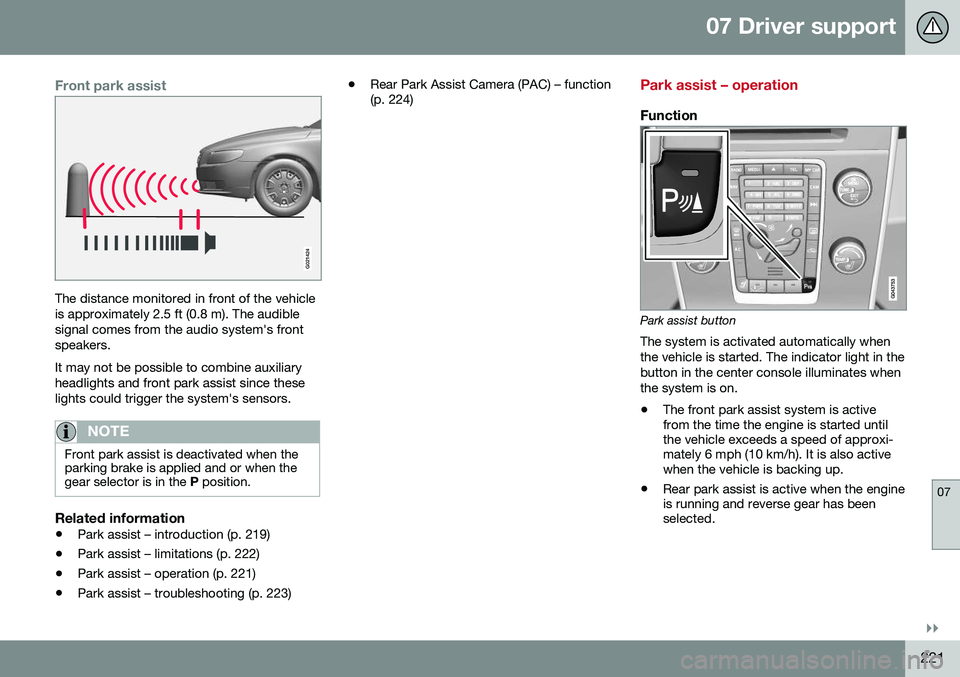
Front park assist
G021424
The distance monitored in front of the vehicle is approximately 2.5 ft (0.8 m). The audiblesignal comes from the audio system's frontspeakers. It may not be possible to combine auxiliary headlights and front park assist since theselights could trigger the system's sensors.
NOTE
Front park assist is deactivated when the parking brake is applied and or when thegear selector is in the P position.
Related information
• Park assist – introduction (p. 219)
• Park assist – limitations (p. 222)
• Park assist – operation (p. 221)
• Park assist – troubleshooting (p. 223) •
Rear Park Assist Camera (PAC) – function (p. 224)
Park assist – operation
Function
Park assist button
The system is activated automatically when the vehicle is started. The indicator light in thebutton in the center console illuminates whenthe system is on.
• The front park assist system is active from the time the engine is started untilthe vehicle exceeds a speed of approxi-mately 6 mph (10 km/h). It is also activewhen the vehicle is backing up.
• Rear park assist is active when the engineis running and reverse gear has beenselected.
Page 224 of 380
||
07 Driver support
07
222
Activating/deactivatingThe system is activated automatically when the vehicle is started.
–Press the Park assist button on the center console to temporarily deactivate the sys-tem(s).
> The indicator light in the button will goout when the system has been deacti- vated.
Park assist will be automatically reactivatedthe next time the engine is started, or if thebutton is pressed (the indicator light in thebutton will illuminate).
NOTE
Park assist is disengaged automatically when the parking brake is applied.
Related information
• Park assist – introduction (p. 219)
• Park assist – limitations (p. 222)
• Park assist – function (p. 219)
• Park assist – troubleshooting (p. 223)
• Rear Park Assist Camera (PAC) – function (p. 224)
Park assist – limitations
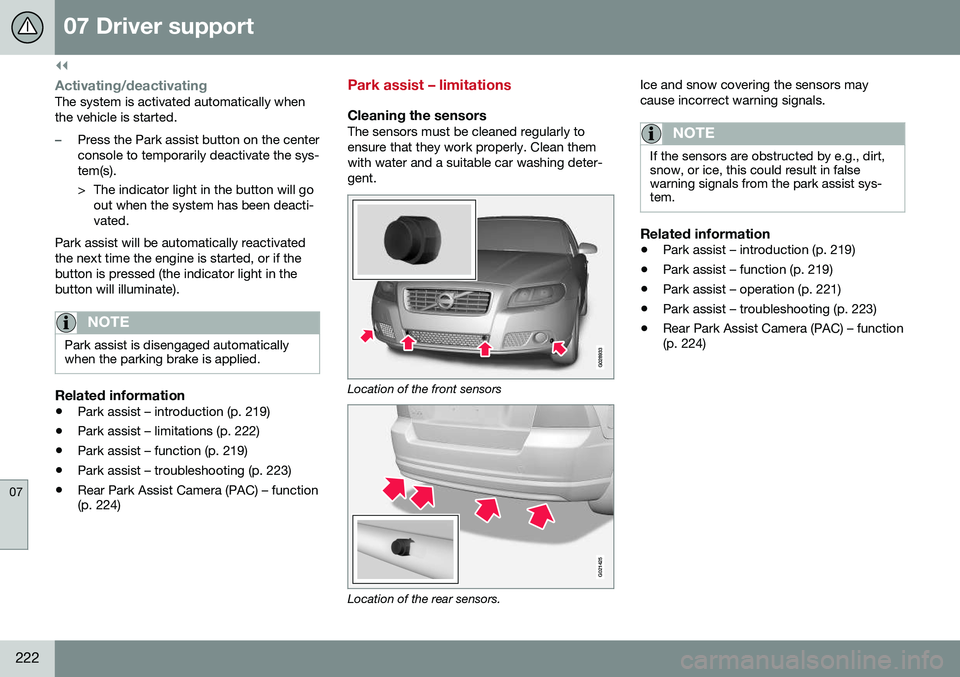
Cleaning the sensorsThe sensors must be cleaned regularly to ensure that they work properly. Clean themwith water and a suitable car washing deter-gent.
Location of the front sensors
G021425
Location of the rear sensors. Ice and snow covering the sensors may cause incorrect warning signals.
NOTE
If the sensors are obstructed by e.g., dirt, snow, or ice, this could result in falsewarning signals from the park assist sys-tem.
Related information
•
Park assist – introduction (p. 219)
• Park assist – function (p. 219)
• Park assist – operation (p. 221)
• Park assist – troubleshooting (p. 223)
• Rear Park Assist Camera (PAC) – function (p. 224)
Page 225 of 380
07 Driver support
07
223
Park assist – troubleshooting
Faults in the systemIf the information symbol illuminates andPark assist syst Service required is shown
on the information display, this indicates that the system is not functioning properly andhas been disengaged. Consult a trained andqualified Volvo service technician.
CAUTION
In certain circumstances, the park assist system may give unexpected warning sig-nals that can be caused by external soundsources that use the same ultrasound fre-quencies as the system. This may includesuch things as the horns of other vehicles,wet tires on asphalt, pneumatic brakes,motorcycle exhaust pipes, etc. This doesnot indicate a fault in the system.
Related information
• Park assist – introduction (p. 219)
• Park assist – limitations (p. 222)
• Park assist – function (p. 219)
• Park assist – operation (p. 221)
• Rear Park Assist Camera (PAC) – function (p. 224)
Rear Park Assist Camera (PAC) – introduction
The Park Assist Camera is designed to pro- vide the driver with a view of the area behindthe vehicle when backing up.
IntroductionPAC uses the display in the center console toshow the area behind the car while you arebacking up. PAC also shows guiding lines in the on- screen image to indicate the direction that thevehicle will take as it moves rearward, whichhelps simplify parallel parking, backing into atight space or when attaching a trailer to thevehicle. The images of vehicles in this section are generic and may not depict your specificmodel.
NOTE
A trailer hitch whose wiring is integrated with the vehicle's electrical system will beincluded in the measurement of the availa-ble space behind the vehicle.
WARNING
• PAC is designed to be a supplemen- tary aid when parking the vehicle. It isnot, however, intended to replace thedriver’s attention and judgment.
• The camera has blind spots where itcannot detect objects or peoplebehind the vehicle.
• Pay particular attention to people oranimals that are close to the vehicle.
• Objects seen on the screen may becloser than they appear to be.
Related information
•
Rear Park Assist Camera (PAC) – opera- tion (p. 224)
• Rear Park Assist Camera (PAC) – limita-tions (p. 227)