change wheel VOLVO S80 2016 Owner´s Manual
[x] Cancel search | Manufacturer: VOLVO, Model Year: 2016, Model line: S80, Model: VOLVO S80 2016Pages: 380, PDF Size: 9.45 MB
Page 298 of 380
09 Wheels and tires
09
296
The new reference values will be used until steps 1-5 stated above are repeated.
NOTE
Always remember to calibrate Tire Monitor when the wheels have been changed orthe tire pressure has been correctedaccording to tire pressure placard or tirepressure table. If correct reference valueshave not been set, the system cannotissue low tire pressure alerts correctly.
Tire Monitor status information
The current status of the system and the tires is indicated by color-coded graphics. This status can be displayed by pressing the MY CAR button on the center console and
going to
SettingsCar settingsTire
monitoring.
The following color-coded graphics indicate:
• All green
: the system is operational and
all tire pressures are at or above the rec- ommended levels.
• One yellow wheel
: the tire indicated is
under-inflated.
• All wheels yellow
: two or more tires are
under-inflated
• All wheels gray
: the system is currently
unavailable. It might be necessary todrive at a speed of at least 20 mph(30 km/h) for several minutes for the sys-tem to become operational.
• All wheels gray in combination with the message
Tire press. syst Service
required and the telltale in the instru-
ment panel (
) is illuminated : the
system is not functioning correctly. Have it checked by a trained and qualifiedVolvo service technician.
• All wheels gray in combination with the message
Tire press. syst currently
unavailable and the telltale in the
instrument panel (
) is illuminated :the system is temporarily unavailable. It should become operational again shortly.
Related information
•
Tire Monitor – messages (p. 297)
Page 318 of 380
||
10 Maintenance and servicing
10
316* Option/accessory, for more information, see Introduction.
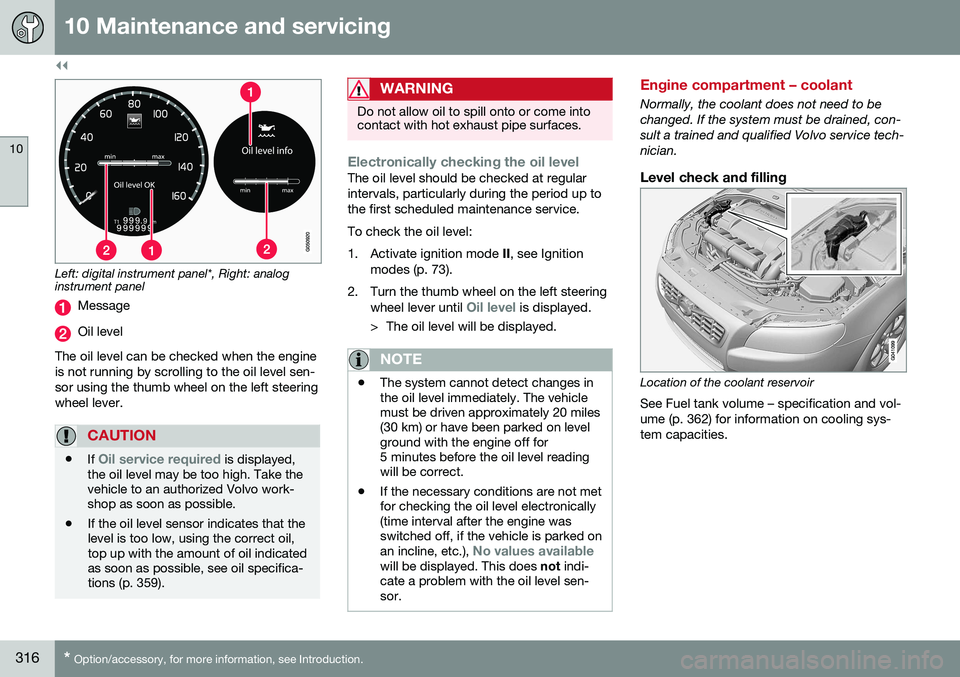
Left: digital instrument panel*, Right: analog instrument panel
Message
Oil level
The oil level can be checked when the engine is not running by scrolling to the oil level sen-sor using the thumb wheel on the left steeringwheel lever.
CAUTION
• If Oil service required is displayed,
the oil level may be too high. Take the vehicle to an authorized Volvo work-shop as soon as possible.
• If the oil level sensor indicates that thelevel is too low, using the correct oil,top up with the amount of oil indicatedas soon as possible, see oil specifica-tions (p. 359).
WARNING
Do not allow oil to spill onto or come into contact with hot exhaust pipe surfaces.
Electronically checking the oil levelThe oil level should be checked at regular intervals, particularly during the period up tothe first scheduled maintenance service. To check the oil level:
1. Activate ignition mode
II, see Ignition
modes (p. 73).
2. Turn the thumb wheel on the left steering wheel lever until
Oil level is displayed.
> The oil level will be displayed.
NOTE
• The system cannot detect changes in the oil level immediately. The vehiclemust be driven approximately 20 miles(30 km) or have been parked on levelground with the engine off for5 minutes before the oil level readingwill be correct.
• If the necessary conditions are not metfor checking the oil level electronically(time interval after the engine wasswitched off, if the vehicle is parked on an incline, etc.),
No values availablewill be displayed. This does
not indi-
cate a problem with the oil level sen- sor.
Engine compartment – coolant
Normally, the coolant does not need to be changed. If the system must be drained, con-sult a trained and qualified Volvo service tech-nician.
Level check and filling
Location of the coolant reservoir
See Fuel tank volume – specification and vol- ume (p. 362) for information on cooling sys-tem capacities.