stop start VOLVO S80 2016 Owner´s Manual
[x] Cancel search | Manufacturer: VOLVO, Model Year: 2016, Model line: S80, Model: VOLVO S80 2016Pages: 380, PDF Size: 9.45 MB
Page 8 of 380
Contents
6* Option/accessory, for more information, see Introduction.
07
Collision warning* – limitations............... 202
The camera’s limitations......................... 204
Collision warning – troubleshooting........ 205Collision warning – symbols and mes-
sages....................................................... 207
Driver Alert System................................. 209
Driver Alert Control (DAC) – introduction 209
Driver Alert Control (DAC) – operation.... 210
Driver Alert Control (DAC) – function...... 210
Driver Alert Control (DAC) – limitations... 211Driver Alert Control (DAC) – symbols and
messages................................................ 212 Lane Departure Warning (LDW) – intro-
duction.................................................... 214 Lane Departure Warning (LDW) – opera-
tion.......................................................... 214 Lane Departure Warning (LDW) - limita-
tions........................................................ 216 Lane Departure Warning (LDW) – sym-
bols and messages................................. 217
Park assist – introduction....................... 219
Park assist – function.............................. 219
Park assist – operation........................... 221
Park assist – limitations.......................... 222
Park assist – troubleshooting.................. 223
07
Rear Park Assist Camera (PAC) – intro-
duction.................................................... 223 Rear Park Assist Camera (PAC) – func-
tion.......................................................... 224 Rear Park Assist Camera (PAC) – opera-
tion.......................................................... 224 Rear Park Assist Camera (PAC) – guiding
and marker lines...................................... 225 Rear Park Assist Camera (PAC) – limita-
tions........................................................ 227
BLIS* – introduction................................ 227
BLIS* – function...................................... 228
BLIS* – operation.................................... 229
BLIS* – limitations................................... 229
BLIS* – messages................................... 230
08
08 Starting and driving
Starting the engine.................................. 233
Switching off the engine......................... 235Engine Remote Start (ERS)* – introduc-
tion.......................................................... 235 Engine Remote Start (ERS)* – starting the
engine..................................................... 236 Engine Remote Start (ERS)* – switching
off the engine.......................................... 236
Jump starting.......................................... 237
Transmission – general information........ 238
Transmission – positions........................ 238
Transmission – Geartronic...................... 240
Transmission – shiftlock override........... 242
Start/Stop – Hill Start Assist (HSA)......... 243
Start/Stop – introduction........................ 243
Start/Stop – function............................... 243
Start/Stop – Auto-stop exceptions......... 244
Start/Stop – Auto-start exceptions......... 245
Start/Stop – settings............................... 246
Start/Stop – symbols and messages...... 247
ECO*....................................................... 248
All Wheel Drive (AWD)............................. 250
Brakes – general..................................... 250
Brakes – symbols ................................... 252
Page 10 of 380
Contents
8
10
10 Maintenance and servicing
Maintenance – introduction.................... 307
Maintenance – owner maintenance........ 308
Maintenance – hoisting........................... 309
Onboard Diagnostic System................... 310
Booking service and repairs .................. 310
Maintenance – opening/closing hood..... 312
Engine compartment – overview............ 313
Engine compartment – engine oil........... 314
Engine compartment – coolant............... 316
Engine compartment – brake fluid.......... 317Engine compartment – power steering
fluid......................................................... 318
Bulbs – introduction................................ 319
Bulbs – headlight housing....................... 320
Bulbs – cover.......................................... 321
Bulbs – low beam, Halogen.................... 321
Bulbs – high beam, Halogen................... 322
Bulbs – extra high beam......................... 322
Bulbs – front turn signals........................ 323
Bulbs – front side marker lights.............. 324
Bulbs – taillight housing.......................... 324
Bulbs – license plate lighting.................. 325
Bulbs – trunk lighting.............................. 326
Bulbs – vanity mirror lighting.................. 326
10
Bulbs – specifications............................. 326
Wiper blades – service position.............. 327
Wiper blades – windshield...................... 328
Engine compartment – washer fluid....... 329
Battery – symbols................................... 330
Battery – handling................................... 330
Battery – maintenance............................ 331
Battery – changing.................................. 332
Fuses – introduction............................... 333
Fuses – engine compartment................. 335
Fuses – glove compartment................... 339
Fuses – cargo area/trunk........................ 342Fuses – engine compartment cold zone
(Start/Stop only)...................................... 343
Washing the car...................................... 345
Automatic car wash................................ 346
Polishing and waxing.............................. 346
Cleaning the interior................................ 347
Touching up paintwork........................... 349
11
11 Specifications
Label information.................................... 352
Dimensions............................................. 355
Weights................................................... 357
Engine specifications.............................. 358
Oil specifications..................................... 359
Oil volume............................................... 360
Coolant – specification and volume........ 361Transmission oil – specification and vol-
umes....................................................... 361
Brake fluid – specification and volume... 361
Power steering – specification................ 362Fuel tank volume – specification and vol-
ume......................................................... 362 Air conditioning – specification and vol-
ume......................................................... 362
Battery specifications............................. 363
Symbols – general information............... 364
Warning symbols.................................... 364
Indicator symbols.................................... 365
Information symbols............................... 366
Information symbols – ceiling console.... 367
Information symbols – center console.... 367
Page 28 of 380
02 Safety
02
26
Occupant safety
Safety is Volvo's cornerstone.
Volvo's concern for safetyOur concern for safety dates back to 1927 when the first Volvo rolled off the productionline. Three-point seat belts (a Volvo inven-tion), safety cages, and energy-absorbingimpact zones were designed into Volvo vehi-cles long before it was fashionable orrequired by government regulation. We will not compromise our commitment to safety. We continue to seek out new safetyfeatures and to refine those already in ourvehicles. You can help. We would appreciatehearing your suggestions about improvingautomobile safety. We also want to know ifyou ever have a safety concern with yourvehicle. Call us in the U.S. at:1-800-458-1552 or in Canada at:1-800-663-8255.
Occupant safety remindersHow safely you drive doesn't depend on how old you are but rather on:• How well you see.
• Your ability to concentrate.
• How quickly you make decisions under stress to avoid an accident.
The following suggestions are intended to help you cope with the ever changing trafficenvironment. •
Never drink and drive.
• If you are taking any medication, consult your physician about its potential effectson your driving abilities.
• Take a driver-retraining course.
• Have your eyes checked regularly.
• Keep your windshield and headlightsclean.
• Replace wiper blades when they start toleave streaks.
• Take into account the traffic, road, andweather conditions, particularly withregard to stopping distance.
• Never send text messages while driving.
• Refrain from using or minimize the use ofa cell phone while driving.
Related information
•Recall information (p. 26)
• Reporting safety defects (p. 27)
Recall information
Information regarding recalls or other service campaigns is available on our website atwww.volvocars.com/us/. On our website, select the tab YOUR VOLVO and the heading RECALL INFORMATION willbe displayed at the lower left side of thescreen. Enter your Vehicle Identification Num-ber for your vehicle (found at the base of thewindshield). If your vehicle has any openRecalls, they will be displayed on this page.
Volvo customers in CanadaFor any questions regarding open recalls for your vehicle, please contact your authorizedVolvo retailer. If your retailer is unable toanswer your questions, please contact VolvoCustomer Relations at 905 695-9626, Mon-day through Friday, 8:30 A.M. to 5:00 P.M.EST or by e-mail at [email protected] may also write us at: Volvo Cars of CanadaNational Customer Service9130 Leslie Street, Suite 101Richmond Hill, Ontario L4B 0B9
Related information
• Occupant safety (p. 26)
• Reporting safety defects (p. 27)
Page 47 of 380
02 Safety
02
}}
45
Crash mode – starting the vehicle
If Crash mode has been set Crash mode (p. 44)) and damage to the vehicle isminor and there is no fuel leakage, you mayattempt to start the engine. To do so:
1. Remove the remote key from the ignitionslot and open the driver's door. If a mes- sage is displayed that the ignition is on,press the start button.
2. Close the driver's door and reinsert the remote key in the ignition slot.
3. Try to start the vehicle.
WARNING
If the message Safety mode See manualis still displayed, the vehicle should not be driven and must be towed. Concealedfaults may make the vehicle difficult tocontrol.
Related information
• Crash mode – general information (p. 44)
• Crash mode – moving the vehicle (p. 45)
Crash mode – moving the vehicle
If the message Normal mode appears after
an attempt has been made to start the engine, Starting the vehicle after a crash (p. 45), thevehicle may be moved carefully from its pres-ent position, if for example, it is blocking traf-fic. It should, however, not be moved fartherthan is absolutely necessary.
WARNING
Even if the vehicle appears to be drivable after Crash mode has been set, it shouldnot be driven or towed (pulled by anothervehicle). There may be concealed damagethat could make it difficult or impossible tocontrol. The vehicle should be transportedon a flatbed tow truck to a trained andqualified Volvo service technician forinspection/repairs.
Related information
• Crash mode – general information (p. 44)
Child safety
Children should always be seated safely when traveling in the vehicle.
General informationVolvo recommends the proper use of restraintsystems (p. 47) for all occupants includingchildren. Remember that, regardless of ageand size, a child should always be properlyrestrained in a vehicle. Your vehicle is also equipped with ISOFIX/ LATCH attachments (p. 54), which make itmore convenient to install child seats. Some restraint systems for children are designed to be secured in the vehicle by lapbelts or the lap portion of a lap-shoulder belt.Such child restraint systems can help protectchildren in vehicles in the event of an acci-dent only if they are used properly. However,children could be endangered in a crash if thechild restraints are not properly secured in thevehicle. Failure to follow the installationinstructions for your child restraint can resultin your child striking the vehicle's interior in asudden stop. Holding a child in your arms is NOT a suitable substitute for a child restraint system. In anaccident, a child held in a person's arms canbe crushed between the vehicle's interior andan unrestrained person. The child could alsobe injured by striking the interior, or by beingejected from the vehicle during a suddenmaneuver or impact. The same can also hap-
Page 63 of 380
03 Instruments and controls
03
* Option/accessory, for more information, see Introduction.61
FunctionSee
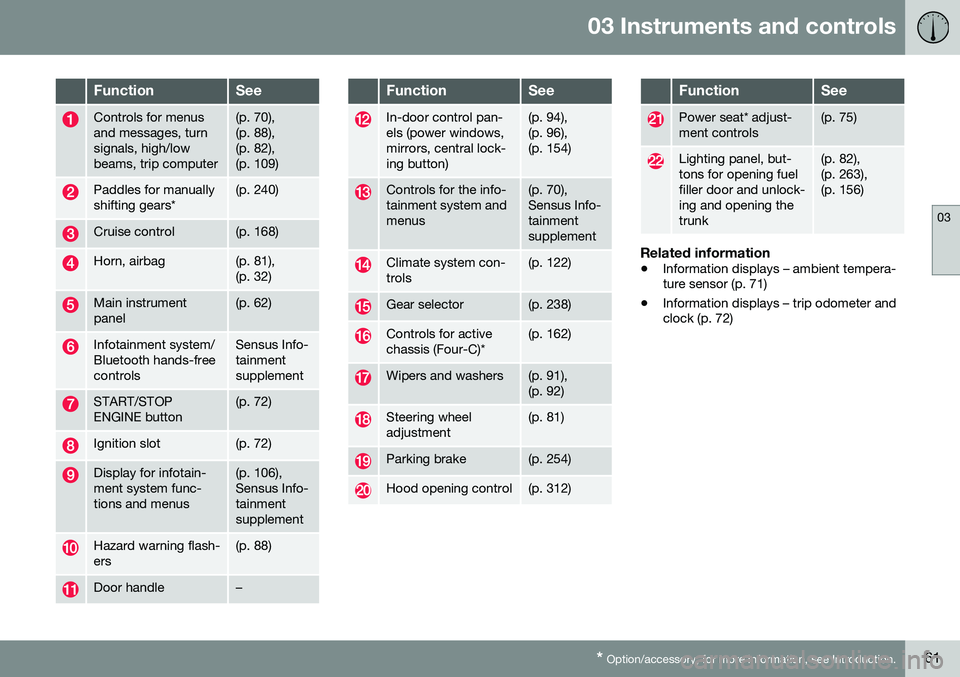
Controls for menus and messages, turnsignals, high/lowbeams, trip computer(p. 70), (p. 88),(p. 82),(p. 109)
Paddles for manually shifting gears*(p. 240)
Cruise control(p. 168)
Horn, airbag(p. 81), (p. 32)
Main instrument panel(p. 62)
Infotainment system/ Bluetooth hands-freecontrolsSensus Info- tainmentsupplement
START/STOP ENGINE button(p. 72)
Ignition slot(p. 72)
Display for infotain- ment system func-tions and menus(p. 106), Sensus Info-tainmentsupplement
Hazard warning flash- ers(p. 88)
Door handle–
FunctionSee
In-door control pan- els (power windows,mirrors, central lock-ing button)(p. 94), (p. 96),(p. 154)
Controls for the info- tainment system andmenus(p. 70), Sensus Info-tainmentsupplement
Climate system con- trols(p. 122)
Gear selector(p. 238)
Controls for active chassis (Four-C)*(p. 162)
Wipers and washers(p. 91), (p. 92)
Steering wheel adjustment(p. 81)
Parking brake(p. 254)
Hood opening control(p. 312)
FunctionSee
Power seat* adjust- ment controls(p. 75)
Lighting panel, but- tons for opening fuelfiller door and unlock-ing and opening thetrunk(p. 82), (p. 263),(p. 156)
Related information
• Information displays – ambient tempera- ture sensor (p. 71)
• Information displays – trip odometer andclock (p. 72)
Page 68 of 380
||
03 Instruments and controls
03
66* Option/accessory, for more information, see Introduction.
Available powerThe smaller, upper indicator shows the engine's available power 2
. The higher the
reading on the scale, the greater the amount of power remaining in the current gear.
Utilized powerThe larger, lower indicator shows the amount of engine power that has been utilized 2
. The
higher the reading on the scale, the greater the amount of power that is being utilized. The larger the gap between the two indica- tors, the greater the amount of power remain-ing.
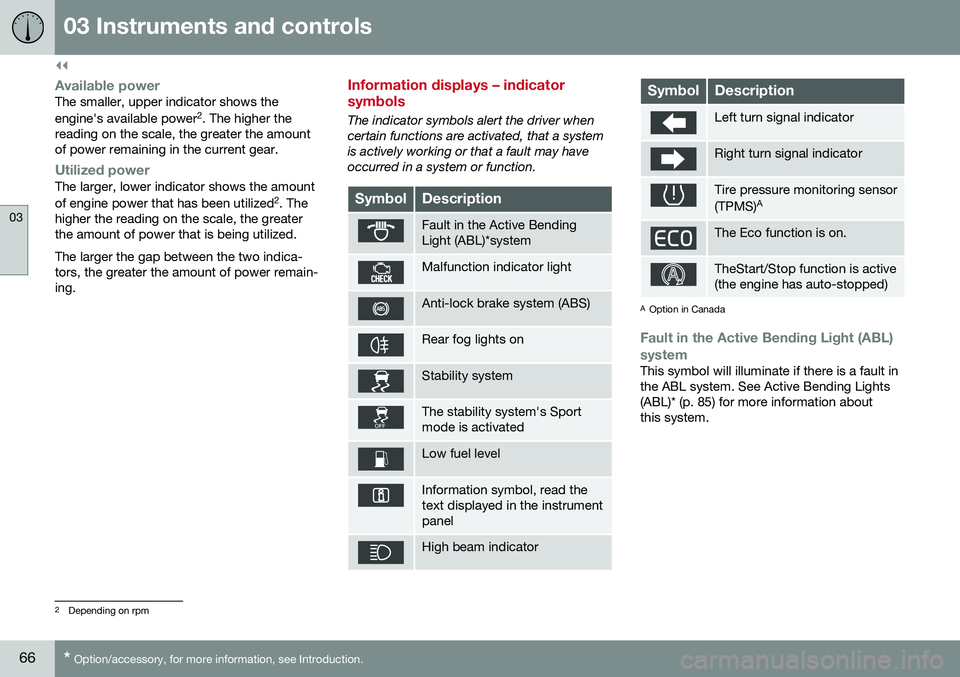
Information displays – indicator symbols
The indicator symbols alert the driver when certain functions are activated, that a systemis actively working or that a fault may haveoccurred in a system or function.
SymbolDescription
Fault in the Active Bending Light (ABL)*system
Malfunction indicator light
Anti-lock brake system (ABS)
Rear fog lights on
Stability system
The stability system's Sport mode is activated
Low fuel level
Information symbol, read the text displayed in the instrumentpanel
High beam indicator
SymbolDescription
Left turn signal indicator
Right turn signal indicator
Tire pressure monitoring sensor (TPMS) A
The Eco function is on.
TheStart/Stop function is active (the engine has auto-stopped)
A
Option in Canada
Fault in the Active Bending Light (ABL)
system
This symbol will illuminate if there is a fault in the ABL system. See Active Bending Lights(ABL)* (p. 85) for more information aboutthis system.
2 Depending on rpm
Page 69 of 380
03 Instruments and controls
03
}}
* Option/accessory, for more information, see Introduction.67
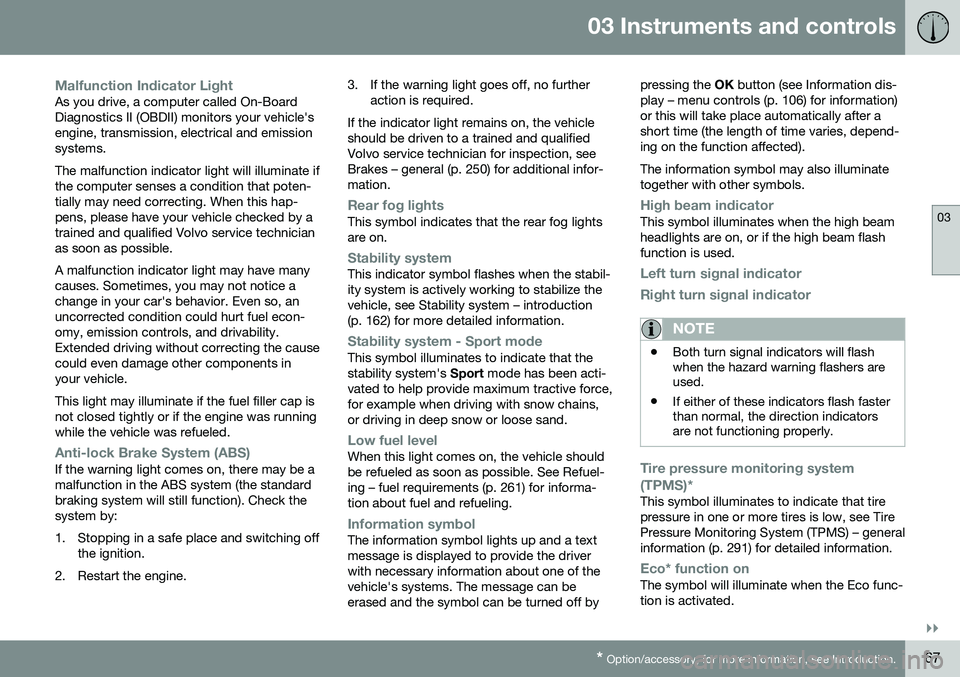
Malfunction Indicator LightAs you drive, a computer called On-Board Diagnostics II (OBDII) monitors your vehicle'sengine, transmission, electrical and emissionsystems. The malfunction indicator light will illuminate if the computer senses a condition that poten-tially may need correcting. When this hap-pens, please have your vehicle checked by atrained and qualified Volvo service technicianas soon as possible. A malfunction indicator light may have many causes. Sometimes, you may not notice achange in your car's behavior. Even so, anuncorrected condition could hurt fuel econ-omy, emission controls, and drivability.Extended driving without correcting the causecould even damage other components inyour vehicle. This light may illuminate if the fuel filler cap is not closed tightly or if the engine was runningwhile the vehicle was refueled.
Anti-lock Brake System (ABS)If the warning light comes on, there may be a malfunction in the ABS system (the standardbraking system will still function). Check thesystem by:
1. Stopping in a safe place and switching off
the ignition.
2. Restart the engine. 3. If the warning light goes off, no further
action is required.
If the indicator light remains on, the vehicle should be driven to a trained and qualifiedVolvo service technician for inspection, seeBrakes – general (p. 250) for additional infor-mation.
Rear fog lightsThis symbol indicates that the rear fog lights are on.
Stability systemThis indicator symbol flashes when the stabil- ity system is actively working to stabilize thevehicle, see Stability system – introduction(p. 162) for more detailed information.
Stability system - Sport modeThis symbol illuminates to indicate that the stability system's Sport mode has been acti-
vated to help provide maximum tractive force,for example when driving with snow chains,or driving in deep snow or loose sand.
Low fuel levelWhen this light comes on, the vehicle should be refueled as soon as possible. See Refuel-ing – fuel requirements (p. 261) for informa-tion about fuel and refueling.
Information symbolThe information symbol lights up and a text message is displayed to provide the driverwith necessary information about one of thevehicle's systems. The message can beerased and the symbol can be turned off by pressing the
OK button (see Information dis-
play – menu controls (p. 106) for information)or this will take place automatically after ashort time (the length of time varies, depend-ing on the function affected). The information symbol may also illuminate together with other symbols.
High beam indicatorThis symbol illuminates when the high beam headlights are on, or if the high beam flashfunction is used.
Left turn signal indicator
Right turn signal indicator
NOTE
• Both turn signal indicators will flash when the hazard warning flashers areused.
• If either of these indicators flash fasterthan normal, the direction indicatorsare not functioning properly.
Tire pressure monitoring system (TPMS)*
This symbol illuminates to indicate that tire pressure in one or more tires is low, see TirePressure Monitoring System (TPMS) – generalinformation (p. 291) for detailed information.
Eco* function onThe symbol will illuminate when the Eco func- tion is activated.
Page 70 of 380
||
03 Instruments and controls
03
68* Option/accessory, for more information, see Introduction.
Start/stop*The symbol illuminates when the engine has auto-stopped.
Related information
• Information displays – introduction (p. 62)
• Information displays – warning symbols (p. 68)
Information displays – warning symbols
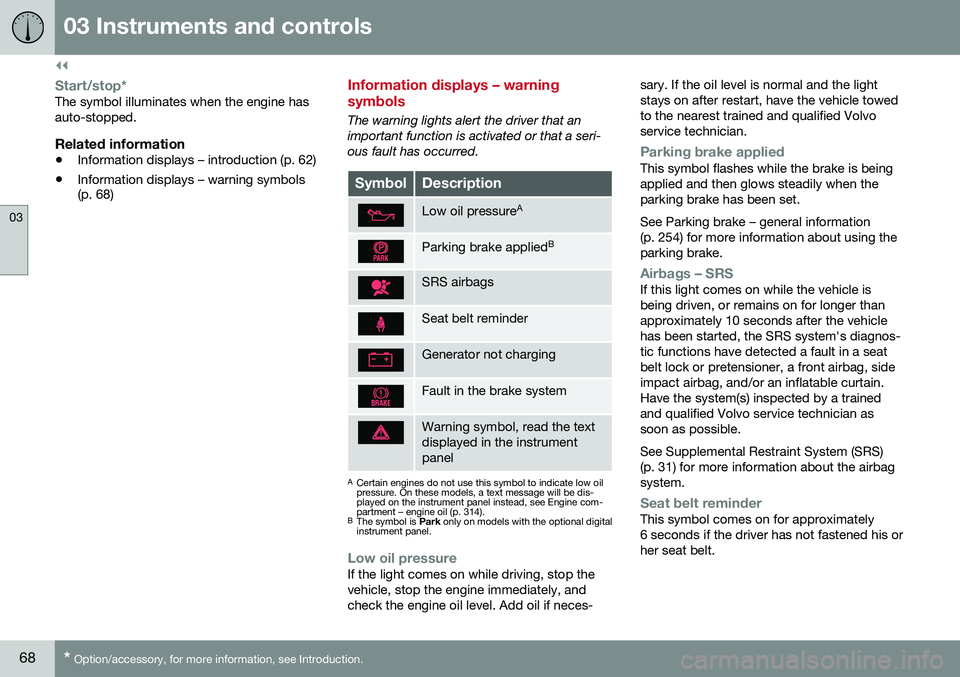
The warning lights alert the driver that an important function is activated or that a seri-ous fault has occurred.
SymbolDescription
Low oil pressure A
Parking brake applied B
SRS airbags
Seat belt reminder
Generator not charging
Fault in the brake system
Warning symbol, read the text displayed in the instrumentpanel
A
Certain engines do not use this symbol to indicate low oil pressure. On these models, a text message will be dis-played on the instrument panel instead, see Engine com-partment – engine oil (p. 314).
B The symbol is Park only on models with the optional digital
instrument panel.
Low oil pressureIf the light comes on while driving, stop the vehicle, stop the engine immediately, andcheck the engine oil level. Add oil if neces- sary. If the oil level is normal and the lightstays on after restart, have the vehicle towedto the nearest trained and qualified Volvoservice technician.
Parking brake appliedThis symbol flashes while the brake is being applied and then glows steadily when theparking brake has been set. See Parking brake – general information (p. 254) for more information about using theparking brake.
Airbags – SRSIf this light comes on while the vehicle is being driven, or remains on for longer thanapproximately 10 seconds after the vehiclehas been started, the SRS system's diagnos-tic functions have detected a fault in a seatbelt lock or pretensioner, a front airbag, sideimpact airbag, and/or an inflatable curtain.Have the system(s) inspected by a trainedand qualified Volvo service technician assoon as possible. See Supplemental Restraint System (SRS) (p. 31) for more information about the airbagsystem.
Seat belt reminderThis symbol comes on for approximately 6 seconds if the driver has not fastened his orher seat belt.
Page 71 of 380
03 Instruments and controls
03
}}
69
Generator not chargingThis symbol comes on during driving if a fault has occurred in the electrical system. Contactan authorized Volvo workshop.
Engine temperatureEngine overheating can result from low oil or coolant levels, towing or hard driving at highheat and altitude, or mechanical malfunction.Engine overheating will be signaled with textand a red warning triangle in the middle of theinstrument display. The exact text will dependon the degree of overheating. It may range from
High engine temp Reduce speed toHigh engine temp Stop engine. If appropri-
ate, other messages, such as Coolant level
low, Stop safely will also be displayed. If
your engine does overheat so that you must stop the engine, always allow the engine tocool before attempting to check oil and cool-ant levels. See Engine compartment – coolant (p. 316) for more information.
Fault in brake systemIf this symbol lights, the brake fluid level may be too low. Stop the vehicle in a safe placeand check the level in the brake fluid reser-voir, see Engine compartment – brake fluid(p. 317). If the level in the reservoir is belowMIN , the vehicle should be transported to an
authorized Volvo workshop to have the brakesystem checked. If the
and symbols come on
at the same time, there may be a fault in the brake force distribution system.
1. Stop the vehicle in a safe place and turn off the engine.
2. Restart the engine.
• If both symbols extinguish, continue driv- ing.
• If the symbols remain on, check the levelin the brake fluid reservoir, see Enginecompartment – brake fluid (p. 317). If thebrake fluid level is normal but the sym-bols are still lit, the vehicle can be driven,with great care, to an authorized Volvoworkshop to have the brake systemchecked.
• If the level in the reservoir is below
MIN,
the vehicle should be transported to anauthorized Volvo workshop to have thebrake system checked.WARNING
• If the fluid level is below the
MIN mark
in the reservoir or if a warning mes- sage is displayed in the text window:DO NOT DRIVE . Have the vehicle
towed to a trained and qualified Volvoservice technician and have the brakesystem inspected.
• If the
and symbols
are on at the same time, there is a risk of reduced vehicle stability.
Warning symbolThe red warning symbol lights up to indicate a problem related to safety and/or drivability.A message will also appear in the instrumentpanel. The symbol remains visible until thefault has been rectified but the text messagecan be cleared with the OK button, see Infor-
mation display – menu controls (p. 106). Thewarning symbol can also come on in conjunc-tion with other symbols. Action:
1. Stop in a safe place. Do not drive the vehicle further.
2. Read the information on the display. Implement the action in accordance with the message in the display. Clear themessage using OK.
Page 74 of 380
03 Instruments and controls
03
72* Option/accessory, for more information, see Introduction.
Information displays – trip odometer and clock
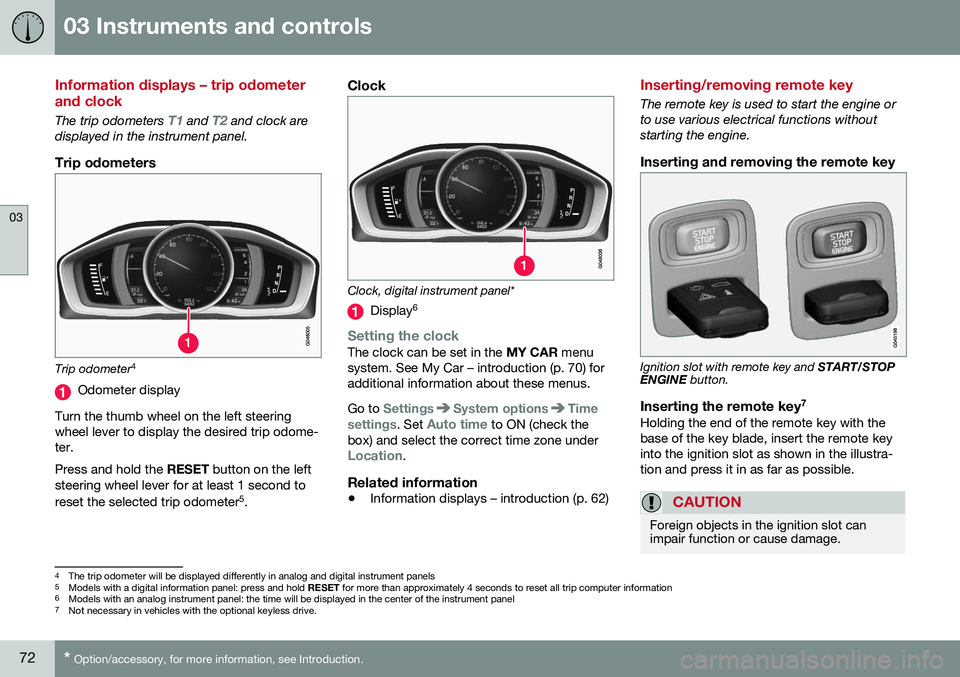
The trip odometers T1 and T2 and clock are
displayed in the instrument panel.
Trip odometers
Trip odometer 4
Odometer display
Turn the thumb wheel on the left steering wheel lever to display the desired trip odome-ter. Press and hold the RESET button on the left
steering wheel lever for at least 1 second to reset the selected trip odometer 5
.
Clock
Clock, digital instrument panel*
Display 6
Setting the clockThe clock can be set in the
MY CAR menu
system. See My Car – introduction (p. 70) for additional information about these menus. Go to
SettingsSystem optionsTime
settings
. Set Auto time to ON (check the
box) and select the correct time zone under
Location.
Related information
• Information displays – introduction (p. 62)
Inserting/removing remote key
The remote key is used to start the engine or to use various electrical functions withoutstarting the engine.
Inserting and removing the remote key
Ignition slot with remote key and
START/STOP
ENGINE button.
Inserting the remote key 7Holding the end of the remote key with the base of the key blade, insert the remote keyinto the ignition slot as shown in the illustra-tion and press it in as far as possible.
CAUTION
Foreign objects in the ignition slot can impair function or cause damage.
4
The trip odometer will be displayed differently in analog and digital instrument panels
5 Models with a digital information panel: press and hold RESET for more than approximately 4 seconds to reset all trip computer information
6 Models with an analog instrument panel: the time will be displayed in the center of the instrument panel
7
Not necessary in vehicles with the optional keyless drive.