mirror VOLVO S80 2016 Owner´s Manual
[x] Cancel search | Manufacturer: VOLVO, Model Year: 2016, Model line: S80, Model: VOLVO S80 2016Pages: 380, PDF Size: 9.45 MB
Page 121 of 380
04 Climate
04
* Option/accessory, for more information, see Introduction.119
Climate – sensors
The climate system utilizes a number of sen- sors to help regulate the temperature andhumidity level in the passenger compartment.
Sensor location
• The sunlight sensor is located on the top side of the dashboard.
NOTE
The sunlight sensor monitors which side of the car that is most exposed to sunlight.This can mean that the temperature maydiffer between the right and left-side airvents, even if the temperatures set for bothsides of the passenger compartment arethe same.
•The temperature sensor for the passen- ger compartment is located below the cli-mate control panel.
• The outside (ambient) temperature sensoris located on the door mirror.
• The humidity sensor* is located in theinterior rearview mirror.
NOTE
Do not cover or block the sensors with clothing or other objects.
Related information
•
Climate – general information (p. 118)
Air quality
The passenger compartment has been designed to be pleasant and comfortable,even for people with asthma and contactallergies.
Passenger compartment filterReplace the cabin air filter with a new one atthe recommended intervals. Please refer toyour Warranty and Service Records Informa-tion booklet, or consult a trained and qualifiedVolvo service technician for these intervals.The filter should be replaced more often whendriving under dirty and dusty conditions. Thefilter cannot be cleaned and therefore shouldalways be replaced with a new one.
NOTE
There are different types of cabin air filters. Ensure that the correct type is installed.
Interior Air Quality System (IAQS)A multifilter helps reduce gases and particles in the incoming air, thereby reducing the lev-els of odors and contaminants entering thevehicle. The air quality sensor detectsincreased levels of contaminants in the out-side air. When the air quality sensor detectscontaminated outside air, the air intake closesand the air inside the passenger compart-ment is recirculated, i.e., no outside air entersthe vehicle. The filter also cleans recirculatedpassenger compartment air.
NOTE
Contact your Volvo retailer for IAQS air fil- ter replacement intervals.
Materials used in the cabinThe materials used in the cabin have been developed to help minimize the amount ofdust and make the cabin easier to keepclean. All floor mats can be easily removedfor cleaning. Use car cleaning products rec-ommended by Volvo. See also the informa-tion in Cleaning the interior (p. 347).
Related information
•Climate – general information (p. 118)
• Interior Air Quality System (IAQS)* (p. 120)
• Climate – menu settings (p. 120)
Page 128 of 380
04 Climate
04
126* Option/accessory, for more information, see Introduction.
Max. defroster and electrically heated windshield*
The heated windshield and max. defroster functions are used to clear the windshield andfront side windows of condensation and iceas quickly as possible.
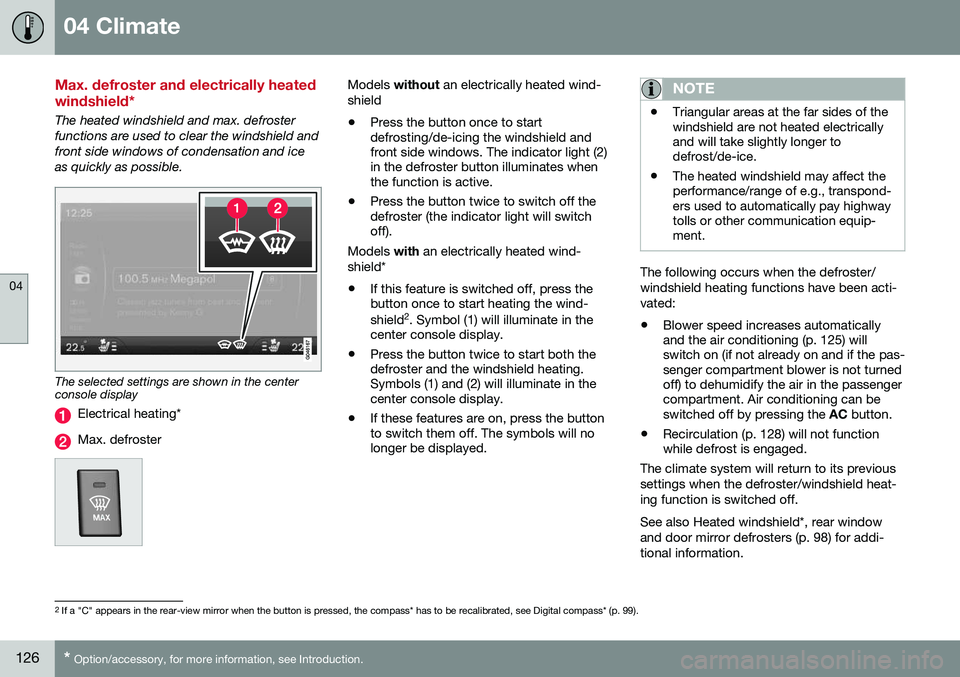
The selected settings are shown in the center console display
Electrical heating*
Max. defroster
Models without an electrically heated wind-
shield • Press the button once to start defrosting/de-icing the windshield andfront side windows. The indicator light (2)in the defroster button illuminates whenthe function is active.
• Press the button twice to switch off thedefroster (the indicator light will switchoff).
Models with an electrically heated wind-
shield*
• If this feature is switched off, press thebutton once to start heating the wind- shield 2
. Symbol (1) will illuminate in the
center console display.
• Press the button twice to start both the defroster and the windshield heating.Symbols (1) and (2) will illuminate in thecenter console display.
• If these features are on, press the buttonto switch them off. The symbols will nolonger be displayed.NOTE
•Triangular areas at the far sides of the windshield are not heated electricallyand will take slightly longer todefrost/de-ice.
• The heated windshield may affect theperformance/range of e.g., transpond-ers used to automatically pay highwaytolls or other communication equip-ment.
The following occurs when the defroster/ windshield heating functions have been acti-vated: •
Blower speed increases automatically and the air conditioning (p. 125) willswitch on (if not already on and if the pas-senger compartment blower is not turnedoff) to dehumidify the air in the passengercompartment. Air conditioning can beswitched off by pressing the
AC button.
• Recirculation (p. 128) will not functionwhile defrost is engaged.
The climate system will return to its previous
settings when the defroster/windshield heat- ing function is switched off. See also Heated windshield*, rear window and door mirror defrosters (p. 98) for addi-tional information.
2 If a "C" appears in the rear-view mirror when the button is pressed, the compass* has to be recalibrated, see Digital compass* (p. 99).
Page 135 of 380
05 Loading and storage
05
* Option/accessory, for more information, see Introduction.133
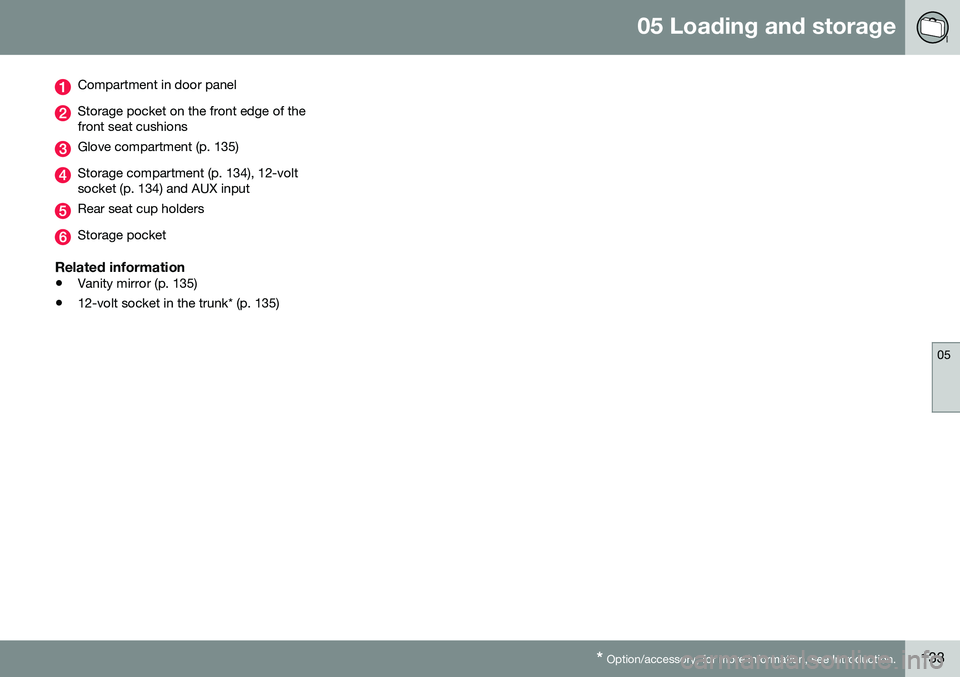
Compartment in door panel
Storage pocket on the front edge of the front seat cushions
Glove compartment (p. 135)
Storage compartment (p. 134), 12-volt socket (p. 134) and AUX input
Rear seat cup holders
Storage pocket
Related information
• Vanity mirror (p. 135)
• 12-volt socket in the trunk* (p. 135)
Page 137 of 380
05 Loading and storage
05
* Option/accessory, for more information, see Introduction.135
Glove compartment
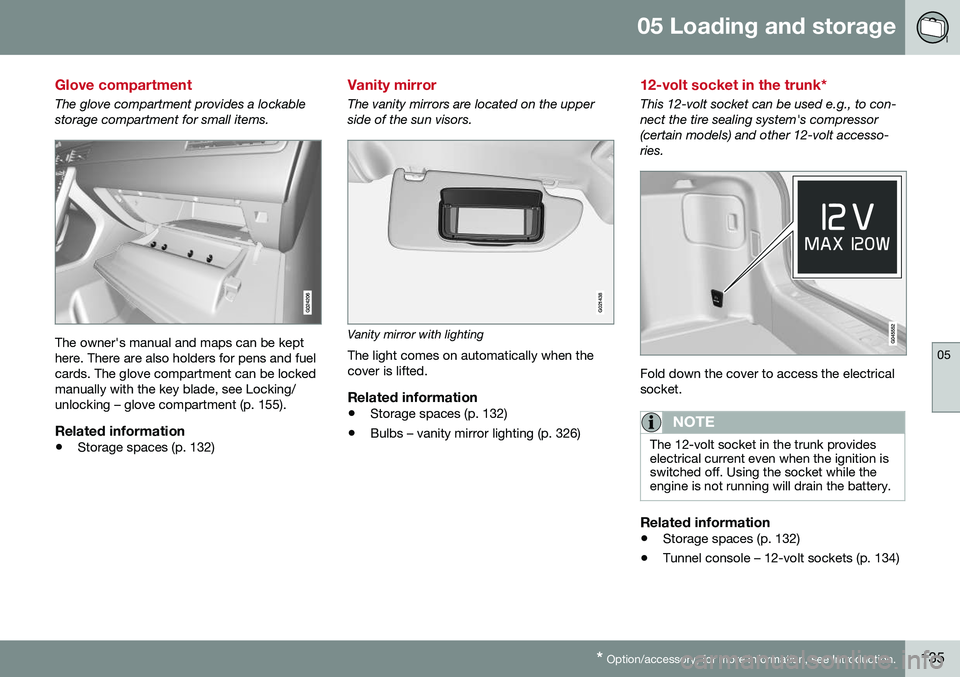
The glove compartment provides a lockable storage compartment for small items.
The owner's manual and maps can be kept here. There are also holders for pens and fuelcards. The glove compartment can be lockedmanually with the key blade, see Locking/unlocking – glove compartment (p. 155).
Related information
• Storage spaces (p. 132)
Vanity mirror
The vanity mirrors are located on the upper side of the sun visors.
G021438
Vanity mirror with lighting
The light comes on automatically when the cover is lifted.
Related information
• Storage spaces (p. 132)
• Bulbs – vanity mirror lighting (p. 326)
12-volt socket in the trunk*
This 12-volt socket can be used e.g., to con- nect the tire sealing system's compressor(certain models) and other 12-volt accesso-ries.
Fold down the cover to access the electrical socket.
NOTE
The 12-volt socket in the trunk provides electrical current even when the ignition isswitched off. Using the socket while theengine is not running will drain the battery.
Related information
• Storage spaces (p. 132)
• Tunnel console – 12-volt sockets (p. 134)
Page 143 of 380
06 Locks and alarm
06
}}
* Option/accessory, for more information, see Introduction.141
Key memory
The memory in the remote key makes it possi- ble to store certain personal settings. The position of the side door mirrors, power driver's seat* and the selected instrument panel theme 1
are stored in the remote keys
when the vehicle is locked. The next time the
driver's door is unlocked with the same
remote key and the door is opened within 2 minutes , the power driver's seat and side
door mirrors will automatically move to theposition that they were in when the doorswere most recently locked with the sameremote key. If the seat/mirrors have not beenreadjusted since the vehicle was locked, theywill already be in the position stored in thatparticular remote key and will not move. Formore information on this feature, see Frontseats – power seat (p. 75). This feature can be activated or deactivated in the vehicle's menu by pressing MY CAR
and going into
SettingsCar settingsCar key memory. For a description of the
menu system, see My Car – introduction (p. 70).
NOTE
If the vehicle is locked with the remote key or is left unlocked for more than 30minutes, the key memory function will bedeactivated. To reactivate the key's memory: • Press the unlock button on the remote key.
For information regarding vehicles with the optional keyless drive, see Keyless drive*–locking/unlocking (p. 149).
Related information
•
Locking/unlocking confirmation (p. 141)
Locking/unlocking confirmation
Settings can be made in the menu system for audible and visual confirmation when thevehicle has been locked or unlocked. Withthese functions activated, the following willoccur when the vehicle is locked/unlocked:
Locking confirmation
•
The turn signals flash once, an audible signal sounds and the door mirrors willfold* in.
Confirmation will only be given when all doors and the trunk are properly closed and locked.
NOTE
If you do not receive confirmation when locking the vehicle, check whether a dooror the trunk is ajar, or if this feature hasbeen turned off in the menu.
Unlocking confirmation
• The turn signals will flash twice and the door mirrors will fold* out.
1
Optional digital instrument panel only
Page 146 of 380
||
06 Locks and alarm
06
144* Option/accessory, for more information, see Introduction.
After a short pause, press the Unlock button a second time within 10 seconds to unlockthe other doors and the trunk. This function can be changed so that all doors unlock at the same time by pressing My Car and going to
SettingsCar
settings
Lock settingsChange doors
unlock setting. For a description of the menu
system, see My Car – introduction (p. 70).
Approach lighting – As you approach
the vehicle, press the button on the remote key to light the interior lighting, parking lights,license plate lighting and the lights in the doormirrors*. These lights will switch off automatically after 30, 60 or 90 seconds. For a description of themenu system, see My Car – introduction(p. 70).
Unlock/open trunk
Press once: This unlocks the trunk (but does
not open it) and disarms the alarm (the alarm indicator light on the dashboard will go out). Ifthe trunk is not opened within two minutes itwill automatically relock and the alarm will berearmed. Press twice: This both unlocks the trunk and
pops it open slightly.
NOTE
Any excess weight (snow, etc.) on the trunk lid may prevent it from opening.
For information on opening the trunk from the passenger compartment, see Locking/unlocking – trunk (p. 156). After closing, the trunk will not automatically relock. Press Lock to relock it and rearm thealarm.
Panic alarm – This button can be used
to attract attention during emergency situa- tions. To activate the panic alarm, press and hold this button for at least 3 seconds or press ittwice within 3 seconds. The turn signals andhorn will be activated. The panic alarm willstop automatically after 2 minutes and45 seconds. To deactivate, wait approximately 5 seconds and press the button again. The Panic alarm button will not unlock the vehicle.
Related information
• Locking/unlocking – from inside (p. 154)
• Locking/unlocking – from the outside (p. 153)
• Locking/unlocking confirmation (p. 141)
Remote key – range
The remote key has a range of approximately 60 ft. (20 m) from the vehicle.
NOTE
Buildings or other obstacles may interfere with the function of the remote key. Thevehicle can also be locked or unlockedwith the key blade, see Alarm-related func-tions (p. 160).
If the remote key is removed from the vehicle while the engine is running or if the ignition isin mode
I or II and all of the doors are closed,
a message will appear in the instrument paneldisplay and there will be an audible signal. When the remote key is returned to the vehi- cle, the message will be erased and the audi-ble signal will stop after one of the followinghas been done: • The remote key is inserted in the ignition slot
• The vehicle's speed exceeds 20 mph(30 km/h)
• The
OK button on the left steering wheel
lever is pressed
Related information
• Remote key – functions (p. 143)
Page 153 of 380
06 Locks and alarm
06
}}
* Option/accessory, for more information, see Introduction.151
position of the driver's seat
2
and door mirrors
will be stored in the remote key's memory. The next time a door is opened by a person with the same remote key in his/her posses-
sion, the driver's seat and door mirrors willautomatically move to the position that theywere in when the door was most recentlylocked.
NOTE
If several people carrying remote keys approach the vehicle at the same time, thedriver's seat and door mirrors will assumethe positions they were in for the personwho opens the driver's door.
See also power seats (p. 75) for information on adjusting and storing the seat's position inthe seat memory.
NOTE
If the vehicle is locked by pressing the but- ton on one of the door handles or bypressing the lock button on the remotekey, or if it is left unlocked for more than30 minutes, the key memory function willbe deactivated. To reactivate the key's memory: • Unlock the vehicle by pulling a door handle with the remote key in yourpossession or by pressing the unlockbutton on the remote key.
Related information
•
Keyless drive*– locking/unlocking (p. 149)
• Remote key – functions (p. 143)
Keyless drive* – messages
If all of the remote keys are removed from the vehicle while the engine is running or if theignition modes (p. 73) is in mode
II and all of
the doors are closed, a message will appearin the instrument panel display and an audiblesignal will sound. When at least one remote key has been returned to the car, the message will beerased in the display and the audible signalwill stop when:
• A door has been opened and closed
• The remote key has been inserted in the ignition slot
• The
OK button has been pressed. For the
location of this button, see Informationdisplay – menu controls (p. 106)
2 Power seats only
Page 228 of 380
||
07 Driver support
07
226
WARNING
Keep in mind that the image on the screen only shows the area behind the vehicle.The driver must always watch for people,animals, other vehicles, etc., near the sidesof the vehicle when turning while backingup.
Marker lines
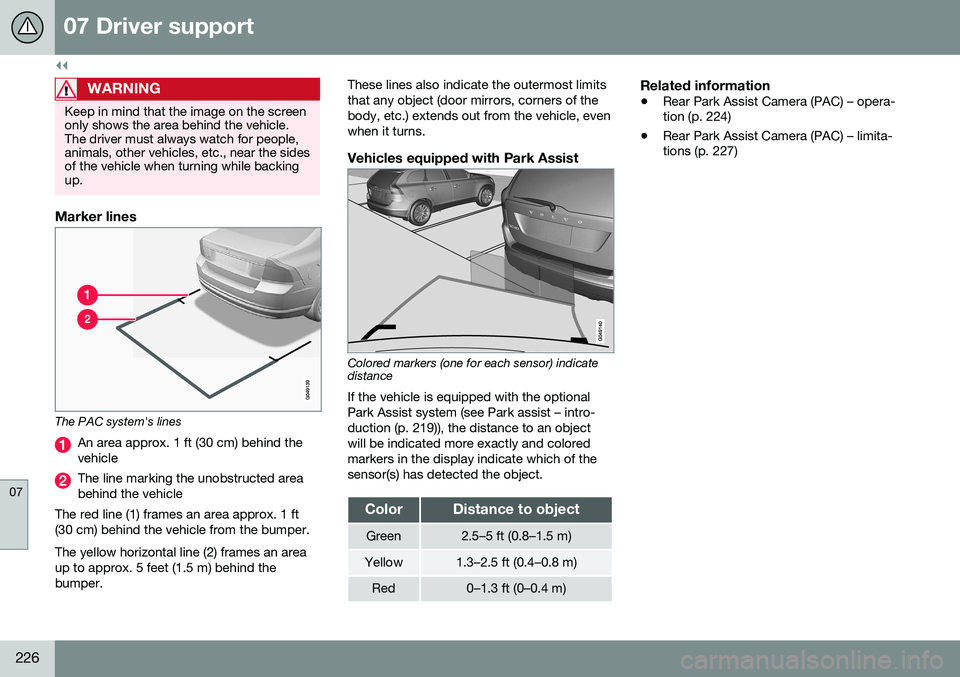
The PAC system's lines
An area approx. 1 ft (30 cm) behind the vehicle
The line marking the unobstructed area behind the vehicle
The red line (1) frames an area approx. 1 ft(30 cm) behind the vehicle from the bumper. The yellow horizontal line (2) frames an area up to approx. 5 feet (1.5 m) behind thebumper. These lines also indicate the outermost limitsthat any object (door mirrors, corners of thebody, etc.) extends out from the vehicle, evenwhen it turns.
Vehicles equipped with Park Assist
Colored markers (one for each sensor) indicate distance If the vehicle is equipped with the optional Park Assist system (see Park assist – intro-duction (p. 219)), the distance to an objectwill be indicated more exactly and coloredmarkers in the display indicate which of thesensor(s) has detected the object.
ColorDistance to object
Green2.5–5 ft (0.8–1.5 m)
Yellow1.3–2.5 ft (0.4–0.8 m)
Red0–1.3 ft (0–0.4 m)
Related information
•
Rear Park Assist Camera (PAC) – opera- tion (p. 224)
• Rear Park Assist Camera (PAC) – limita-tions (p. 227)
Page 229 of 380
07 Driver support
07
}}
* Option/accessory, for more information, see Introduction.227
Rear Park Assist Camera (PAC) – limitations
LimitationsEven if a fairly small section of the screen image appears to be obstructed, this maymean that a relatively large area behind thevehicle is hidden and objects there may notbe detected until they are very near the vehi-cle.
NOTE
Bicycle carriers or other accessories mounted on the trunk may obstruct thecamera's field of view.
Keep in mind
• Keep the camera's lens free of dirt, ice and snow. Remove ice and snow care-fully to avoid scratching the lens.
• Clean the lens regularly with warm waterand a suitable car washing detergent.
Related information
•Rear Park Assist Camera (PAC) – intro-duction (p. 223)
• Rear Park Assist Camera (PAC) – opera-tion (p. 224)
• Park assist – introduction (p. 219)
BLIS* – introduction
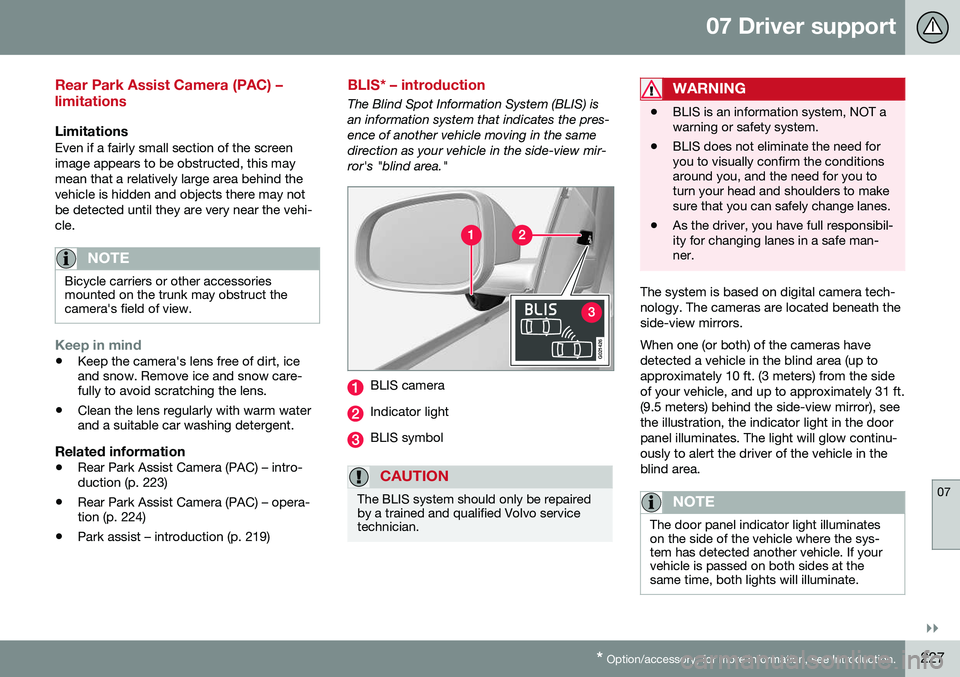
The Blind Spot Information System (BLIS) is an information system that indicates the pres-ence of another vehicle moving in the samedirection as your vehicle in the side-view mir-ror's "blind area."
G021426
BLIS camera
Indicator light
BLIS symbol
CAUTION
The BLIS system should only be repaired by a trained and qualified Volvo servicetechnician.
WARNING
• BLIS is an information system, NOT a warning or safety system.
• BLIS does not eliminate the need foryou to visually confirm the conditionsaround you, and the need for you toturn your head and shoulders to makesure that you can safely change lanes.
• As the driver, you have full responsibil-ity for changing lanes in a safe man-ner.
The system is based on digital camera tech- nology. The cameras are located beneath theside-view mirrors. When one (or both) of the cameras have detected a vehicle in the blind area (up toapproximately 10 ft. (3 meters) from the sideof your vehicle, and up to approximately 31 ft.(9.5 meters) behind the side-view mirror), seethe illustration, the indicator light in the doorpanel illuminates. The light will glow continu-ously to alert the driver of the vehicle in theblind area.
NOTE
The door panel indicator light illuminates on the side of the vehicle where the sys-tem has detected another vehicle. If yourvehicle is passed on both sides at thesame time, both lights will illuminate.
Page 235 of 380
08 Starting and driving
08
}}
* Option/accessory, for more information, see Introduction.233
Starting the engine
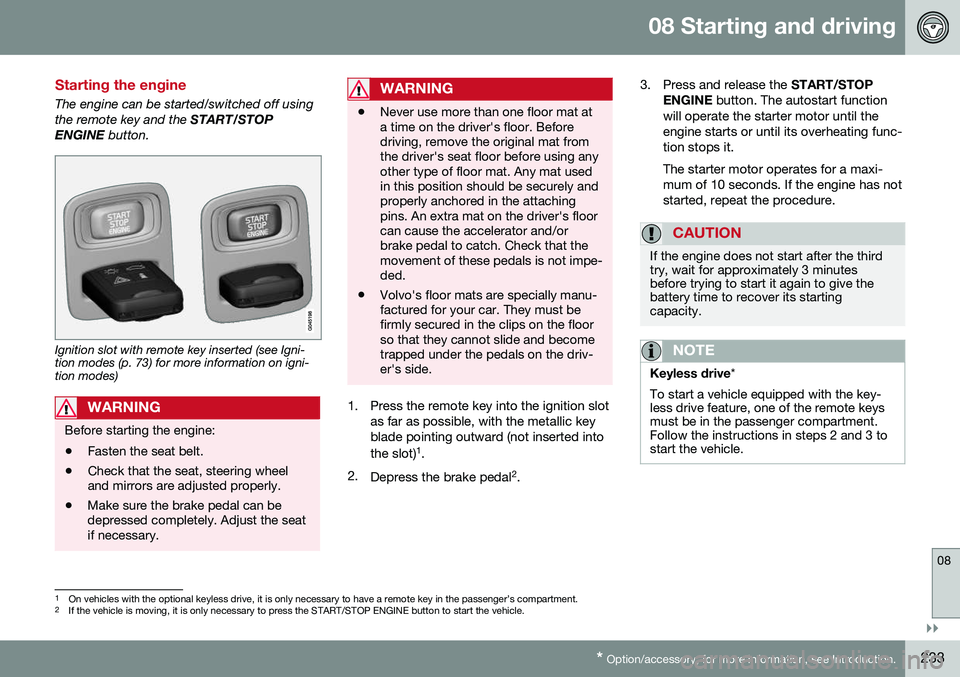
The engine can be started/switched off using the remote key and the START/STOP
ENGINE button.
Ignition slot with remote key inserted (see Igni- tion modes (p. 73) for more information on igni-tion modes)
WARNING
Before starting the engine:
• Fasten the seat belt.
• Check that the seat, steering wheel and mirrors are adjusted properly.
• Make sure the brake pedal can bedepressed completely. Adjust the seatif necessary.
WARNING
•Never use more than one floor mat at a time on the driver's floor. Beforedriving, remove the original mat fromthe driver's seat floor before using anyother type of floor mat. Any mat usedin this position should be securely andproperly anchored in the attachingpins. An extra mat on the driver's floorcan cause the accelerator and/orbrake pedal to catch. Check that themovement of these pedals is not impe-ded.
• Volvo's floor mats are specially manu-factured for your car. They must befirmly secured in the clips on the floorso that they cannot slide and becometrapped under the pedals on the driv-er's side.
1. Press the remote key into the ignition slot
as far as possible, with the metallic key blade pointing outward (not inserted into the slot) 1
.
2. Depress the brake pedal 2
. 3. Press and release the
START/STOP
ENGINE button. The autostart function
will operate the starter motor until the engine starts or until its overheating func-tion stops it. The starter motor operates for a maxi- mum of 10 seconds. If the engine has notstarted, repeat the procedure.
CAUTION
If the engine does not start after the third try, wait for approximately 3 minutesbefore trying to start it again to give thebattery time to recover its startingcapacity.
NOTE
Keyless drive *
To start a vehicle equipped with the key- less drive feature, one of the remote keysmust be in the passenger compartment.Follow the instructions in steps 2 and 3 tostart the vehicle.
1 On vehicles with the optional keyless drive, it is only necessary to have a remote key in the passenger’s compartment.
2 If the vehicle is moving, it is only necessary to press the START/STOP ENGINE button to start the vehicle.