display VOLVO S80 2016 Owner´s Manual
[x] Cancel search | Manufacturer: VOLVO, Model Year: 2016, Model line: S80, Model: VOLVO S80 2016Pages: 380, PDF Size: 9.45 MB
Page 168 of 380
07 Driver support
07
166* Option/accessory, for more information, see Introduction.
Adjustable steering force*
Steering force increases with the speed of the vehicle to give the driver enhanced sense ofcontrol and stability. At low speed the vehicleis easy to steer in order to facilitate parking,etc.
Adjustable steering force*Steering force can be changed under MY
CAR
Car settingsSteering wheel
force
. Select Low, Medium or High. For a
description of the menu system, My Car – introduction (p. 70).
NOTE
This steering force level menu function cannot be accessed when the vehicle is inmotion.
NOTE
In certain situations, the power steering may become too warm and will have to betemporarily cooled down. While this ishappening, the power steering effect willbe reduced slightly and somewhat moreeffort may be required to turn the steeringwheel. If this occurs, a message will be displayed in the instrument panel.
Related information
• Active chassis* (Four C) (p. 162)
Road Sign Information (RSI)* – introduction
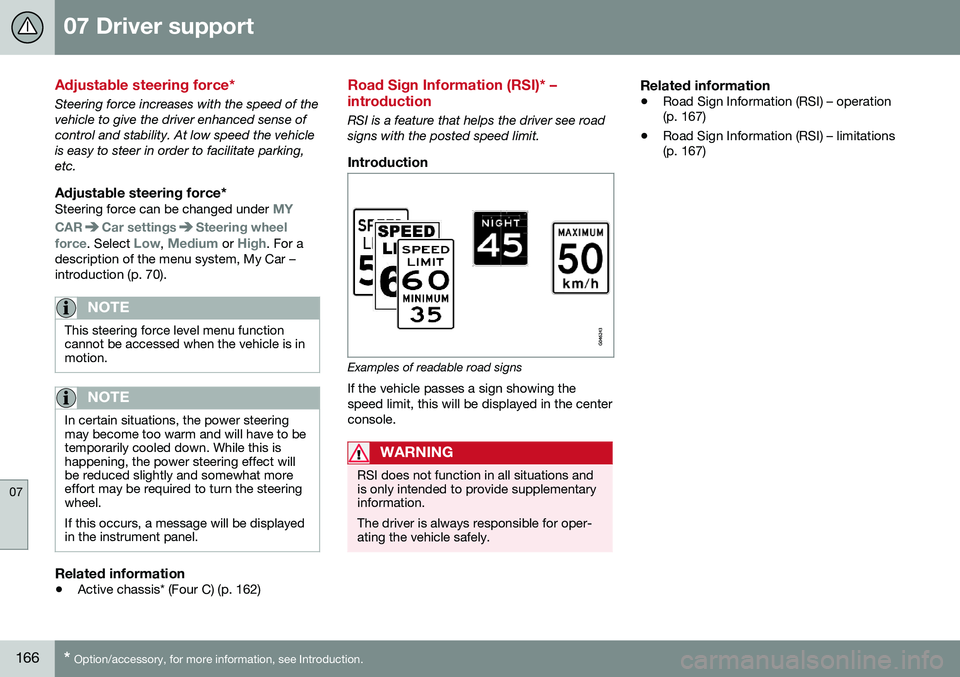
RSI is a feature that helps the driver see road signs with the posted speed limit.
Introduction
Examples of readable road signs If the vehicle passes a sign showing the speed limit, this will be displayed in the centerconsole.
WARNING
RSI does not function in all situations and is only intended to provide supplementaryinformation. The driver is always responsible for oper- ating the vehicle safely.
Related information
•Road Sign Information (RSI) – operation (p. 167)
• Road Sign Information (RSI) – limitations(p. 167)
Page 169 of 380
07 Driver support
07
* Option/accessory, for more information, see Introduction.167
Road Sign Information (RSI) – operation
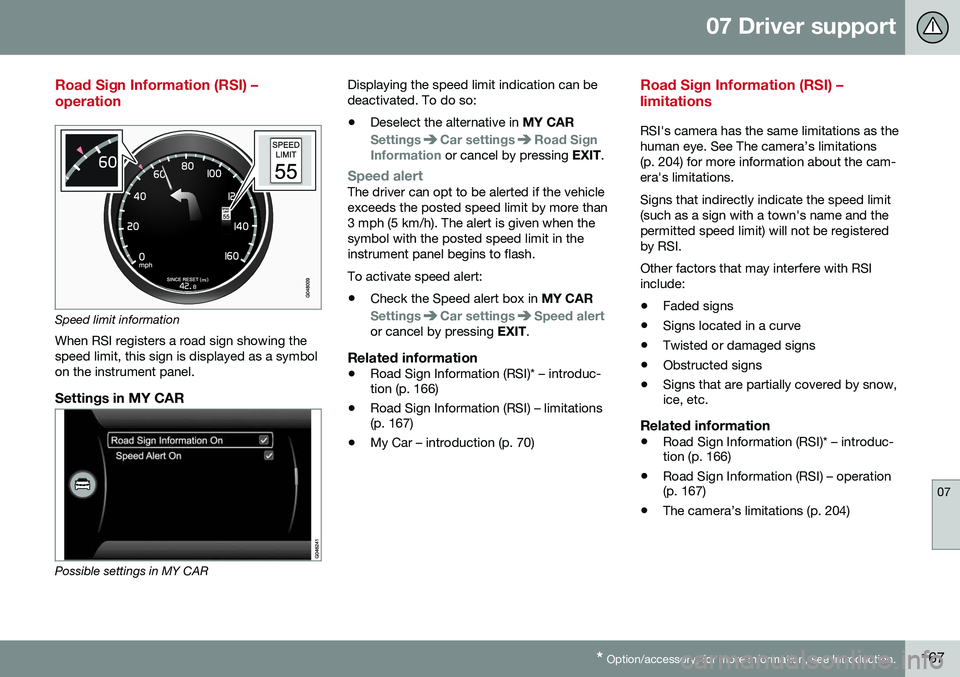
Speed limit information
When RSI registers a road sign showing the speed limit, this sign is displayed as a symbolon the instrument panel.
Settings in MY CAR
Possible settings in MY CAR Displaying the speed limit indication can be deactivated. To do so:
• Deselect the alternative in
MY CAR
SettingsCar settingsRoad Sign
Information or cancel by pressing EXIT.
Speed alertThe driver can opt to be alerted if the vehicle exceeds the posted speed limit by more than3 mph (5 km/h). The alert is given when thesymbol with the posted speed limit in theinstrument panel begins to flash. To activate speed alert:
• Check the Speed alert box in
MY CAR
SettingsCar settingsSpeed alertor cancel by pressing EXIT.
Related information
•Road Sign Information (RSI)* – introduc- tion (p. 166)
• Road Sign Information (RSI) – limitations(p. 167)
• My Car – introduction (p. 70)
Road Sign Information (RSI) – limitations
RSI's camera has the same limitations as the human eye. See The camera’s limitations(p. 204) for more information about the cam-era's limitations. Signs that indirectly indicate the speed limit (such as a sign with a town's name and thepermitted speed limit) will not be registeredby RSI. Other factors that may interfere with RSI include:
• Faded signs
• Signs located in a curve
• Twisted or damaged signs
• Obstructed signs
• Signs that are partially covered by snow, ice, etc.
Related information
•Road Sign Information (RSI)* – introduc-tion (p. 166)
• Road Sign Information (RSI) – operation(p. 167)
• The camera’s limitations (p. 204)
Page 170 of 380
07 Driver support
07
168
Cruise control (CC) – introduction
Cruise control is designed to assist the driver by maintaining a set speed. It is primarilyintended for use on long straight roads insteady traffic, such as on highways and othermain roads.
Operation
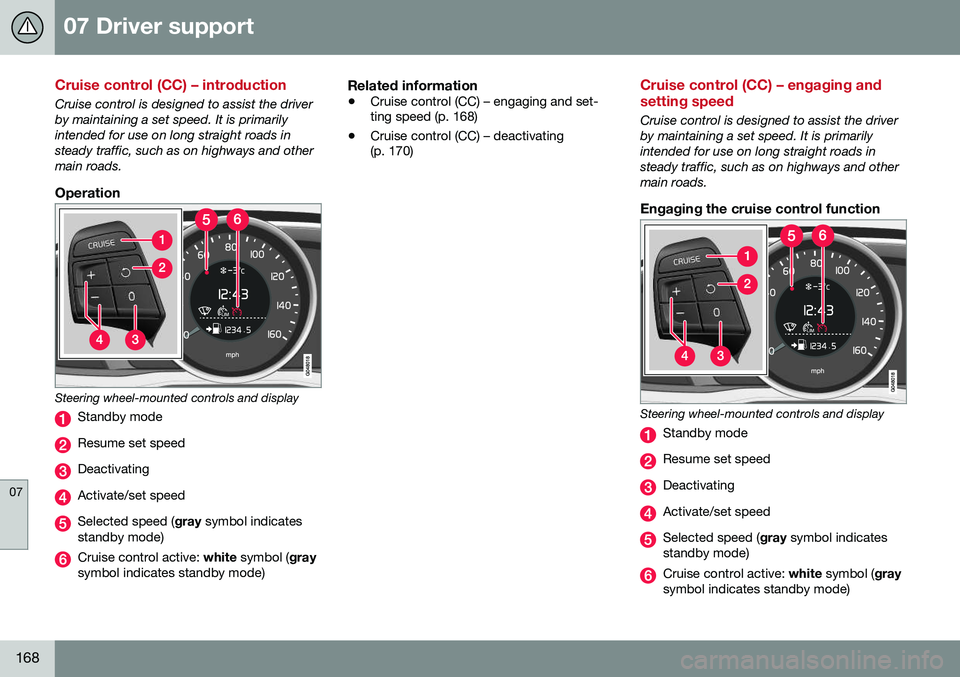
Steering wheel-mounted controls and display
Standby mode
Resume set speed
Deactivating
Activate/set speed
Selected speed (gray symbol indicates
standby mode)
Cruise control active: white symbol ( gray
symbol indicates standby mode)
Related information
• Cruise control (CC) – engaging and set- ting speed (p. 168)
• Cruise control (CC) – deactivating(p. 170)
Cruise control (CC) – engaging and setting speed
Cruise control is designed to assist the driver by maintaining a set speed. It is primarilyintended for use on long straight roads insteady traffic, such as on highways and othermain roads.
Engaging the cruise control function
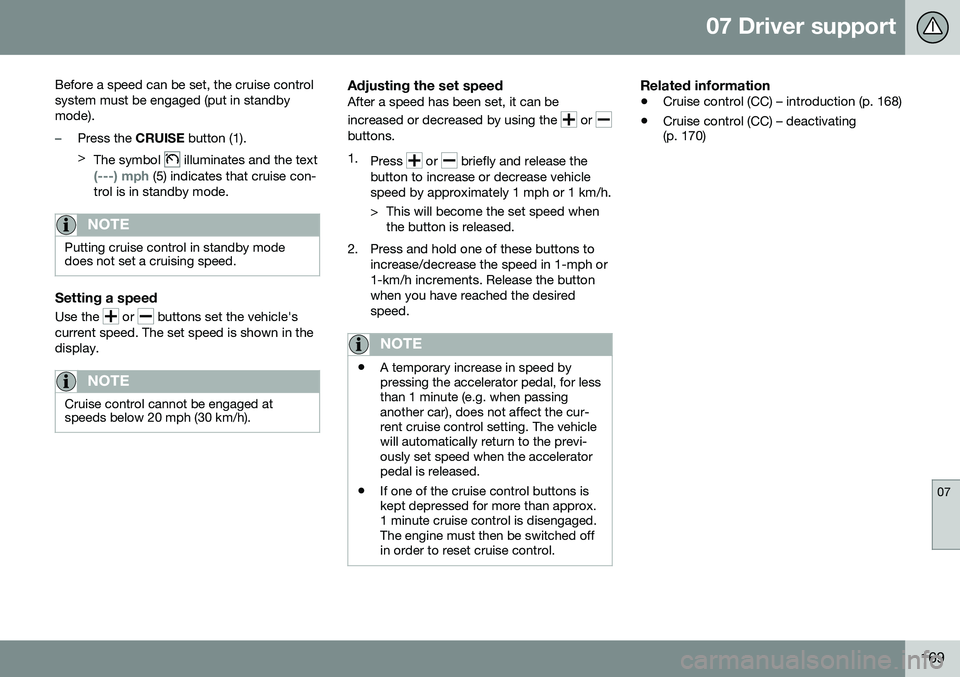
Steering wheel-mounted controls and display
Standby mode
Resume set speed
Deactivating
Activate/set speed
Selected speed (
gray symbol indicates
standby mode)
Cruise control active: white symbol ( gray
symbol indicates standby mode)
Page 171 of 380
07 Driver support
07
169
Before a speed can be set, the cruise control system must be engaged (put in standbymode).
–Press the
CRUISE button (1).
> The symbol
illuminates and the text
(---) mph (5) indicates that cruise con-
trol is in standby mode.
NOTE
Putting cruise control in standby mode does not set a cruising speed.
Setting a speed
Use the or buttons set the vehicle's
current speed. The set speed is shown in the display.
NOTE
Cruise control cannot be engaged at speeds below 20 mph (30 km/h).
Adjusting the set speedAfter a speed has been set, it can be increased or decreased by using the
or buttons. 1. Press
or briefly and release the
button to increase or decrease vehicle speed by approximately 1 mph or 1 km/h.
> This will become the set speed when the button is released.
2. Press and hold one of these buttons to increase/decrease the speed in 1-mph or 1-km/h increments. Release the buttonwhen you have reached the desiredspeed.
NOTE
•A temporary increase in speed by pressing the accelerator pedal, for lessthan 1 minute (e.g. when passinganother car), does not affect the cur-rent cruise control setting. The vehiclewill automatically return to the previ-ously set speed when the acceleratorpedal is released.
• If one of the cruise control buttons iskept depressed for more than approx.1 minute cruise control is disengaged.The engine must then be switched offin order to reset cruise control.
Related information
•
Cruise control (CC) – introduction (p. 168)
• Cruise control (CC) – deactivating (p. 170)
Page 172 of 380
07 Driver support
07
170
Toggling between ACC and CC (standard Cruise Control)
Adaptive Cruise Control (ACC) helps the driver maintain a safe distance/time interval tothe vehicle ahead.
Switching from ACC to CCThis may be useful if, for example, the radarsensor is obstructed in some way. SeeAdaptive Cruise Control – limitations (p. 180)for additional information.
• Press and hold the
button; the symbol
in the instrument panel will switch from
to .
> This activates the standard cruise control function (see Cruise control (CC) – intro- duction (p. 168)).
WARNING
Switching from ACC to CC means that:
• Your vehicle will
no longer automati-
cally maintain a set distance to a vehi- cle ahead.
• Only the set speed will be maintainedand the driver will have to apply thebrakes when needed.
Switching from CC to ACC
Switch off cruise control by pressing once
or twice as needed according to the instruc- tions in the previous section "Turning ACC off completely." The next time the system isswitched on, ACC will be reactivated.
Related information
•
Adaptive Cruise Control – introduction (p. 171)
• Adaptive Cruise Control – function(p. 172)
Cruise control (CC) – deactivating
Cruise control is designed to assist the driver by maintaining a set speed. It is primarilyintended for use on long straight roads insteady traffic, such as on highways and othermain roads.
Automatic deactivationThe cruise control is automatically deacti-vated
temporarily if one of the following
occurs: • If the speed drops below approximately 20 mph (30 km/h).
• When the brake pedal is depressed.
• If the gear selector is moved to positionN
.
• During wheel spin or wheel lock-up.
• If the vehicle's speed is increased byusing the accelerator pedal for more than1 minute.
• Engine speed (rpm) is too high or too low.
The currently set speed will be saved in the system's memory.
Temporary deactivationThe driver can temporarily deactivate thecruise control by pressing 0. The saved
speed is shown in brackets in the informationdisplay.
Page 174 of 380
||
07 Driver support
07
172
Operation
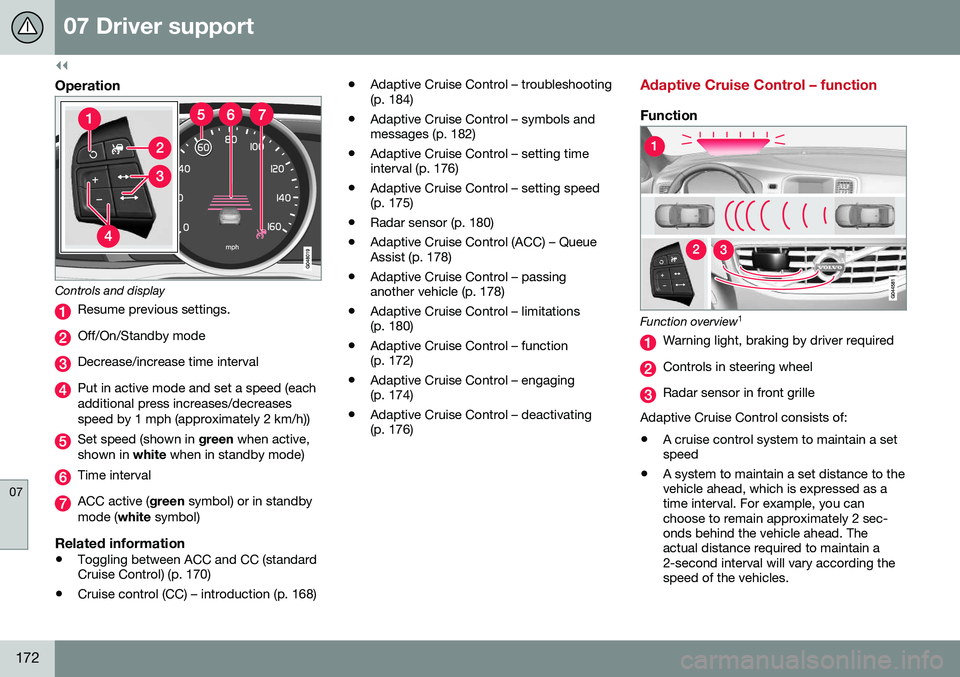
Controls and display
Resume previous settings.
Off/On/Standby mode
Decrease/increase time interval
Put in active mode and set a speed (each additional press increases/decreasesspeed by 1 mph (approximately 2 km/h))
Set speed (shown in green when active,
shown in white when in standby mode)
Time interval
ACC active ( green symbol) or in standby
mode ( white symbol)
Related information
•Toggling between ACC and CC (standard Cruise Control) (p. 170)
• Cruise control (CC) – introduction (p. 168) •
Adaptive Cruise Control – troubleshooting(p. 184)
• Adaptive Cruise Control – symbols andmessages (p. 182)
• Adaptive Cruise Control – setting timeinterval (p. 176)
• Adaptive Cruise Control – setting speed(p. 175)
• Radar sensor (p. 180)
• Adaptive Cruise Control (ACC) – QueueAssist (p. 178)
• Adaptive Cruise Control – passinganother vehicle (p. 178)
• Adaptive Cruise Control – limitations(p. 180)
• Adaptive Cruise Control – function(p. 172)
• Adaptive Cruise Control – engaging(p. 174)
• Adaptive Cruise Control – deactivating(p. 176)
Adaptive Cruise Control – function
Function
Function overview 1
Warning light, braking by driver required
Controls in steering wheel
Radar sensor in front grille
Adaptive Cruise Control consists of: • A cruise control system to maintain a set speed
• A system to maintain a set distance to thevehicle ahead, which is expressed as atime interval. For example, you canchoose to remain approximately 2 sec-onds behind the vehicle ahead. Theactual distance required to maintain a2-second interval will vary according thespeed of the vehicles.
Page 176 of 380
||
07 Driver support
07
174
WARNING
Adaptive Cruise Control only warns of vehicles detected by the radar sensor, seeAdaptive Cruise Control – limitations(p. 180). In some cases there may be nowarning or the warning may be delayed.The driver should always apply the brakeswhen necessary.
Steep inclines and/or heavy loadsACC is primarily intended for use on fairly level roads. The system may have difficultymaintaining the correct distance to a vehicleahead on steep inclines, if the vehicle is car-rying a heavy load or is towing a trailer. Inthese situations, the driver should always beprepared to apply the brakes if necessary.
Related information
•Adaptive Cruise Control – introduction (p. 171)
Adaptive Cruise Control – engaging
Putting ACC in standby modeBefore ACC can be used to regulate speed and/or the distance to a vehicle ahead, itmust first be put in standby mode. To do so:
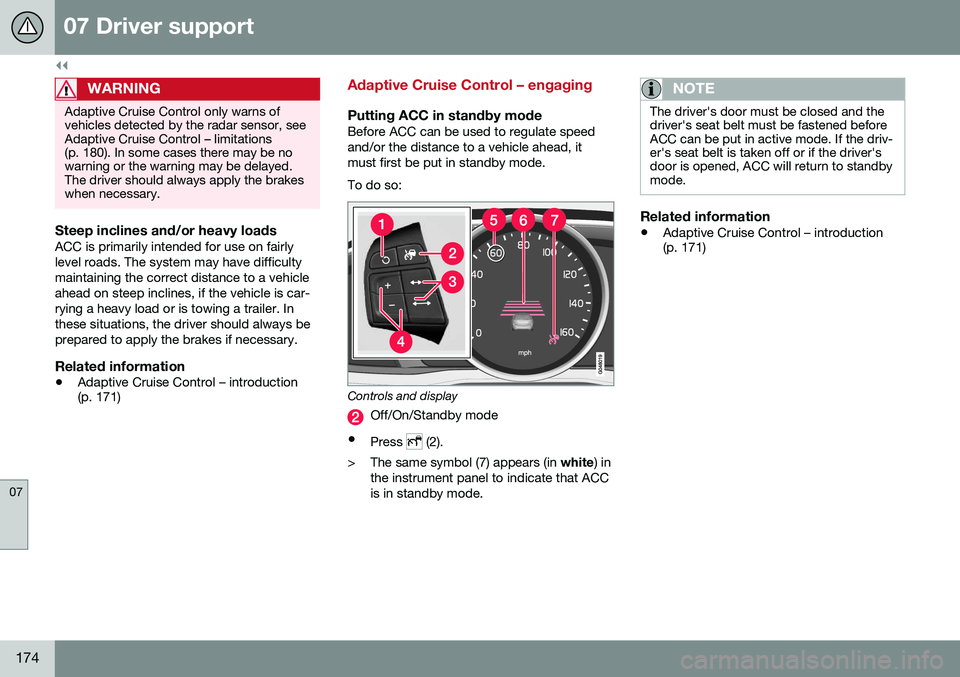
Controls and display
Off/On/Standby mode
• Press
(2).
> The same symbol (7) appears (in white) in
the instrument panel to indicate that ACC is in standby mode.
NOTE
The driver's door must be closed and the driver's seat belt must be fastened beforeACC can be put in active mode. If the driv-er's seat belt is taken off or if the driver'sdoor is opened, ACC will return to standbymode.
Related information
• Adaptive Cruise Control – introduction (p. 171)
Page 177 of 380
07 Driver support
07
175
Adaptive Cruise Control – setting speed
Setting a speedOnce ACC has been put in standby mode:
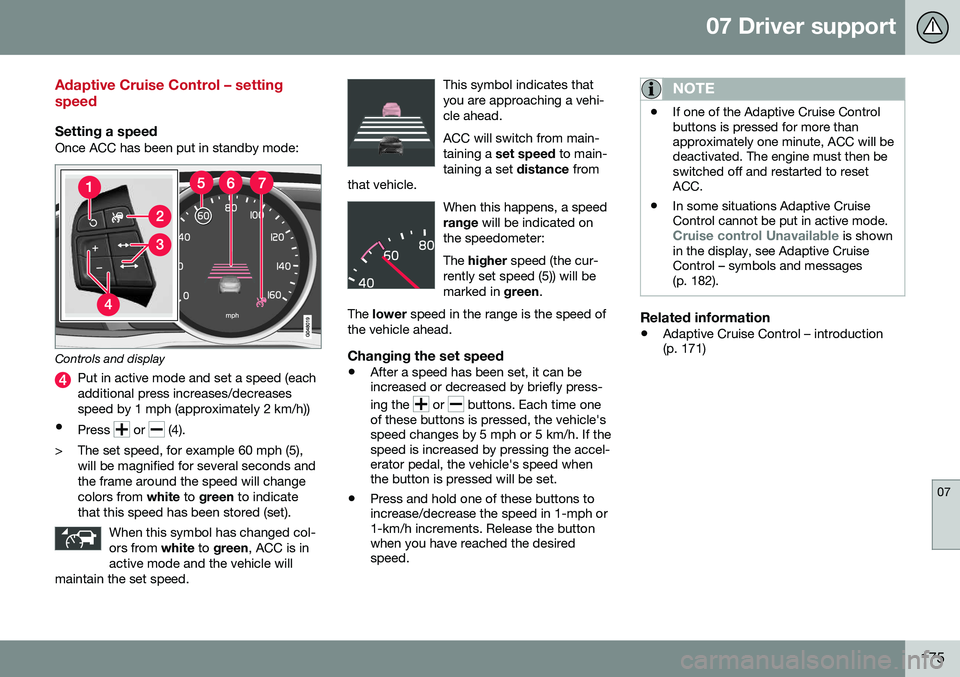
Controls and display
Put in active mode and set a speed (each additional press increases/decreasesspeed by 1 mph (approximately 2 km/h))
• Press
or (4).
> The set speed, for example 60 mph (5), will be magnified for several seconds and the frame around the speed will changecolors from white to green to indicate
that this speed has been stored (set).
When this symbol has changed col-ors from white to green , ACC is in
active mode and the vehicle will
maintain the set speed.
This symbol indicates that you are approaching a vehi-cle ahead. ACC will switch from main- taining a set speed to main-
taining a set distance from
that vehicle.
When this happens, a speed range will be indicated on
the speedometer: The higher speed (the cur-
rently set speed (5)) will be marked in green.
The lower speed in the range is the speed of
the vehicle ahead.
Changing the set speed
• After a speed has been set, it can be increased or decreased by briefly press- ing the
or buttons. Each time one
of these buttons is pressed, the vehicle's speed changes by 5 mph or 5 km/h. If thespeed is increased by pressing the accel-erator pedal, the vehicle's speed whenthe button is pressed will be set.
• Press and hold one of these buttons toincrease/decrease the speed in 1-mph or1-km/h increments. Release the buttonwhen you have reached the desiredspeed.
NOTE
•If one of the Adaptive Cruise Control buttons is pressed for more thanapproximately one minute, ACC will bedeactivated. The engine must then beswitched off and restarted to resetACC.
• In some situations Adaptive CruiseControl cannot be put in active mode.
Cruise control Unavailable is shown
in the display, see Adaptive Cruise Control – symbols and messages(p. 182).
Related information
• Adaptive Cruise Control – introduction (p. 171)
Page 178 of 380
07 Driver support
07
176
Adaptive Cruise Control – setting time interval
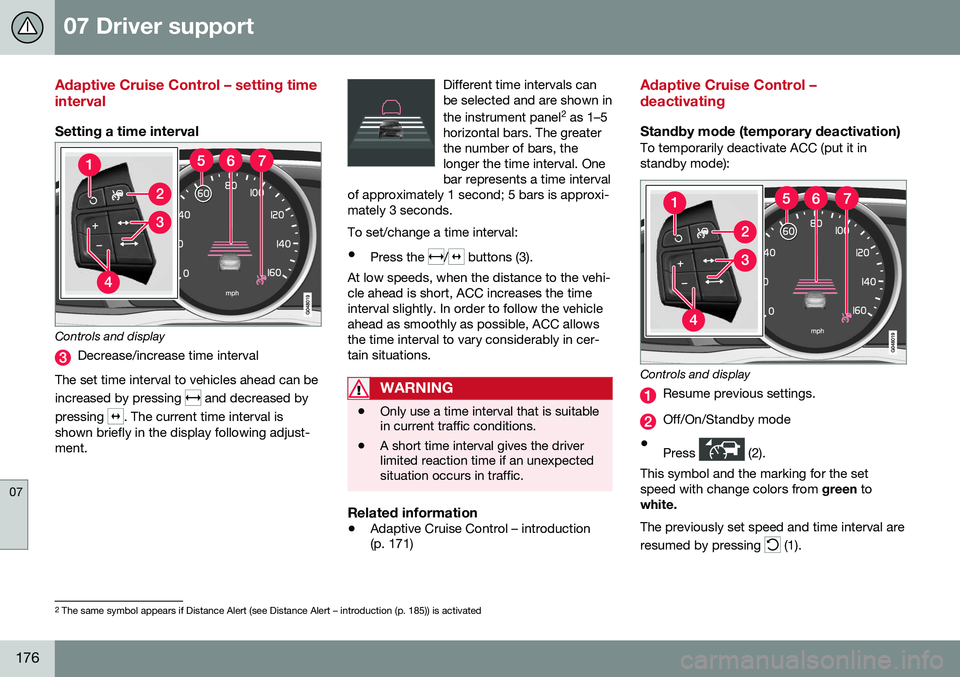
Setting a time interval
Controls and display
Decrease/increase time interval
The set time interval to vehicles ahead can be increased by pressing
and decreased by
pressing
. The current time interval is
shown briefly in the display following adjust- ment. Different time intervals canbe selected and are shown in the instrument panel
2
as 1–5
horizontal bars. The greater the number of bars, thelonger the time interval. Onebar represents a time interval
of approximately 1 second; 5 bars is approxi-mately 3 seconds.
To set/change a time interval:
• Press the
/ buttons (3).
At low speeds, when the distance to the vehi- cle ahead is short, ACC increases the timeinterval slightly. In order to follow the vehicleahead as smoothly as possible, ACC allowsthe time interval to vary considerably in cer-tain situations.
WARNING
• Only use a time interval that is suitable in current traffic conditions.
• A short time interval gives the driverlimited reaction time if an unexpectedsituation occurs in traffic.
Related information
•
Adaptive Cruise Control – introduction (p. 171)
Adaptive Cruise Control – deactivating
Standby mode (temporary deactivation)To temporarily deactivate ACC (put it in standby mode):
Controls and display
Resume previous settings.
Off/On/Standby mode
• Press
(2).
This symbol and the marking for the set speed with change colors from green to
white. The previously set speed and time interval are resumed by pressing
(1).
2 The same symbol appears if Distance Alert (see Distance Alert – introduction (p. 185)) is activated
Page 179 of 380
07 Driver support
07
177
WARNING
The vehicle may accelerate quickly after
has been pressed if its current speed is
considerably lower than the set speed.
Standby mode due to action by the driver
ACC is temporarily deactivated and put in standby mode:
• if the brakes are applied
• if the gear selector is moved to
N
• if the driver drives faster than the set speed for more than
1 minute.
In this happens, the driver will have to regu- late the vehicle's speed.
NOTE
If the accelerator pedal is only depressed for a short time, such as when passinganother vehicle, ACC is deactivated tem-porarily and is reactivated when the pedalis released.
Automatic standby modeACC is linked to other systems such as the stability system. If this system is not function-ing properly, ACC will switch off automati-cally. In the event of automatic deactivation, an audible signal will sound and the message
Cruise control Cancelled is shown in the
instrument panel. The driver must then inter- vene and adapt the vehicle's speed to thesurrounding traffic and regulate the distanceto the vehicle ahead. An automatic switch to standby mode may be caused if:
• engine speed (rpm) is too high/low
• The driver's door is opened
• The driver unbuckles his/her seat belt
• the vehicle's speed goes below 18 mph (30 km/h)
• the wheels lose traction
• brake temperature is high
• the radar sensor is obstructed by, forexample, wet snow or rain.
Resuming the set speedIf ACC is in standby mode, it can be reactiva- ted by pressing the
button on the steering
wheel keypad. The vehicle will return to the most recently set speed.
WARNING
The vehicle may accelerate quickly after
has been pressed if its current speed is
considerably lower than the set speed.
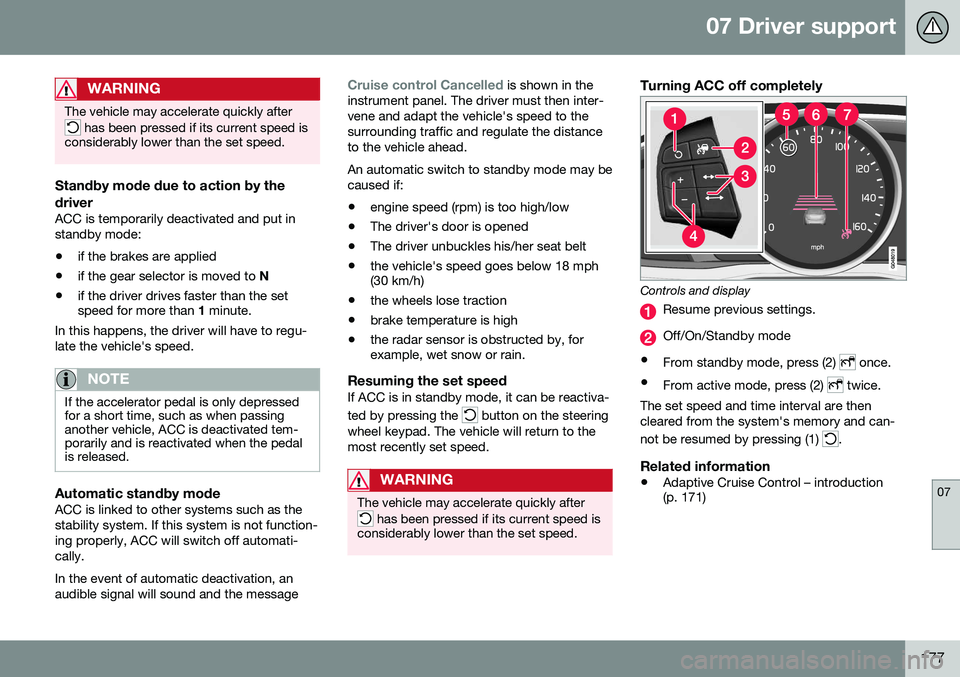
Turning ACC off completely
Controls and display
Resume previous settings.
Off/On/Standby mode
• From standby mode, press (2)
once.
• From active mode, press (2)
twice.
The set speed and time interval are then cleared from the system's memory and can- not be resumed by pressing (1)
.
Related information
• Adaptive Cruise Control – introduction (p. 171)