lock VOLVO S80 2016 Owner´s Manual
[x] Cancel search | Manufacturer: VOLVO, Model Year: 2016, Model line: S80, Model: VOLVO S80 2016Pages: 380, PDF Size: 9.45 MB
Page 160 of 380
||
06 Locks and alarm
06
158
Related information
•Alarm – turning off (p. 159)
• Alarm signal (p. 159)
• Alarm indicator (p. 158)
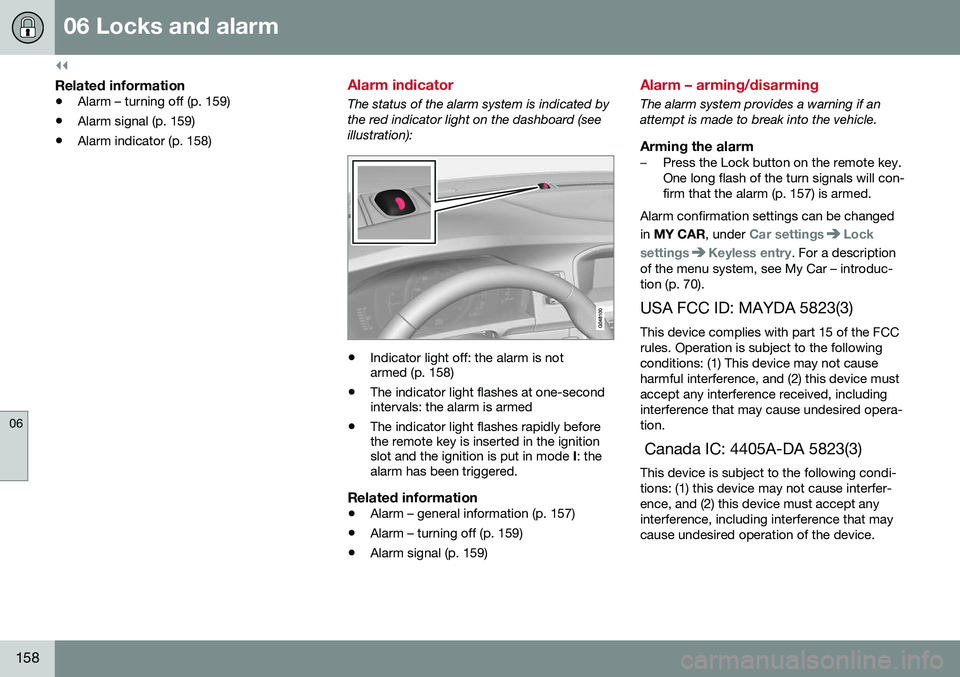
Alarm indicator
The status of the alarm system is indicated by the red indicator light on the dashboard (seeillustration):
•Indicator light off: the alarm is not armed (p. 158)
• The indicator light flashes at one-secondintervals: the alarm is armed
• The indicator light flashes rapidly beforethe remote key is inserted in the ignitionslot and the ignition is put in mode
I: the
alarm has been triggered.
Related information
• Alarm – general information (p. 157)
• Alarm – turning off (p. 159)
• Alarm signal (p. 159)
Alarm – arming/disarming
The alarm system provides a warning if an attempt is made to break into the vehicle.
Arming the alarm–Press the Lock button on the remote key. One long flash of the turn signals will con-firm that the alarm (p. 157) is armed.
Alarm confirmation settings can be changed in MY CAR , under
Car settingsLock
settings
Keyless entry. For a description
of the menu system, see My Car – introduc- tion (p. 70).
USA FCC ID: MAYDA 5823(3) This device complies with part 15 of the FCCrules. Operation is subject to the followingconditions: (1) This device may not causeharmful interference, and (2) this device mustaccept any interference received, includinginterference that may cause undesired opera-tion. Canada IC: 4405A-DA 5823(3) This device is subject to the following condi- tions: (1) this device may not cause interfer-ence, and (2) this device must accept anyinterference, including interference that maycause undesired operation of the device.
Page 161 of 380
06 Locks and alarm
06
159
Disarming the alarm–Press the Unlock button on the remote key.
> Two short flashes from the car's direc-tion indicators confirm that the alarm has been deactivated and that alldoors are unlocked.
Related information
• Alarm indicator (p. 158)
• Alarm signal (p. 159)
• Alarm – turning off (p. 159)
• Alarm-related functions (p. 160)
Alarm signal
An audible (p. 157) signal is given by a battery powered siren. The alarm cycle lasts for30 seconds. The visual alarm signal is given by flashing all turn signals for approximately 5 minutes oruntil the alarm is turned off.
Related information
•Alarm indicator (p. 158)
• Alarm – arming/disarming (p. 158)
• Alarm – turning off (p. 159)
Alarm – turning off
The alarm system provides a warning if an attempt is made to break into the vehicle. If the alarm is sounding, it can be stopped by pressing the Unlock button on the remote keyor by inserting the remote key in the ignitionslot. Two short flashes from the car's turn sig-nals confirm that the alarm has been turnedoff.
Related information
• Alarm indicator (p. 158)
• Alarm – arming/disarming (p. 158)
• Remote key – replacing the battery (p. 147)
Page 162 of 380
06 Locks and alarm
06
160
Alarm-related functions
The following is general information regarding the alarm system in your vehicle.
Automatic re-armingIf the doors are unlocked, the locks will auto-matically re-engage (re-lock) and the alarmwill re-arm after 2 minutes unless a door orthe trunk has been opened.
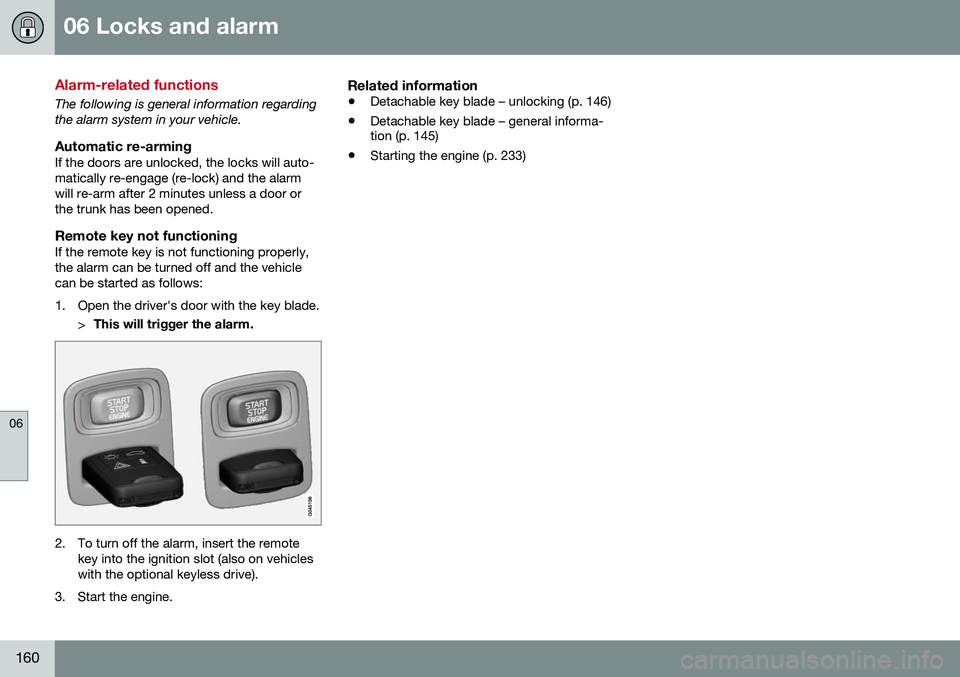
Remote key not functioningIf the remote key is not functioning properly,the alarm can be turned off and the vehiclecan be started as follows:
1. Open the driver's door with the key blade.>This will trigger the alarm.
2. To turn off the alarm, insert the remote
key into the ignition slot (also on vehicles with the optional keyless drive).
3. Start the engine.
Related information
• Detachable key blade – unlocking (p. 146)
• Detachable key blade – general informa- tion (p. 145)
• Starting the engine (p. 233)
Page 172 of 380
07 Driver support
07
170
Toggling between ACC and CC (standard Cruise Control)
Adaptive Cruise Control (ACC) helps the driver maintain a safe distance/time interval tothe vehicle ahead.
Switching from ACC to CCThis may be useful if, for example, the radarsensor is obstructed in some way. SeeAdaptive Cruise Control – limitations (p. 180)for additional information.
• Press and hold the
button; the symbol
in the instrument panel will switch from
to .
> This activates the standard cruise control function (see Cruise control (CC) – intro- duction (p. 168)).
WARNING
Switching from ACC to CC means that:
• Your vehicle will
no longer automati-
cally maintain a set distance to a vehi- cle ahead.
• Only the set speed will be maintainedand the driver will have to apply thebrakes when needed.
Switching from CC to ACC
Switch off cruise control by pressing once
or twice as needed according to the instruc- tions in the previous section "Turning ACC off completely." The next time the system isswitched on, ACC will be reactivated.
Related information
•
Adaptive Cruise Control – introduction (p. 171)
• Adaptive Cruise Control – function(p. 172)
Cruise control (CC) – deactivating
Cruise control is designed to assist the driver by maintaining a set speed. It is primarilyintended for use on long straight roads insteady traffic, such as on highways and othermain roads.
Automatic deactivationThe cruise control is automatically deacti-vated
temporarily if one of the following
occurs: • If the speed drops below approximately 20 mph (30 km/h).
• When the brake pedal is depressed.
• If the gear selector is moved to positionN
.
• During wheel spin or wheel lock-up.
• If the vehicle's speed is increased byusing the accelerator pedal for more than1 minute.
• Engine speed (rpm) is too high or too low.
The currently set speed will be saved in the system's memory.
Temporary deactivationThe driver can temporarily deactivate thecruise control by pressing 0. The saved
speed is shown in brackets in the informationdisplay.
Page 184 of 380
07 Driver support
07
182
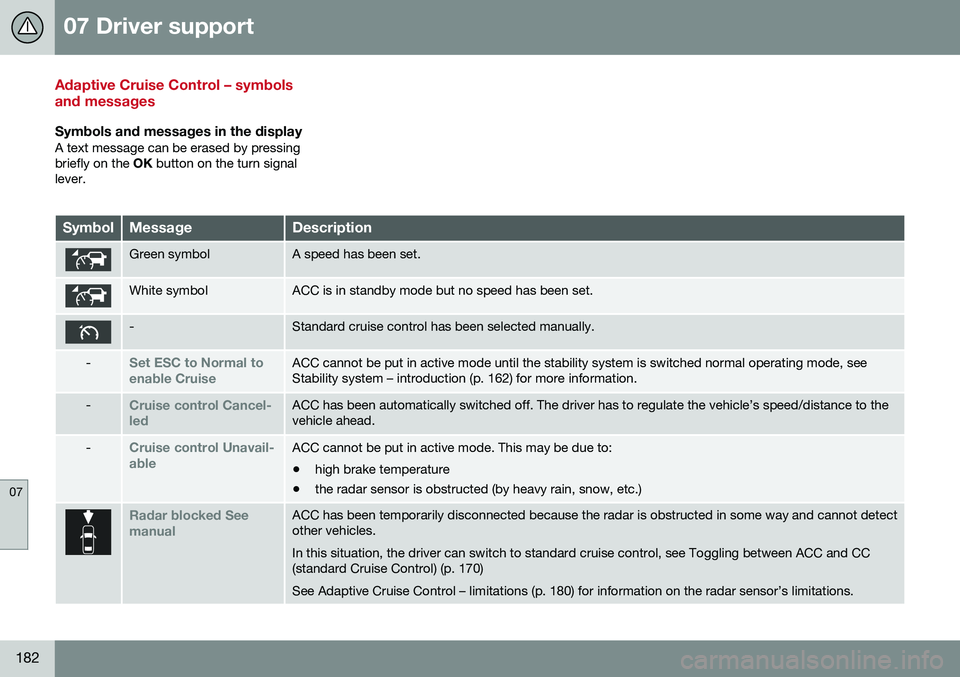
Adaptive Cruise Control – symbols and messages
Symbols and messages in the displayA text message can be erased by pressing briefly on the OK button on the turn signal
lever.
SymbolMessageDescription
Green symbolA speed has been set.
White symbolACC is in standby mode but no speed has been set.
-Standard cruise control has been selected manually.
-Set ESC to Normal to enable CruiseACC cannot be put in active mode until the stability system is switched normal operating mode, see Stability system – introduction (p. 162) for more information.
-Cruise control Cancel- ledACC has been automatically switched off. The driver has to regulate the vehicle’s speed/distance to the vehicle ahead.
-Cruise control Unavail- ableACC cannot be put in active mode. This may be due to: • high brake temperature
• the radar sensor is obstructed (by heavy rain, snow, etc.)
Radar blocked See manualACC has been temporarily disconnected because the radar is obstructed in some way and cannot detect other vehicles. In this situation, the driver can switch to standard cruise control, see Toggling between ACC and CC (standard Cruise Control) (p. 170) See Adaptive Cruise Control – limitations (p. 180) for information on the radar sensor’s limitations.
Page 186 of 380
07 Driver support
07
184
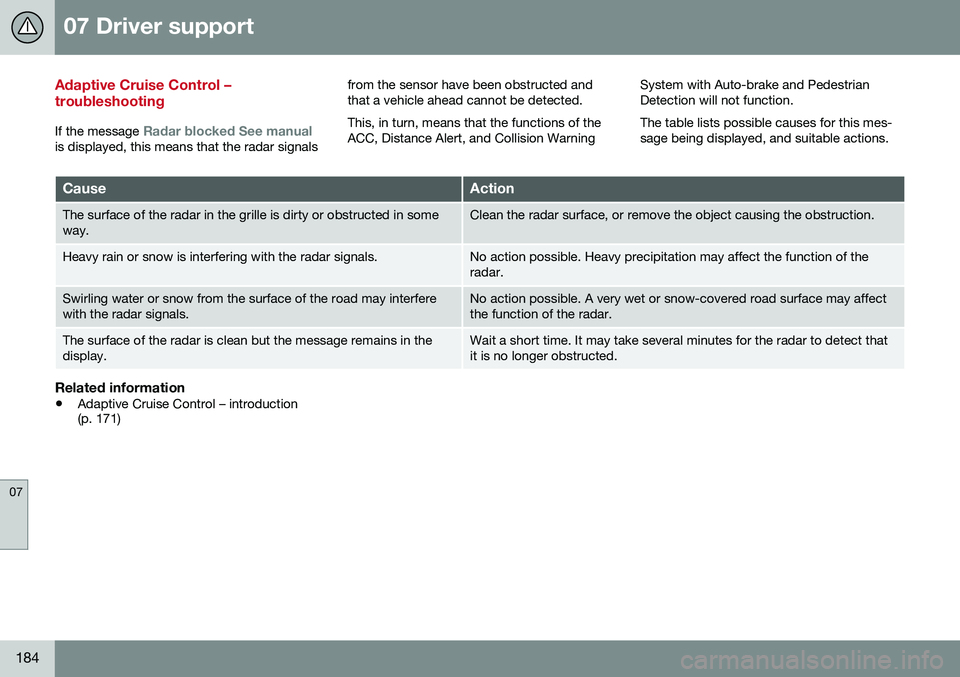
Adaptive Cruise Control – troubleshooting
If the message Radar blocked See manualis displayed, this means that the radar signalsfrom the sensor have been obstructed and that a vehicle ahead cannot be detected. This, in turn, means that the functions of the ACC, Distance Alert, and Collision Warning
System with Auto-brake and PedestrianDetection will not function. The table lists possible causes for this mes- sage being displayed, and suitable actions.
CauseAction
The surface of the radar in the grille is dirty or obstructed in some way.Clean the radar surface, or remove the object causing the obstruction.
Heavy rain or snow is interfering with the radar signals.No action possible. Heavy precipitation may affect the function of the radar.
Swirling water or snow from the surface of the road may interfere with the radar signals.No action possible. A very wet or snow-covered road surface may affect the function of the radar.
The surface of the radar is clean but the message remains in the display.Wait a short time. It may take several minutes for the radar to detect that it is no longer obstructed.
Related information
•
Adaptive Cruise Control – introduction (p. 171)
Page 190 of 380
07 Driver support
07
188
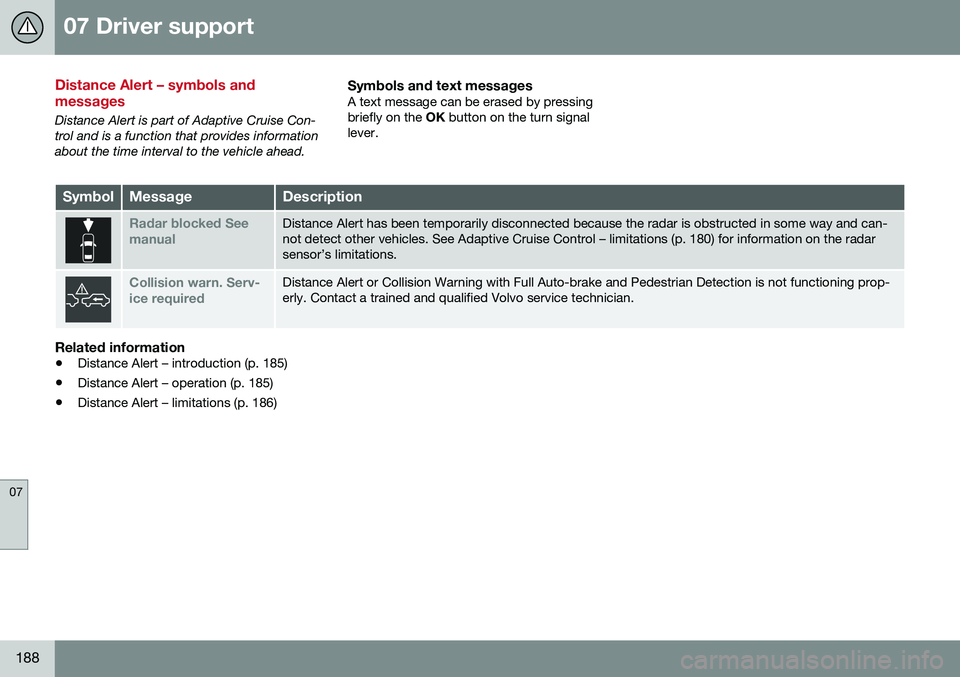
Distance Alert – symbols and messages
Distance Alert is part of Adaptive Cruise Con- trol and is a function that provides informationabout the time interval to the vehicle ahead.
Symbols and text messagesA text message can be erased by pressingbriefly on the OK button on the turn signal
lever.
SymbolMessageDescription
Radar blocked See manualDistance Alert has been temporarily disconnected because the radar is obstructed in some way and can- not detect other vehicles. See Adaptive Cruise Control – limitations (p. 180) for information on the radarsensor’s limitations.
Collision warn. Serv- ice requiredDistance Alert or Collision Warning with Full Auto-brake and Pedestrian Detection is not functioning prop- erly. Contact a trained and qualified Volvo service technician.
Related information
• Distance Alert – introduction (p. 185)
• Distance Alert – operation (p. 185)
• Distance Alert – limitations (p. 186)
Page 194 of 380
||
07 Driver support
07
192
Therefore, vehicles or objects with low-reflec- tive surfaces may not be detected. Normally,the license plate and taillight reflectors givethe rear section of a vehicle ahead sufficientreflective surfaces to be detected.
NOTE
•Keep the windshield in front of the laser sensor free of ice, snow, dirt,etc., see City Safety – function(p. 190).
• Snow or ice on the hood deeper than2 inches (5 cm) may obstruct the sen-sor. Keep the hood free of ice andsnow.
• Do not mount or in any way attachanything on the windshield that couldobstruct the laser sensor.
Related information
•
City Safety – introduction (p. 189)
• City Safety – function (p. 190)
• City Safety – operation (p. 191)
• City Safety – troubleshooting (p. 192)
• City Safety – symbols and messages (p. 194)
• City Safety – Laser sensor (p. 195)
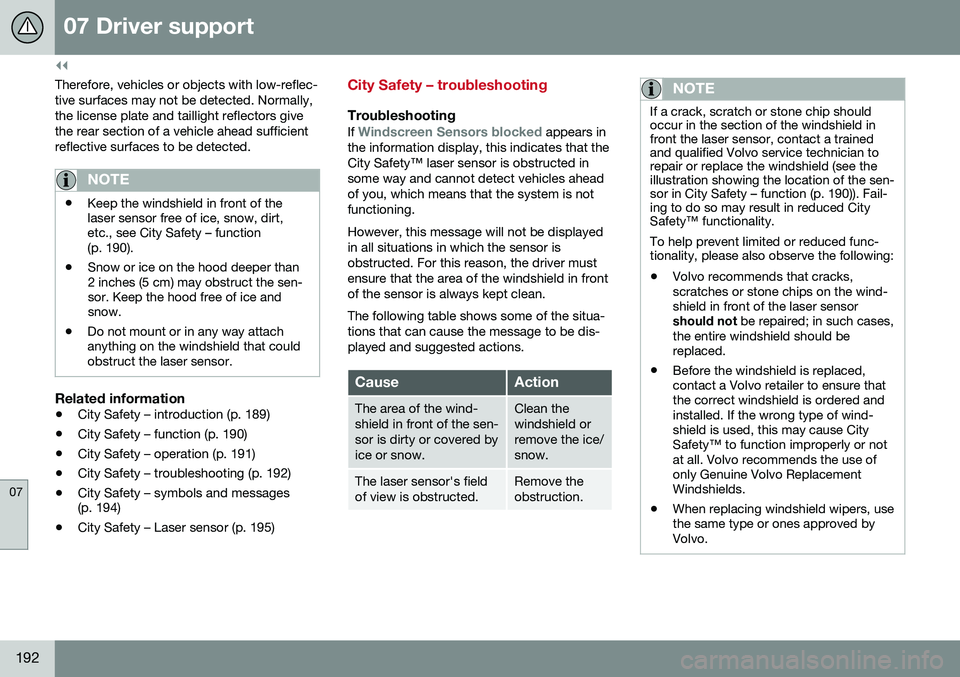
City Safety – troubleshooting
Troubleshooting
If Windscreen Sensors blocked appears in
the information display, this indicates that the City Safety™ laser sensor is obstructed insome way and cannot detect vehicles aheadof you, which means that the system is notfunctioning. However, this message will not be displayed in all situations in which the sensor isobstructed. For this reason, the driver mustensure that the area of the windshield in frontof the sensor is always kept clean. The following table shows some of the situa- tions that can cause the message to be dis-played and suggested actions.
CauseAction
The area of the wind- shield in front of the sen-sor is dirty or covered byice or snow.Clean the windshield orremove the ice/snow.
The laser sensor's field of view is obstructed.Remove the obstruction.
NOTE
If a crack, scratch or stone chip should occur in the section of the windshield infront the laser sensor, contact a trainedand qualified Volvo service technician torepair or replace the windshield (see theillustration showing the location of the sen-sor in City Safety – function (p. 190)). Fail-ing to do so may result in reduced CitySafety™ functionality. To help prevent limited or reduced func- tionality, please also observe the following:
• Volvo recommends that cracks, scratches or stone chips on the wind-shield in front of the laser sensorshould not
be repaired; in such cases,
the entire windshield should bereplaced.
• Before the windshield is replaced,contact a Volvo retailer to ensure thatthe correct windshield is ordered andinstalled. If the wrong type of wind-shield is used, this may cause CitySafety™ to function improperly or notat all. Volvo recommends the use ofonly Genuine Volvo ReplacementWindshields.
• When replacing windshield wipers, usethe same type or ones approved byVolvo.
Page 196 of 380
07 Driver support
07
194
City Safety – symbols and messages
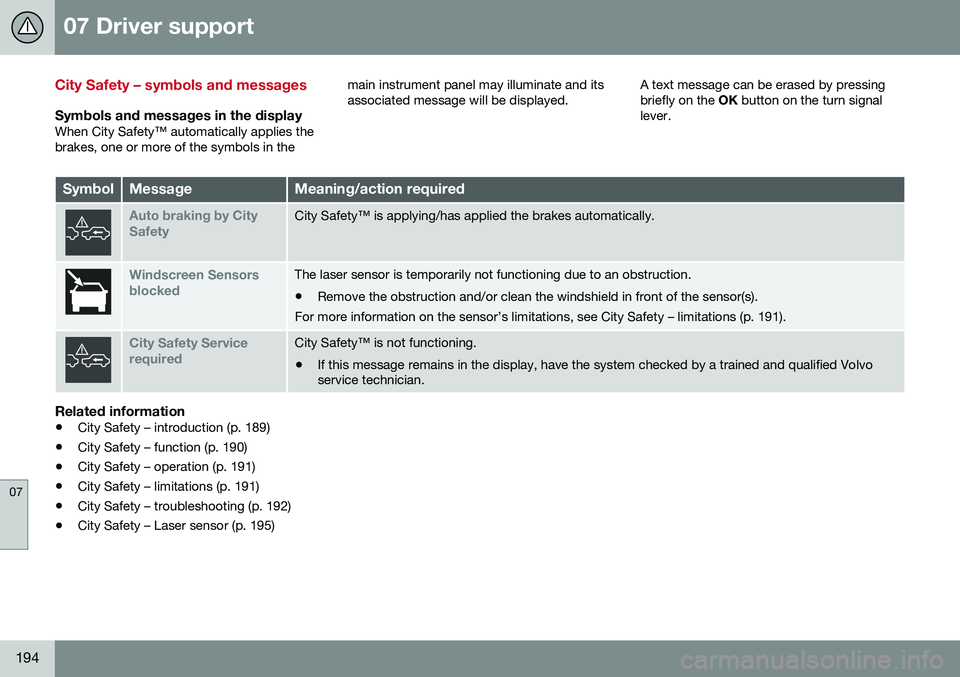
Symbols and messages in the displayWhen City Safety™ automatically applies the brakes, one or more of the symbols in themain instrument panel may illuminate and itsassociated message will be displayed.
A text message can be erased by pressingbriefly on the
OK button on the turn signal
lever.
SymbolMessageMeaning/action required
Auto braking by City SafetyCity Safety™ is applying/has applied the brakes automatically.
Windscreen Sensors blockedThe laser sensor is temporarily not functioning due to an obstruction.
• Remove the obstruction and/or clean the windshield in front of the sensor(s).
For more information on the sensor’s limitations, see City Safety – limitations (p. 191).
City Safety Service requiredCity Safety™ is not functioning.
• If this message remains in the display, have the system checked by a trained and qualified Volvo service technician.
Related information
• City Safety – introduction (p. 189)
• City Safety – function (p. 190)
• City Safety – operation (p. 191)
• City Safety – limitations (p. 191)
• City Safety – troubleshooting (p. 192)
• City Safety – Laser sensor (p. 195)
Page 206 of 380
07 Driver support
07
204* Option/accessory, for more information, see Introduction.
The camera’s limitations
The camera has the same limitations as the human eye. The camera is used by Pedestrian and Cyclist Detection with Full Auto Brake Collision warn-ing – introduction (p. 196), Active High Beams(Active high beams (AHB)* (p. 84)), Road SignInformation (Road Sign Information (RSI)* –introduction (p. 166)) and Driver Alert System(Driver Alert System (p. 209)) with LaneDeparture Warning.
NOTE
• To help protect the camera in very hot conditions, it may be temporarilyswitched off for approximately 15minutes after the engine has beenstarted.
• Keep the section of the windshield infront of the camera clean and free ofice, snow, or condensation.
WARNING
•
The camera has the same type of limi- tations as the human eye, i.e., it can-not see as well in heavy snowfall orrain, thick fog or in heavy blowing dustor snow. In such conditions, systemsdepending on the camera may experi-ence greatly reduced functionality ormay be temporarily deactivated.
• Never place any objects, decals, etc.,on the windshield in front of the cam-era. This could reduce or block thecamera’s function, and could causeone or more of the systems that utilizethe camera to stop functioning.
• Strong sunlight, reflections from theroad surface, ice or snow covering theroad, a dirty road surface, or unclearlane marker lines may drasticallyreduce the camera’s capacity todetect the side of a lane, a pedestrian,a cyclist or another vehicle.
Related information
•
Collision warning – introduction (p. 196)
• Collision warning* – function (p. 198)
• Collision warning* – operation (p. 199)
• Collision warning* – Pedestrian detection (p. 201)
• Collision warning* – Cyclist detection(p. 200)
• Collision warning* – limitations (p. 202) •
Collision warning – troubleshooting(p. 205)
• Collision warning – symbols and mes-sages (p. 207)
• Road Sign Information (RSI)* – introduc-tion (p. 166)
• Driver Alert System (p. 209)
• Active high beams (AHB)* (p. 84)