buttons VOLVO S80 2016 Owner´s Manual
[x] Cancel search | Manufacturer: VOLVO, Model Year: 2016, Model line: S80, Model: VOLVO S80 2016Pages: 380, PDF Size: 9.45 MB
Page 61 of 380
03 Instruments and controls
03
}}
59
Instrument overview
This overview shows the location of the instrument panel and center console displays,and controls/buttons/switches.
Page 72 of 380
||
03 Instruments and controls
03
70
Reminder – doors not closedIf one of the doors is not closed properly, the
information or warning symbol illuminates
(depending on the vehicle's speed), a graphic will be displayed in instrument panel and an explanatory text message 3
will also be dis-
played in the instrument panel. Stop the vehi- cle in a safe place as soon as possible andclose the door.
If the vehicle is driven at a speedlower than approximately 5 mph(7 km/h), the information symbol illu-
minates.
If the vehicle is driven at a speed higher than approximately 5 mph(7 km/h), the warning symbol illumi-
nates.
If the hood is not closed properly, the warn-
ing symbol illuminates, a graphic will be dis-
played in instrument panel and an explana- tory text message 3
will also be displayed in
the instrument panel. Stop the vehicle in a safe place as soon as possible and close thehood. If the trunk is not closed properly, the infor-
mation symbol illuminates and a graphic will
be displayed in instrument panel. Stop the vehicle in a safe place as soon as possibleand close the trunk.
Related information
• Information displays – introduction (p. 62)
• Information displays – indicator symbols (p. 66)
My Car – introduction
The MY CAR menu system provides access to menus for operating many of the vehicle'sfunctions, such as setting the clock, door mir-rors, lock and alarm settings, etc. Some of the features or functions are stand- ard; others are optional and vary according tomodel/market.
OperationUse the buttons on the center console or thesteering wheel keypad to navigate in themenus.
3
Text message applies only to models with the optional digital instrument panel
Page 73 of 380
03 Instruments and controls
03
* Option/accessory, for more information, see Introduction.71
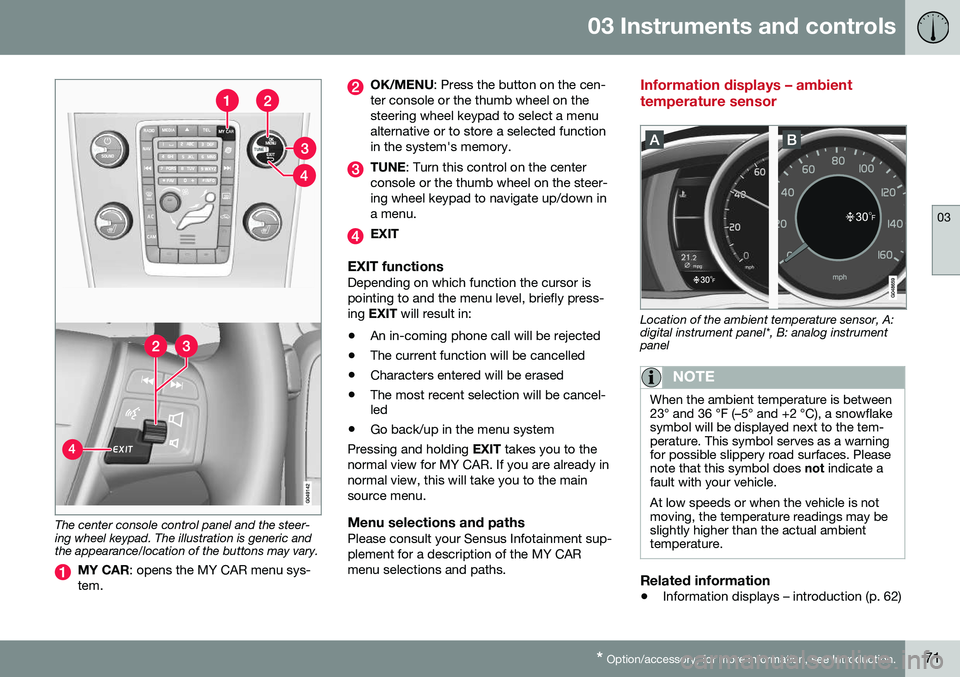
The center console control panel and the steer- ing wheel keypad. The illustration is generic andthe appearance/location of the buttons may vary.
MY CAR : opens the MY CAR menu sys-
tem.
OK/MENU : Press the button on the cen-
ter console or the thumb wheel on the steering wheel keypad to select a menualternative or to store a selected functionin the system's memory.
TUNE : Turn this control on the center
console or the thumb wheel on the steer- ing wheel keypad to navigate up/down ina menu.
EXIT
EXIT functionsDepending on which function the cursor is pointing to and the menu level, briefly press-ing EXIT will result in:
• An in-coming phone call will be rejected
• The current function will be cancelled
• Characters entered will be erased
• The most recent selection will be cancel- led
• Go back/up in the menu system
Pressing and holding EXIT takes you to the
normal view for MY CAR. If you are already in normal view, this will take you to the mainsource menu.
Menu selections and pathsPlease consult your Sensus Infotainment sup-plement for a description of the MY CARmenu selections and paths.
Information displays – ambient temperature sensor
Location of the ambient temperature sensor, A: digital instrument panel*, B: analog instrumentpanel
NOTE
When the ambient temperature is between 23° and 36 °F (–5° and +2 °C), a snowflakesymbol will be displayed next to the tem-perature. This symbol serves as a warningfor possible slippery road surfaces. Pleasenote that this symbol does not indicate a
fault with your vehicle. At low speeds or when the vehicle is not moving, the temperature readings may beslightly higher than the actual ambienttemperature.
Related information
• Information displays – introduction (p. 62)
Page 78 of 380
||
03 Instruments and controls
03
76* Option/accessory, for more information, see Introduction.
Operation
NOTE
• Only one of the power seat's controls can be used at the same time.
• The power seats have an overloadprotector that activates if a seat isblocked by any object. If this occurs,switch off the ignition (key in posi-tion
0) and wait for a short period
before operating the seat again.
Power seat memory function
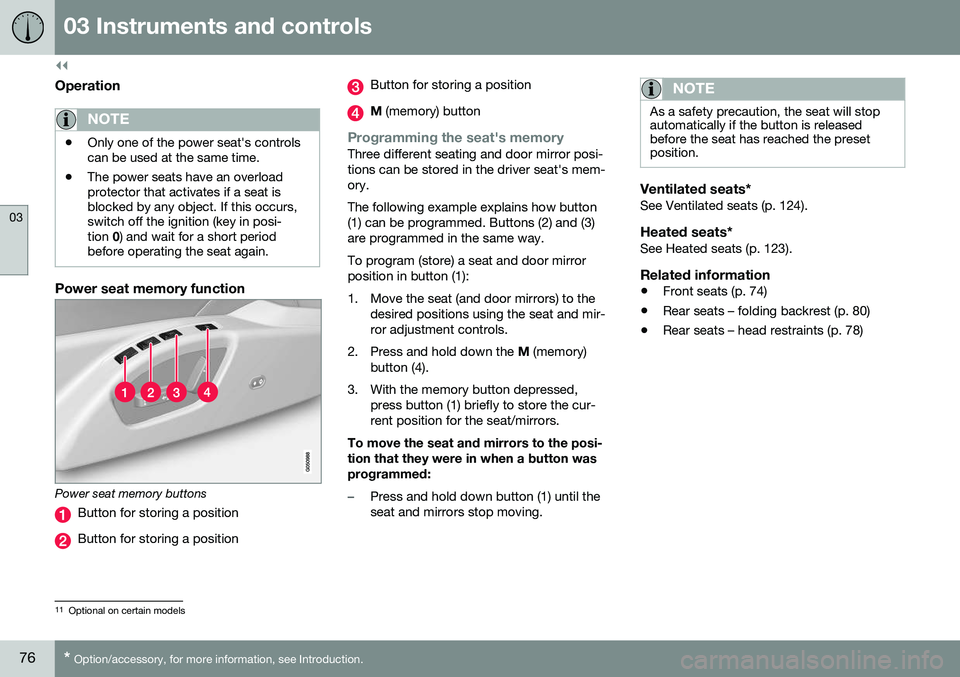
Power seat memory buttons
Button for storing a position
Button for storing a position
Button for storing a position
M (memory) button
Programming the seat's memoryThree different seating and door mirror posi- tions can be stored in the driver seat's mem-ory. The following example explains how button (1) can be programmed. Buttons (2) and (3)are programmed in the same way. To program (store) a seat and door mirror position in button (1):
1. Move the seat (and door mirrors) to the
desired positions using the seat and mir- ror adjustment controls.
2. Press and hold down the M (memory)
button (4).
3. With the memory button depressed, press button (1) briefly to store the cur-rent position for the seat/mirrors.
To move the seat and mirrors to the posi-tion that they were in when a button wasprogrammed:
–Press and hold down button (1) until the seat and mirrors stop moving.
NOTE
As a safety precaution, the seat will stop automatically if the button is releasedbefore the seat has reached the presetposition.
Ventilated seats*See Ventilated seats (p. 124).
Heated seats*See Heated seats (p. 123).
Related information
• Front seats (p. 74)
• Rear seats – folding backrest (p. 80)
• Rear seats – head restraints (p. 78)
11
Optional on certain models
Page 79 of 380
03 Instruments and controls
03
}}
* Option/accessory, for more information, see Introduction.77
Key memory – power driver's seat* and door mirrors
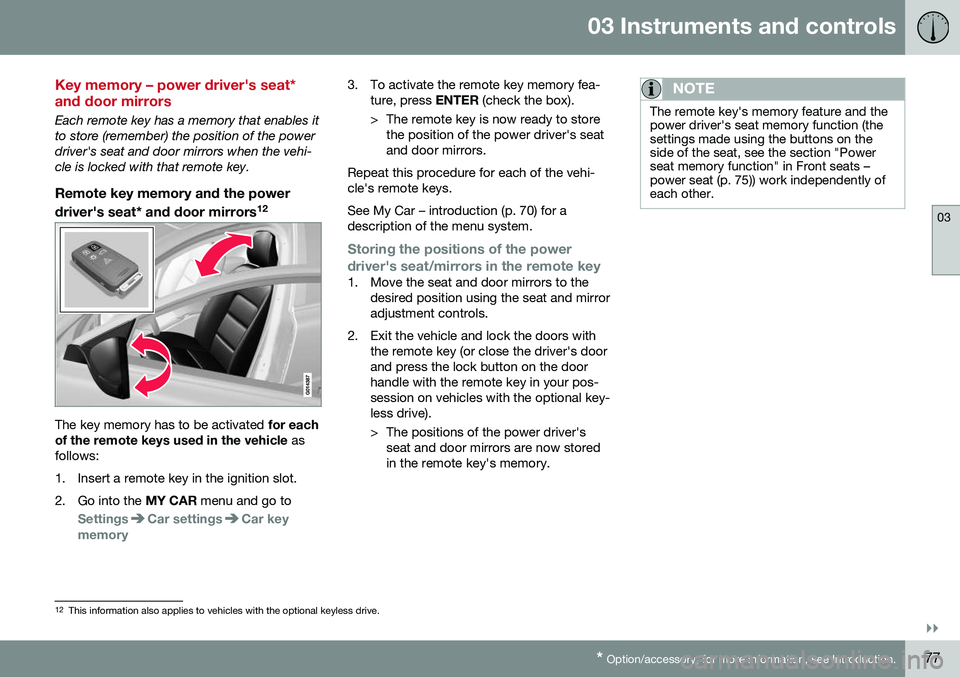
Each remote key has a memory that enables it to store (remember) the position of the powerdriver's seat and door mirrors when the vehi-cle is locked with that remote key.
Remote key memory and the power
driver's seat* and door mirrors 12
The key memory has to be activated
for each
of the remote keys used in the vehicle as
follows:
1. Insert a remote key in the ignition slot.
2. Go into the MY CAR menu and go to
SettingsCar settingsCar key
memory
3. To activate the remote key memory fea- ture, press ENTER (check the box).
> The remote key is now ready to store the position of the power driver's seat and door mirrors.
Repeat this procedure for each of the vehi-cle's remote keys. See My Car – introduction (p. 70) for a description of the menu system.
Storing the positions of the power
driver's seat/mirrors in the remote key
1. Move the seat and door mirrors to the desired position using the seat and mirror adjustment controls.
2. Exit the vehicle and lock the doors with the remote key (or close the driver's doorand press the lock button on the doorhandle with the remote key in your pos-session on vehicles with the optional key-less drive).
> The positions of the power driver'sseat and door mirrors are now stored in the remote key's memory.
NOTE
The remote key's memory feature and the power driver's seat memory function (thesettings made using the buttons on theside of the seat, see the section "Powerseat memory function" in Front seats –power seat (p. 75)) work independently ofeach other.
12This information also applies to vehicles with the optional keyless drive.
Page 91 of 380
03 Instruments and controls
03
}}
* Option/accessory, for more information, see Introduction.89
NOTE
• This automatic flashing sequence can be interrupted by immediately movingthe lever in the opposite direction.
• If the turn signal indicator flashesfaster than normal, check for aburned-out turn signal bulb.
Related information
•
Hazard warning flashers (p. 88)
Front interior lighting
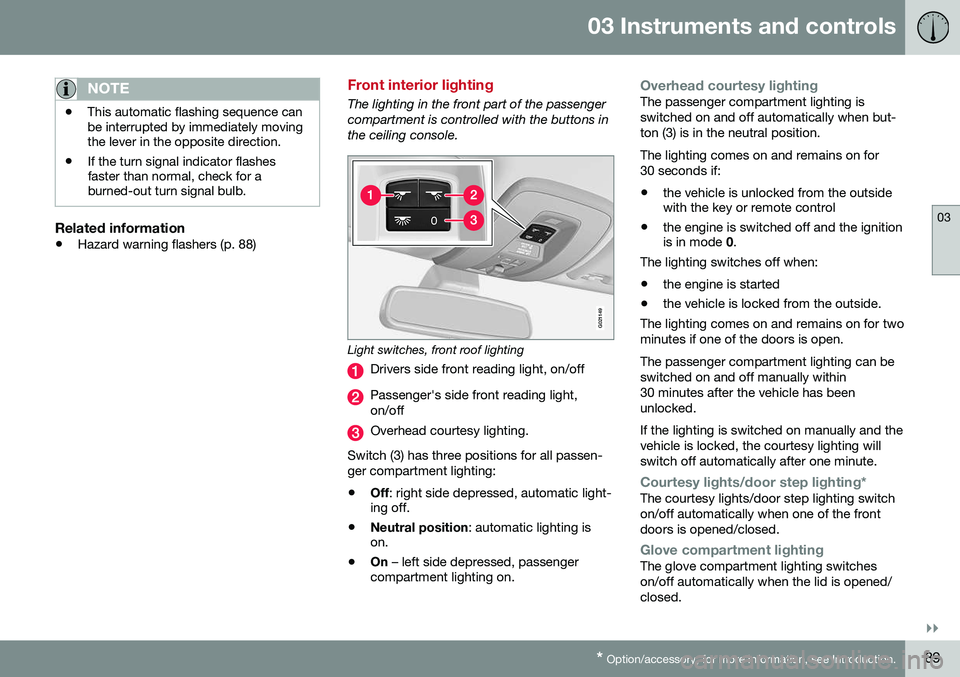
The lighting in the front part of the passenger compartment is controlled with the buttons inthe ceiling console.
G021149
Light switches, front roof lighting
Drivers side front reading light, on/off
Passenger's side front reading light, on/off
Overhead courtesy lighting.
Switch (3) has three positions for all passen- ger compartment lighting:
• Off
: right side depressed, automatic light-
ing off.
• Neutral position
: automatic lighting is
on.
• On
– left side depressed, passenger
compartment lighting on.
Overhead courtesy lightingThe passenger compartment lighting is switched on and off automatically when but-ton (3) is in the neutral position. The lighting comes on and remains on for 30 seconds if:
• the vehicle is unlocked from the outside with the key or remote control
• the engine is switched off and the ignitionis in mode
0.
The lighting switches off when:
• the engine is started
• the vehicle is locked from the outside.
The lighting comes on and remains on for two minutes if one of the doors is open. The passenger compartment lighting can be switched on and off manually within30 minutes after the vehicle has beenunlocked. If the lighting is switched on manually and the vehicle is locked, the courtesy lighting willswitch off automatically after one minute.
Courtesy lights/door step lighting*The courtesy lights/door step lighting switch on/off automatically when one of the frontdoors is opened/closed.
Glove compartment lightingThe glove compartment lighting switches on/off automatically when the lid is opened/closed.
Page 96 of 380
03 Instruments and controls
03
94
Power windows
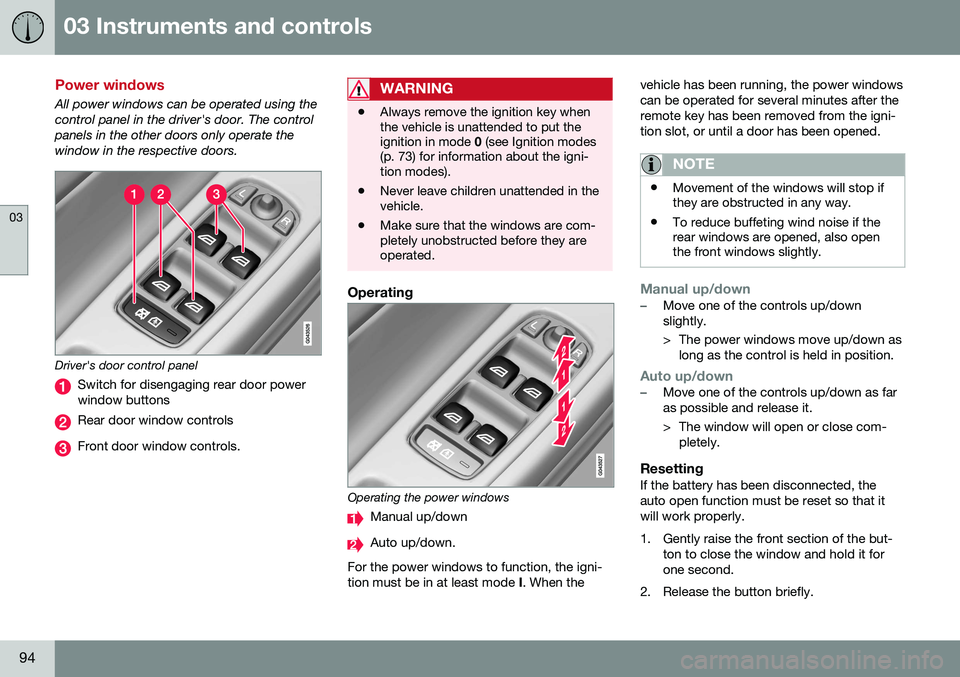
All power windows can be operated using the control panel in the driver's door. The controlpanels in the other doors only operate thewindow in the respective doors.
Driver's door control panel
Switch for disengaging rear door power window buttons
Rear door window controls
Front door window controls.
WARNING
•Always remove the ignition key when the vehicle is unattended to put theignition in mode
0 (see Ignition modes
(p. 73) for information about the igni-tion modes).
• Never leave children unattended in thevehicle.
• Make sure that the windows are com-pletely unobstructed before they areoperated.
Operating
Operating the power windows
Manual up/down
Auto up/down.
For the power windows to function, the igni- tion must be in at least mode I. When the vehicle has been running, the power windowscan be operated for several minutes after theremote key has been removed from the igni-tion slot, or until a door has been opened.
NOTE
•
Movement of the windows will stop if they are obstructed in any way.
• To reduce buffeting wind noise if therear windows are opened, also openthe front windows slightly.
Manual up/down–Move one of the controls up/down slightly.
> The power windows move up/down as
long as the control is held in position.
Auto up/down–Move one of the controls up/down as far as possible and release it.
> The window will open or close com-pletely.
ResettingIf the battery has been disconnected, the auto open function must be reset so that itwill work properly.
1. Gently raise the front section of the but- ton to close the window and hold it for one second.
2. Release the button briefly.
Page 98 of 380
03 Instruments and controls
03
96* Option/accessory, for more information, see Introduction.
Power door mirrors
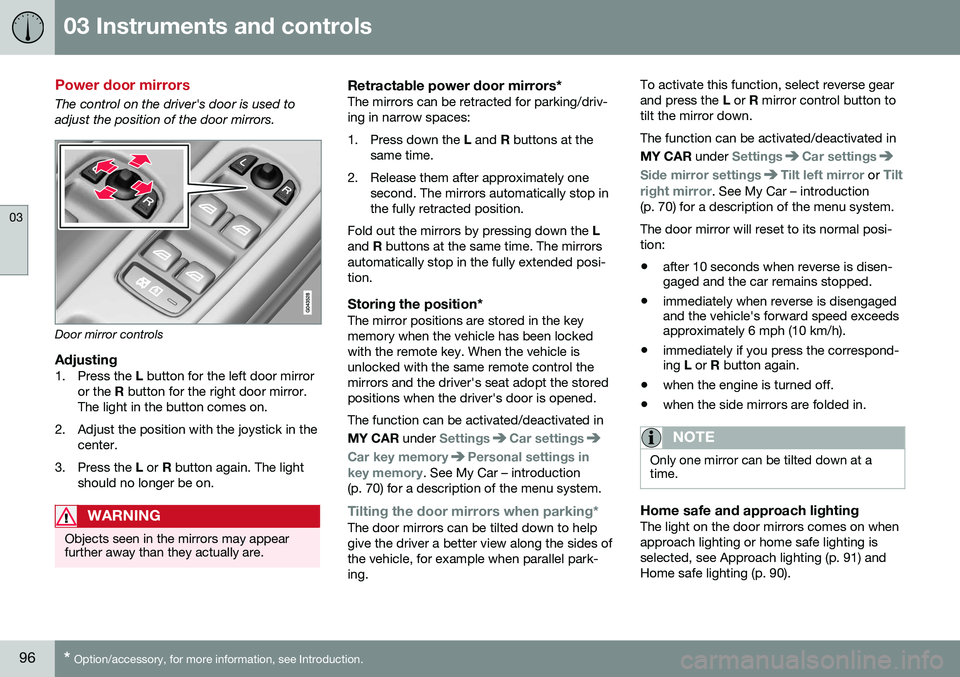
The control on the driver's door is used to adjust the position of the door mirrors.
Door mirror controls
Adjusting1. Press the L button for the left door mirror
or the R button for the right door mirror.
The light in the button comes on.
2. Adjust the position with the joystick in the center.
3. Press the L or R button again. The light
should no longer be on.
WARNING
Objects seen in the mirrors may appear further away than they actually are.
Retractable power door mirrors*The mirrors can be retracted for parking/driv- ing in narrow spaces:
1. Press down the L and R buttons at the
same time.
2. Release them after approximately one second. The mirrors automatically stop in the fully retracted position.
Fold out the mirrors by pressing down the L
and R buttons at the same time. The mirrors
automatically stop in the fully extended posi-tion.
Storing the position*The mirror positions are stored in the keymemory when the vehicle has been lockedwith the remote key. When the vehicle isunlocked with the same remote control themirrors and the driver's seat adopt the storedpositions when the driver's door is opened. The function can be activated/deactivated in MY CAR under
SettingsCar settings
Car key memoryPersonal settings in
key memory. See My Car – introduction
(p. 70) for a description of the menu system.
Tilting the door mirrors when parking*The door mirrors can be tilted down to help give the driver a better view along the sides ofthe vehicle, for example when parallel park-ing. To activate this function, select reverse gearand press the
L or R mirror control button to
tilt the mirror down. The function can be activated/deactivated in MY CAR under
SettingsCar settings
Side mirror settingsTilt left mirror or Tilt
right mirror
. See My Car – introduction
(p. 70) for a description of the menu system. The door mirror will reset to its normal posi- tion: • after 10 seconds when reverse is disen- gaged and the car remains stopped.
• immediately when reverse is disengagedand the vehicle's forward speed exceedsapproximately 6 mph (10 km/h).
• immediately if you press the correspond-ing
L or R button again.
• when the engine is turned off.
• when the side mirrors are folded in.
NOTE
Only one mirror can be tilted down at a time.
Home safe and approach lightingThe light on the door mirrors comes on when approach lighting or home safe lighting isselected, see Approach lighting (p. 91) andHome safe lighting (p. 90).
Page 100 of 380
03 Instruments and controls
03
98* Option/accessory, for more information, see Introduction.
Heated windshield*, rear window and door mirror defrosters
The heating function is used to defrost/de-ice the windshield and/or the rear window anddoor mirrors.
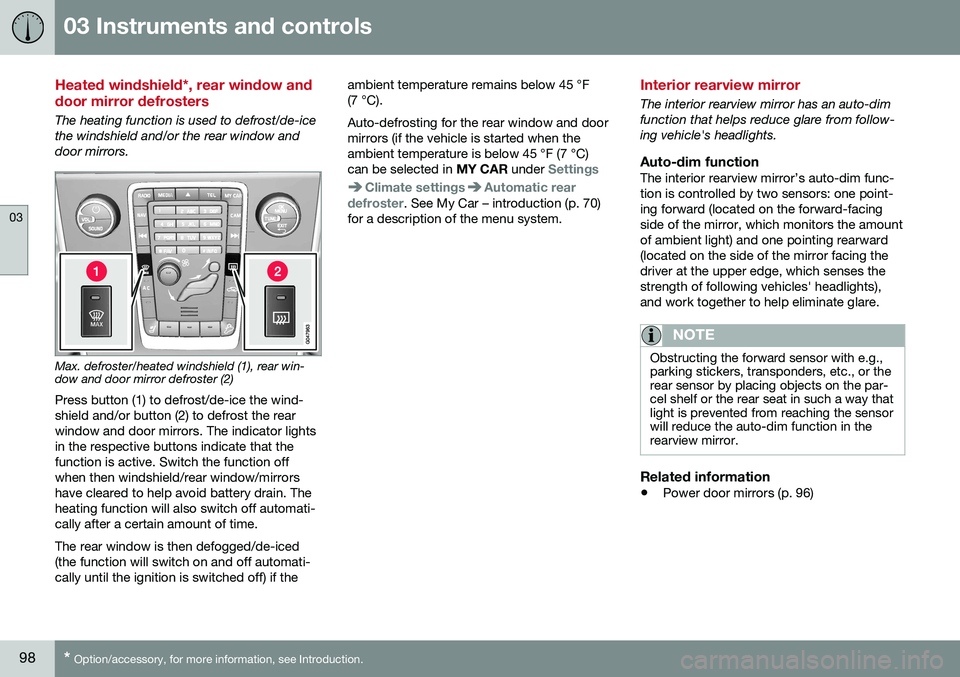
Max. defroster/heated windshield (1), rear win- dow and door mirror defroster (2)
Press button (1) to defrost/de-ice the wind- shield and/or button (2) to defrost the rearwindow and door mirrors. The indicator lightsin the respective buttons indicate that thefunction is active. Switch the function offwhen then windshield/rear window/mirrorshave cleared to help avoid battery drain. Theheating function will also switch off automati-cally after a certain amount of time. The rear window is then defogged/de-iced (the function will switch on and off automati-cally until the ignition is switched off) if the ambient temperature remains below 45 °F(7 °C). Auto-defrosting for the rear window and door mirrors (if the vehicle is started when theambient temperature is below 45 °F (7 °C)can be selected in
MY CAR under
Settings
Climate settingsAutomatic rear
defroster. See My Car – introduction (p. 70)
for a description of the menu system.
Interior rearview mirror
The interior rearview mirror has an auto-dim function that helps reduce glare from follow-ing vehicle's headlights.
Auto-dim functionThe interior rearview mirror’s auto-dim func-tion is controlled by two sensors: one point-ing forward (located on the forward-facingside of the mirror, which monitors the amountof ambient light) and one pointing rearward(located on the side of the mirror facing thedriver at the upper edge, which senses thestrength of following vehicles' headlights),and work together to help eliminate glare.
NOTE
Obstructing the forward sensor with e.g., parking stickers, transponders, etc., or therear sensor by placing objects on the par-cel shelf or the rear seat in such a way thatlight is prevented from reaching the sensorwill reduce the auto-dim function in therearview mirror.
Related information
• Power door mirrors (p. 96)
Page 105 of 380
03 Instruments and controls
03
}}
* Option/accessory, for more information, see Introduction.103
Retain the original transmitter of the RF device you are programming for use in othervehicles as well as for future HomeLink pro-gramming. It is also suggested that upon thesale of the vehicle, the programmed Home-Link buttons be erased for security purposes.Refer to “Resetting HomeLink Buttons” in HomeLink
®
Wireless Control System* – pro-
gramming (p. 103).
Using HomeLinkTo operate, simply press and hold the pro- grammed HomeLink button until the traineddevice begins to operate (this may take sev-eral seconds). Activation will now occur forthe trained device (i.e., garage door opener,gate operator, security system, entry doorlock, home/office lighting, etc.). For conven-ience, the hand-held transmitter of the devicemay also be used at any time. In the eventthat there are still programming difficulties orquestions, contact HomeLink at:www.homelink.com/www.youtube.com/HomeLinkGentex or by phoning the hotline at1–800–355–3515.
NOTE
If the ignition is switched off, HomeLink will function for 30 minutes after the driv-er's door has been opened.
HomeLink ®
Wireless Control System*
– programming
The HomeLink Wireless Control System pro- vides a convenient way to replace up to threehand-held radio-frequency (RF) transmittersused to activate devices such as gate opera-tors, garage door openers, entry door locks,security systems, even home lighting. Addi-tional information can be found on the Inter-net atwww.homelink.com/www.youtube.com/HomeLinkGentex or by phoning the hotline at1–800–355–3515.
NOTE
Some vehicles may require the ignition to be switched on or be in the “accessories”position for programming and/or operationof HomeLink. It is also recommended thata new battery be placed in the hand-heldtransmitter of the device being pro-grammed to HomeLink for quicker trainingand accurate transmission of the radio-fre-quency signal. The HomeLink buttonsmust be reset first. When this has beencompleted, Homelink is in learning modeso that you can perform programming.
1. Position the end of your hand-held trans- mitter 1–3 inches (5–14 cm) away from the HomeLink button you wish to pro-gram while keeping the indicator light inview. 2. Simultaneously press and hold both the
chosen HomeLink and hand-held trans-mitter buttons until the HomeLink indica-tor light changes from a slow to a rapidlyblinking light. Now you may release boththe HomeLink and hand-held transmitterbuttons.
NOTE
Some devices may require you to replace this Programming Step 2 with proceduresnoted in the “Gate Operator / CanadianProgramming” section. If the HomeLinkindicator light does not change to a rapidlyblinking light after performing these steps,contact HomeLink at www.homelink.com/www.youtube.com/HomeLinkGentex or byphoning the hotline at 1–800–355–3515.