display VOLVO S90 2017 Owner´s Manual
[x] Cancel search | Manufacturer: VOLVO, Model Year: 2017, Model line: S90, Model: VOLVO S90 2017Pages: 548, PDF Size: 11.42 MB
Page 305 of 548
DRIVER SUPPORT
}}
* Option/accessory.303
The following table shows some of the situations that can cause the message to be displayed andsuggested actions.
Cause
Action
The area of the wind- shield in front of thecamera/radar sensor isdirty or covered by ice orsnow. Clean the wind-shield or removethe ice/ snow.
Thick fog or heavy rain/snow blocks reduces thecamera/radar sensor'srange of visibility. No action. Thedriver should beextra alert in condi-tions of this type.
There is dirt betweenthe inside of the wind-shield and the camera/radar sensor. Have the area ofthe windshieldcleaned by atrained and quali-fied Volvo servicetechnician.
CAUTION
•
Service and maintenance on City Safety may only be carried out by a trained andqualified Volvo service technician.
• If a crack, scratch or stone chip shouldoccur in the section of the windshield infront the camera/radar sensor, contact atrained and qualified Volvo service techni-cian to repair or replace the windshield.Failing to do so may result in reducedCity Safety functionality.
• This can also result in certain functionsbeing reduced or disabled, or they mayrespond incorrectly.
To help avoid the risk of incorrect, reduced ordisabled functionality for driver support sys-tems using the camera or radar sensors:
• Volvo recommends that cracks, scratchesor stone chips on the windshield in front of the camera/radar sensor should
not
be repaired; in such cases, the entire windshield should be replaced.
• Before the windshield is replaced, con-tact a Volvo retailer to ensure that thecorrect windshield is ordered and instal-led. If the wrong type of windshield isused, this may cause City Safety to func-tion improperly or not at all.
• Volvo recommends the use of only Genu-ine Volvo Replacement Windshields.
• When replacing windshield wipers, use the same type or ones approved by Volvo.
After the windshield has been replaced, thecamera/radar sensor will have to be recalibra-ted by a trained and qualified Volvo servicetechnician to help ensure proper function ofall of the vehicle's camera-/radar-based sys-tems.
MaintenanceIn order for City Safety to function properly, the area of the windshield must be kept free of dirt,ice, snow, etc.
Other vehicle functionsIf a message is displayed in the instrument panel,this means that the other systems using the cam-era/radar sensor (see the list below) will not havefull functionality or may not function at all. The camera and radar sensor is used by the fol- lowing functions: • Distance Alert
*
• Driver Alert Control
*
• Adaptive Cruise Control
*
• Pilot Assist
*
• Run-off Mitigation
• Road Sign Information
*
• Active High Beams
*
• Lane Keeping Aid
*
Page 307 of 548

DRIVER SUPPORT
}}
305
Camera and radar sensor's field of vision
The camera and radar sensor have limited fields of vision. In some situations they may detect avehicle, large animal, pedestrian or cyclist laterthan expected or not detect them at all. Other vehicles that are dirty may be detected later than others and in dark conditions, motorcy-cles may be detected late or not at all. If a text message is displayed in the instrument panel indicates that the camera or radar sensorare blocked, it may be difficult for City Safety todetect a vehicle, pedestrian or cyclist and thesystem's functionality may be reduced.
WARNING
Text messages may not be displayed in all sit- uations in which the camera and/or radarsensor are blocked. It is therefore essential tokeep the windshield in front the camera/radarsensor clean and free from snow, ice, etc. Camera and radar sensor components should only be serviced or replaced by a trained andqualified Volvo service technician.
Action by the driver
Backing up
City Safety is temporarily deactivated while the vehicle is backing up.
Low speed
City Safety is not activated at very low speeds (under approx. 3 mph (4 km/h). This means thatthe system will not be triggered if your vehicleapproaches a vehicle ahead at very low speed,such as when parking.
Active driver
Action by the driver always has priority. For this reason, City Safety may not react or react laterthan expected in situations in which the driver isactively operating the vehicle, even if a collision isimminent. This is also done to help eliminateexcessive warnings.
Other limitations
City Safety uses the vehicle's camera and radar sensor, which have certain general limitations.See the articles "Camera limitations" and "Radarsensor limitations" for additional information.
WARNING
•
Warnings and braking may be delayed or not occur at all if traffic, weather or otherconditions prevent the camera and/orradar sensor from detecting pedestrians,cyclists, large animals or other vehiclescorrectly.
• Other vehicles can only be detected indarkness if their headlights and taillightsare clearly visible.
• The sensors have a limited range forpedestrians and cyclists. The systemfunctions best at relative speeds up to30 mph (50 km/h). For stationary orslow-moving vehicles, the system func-tions best at speeds up to approx.43 mph (70 km/h).
• If there is a risk of colliding with a largeanimal, City Safety can reduce the vehi-cle's speed by up to 9 mph (15 km/h).Warnings and braking are most effectiveat speeds above 43 mph (70 km/h) andless effective at lower speeds.
Page 309 of 548
DRIVER SUPPORT
307
City Safety symbols and messages
A number of City Safety-related messages may be displayed in the instrument panel.
Several examples are provided in the following table:
Message Explanation
City Safety Automatic interventionWhen City Safety is braking or has applied the brakes, one of more symbols may illuminate in the instrument panel and a text message will be displayed.
City Safety Reduced functionality Service requiredThe system is not functioning properly. Contact a trained and authorized Volvo service technician.
A text message can be erased by briefly pressing the O button on the right-side steering wheel
keypad. If the message recurs, contact a trained and authorized Volvo service technician orretailer.
Related information
• City Safety
™ (p. 296)
Page 311 of 548
DRIVER SUPPORT
}}
* Option/accessory.309
Blind Spot Information (BLIS) *
Blind Spot Information is a system designed to alert the driver to the presence of other vehiclesmoving in the same direction as your vehicle onroads with several lanes.
Blind Spot Information is a driving aid intended to:
• detect other vehicles in your door mirrors'"blind area"
• detect vehicles that are about to pass yourvehicle or are approaching your vehiclequickly from behind in the left and/or rightlanes
WARNING
•
Blind Spot Information is an information system, NOT a warning or safety systemand does not function in all situations.
• Blind Spot Information does not eliminatethe need for you to visually confirm theconditions around you, and the need foryou to turn your head and shoulders tomake sure that you can safely changelanes or back up.
• As the driver, you have full responsibilityfor changing lanes/backing up in a safemanner.
Overview
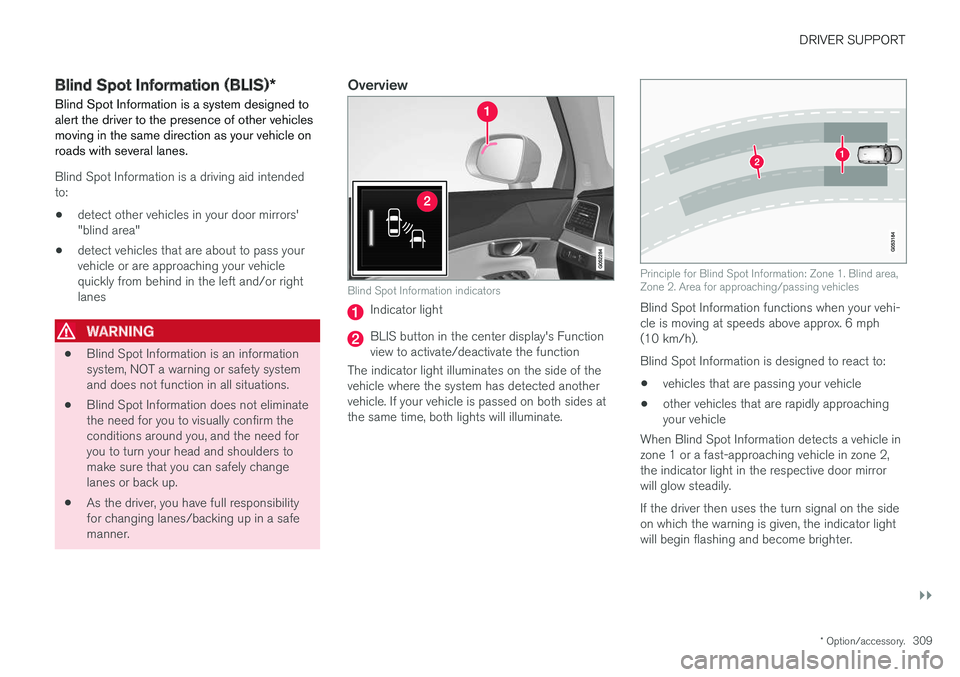
Blind Spot Information indicators
Indicator light
BLIS button in the center display's Function view to activate/deactivate the function
The indicator light illuminates on the side of thevehicle where the system has detected anothervehicle. If your vehicle is passed on both sides atthe same time, both lights will illuminate.
Principle for Blind Spot Information: Zone 1. Blind area, Zone 2. Area for approaching/passing vehicles
Blind Spot Information functions when your vehi- cle is moving at speeds above approx. 6 mph(10 km/h). Blind Spot Information is designed to react to:
• vehicles that are passing your vehicle
• other vehicles that are rapidly approaching your vehicle
When Blind Spot Information detects a vehicle inzone 1 or a fast-approaching vehicle in zone 2,the indicator light in the respective door mirrorwill glow steadily. If the driver then uses the turn signal on the side on which the warning is given, the indicator lightwill begin flashing and become brighter.
Page 312 of 548
||
DRIVER SUPPORT
* Option/accessory.
310
WARNING
• Blind Spot Information does not function in sharp curves.
• Blind Spot Information does not functionwhen your vehicle is backing up.
Related information
•
Blind Spot Information (BLIS)
* On/Off
(p. 310)
• Blind Spot Information (BLIS)
* limitations
(p. 311)
• Cross Traffic Alert (CTA)
* (p. 311)
Blind Spot Information (BLIS) *
On/Off The Blind Spot Information function can be acti- vated/deactivated.
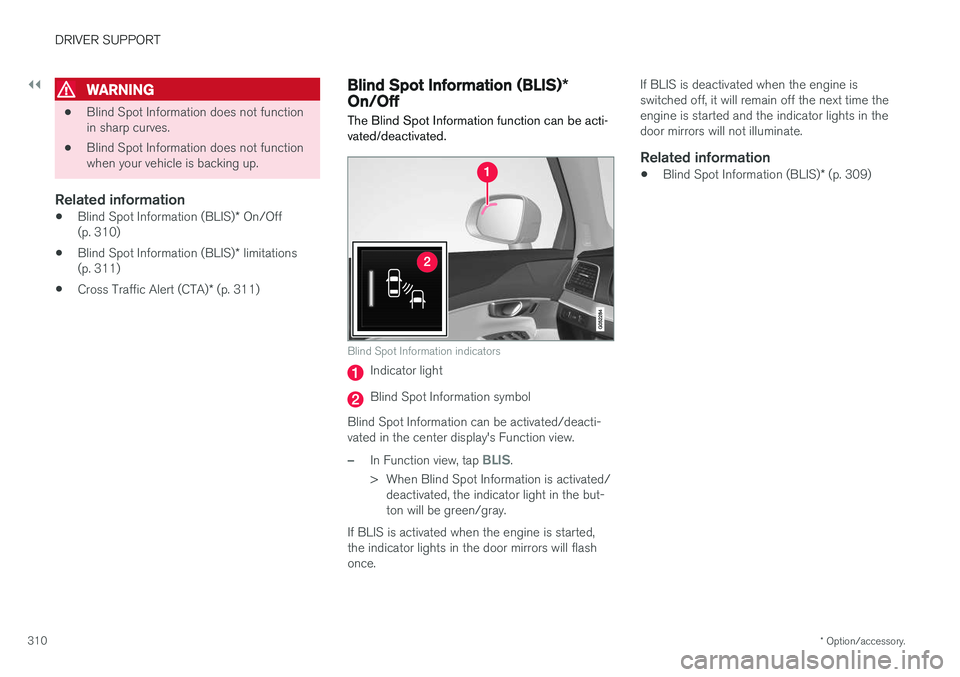
Blind Spot Information indicators
Indicator light
Blind Spot Information symbol
Blind Spot Information can be activated/deacti- vated in the center display's Function view.
–In Function view, tap BLIS.
> When Blind Spot Information is activated/ deactivated, the indicator light in the but- ton will be green/gray.
If BLIS is activated when the engine is started,the indicator lights in the door mirrors will flashonce. If BLIS is deactivated when the engine isswitched off, it will remain off the next time theengine is started and the indicator lights in thedoor mirrors will not illuminate.
Related information
•
Blind Spot Information (BLIS)
* (p. 309)
Page 314 of 548
||
DRIVER SUPPORT
* Option/accessory.
312 If CTA detects that something is approaching your vehicle from the side:
• An audible signal indicates will sound fromeither the left or right infotainment systemspeakers, depending on which the side ofyour vehicle the approaching vehicle/ objecthas been detected.
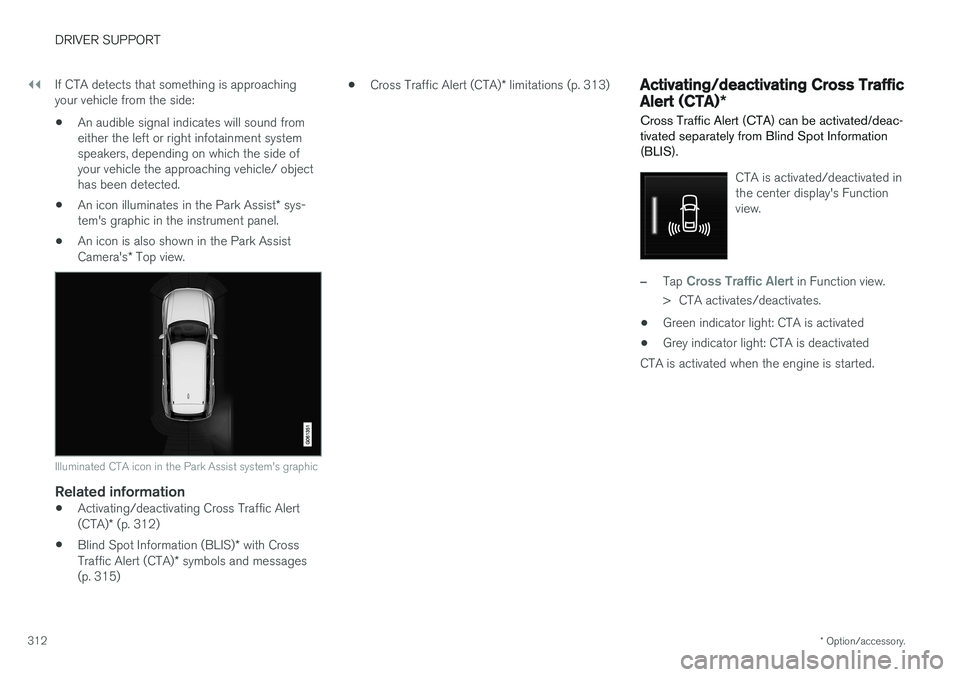
• An icon illuminates in the Park Assist
* sys-
tem's graphic in the instrument panel.
• An icon is also shown in the Park Assist Camera's
* Top view.
Illuminated CTA icon in the Park Assist system's graphic
Related information
• Activating/deactivating Cross Traffic Alert (CTA)
* (p. 312)
• Blind Spot Information (BLIS)
* with Cross
Traffic Alert (CTA) * symbols and messages
(p. 315) •
Cross Traffic Alert (CTA)
* limitations (p. 313)
Activating/deactivating Cross Traffic Alert (CTA) *
Cross Traffic Alert (CTA) can be activated/deac- tivated separately from Blind Spot Information(BLIS).
CTA is activated/deactivated in the center display's Functionview.
–Tap Cross Traffic Alert in Function view.
> CTA activates/deactivates.
• Green indicator light: CTA is activated
• Grey indicator light: CTA is deactivated
CTA is activated when the engine is started.
Page 317 of 548
DRIVER SUPPORT
* Option/accessory.315
Blind Spot Information (BLIS) * with
Cross Traffic Alert (CTA) * symbols
and messages
In situations where Blind Spot Information and/or Cross Traffic Alert are not functioning properly or if the function is interrupted, a sym-bol and a text message may be displayed in theinstrument panel. Follow the instructions provi-ded.
The following table lists several symbols and messages:
Message
Explanation
Blind spot sensor Service requiredThe system is not functioning properly. Contact a trained and qualified Volvo service technician
Blind spot system off Trailer attachedBLIS and CTA have been deactivated because a trailer has been connected to teh vehicle's electrical system.
A text message can be erased by briefly pressing the O button on the right-side steering wheel
keypad. If the message recurs, contact a trained and authorized Volvo service technician orretailer.
Related information
• Cross Traffic Alert (CTA)
* (p. 311)
• Blind Spot Information (BLIS)
* (p. 309)
Page 318 of 548
DRIVER SUPPORT
* Option/accessory.
316
Road Sign Information (RSI) *
RSI is a feature that helps the driver see road signs showing the posted speed limit.
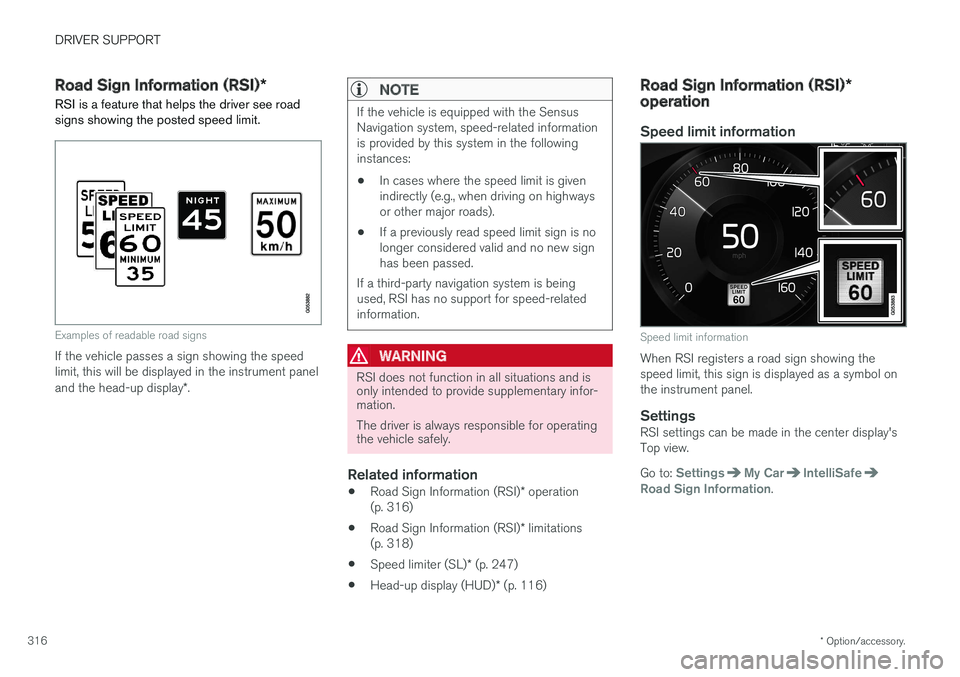
Examples of readable road signs
If the vehicle passes a sign showing the speed limit, this will be displayed in the instrument panel and the head-up display *.
NOTE
If the vehicle is equipped with the Sensus Navigation system, speed-related informationis provided by this system in the followinginstances:
• In cases where the speed limit is givenindirectly (e.g., when driving on highwaysor other major roads).
• If a previously read speed limit sign is nolonger considered valid and no new signhas been passed.
If a third-party navigation system is beingused, RSI has no support for speed-relatedinformation.
WARNING
RSI does not function in all situations and is only intended to provide supplementary infor-mation. The driver is always responsible for operating the vehicle safely.
Related information
• Road Sign Information (RSI)
* operation
(p. 316)
• Road Sign Information (RSI)
* limitations
(p. 318)
• Speed limiter (SL)
* (p. 247)
• Head-up display (HUD)
* (p. 116)
Road Sign Information (RSI) *
operation
Speed limit information
Speed limit information
When RSI registers a road sign showing the speed limit, this sign is displayed as a symbol onthe instrument panel.
SettingsRSI settings can be made in the center display'sTop view. Go to:
SettingsMy CarIntelliSafeRoad Sign Information.
Page 319 of 548
DRIVER SUPPORT
* Option/accessory.317
Activating/deactivating RSI
RSI can be activated/deacti- vated in the center display'sfunction view.
–Tap the Road Sign Information button in
Function view.
> When RSI is activated, the indicator light in the button will be green. The indicator light will be gray when the function isdeactivated.
Activating/deactivating the speed warning function
The driver can be alerted if the current speed limit is being exceeded (the symbol for the cur-rent speed limit will begin to flash). This functioncan be activated or deactivated and the limit for awarning can be set. 1. Tap
Settings in the center display's Top
view.
2. Tap
My CarIntelliSafeRoad Sign
Information.
3. Tap
Speed Limit Warning to activate/deac-
tivate this function.
> If the function is activated, a speed selec- tor will be displayed. 4. Select the limit at which the speed warning is
to be given by pressing the up/down arrows. Please be aware that the set warning limit will not be used when a speed camera sym-bol is displayed in the instrument panel.
Activating/deactivating the audible alert
The audible alert can be activated/deactivated and the limit for a warning can be set. 1.Tap
Settings in the center display's Top
view.
2. Tap
My CarIntelliSafeRoad Sign
Information.
3. Tap
Audio Warning to activate/deactivate
this function.
Speed camera alert
Speed camera warning in the instrument panel (generic illustration)
If the Sensus navigation system in your vehicle is being used,the driver can be alerted if thevehicle is exceeding a detectedspeed limit and is approachinga speed camera.
Related information
• Road Sign Information (RSI)
* (p. 316)
• Road Sign Information (RSI)
* limitations
(p. 318)
Page 323 of 548
DRIVER SUPPORT
}}
321
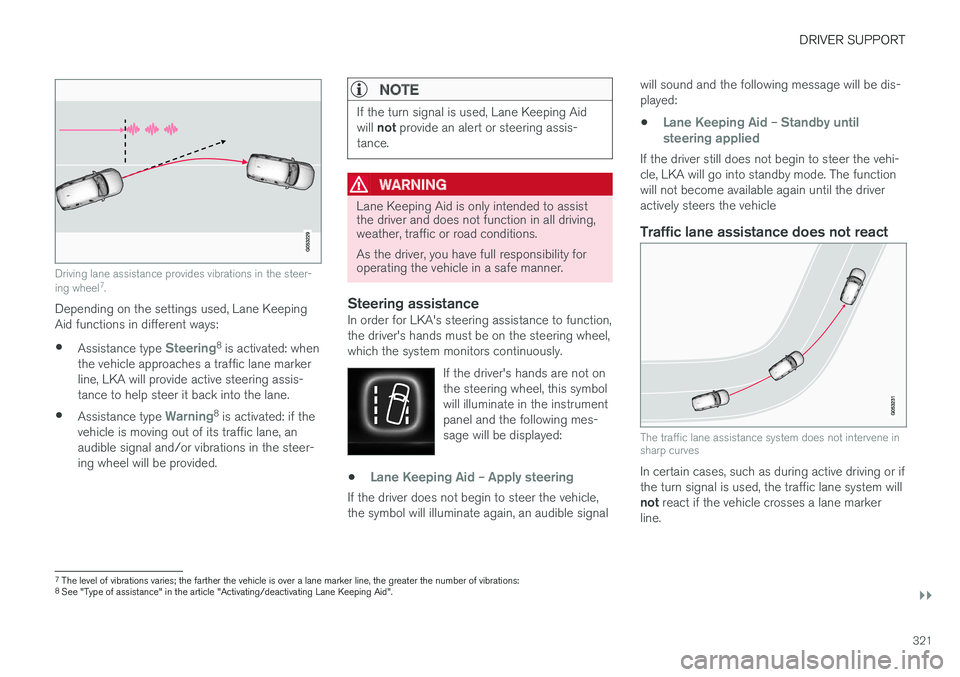
Driving lane assistance provides vibrations in the steer- ing wheel7
.
Depending on the settings used, Lane Keeping Aid functions in different ways:
• Assistance type
Steering8
is activated: when
the vehicle approaches a traffic lane marker line, LKA will provide active steering assis-tance to help steer it back into the lane.
• Assistance type
Warning8
is activated: if the
vehicle is moving out of its traffic lane, an audible signal and/or vibrations in the steer-ing wheel will be provided.
NOTE
If the turn signal is used, Lane Keeping Aid will not provide an alert or steering assis-
tance.
WARNING
Lane Keeping Aid is only intended to assist the driver and does not function in all driving,weather, traffic or road conditions. As the driver, you have full responsibility for operating the vehicle in a safe manner.
Steering assistanceIn order for LKA's steering assistance to function, the driver's hands must be on the steering wheel,which the system monitors continuously.
If the driver's hands are not onthe steering wheel, this symbolwill illuminate in the instrumentpanel and the following mes-sage will be displayed:
•Lane Keeping Aid – Apply steering
If the driver does not begin to steer the vehicle, the symbol will illuminate again, an audible signal will sound and the following message will be dis-played:
•
Lane Keeping Aid – Standby until
steering applied
If the driver still does not begin to steer the vehi- cle, LKA will go into standby mode. The functionwill not become available again until the driveractively steers the vehicle
Traffic lane assistance does not react
The traffic lane assistance system does not intervene in sharp curves
In certain cases, such as during active driving or if the turn signal is used, the traffic lane system will not react if the vehicle crosses a lane marker
line.
7 The level of vibrations varies; the farther the vehicle is over a lane marker line, the greater the number of vibrations:
8 See "Type of assistance" in the article "Activating/deactivating Lane Keeping Aid".