change wheel VOLVO S90 2017 Owner´s Manual
[x] Cancel search | Manufacturer: VOLVO, Model Year: 2017, Model line: S90, Model: VOLVO S90 2017Pages: 548, PDF Size: 11.42 MB
Page 198 of 548
||
CLIMATE
* Option/accessory.
196
Activating/deactivating front seat ventilation
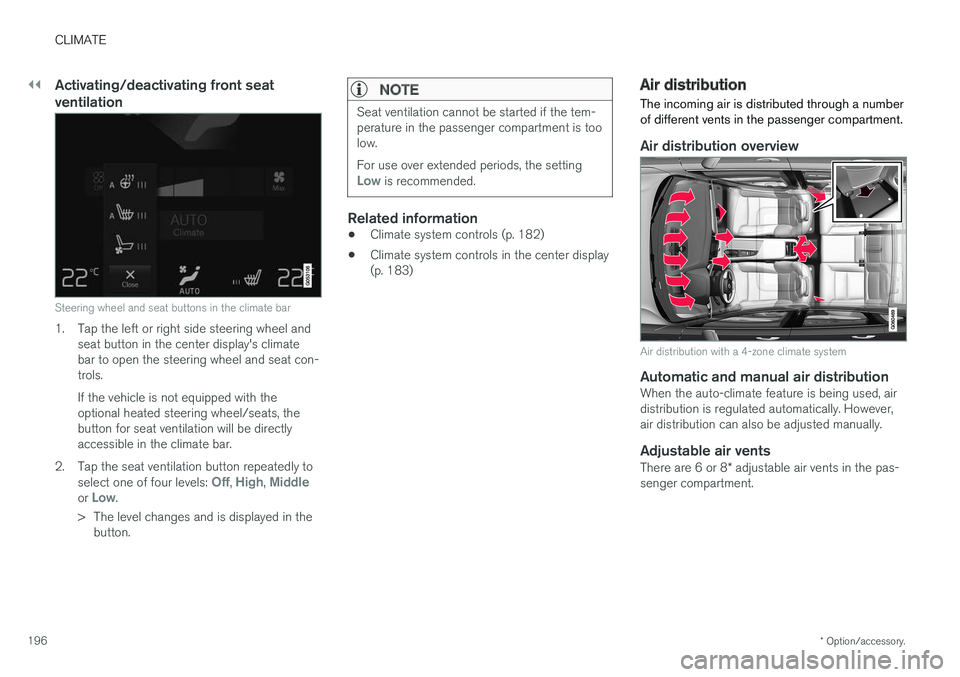
Steering wheel and seat buttons in the climate bar
1. Tap the left or right side steering wheel and
seat button in the center display's climate bar to open the steering wheel and seat con-trols. If the vehicle is not equipped with the optional heated steering wheel/seats, thebutton for seat ventilation will be directlyaccessible in the climate bar.
2. Tap the seat ventilation button repeatedly to select one of four levels:
Off, High, Middleor Low.
> The level changes and is displayed in the button.
NOTE
Seat ventilation cannot be started if the tem- perature in the passenger compartment is toolow. For use over extended periods, the setting
Low is recommended.
Related information
• Climate system controls (p. 182)
• Climate system controls in the center display (p. 183)
Air distribution
The incoming air is distributed through a number of different vents in the passenger compartment.
Air distribution overview
Air distribution with a 4-zone climate system
Automatic and manual air distributionWhen the auto-climate feature is being used, air distribution is regulated automatically. However,air distribution can also be adjusted manually.
Adjustable air vents
There are 6 or 8 * adjustable air vents in the pas-
senger compartment.
Page 206 of 548
||
LOADING AND STORAGE
204•
Place heavier cargo at the bottom of the load.
• Secure the cargo correctly with appropriatetie-down equipment.
• Check periodically that the load carriers andload are properly secured.
• Remember that the vehicle's center of gravityand handling change when you carry a loadon the roof.
• The vehicle's wind resistance and fuel con-sumption will increase with the size of theload.
• Drive smoothly. Avoid rapid starts, fast cor-nering and hard braking.
CAUTION
The optional moonroof should not be opened while load carriers are installed on the vehicle.
See the article "Weights" for information about the maximum permissible load that can be trans-ported on the roof.
Related information
•
Weights (p. 525)
• Load anchoring eyelets (p. 207)
• Whiplash protection system (p. 59)
• Locking/unlocking the trunk (p. 228)
Passenger compartment storage spaces
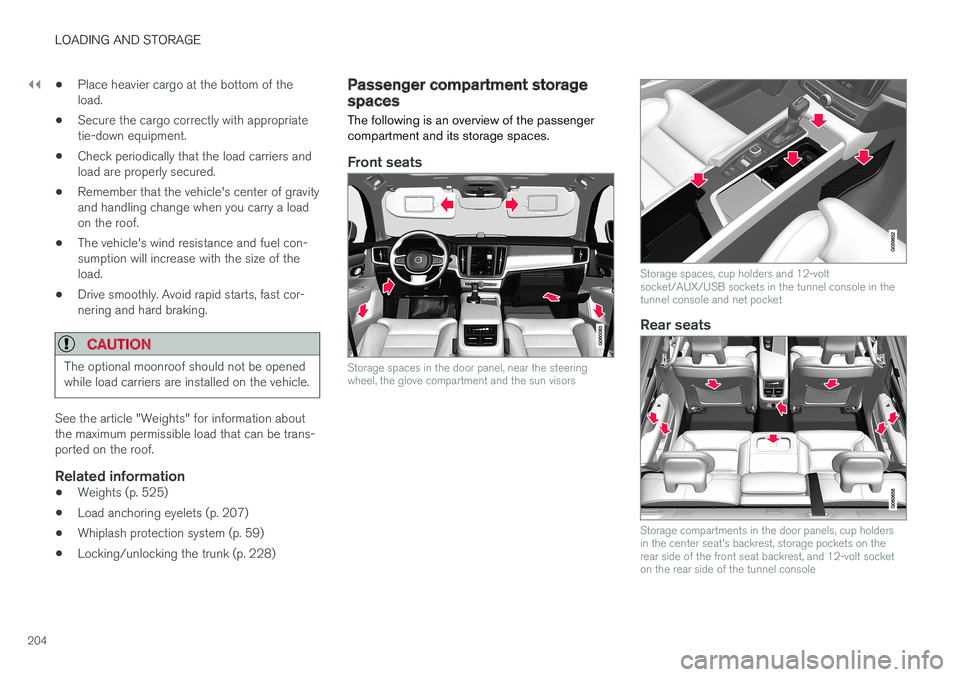
The following is an overview of the passenger compartment and its storage spaces.
Front seats
Storage spaces in the door panel, near the steering wheel, the glove compartment and the sun visors
Storage spaces, cup holders and 12-volt socket/AUX/USB sockets in the tunnel console in thetunnel console and net pocket
Rear seats
Storage compartments in the door panels, cup holders in the center seat's backrest, storage pockets on therear side of the front seat backrest, and 12-volt socketon the rear side of the tunnel console
Page 244 of 548

DRIVER SUPPORT
* Option/accessory.
242
Driver support systems
The vehicle is equipped with a number of driver support systems that help provide the driver withactive/passive support.
Some of these systems are standard while others are optional and they are designed to e.g., helpthe driver maintain a set speed or a set distanceto a vehicle ahead, or warn the driver of a poten-tial collision situation and in certain cases applythe brakes if necessary. Certain optional systemscan also assist in various parking situations.
Related information
• Adjustable steering force
* (p. 242)
• Electronic Stability Control (ESC) (p. 243)
• Roll stability control (RSC) (p. 247)
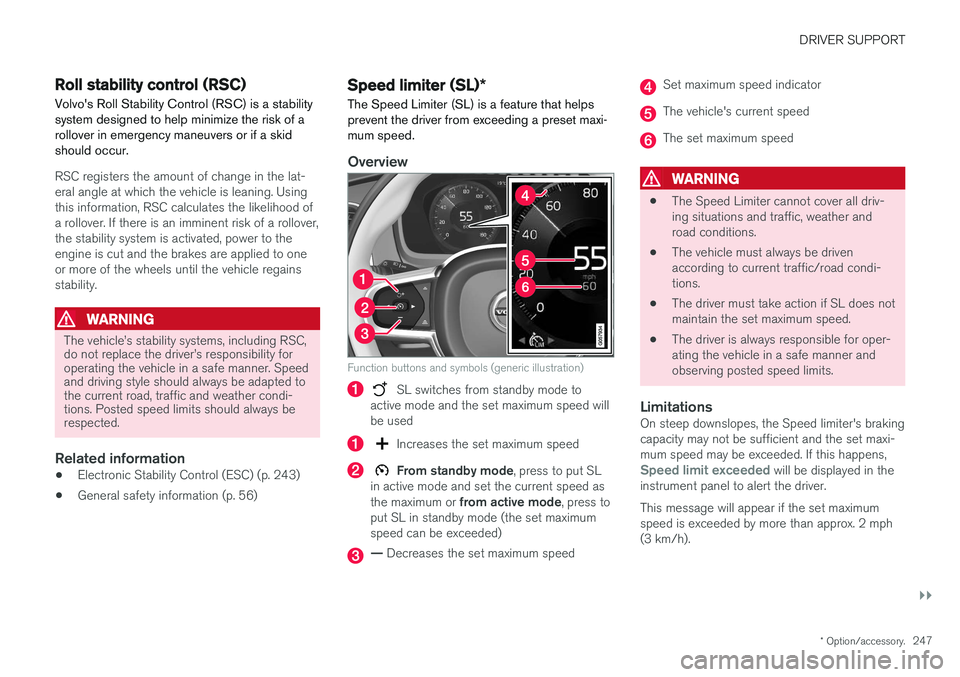
• Speed limiter (SL)
* (p. 247)
• Distance Alert
* (p. 259)
• Cruise Control (CC) (p. 254)
• Adaptive Cruise Control (ACC)
* (p. 261)
• Pilot Assist
* (p. 275)
• Driver support system radar sensor (p. 288)
• Driver support system camera (p. 292)
• City Safety
™ (p. 296)
• Blind Spot Information (BLIS)
* (p. 309)
• Cross Traffic Alert (CTA)
* (p. 311)
• Road Sign Information (RSI)
* (p. 316) •
Driver Alert Control (DAC) (p. 318)
• Driving lane assistance (p. 320)
• Run-off Mitigation (p. 325)
• Park Assist
* (p. 328)
• Park Assist Camera (PAC)
* (p. 332)
• Park Assist Pilot (PAP)
* (p. 338)
Adjustable steering force *
Steering force increases with the speed of the vehicle to give the driver an enhanced sense ofcontrol and stability. At low speed the vehicle iseasier to steer in order to facilitate parking, etc.
Changing the steering force levelTo change the level of steering force, see theinformation under the heading "individual" in arti-cle "Drive modes" for additional information. On models not equipped with the drive mode control in the center console, the selection ismade in the center display's Top view under:
SettingsMy CarDrive ModesSteering force
NOTE
•This steering force level menu function cannot be accessed when the vehicle isin motion.
• In certain situations, the power steeringfunction may become too hot and mustbe temporarily cooled. During cooling,power steering effect will be reduced andmore force may be necessary to turn thesteering wheel and a message will bedisplayed in the instrument panel.
Page 249 of 548
DRIVER SUPPORT
}}
* Option/accessory.247
Roll stability control (RSC)
Volvo's Roll Stability Control (RSC) is a stability system designed to help minimize the risk of arollover in emergency maneuvers or if a skidshould occur.
RSC registers the amount of change in the lat- eral angle at which the vehicle is leaning. Usingthis information, RSC calculates the likelihood ofa rollover. If there is an imminent risk of a rollover,the stability system is activated, power to theengine is cut and the brakes are applied to oneor more of the wheels until the vehicle regainsstability.
WARNING
The vehicle
Page 257 of 548
DRIVER SUPPORT
* Option/accessory.255
NOTE
Before CC can be activated, the vehicle's speed must be at least 20 mph (30 km/h).This is also the lowest speed that can be set.
Activating CC (putting it in active mode and setting a speed)
–With the symbol displayed (CC is in
standby mode), press the
button (2) on
the left-side steering wheel keypad.
> This puts CC in active mode and will maintain the vehicle's current speed.
Related information
• Cruise Control (CC) (p. 254)
• Switching between Cruise Control and Adaptive Cruise Control
* (p. 258)
• Deactivating/resuming Cruise Control (CC) (p. 256)
• Turning Cruise Control off (p. 257)
Changing Cruise Control speed
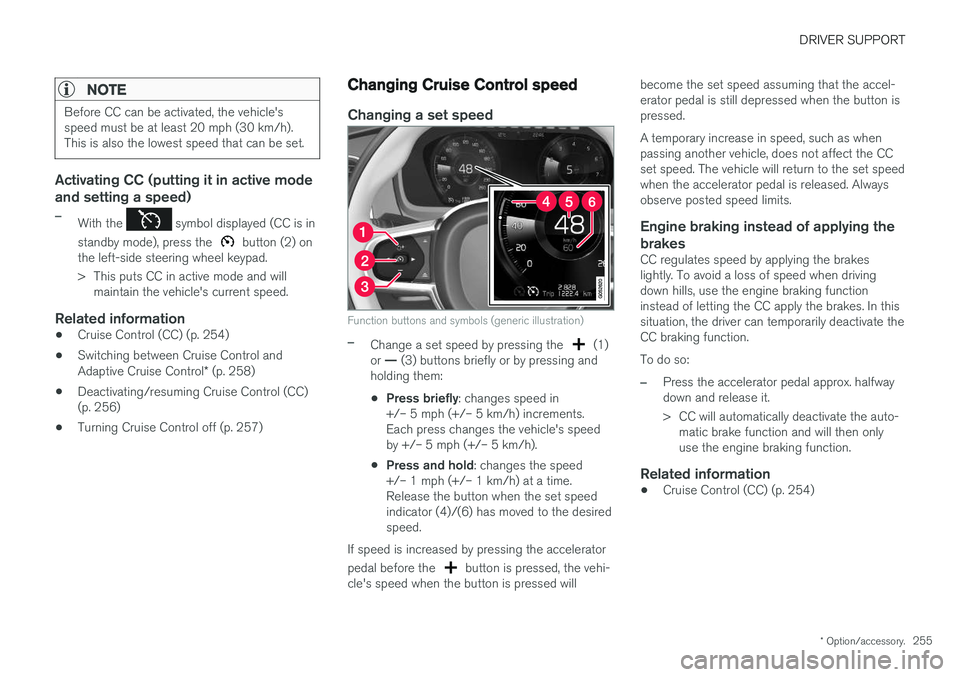
Changing a set speed
Function buttons and symbols (generic illustration)
–Change a set speed by pressing the (1)
or — (3) buttons briefly or by pressing and
holding them:
• Press briefly
: changes speed in
+/– 5 mph (+/– 5 km/h) increments. Each press changes the vehicle's speedby +/– 5 mph (+/– 5 km/h).
• Press and hold
: changes the speed
+/– 1 mph (+/– 1 km/h) at a time.Release the button when the set speedindicator (4)/(6) has moved to the desiredspeed.
If speed is increased by pressing the accelerator pedal before the
button is pressed, the vehi-
cle's speed when the button is pressed will become the set speed assuming that the accel- erator pedal is still depressed when the button ispressed. A temporary increase in speed, such as when passing another vehicle, does not affect the CCset speed. The vehicle will return to the set speedwhen the accelerator pedal is released. Alwaysobserve posted speed limits.
Engine braking instead of applying the
brakes
CC regulates speed by applying the brakeslightly. To avoid a loss of speed when drivingdown hills, use the engine braking functioninstead of letting the CC apply the brakes. In thissituation, the driver can temporarily deactivate theCC braking function. To do so:
–Press the accelerator pedal approx. halfway down and release it.
> CC will automatically deactivate the auto- matic brake function and will then only use the engine braking function.
Related information
• Cruise Control (CC) (p. 254)
Page 258 of 548
DRIVER SUPPORT
256
Deactivating/resuming Cruise Control (CC) Cruise Control (CC) can be temporarily deacti- vated and put in standby mode.
Deactivating and putting CC in standbymode
To temporarily deactivate and put Cruise Control in standby mode:
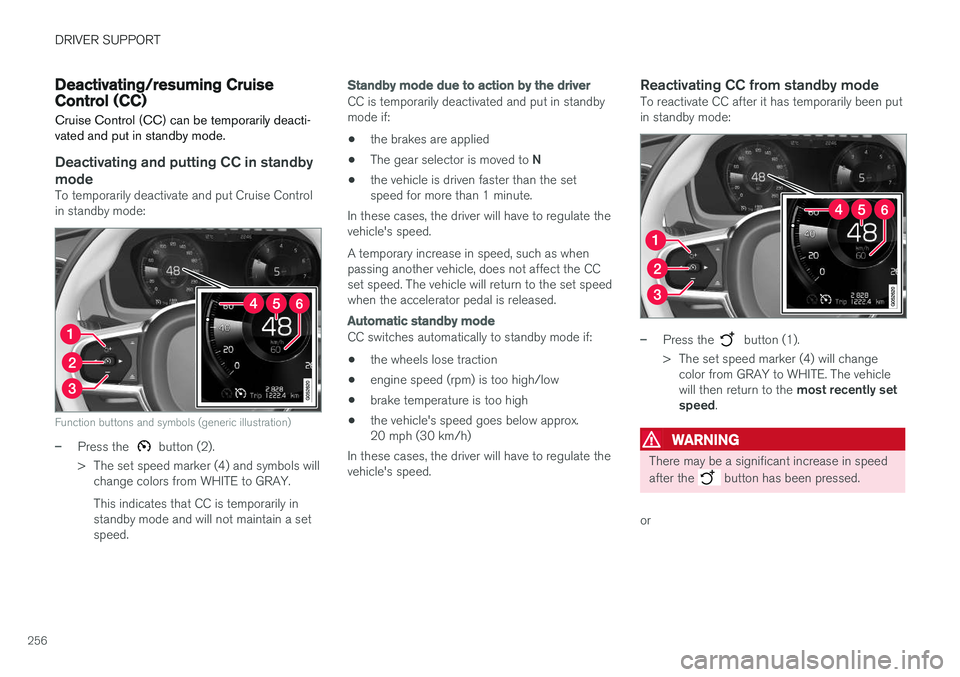
Function buttons and symbols (generic illustration)
–Press the button (2).
> The set speed marker (4) and symbols will change colors from WHITE to GRAY. This indicates that CC is temporarily in standby mode and will not maintain a setspeed.
Standby mode due to action by the driver
CC is temporarily deactivated and put in standby mode if:
• the brakes are applied
• The gear selector is moved to
N
• the vehicle is driven faster than the setspeed for more than 1 minute.
In these cases, the driver will have to regulate thevehicle's speed. A temporary increase in speed, such as when passing another vehicle, does not affect the CCset speed. The vehicle will return to the set speedwhen the accelerator pedal is released.
Automatic standby mode
CC switches automatically to standby mode if:
• the wheels lose traction
• engine speed (rpm) is too high/low
• brake temperature is too high
• the vehicle's speed goes below approx. 20 mph (30 km/h)
In these cases, the driver will have to regulate thevehicle's speed.
Reactivating CC from standby modeTo reactivate CC after it has temporarily been putin standby mode:
–Press the button (1).
> The set speed marker (4) will change color from GRAY to WHITE. The vehicle will then return to the most recently set
speed .
WARNING
There may be a significant increase in speed after the
button has been pressed.
or
Page 259 of 548
DRIVER SUPPORT
* Option/accessory.257
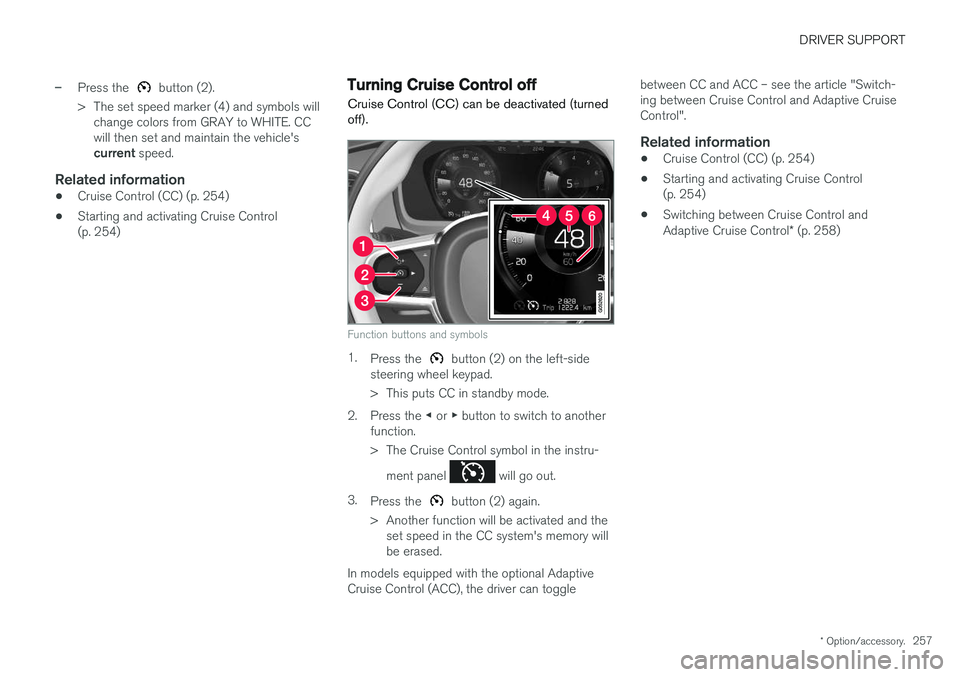
–Press the button (2).
> The set speed marker (4) and symbols will change colors from GRAY to WHITE. CC will then set and maintain the vehicle's current speed.
Related information
•Cruise Control (CC) (p. 254)
• Starting and activating Cruise Control (p. 254)
Turning Cruise Control off
Cruise Control (CC) can be deactivated (turned off).
Function buttons and symbols
1. Press the button (2) on the left-side
steering wheel keypad.
> This puts CC in standby mode.
2. Press the ◀ or ▶ button to switch to another
function.
> The Cruise Control symbol in the instru-
ment panel
will go out.
3. Press the
button (2) again.
> Another function will be activated and the set speed in the CC system's memory will be erased.
In models equipped with the optional AdaptiveCruise Control (ACC), the driver can toggle between CC and ACC – see the article "Switch-ing between Cruise Control and Adaptive CruiseControl".
Related information
•
Cruise Control (CC) (p. 254)
• Starting and activating Cruise Control(p. 254)
• Switching between Cruise Control and Adaptive Cruise Control
* (p. 258)
Page 260 of 548
DRIVER SUPPORT
* Option/accessory.
258
Switching between Cruise Control and Adaptive Cruise Control *
In models equipped with the optional ACC, the driver can toggle between CC and ACC.
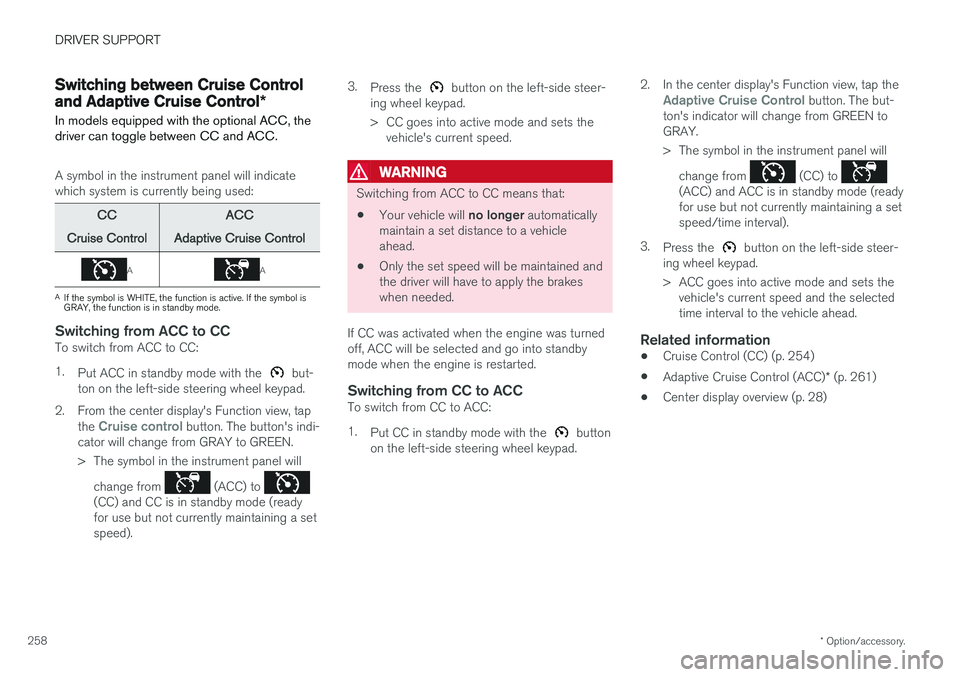
A symbol in the instrument panel will indicate which system is currently being used:
CC
Cruise Control ACC
Adaptive Cruise Control
AA
A If the symbol is WHITE, the function is active. If the symbol is GRAY, the function is in standby mode.
Switching from ACC to CCTo switch from ACC to CC: 1. Put ACC in standby mode with the
but-
ton on the left-side steering wheel keypad.
2. From the center display's Function view, tap the
Cruise control button. The button's indi-
cator will change from GRAY to GREEN.
> The symbol in the instrument panel will
change from
(ACC) to (CC) and CC is in standby mode (ready for use but not currently maintaining a setspeed). 3.
Press the
button on the left-side steer-
ing wheel keypad.
> CC goes into active mode and sets the vehicle's current speed.
WARNING
Switching from ACC to CC means that:
• Your vehicle will
no longer automatically
maintain a set distance to a vehicle ahead.
• Only the set speed will be maintained andthe driver will have to apply the brakeswhen needed.
If CC was activated when the engine was turnedoff, ACC will be selected and go into standbymode when the engine is restarted.
Switching from CC to ACCTo switch from CC to ACC: 1. Put CC in standby mode with the
button
on the left-side steering wheel keypad. 2. In the center display's Function view, tap the
Adaptive Cruise Control button. The but-
ton's indicator will change from GREEN to GRAY.
> The symbol in the instrument panel will
change from
(CC) to (ACC) and ACC is in standby mode (ready for use but not currently maintaining a setspeed/time interval).
3. Press the
button on the left-side steer-
ing wheel keypad.
> ACC goes into active mode and sets the vehicle's current speed and the selected time interval to the vehicle ahead.
Related information
• Cruise Control (CC) (p. 254)
• Adaptive Cruise Control (ACC)
* (p. 261)
• Center display overview (p. 28)
Page 268 of 548

||
DRIVER SUPPORT
* Option/accessory.
266
Automatic standby mode
ACC interacts with other systems, such as Electronic Stability Control. If any of these othersystems are not functioning properly, ACC willturn off automatically.
WARNING
If this happens, the driver will be alerted by an audible signal and a message in the instru-ment panel. The driver will have to adapt thevehicle's speed, apply the brakes when nec-essary and keep a safe distance to the vehicleahead.
ACC switches automatically to standby mode if: • the vehicle's speed goes below approx. 3 mph (5 km/h) and ACC cannot determineif the vehicle ahead is stationary or is anobject such as a speed bump, etc
• the vehicle's speed goes below approx.3 mph (5 km/h) and the vehicle aheadchanges lanes or turns so that ACC nolonger has a target vehicle to follow
• the driver opens the door
• the driver unbuckles the seat belt
• the engine speed (rpm) is too high/low
• the wheels lose traction
• the brake temperature is too high
• the parking brake is applied •
the stability system's
ESC Sport Mode is
activated
• the
Off Road drive mode is selected
• The radar sensor is covered by e.g., wet snow or if heavy rain interferes with radar waves
Reactivating ACC from standby mode
Generic illustration
To reactivate ACC after it has temporarily been put in standby mode:
–Press the button (1).
> The vehicle will then return to the most
recently set speed .
WARNING
There may be a significant increase in speed after the
button has been pressed.
Related information
•Adaptive Cruise Control (ACC)
* (p. 261)
• Starting and activating Adaptive Cruise Control (ACC)
* (p. 264)
• Setting an Adaptive Cruise Control time interval (p. 267)
• Passing Assistance with Adaptive CruiseControl or Pilot Assist (p. 268)
• Adaptive Cruise Control (ACC) symbols andmessages (p. 273)
• Distance Alert
* (p. 259)
Page 272 of 548
||
DRIVER SUPPORT
* Option/accessory.
270
WARNING
At speeds above 20 mph (30 km/h), if ACC
changes targets from a moving vehicle to a stationary one, the system will not react to the
stationary vehicle and will accelerate to the previously set speed. The driver must actively apply the brakes to slow/stop the vehicle.
Automatic standby mode when changing targets
ACC disengages and goes into standby mode if:
• your vehicle's speed goes below approx. 3 mph (5 km/h) and ACC cannot determineif the target object is a stationary vehicle orsome other type of object such as a speedbump, etc
• the vehicle's speed goes below approx.3 mph (5 km/h) and the vehicle aheadchanges lanes or turns so that ACC nolonger has a target vehicle to follow.
Auto-hold brake functionIn slow-moving, stop-and-go traffic or when stop-ped at a traffic light, driving will resume automati-cally if the vehicle is not stopped for more thanapprox. 3 seconds. If it takes more than3 seconds for the vehicle ahead to begin movingagain, ACC will go into standby mode and theauto-hold brake function will activate.
–The driver will then have to reactivate ACC in one of the following ways:
• Press the
button on the left-side
steering wheel keypad.
• Press the accelerator pedal.
> ACC will resume following the vehicle ahead (target vehicle) if it begins to move within approx. 6 seconds.
NOTE
ACC can keep the vehicle at a standstill for up to 5 minutes, after which the parking brakewill be set and ACC will go into standbymode. The parking brake has to be released before ACC can be reactivated.
Deactivation of the auto-hold brake function
In certain situations, auto-hold will be deactivated when the vehicle is at a standstill and ACC will gointo standby mode. This means that the brakes will be released and the vehicle can begin to roll. The driver must actively apply the brakes to keep the vehicle at a standstill. This can occur in the following situations: • the driver presses the brake pedal
• the parking brake is set •
the gear selector is moved to the
P, N or R
positions
• the driver puts ACC in standby mode.
Automatically setting the parking brakeIn certain situations, the parking brake is set automatically to help keep the vehicle at a stand-still. This occurs if ACC keeps the vehicle at a stand- still with the brakes and:
• the driver unbuckles the seat belt or opensthe door
• ACC has kept the vehicle at a standstill formore than approx. 5 minutes
• the brakes overheat
• the engine is turned off.
Related information
•
Adaptive Cruise Control (ACC)
* (p. 261)
• Auto-hold brake function (p. 348)
• Parking brake (p. 350)