navigation VOLVO S90 2017 Owner´s Manual
[x] Cancel search | Manufacturer: VOLVO, Model Year: 2017, Model line: S90, Model: VOLVO S90 2017Pages: 548, PDF Size: 11.42 MB
Page 42 of 548

||
INTRODUCTION
40tive app's basic functions. When a sub-view is expanded, the Home view's fourth sub-view will temporarily not be displayed.
• To minimize a sub-view, tap anywhere on thescreen.
Opening/closing a sub-view in full-screen
mode
The extra sub-view and the Navigation sub-view
can be opened in full-screen mode to show addi- tional information and possible settings.
In expanded mode, open theapp in full-screen mode by tap-ping the symbol.
Tap on the symbol or the Home button below the screen toreturn to the expanded view.
It is always possible to return to Home view by pressing the Home button. Press the Home but- ton twice to return to Home view's standard view
from full-screen.
Home button for the center display
Status barCurrent vehicle activities are shown in the status bar at the top of the screen. Network and con-nection information is shown to the left. Briefinformation about currently running apps and theclock are shown to the right.
Top viewThe top view has a tab at the center of the statusbar. Pull down (expand) the Top view by swipingthe tab downward.
Top view when expanded
Top view provides access to: •
Settings
•Owner's manual
•Profile
• The vehicle's stored messages
To leave (minimize) Top view, tap the screen out- side of this view or tap at the bottom of Top viewand swipe upward. The views behind will becomevisible again. Top view is not available when theignition is being started/switched off or when amessage is displayed on the screen.
Page 99 of 548
INSTRUMENTS AND CONTROLS
}}
* Option/accessory.97
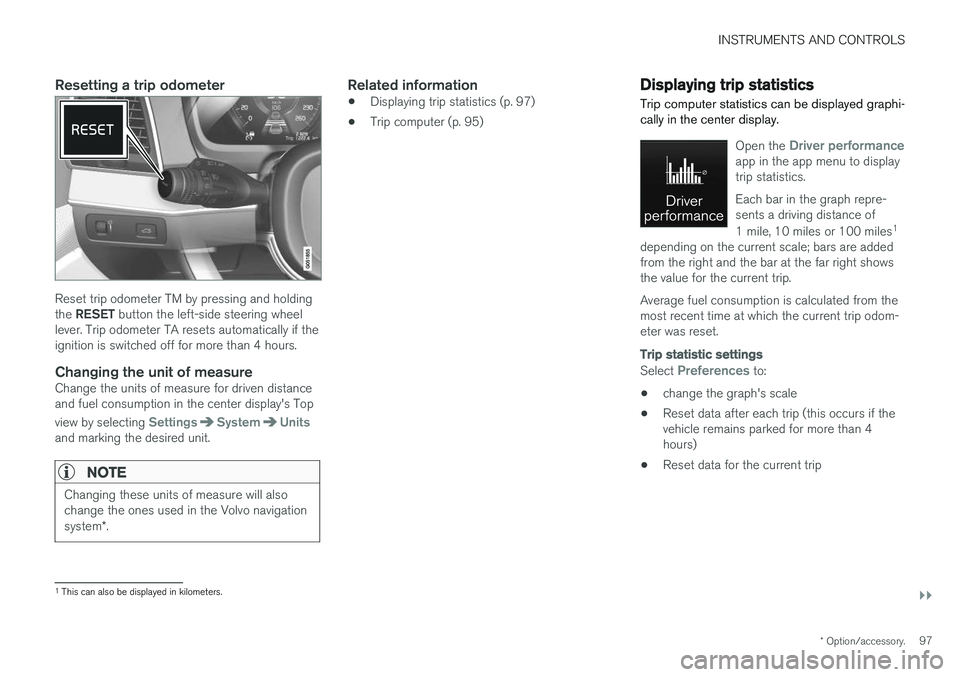
Resetting a trip odometer
Reset trip odometer TM by pressing and holding the RESET button the left-side steering wheel
lever. Trip odometer TA resets automatically if the ignition is switched off for more than 4 hours.
Changing the unit of measureChange the units of measure for driven distanceand fuel consumption in the center display's Top view by selecting
SettingsSystemUnitsand marking the desired unit.
NOTE
Changing these units of measure will also change the ones used in the Volvo navigation system *.
Related information
• Displaying trip statistics (p. 97)
• Trip computer (p. 95)
Displaying trip statistics Trip computer statistics can be displayed graphi- cally in the center display.
Open the Driver performanceapp in the app menu to display trip statistics. Each bar in the graph repre- sents a driving distance of 1 mile, 10 miles or 100 miles 1
depending on the current scale; bars are added from the right and the bar at the far right showsthe value for the current trip. Average fuel consumption is calculated from the most recent time at which the current trip odom-eter was reset.
Trip statistic settings
Select Preferences to:
• change the graph's scale
• Reset data after each trip (this occurs if the vehicle remains parked for more than 4hours)
• Reset data for the current trip
1
This can also be displayed in kilometers.
Page 112 of 548
||
INSTRUMENTS AND CONTROLS
* Option/accessory.
110
Types of settings
Type of setting Description
Trigger function Starts an app or a separate viewfor more advanced settings. Tapthe text to e.g., connect aBluetooth device.
Radiobutton Select one of the possible set-tings by tapping the desired radiobutton to e.g., change the systemlanguage.
Multi-selectionbutton Select a level for a particular set-ting by pressing the desired partof the button e.g., to set thedesired level for City Safety.
Checkbox Tap to activate/deactivate a func-tion e.g., to select automatic startfor steering wheel heating.
Slider Select a level for a function by pressing and dragging the slidercontrol e.g., to set a volume level.
Informa-tion dis-play This is not an actual setting butdisplays information such as thevehicle's VIN number.
Related information
•
Center display overview (p. 28)
• Navigating in the center display's views (p. 38)
• Using the center display (p. 44)
• Changing system settings in Settings view(p. 112)
• Categories in Settings view (p. 110)
Categories in Settings view
Settings view consists of a number of main cate- gories and sub-categories that contain settingsand information for many of the vehicle's fea-tures and functions.
The main categories in Settings view are: My
Car, Sound, Navigation, Media,Communication, Climate and System.
Each main category, in turn, contains several sub- categories with possible settings. The tableshows the first level of sub-categories. The possi-ble settings for a function or area are describedin greater detail in their respective articles in theowner's manual. For system settings not descri-bed in the respective articles, see "Changing sys-tem settings in Settings view."
My Car
Sub-categories Type of setting
DisplaysPersonal
IntelliSafeCombination
Park AssistGlobal
Drive Mode/Individual
Drive Mode* Combination
LightsCombination
MirrorsPersonal
LockingCombination
Page 113 of 548
INSTRUMENTS AND CONTROLS
* Option/accessory.111
Sub-categories Type of setting
Electric Parking BrakeCombination
SeatsCombination
WipersCombination
SuspensionGlobal
Sound
Sub-categoriesType of setting
Sound Experience*Personal
TonePersonal
BalancePersonal
System VolumesCombination
Navigation
Sub-categories
Type of setting
MapPersonal
RoutePersonal
TrafficPersonal
GuidancePersonal
SystemPersonal
Media
Sub-categories Type of setting
AM/FM RadioA
Personal
SiriusXMPersonal
Gracenote ®Personal
VideoPersonal
A
AM radio is not available in hybrid models.
Communication
Sub-categories Type of setting
Phone–
Text Messages–
Bluetooth–
Wi-FiGlobal
Vehicle Wi-Fi HotspotGlobal
Vehicle Modem InternetGlobal
Volvo On Call–
Volvo Service NetworksGlobal
ClimateThe main category Climate has no sub-catego-
ries.
System
Sub-categories Type of setting
Driver ProfilePersonal
Date & Time–
LanguagePersonal
Keyboard LayoutsGlobal
Voice ControlPersonal
UnitsPersonal
Storage–
Software Updates–
Global Reset–
Services–
Related information
•Settings view (p. 109)
• Changing system settings in Settings view (p. 112)
Page 118 of 548
INSTRUMENTS AND CONTROLS
* Option/accessory.
116
Head-up display (HUD) *
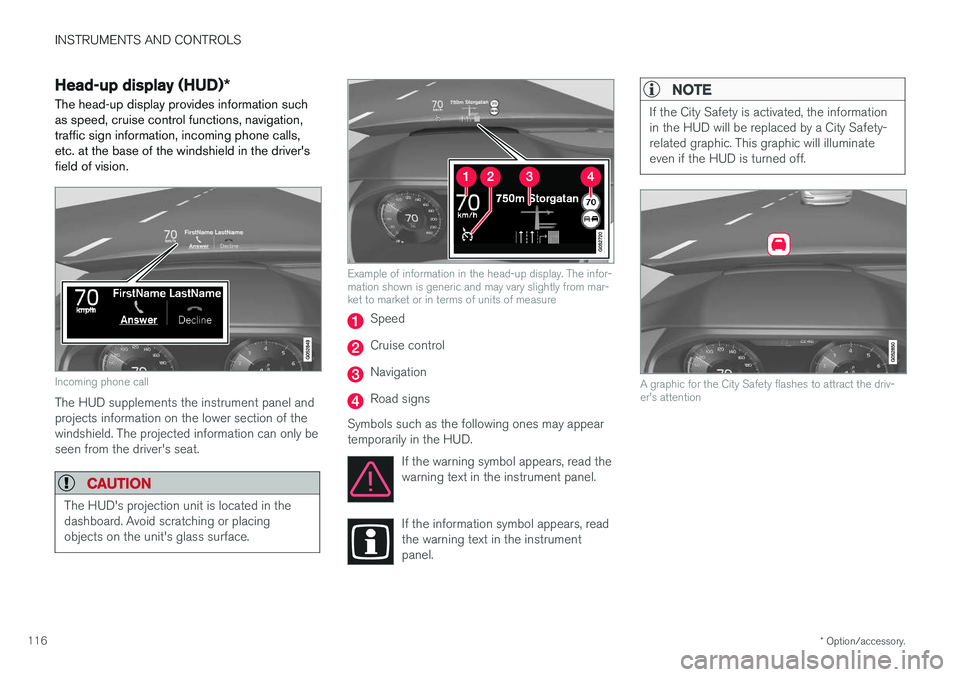
The head-up display provides information such as speed, cruise control functions, navigation,traffic sign information, incoming phone calls,etc. at the base of the windshield in the driver'sfield of vision.
Incoming phone call
The HUD supplements the instrument panel and projects information on the lower section of thewindshield. The projected information can only beseen from the driver's seat.
CAUTION
The HUD's projection unit is located in the dashboard. Avoid scratching or placingobjects on the unit's glass surface.
Example of information in the head-up display. The infor- mation shown is generic and may vary slightly from mar-ket to market or in terms of units of measure
Speed
Cruise control
Navigation
Road signs
Symbols such as the following ones may appear temporarily in the HUD. If the warning symbol appears, read thewarning text in the instrument panel.
If the information symbol appears, read the warning text in the instrumentpanel.
NOTE
If the City Safety is activated, the information in the HUD will be replaced by a City Safety-related graphic. This graphic will illuminateeven if the HUD is turned off.
A graphic for the City Safety flashes to attract the driv- er's attention
Page 119 of 548
INSTRUMENTS AND CONTROLS
}}
117
NOTE
The driver's ability to see information in the HUD may be impeded by: •the use of polarizing sunglasses
• the use of an aftermarket or non-Volvo replacement windshield
• not sitting in the center of the driver'sseat
• objects on the HUD projector glass onthe dashboard
• certain ambient lighting conditions
• certain types of vision problems, whichmay also result in headaches or eyestrain.
• Activating/deactivating and settings forHUD are only possible when an image isprojected on the windshield. The enginemust be running.
Activating/deactivating HUDHUD can be activated in two ways in the center display:
Via Function view
Tap the Head-up display but-
ton.
Via settings
1. Tap Settings in Top view.
2. Tap
My CarDisplays.
3. Select/deselect
Head-Up Display.
This selection can be stored as a personal set- ting in a driver profile.
Selecting display alternatives1. Tap Settings in Top view.
2. Tap
My CarDisplaysHead-Up
Display Options.
Tap Go to the center display's Settings view and select
Driver Display & Head-up
Display.
3. Select :
Show Navigation In Head-Up
Display, Road Sign Information In Head-
Up Display, Show Driver Support In
Head-Up Display or Show Phone In
Head-Up Display.
This selection can be stored as a personal set- ting in a driver profile.
Adjusting HUD brightness and height position
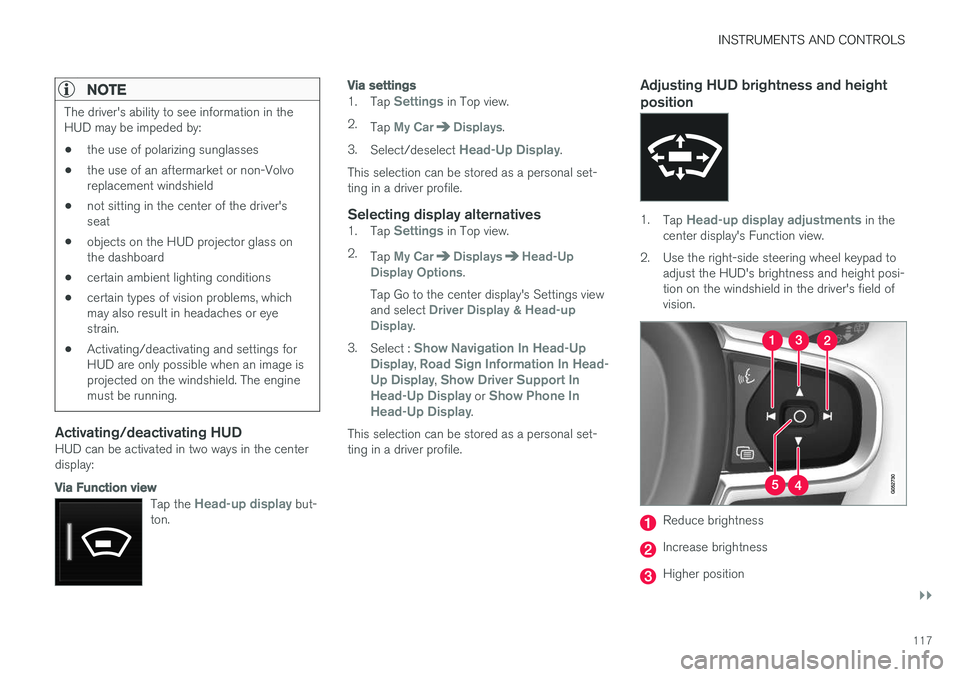
1. Tap Head-up display adjustments in the
center display's Function view.
2. Use the right-side steering wheel keypad to adjust the HUD's brightness and height posi- tion on the windshield in the driver's field ofvision.
Reduce brightness
Increase brightness
Higher position
Page 121 of 548
INSTRUMENTS AND CONTROLS
}}
* Option/accessory.119
Voice control
Voice commands make it possible for the driver to voice-control certain functions in the mediaplayer, a Bluetooth-connected cell phone, cli- mate system and the Volvo navigation system *.
Voice control offers convenience and enables the driver to keep his/her hands on the steeringwheel and concentrate on driving and the trafficsituation around the vehicle.
WARNING
As the driver, you have full responsibility for operating the vehicle safely and adhering toall applicable traffic regulations.
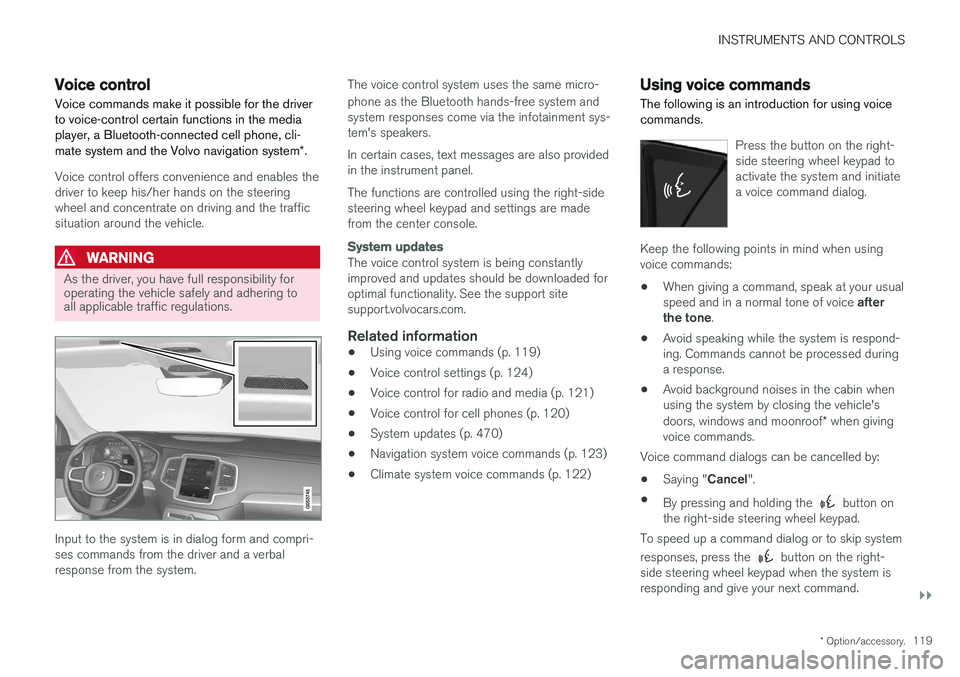
Input to the system is in dialog form and compri- ses commands from the driver and a verbalresponse from the system. The voice control system uses the same micro- phone as the Bluetooth hands-free system and system responses come via the infotainment sys-tem's speakers. In certain cases, text messages are also provided in the instrument panel. The functions are controlled using the right-side steering wheel keypad and settings are madefrom the center console.
System updates
The voice control system is being constantly improved and updates should be downloaded foroptimal functionality. See the support sitesupport.volvocars.com.
Related information
•
Using voice commands (p. 119)
• Voice control settings (p. 124)
• Voice control for radio and media (p. 121)
• Voice control for cell phones (p. 120)
• System updates (p. 470)
• Navigation system voice commands (p. 123)
• Climate system voice commands (p. 122)
Using voice commands
The following is an introduction for using voice commands.
Press the button on the right- side steering wheel keypad toactivate the system and initiatea voice command dialog.
Keep the following points in mind when using voice commands:
• When giving a command, speak at your usual speed and in a normal tone of voice
after
the tone .
• Avoid speaking while the system is respond- ing. Commands cannot be processed duringa response.
• Avoid background noises in the cabin whenusing the system by closing the vehicle's doors, windows and moonroof
* when giving
voice commands.
Voice command dialogs can be cancelled by:
• Saying "
Cancel".
• By pressing and holding the
button on
the right-side steering wheel keypad.
To speed up a command dialog or to skip system responses, press the
button on the right-
side steering wheel keypad when the system is responding and give your next command.
Page 125 of 548
INSTRUMENTS AND CONTROLS
123
Navigation system voice commands
Many of the navigation system's functions can be activated using voice commands.
The procedure for using voice control is descri- bed in greater detail in the articles "Voice con-trol," "Using voice control" and "Voice controlsettings."
Voice commandsThe following list contains examples of com-mands that are unique to navigation system. To use the voice control system, press the
on the right-side steering wheel keypad and say one of the following commands after the tone:
• "
Navigation": Starts a navigation voice com-
mand dialog and displays available com- mands.
• "
Take me home": Guidance will be given to
the location set as Home.
• "
Go to [City]": Enter a city as a destination,
e.g., "Go to New York."
• "
Go to [Address]": Enter an address as a
destination, e.g., Go to 125 43 St., New York."
• "
Go to Intersection": Starts a dialog where
two street names are entered. The destina- tion will then be the intersection of the twostreets. •
"
Go to [Zip code]": Enter a zip code as a
destination, e.g., "Go to 07405."
• "
Go to [Name]": Enter a name from a list of
contacts e.g., "Go to John Smith."
• "
Search [POI category] in [City]": The list
of results will be sorted around the center of the selected city/town, e.g., Search restau-rants in Butler.
•
Search [POI category]": For example,
Search Yankee Stadium.
• "
Change country/Change state":
Changes the country/state in which a search is conducted.
• "
Show favorites": Shows a list of Favoritesin the center display's Top view.
• "
Clear itinerary": Deletes all intermediate
destinations in an itinerary.
• "
Repeat voice guidance": Repeats the
most recent guidance instruction.
• "
Pause guidance": Pauses guidance on
the map.
• "
Resume guidance": Resumes guidance
on the map.
• "
Turn off voice guidance": Turns voice
navigation guidance off.
• "
Turn on voice guidance": Turns voice
navigation guidance on.
Related information
• Voice control (p. 119)
• Using voice commands (p. 119)
• Voice control settings (p. 124)
Page 126 of 548
INSTRUMENTS AND CONTROLS
* Option/accessory.
124
Voice control settings
There are a number of settings that can be made for the voice control system.
Open the center display's Top view and tap
SettingsSystemVoice Control and
select settings. •
Repeat Mode
•Gender
•Speech Rate
Sound settings
Open Top view and tap SettingsSound
System VolumesVoice Control.
Changing languages
The voice control system only understands the languages marked by the
symbol in the list
of possible system languages. Changing the language for this system also affects menus, messages and help texts. Open Top view and tap
SettingsSystemLanguage.
Related information
• Voice control (p. 119)
• Using voice commands (p. 119)
• Navigation system voice commands (p. 123)
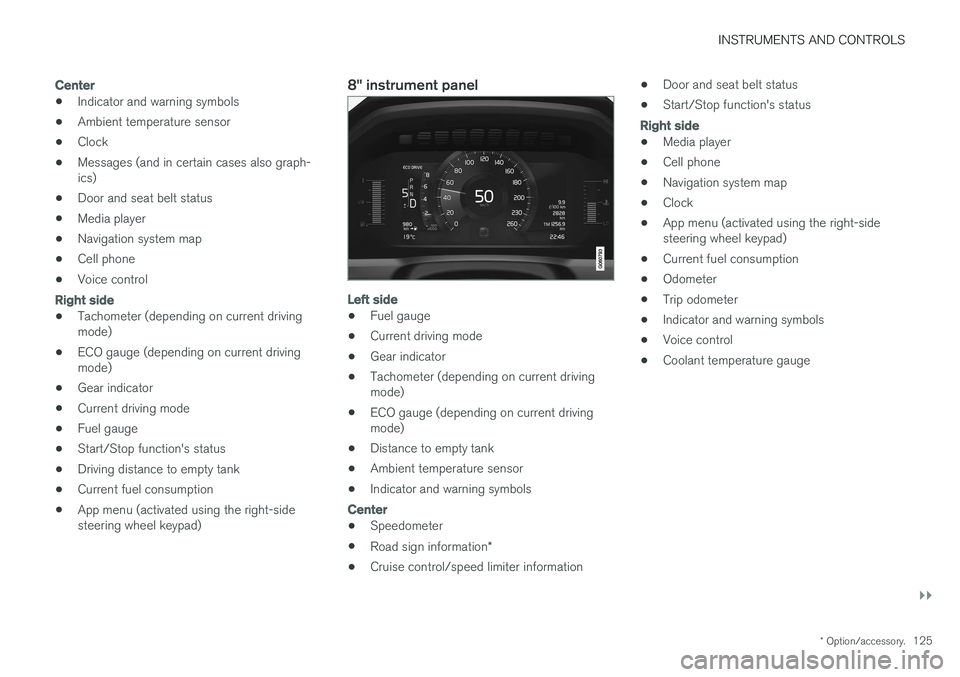
Instrument panel
The instrument panel displays vehicle- and driv- ing-related information.
The gauges, indicators, symbols and functions displayed in the instrument panel depend on theequipment/systems installed in the vehicle andwhich functions are currently activated. The instrument panel is available in two versions: 12" and 8". Some of the functions listed below are optional.
WARNING
• If the instrument panel is not functioning properly, information about e.g., brakes,airbags or other safety-related messagescannot be displayed and the driver cannotbe alerted to possible problems.
• If the instrument panel turns off, does notactivate when the ignition is switched onor is completely/partially not possible toread, do not drive the vehicle. Contact atrained and qualified Volvo service techni-cian.
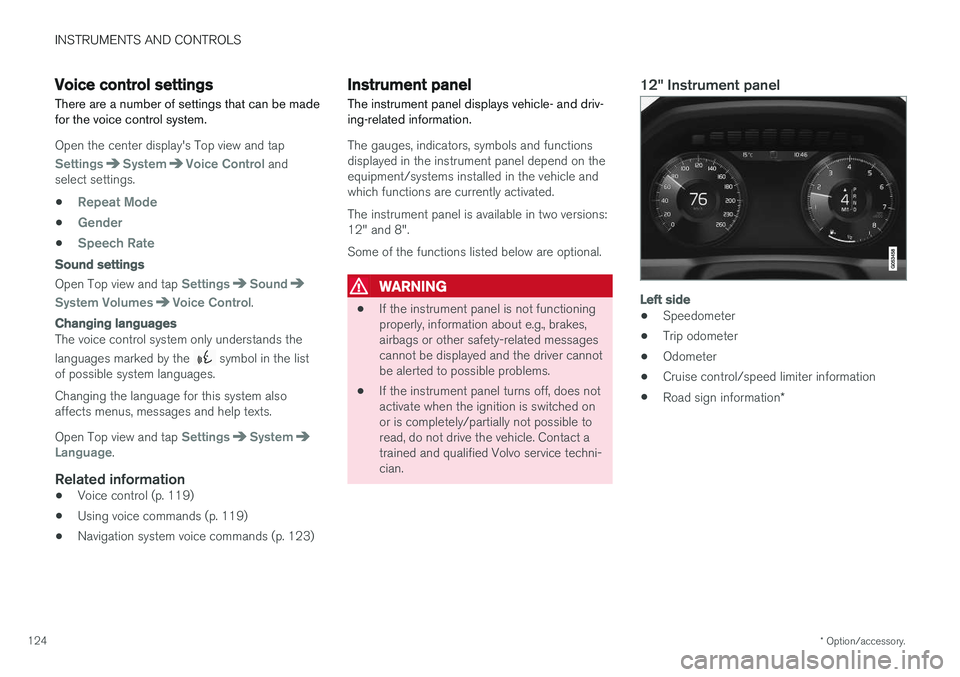
12" Instrument panel
Left side
• Speedometer
• Trip odometer
• Odometer
• Cruise control/speed limiter information
• Road sign information
*
Page 127 of 548
INSTRUMENTS AND CONTROLS
}}
* Option/accessory.125
Center
•Indicator and warning symbols
• Ambient temperature sensor
• Clock
• Messages (and in certain cases also graph- ics)
• Door and seat belt status
• Media player
• Navigation system map
• Cell phone
• Voice control
Right side
•Tachometer (depending on current driving mode)
• ECO gauge (depending on current drivingmode)
• Gear indicator
• Current driving mode
• Fuel gauge
• Start/Stop function's status
• Driving distance to empty tank
• Current fuel consumption
• App menu (activated using the right-sidesteering wheel keypad)
8" instrument panel
Left side
•Fuel gauge
• Current driving mode
• Gear indicator
• Tachometer (depending on current driving mode)
• ECO gauge (depending on current drivingmode)
• Distance to empty tank
• Ambient temperature sensor
• Indicator and warning symbols
Center
•
Speedometer
• Road sign information
*
• Cruise control/speed limiter information •
Door and seat belt status
• Start/Stop function's status
Right side
•Media player
• Cell phone
• Navigation system map
• Clock
• App menu (activated using the right-side steering wheel keypad)
• Current fuel consumption
• Odometer
• Trip odometer
• Indicator and warning symbols
• Voice control
• Coolant temperature gauge