child lock VOLVO S90 2017 Owner´s Manual
[x] Cancel search | Manufacturer: VOLVO, Model Year: 2017, Model line: S90, Model: VOLVO S90 2017Pages: 548, PDF Size: 11.42 MB
Page 232 of 548
||
LOCKS AND ALARM
* Option/accessory.
230
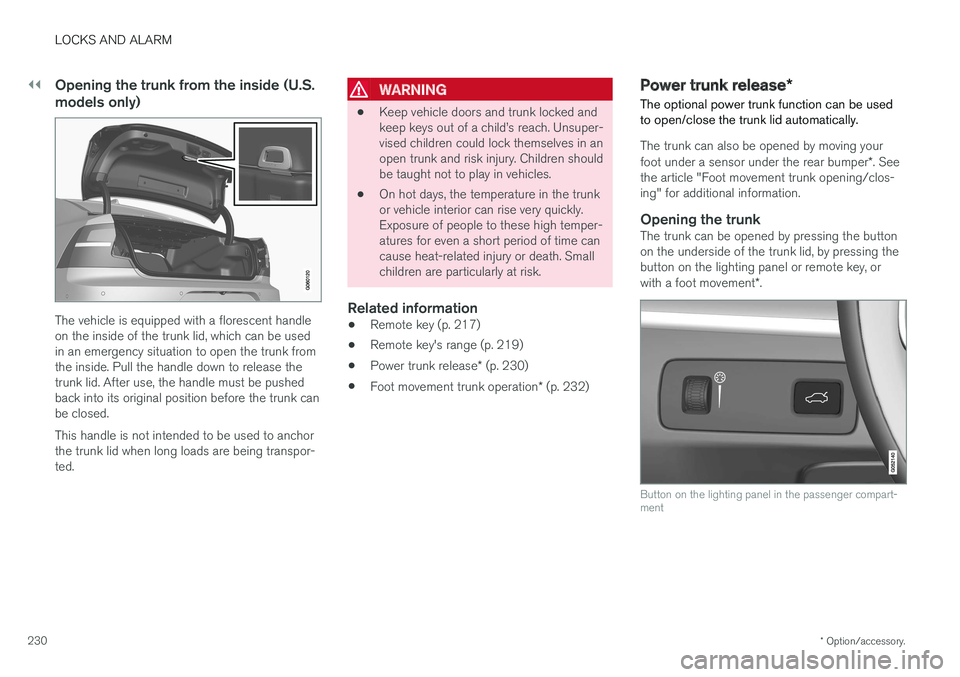
Opening the trunk from the inside (U.S. models only)
The vehicle is equipped with a florescent handle on the inside of the trunk lid, which can be usedin an emergency situation to open the trunk fromthe inside. Pull the handle down to release thetrunk lid. After use, the handle must be pushedback into its original position before the trunk canbe closed. This handle is not intended to be used to anchor the trunk lid when long loads are being transpor-ted.
WARNING
• Keep vehicle doors and trunk locked and keep keys out of a child
Page 237 of 548
LOCKS AND ALARM
}}
235
Locking/unlocking with the detachable key blade
The detachable key blade can be used to e.g., unlock the driver's door from the outside if, forexample, the remote key's battery is weak.
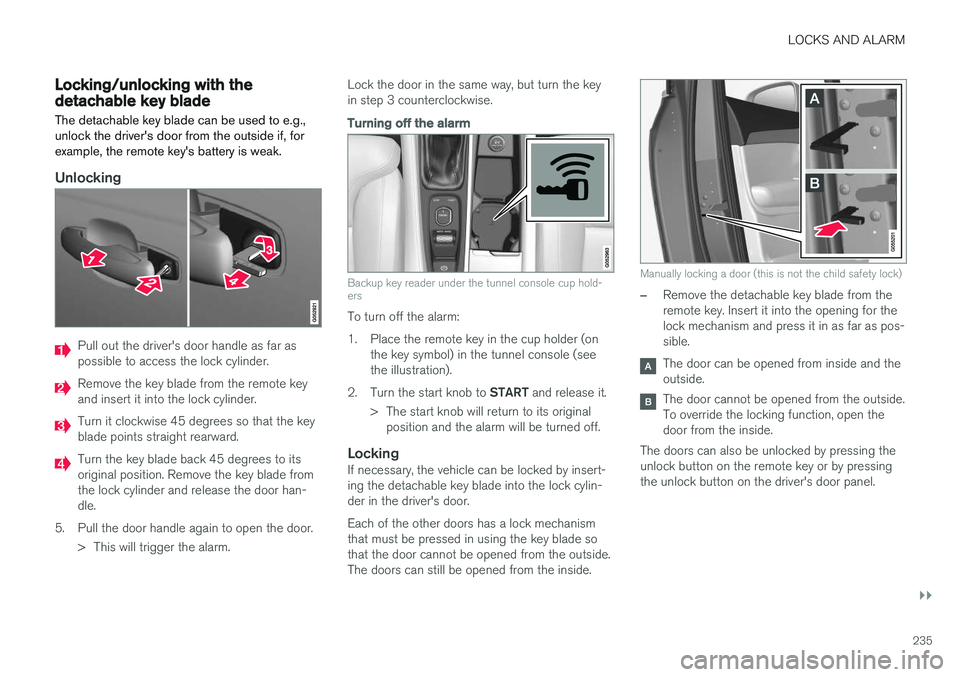
Unlocking
Pull out the driver's door handle as far as possible to access the lock cylinder.
Remove the key blade from the remote key and insert it into the lock cylinder.
Turn it clockwise 45 degrees so that the key blade points straight rearward.
Turn the key blade back 45 degrees to its original position. Remove the key blade fromthe lock cylinder and release the door han-dle.
5. Pull the door handle again to open the door. > This will trigger the alarm. Lock the door in the same way, but turn the keyin step 3 counterclockwise.
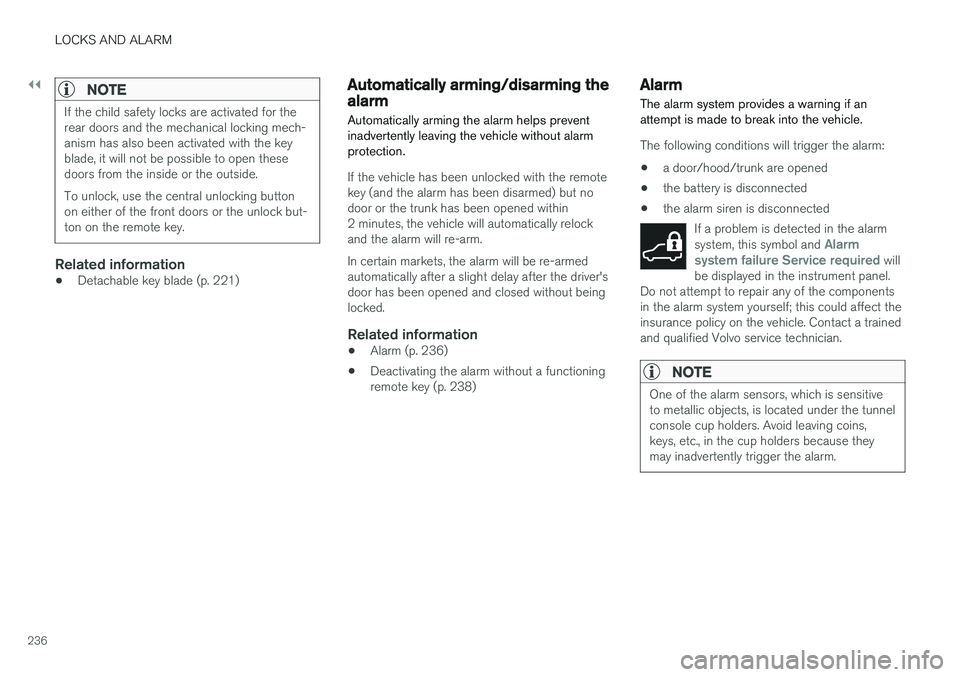
Turning off the alarm
Backup key reader under the tunnel console cup hold- ers
To turn off the alarm:
1. Place the remote key in the cup holder (on
the key symbol) in the tunnel console (see the illustration).
2. Turn the start knob to START and release it.
> The start knob will return to its original position and the alarm will be turned off.
LockingIf necessary, the vehicle can be locked by insert-ing the detachable key blade into the lock cylin-der in the driver's door. Each of the other doors has a lock mechanism that must be pressed in using the key blade sothat the door cannot be opened from the outside.The doors can still be opened from the inside.
Manually locking a door (this is not the child safety lock)
–Remove the detachable key blade from the remote key. Insert it into the opening for thelock mechanism and press it in as far as pos-sible.
The door can be opened from inside and the outside.
The door cannot be opened from the outside. To override the locking function, open thedoor from the inside.
The doors can also be unlocked by pressing theunlock button on the remote key or by pressingthe unlock button on the driver's door panel.
Page 238 of 548
||
LOCKS AND ALARM
236
NOTE
If the child safety locks are activated for the rear doors and the mechanical locking mech-anism has also been activated with the keyblade, it will not be possible to open thesedoors from the inside or the outside. To unlock, use the central unlocking button on either of the front doors or the unlock but-ton on the remote key.
Related information
•Detachable key blade (p. 221)
Automatically arming/disarming the alarm
Automatically arming the alarm helps prevent inadvertently leaving the vehicle without alarmprotection.
If the vehicle has been unlocked with the remote key (and the alarm has been disarmed) but nodoor or the trunk has been opened within2 minutes, the vehicle will automatically relockand the alarm will re-arm. In certain markets, the alarm will be re-armed automatically after a slight delay after the driver'sdoor has been opened and closed without beinglocked.
Related information
• Alarm (p. 236)
• Deactivating the alarm without a functioningremote key (p. 238)
Alarm
The alarm system provides a warning if an attempt is made to break into the vehicle.
The following conditions will trigger the alarm:
• a door/hood/trunk are opened
• the battery is disconnected
• the alarm siren is disconnected
If a problem is detected in the alarm system, this symbol and
Alarm
system failure Service required will
be displayed in the instrument panel.
Do not attempt to repair any of the components in the alarm system yourself; this could affect theinsurance policy on the vehicle. Contact a trainedand qualified Volvo service technician.
NOTE
One of the alarm sensors, which is sensitive to metallic objects, is located under the tunnelconsole cup holders. Avoid leaving coins,keys, etc., in the cup holders because theymay inadvertently trigger the alarm.
Page 240 of 548
LOCKS AND ALARM
* Option/accessory.
238
Deactivating the alarm without a functioning remote key
If the remote key is not functioning properly, the alarm can be turned off and the vehicle can bestarted as follows:
1. Unlock and open the driver's door with the detachable key blade.
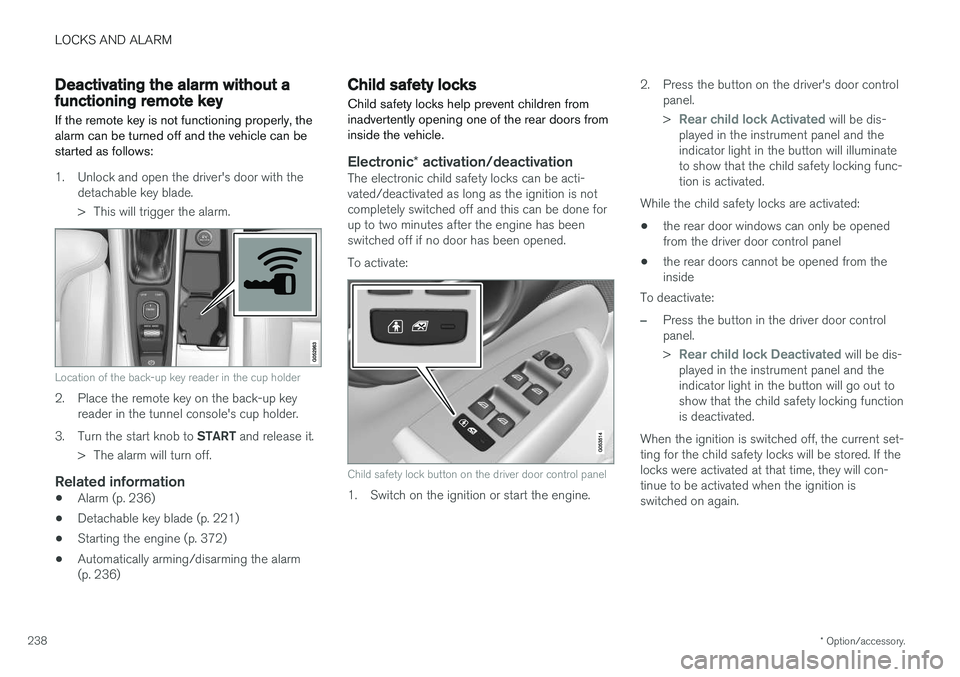
> This will trigger the alarm.
Location of the back-up key reader in the cup holder
2. Place the remote key on the back-up keyreader in the tunnel console's cup holder.
3. Turn the start knob to START and release it.
> The alarm will turn off.
Related information
• Alarm (p. 236)
• Detachable key blade (p. 221)
• Starting the engine (p. 372)
• Automatically arming/disarming the alarm (p. 236)
Child safety locks
Child safety locks help prevent children from inadvertently opening one of the rear doors frominside the vehicle.
Electronic * activation/deactivationThe electronic child safety locks can be acti- vated/deactivated as long as the ignition is notcompletely switched off and this can be done forup to two minutes after the engine has beenswitched off if no door has been opened. To activate:
Child safety lock button on the driver door control panel
1. Switch on the ignition or start the engine. 2. Press the button on the driver's door control
panel. >
Rear child lock Activated will be dis-
played in the instrument panel and the indicator light in the button will illuminateto show that the child safety locking func-tion is activated.
While the child safety locks are activated:
• the rear door windows can only be openedfrom the driver door control panel
• the rear doors cannot be opened from theinside
To deactivate:
–Press the button in the driver door control panel. >
Rear child lock Deactivated will be dis-
played in the instrument panel and the indicator light in the button will go out toshow that the child safety locking functionis deactivated.
When the ignition is switched off, the current set-ting for the child safety locks will be stored. If thelocks were activated at that time, they will con-tinue to be activated when the ignition isswitched on again.
Page 241 of 548
LOCKS AND ALARM
}}
* Option/accessory.239
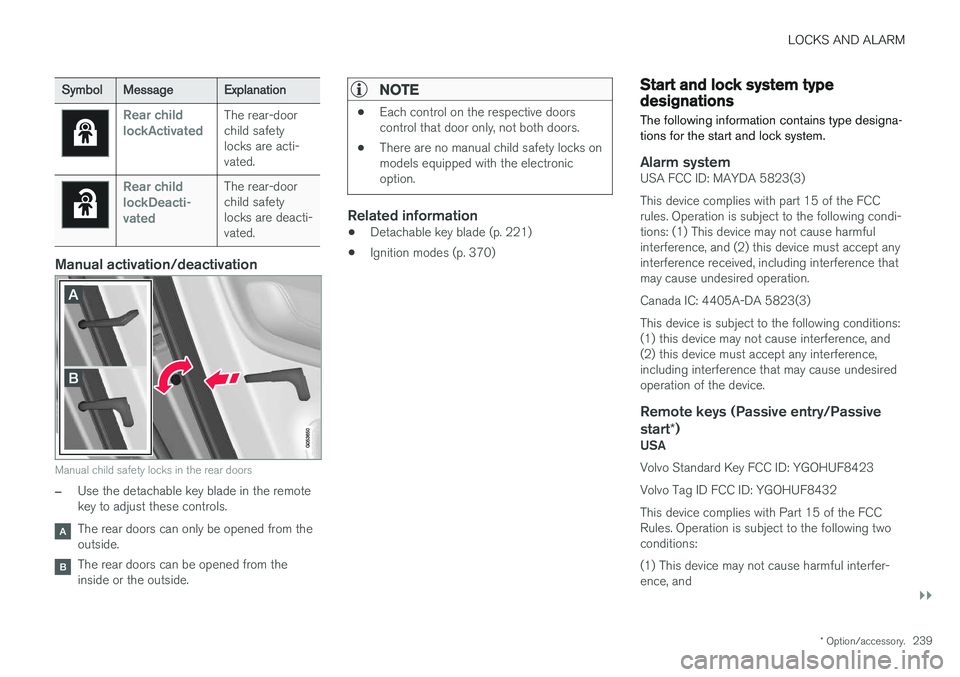
SymbolMessage Explanation
Rear child lockActivatedThe rear-door child safetylocks are acti-vated.
Rear child lockDeacti-vatedThe rear-door child safetylocks are deacti-vated.
Manual activation/deactivation
Manual child safety locks in the rear doors
–Use the detachable key blade in the remote key to adjust these controls.
The rear doors can only be opened from the outside.
The rear doors can be opened from the inside or the outside.
NOTE
•Each control on the respective doors control that door only, not both doors.
• There are no manual child safety locks onmodels equipped with the electronicoption.
Related information
• Detachable key blade (p. 221)
• Ignition modes (p. 370)
Start and lock system type designations
The following information contains type designa- tions for the start and lock system.
Alarm systemUSA FCC ID: MAYDA 5823(3) This device complies with part 15 of the FCC rules. Operation is subject to the following condi-tions: (1) This device may not cause harmfulinterference, and (2) this device must accept anyinterference received, including interference thatmay cause undesired operation. Canada IC: 4405A-DA 5823(3)This device is subject to the following conditions: (1) this device may not cause interference, and(2) this device must accept any interference,including interference that may cause undesiredoperation of the device.
Remote keys (Passive entry/Passive start *)
USA Volvo Standard Key FCC ID: YGOHUF8423 Volvo Tag ID FCC ID: YGOHUF8432This device complies with Part 15 of the FCC Rules. Operation is subject to the following twoconditions: (1) This device may not cause harmful interfer- ence, and
Page 538 of 548
INDEX
536Booster cushions 83
Brake assist system 349
Brake lights 146, 350Brakes
auto-hold 348
Brake system Brake pad inspection 347
fluid 527
general information 346, 348, 349
Bulbs 497 replacing 493
specifications 500
C
Cameradriver support systems 292
limitations 293
Camera, Park Assist 332, 334, 336, 337
Capacity weight 446, 525Cargo compartment raising/lowering the level 202
Cargo space 202
Car wash 511
Catalytic converter 364
CD, USB, iPod, AUX, Bluetooth, Recents, Library, Shuffle, Similar, Change device, Pri-mary Audio Default Language, Subtitle, Pri-mary Subtitle Default Language, Video, DivX ® VOD 420
CD player 420 Cell phone hands-free 407
Pairing 408
Cell phone voice control 120 Center display changing settings 30
cleaning 515
keyboard 31
navigating in 38
overview 28
screen in the center console 44
symbols in the status bar 43
Chains 447
Changing a wheel 450Child restraints recalls and registration 77
Child restraint systems 77 booster cushions 83
convertible seats 80
infant seats 78
ISOFIX/LATCH anchors 84
top tether anchors 86Child safety 75
booster cushions 83
child restraint systems 77, 85
convertible seats 80
infant seats 78
Child safety locks 238 Child seats lower attachment points 85
City safety 296, 304City Safety crossing traffic 301
detecting objects 299
limitations 304
rear collision warning 308
symbols and messages 307
troubleshooting 302
City Safety, On/Off 298 City Safety ™
Multi Target 302
Cleaning exterior 511
interior 513
Clean Zone Interior Package 180
Climate system 182 air distribution 196, 198, 199
air filter 181
air vents 197
auto mode 182
Page 544 of 548
INDEX
542
S
Safety, occupant 56
Safety defects, reporting 57
Safety locks, child 238
Safety mode 73Seatadjusting the passenger's seat from the
driver's seat 163
Seat belt reminder 64
Seat belts Automatic locking retractor/Emergency
locking retractor 77
buckling 62
pretensioners 60, 61
reminder 64
securing child restraint systems 78, 80, 83
unbuckling 62
use during pregnancy 58
using 60
Seats rear 169
Sensus 17 Service connected service booking 472
Settings view
categories 110
resetting 113
system settings 112
Shiftlock override 383
Side door mirrors 102
Side impact airbags 72Sirius Satellite radio Travel link 401
SiriusXM ®
Satellite radio
traffic information 398, 399, 400
Ski hatch center backrest 202
Snow chains 447
Snow tires 447Sound settings media 424
ringtones 413
Sound settings, audio system 391, 424 Specifications bulbs 500
Speed camera alert 316
Speed limiter 247, 249, 253 automatic 249, 251
deactivating/reactivating 252
starting/activating 248Spin control 243
Stability system 243sport mode 244
Start/Stop (engine function) 379, 381Start and lock system type designations 239
Starting and driving 346
Starting the engine 372Starting the vehicle after a crash (crash mode) 73, 74
Start inhibitor (immobilizer) 214
Steering wheel 159 adjusting 161
heated 192
horn 159
keypad 159
Steering wheel paddles 159
Stone chips, touching up 516, 517
Storage compartments 204
Studded tires 447
Sunroof (moonroof) 103, 104
Sun shade 106, 108
Sun visor 208
Suspension 388
System updates 470
Page 545 of 548
INDEX
543
T
Technician certification 53 Temperatureperceived 178
Temperature sensor ambient 114
Temporary spare tire 451Tethering wi-fi sharing 431
Three-way catalytic converter 364
Tire inflation pressure 532
Tire Pressure Monitoring System 455, 457 calibrating 458
Tire Pressure Monitoring System (TPMS) 458
Tires 440, 450 changing 450
changing from summer to winter 445
glossary of terms 444
improving economy 440
inflation pressure 448
inflation pressure table 532installing (mounting) a wheel on the
vehicle 454
rotation 441
snow 447
spare 451
specifications 442
storing 441
studded 447
tire pressure monitoring system 455, 457
tire sealing system 459, 461, 465
tread wear indicator 445
uniform tire quality grading 447
wheel bolts 452
Tire sealing system 459, 461, 465 Top tether anchors (child restraint sys- tems) 86
Touching up paint 516, 517
Towbar 368
Towing a trailer 366, 369 trailer hitch 368
Towing eyelet 357
Towing the vehicle 359
Traction control 243
Trailer hitch 368
Trailer towing 366, 369 trailer hitch 368
Transmission gear shift indicator 384
general description 382, 384
Hill Start Assist 350
oil 533
shifting with steering wheel paddles 386
shiftlock override 383Travel Link 401Alerts 404
Fuel 405
Sports 406
weather 403
Tread wear indicator 445
Trip computer 95, 96, 97 reset 96
Trip odometers 95
Trips, long distance 353
Trip statistics 97Trunk locking/unlocking (private locking) 233 operating with the foot movement sen-
sor 232
power release 230
Turn signals 146 changing bulbs 496
U
Uniform Tire Quality Grading 447
Unlocking the vehicle 223, 224, 228
USB/AUX connection 414, 423
User profile 172