door lock VOLVO S90 2017 Owner´s Manual
[x] Cancel search | Manufacturer: VOLVO, Model Year: 2017, Model line: S90, Model: VOLVO S90 2017Pages: 548, PDF Size: 11.42 MB
Page 173 of 548
INSTRUMENTS AND CONTROLS
171
WARNING
•When one or more sections of the back- rest is returned to the upright position,check that it is properly locked in place bypushing and pulling it.
• Return the outboard head restraints tothe upright position.
• Long loads should always be securelyanchored to help avoid injury in the eventof a sudden stop.
• Always turn the engine off and apply theparking brake when loading/unloadingthe vehicle.
• Place the transmission in the Park (
P)
position to help prevent inadvertentmovement of the gear selector.
Folding down a section of the backrestThe vehicle must be stationary and one of therear doors must be open before a backrest sec-tion can be folded down.
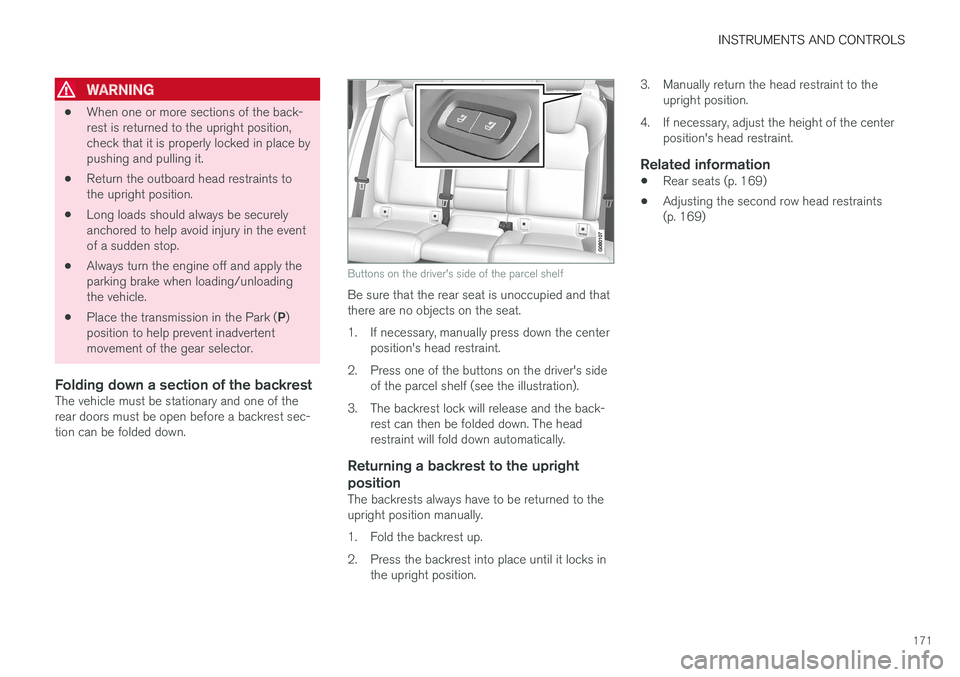
Buttons on the driver's side of the parcel shelf
Be sure that the rear seat is unoccupied and that there are no objects on the seat.
1. If necessary, manually press down the center position's head restraint.
2. Press one of the buttons on the driver's side of the parcel shelf (see the illustration).
3. The backrest lock will release and the back- rest can then be folded down. The head restraint will fold down automatically.
Returning a backrest to the upright position
The backrests always have to be returned to the upright position manually.
1. Fold the backrest up.
2. Press the backrest into place until it locks inthe upright position. 3. Manually return the head restraint to the
upright position.
4. If necessary, adjust the height of the center position's head restraint.
Related information
• Rear seats (p. 169)
• Adjusting the second row head restraints (p. 169)
Page 181 of 548
CLIMATE
}}
* Option/accessory.179
Climate system sensors The climate system's sensors help regulate the passenger compartment temperature, humiditylevel, etc.
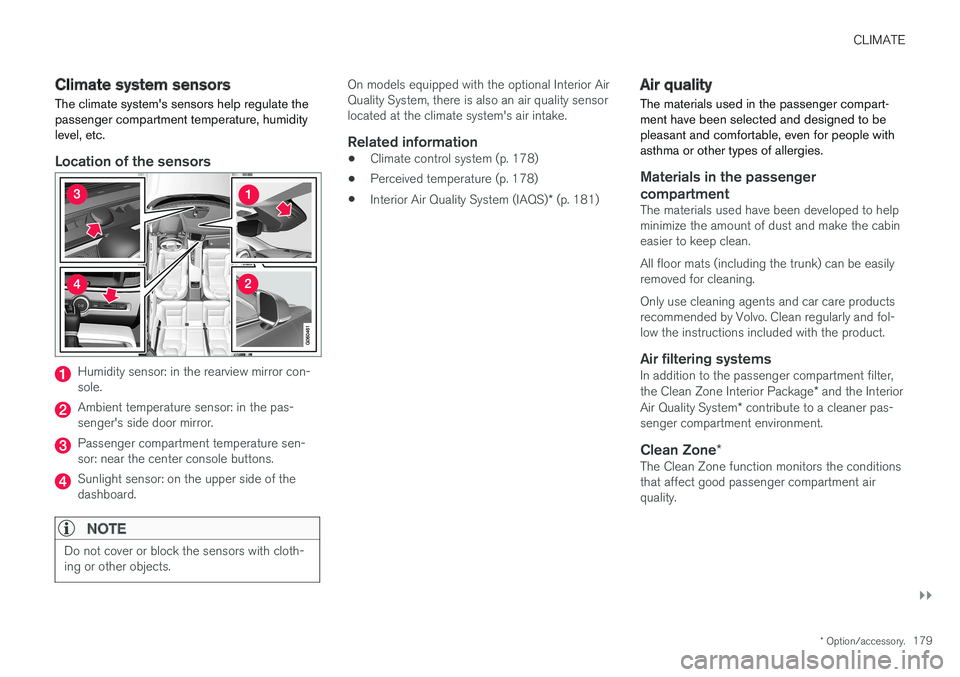
Location of the sensors
Humidity sensor: in the rearview mirror con- sole.
Ambient temperature sensor: in the pas- senger's side door mirror.
Passenger compartment temperature sen- sor: near the center console buttons.
Sunlight sensor: on the upper side of the dashboard.
NOTE
Do not cover or block the sensors with cloth- ing or other objects.
On models equipped with the optional Interior Air Quality System, there is also an air quality sensorlocated at the climate system's air intake.
Related information
•Climate control system (p. 178)
• Perceived temperature (p. 178)
• Interior Air Quality System (IAQS)
* (p. 181)
Air quality
The materials used in the passenger compart- ment have been selected and designed to bepleasant and comfortable, even for people withasthma or other types of allergies.
Materials in the passenger compartment
The materials used have been developed to help minimize the amount of dust and make the cabineasier to keep clean. All floor mats (including the trunk) can be easily removed for cleaning. Only use cleaning agents and car care products recommended by Volvo. Clean regularly and fol-low the instructions included with the product.
Air filtering systemsIn addition to the passenger compartment filter, the Clean Zone Interior Package * and the Interior
Air Quality System * contribute to a cleaner pas-
senger compartment environment.
Clean Zone *The Clean Zone function monitors the conditions that affect good passenger compartment airquality.
Page 182 of 548
||
CLIMATE
* Option/accessory.
180
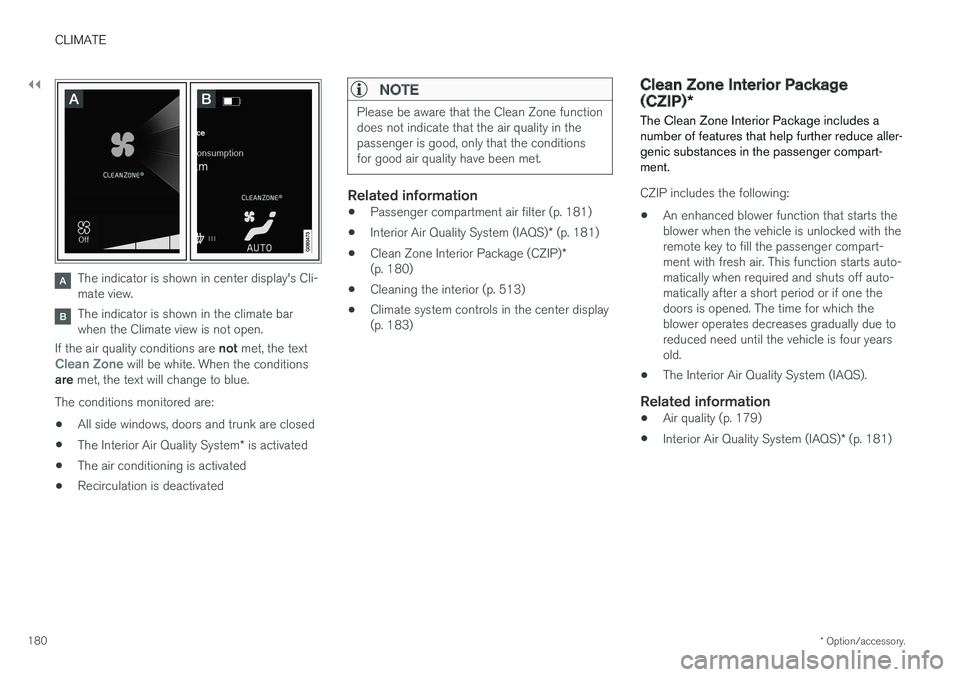
The indicator is shown in center display's Cli- mate view.
The indicator is shown in the climate bar when the Climate view is not open.
If the air quality conditions are not met, the text
Clean Zone will be white. When the conditions
are met, the text will change to blue.
The conditions monitored are:
• All side windows, doors and trunk are closed
• The Interior Air Quality System
* is activated
• The air conditioning is activated
• Recirculation is deactivated
NOTE
Please be aware that the Clean Zone function does not indicate that the air quality in thepassenger is good, only that the conditionsfor good air quality have been met.
Related information
•
Passenger compartment air filter (p. 181)
• Interior Air Quality System (IAQS)
* (p. 181)
• Clean Zone Interior Package (CZIP)
*
(p. 180)
• Cleaning the interior (p. 513)
• Climate system controls in the center display (p. 183)
Clean Zone Interior Package (CZIP)
*
The Clean Zone Interior Package includes a number of features that help further reduce aller-genic substances in the passenger compart-ment.
CZIP includes the following:
• An enhanced blower function that starts the blower when the vehicle is unlocked with theremote key to fill the passenger compart-ment with fresh air. This function starts auto-matically when required and shuts off auto-matically after a short period or if one thedoors is opened. The time for which theblower operates decreases gradually due toreduced need until the vehicle is four yearsold.
• The Interior Air Quality System (IAQS).
Related information
•
Air quality (p. 179)
• Interior Air Quality System (IAQS)
* (p. 181)
Page 206 of 548
||
LOADING AND STORAGE
204•
Place heavier cargo at the bottom of the load.
• Secure the cargo correctly with appropriatetie-down equipment.
• Check periodically that the load carriers andload are properly secured.
• Remember that the vehicle's center of gravityand handling change when you carry a loadon the roof.
• The vehicle's wind resistance and fuel con-sumption will increase with the size of theload.
• Drive smoothly. Avoid rapid starts, fast cor-nering and hard braking.
CAUTION
The optional moonroof should not be opened while load carriers are installed on the vehicle.
See the article "Weights" for information about the maximum permissible load that can be trans-ported on the roof.
Related information
•
Weights (p. 525)
• Load anchoring eyelets (p. 207)
• Whiplash protection system (p. 59)
• Locking/unlocking the trunk (p. 228)
Passenger compartment storage spaces
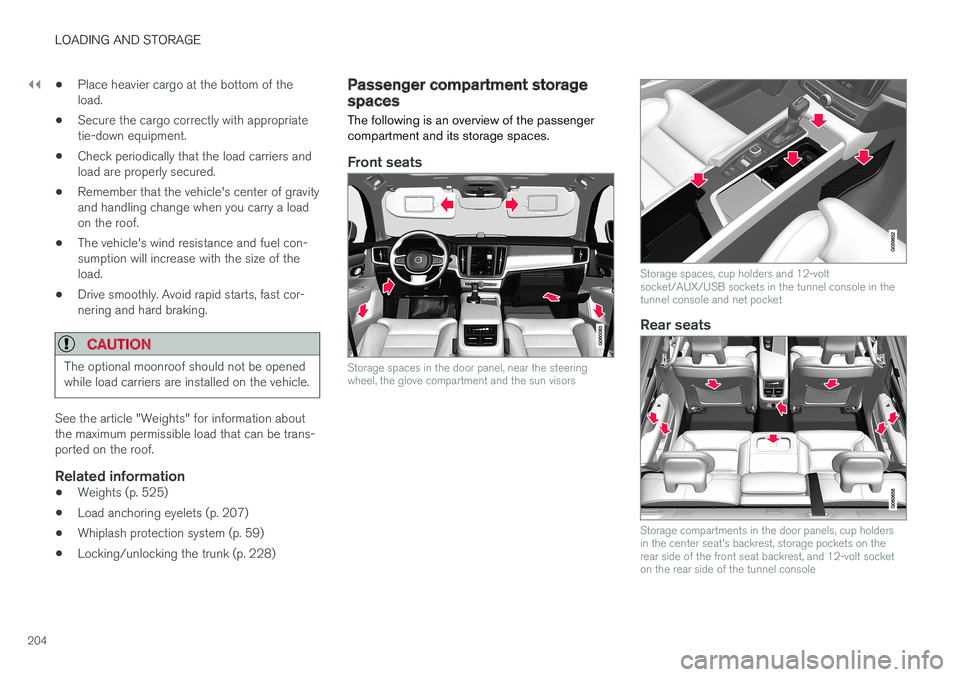
The following is an overview of the passenger compartment and its storage spaces.
Front seats
Storage spaces in the door panel, near the steering wheel, the glove compartment and the sun visors
Storage spaces, cup holders and 12-volt socket/AUX/USB sockets in the tunnel console in thetunnel console and net pocket
Rear seats
Storage compartments in the door panels, cup holders in the center seat's backrest, storage pockets on therear side of the front seat backrest, and 12-volt socketon the rear side of the tunnel console
Page 207 of 548
LOADING AND STORAGE
}}
* Option/accessory.205
Related information
•Tunnel console (p. 206)
• Using the glove compartment (p. 205)
• Electrical sockets (p. 209)
• Sun visors (p. 208)
Using the glove compartment
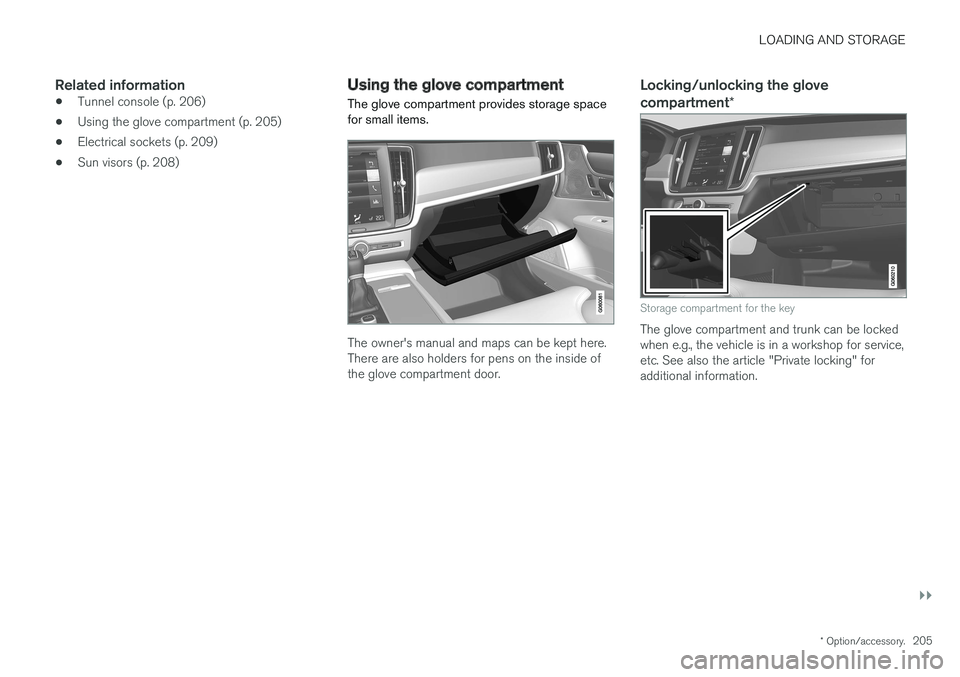
The glove compartment provides storage space for small items.
The owner's manual and maps can be kept here. There are also holders for pens on the inside ofthe glove compartment door.
Locking/unlocking the glove compartment *
Storage compartment for the key
The glove compartment and trunk can be locked when e.g., the vehicle is in a workshop for service,etc. See also the article "Private locking" foradditional information.
Page 216 of 548
LOCKS AND ALARM
* Option/accessory.
214
Locks and remote keys
The vehicle can be locked and unlocked in vari- ous ways and there are several types of remotekeys that can be used.
Locking/unlocking/opening/closingThe vehicle can be locked/unlocked from the passenger compartment, using the buttons onthe remote key or by using the optional PassiveEntry system where it is only necessary to have akey in your possession to lock or unlock thedoors. On models equipped with a power trunk *, it can
also be opened/closed by moving your foot under a sensor * beneath the rear bumper.
If for any reason a remote key does not function properly, it may be necessary to replace its bat-teries but the vehicle can always be locked orunlocked manually using the remote key'sdetachable key blade.
Remote keyThe remote key does not have to be physicallyhandled in order to start the engine because thevehicle is equipped with the standard PassiveStart system (the key only needs to be in thefront part of the passenger compartment). If thevehicle is equipped with the optional PassiveEntry system that enables keyless entry and start,the key can be anywhere in the vehicle when theengine is started. Models with Passive Entry
* also have an extra,
smaller key without buttons called a Key Tag. Additional keys can be ordered from a Volvo retailer.
Related information
• Immobilizer (p. 214)
• Alarm (p. 236)
• Child safety locks (p. 238)
• Remote key (p. 217)
• Foot movement trunk operation
* (p. 232)
• Locking/unlocking from inside the vehicle(p. 224)
• Locking/unlocking from outside the vehicle(p. 223)
• Locking/unlocking the trunk (p. 228)
• Starting the engine (p. 372)
Immobilizer
The immobilizer is a start inhibitor that helps pre- vent unauthorized persons from starting theengine.
Each of the keys supplied with your vehicle con- tains a unique coded transponder. The vehiclecode in the key is transmitted to the vehicle'signition system where it is compared to the codestored in the start inhibitor module. The following message (which may appear in the instrument panel) is related to the immobilizer:
Symbol Message Explanation
Vehicle key not found See Owner'smanualRemote key not recognized duringstart. Place theremote key on thekey symbol in thetunnel console cupholder and try tostart the vehicleagain.
Related information
•Remote key's range (p. 219)
• Remote key (p. 217)
Page 220 of 548
||
LOCKS AND ALARM
* Option/accessory.
218 Each of the remote keys provided with the vehicle can be linked to a driver profile containing uniquepersonal settings that will be applied when thatparticular key is used. See also the article "Driverprofile" for additional information.
NOTE
Avoid placing the remote key closer than approx. (4-6 in.) (10-15 cm) to any metallicobjects or electronic devices such as cellphones, tablets, laptops or chargers.
If interference persists, unlock the vehicle with the detachable key blade and place the remotekey in the backup key reader in the tunnel con-sole cup holder to disarm the alarm.
WARNING
Always remove the remote key from the pas- senger compartment when leaving the vehicle and ensure that the ignition in mode
0, espe-
cially if there are children in the vehicle.
Key TagIn addition to the two remote keys provided, a smaller third key, called a Key Tag, is also provi-ded for vehicles equipped with the optionalPassive Entry system. This key functions in the same way as a standardremote key but does not have a detachable keyblade and its battery cannot be replaced; a newKey Tag has to be ordered.
Ordering new keysTwo remote keys are provided with the vehicle (a Key Tag
2
is also included for vehicles equipped
with the optional Passive Entry system). Addi- tional keys (a total of 12) can be ordered andused with the vehicle.
The remote key's buttons
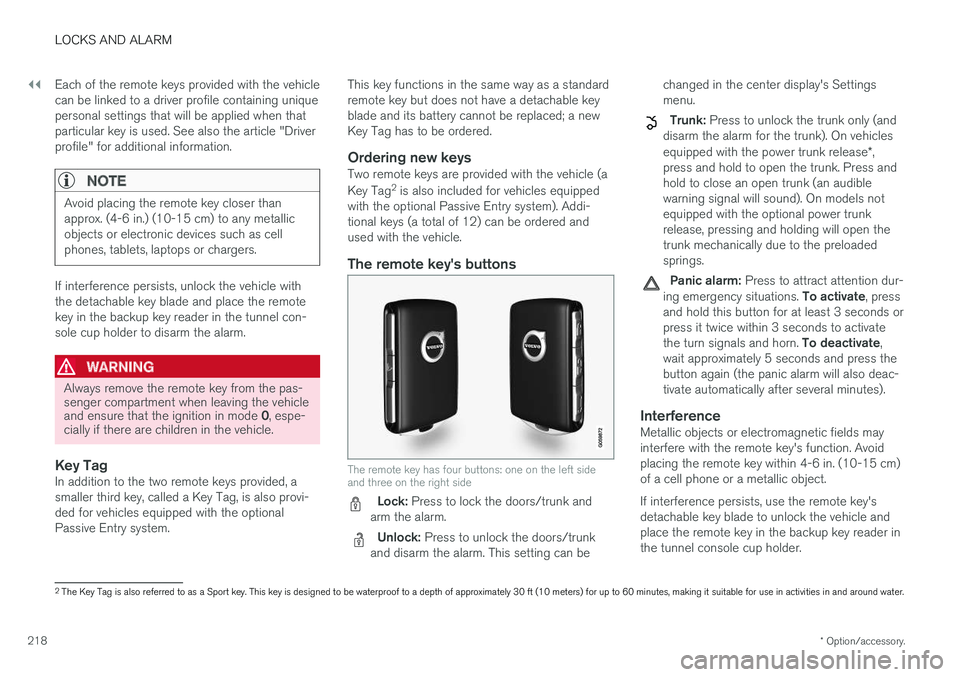
The remote key has four buttons: one on the left side and three on the right side
Lock: Press to lock the doors/trunk and
arm the alarm.
Unlock: Press to unlock the doors/trunk
and disarm the alarm. This setting can be changed in the center display's Settings menu.
Trunk: Press to unlock the trunk only (and
disarm the alarm for the trunk). On vehicles equipped with the power trunk release *,
press and hold to open the trunk. Press and hold to close an open trunk (an audiblewarning signal will sound). On models notequipped with the optional power trunkrelease, pressing and holding will open thetrunk mechanically due to the preloadedsprings.
Panic alarm: Press to attract attention dur-
ing emergency situations. To activate, press
and hold this button for at least 3 seconds or press it twice within 3 seconds to activate the turn signals and horn. To deactivate,
wait approximately 5 seconds and press the button again (the panic alarm will also deac-tivate automatically after several minutes).
InterferenceMetallic objects or electromagnetic fields mayinterfere with the remote key's function. Avoidplacing the remote key within 4-6 in. (10-15 cm)of a cell phone or a metallic object. If interference persists, use the remote key's detachable key blade to unlock the vehicle andplace the remote key in the backup key reader inthe tunnel console cup holder.
2 The Key Tag is also referred to as a Sport key. This key is designed to be waterproof to a depth of approximately 30 ft (10 meters) for up to 60 minutes, making it suitable for use in activities in and around water.
Page 222 of 548
||
LOCKS AND ALARM
* Option/accessory.
220
Keyless use 3
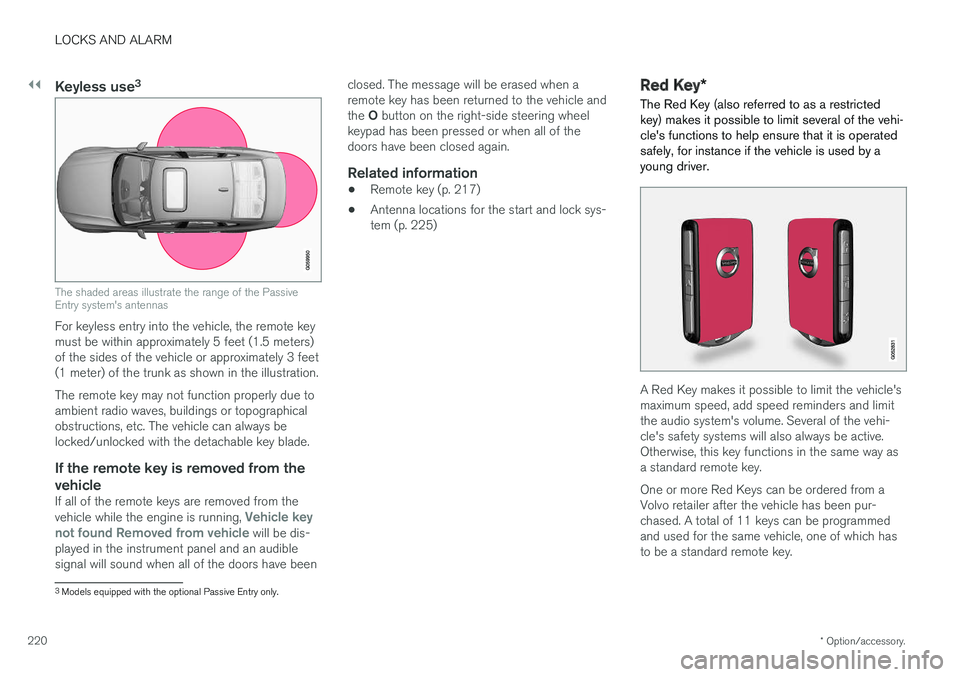
The shaded areas illustrate the range of the Passive Entry system's antennas
For keyless entry into the vehicle, the remote key must be within approximately 5 feet (1.5 meters)of the sides of the vehicle or approximately 3 feet(1 meter) of the trunk as shown in the illustration. The remote key may not function properly due to ambient radio waves, buildings or topographicalobstructions, etc. The vehicle can always belocked/unlocked with the detachable key blade.
If the remote key is removed from the
vehicle
If all of the remote keys are removed from the vehicle while the engine is running, Vehicle key
not found Removed from vehicle will be dis-
played in the instrument panel and an audible signal will sound when all of the doors have been closed. The message will be erased when aremote key has been returned to the vehicle and the
O button on the right-side steering wheel
keypad has been pressed or when all of the doors have been closed again.
Related information
• Remote key (p. 217)
• Antenna locations for the start and lock sys-tem (p. 225)
Red Key
*
The Red Key (also referred to as a restricted key) makes it possible to limit several of the vehi-cle's functions to help ensure that it is operatedsafely, for instance if the vehicle is used by ayoung driver.
A Red Key makes it possible to limit the vehicle's maximum speed, add speed reminders and limitthe audio system's volume. Several of the vehi-cle's safety systems will also always be active.Otherwise, this key functions in the same way asa standard remote key. One or more Red Keys can be ordered from a Volvo retailer after the vehicle has been pur-chased. A total of 11 keys can be programmedand used for the same vehicle, one of which hasto be a standard remote key.
3 Models equipped with the optional Passive Entry only.
Page 223 of 548
LOCKS AND ALARM
}}
* Option/accessory.221
Settings for the Red Key can be made by a standard remote key user from the center dis- play's Top view under:
SettingsSystem
Driver ProfileRed key.
Several of the vehicle's safety function cannot be turned off by a Red Key user. The restrictions are designed to help reduce the risk of an accident and they cannot be changedby a Red Key user. These settings cannot bechanged by the Red Key's user.
Possible settingsThe following settings can be made for a RedKey:
Speed Limiter * (On/Off)
• Setting interval: 30-160 mph (50-250 km/h)
• Default setting: 75 mph (120 km/h)
• Increments: 1 mph (1 km/h)
This symbol will appear in the instru- ment panel and the message
Red
keySpeed limitation cannot be exceeded
will be displayed.
See the article "Speed limiter" for additional information.
Speed reminder (On/Off):
• Setting interval: 0-155 mph (0-250 km/h
• Default settings: 30, 45 and 55 mph (50, 70 and 90 km/h.)
• Increments: 1 mph (1 km/h) •
Max. number of reminders: 6
Reduced max. volume (on/off)
•Default setting: On
Adaptive cruise control
* (On/Off)
• Initial setting: On at the longest interval
• See the article "Adaptive cruise control" for additional information
Safety functionsThe following safety functions will always beactive for a Red Key user: •
Blind Spot Information (BLIS)
*
• Lane Keeping Aid (LKA)
*
• Distance Alert
*
• City Safety
*
• Driver Alert Control (DAC)
*
• Road Sign Information (RSI)
*
Related information
•Remote key (p. 217)
• Adaptive Cruise Control (ACC)
* (p. 261)
• Speed limiter (SL)
* (p. 247)
• Blind Spot Information (BLIS)
* (p. 309)
• Driving lane assistance (p. 320)
• Distance Alert
* (p. 259)
• City Safety
™ (p. 296)
• Driver Alert Control (DAC) (p. 318)
• Road Sign Information (RSI)
* (p. 316)
Detachable key blade Your vehicle's remote key contains a detachable key blade that can be used to unlock the driver'sdoor, etc. A Volvo retailer can provide you with the key blade's unique code.
Using the detachable key bladeThe remote key's detachable key blade can be used to:
• Unlock the driver's door if the central lockingsystem cannot be activated using the remotekey
• Lock all doors
• Activate/deactivate the mechanical childsafety locks in the rear doors
Page 225 of 548
LOCKS AND ALARM
}}
* Option/accessory.223
Locking/unlocking from outside the vehicle The buttons on the remote key can be used to lock or unlock all doors and the trunk at thesame time. This can also be done without press-ing the remote key buttons on models equippedwith the optional keyless Passive Entry system. The power trunk* can also be opened/closed by
moving your foot under a sensor beneath the rear bumper.
Locking and unlockingThe lock/unlock settings can be changed in the center display's Top view. Go to:
SettingsMy CarRemote Unlockand select Unlock All Doors or Driver Door
Only.
In order to lock the vehicle, the driver's door must be closed. If the trunk or any of the other doorsare open, they will be locked and the alarm will bearmed when they are closed.
NOTE
Be sure the remote key is outside of the vehi- cle before the other doors/trunk are closed tohelp avoid locking the remote inside the vehi-cle.
The settings made for the Remote Unlock func-
tion also affect the central locking system when a door is opened from inside the vehicle using a door handle. See also the article "Locking/unlocking from inside the vehicle" for additionalinformation. If the locks repeatedly do not react when the unlock button is pressed, begin by moving closerto the vehicle. However, it may be necessary toreplace the battery in the remote. In this case, thedriver's door can be unlocked with the detacha-ble key blade. See also the article "Detachablekey blade" for additional information.
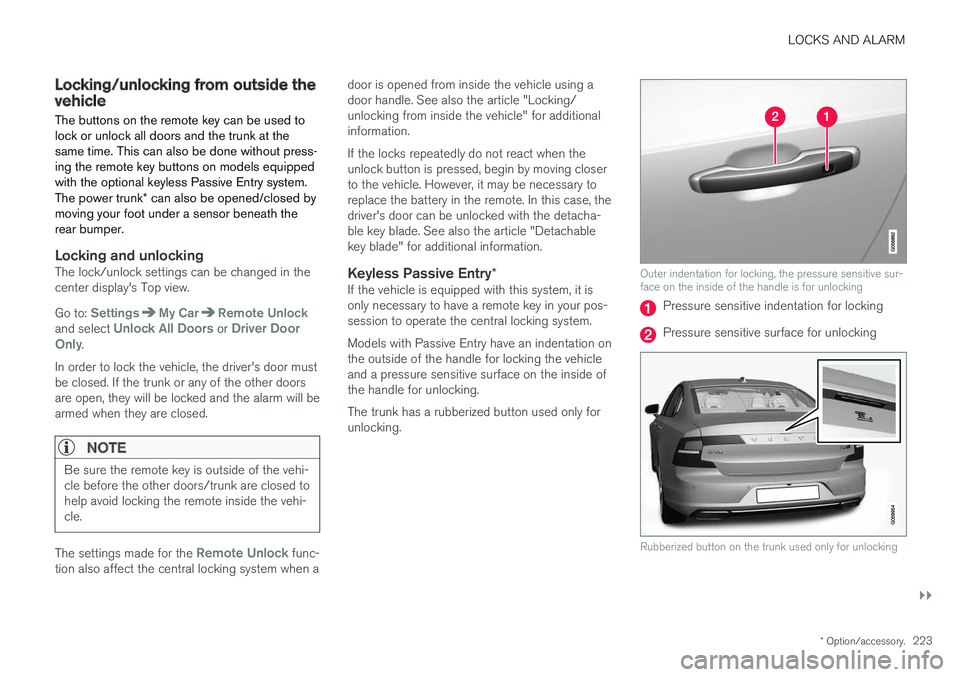
Keyless Passive Entry
*If the vehicle is equipped with this system, it isonly necessary to have a remote key in your pos-session to operate the central locking system. Models with Passive Entry have an indentation on the outside of the handle for locking the vehicleand a pressure sensitive surface on the inside ofthe handle for unlocking. The trunk has a rubberized button used only for unlocking.
Outer indentation for locking, the pressure sensitive sur- face on the inside of the handle is for unlocking
Pressure sensitive indentation for locking
Pressure sensitive surface for unlocking
Rubberized button on the trunk used only for unlocking