ECO mode VOLVO S90 2017 Owner´s Manual
[x] Cancel search | Manufacturer: VOLVO, Model Year: 2017, Model line: S90, Model: VOLVO S90 2017Pages: 548, PDF Size: 11.42 MB
Page 220 of 548
||
LOCKS AND ALARM
* Option/accessory.
218 Each of the remote keys provided with the vehicle can be linked to a driver profile containing uniquepersonal settings that will be applied when thatparticular key is used. See also the article "Driverprofile" for additional information.
NOTE
Avoid placing the remote key closer than approx. (4-6 in.) (10-15 cm) to any metallicobjects or electronic devices such as cellphones, tablets, laptops or chargers.
If interference persists, unlock the vehicle with the detachable key blade and place the remotekey in the backup key reader in the tunnel con-sole cup holder to disarm the alarm.
WARNING
Always remove the remote key from the pas- senger compartment when leaving the vehicle and ensure that the ignition in mode
0, espe-
cially if there are children in the vehicle.
Key TagIn addition to the two remote keys provided, a smaller third key, called a Key Tag, is also provi-ded for vehicles equipped with the optionalPassive Entry system. This key functions in the same way as a standardremote key but does not have a detachable keyblade and its battery cannot be replaced; a newKey Tag has to be ordered.
Ordering new keysTwo remote keys are provided with the vehicle (a Key Tag
2
is also included for vehicles equipped
with the optional Passive Entry system). Addi- tional keys (a total of 12) can be ordered andused with the vehicle.
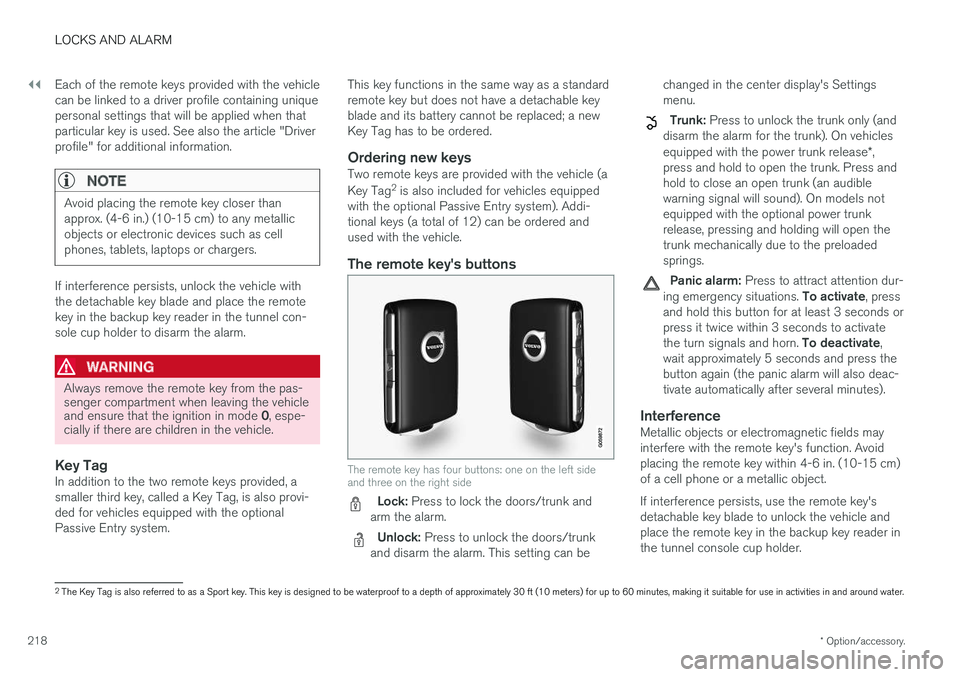
The remote key's buttons
The remote key has four buttons: one on the left side and three on the right side
Lock: Press to lock the doors/trunk and
arm the alarm.
Unlock: Press to unlock the doors/trunk
and disarm the alarm. This setting can be changed in the center display's Settings menu.
Trunk: Press to unlock the trunk only (and
disarm the alarm for the trunk). On vehicles equipped with the power trunk release *,
press and hold to open the trunk. Press and hold to close an open trunk (an audiblewarning signal will sound). On models notequipped with the optional power trunkrelease, pressing and holding will open thetrunk mechanically due to the preloadedsprings.
Panic alarm: Press to attract attention dur-
ing emergency situations. To activate, press
and hold this button for at least 3 seconds or press it twice within 3 seconds to activate the turn signals and horn. To deactivate,
wait approximately 5 seconds and press the button again (the panic alarm will also deac-tivate automatically after several minutes).
InterferenceMetallic objects or electromagnetic fields mayinterfere with the remote key's function. Avoidplacing the remote key within 4-6 in. (10-15 cm)of a cell phone or a metallic object. If interference persists, use the remote key's detachable key blade to unlock the vehicle andplace the remote key in the backup key reader inthe tunnel console cup holder.
2 The Key Tag is also referred to as a Sport key. This key is designed to be waterproof to a depth of approximately 30 ft (10 meters) for up to 60 minutes, making it suitable for use in activities in and around water.
Page 231 of 548
LOCKS AND ALARM
}}
* Option/accessory.229
2. Lift to open the trunk completely.
CAUTION
•
When pressing the rubberized pressure plate, only light pressure is necessary torelease the trunk's electronic lockingmechanism.
• When opening the trunk, pull it up usingthe handle. Too much pressure on the rub-berized pressure plate can damage itselectrical connections.
WARNING
Driving with the trunk open:
Driving with the
trunk open could lead to poisonous exhaust gases entering the passenger compartment. Ifthe trunk must be kept open for any reason,proceed as follows:
• Close the windows
• Set the ventilation system control to air flow to floor, windshield and side windowsand the blower control to its highest set-ting.
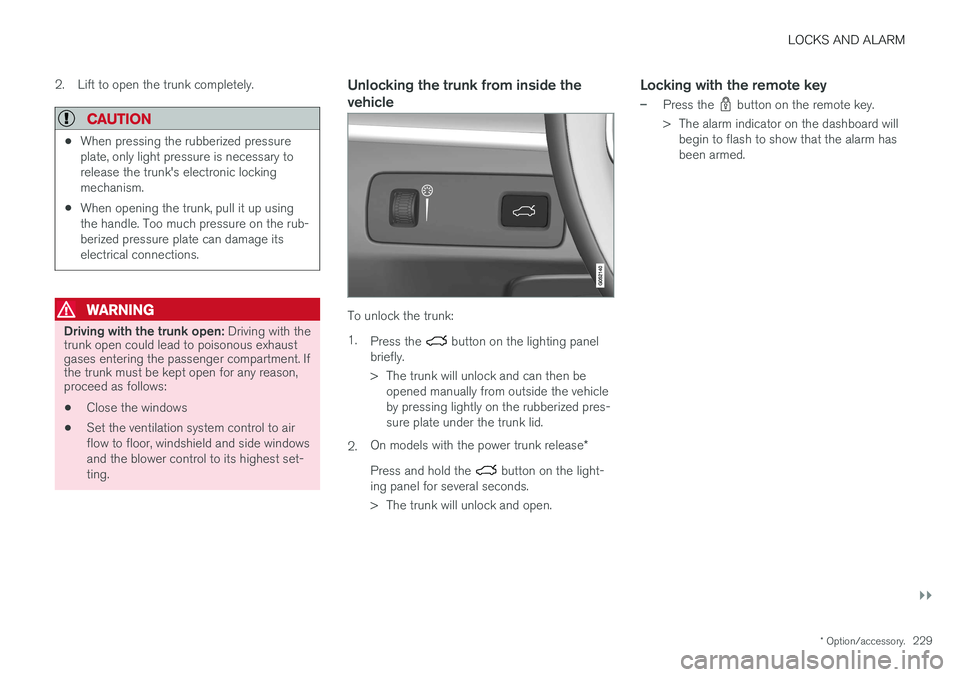
Unlocking the trunk from inside the vehicle
To unlock the trunk: 1.
Press the
button on the lighting panel
briefly.
> The trunk will unlock and can then be opened manually from outside the vehicle by pressing lightly on the rubberized pres-sure plate under the trunk lid.
2. On models with the power trunk release
*
Press and hold the
button on the light-
ing panel for several seconds.
> The trunk will unlock and open.
Locking with the remote key
–Press the button on the remote key.
> The alarm indicator on the dashboard will begin to flash to show that the alarm has been armed.
Page 239 of 548
LOCKS AND ALARM
* Option/accessory.237
Arming the alarm
–Lock the vehicle by pressing the remote key's lock button. On models with theoptional Passive Entry system, the vehiclecan also be locked by pressing the outerindentation for locking on one of the doorhandles or by pressing the trunk's rubberizedpressure plate. If the vehicle is equipped with a power trunk release*, the button on the lower edge of the
trunk can also be used to lock the vehicle and arm the alarm.
Disarming the alarmThe alarm can be disarmed by: • Unlock the vehicle by pressing the remote key's unlock button
• Pressing the pressure-sensitive area on theinside of one of the door handles on modelswith the optional Passive Entry system.
• Pressing the trunk's rubberized pressureplate on models with the optional PassiveEntry system.
Turning off a triggered (sounding)
alarm
–Press the remote key's unlock button or put the ignition in mode I by turning the start
knob to START and releasing it.
Alarm signalsThe following occurs if the alarm has been trig- gered:
• A siren will sound for 30 seconds or until thealarm is turned off
• All turn signals flash for 5 minutes or untilthe alarm is turned off
If the door that triggered the alarm is left open,
the alarm cycle will be repeated 10 times.
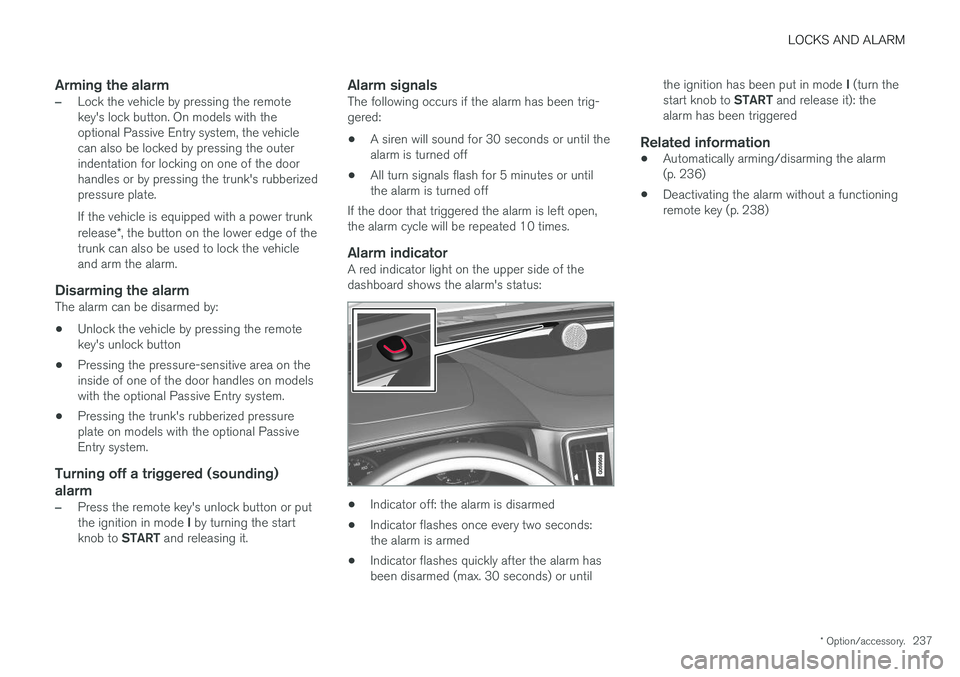
Alarm indicatorA red indicator light on the upper side of thedashboard shows the alarm's status:
• Indicator off: the alarm is disarmed
• Indicator flashes once every two seconds: the alarm is armed
• Indicator flashes quickly after the alarm hasbeen disarmed (max. 30 seconds) or until the ignition has been put in mode
I (turn the
start knob to START and release it): the
alarm has been triggered
Related information
• Automatically arming/disarming the alarm(p. 236)
• Deactivating the alarm without a functioningremote key (p. 238)
Page 244 of 548

DRIVER SUPPORT
* Option/accessory.
242
Driver support systems
The vehicle is equipped with a number of driver support systems that help provide the driver withactive/passive support.
Some of these systems are standard while others are optional and they are designed to e.g., helpthe driver maintain a set speed or a set distanceto a vehicle ahead, or warn the driver of a poten-tial collision situation and in certain cases applythe brakes if necessary. Certain optional systemscan also assist in various parking situations.
Related information
• Adjustable steering force
* (p. 242)
• Electronic Stability Control (ESC) (p. 243)
• Roll stability control (RSC) (p. 247)
• Speed limiter (SL)
* (p. 247)
• Distance Alert
* (p. 259)
• Cruise Control (CC) (p. 254)
• Adaptive Cruise Control (ACC)
* (p. 261)
• Pilot Assist
* (p. 275)
• Driver support system radar sensor (p. 288)
• Driver support system camera (p. 292)
• City Safety
™ (p. 296)
• Blind Spot Information (BLIS)
* (p. 309)
• Cross Traffic Alert (CTA)
* (p. 311)
• Road Sign Information (RSI)
* (p. 316) •
Driver Alert Control (DAC) (p. 318)
• Driving lane assistance (p. 320)
• Run-off Mitigation (p. 325)
• Park Assist
* (p. 328)
• Park Assist Camera (PAC)
* (p. 332)
• Park Assist Pilot (PAP)
* (p. 338)
Adjustable steering force *
Steering force increases with the speed of the vehicle to give the driver an enhanced sense ofcontrol and stability. At low speed the vehicle iseasier to steer in order to facilitate parking, etc.
Changing the steering force levelTo change the level of steering force, see theinformation under the heading "individual" in arti-cle "Drive modes" for additional information. On models not equipped with the drive mode control in the center console, the selection ismade in the center display's Top view under:
SettingsMy CarDrive ModesSteering force
NOTE
•This steering force level menu function cannot be accessed when the vehicle isin motion.
• In certain situations, the power steeringfunction may become too hot and mustbe temporarily cooled. During cooling,power steering effect will be reduced andmore force may be necessary to turn thesteering wheel and a message will bedisplayed in the instrument panel.
Page 245 of 548
DRIVER SUPPORT
}}
* Option/accessory.243
Related information
•Driver support systems (p. 242)
• Drive modes
* (p. 374)
Electronic Stability Control (ESC)
Electronic Stability Control (ESC) helps reduce wheel spin, counteract skidding and to generallyhelp improve directional stability.
A pulsating sound will be audi- ble when the system is activelyoperating and is normal. Accel-eration may also be slightlyslower than normal.
WARNING
ESC is a supplementary aid and cannot deal with all situations or road conditions. The driver is always responsible for operating the vehicle in a safe manner in accordancewith current traffic regulations.
ESC consists of the following functions: • Traction control
• Spin control
• Active Yaw Control
• Engine Drag Control
• Trailer Stability Assist
Traction controlThis function is designed to help reduce wheel spin by transferring power from a drive wheel that begins to lose traction to the wheel on the oppo-site side of the vehicle (on the same axle).
Spin controlThis function is designed to help prevent thedrive wheels from spinning while the vehicle isaccelerating.
Active Yaw ControlAt low speeds, this function helps maintain direc-tional stability by braking one or more of thewheels if the vehicle shows a tendency to skid orslide laterally.
Engine Drag Control EDCEDC helps keep the engine running if the wheelsshow a tendency to lock, e.g., when shifting downin the manual shifting mode or while using theengine's braking function on a slippery surface. Ifthe wheels were to lock, the vehicle wouldbecome more difficult to steer.
Trailer Stability Assist
*1TSA helps stabilize a vehicle that is towing atrailer when the vehicle and trailer have begun tosway. This system is automatically deactivated if the driver selects
Sport mode.
1
This function is included if the vehicle is equipped with a Volvo original trailer hitch.
Page 247 of 548
DRIVER SUPPORT
}}
245
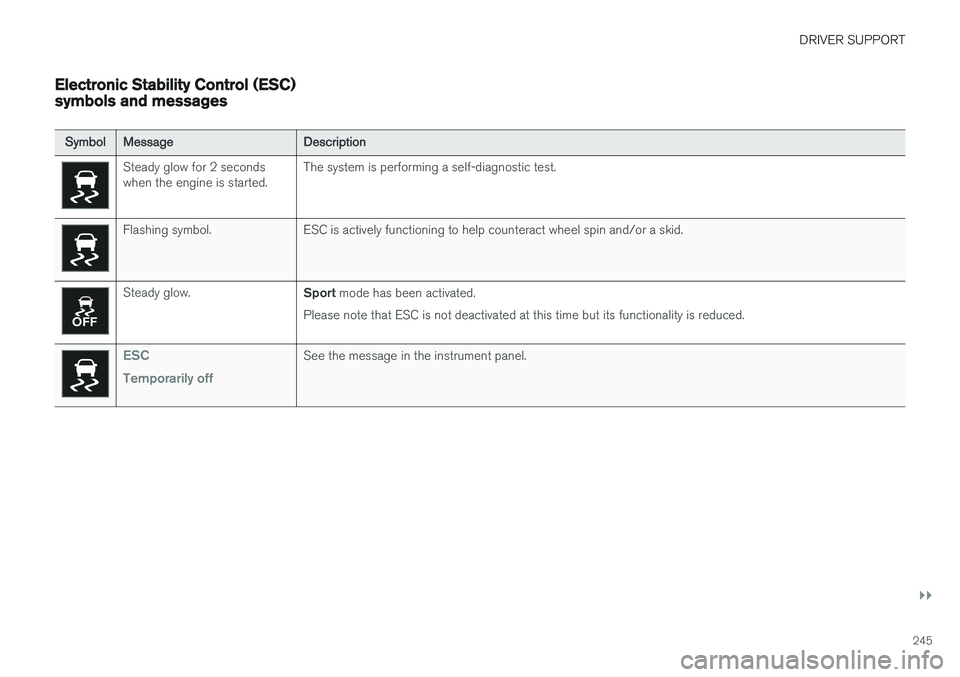
Electronic Stability Control (ESC) symbols and messages
SymbolMessage Description
Steady glow for 2 seconds when the engine is started.The system is performing a self-diagnostic test.
Flashing symbol. ESC is actively functioning to help counteract wheel spin and/or a skid.
Steady glow.
Sport mode has been activated.
Please note that ESC is not deactivated at this time but its functionality is reduced.
ESC Temporarily offSee the message in the instrument panel.
Page 256 of 548
DRIVER SUPPORT
* Option/accessory.
254
Cruise Control (CC)
Cruise Control (CC) is designed to assist the driver by maintaining a set speed. It is primarilyintended for use on long straight roads in steadytraffic, such as on highways and other mainroads in smoothly flowing traffic.
Overview
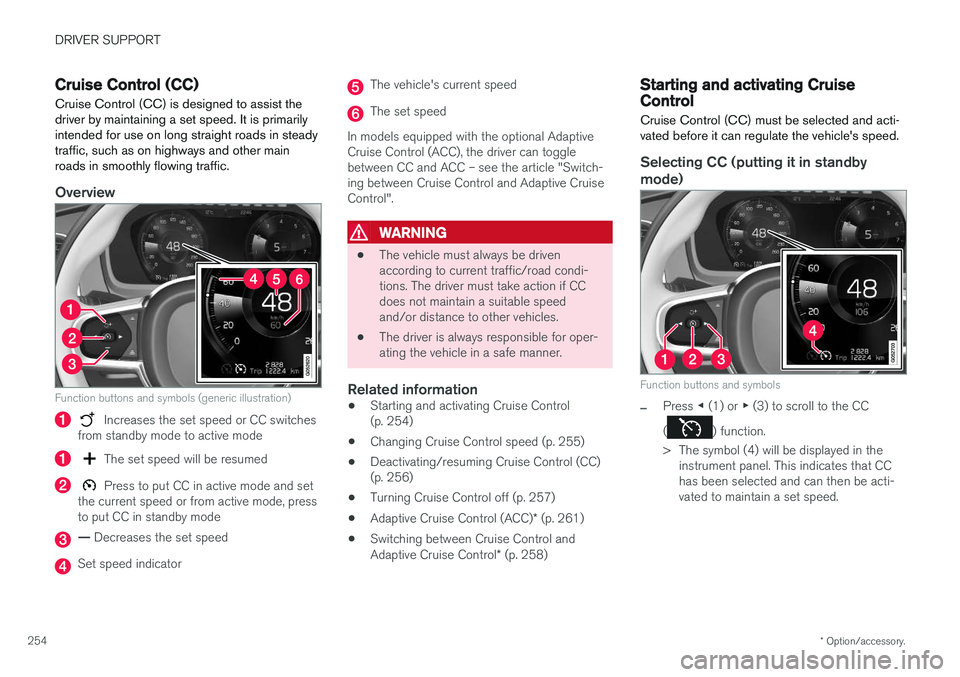
Function buttons and symbols (generic illustration)
Increases the set speed or CC switches
from standby mode to active mode
The set speed will be resumed
Press to put CC in active mode and set
the current speed or from active mode, press to put CC in standby mode
— Decreases the set speed
Set speed indicator
The vehicle's current speed
The set speed
In models equipped with the optional Adaptive Cruise Control (ACC), the driver can togglebetween CC and ACC – see the article "Switch-ing between Cruise Control and Adaptive CruiseControl".
WARNING
• The vehicle must always be driven according to current traffic/road condi-tions. The driver must take action if CCdoes not maintain a suitable speedand/or distance to other vehicles.
• The driver is always responsible for oper-ating the vehicle in a safe manner.
Related information
•Starting and activating Cruise Control(p. 254)
• Changing Cruise Control speed (p. 255)
• Deactivating/resuming Cruise Control (CC)(p. 256)
• Turning Cruise Control off (p. 257)
• Adaptive Cruise Control (ACC)
* (p. 261)
• Switching between Cruise Control and Adaptive Cruise Control
* (p. 258)
Starting and activating Cruise Control
Cruise Control (CC) must be selected and acti- vated before it can regulate the vehicle's speed.
Selecting CC (putting it in standby
mode)
Function buttons and symbols
–Press ◀ (1) or ▶ (3) to scroll to the CC
(
) function.
> The symbol (4) will be displayed in the instrument panel. This indicates that CC has been selected and can then be acti-vated to maintain a set speed.
Page 257 of 548
DRIVER SUPPORT
* Option/accessory.255
NOTE
Before CC can be activated, the vehicle's speed must be at least 20 mph (30 km/h).This is also the lowest speed that can be set.
Activating CC (putting it in active mode and setting a speed)
–With the symbol displayed (CC is in
standby mode), press the
button (2) on
the left-side steering wheel keypad.
> This puts CC in active mode and will maintain the vehicle's current speed.
Related information
• Cruise Control (CC) (p. 254)
• Switching between Cruise Control and Adaptive Cruise Control
* (p. 258)
• Deactivating/resuming Cruise Control (CC) (p. 256)
• Turning Cruise Control off (p. 257)
Changing Cruise Control speed
Changing a set speed
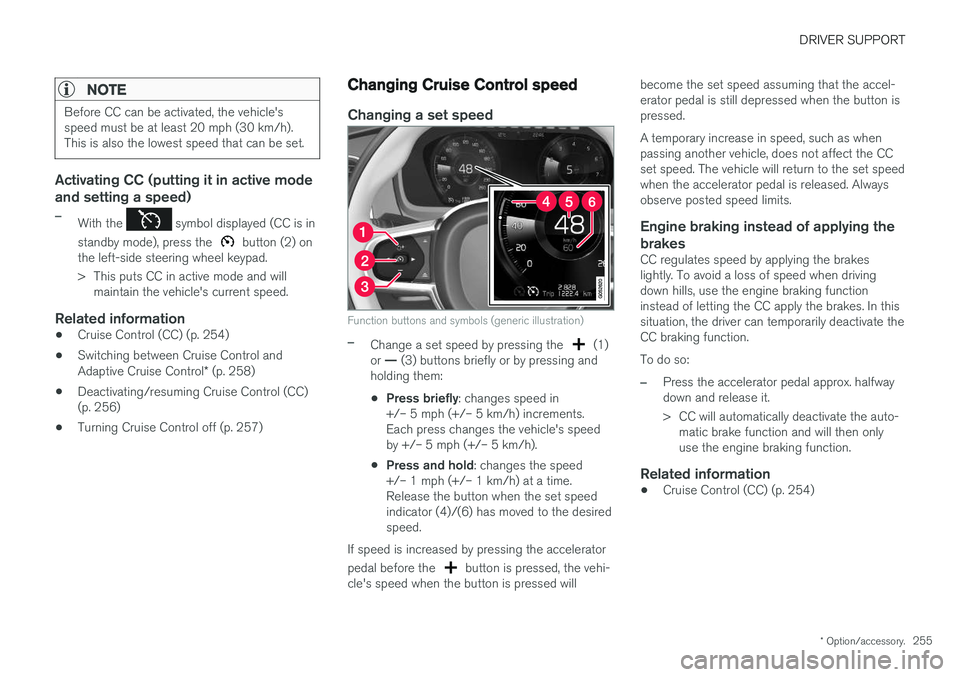
Function buttons and symbols (generic illustration)
–Change a set speed by pressing the (1)
or — (3) buttons briefly or by pressing and
holding them:
• Press briefly
: changes speed in
+/– 5 mph (+/– 5 km/h) increments. Each press changes the vehicle's speedby +/– 5 mph (+/– 5 km/h).
• Press and hold
: changes the speed
+/– 1 mph (+/– 1 km/h) at a time.Release the button when the set speedindicator (4)/(6) has moved to the desiredspeed.
If speed is increased by pressing the accelerator pedal before the
button is pressed, the vehi-
cle's speed when the button is pressed will become the set speed assuming that the accel- erator pedal is still depressed when the button ispressed. A temporary increase in speed, such as when passing another vehicle, does not affect the CCset speed. The vehicle will return to the set speedwhen the accelerator pedal is released. Alwaysobserve posted speed limits.
Engine braking instead of applying the
brakes
CC regulates speed by applying the brakeslightly. To avoid a loss of speed when drivingdown hills, use the engine braking functioninstead of letting the CC apply the brakes. In thissituation, the driver can temporarily deactivate theCC braking function. To do so:
–Press the accelerator pedal approx. halfway down and release it.
> CC will automatically deactivate the auto- matic brake function and will then only use the engine braking function.
Related information
• Cruise Control (CC) (p. 254)
Page 259 of 548
DRIVER SUPPORT
* Option/accessory.257
–Press the button (2).
> The set speed marker (4) and symbols will change colors from GRAY to WHITE. CC will then set and maintain the vehicle's current speed.
Related information
•Cruise Control (CC) (p. 254)
• Starting and activating Cruise Control (p. 254)
Turning Cruise Control off
Cruise Control (CC) can be deactivated (turned off).
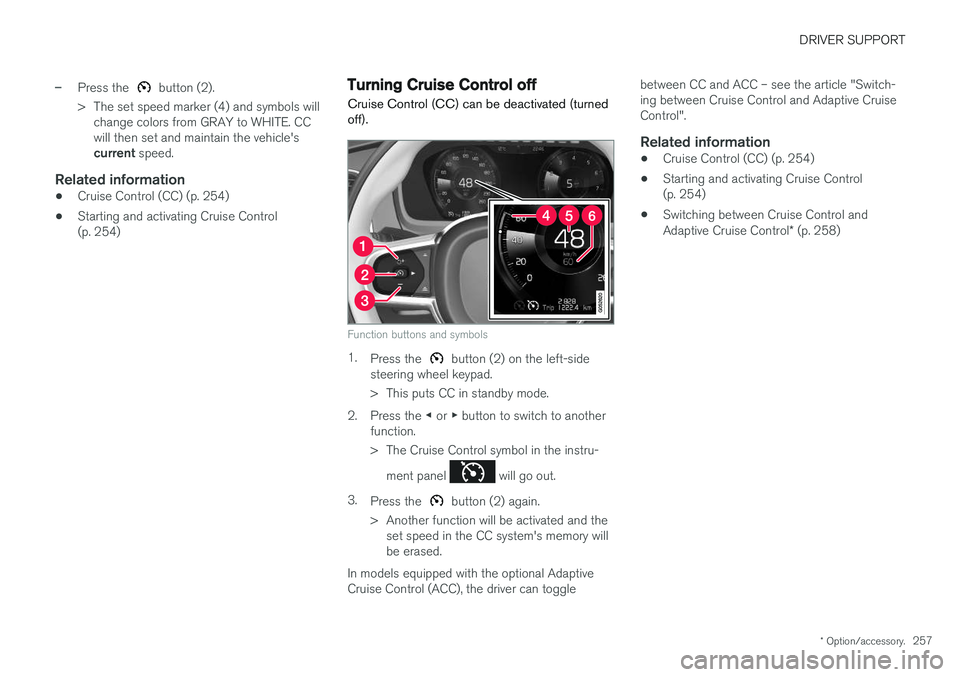
Function buttons and symbols
1. Press the button (2) on the left-side
steering wheel keypad.
> This puts CC in standby mode.
2. Press the ◀ or ▶ button to switch to another
function.
> The Cruise Control symbol in the instru-
ment panel
will go out.
3. Press the
button (2) again.
> Another function will be activated and the set speed in the CC system's memory will be erased.
In models equipped with the optional AdaptiveCruise Control (ACC), the driver can toggle between CC and ACC – see the article "Switch-ing between Cruise Control and Adaptive CruiseControl".
Related information
•
Cruise Control (CC) (p. 254)
• Starting and activating Cruise Control(p. 254)
• Switching between Cruise Control and Adaptive Cruise Control
* (p. 258)
Page 263 of 548

DRIVER SUPPORT
}}
* Option/accessory.261
WARNING
•Poor weather or winding roads can affect the radar sensor's capacity to detect vehi-cles ahead.
• A vehicle's size (e.g., a motorcycle) canalso affect the radar sensor's capacity todetect another vehicle. This may result inthe warning light illuminating at a shorterdistance than the one that has been setor not illuminating at all.
• High speeds may also result in the warn-ing light illuminating at a shorter distancethan the one that has been set due tolimitations in the radar sensor's range.
For additional information, see also the article"Radar sensor limitations."
Related information
• Radar sensor limitations (p. 289)
• Distance Alert
* (p. 259)
Adaptive Cruise Control (ACC) *
ACC is an optional system designed to assist the driver by maintaining a set speed or a settime interval to the vehicle ahead.
ACC helps provide more relaxed driving on long trips on highways or other major roads in a rela-tively even flow of traffic.
The camera and radar sensor monitor the distance to the vehicle ahead (generic illustration - certain detailsmay vary from model to model)
The driver sets that desired speed and time inter- val to the vehicle ahead. When the camera andradar sensor detects a slower moving vehicleahead, your vehicle's speed is automaticallyadapted. When there are no longer slower mov-ing vehicles ahead, your vehicle will accelerate toresume the set speed. ACC is designed to follow a vehicle ahead in the same lane and maintain a time interval to that vehicle set by the driver. If the radar sensor doesnot detect a vehicle ahead, ACC will insteadmaintain the speed set by the driver. ACC is designed to smoothly regulate speed. However, the driver must apply the brakes in sit-uations that require immediate braking such aswhen there are great differences in speedbetween vehicles, or if the vehicle ahead brakessuddenly. Due to limitations in the radar sensor,braking may occur unexpectedly or not at all. Adaptive Cruise Control can follow another vehi- cle from a standstill up to 125 mph (200 km/h).Always observe posted speed limits. The driver can also toggle between ACC and Cruise Control (CC) – see the article "Switchingbetween Cruise Control and Adaptive CruiseControl".