center console VOLVO S90 2017 Owner´s Manual
[x] Cancel search | Manufacturer: VOLVO, Model Year: 2017, Model line: S90, Model: VOLVO S90 2017Pages: 548, PDF Size: 11.42 MB
Page 419 of 548
INFOTAINMENT
}}
417
From a previously connected iPhone
1. Connect the iPhone to the USB socket in
the tunnel console. If there are two USB sockets, connect to the one with the whiteframe. >If the automatic start setting has been
activated, the Apple CarPlay sub-view will open and compatible apps will be dis-played.
2. If the automatic start setting has not been
activated, open the
Apple CarPlay app from
the center display's App view.
> The Apple CarPlay sub-view will open and compatible apps will be displayed.
3. Tap the desired app. > The app will start.
Apple CarPlay will run in the background if another app is started in the same sub-view. Toreturn to Apple CarPlay, tap the Apple CarPlayicon in App view.
Toggling between Apple CarPlay and iPod
Apple CarPlay to iPod
1.
Tap Settings in the center display's Top
view.
2. Tap
CommunicationApple CarPlay. 3. Deselect the Apple device's box that will no
longer start Apple CarPlay when it is con- nected.
4. Disconnect and reconnect the Apple device to the USB socket.
5. Open the
iPod app from App view.
iPod to Apple CarPlay
1.
Tap Apple CarPlay in the center display's
App view.
2. Read the conditions in the pop-up window that appears and tap
OK.
3. Disconnect and reconnect the Apple device to the USB socket.
> The Apple CarPlay sub-view will open.
Related information
• Media player (p. 415)
• Playing media (p. 420)
• Connecting a device via the AUX/USB socket (p. 414)
• Apple CarPlay settings (p. 417)
Apple CarPlay settings This article explains settings for a cell phone connected through Apple CarPlay.
Automatic start1.
Tap Settings in the center display's Top
view.
2. Tap
CommunicationApple CarPlay and
select the following settings:
• Select the Apple CarPlay box for auto- matic start when the device's USB cableis connected.
• Deselect the Apple CarPlay box to
disa-
ble automatic start when the device's
USB cable is connected.
A maximum of 20 Apple devices can be stored inthe list. When the list is full, the first (oldest)device stored will be deleted. To erase the entire list, a factory reset has to be performed. See the article "Resetting the set-tings view."
System volume levels1. Tap Settings in the center display's Top
view.
Page 422 of 548
||
INFOTAINMENT
* Option/accessory.
420 2.
Tap
SoundSystem Volumes and select
the following settings: •
Voice Control
•Navigation
•Ringtone
Related information
• Android auto
* (p. 418)
• Resetting the settings view (p. 113)
CD (media) player
*
The CD (media) player can play commercially purchased discs as well as ones that you haveburned yourself. See the article "Media playertechnical data" for information about compatiblefile formats.
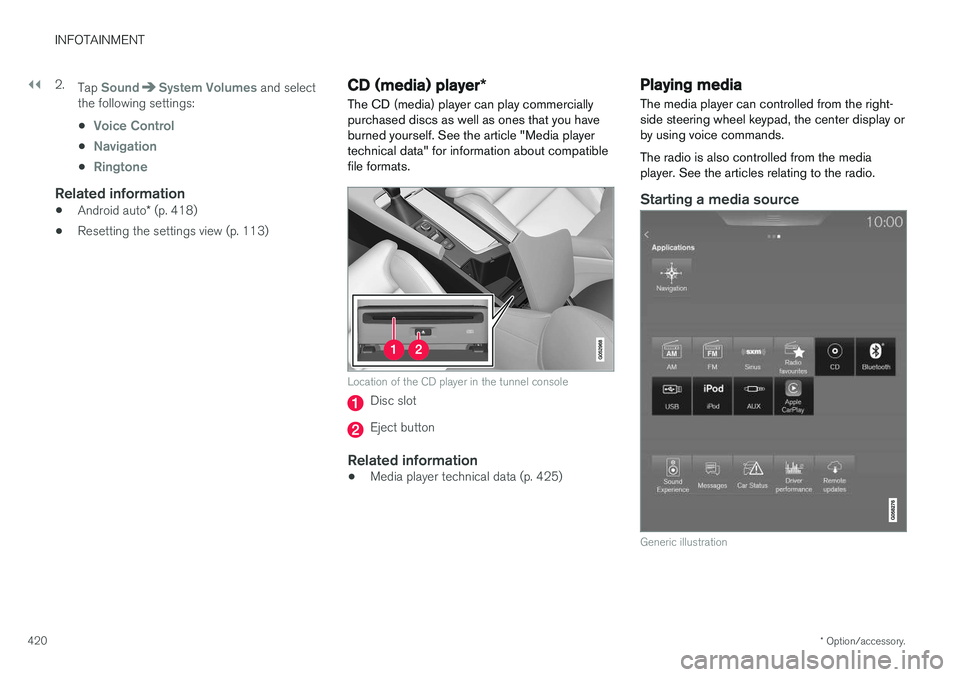
Location of the CD player in the tunnel console
Disc slot
Eject button
Related information
• Media player technical data (p. 425)
Playing media The media player can controlled from the right- side steering wheel keypad, the center display orby using voice commands. The radio is also controlled from the media player. See the articles relating to the radio.
Starting a media source
Generic illustration
Page 490 of 548
||
MAINTENANCE AND SERVICING
* Option/accessory.
488
Positions
• Fuses 1, 3–21, 23–36, 39–53 and 55–59 are called "Micro".
• Fuses 2, 22, 37–38 and 54 are called"MCase" and should only be replaced by atrained and qualified Volvo service technician.
Function
A
– –
120-volt socket on the rear side of the tunnel console* 30
– –
Alarm system movement sensor
A
5
Media player 5
Instrument panel 5
Center console buttons 5
Sun sensor 5
– –
– –
Steering wheel module 5
Module for start knob and parking brake 5
Function
A
Heated steering wheel* module 15
– –
– –
– –
– –
Climate system control module 10
– –
On-board diagnostics (OBDII) 10
Center display 5
Climate system blower module (front) 40
– –
Instrument lighting; Courtesy light- ing; Rearview mirror auto-dim func-tion; Rain and light sensor; Rear tunnel console keypad
*; Power
front seats *; Rear door control pan-
els 7.5
Control module for driver support functions
5
Function
A
Moonroof* 20
Head-up display
* 5
Courtesy lighting 5
– –
Ceiling console display (seat belt reminder, front passenger side air-bag indicator) 5
– –
Humidity sensor 5
Rear passenger-side door module 20
Fuses in the trunk 10
Internet connection control module; Volvo On Call control module
5
Rear driver-side door module 20
Infotainment control module (amplifier)40
– –
Multi-band antenna module 5
Front seat massage function 5
Page 514 of 548
||
MAINTENANCE AND SERVICING
512bering that it may not be as thorough as when you yourself go over the vehicle withsponge and water. Keeping the underbodyclean is most important, especially in the win-ter. Some automatic washers do not havefacilities for washing the underbody.
NOTE
Condensation may form temporarily on the inside of the lenses of exterior lights such asheadlights or taillights. This is normal and thelights are designed to withstand moisture.Normally, condensation will dissipate after thelights have been on for a short time.
CAUTION
When using an automatic car wash in which the vehicle has to be able to roll freely, theauto-hold brake function must be deactivated.If this is not done, the brakes will automati-cally be applied when the vehicle is stationary. To deactivate this function:
1. Drive the vehicle into the car wash
2. Turn off the auto-hold function using the
control on the center console
3. Turn off the parking brake's automatic function in the center display's Top view (tap
Settings, tap My CarElectric
Parking Brake and deselect Auto
Activate Parking Brake)
4. Put the gear selector in N
5. Switch off the ignition by turning the start knob to STOP and holding it in this posi-
tion for at least 4 seconds
The vehicle will then be able to roll freely.
CAUTION
• Before driving into an automatic car wash, turn off the optional rain sensor toavoid damaging the windshield wipers.
• Make sure that side view mirrors, auxiliarylamps, etc, are secure, and that anyantenna(s) are retracted or removed. Oth-erwise there is risk of the machine dis-lodging them.
• Chromed wheels:
Clean chrome-plated
wheels using the same detergents usedfor the body of the vehicle. Aggressivewheel-cleaning agents can permanentlystain chrome-plated wheels.
WARNING
• When the vehicle is driven immediately after being washed, apply the brakes,including the parking brake, several timesin order to remove any moisture from thebrake linings.
• Engine cleaning agents should not beused when the engine is warm. This con-stitutes a fire risk.
Exterior componentsVolvo recommends the use of special cleaningproducts, available at your Volvo retailer, forcleaning colored plastic, rubber, or ornamental
Page 538 of 548
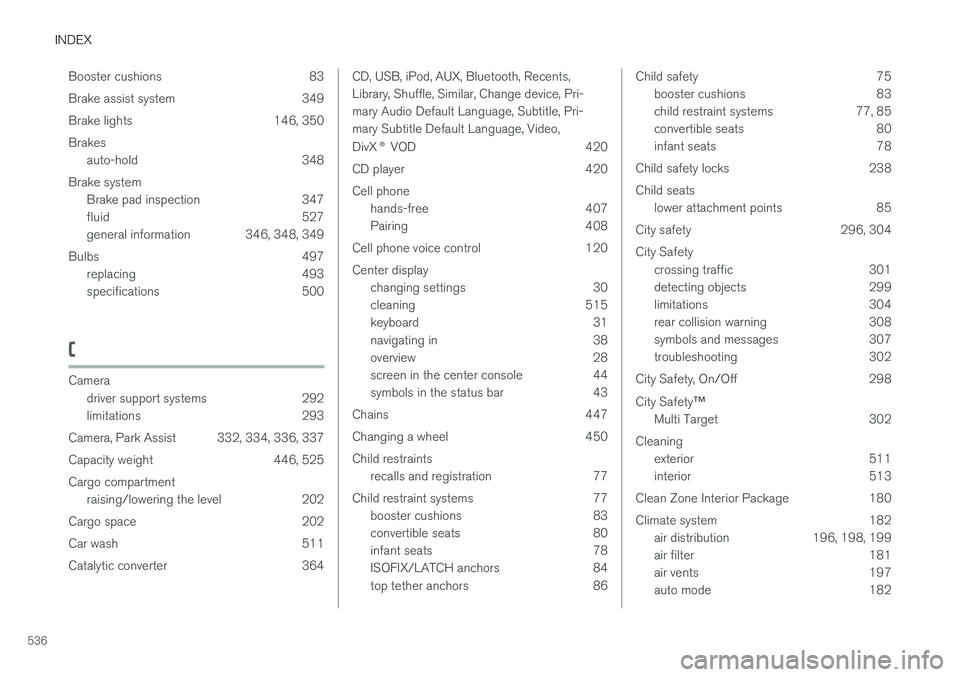
INDEX
536Booster cushions 83
Brake assist system 349
Brake lights 146, 350Brakes
auto-hold 348
Brake system Brake pad inspection 347
fluid 527
general information 346, 348, 349
Bulbs 497 replacing 493
specifications 500
C
Cameradriver support systems 292
limitations 293
Camera, Park Assist 332, 334, 336, 337
Capacity weight 446, 525Cargo compartment raising/lowering the level 202
Cargo space 202
Car wash 511
Catalytic converter 364
CD, USB, iPod, AUX, Bluetooth, Recents, Library, Shuffle, Similar, Change device, Pri-mary Audio Default Language, Subtitle, Pri-mary Subtitle Default Language, Video, DivX ® VOD 420
CD player 420 Cell phone hands-free 407
Pairing 408
Cell phone voice control 120 Center display changing settings 30
cleaning 515
keyboard 31
navigating in 38
overview 28
screen in the center console 44
symbols in the status bar 43
Chains 447
Changing a wheel 450Child restraints recalls and registration 77
Child restraint systems 77 booster cushions 83
convertible seats 80
infant seats 78
ISOFIX/LATCH anchors 84
top tether anchors 86Child safety 75
booster cushions 83
child restraint systems 77, 85
convertible seats 80
infant seats 78
Child safety locks 238 Child seats lower attachment points 85
City safety 296, 304City Safety crossing traffic 301
detecting objects 299
limitations 304
rear collision warning 308
symbols and messages 307
troubleshooting 302
City Safety, On/Off 298 City Safety ™
Multi Target 302
Cleaning exterior 511
interior 513
Clean Zone Interior Package 180
Climate system 182 air distribution 196, 198, 199
air filter 181
air vents 197
auto mode 182