window VOLVO S90 2017 Owner´s Manual
[x] Cancel search | Manufacturer: VOLVO, Model Year: 2017, Model line: S90, Model: VOLVO S90 2017Pages: 548, PDF Size: 11.42 MB
Page 195 of 548
CLIMATE
* Option/accessory.193
2. Tap the steering wheel heating button
repeatedly to select one of four levels:
Off,High, Middle or Low.
> The level changes and is displayed in the button.
Automatic steering wheel heatingThe automatic function starts heating the steer- ing wheel automatically when the engine isstarted if the temperature is sufficiently cold. Thisfeature can be activated/deactivated. 1. Tap
Settings in the center display's Top
view.
2. Tap
Climate.
3. Under
Auto Steering Wheel Heating
Level, select Off, Low, Middle or High to
activate/deactivate the automatic function.
Related information
• Climate system controls (p. 182)
• Climate system controls in the center display (p. 183)
• Steering wheel (p. 159)
Air conditioning
The air conditioning cools and dehumidifies the air in the passenger compartment.
Activating/deactivating the main air conditioning unit
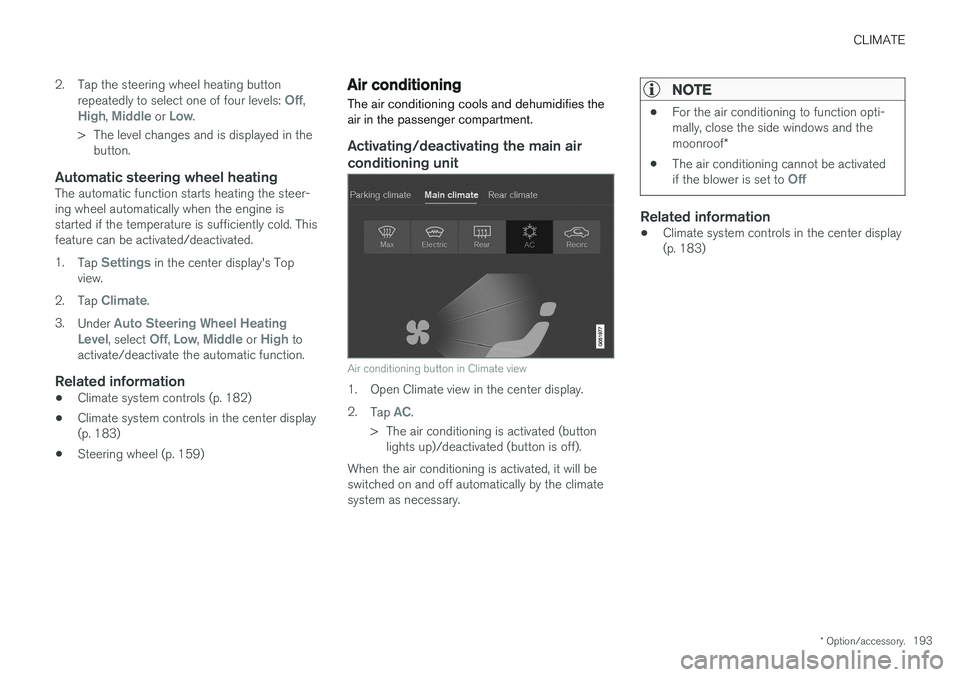
Air conditioning button in Climate view
1. Open Climate view in the center display. 2. Tap
AC.
> The air conditioning is activated (button lights up)/deactivated (button is off).
When the air conditioning is activated, it will be switched on and off automatically by the climatesystem as necessary.
NOTE
• For the air conditioning to function opti- mally, close the side windows and the moonroof
*
• The air conditioning cannot be activated if the blower is set to
Off
Related information
•Climate system controls in the center display (p. 183)
Page 199 of 548
CLIMATE
}}
* Option/accessory.197
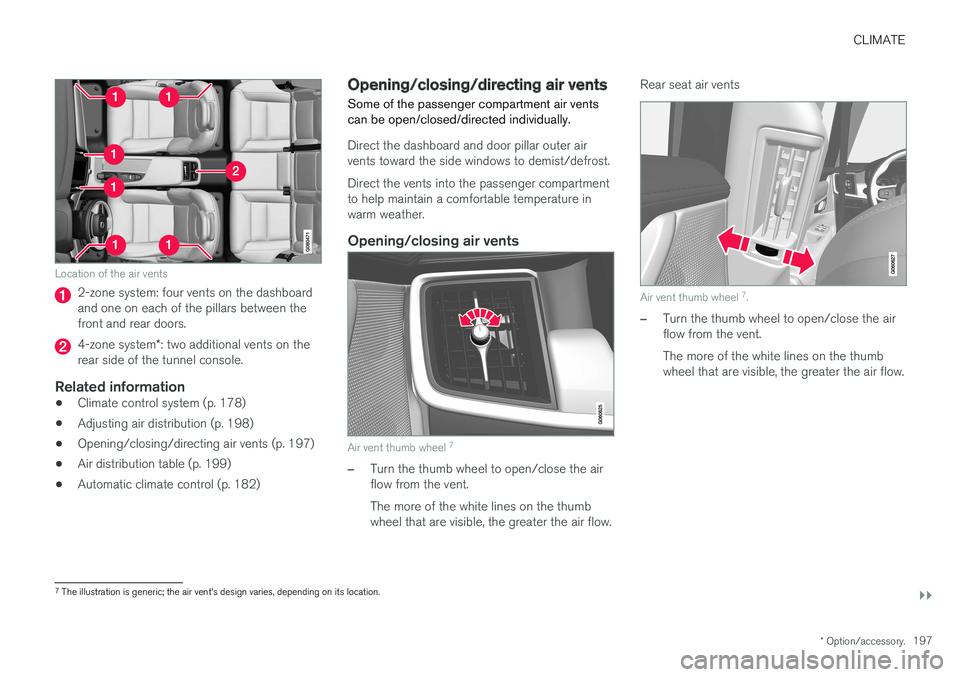
Location of the air vents
2-zone system: four vents on the dashboard and one on each of the pillars between thefront and rear doors.
4-zone system*: two additional vents on the
rear side of the tunnel console.
Related information
• Climate control system (p. 178)
• Adjusting air distribution (p. 198)
• Opening/closing/directing air vents (p. 197)
• Air distribution table (p. 199)
• Automatic climate control (p. 182)
Opening/closing/directing air vents
Some of the passenger compartment air vents can be open/closed/directed individually.
Direct the dashboard and door pillar outer air vents toward the side windows to demist/defrost. Direct the vents into the passenger compartment to help maintain a comfortable temperature inwarm weather.
Opening/closing air vents
Air vent thumb wheel 7
–Turn the thumb wheel to open/close the air flow from the vent. The more of the white lines on the thumb wheel that are visible, the greater the air flow. Rear seat air vents
Air vent thumb wheel
7
.
–Turn the thumb wheel to open/close the air flow from the vent. The more of the white lines on the thumb wheel that are visible, the greater the air flow.
7 The illustration is generic; the air vent's design varies, depending on its location.
Page 205 of 548
LOADING AND STORAGE
}}
* Option/accessory.203
WARNING
•Stop the engine, put the gear selector in P
, and apply the parking brake when
loading or unloading long objects.
• The vehicle's driving characteristics may change depending on the weight and dis-tribution of the load.
• A 44-pound (20 kg) object produces aforce of 2,200 pounds (1,000 kg) in ahead-on collision at 30 mph (50 km/h).
• The cargo area and rear seat should notbe loaded to a level higher than 2 in.(5 cm) below the upper edge of the rearside windows. Objects placed higher thanthis level could impede the function ofthe Inflatable Curtain.
WARNING
• Cover sharp edges on long loads to help prevent injury to occupants. Secure theload to help prevent shifting during sud-den stops.
• Always secure large and heavy objectswith a seat belt or cargo retaining straps.
• Always secure the load to help prevent itfrom moving in the event of sudden stops.
• Switch off the engine, apply the parking brake and put the gear selector in
P
when loading and unloading the vehicle.
Extra loading space
The rear seat backrests can be folded down * to
added cargo space or for transporting long objects. The hatch in the center section of the rear seat backrest * can be opened without folding the
backrest down to transport long objects such as skis, etc.
WARNING
• Boxes, suitcases, etc. wedged behind the front seats could impede the function ofthe Whiplash Protection System.
• If the rear seat backrests are foldeddown, cargo must be secured to preventit from sliding forward against the frontseat backrests in the event of a collisionfrom the rear. This could interfere withthe action of the Whiplash ProtectionSystem.
WARNING
•
Cover sharp edges on long loads to help prevent injury to occupants. Secure theload to help prevent shifting during sud-den stops.
• Always secure large and heavy objectswith a seat belt or cargo retaining straps.
• Always secure the load to help prevent itfrom moving in the event of sudden stops.
• Switch off the engine, apply the parking brake and put the gear selector in
P
when loading and unloading the vehicle.
Roof loadsLoad carriers are available as Volvo accessories. Observe the following points when in use:
• To avoid damaging your vehicle and toachieve maximum safety when driving, werecommend using the load carriers that Volvohas developed especially for your vehicle.
• Volvo-approved removable roof racks aredesigned to carry the maximum allowableroof load for this vehicle (see the article"Weights" for specific information).
• Never exceed the rack manufacturer's weighlimits.
• Avoid single-point loads. Distribute loadsevenly.
Page 226 of 548
||
LOCKS AND ALARM
* Option/accessory.
224
Locking
All of the doors have to be closed before the vehicle can be locked but the trunk can be open. Lock the doors and trunk by pressing the pres- sure sensitive indentation on the outside of anyof the door handles. The lock indicator light onthe dashboard will begin to flash to show that thevehicle is locked and the alarm has been armed.
NOTE
Only one of a door handle's lock/unlock sur- faces should be pressed at a time. If bothareas are pressed simultaneously, the desiredlocking/unlocking action may not occur ormay be delayed.
To close windows or the moonroof * when locking
the vehicle, hold the pressure sensitive surface on the outside of a door handle until the win-dow(s)/moonroof have closed completely. Thewindows/moonroof will stop if the button isreleased before they are fully closed.
Unlocking
Pull a door handle to unlock and open the door or press the rubberized button under the trunkopening control. The lock indicator light on thedashboard will go out to show that the vehicle isunlocked and the alarm has been disarmed. The lock/unlock settings can be changed in the center display's Top view: Go to:
SettingsMy CarKeyless Unlockand select All Doors or Single Door.
Automatic relockingIf no door or the trunk is opened within two minutes after being unlocked, the vehicle willautomatically relock.
Remote door unlockThe vehicle can be unlocked using the Volvo OnCall app.
Related information
•
Remote key (p. 217)
• Remote key's range (p. 219)
• Detachable key blade (p. 221)
• Alarm (p. 236)
• Locking/unlocking from inside the vehicle(p. 224)
• Foot movement trunk operation
* (p. 232)
• Locking/unlocking the trunk (p. 228)
Locking/unlocking from inside the vehicle The lock buttons on either of the front doors can be used to lock or unlock all doors and the trunkat the same time. The rear doors can be locked using their respective lock buttons
*.
The central locking system
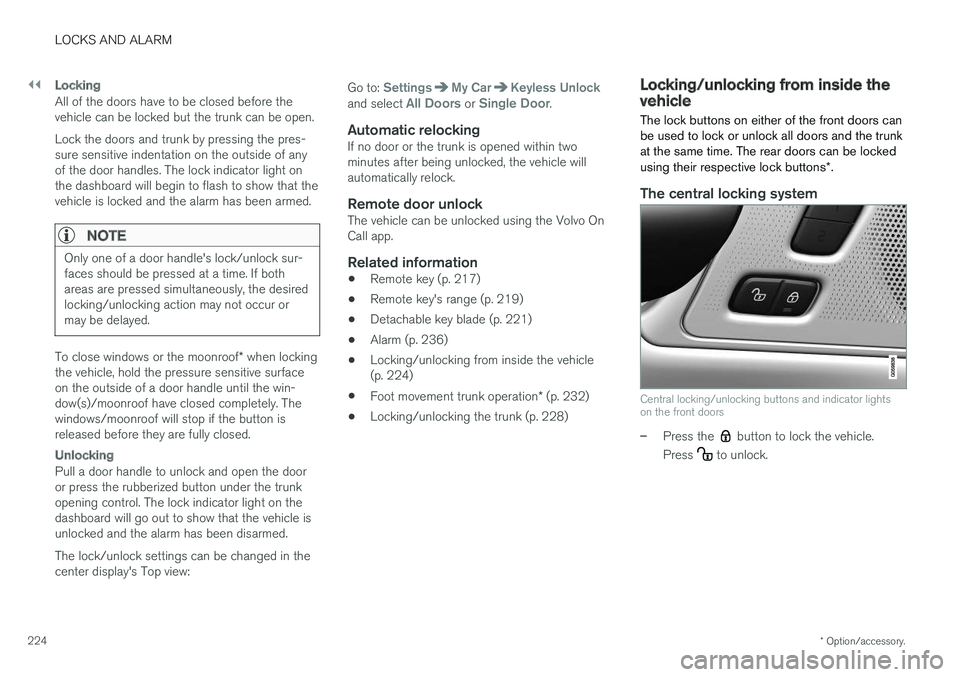
Central locking/unlocking buttons and indicator lights on the front doors
–Press the button to lock the vehicle.
Press
to unlock.
Page 231 of 548
LOCKS AND ALARM
}}
* Option/accessory.229
2. Lift to open the trunk completely.
CAUTION
•
When pressing the rubberized pressure plate, only light pressure is necessary torelease the trunk's electronic lockingmechanism.
• When opening the trunk, pull it up usingthe handle. Too much pressure on the rub-berized pressure plate can damage itselectrical connections.
WARNING
Driving with the trunk open:
Driving with the
trunk open could lead to poisonous exhaust gases entering the passenger compartment. Ifthe trunk must be kept open for any reason,proceed as follows:
• Close the windows
• Set the ventilation system control to air flow to floor, windshield and side windowsand the blower control to its highest set-ting.
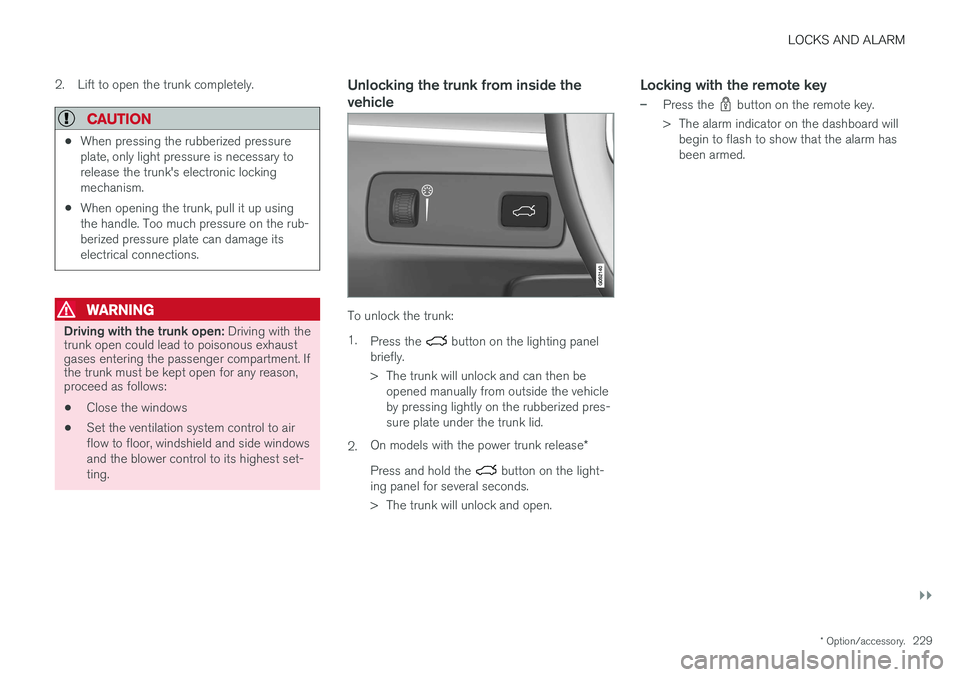
Unlocking the trunk from inside the vehicle
To unlock the trunk: 1.
Press the
button on the lighting panel
briefly.
> The trunk will unlock and can then be opened manually from outside the vehicle by pressing lightly on the rubberized pres-sure plate under the trunk lid.
2. On models with the power trunk release
*
Press and hold the
button on the light-
ing panel for several seconds.
> The trunk will unlock and open.
Locking with the remote key
–Press the button on the remote key.
> The alarm indicator on the dashboard will begin to flash to show that the alarm has been armed.
Page 236 of 548
||
LOCKS AND ALARM
2341. Private locking can be activated from the
center display's Function view or under Set- tings in Top view:
• In Function view, tap
Private Locking.
• In Top view, tap
Settings and then tap
My CarLocking. Tap the Private
Locking box.
> A pop-up window will appear.
NOTE
• A security code has to be selected the first time this function is used. This code isused to deactivate any previously used PINcodes. Keep this code in a safe place.
• If private locking is activated and the vehi-cle is unlocked using Volvo On Call or theVolvo On Call mobile app, it will be auto-matically deactivated.
2. Enter the code to be used to unlock the
trunk after it has been locked and tap
Confirm.
> The trunk will lock. Confirmation is provi- ded by a green indicator light in the but- ton in Function view and an X in the pri-vate locking box under Top view's Set-tings.
3. The glove compartment is locked using the key provided.
NOTE
• The key blade in the remote key cannot be used to lock/unlock the glove com-partment. This can only be done with theseparate key provided.
• The key used to lock/unlock the glovecompartment is longer than the lock cyl-inder. Only half of the key can be insertedinto the cylinder.
Deactivating private locking1. This function can be deactivated from the
center display's Function view or under Set- tings in Top view:
• In Function view, tap
Private Locking.
• In Top view, tap
Settings and then tap
My CarLocking. Tap (deselect) thePrivate Locking box.
> A pop-up window will appear.
2. Enter the code used for locking and tap
Confirm.
> The trunk will unlock. Confirmation is pro- vided when the green indicator light in the button in Function view goes out and theX in the private locking box under Topview's Settings disappears.
3. The glove compartment is unlocked using the key provided.
Related information
• Locking/unlocking the trunk (p. 228)
• Using the glove compartment (p. 205)
• Navigating in the center display's views(p. 38)
Page 240 of 548
LOCKS AND ALARM
* Option/accessory.
238
Deactivating the alarm without a functioning remote key
If the remote key is not functioning properly, the alarm can be turned off and the vehicle can bestarted as follows:
1. Unlock and open the driver's door with the detachable key blade.
> This will trigger the alarm.
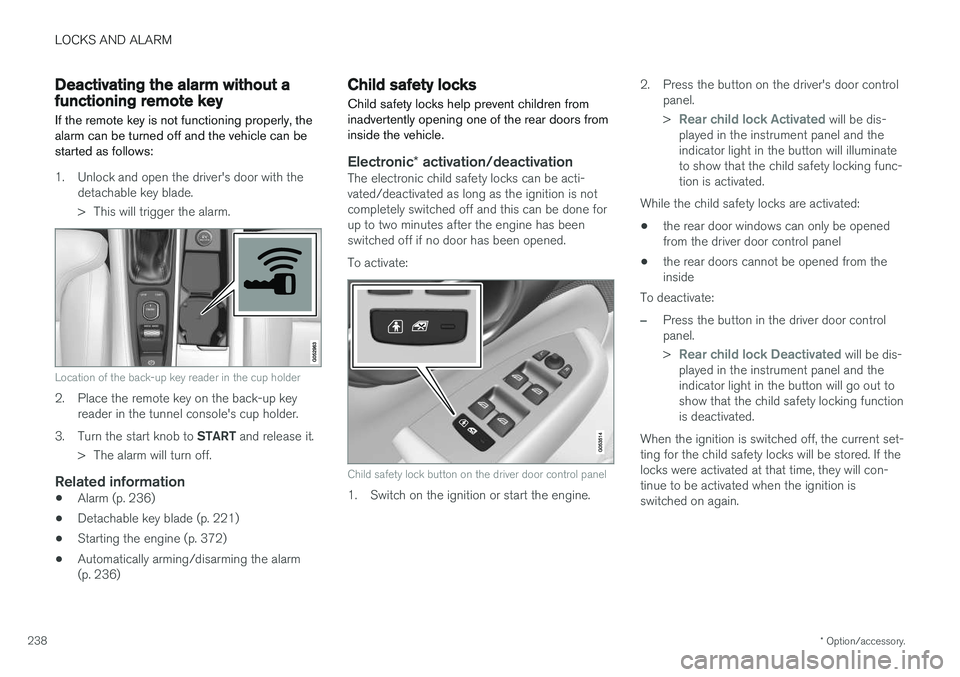
Location of the back-up key reader in the cup holder
2. Place the remote key on the back-up keyreader in the tunnel console's cup holder.
3. Turn the start knob to START and release it.
> The alarm will turn off.
Related information
• Alarm (p. 236)
• Detachable key blade (p. 221)
• Starting the engine (p. 372)
• Automatically arming/disarming the alarm (p. 236)
Child safety locks
Child safety locks help prevent children from inadvertently opening one of the rear doors frominside the vehicle.
Electronic * activation/deactivationThe electronic child safety locks can be acti- vated/deactivated as long as the ignition is notcompletely switched off and this can be done forup to two minutes after the engine has beenswitched off if no door has been opened. To activate:
Child safety lock button on the driver door control panel
1. Switch on the ignition or start the engine. 2. Press the button on the driver's door control
panel. >
Rear child lock Activated will be dis-
played in the instrument panel and the indicator light in the button will illuminateto show that the child safety locking func-tion is activated.
While the child safety locks are activated:
• the rear door windows can only be openedfrom the driver door control panel
• the rear doors cannot be opened from theinside
To deactivate:
–Press the button in the driver door control panel. >
Rear child lock Deactivated will be dis-
played in the instrument panel and the indicator light in the button will go out toshow that the child safety locking functionis deactivated.
When the ignition is switched off, the current set-ting for the child safety locks will be stored. If thelocks were activated at that time, they will con-tinue to be activated when the ignition isswitched on again.
Page 291 of 548
DRIVER SUPPORT
}}
289
Radar sensor limitations
The radar sensor used by several of the driver support systems has certain limitations, whichalso affect the systems using it.
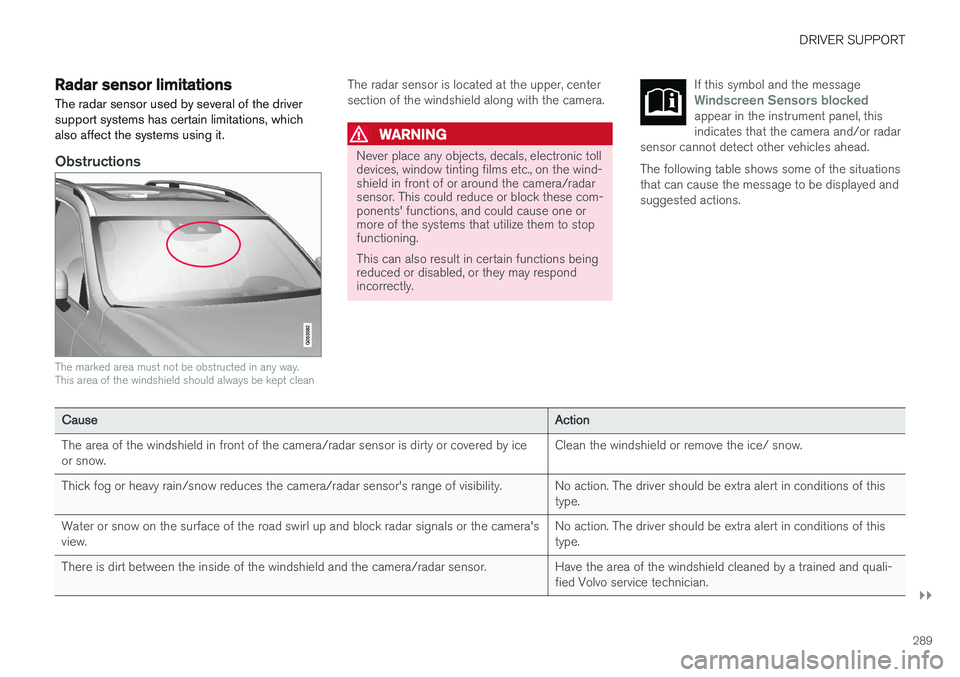
Obstructions
The marked area must not be obstructed in any way. This area of the windshield should always be kept clean
The radar sensor is located at the upper, center section of the windshield along with the camera.
WARNING
Never place any objects, decals, electronic toll devices, window tinting films etc., on the wind-shield in front of or around the camera/radarsensor. This could reduce or block these com-ponents' functions, and could cause one ormore of the systems that utilize them to stopfunctioning. This can also result in certain functions being reduced or disabled, or they may respondincorrectly. If this symbol and the message
Windscreen Sensors blockedappear in the instrument panel, this indicates that the camera and/or radar
sensor cannot detect other vehicles ahead.
The following table shows some of the situations that can cause the message to be displayed andsuggested actions.
Cause Action
The area of the windshield in front of the camera/radar sensor is dirty or covered by ice or snow. Clean the windshield or remove the ice/ snow.
Thick fog or heavy rain/snow reduces the camera/radar sensor's range of visibility. No action. The driver should be extra alert in conditions of this type.
Water or snow on the surface of the road swirl up and block radar signals or the camera'sview. No action. The driver should be extra alert in conditions of thistype.
There is dirt between the inside of the windshield and the camera/radar sensor. Have the area of the windshield cleaned by a trained and quali- fied Volvo service technician.
Page 356 of 548
STARTING AND DRIVING
354in countries where it may be difficult to obtain the correct fuel.
• Consider your destination. If you will be driv-ing through an area where snow or ice arelikely to occur, consider using snow tires.
Driving economically
Better driving economy can be obtained by thinking ahead, avoiding rapid starts and stopsand adjusting the speed of your vehicle to imme-diate traffic conditions.
Economical driving conserves natural resources
Observe the following rules: • Bring the engine to normal operating tem- perature as soon as possible by driving witha light foot on the accelerator pedal for thefirst few minutes of operation. A cold engineuses more fuel and is subject to increasedwear.
• Whenever possible, avoid using the vehiclefor driving short distances. This does notallow the engine to reach normal operatingtemperature.
• Drive carefully and avoid rapid accelerationand hard braking.
• Use the transmission's Drive (
D) position as
often as possible and avoid using kick-down.
• Using the engine's Eco function can helpimprove fuel economy.
• Do not exceed posted speed limits.
• Avoid carrying unnecessary items (extra load)in the vehicle.
• Maintain correct tire pressure. Check tirepressure regularly (when the tires are cold). •
Use tires recommended by Volvo for yourvehicle.
• Remove snow tires when threat of snow orice has ended.
• Note that roof racks, ski racks, etc, increaseair resistance and also fuel consumption.
• At highway driving speeds, fuel consumptionwill be lower with the air conditioning on andthe windows closed than with the air condi-tioning off and the windows open.
• Using the onboard trip computer's fuel con-sumption modes can help you learn how todrive more economically.
Other factors that decrease gas mileage are:
• Dirty air cleaner
• Dirty engine oil and clogged oil filter
• Dragging brakes
• Incorrect front end alignment
Some of the above mentioned items and othersare checked at the standard maintenance inter-vals.
Handling and roadholding
• Vehicle load, tire design and inflation pres-sure all affect vehicle handling. Therefore,check that the tires are inflated to the rec-ommended pressure according to the vehicleload. Loads should be distributed so that
Page 368 of 548
STARTING AND DRIVING
366
Driving with a trailer
When towing a trailer, always observe the legal requirements of the state/province.
• All Volvo models are equipped with energy- absorbing shock-mounted bumpers. Trailerhitch installation should not interfere with theproper operation of this bumper system.
Trailer towing does not normally present any par-ticular problems, but take into consideration:
• Increase tire pressure to recommended fullpressure.
• When your vehicle is new, avoid towing heavytrailers during the first 620 miles (1,000 km).
• Maximum speed when towing a trailer:50 mph (80 km/h).
• Engine and transmission are subject toincreased loads. Therefore, engine coolanttemperature should be closely watched whendriving in hot climates or hilly terrain. Use alower gear and turn off the air conditioner ifthe temperature gauge needle enters the redrange.
• If the automatic transmission begins to over-heat, a message will be displayed in the textwindow.
• Avoid overload and other abusive operation.
• Hauling a trailer affects handling, durability,and economy. •
It is necessary to balance trailer brakes withthe towing vehicle brakes to provide a safestop (check and observe state/local regula-tions).
• Do not connect the trailer's brake systemdirectly to the vehicle's brake system.
• More frequent vehicle maintenance isrequired.
• Remove the ball holder when the hitch is notbeing used.
NOTE
•
When parking the vehicle with a trailer on a hill, apply the parking brake before put- ting the gear selector in
P. Always follow
the trailer manufacturer's recommenda- tions for wheel chocking.
• When starting on a hill, put the gear selector in
D before releasing the parking
brake.
• If you use the manual (Geartronic) shift positions while towing a trailer, make surethe gear you select does not put toomuch strain on the engine (using toohigh a gear).
• The drawbar assembly/trailer hitch maybe rated for trailers heavier than the vehi-cle is designed to tow. Please adhere toVolvo's recommended trailer weights.
• Avoid driving with a trailer on inclines ofmore than 15%.