wheel VOLVO S90 2017 Owner´s Manual
[x] Cancel search | Manufacturer: VOLVO, Model Year: 2017, Model line: S90, Model: VOLVO S90 2017Pages: 548, PDF Size: 11.42 MB
Page 162 of 548
||
INSTRUMENTS AND CONTROLS
* Option/accessory.
160
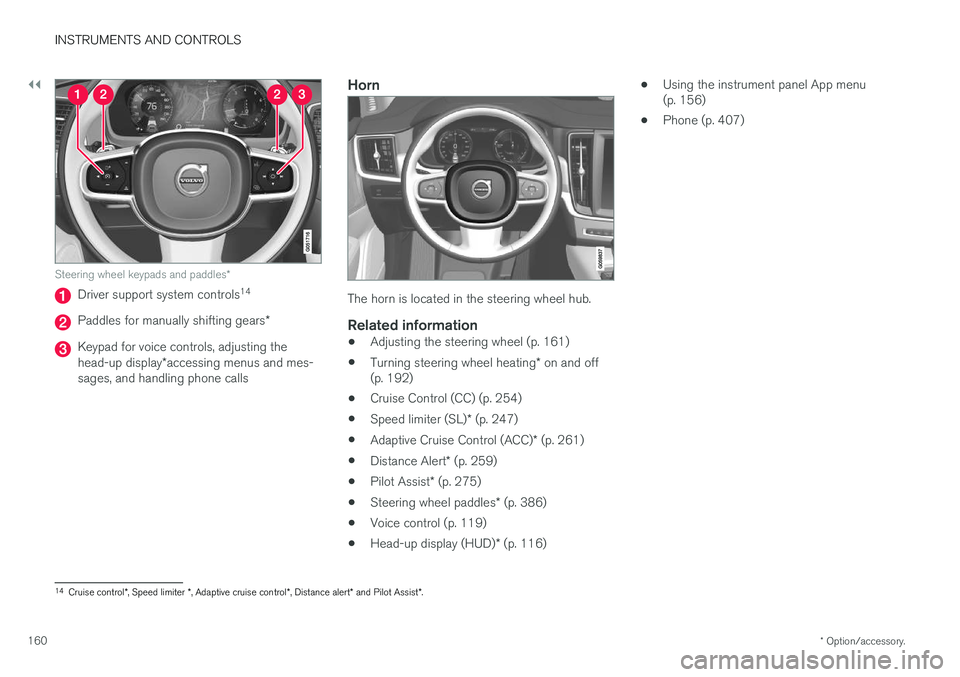
Steering wheel keypads and paddles *
Driver support system controls14
Paddles for manually shifting gears
*
Keypad for voice controls, adjusting the head-up display*accessing menus and mes-
sages, and handling phone calls
Horn
The horn is located in the steering wheel hub.
Related information
• Adjusting the steering wheel (p. 161)
• Turning steering wheel heating
* on and off
(p. 192)
• Cruise Control (CC) (p. 254)
• Speed limiter (SL)
* (p. 247)
• Adaptive Cruise Control (ACC)
* (p. 261)
• Distance Alert
* (p. 259)
• Pilot Assist
* (p. 275)
• Steering wheel paddles
* (p. 386)
• Voice control (p. 119)
• Head-up display (HUD)
* (p. 116) •
Using the instrument panel App menu (p. 156)
• Phone (p. 407)
14
Cruise control *, Speed limiter *, Adaptive cruise control *, Distance alert * and Pilot Assist *.
Page 163 of 548
INSTRUMENTS AND CONTROLS
* Option/accessory.161
Adjusting the steering wheel
The steering wheel can be adjusted to various positions.
WARNING
Never adjust the steering wheel while driving.
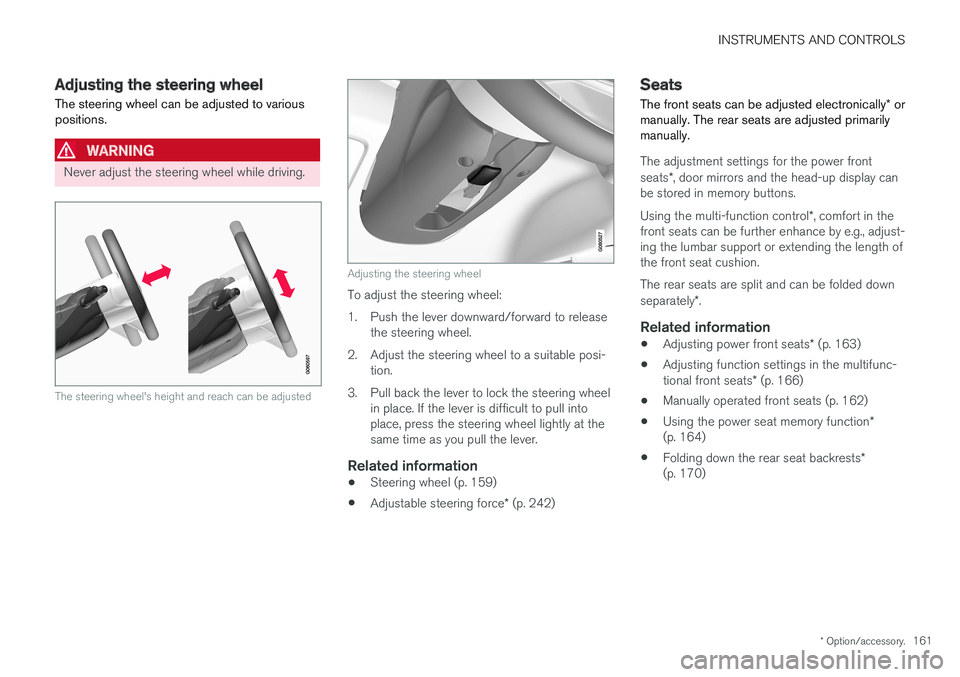
The steering wheel's height and reach can be adjusted
Adjusting the steering wheel
To adjust the steering wheel:
1. Push the lever downward/forward to release the steering wheel.
2. Adjust the steering wheel to a suitable posi- tion.
3. Pull back the lever to lock the steering wheel in place. If the lever is difficult to pull into place, press the steering wheel lightly at thesame time as you pull the lever.
Related information
• Steering wheel (p. 159)
• Adjustable steering force
* (p. 242)
Seats
The front seats can be adjusted electronically * or
manually. The rear seats are adjusted primarily manually.
The adjustment settings for the power front seats *, door mirrors and the head-up display can
be stored in memory buttons. Using the multi-function control *, comfort in the
front seats can be further enhance by e.g., adjust- ing the lumbar support or extending the length ofthe front seat cushion. The rear seats are split and can be folded down separately *.
Related information
• Adjusting power front seats
* (p. 163)
• Adjusting function settings in the multifunc-tional front seats
* (p. 166)
• Manually operated front seats (p. 162)
• Using the power seat memory function
*
(p. 164)
• Folding down the rear seat backrests
*
(p. 170)
Page 164 of 548
INSTRUMENTS AND CONTROLS
* Option/accessory.
162
Manually operated front seats
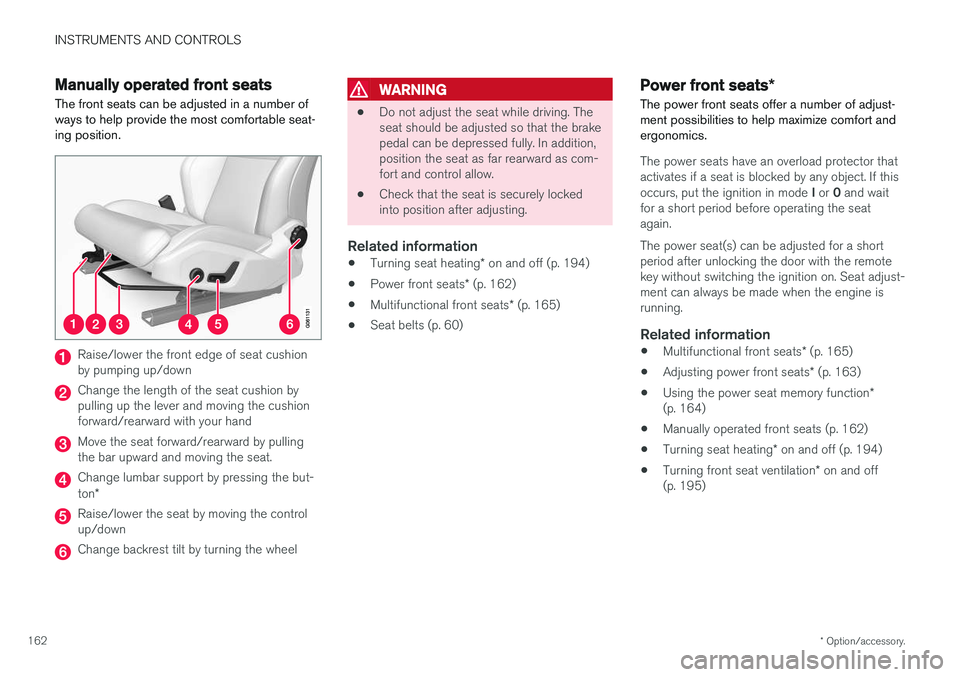
The front seats can be adjusted in a number of ways to help provide the most comfortable seat-ing position.
Raise/lower the front edge of seat cushion by pumping up/down
Change the length of the seat cushion by pulling up the lever and moving the cushionforward/rearward with your hand
Move the seat forward/rearward by pulling the bar upward and moving the seat.
Change lumbar support by pressing the but- ton *
Raise/lower the seat by moving the control up/down
Change backrest tilt by turning the wheel
WARNING
• Do not adjust the seat while driving. The seat should be adjusted so that the brakepedal can be depressed fully. In addition,position the seat as far rearward as com-fort and control allow.
• Check that the seat is securely lockedinto position after adjusting.
Related information
•
Turning seat heating
* on and off (p. 194)
• Power front seats
* (p. 162)
• Multifunctional front seats
* (p. 165)
• Seat belts (p. 60)
Power front seats
*
The power front seats offer a number of adjust- ment possibilities to help maximize comfort andergonomics.
The power seats have an overload protector that
activates if a seat is blocked by any object. If this occurs, put the ignition in mode I or 0 and wait
for a short period before operating the seat again. The power seat(s) can be adjusted for a short period after unlocking the door with the remotekey without switching the ignition on. Seat adjust-ment can always be made when the engine isrunning.
Related information
• Multifunctional front seats
* (p. 165)
• Adjusting power front seats
* (p. 163)
• Using the power seat memory function
*
(p. 164)
• Manually operated front seats (p. 162)
• Turning seat heating
* on and off (p. 194)
• Turning front seat ventilation
* on and off
(p. 195)
Page 185 of 548
CLIMATE
}}
* Option/accessory.183
•
Rear climate system controls on the tunnel console
* (p. 185)
• Defrosting windows and mirrors (p. 190)
• Climate system voice commands (p. 122)
• Air quality (p. 179)
Climate system controls in the center display
All climate system functions can be controlled from the center display's climate bar and Cli-mate view.
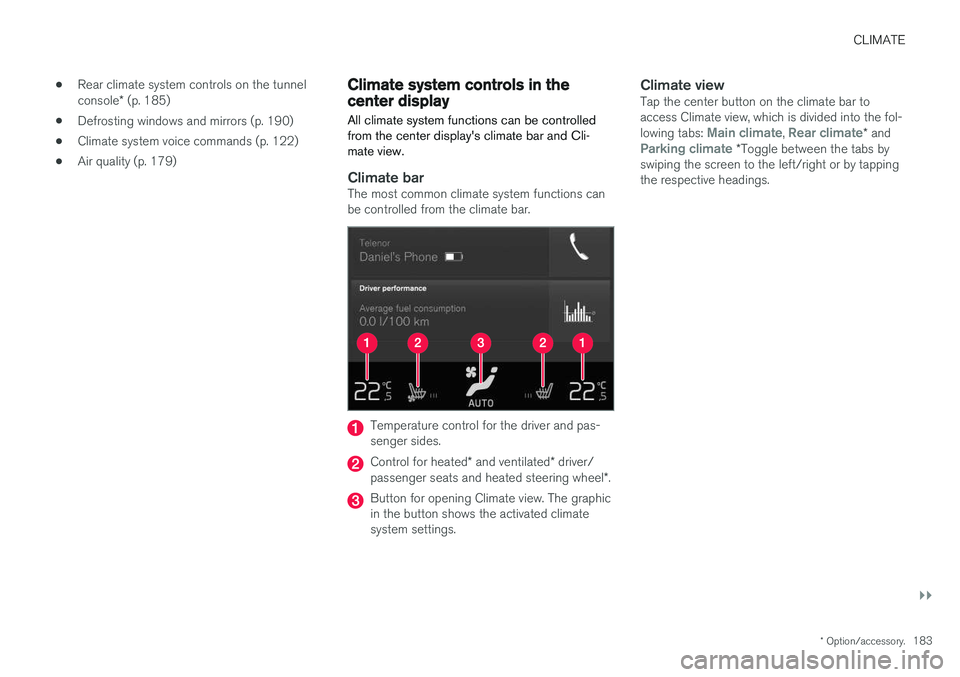
Climate barThe most common climate system functions can be controlled from the climate bar.
Temperature control for the driver and pas- senger sides.
Control for heated * and ventilated * driver/
passenger seats and heated steering wheel *.
Button for opening Climate view. The graphic in the button shows the activated climatesystem settings.
Climate viewTap the center button on the climate bar toaccess Climate view, which is divided into the fol- lowing tabs:
Main climate, Rear climate* andParking climate *Toggle between the tabs by
swiping the screen to the left/right or by tapping the respective headings.
Page 187 of 548
CLIMATE
}}
* Option/accessory.185
Related information
•Climate system controls (p. 182)
• Defrosting windows and mirrors (p. 190)
• Air conditioning (p. 193)
• Adjusting air distribution (p. 198)
• Setting the temperature (p. 187)
• Setting the blower speed (p. 185)
• Automatic climate control (p. 182)
• Turning steering wheel heating
* on and off
(p. 192)
• Turning seat heating
* on and off (p. 194)
Rear climate system controls on the tunnel console *
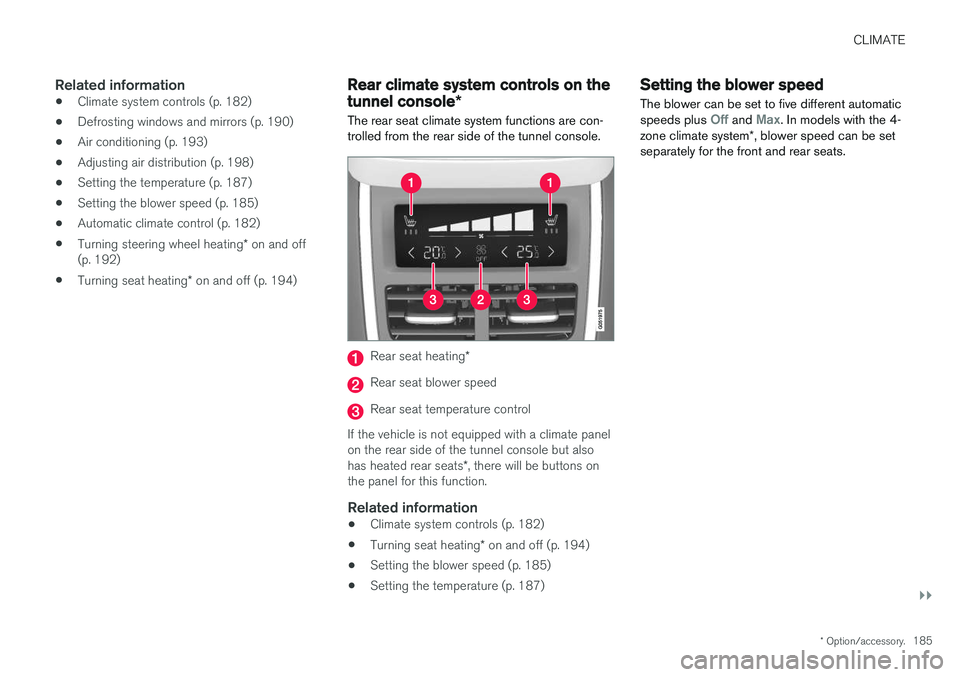
The rear seat climate system functions are con- trolled from the rear side of the tunnel console.
Rear seat heating *
Rear seat blower speed
Rear seat temperature control
If the vehicle is not equipped with a climate panel on the rear side of the tunnel console but also has heated rear seats *, there will be buttons on
the panel for this function.
Related information
• Climate system controls (p. 182)
• Turning seat heating
* on and off (p. 194)
• Setting the blower speed (p. 185)
• Setting the temperature (p. 187)
Setting the blower speed The blower can be set to five different automatic speeds plus
Off and Max. In models with the 4-
zone climate system *, blower speed can be set
separately for the front and rear seats.
Page 194 of 548
||
CLIMATE
* Option/accessory.
192
Automatically activating/deactivating the window heating function when theengine is started
The rear window/door mirror/windshield heating *
can be set to start automatically when the engine is started. The heating function switches off auto-matically when the glass surfaces are sufficientlywarm and the condensation/ice has disappeared. 1. Tap
Settings in the center display's Top
view and select Climate.
2. Activate/deactivate the respective defroster functions when the engine is started by selecting/deselecting the boxes for
Auto
Electric Front Defroster and Auto Electric
Rear Defroster.
The heating function will switch off automatically
when the window/mirror is sufficiently warm and the ice/condensation has disappeared.
Related information
• Climate system controls (p. 182)
• Climate system controls in the center display(p. 183)
• Defrosting windows and mirrors (p. 190)
• Air conditioning (p. 193)
• Turning recirculation on and off (p. 189)
• Adjusting air distribution (p. 198)
• Setting the blower speed (p. 185)
• Automatic climate control (p. 182) •
Turning front seat ventilation
* on and off
(p. 195)
• Turning steering wheel heating
* on and off
(p. 192)
Turning steering wheel heating * on
and off
The steering wheel can be heated electrically for added comfort in cold weather.
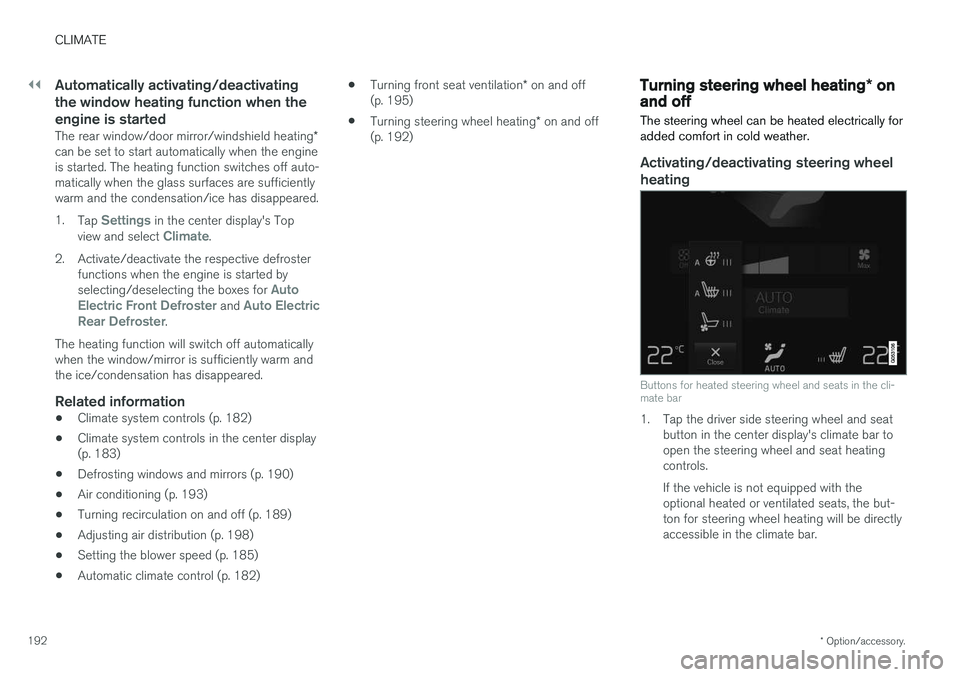
Activating/deactivating steering wheel
heating
Buttons for heated steering wheel and seats in the cli- mate bar
1. Tap the driver side steering wheel and seat button in the center display's climate bar to open the steering wheel and seat heatingcontrols. If the vehicle is not equipped with the optional heated or ventilated seats, the but-ton for steering wheel heating will be directlyaccessible in the climate bar.
Page 195 of 548
CLIMATE
* Option/accessory.193
2. Tap the steering wheel heating button
repeatedly to select one of four levels:
Off,High, Middle or Low.
> The level changes and is displayed in the button.
Automatic steering wheel heatingThe automatic function starts heating the steer- ing wheel automatically when the engine isstarted if the temperature is sufficiently cold. Thisfeature can be activated/deactivated. 1. Tap
Settings in the center display's Top
view.
2. Tap
Climate.
3. Under
Auto Steering Wheel Heating
Level, select Off, Low, Middle or High to
activate/deactivate the automatic function.
Related information
• Climate system controls (p. 182)
• Climate system controls in the center display (p. 183)
• Steering wheel (p. 159)
Air conditioning
The air conditioning cools and dehumidifies the air in the passenger compartment.
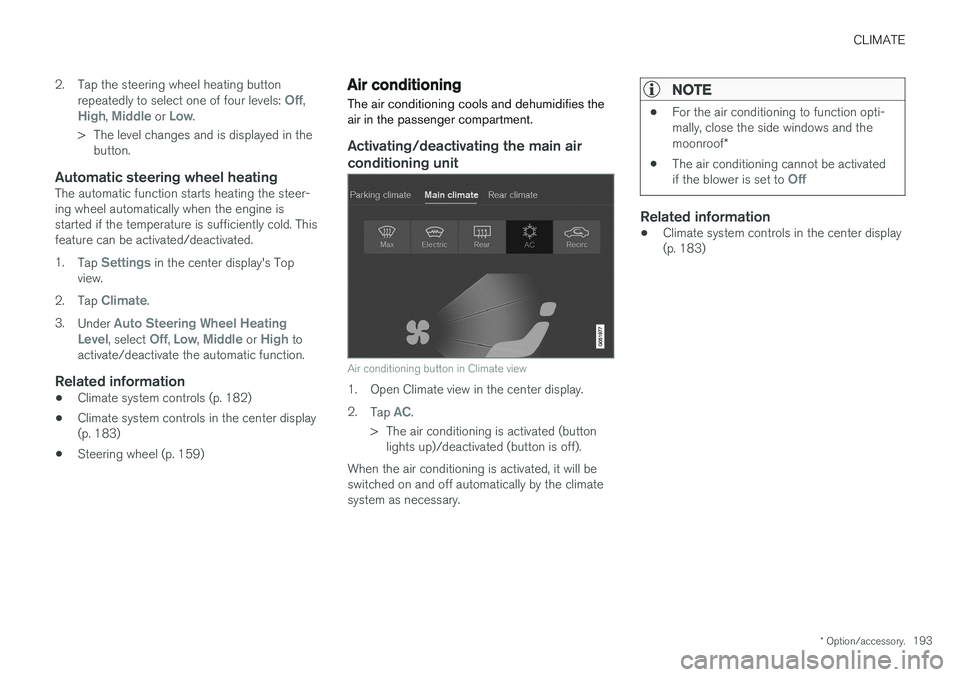
Activating/deactivating the main air conditioning unit
Air conditioning button in Climate view
1. Open Climate view in the center display. 2. Tap
AC.
> The air conditioning is activated (button lights up)/deactivated (button is off).
When the air conditioning is activated, it will be switched on and off automatically by the climatesystem as necessary.
NOTE
• For the air conditioning to function opti- mally, close the side windows and the moonroof
*
• The air conditioning cannot be activated if the blower is set to
Off
Related information
•Climate system controls in the center display (p. 183)
Page 196 of 548
CLIMATE
* Option/accessory.
194
Turning seat heating * on and off
The seats can be heated for added comfort in cold weather.
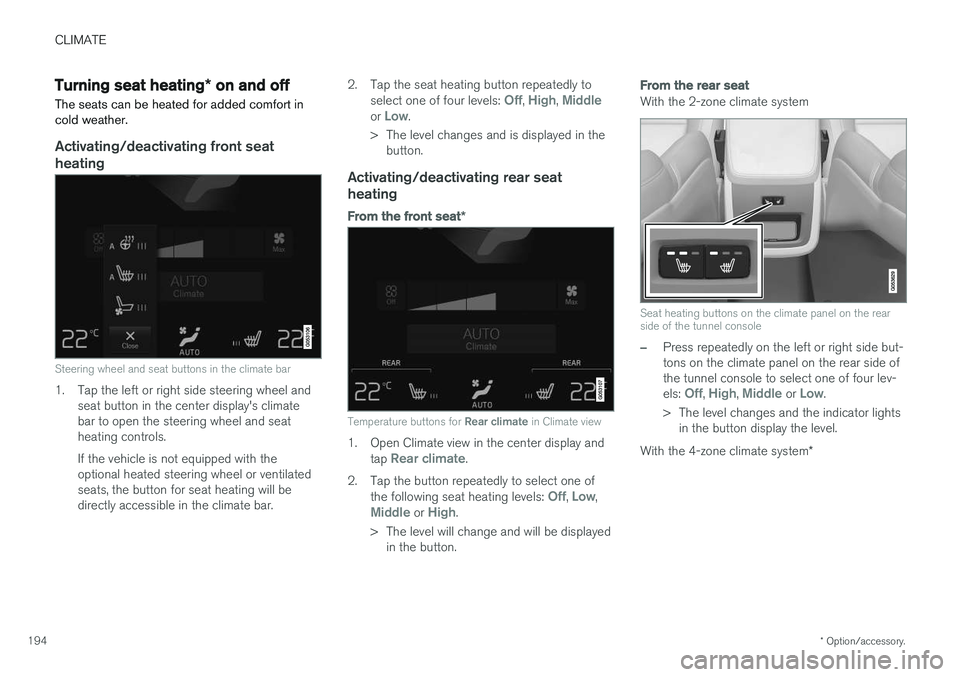
Activating/deactivating front seat heating
Steering wheel and seat buttons in the climate bar
1. Tap the left or right side steering wheel and seat button in the center display's climate bar to open the steering wheel and seatheating controls. If the vehicle is not equipped with the optional heated steering wheel or ventilatedseats, the button for seat heating will bedirectly accessible in the climate bar. 2. Tap the seat heating button repeatedly to
select one of four levels:
Off, High, Middleor Low.
> The level changes and is displayed in the button.
Activating/deactivating rear seat heating
From the front seat *
Temperature buttons for Rear climate in Climate view
1. Open Climate view in the center display and
tap Rear climate.
2. Tap the button repeatedly to select one of the following seat heating levels:
Off, Low,Middle or High.
> The level will change and will be displayed in the button.
From the rear seat
With the 2-zone climate system
Seat heating buttons on the climate panel on the rear side of the tunnel console
–Press repeatedly on the left or right side but- tons on the climate panel on the rear side ofthe tunnel console to select one of four lev- els:
Off, High, Middle or Low.
> The level changes and the indicator lights in the button display the level.
With the 4-zone climate system *
Page 198 of 548
||
CLIMATE
* Option/accessory.
196
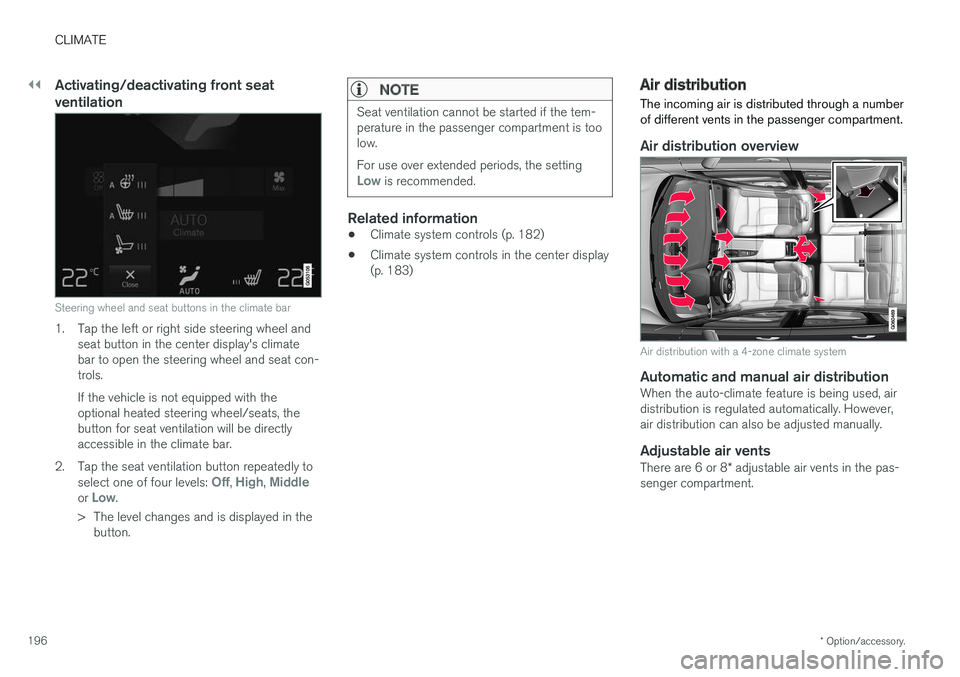
Activating/deactivating front seat ventilation
Steering wheel and seat buttons in the climate bar
1. Tap the left or right side steering wheel and
seat button in the center display's climate bar to open the steering wheel and seat con-trols. If the vehicle is not equipped with the optional heated steering wheel/seats, thebutton for seat ventilation will be directlyaccessible in the climate bar.
2. Tap the seat ventilation button repeatedly to select one of four levels:
Off, High, Middleor Low.
> The level changes and is displayed in the button.
NOTE
Seat ventilation cannot be started if the tem- perature in the passenger compartment is toolow. For use over extended periods, the setting
Low is recommended.
Related information
• Climate system controls (p. 182)
• Climate system controls in the center display (p. 183)
Air distribution
The incoming air is distributed through a number of different vents in the passenger compartment.
Air distribution overview
Air distribution with a 4-zone climate system
Automatic and manual air distributionWhen the auto-climate feature is being used, air distribution is regulated automatically. However,air distribution can also be adjusted manually.
Adjustable air vents
There are 6 or 8 * adjustable air vents in the pas-
senger compartment.
Page 199 of 548
CLIMATE
}}
* Option/accessory.197
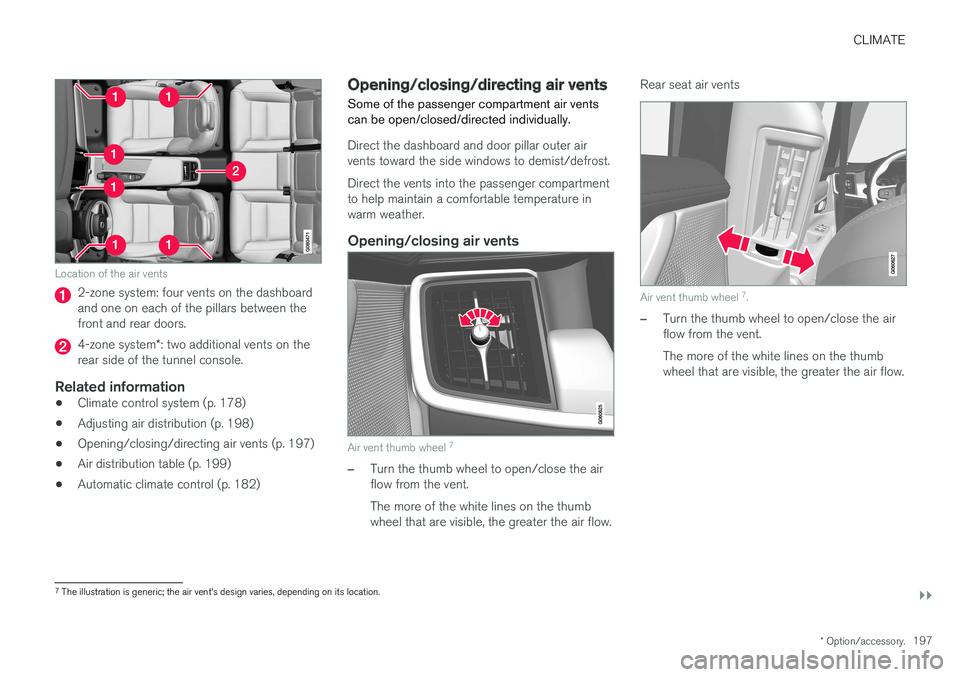
Location of the air vents
2-zone system: four vents on the dashboard and one on each of the pillars between thefront and rear doors.
4-zone system*: two additional vents on the
rear side of the tunnel console.
Related information
• Climate control system (p. 178)
• Adjusting air distribution (p. 198)
• Opening/closing/directing air vents (p. 197)
• Air distribution table (p. 199)
• Automatic climate control (p. 182)
Opening/closing/directing air vents
Some of the passenger compartment air vents can be open/closed/directed individually.
Direct the dashboard and door pillar outer air vents toward the side windows to demist/defrost. Direct the vents into the passenger compartment to help maintain a comfortable temperature inwarm weather.
Opening/closing air vents
Air vent thumb wheel 7
–Turn the thumb wheel to open/close the air flow from the vent. The more of the white lines on the thumb wheel that are visible, the greater the air flow. Rear seat air vents
Air vent thumb wheel
7
.
–Turn the thumb wheel to open/close the air flow from the vent. The more of the white lines on the thumb wheel that are visible, the greater the air flow.
7 The illustration is generic; the air vent's design varies, depending on its location.