wheel VOLVO S90 2017 Owner´s Manual
[x] Cancel search | Manufacturer: VOLVO, Model Year: 2017, Model line: S90, Model: VOLVO S90 2017Pages: 548, PDF Size: 11.42 MB
Page 282 of 548
||
DRIVER SUPPORT
* Option/accessory.
280
• the lane is at the top of a hill, on an uneven road surface or over a bump.
• bad weather conditions (rain, snow, fog,slush, poor visibility, backlighting, etc).
The driver should also be aware that Pilot Assist has the following limitations: • High curbs, barriers and temporary obsta- cles (cones, barriers etc) may not bedetected or could be detected incorrectlyas side marker lines, which may create arisk of collision. The driver must ensure asafe distance to these obstacles.
• The camera or radar sensor may not beable to detect objects if there are pot-holes or if there are stationary objectspartially or completely blocking the road.
• Pilot Assist does not "see" pedestrians,animals, etc.
• Pilot Assist's steering capacity is limitedand may not always be able to help thedriver keep the vehicle in the lane.
Hands on the steering wheel
Pilot Assist only functions when the driver's hands are on the steering wheel
, which is con-
tinuously monitored by the system. If this is notthe case, the driver will be alerted by a text mes-sage in the instrument panel. If the driver's handsare not returned to the steering wheel, an audiblesignal will sound. If the driver does not return his/her hands to thesteering wheel after the audible signal, PilotAssist will go into standby mode and must be reactivated by pressing
.
Related information
•
Pilot Assist
* (p. 275)
• Changing Pilot Assist speed (p. 280)
• Setting a Pilot Assist time interval (p. 281)
• Changing target vehicles and automatic braking with Pilot Assist (p. 284)
• Deactivating/resuming Pilot Assist (p. 282)
• Passing Assistance with Adaptive CruiseControl or Pilot Assist (p. 268)
• Pilot Assist limitations (p. 285)
• Pilot Assist symbols and messages (p. 287)
Changing Pilot Assist speed
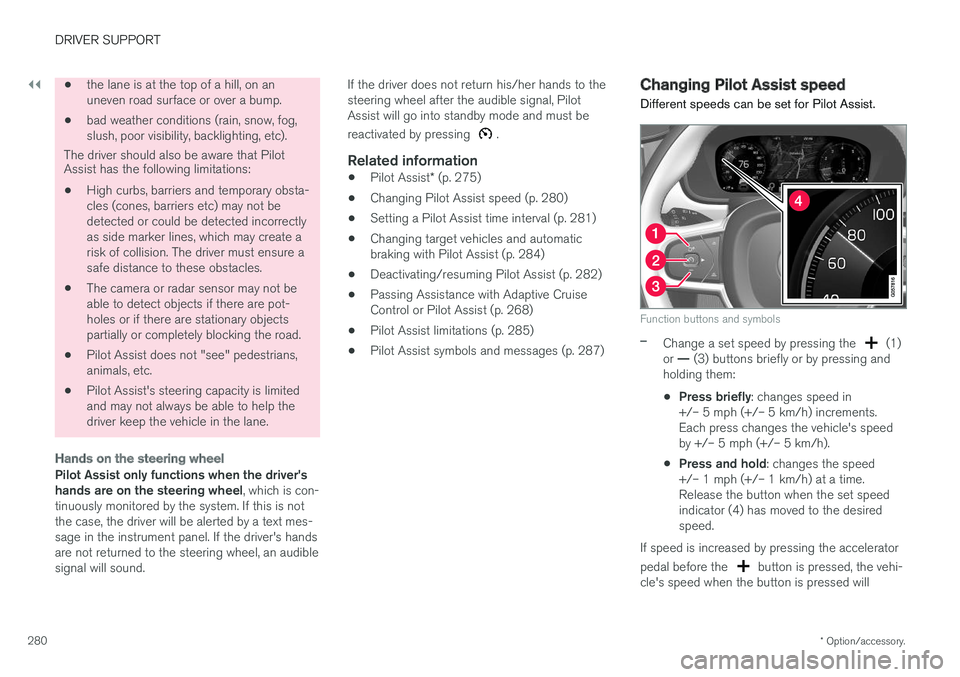
Different speeds can be set for Pilot Assist.
Function buttons and symbols
–Change a set speed by pressing the (1)
or — (3) buttons briefly or by pressing and
holding them:
• Press briefly
: changes speed in
+/– 5 mph (+/– 5 km/h) increments. Each press changes the vehicle's speedby +/– 5 mph (+/– 5 km/h).
• Press and hold
: changes the speed
+/– 1 mph (+/– 1 km/h) at a time.Release the button when the set speedindicator (4) has moved to the desiredspeed.
If speed is increased by pressing the accelerator pedal before the
button is pressed, the vehi-
cle's speed when the button is pressed will
Page 283 of 548
DRIVER SUPPORT
}}
* Option/accessory.281
become the set speed assuming that the accel- erator pedal is still depressed when the button ispressed. A temporary increase in speed, such as when passing another vehicle, does not affect thespeed set for Pilot Assist. The vehicle will returnto the set speed when the accelerator pedal isreleased. Pilot Assist can follow another vehicle from a standstill up to a speed of approx. 125 mph(200 km/h). Always observe posted speed limits. The lowest speed that can be set/stored for Pilot Assist is 20 mph (30 km/h). However, PilotAssist can monitor and react to the speed of thevehicle ahead down to a standstill. The highest speed that can be set/stored is approx. 125 mph (200 km/h). Always observeposted speed limits.
Related information
•
Pilot Assist
* (p. 275)
• Starting and activating Pilot Assist (p. 278)
• Setting a Pilot Assist time interval (p. 281)
• Changing target vehicles and automaticbraking with Pilot Assist (p. 284)
• Deactivating/resuming Pilot Assist (p. 282)
• Passing Assistance with Adaptive CruiseControl or Pilot Assist (p. 268)
• Pilot Assist limitations (p. 285) •
Pilot Assist symbols and messages (p. 287)
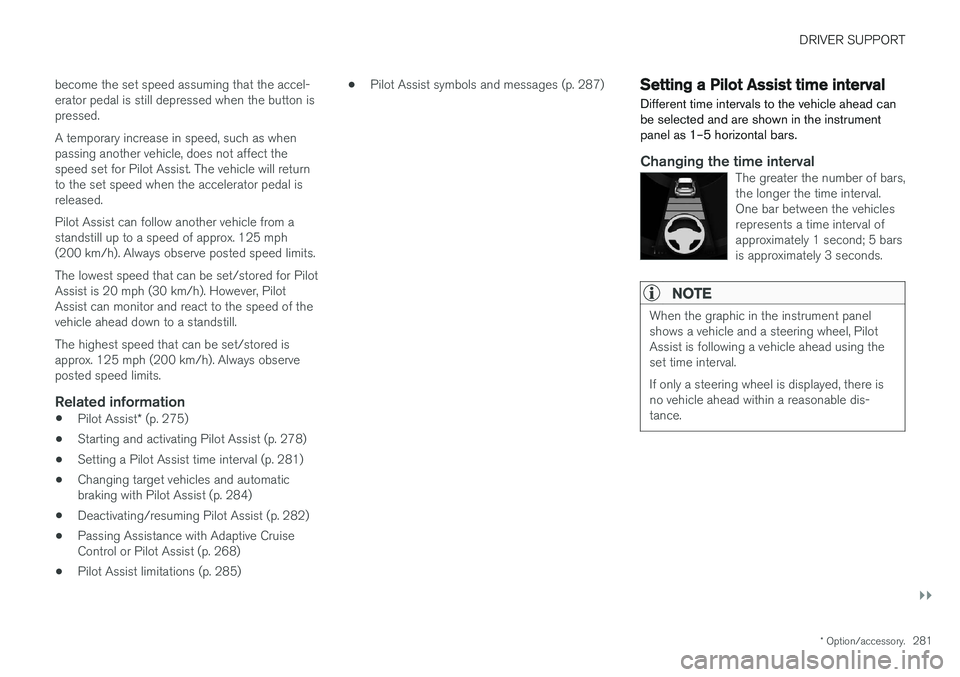
Setting a Pilot Assist time interval
Different time intervals to the vehicle ahead can be selected and are shown in the instrumentpanel as 1–5 horizontal bars.
Changing the time intervalThe greater the number of bars, the longer the time interval.One bar between the vehiclesrepresents a time interval ofapproximately 1 second; 5 barsis approximately 3 seconds.
NOTE
When the graphic in the instrument panel shows a vehicle and a steering wheel, PilotAssist is following a vehicle ahead using theset time interval. If only a steering wheel is displayed, there is no vehicle ahead within a reasonable dis-tance.
Page 285 of 548
DRIVER SUPPORT
}}
* Option/accessory.283
In standby mode, the driver will have to regulate the vehicle's speed and the distance to the vehi-cle ahead. When Pilot Assist is in standby mode and your vehicle comes too close to another vehicle, thedriver will be alerted by the Distance Alert func-tion.
Standby mode due to action by the driver
Pilot Assist is temporarily deactivated and put in standby mode if:
• the brakes are applied
• The gear selector is moved to
N
• the turn signals are used for more than1 minute
• the vehicle is driven faster than the setspeed for more than 1 minute.
A temporary increase in speed, such as whenpassing another vehicle, does not affect the PilotAssist set speed. The vehicle will return to the setspeed when the accelerator pedal is released. When the turn signals are used, Pilot Assist's steering function will be temporarily deactivated.When this is no longer the case, the steeringfunction will reactivate if the traffic lane's sidemarker lines can still be detected.
Automatic standby mode
Pilot Assist interacts with other systems, such as Electronic Stability Control. If any of these other systems are not functioning properly, Pilot Assistwill automatically be deactivated.
WARNING
If this happens, the driver will be alerted by an audible signal and a message in the instru-ment panel. The driver will have to adapt thevehicle's speed, apply the brakes when nec-essary and keep a safe distance to the vehicleahead.
Pilot Assist switches automatically to standby mode if: • the vehicle's speed is below approx. 3 mph(5 km/h) and Pilot Assist cannot determine ifa vehicle ahead is a stationary vehicle or anobject.
• the vehicle's speed is below approx. 3 mph(5 km/h) and the vehicle ahead turns so thatPilot Assist no longer has a vehicle to follow(target vehicle).
• the driver's hands are not on the steeringwheel
• the driver's door is opened
• the driver unbuckles the seat belt
• engine speed (rpm) is too high/low
• the wheels lose traction
• brake temperature is too high
• the parking brake is set •
The camera lens/radar sensor is covered bye.g., snow or if heavy rain interferes withradar wavesReactivating Pilot Assist from standby
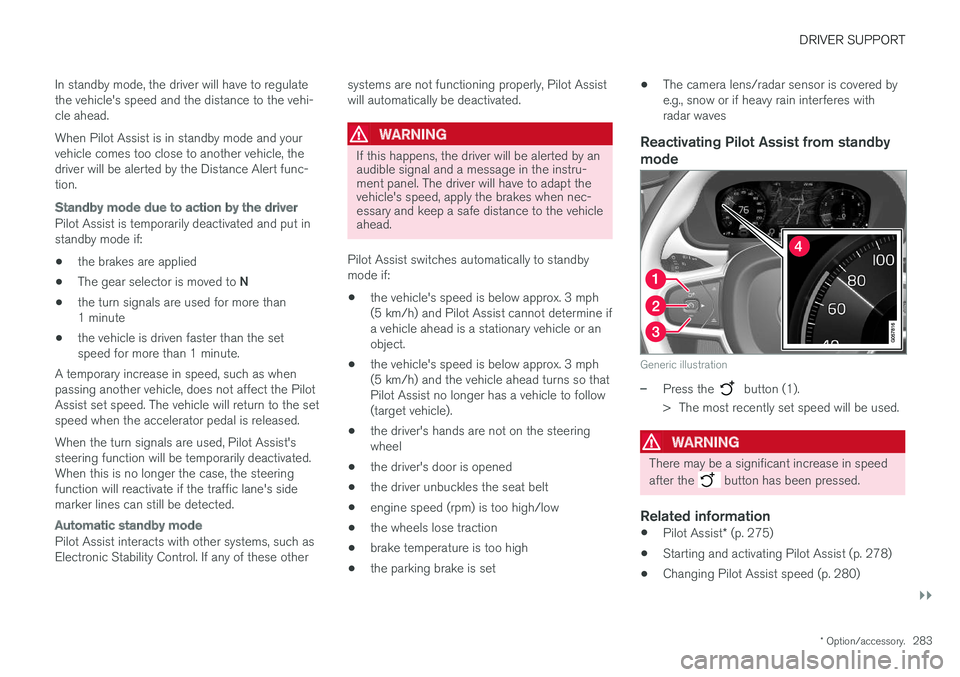
mode
Generic illustration
–Press the button (1).
> The most recently set speed will be used.
WARNING
There may be a significant increase in speed after the
button has been pressed.
Related information
• Pilot Assist
* (p. 275)
• Starting and activating Pilot Assist (p. 278)
• Changing Pilot Assist speed (p. 280)
Page 287 of 548
DRIVER SUPPORT
}}
* Option/accessory.285
–The driver will then have to reactivate Pilot Assist in one of the following ways:
• Press the
button on the left-side
steering wheel keypad
• Press the accelerator pedal
> Pilot Assist will resume following the vehi- cle ahead (target vehicle) if it begins to move within approx. 6 seconds.
NOTE
Pilot Assist can keep the vehicle at a stand- still for up to 5 minutes, after which the park-ing brake will be set and Pilot Assist will gointo standby mode. The parking brake has to be released before Pilot Assist can be reactivated.
Deactivation of the auto-hold brake function
In certain situations, auto-hold will be deactivated when the vehicle is at a standstill and Pilot Assistwill go into standby mode. This means that the brakes will be released and the vehicle can begin to roll. The driver must actively apply the brakes to keep the vehicle at a standstill. This can occur in the following situations: • the driver presses the brake pedal
• the parking brake is set •
the gear selector is moved to the
P, N or R
positions
• the driver puts Pilot Assist in standby mode
Automatically setting the parking brakeIn certain situations, the parking brake is set automatically to help keep the vehicle at a stand-still. This occurs if Pilot Assist keeps the vehicle at a standstill with the brakes and:
• the driver unbuckles the seat belt or opensthe door
• Pilot Assist has kept the vehicle at a stand-still for more than approx. 5 minutes
• the engine is turned off
• the brakes overheat
Related information
•
Pilot Assist
* (p. 275)
• Starting and activating Pilot Assist (p. 278)
• Changing Pilot Assist speed (p. 280)
• Setting a Pilot Assist time interval (p. 281)
• Deactivating/resuming Pilot Assist (p. 282)
• Passing Assistance with Adaptive CruiseControl or Pilot Assist (p. 268)
• Pilot Assist limitations (p. 285)
• Pilot Assist symbols and messages (p. 287)
Pilot Assist limitations
Pilot Assist functionality may be limited in certain situations.
Pilot Assist is designed to help the driver in a number of situations. However, the driver alwayshas the primary responsibility for maintaining asafe distance to other vehicles and for keepingthe vehicle in its proper traffic lane.
Page 309 of 548
DRIVER SUPPORT
307
City Safety symbols and messages
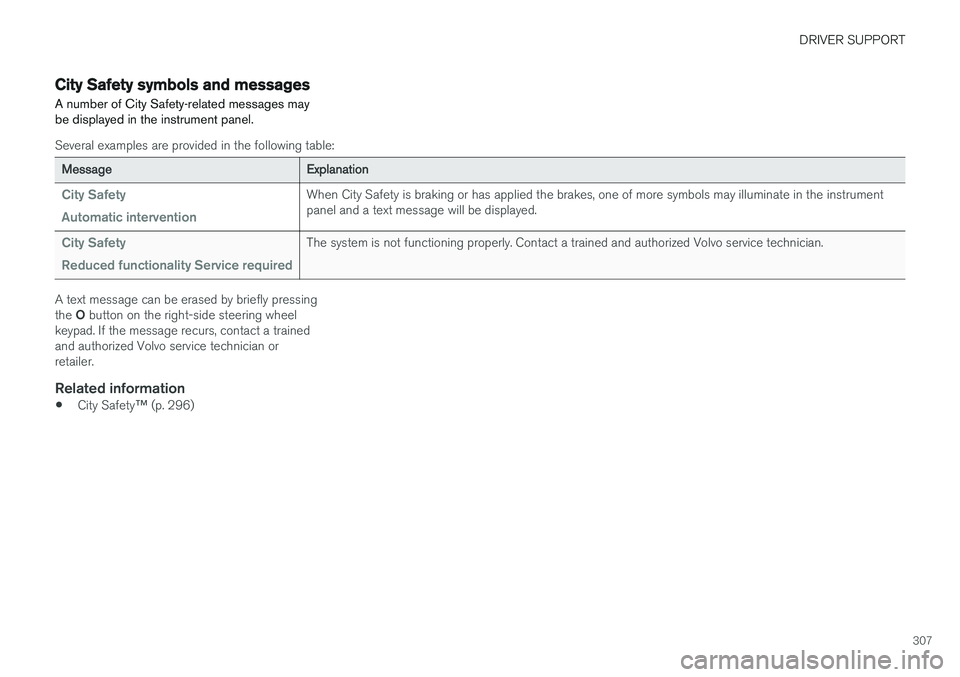
A number of City Safety-related messages may be displayed in the instrument panel.
Several examples are provided in the following table:
Message Explanation
City Safety Automatic interventionWhen City Safety is braking or has applied the brakes, one of more symbols may illuminate in the instrument panel and a text message will be displayed.
City Safety Reduced functionality Service requiredThe system is not functioning properly. Contact a trained and authorized Volvo service technician.
A text message can be erased by briefly pressing the O button on the right-side steering wheel
keypad. If the message recurs, contact a trained and authorized Volvo service technician orretailer.
Related information
• City Safety
™ (p. 296)
Page 317 of 548
DRIVER SUPPORT
* Option/accessory.315
Blind Spot Information (BLIS) * with
Cross Traffic Alert (CTA) * symbols
and messages
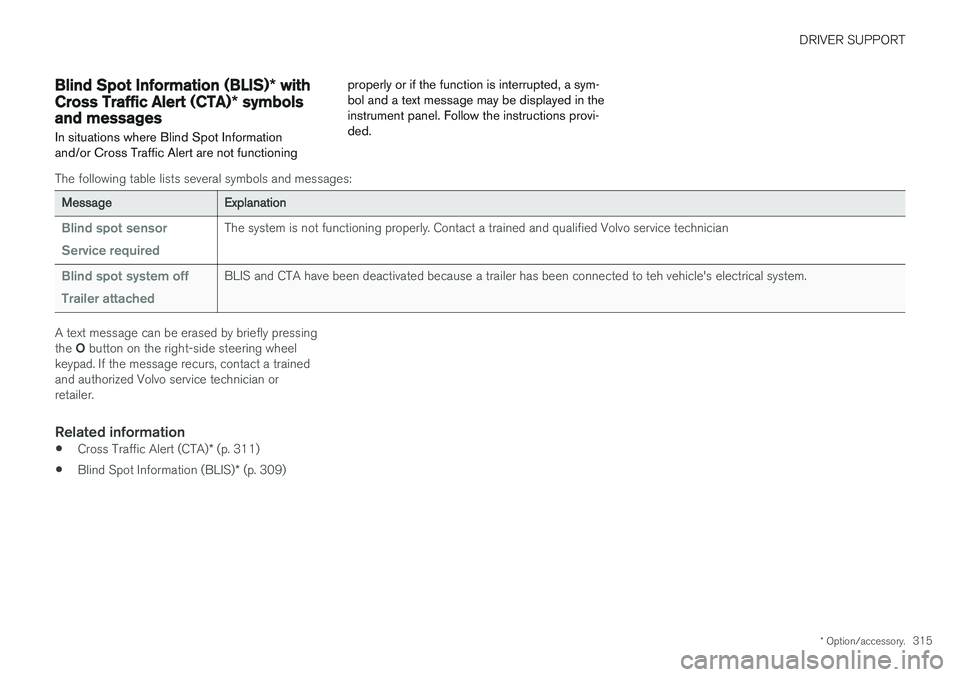
In situations where Blind Spot Information and/or Cross Traffic Alert are not functioning properly or if the function is interrupted, a sym-bol and a text message may be displayed in theinstrument panel. Follow the instructions provi-ded.
The following table lists several symbols and messages:
Message
Explanation
Blind spot sensor Service requiredThe system is not functioning properly. Contact a trained and qualified Volvo service technician
Blind spot system off Trailer attachedBLIS and CTA have been deactivated because a trailer has been connected to teh vehicle's electrical system.
A text message can be erased by briefly pressing the O button on the right-side steering wheel
keypad. If the message recurs, contact a trained and authorized Volvo service technician orretailer.
Related information
• Cross Traffic Alert (CTA)
* (p. 311)
• Blind Spot Information (BLIS)
* (p. 309)
Page 323 of 548
DRIVER SUPPORT
}}
321
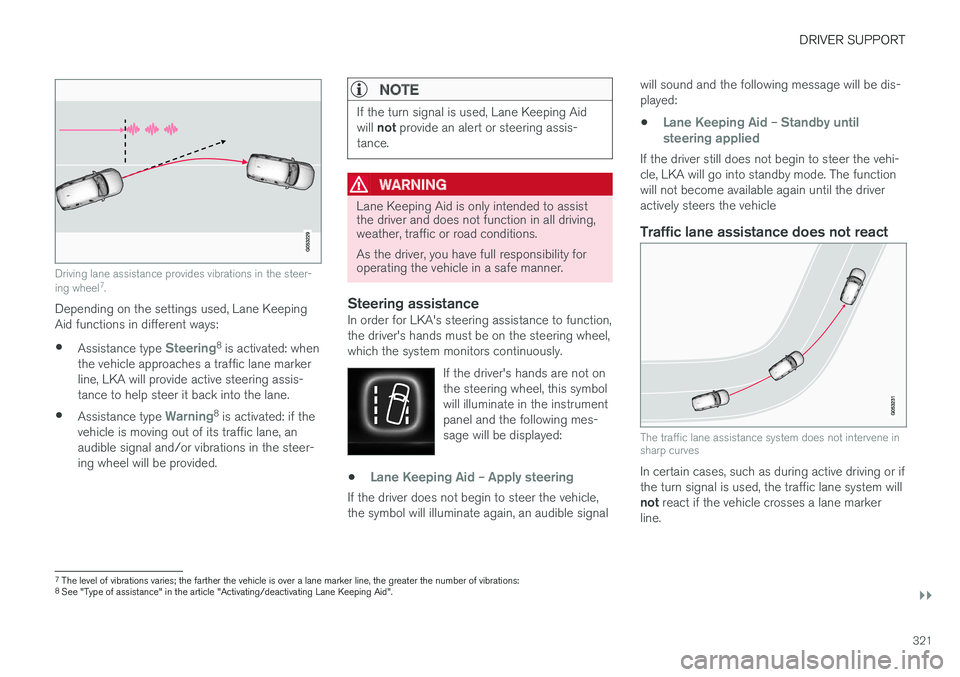
Driving lane assistance provides vibrations in the steer- ing wheel7
.
Depending on the settings used, Lane Keeping Aid functions in different ways:
• Assistance type
Steering8
is activated: when
the vehicle approaches a traffic lane marker line, LKA will provide active steering assis-tance to help steer it back into the lane.
• Assistance type
Warning8
is activated: if the
vehicle is moving out of its traffic lane, an audible signal and/or vibrations in the steer-ing wheel will be provided.
NOTE
If the turn signal is used, Lane Keeping Aid will not provide an alert or steering assis-
tance.
WARNING
Lane Keeping Aid is only intended to assist the driver and does not function in all driving,weather, traffic or road conditions. As the driver, you have full responsibility for operating the vehicle in a safe manner.
Steering assistanceIn order for LKA's steering assistance to function, the driver's hands must be on the steering wheel,which the system monitors continuously.
If the driver's hands are not onthe steering wheel, this symbolwill illuminate in the instrumentpanel and the following mes-sage will be displayed:
•Lane Keeping Aid – Apply steering
If the driver does not begin to steer the vehicle, the symbol will illuminate again, an audible signal will sound and the following message will be dis-played:
•
Lane Keeping Aid – Standby until
steering applied
If the driver still does not begin to steer the vehi- cle, LKA will go into standby mode. The functionwill not become available again until the driveractively steers the vehicle
Traffic lane assistance does not react
The traffic lane assistance system does not intervene in sharp curves
In certain cases, such as during active driving or if the turn signal is used, the traffic lane system will not react if the vehicle crosses a lane marker
line.
7 The level of vibrations varies; the farther the vehicle is over a lane marker line, the greater the number of vibrations:
8 See "Type of assistance" in the article "Activating/deactivating Lane Keeping Aid".
Page 324 of 548
||
DRIVER SUPPORT
322
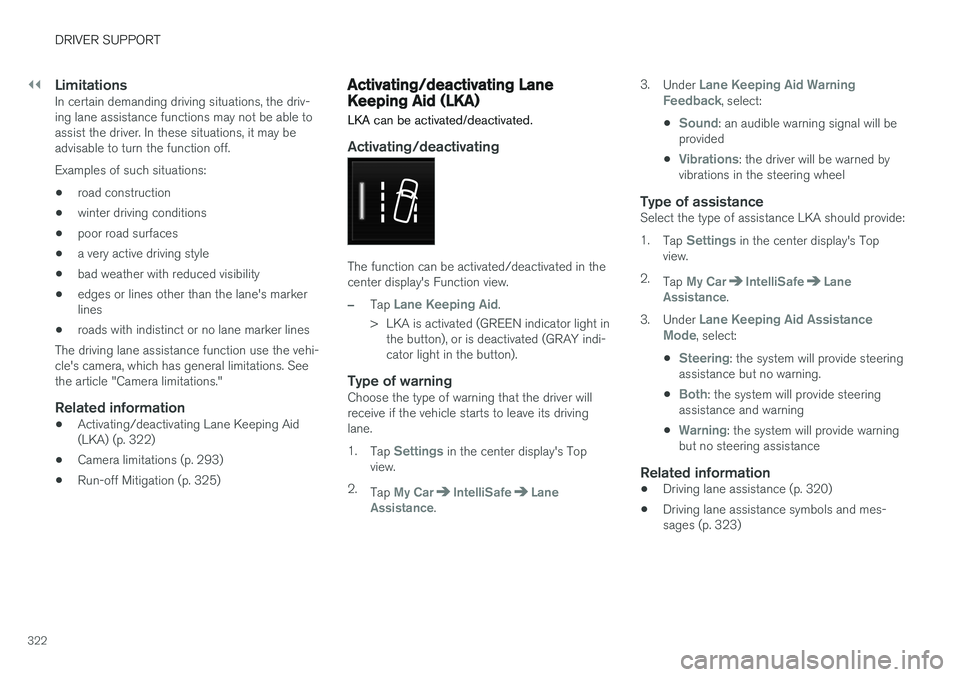
LimitationsIn certain demanding driving situations, the driv- ing lane assistance functions may not be able toassist the driver. In these situations, it may beadvisable to turn the function off. Examples of such situations: •road construction
• winter driving conditions
• poor road surfaces
• a very active driving style
• bad weather with reduced visibility
• edges or lines other than the lane's marker lines
• roads with indistinct or no lane marker lines
The driving lane assistance function use the vehi-cle's camera, which has general limitations. Seethe article "Camera limitations."
Related information
• Activating/deactivating Lane Keeping Aid(LKA) (p. 322)
• Camera limitations (p. 293)
• Run-off Mitigation (p. 325)
Activating/deactivating Lane Keeping Aid (LKA) LKA can be activated/deactivated.
Activating/deactivating
The function can be activated/deactivated in the center display's Function view.
–Tap Lane Keeping Aid.
> LKA is activated (GREEN indicator light in the button), or is deactivated (GRAY indi- cator light in the button).
Type of warningChoose the type of warning that the driver willreceive if the vehicle starts to leave its drivinglane. 1. Tap
Settings in the center display's Top
view.
2. Tap
My CarIntelliSafeLane
Assistance. 3.
Under
Lane Keeping Aid Warning
Feedback, select:
•
Sound: an audible warning signal will be
provided
•
Vibrations: the driver will be warned by
vibrations in the steering wheel
Type of assistanceSelect the type of assistance LKA should provide: 1. Tap
Settings in the center display's Top
view.
2. Tap
My CarIntelliSafeLane
Assistance.
3. Under
Lane Keeping Aid Assistance
Mode, select:
•
Steering: the system will provide steering
assistance but no warning.
•
Both: the system will provide steering
assistance and warning
•
Warning: the system will provide warning
but no steering assistance
Related information
• Driving lane assistance (p. 320)
• Driving lane assistance symbols and mes- sages (p. 323)
Page 326 of 548
||
DRIVER SUPPORT
324
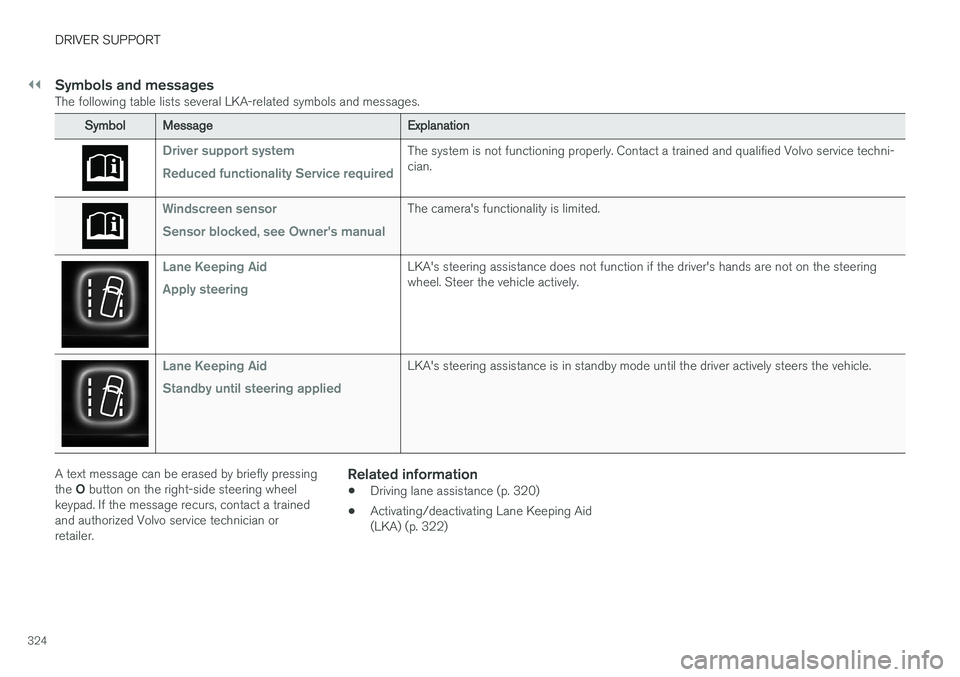
Symbols and messagesThe following table lists several LKA-related symbols and messages.
SymbolMessage Explanation
Driver support system Reduced functionality Service requiredThe system is not functioning properly. Contact a trained and qualified Volvo service techni- cian.
Windscreen sensor Sensor blocked, see Owner's manualThe camera's functionality is limited.
Lane Keeping Aid Apply steeringLKA's steering assistance does not function if the driver's hands are not on the steering wheel. Steer the vehicle actively.
Lane Keeping Aid Standby until steering appliedLKA's steering assistance is in standby mode until the driver actively steers the vehicle.
A text message can be erased by briefly pressing the O button on the right-side steering wheel
keypad. If the message recurs, contact a trained and authorized Volvo service technician orretailer.Related information
• Driving lane assistance (p. 320)
• Activating/deactivating Lane Keeping Aid(LKA) (p. 322)
Page 333 of 548
DRIVER SUPPORT
* Option/accessory.331
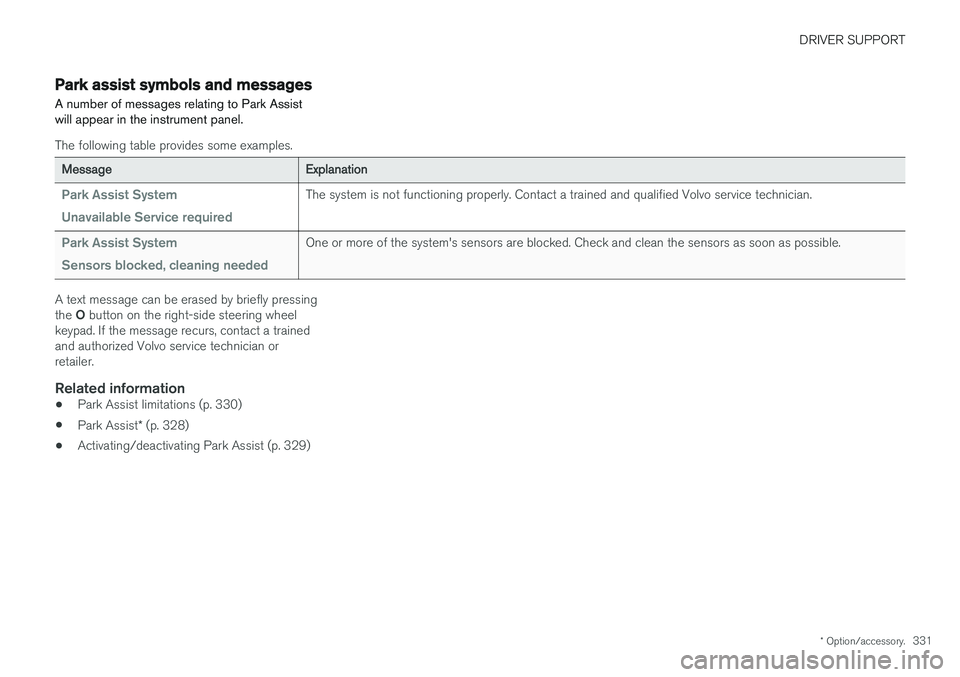
Park assist symbols and messages
A number of messages relating to Park Assist will appear in the instrument panel.
The following table provides some examples.
Message Explanation
Park Assist System Unavailable Service requiredThe system is not functioning properly. Contact a trained and qualified Volvo service technician.
Park Assist System Sensors blocked, cleaning neededOne or more of the system's sensors are blocked. Check and clean the sensors as soon as possible.
A text message can be erased by briefly pressing the O button on the right-side steering wheel
keypad. If the message recurs, contact a trained and authorized Volvo service technician orretailer.
Related information
• Park Assist limitations (p. 330)
• Park Assist
* (p. 328)
• Activating/deactivating Park Assist (p. 329)