buttons VOLVO S90 2017 Owner´s Manual
[x] Cancel search | Manufacturer: VOLVO, Model Year: 2017, Model line: S90, Model: VOLVO S90 2017Pages: 548, PDF Size: 11.42 MB
Page 229 of 548
LOCKS AND ALARM
227
Indicators in the interior lock buttons
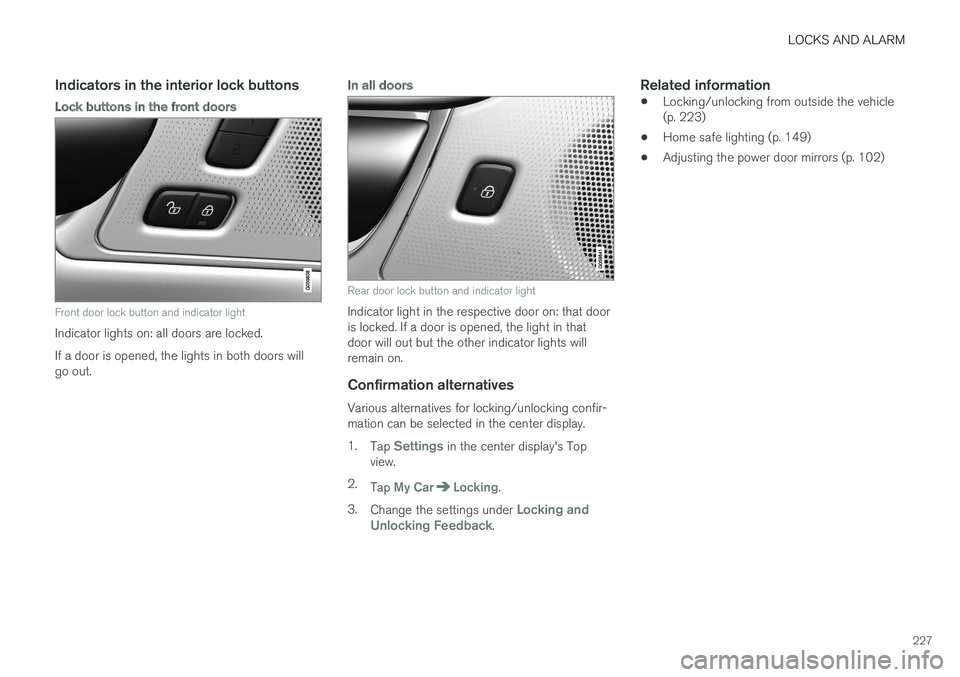
Lock buttons in the front doors
Front door lock button and indicator light
Indicator lights on: all doors are locked. If a door is opened, the lights in both doors will go out.
In all doors
Rear door lock button and indicator light
Indicator light in the respective door on: that door is locked. If a door is opened, the light in thatdoor will out but the other indicator lights willremain on.
Confirmation alternatives
Various alternatives for locking/unlocking confir-mation can be selected in the center display. 1.Tap
Settings in the center display's Top
view.
2. Tap
My CarLocking.
3. Change the settings under
Locking and
Unlocking Feedback.
Related information
• Locking/unlocking from outside the vehicle (p. 223)
• Home safe lighting (p. 149)
• Adjusting the power door mirrors (p. 102)
Page 233 of 548
LOCKS AND ALARM
}}
* Option/accessory.231
The power trunk release can be activated by:
• Pressing and holding the
button on the
lighting panel until the trunk lid begins to open.
• Pressing and holding the
button on the
remote key until the trunk lid begins to open.
• Pressing lightly on the rubber-covered button on the underside of the trunk lid.
• Moving your foot under a sensor under the rear bumper
*.
Closing the trunkThe trunk can be closed by pressing the button on the lighting panel or on the remote key, bypressing the button on the lower edge of the trunk lid *10
or by moving your foot under a sensor
beneath the rear bumper *.
To close the trunk:
–Press and hold the button on the light-
ing panel or on the
button on the
remote key.
> The trunk will close automatically and
audible signal will sound. This will not
lock the trunk.
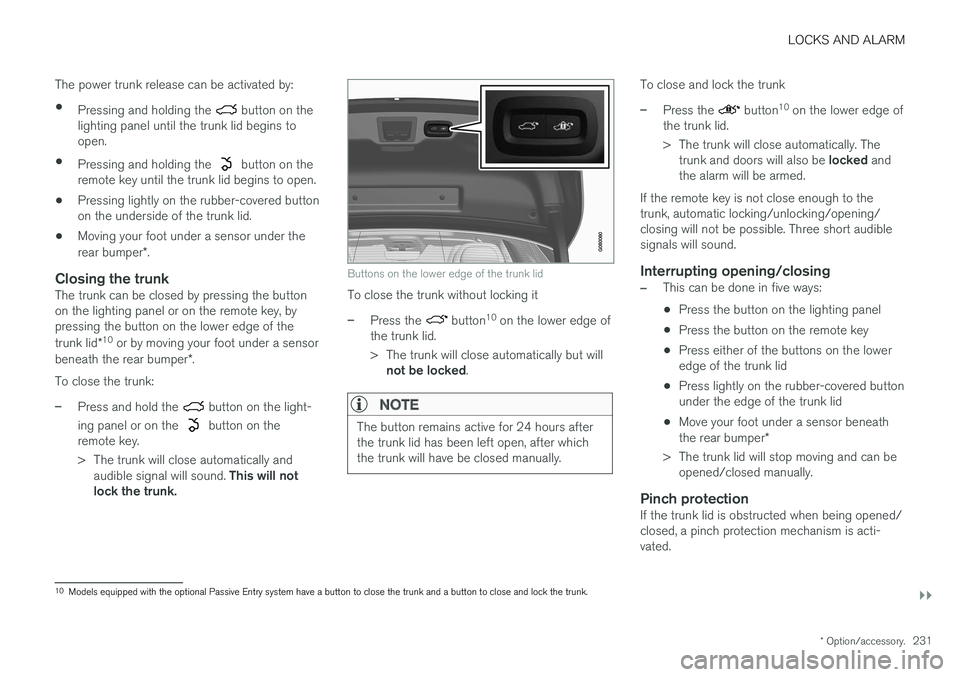
Buttons on the lower edge of the trunk lid
To close the trunk without locking it
–Press the button 10
on the lower edge of
the trunk lid.
> The trunk will close automatically but will not be locked .
NOTE
The button remains active for 24 hours after the trunk lid has been left open, after whichthe trunk will have be closed manually.
To close and lock the trunk
–Press the button10
on the lower edge of
the trunk lid.
> The trunk will close automatically. The trunk and doors will also be locked and
the alarm will be armed.
If the remote key is not close enough to the trunk, automatic locking/unlocking/opening/closing will not be possible. Three short audiblesignals will sound.
Interrupting opening/closing
–This can be done in five ways: • Press the button on the lighting panel
• Press the button on the remote key
• Press either of the buttons on the lower edge of the trunk lid
• Press lightly on the rubber-covered buttonunder the edge of the trunk lid
• Move your foot under a sensor beneath the rear bumper
*
> The trunk lid will stop moving and can be opened/closed manually.
Pinch protectionIf the trunk lid is obstructed when being opened/ closed, a pinch protection mechanism is acti-vated.
10Models equipped with the optional Passive Entry system have a button to close the trunk and a button to close and lock the trunk.
Page 235 of 548
LOCKS AND ALARM
}}
* Option/accessory.233
Operation
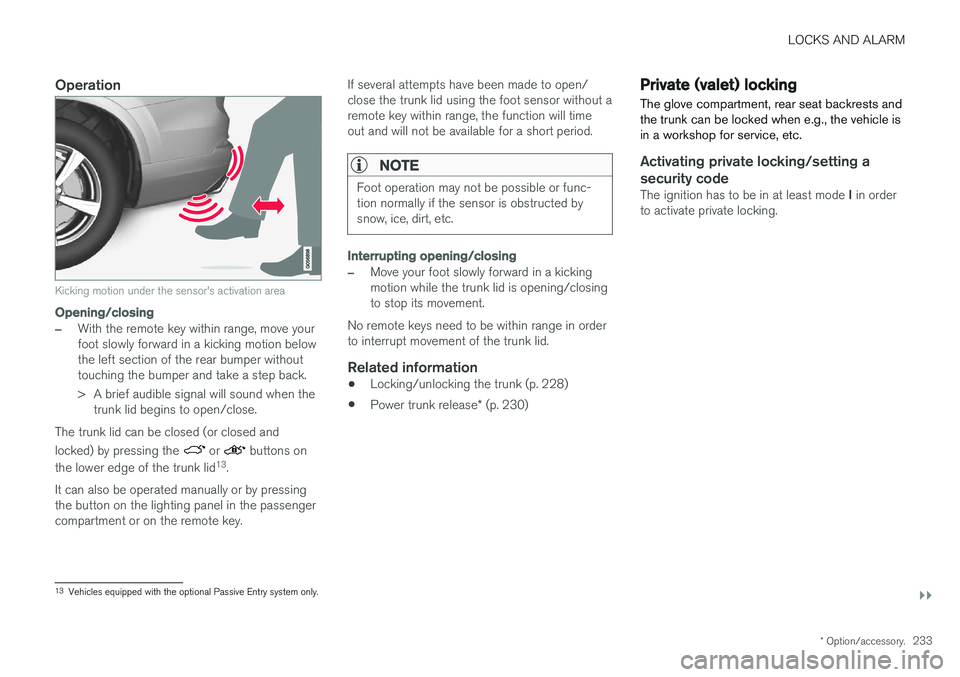
Kicking motion under the sensor's activation area
Opening/closing
–With the remote key within range, move your foot slowly forward in a kicking motion belowthe left section of the rear bumper withouttouching the bumper and take a step back.
> A brief audible signal will sound when the
trunk lid begins to open/close.
The trunk lid can be closed (or closed and locked) by pressing the
or buttons on
the lower edge of the trunk lid 13
.
It can also be operated manually or by pressing the button on the lighting panel in the passengercompartment or on the remote key. If several attempts have been made to open/close the trunk lid using the foot sensor without aremote key within range, the function will timeout and will not be available for a short period.
NOTE
Foot operation may not be possible or func- tion normally if the sensor is obstructed bysnow, ice, dirt, etc.
Interrupting opening/closing
–Move your foot slowly forward in a kicking motion while the trunk lid is opening/closingto stop its movement.
No remote keys need to be within range in orderto interrupt movement of the trunk lid.
Related information
• Locking/unlocking the trunk (p. 228)
• Power trunk release
* (p. 230)
Private (valet) locking
The glove compartment, rear seat backrests and the trunk can be locked when e.g., the vehicle isin a workshop for service, etc.
Activating private locking/setting a security code
The ignition has to be in at least mode I in order
to activate private locking.
13 Vehicles equipped with the optional Passive Entry system only.
Page 250 of 548
||
DRIVER SUPPORT
* Option/accessory.
248
Related information
• Starting and activating the Speed Limiter (SL)
* (p. 248)
• Deactivating/reactivating the Speed Limiter
*
(p. 252)
• Changing a Speed Limiter (SL)
* maximum
speed (p. 249)
• Automatic Speed Limiter (ASL)
* (p. 249)
• Activating/deactivating the Automatic SpeedLimiter (ASL)
* (p. 251)
• Changing tolerance for the Automatic Speed Limiter (p. 251)
• Turning the Speed Limiter
* off (p. 253)
Starting and activating the Speed Limiter (SL) *
The Speed Limiter (SL) is a feature that has to be selected and activated in order to set a maxi-mum speed.
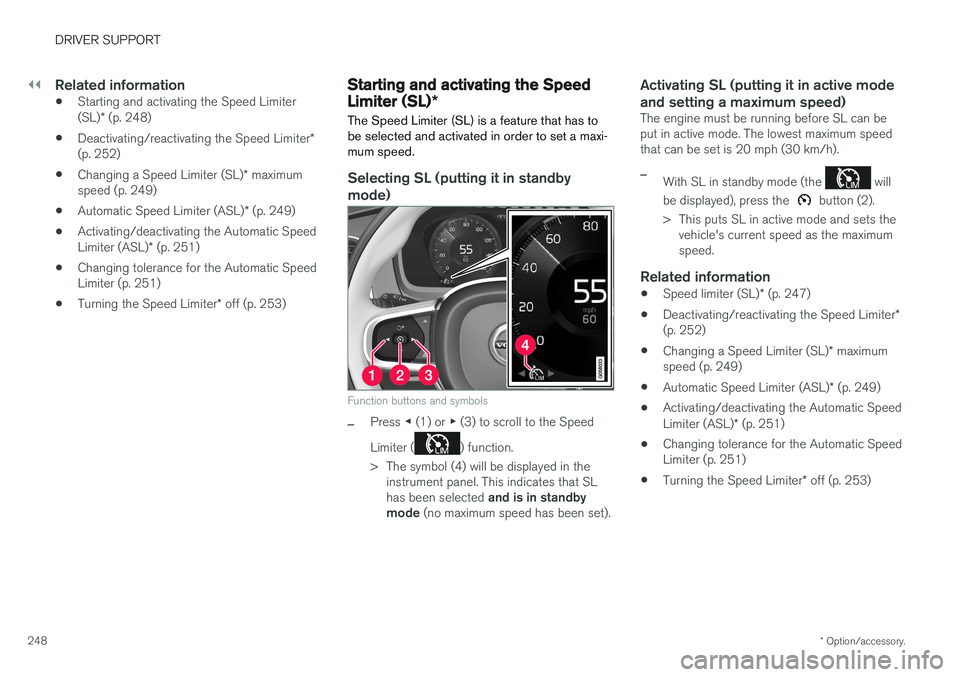
Selecting SL (putting it in standby mode)
Function buttons and symbols
–Press ◀ (1) or ▶ (3) to scroll to the Speed
Limiter (
) function.
> The symbol (4) will be displayed in the instrument panel. This indicates that SL has been selected and is in standby
mode (no maximum speed has been set).
Activating SL (putting it in active mode and setting a maximum speed)
The engine must be running before SL can be put in active mode. The lowest maximum speedthat can be set is 20 mph (30 km/h).
–With SL in standby mode (the will
be displayed), press the
button (2).
> This puts SL in active mode and sets the vehicle's current speed as the maximum speed.
Related information
• Speed limiter (SL)
* (p. 247)
• Deactivating/reactivating the Speed Limiter
*
(p. 252)
• Changing a Speed Limiter (SL)
* maximum
speed (p. 249)
• Automatic Speed Limiter (ASL)
* (p. 249)
• Activating/deactivating the Automatic Speed Limiter (ASL)
* (p. 251)
• Changing tolerance for the Automatic Speed Limiter (p. 251)
• Turning the Speed Limiter
* off (p. 253)
Page 251 of 548
DRIVER SUPPORT
}}
* Option/accessory.249
Changing a Speed Limiter (SL) *
maximum speed
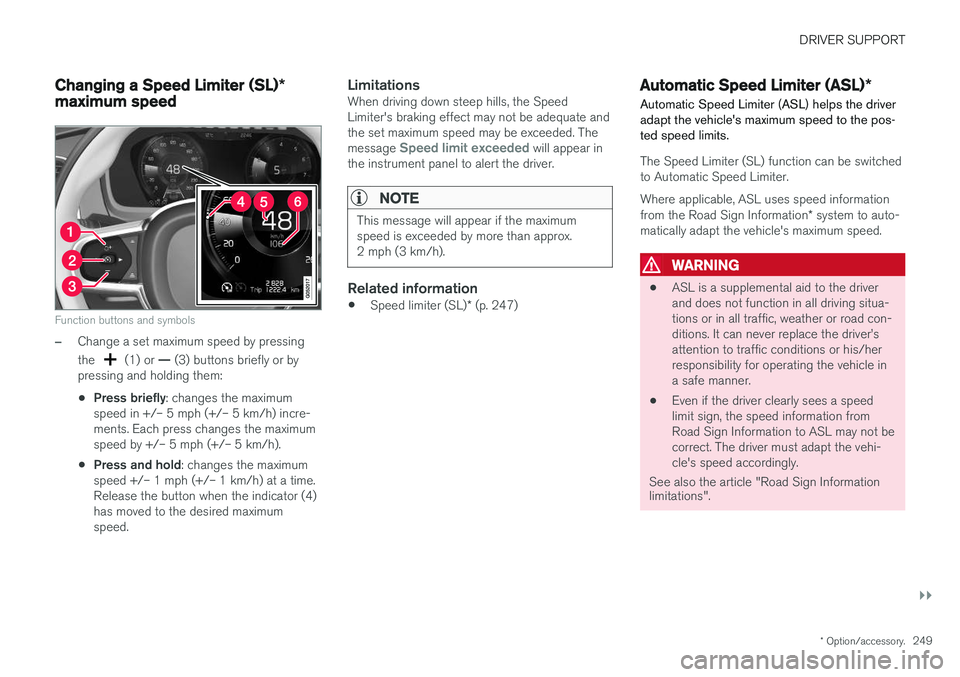
Function buttons and symbols
–Change a set maximum speed by pressing the
(1) or — (3) buttons briefly or by
pressing and holding them: • Press briefly
: changes the maximum
speed in +/– 5 mph (+/– 5 km/h) incre- ments. Each press changes the maximumspeed by +/– 5 mph (+/– 5 km/h).
• Press and hold
: changes the maximum
speed +/– 1 mph (+/– 1 km/h) at a time.Release the button when the indicator (4)has moved to the desired maximumspeed.
LimitationsWhen driving down steep hills, the SpeedLimiter's braking effect may not be adequate andthe set maximum speed may be exceeded. The message
Speed limit exceeded will appear in
the instrument panel to alert the driver.
NOTE
This message will appear if the maximum speed is exceeded by more than approx.2 mph (3 km/h).
Related information
• Speed limiter (SL)
* (p. 247)
Automatic Speed Limiter (ASL) *
Automatic Speed Limiter (ASL) helps the driver adapt the vehicle's maximum speed to the pos-ted speed limits.
The Speed Limiter (SL) function can be switched to Automatic Speed Limiter.
Where applicable, ASL uses speed information from the Road Sign Information * system to auto-
matically adapt the vehicle's maximum speed.
WARNING
• ASL is a supplemental aid to the driver and does not function in all driving situa-tions or in all traffic, weather or road con-ditions. It can never replace the driver
Page 254 of 548
||
DRIVER SUPPORT
* Option/accessory.
252
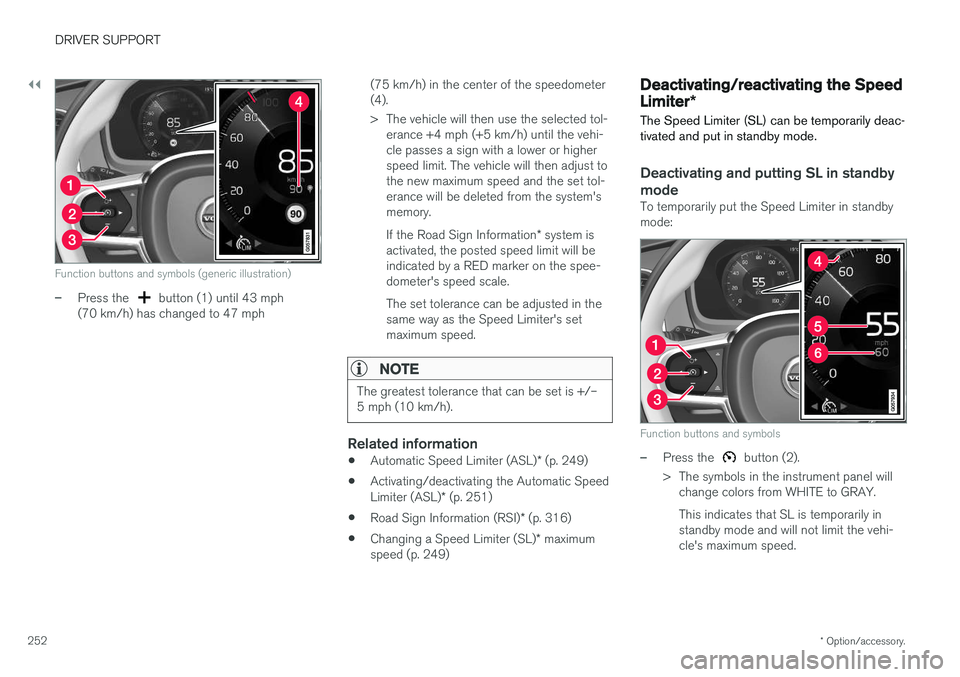
Function buttons and symbols (generic illustration)
–Press the button (1) until 43 mph
(70 km/h) has changed to 47 mph (75 km/h) in the center of the speedometer (4).
> The vehicle will then use the selected tol-
erance +4 mph (+5 km/h) until the vehi- cle passes a sign with a lower or higherspeed limit. The vehicle will then adjust tothe new maximum speed and the set tol-erance will be deleted from the system'smemory. If the Road Sign Information * system is
activated, the posted speed limit will be indicated by a RED marker on the spee-dometer's speed scale. The set tolerance can be adjusted in the same way as the Speed Limiter's setmaximum speed.
NOTE
The greatest tolerance that can be set is +/– 5 mph (10 km/h).
Related information
• Automatic Speed Limiter (ASL)
* (p. 249)
• Activating/deactivating the Automatic Speed Limiter (ASL)
* (p. 251)
• Road Sign Information (RSI)
* (p. 316)
• Changing a Speed Limiter (SL)
* maximum
speed (p. 249)
Deactivating/reactivating the Speed Limiter *
The Speed Limiter (SL) can be temporarily deac- tivated and put in standby mode.
Deactivating and putting SL in standby
mode
To temporarily put the Speed Limiter in standby mode:
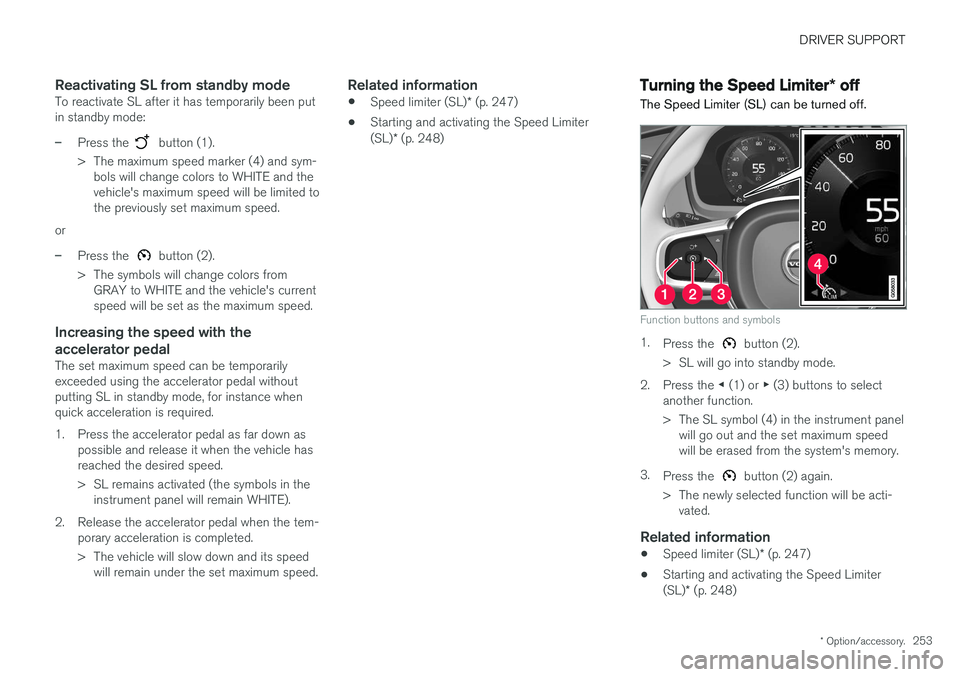
Function buttons and symbols
–Press the button (2).
> The symbols in the instrument panel will change colors from WHITE to GRAY. This indicates that SL is temporarily in standby mode and will not limit the vehi-cle's maximum speed.
Page 255 of 548
DRIVER SUPPORT
* Option/accessory.253
Reactivating SL from standby modeTo reactivate SL after it has temporarily been put in standby mode:
–Press the button (1).
> The maximum speed marker (4) and sym- bols will change colors to WHITE and the vehicle's maximum speed will be limited tothe previously set maximum speed.
or
–Press the button (2).
> The symbols will change colors from GRAY to WHITE and the vehicle's current speed will be set as the maximum speed.
Increasing the speed with the accelerator pedal
The set maximum speed can be temporarily exceeded using the accelerator pedal withoutputting SL in standby mode, for instance whenquick acceleration is required.
1. Press the accelerator pedal as far down as possible and release it when the vehicle has reached the desired speed.
> SL remains activated (the symbols in theinstrument panel will remain WHITE).
2. Release the accelerator pedal when the tem- porary acceleration is completed.
> The vehicle will slow down and its speedwill remain under the set maximum speed.
Related information
• Speed limiter (SL)
* (p. 247)
• Starting and activating the Speed Limiter (SL)
* (p. 248)
Turning the Speed Limiter * off
The Speed Limiter (SL) can be turned off.
Function buttons and symbols
1. Press the button (2).
> SL will go into standby mode.
2. Press the ◀ (1) or ▶ (3) buttons to select
another function.
> The SL symbol (4) in the instrument panel will go out and the set maximum speed will be erased from the system's memory.
3. Press the
button (2) again.
> The newly selected function will be acti- vated.
Related information
• Speed limiter (SL)
* (p. 247)
• Starting and activating the Speed Limiter (SL)
* (p. 248)
Page 256 of 548
DRIVER SUPPORT
* Option/accessory.
254
Cruise Control (CC)
Cruise Control (CC) is designed to assist the driver by maintaining a set speed. It is primarilyintended for use on long straight roads in steadytraffic, such as on highways and other mainroads in smoothly flowing traffic.
Overview
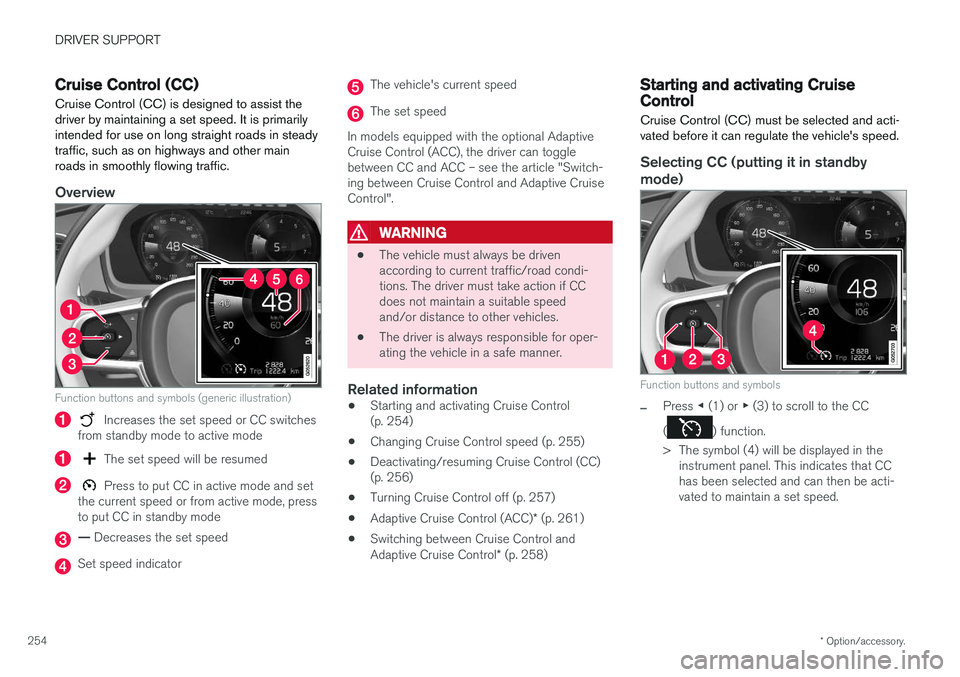
Function buttons and symbols (generic illustration)
Increases the set speed or CC switches
from standby mode to active mode
The set speed will be resumed
Press to put CC in active mode and set
the current speed or from active mode, press to put CC in standby mode
— Decreases the set speed
Set speed indicator
The vehicle's current speed
The set speed
In models equipped with the optional Adaptive Cruise Control (ACC), the driver can togglebetween CC and ACC – see the article "Switch-ing between Cruise Control and Adaptive CruiseControl".
WARNING
• The vehicle must always be driven according to current traffic/road condi-tions. The driver must take action if CCdoes not maintain a suitable speedand/or distance to other vehicles.
• The driver is always responsible for oper-ating the vehicle in a safe manner.
Related information
•Starting and activating Cruise Control(p. 254)
• Changing Cruise Control speed (p. 255)
• Deactivating/resuming Cruise Control (CC)(p. 256)
• Turning Cruise Control off (p. 257)
• Adaptive Cruise Control (ACC)
* (p. 261)
• Switching between Cruise Control and Adaptive Cruise Control
* (p. 258)
Starting and activating Cruise Control
Cruise Control (CC) must be selected and acti- vated before it can regulate the vehicle's speed.
Selecting CC (putting it in standby
mode)
Function buttons and symbols
–Press ◀ (1) or ▶ (3) to scroll to the CC
(
) function.
> The symbol (4) will be displayed in the instrument panel. This indicates that CC has been selected and can then be acti-vated to maintain a set speed.
Page 257 of 548
DRIVER SUPPORT
* Option/accessory.255
NOTE
Before CC can be activated, the vehicle's speed must be at least 20 mph (30 km/h).This is also the lowest speed that can be set.
Activating CC (putting it in active mode and setting a speed)
–With the symbol displayed (CC is in
standby mode), press the
button (2) on
the left-side steering wheel keypad.
> This puts CC in active mode and will maintain the vehicle's current speed.
Related information
• Cruise Control (CC) (p. 254)
• Switching between Cruise Control and Adaptive Cruise Control
* (p. 258)
• Deactivating/resuming Cruise Control (CC) (p. 256)
• Turning Cruise Control off (p. 257)
Changing Cruise Control speed
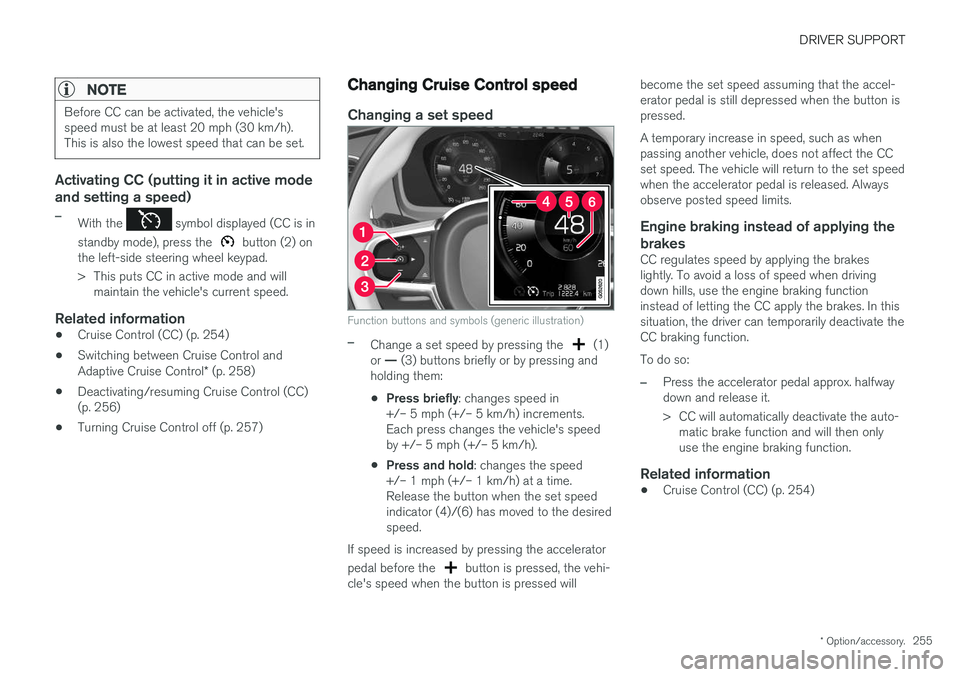
Changing a set speed
Function buttons and symbols (generic illustration)
–Change a set speed by pressing the (1)
or — (3) buttons briefly or by pressing and
holding them:
• Press briefly
: changes speed in
+/– 5 mph (+/– 5 km/h) increments. Each press changes the vehicle's speedby +/– 5 mph (+/– 5 km/h).
• Press and hold
: changes the speed
+/– 1 mph (+/– 1 km/h) at a time.Release the button when the set speedindicator (4)/(6) has moved to the desiredspeed.
If speed is increased by pressing the accelerator pedal before the
button is pressed, the vehi-
cle's speed when the button is pressed will become the set speed assuming that the accel- erator pedal is still depressed when the button ispressed. A temporary increase in speed, such as when passing another vehicle, does not affect the CCset speed. The vehicle will return to the set speedwhen the accelerator pedal is released. Alwaysobserve posted speed limits.
Engine braking instead of applying the
brakes
CC regulates speed by applying the brakeslightly. To avoid a loss of speed when drivingdown hills, use the engine braking functioninstead of letting the CC apply the brakes. In thissituation, the driver can temporarily deactivate theCC braking function. To do so:
–Press the accelerator pedal approx. halfway down and release it.
> CC will automatically deactivate the auto- matic brake function and will then only use the engine braking function.
Related information
• Cruise Control (CC) (p. 254)
Page 258 of 548
DRIVER SUPPORT
256
Deactivating/resuming Cruise Control (CC) Cruise Control (CC) can be temporarily deacti- vated and put in standby mode.
Deactivating and putting CC in standbymode
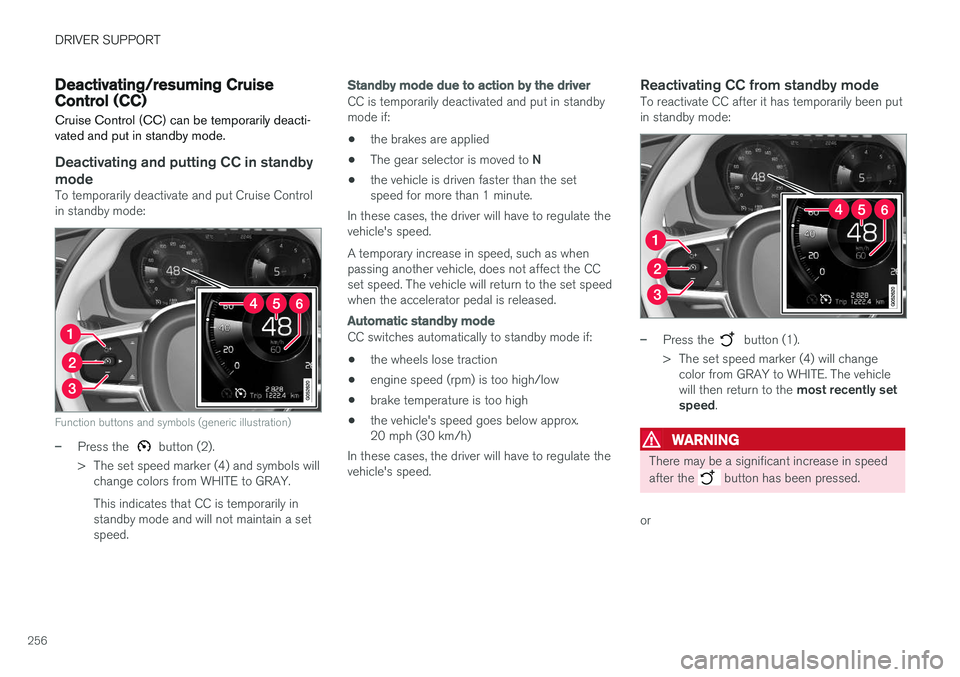
To temporarily deactivate and put Cruise Control in standby mode:
Function buttons and symbols (generic illustration)
–Press the button (2).
> The set speed marker (4) and symbols will change colors from WHITE to GRAY. This indicates that CC is temporarily in standby mode and will not maintain a setspeed.
Standby mode due to action by the driver
CC is temporarily deactivated and put in standby mode if:
• the brakes are applied
• The gear selector is moved to
N
• the vehicle is driven faster than the setspeed for more than 1 minute.
In these cases, the driver will have to regulate thevehicle's speed. A temporary increase in speed, such as when passing another vehicle, does not affect the CCset speed. The vehicle will return to the set speedwhen the accelerator pedal is released.
Automatic standby mode
CC switches automatically to standby mode if:
• the wheels lose traction
• engine speed (rpm) is too high/low
• brake temperature is too high
• the vehicle's speed goes below approx. 20 mph (30 km/h)
In these cases, the driver will have to regulate thevehicle's speed.
Reactivating CC from standby modeTo reactivate CC after it has temporarily been putin standby mode:
–Press the button (1).
> The set speed marker (4) will change color from GRAY to WHITE. The vehicle will then return to the most recently set
speed .
WARNING
There may be a significant increase in speed after the
button has been pressed.
or