change language VOLVO S90 2017 Owner´s Manual
[x] Cancel search | Manufacturer: VOLVO, Model Year: 2017, Model line: S90, Model: VOLVO S90 2017Pages: 548, PDF Size: 11.42 MB
Page 26 of 548
||
INTRODUCTION
24
WARNING
The driver is always responsible for operating the vehicle in a safe manner and adhering tocurrent laws and traffic regulations. It is also important that the vehicle be oper- ated, maintained and serviced according toVolvo's recommendations/instructions in theowner's manual.
Changing the language used in the vehicle's center display
Changing languages in the center display could mean that some of the owner's information provi-ded may not comply with national or local stat-utes and regulations. Changing to a languagethat you do not understand may also make it diffi-cult to change back to the original language.
Related information
•Owner's manual in mobile devices (p. 20)
• Navigating in the digital owner's manual(p. 51)
• On-board digital owner's manual (p. 50)
• Navigating in the digital owner's manual(p. 51)
• Using the owner's manual (p. 48)
• Additional information about your vehicle(p. 14)
Driver distraction
Please keep the following warnings in mind when operating/servicing your vehicle.
A driver has a responsibility to do everything pos- sible to ensure his or her own safety and thesafety of passengers in the vehicle and otherssharing the roadway. Avoiding distractions is partof that responsibility. Driver distraction results from driver activities that are not directly related to controlling the vehiclein the driving environment. Your new Volvo is, orcan be, equipped with many feature-rich enter-tainment and communication systems. Theseinclude hands-free cellular telephones, navigationsystems, and multipurpose audio systems. Youmay also own other portable electronic devicesfor your own convenience. When used properlyand safely, they enrich the driving experience.Improperly used, any of these could cause a dis-traction. For all of these systems, we want to provide the following warning that reflects the strong Volvoconcern for your safety. Never use these devicesor any feature of your vehicle in a way that dis-tracts you from the task of driving safely. Distrac-tion can lead to a serious accident. In addition tothis general warning, we offer the following guid-ance regarding specific newer features that maybe found in your vehicle:
WARNING
• Never use a hand-held cellular telephone while driving. Some jurisdictions prohibitcellular telephone use by a driver whilethe vehicle is moving.
• If your vehicle is equipped with a naviga-tion system, set and make changes toyour travel itinerary only with the vehicleparked.
• Never program your audio system whilethe vehicle is moving. Program radio pre-sets with the vehicle parked, and use yourprogrammed presets to make radio usequicker and simpler.
• Never use portable computers or per-sonal digital assistants while the vehicleis moving.
Accessory installation
•We strongly recommend that Volvo ownersinstall only genuine, Volvo-approved acces-sories, and that accessory installations beperformed only by a trained and qualifiedVolvo service technician.
• Genuine Volvo accessories are tested toensure compatibility with the performance,safety, and emission systems in your vehicle.Additionally, a trained and qualified Volvoservice technician knows where accessoriesmay and may not be safely installed in yourVolvo. In all cases, please consult a trained
Page 34 of 548
||
INTRODUCTION
32
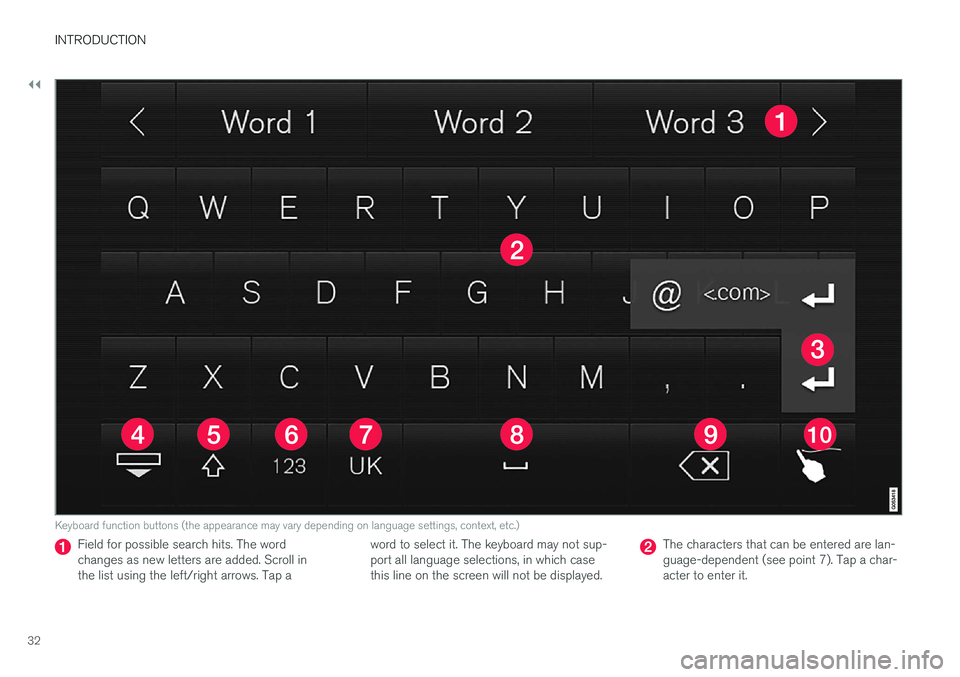
Keyboard function buttons (the appearance may vary depending on language settings, context, etc.)
Field for possible search hits. The word changes as new letters are added. Scroll inthe list using the left/right arrows. Tap aword to select it. The keyboard may not sup-port all language selections, in which casethis line on the screen will not be displayed.The characters that can be entered are lan- guage-dependent (see point 7). Tap a char-acter to enter it.
Page 35 of 548
INTRODUCTION
}}
33
Several buttons (depending on the context for which the keyboard is being used) will bedisplayed here. In certain cases, it can be used to enter @, .com or to start a new line.
Press to hide the keyboard. In cases where this is not possible, the button will not be dis-played.
Tap once to enter one uppercase letter.
Double-tap for Caps lock (tap again to
return to lowercase letters). Letters entered after the !, . and ? characters will automati-cally be uppercase. The first letter in the textfield or in text fields intended for names,addresses or company names will also auto-matically be uppercase. The first letter in textfields intended for passwords, webaddresses or email addresses will automati-cally be lowercase unless upper case ischosen.
Press to display the numbers that can be entered. When numbers are displayed, tap
to resume entering text or to
enter special characters.
Tap to change the keyboard language (in this example, UK English is the selected lan-guage). The characters available will changeaccording to the selected language (2). Thisbutton will only be displayed if several key-board languages have been selected (seethe section "Changing keyboard languages" below). Tap to display a list of possible lan-guages and tap a language to use it.
Tap to enter blank spaces.
Tap to erase one character at a time.
Tap to enable handwriting. See the section "Handwritten text" below.
Entering text and performing searches using thekeyboard are done somewhat differently in thenavigation system. See the section "Filtering des-tination search results" below. Tap the button above the keyboard to confirm the text that has been entered (not shown in theillustration). This button's appearance differsdepending on the context.
Changing keyboard languagesIn order to change keyboard languages, they must first be selected under Settings.
The keyboard language can be changed without changing the language used for the other sys-tems/menus in the vehicle.
1. Pull down the center display's Top view and tap
Settings.
2. Tap
SystemKeyboard Layouts. 3. Select and one or more of the languages in
the list.
> The makes it possible to change the key-board layout and characters available depending on the language(s) selected.
When more than one languagehas been selected, this button (7)3
will appear on the key-
board.
To shift between keyboard languages:
1. Press and hold the button (7).
> A list will be displayed.
2. Tap the desired language. If more than four languages have been selected in
Settings,
scroll in the list.
> The keyboard layout and characters avail- able will change to the selected language.
3In the example illustration, the button shows "UK".
Page 36 of 548
||
INTRODUCTION
34
Special characters
To enter language-specific characters such as é
or è (if available):
1. Press and hold a character key. > A box with available characters will open.
2. Tap the desired character. If none of the spe- cial characters is selected, the key's initial character will be entered.
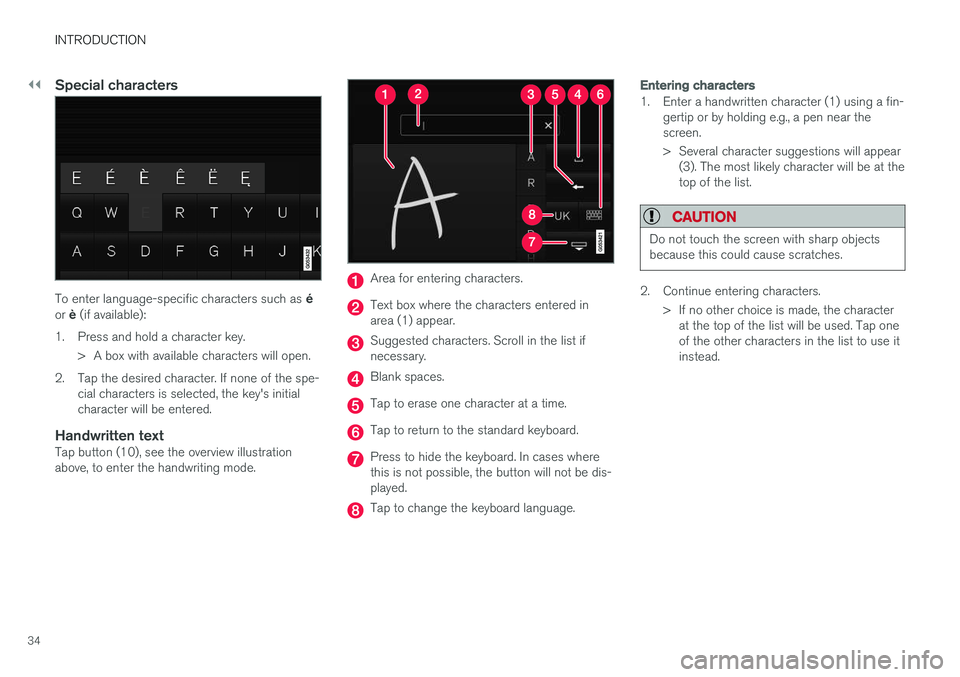
Handwritten textTap button (10), see the overview illustrationabove, to enter the handwriting mode.
Area for entering characters.
Text box where the characters entered in area (1) appear.
Suggested characters. Scroll in the list if necessary.
Blank spaces.
Tap to erase one character at a time.
Tap to return to the standard keyboard.
Press to hide the keyboard. In cases where this is not possible, the button will not be dis-played.
Tap to change the keyboard language.
Entering characters
1. Enter a handwritten character (1) using a fin-gertip or by holding e.g., a pen near the screen.
> Several character suggestions will appear(3). The most likely character will be at the top of the list.
CAUTION
Do not touch the screen with sharp objects because this could cause scratches.
2. Continue entering characters.
> If no other choice is made, the characterat the top of the list will be used. Tap one of the other characters in the list to use itinstead.
Page 112 of 548
||
INSTRUMENTS AND CONTROLS
* Option/accessory.
110
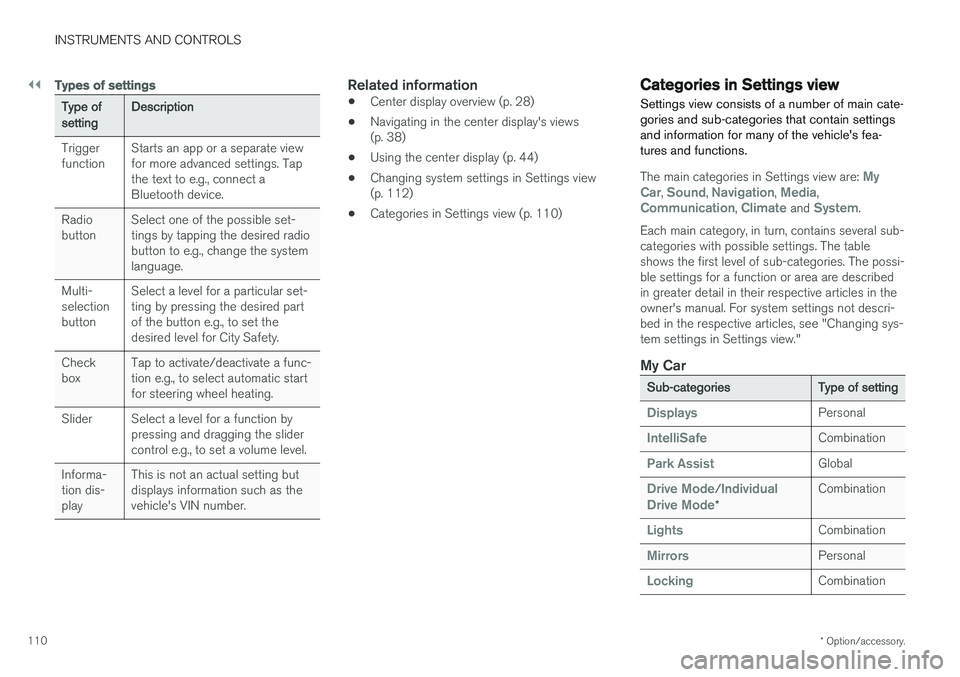
Types of settings
Type of setting Description
Trigger function Starts an app or a separate viewfor more advanced settings. Tapthe text to e.g., connect aBluetooth device.
Radiobutton Select one of the possible set-tings by tapping the desired radiobutton to e.g., change the systemlanguage.
Multi-selectionbutton Select a level for a particular set-ting by pressing the desired partof the button e.g., to set thedesired level for City Safety.
Checkbox Tap to activate/deactivate a func-tion e.g., to select automatic startfor steering wheel heating.
Slider Select a level for a function by pressing and dragging the slidercontrol e.g., to set a volume level.
Informa-tion dis-play This is not an actual setting butdisplays information such as thevehicle's VIN number.
Related information
•
Center display overview (p. 28)
• Navigating in the center display's views (p. 38)
• Using the center display (p. 44)
• Changing system settings in Settings view(p. 112)
• Categories in Settings view (p. 110)
Categories in Settings view
Settings view consists of a number of main cate- gories and sub-categories that contain settingsand information for many of the vehicle's fea-tures and functions.
The main categories in Settings view are: My
Car, Sound, Navigation, Media,Communication, Climate and System.
Each main category, in turn, contains several sub- categories with possible settings. The tableshows the first level of sub-categories. The possi-ble settings for a function or area are describedin greater detail in their respective articles in theowner's manual. For system settings not descri-bed in the respective articles, see "Changing sys-tem settings in Settings view."
My Car
Sub-categories Type of setting
DisplaysPersonal
IntelliSafeCombination
Park AssistGlobal
Drive Mode/Individual
Drive Mode* Combination
LightsCombination
MirrorsPersonal
LockingCombination
Page 114 of 548
INSTRUMENTS AND CONTROLS
* Option/accessory.
112
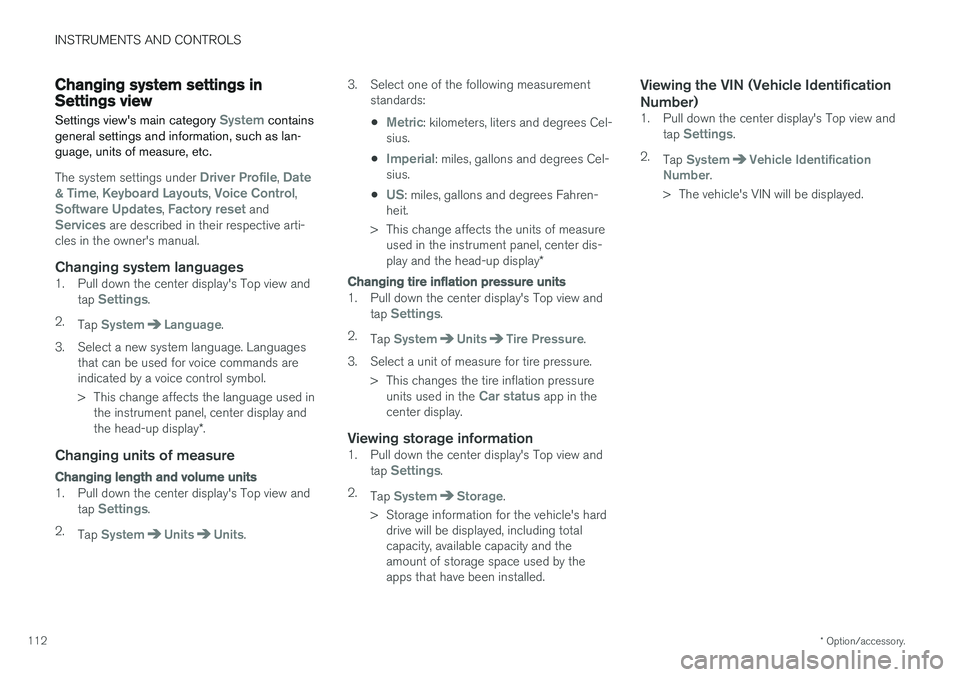
Changing system settings in Settings view
Settings view's main category
System contains
general settings and information, such as lan- guage, units of measure, etc.
The system settings under Driver Profile, Date
& Time, Keyboard Layouts, Voice Control,Software Updates, Factory reset andServices are described in their respective arti-
cles in the owner's manual.
Changing system languages1. Pull down the center display's Top view and
tap Settings.
2. Tap
SystemLanguage.
3. Select a new system language. Languages that can be used for voice commands are indicated by a voice control symbol.
> This change affects the language used inthe instrument panel, center display and the head-up display *.
Changing units of measure
Changing length and volume units
1. Pull down the center display's Top view and
tap Settings.
2. Tap
SystemUnitsUnits. 3. Select one of the following measurement
standards:
•
Metric: kilometers, liters and degrees Cel-
sius.
•
Imperial: miles, gallons and degrees Cel-
sius.
•
US: miles, gallons and degrees Fahren-
heit.
> This change affects the units of measure used in the instrument panel, center dis- play and the head-up display *
Changing tire inflation pressure units
1. Pull down the center display's Top view and
tap Settings.
2. Tap
SystemUnitsTire Pressure.
3. Select a unit of measure for tire pressure. > This changes the tire inflation pressureunits used in the
Car status app in the
center display.
Viewing storage information1. Pull down the center display's Top view and
tap Settings.
2. Tap
SystemStorage.
> Storage information for the vehicle's hard drive will be displayed, including total capacity, available capacity and theamount of storage space used by theapps that have been installed.
Viewing the VIN (Vehicle Identification Number)
1. Pull down the center display's Top view and
tap Settings.
2. Tap
SystemVehicle Identification
Number.
> The vehicle's VIN will be displayed.
Page 129 of 548
INSTRUMENTS AND CONTROLS
}}
127
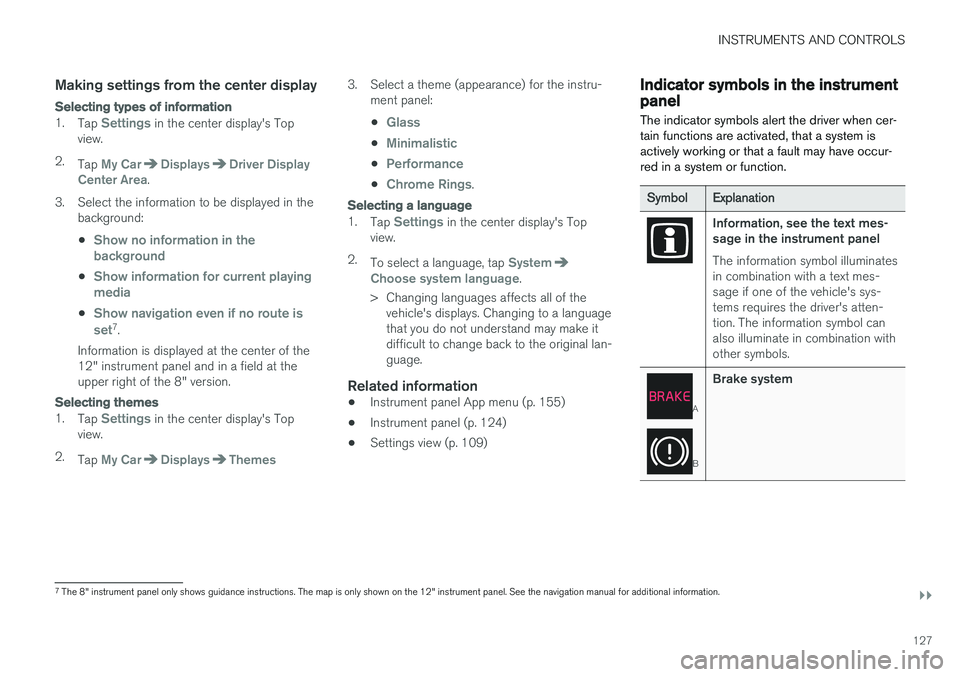
Making settings from the center display
Selecting types of information
1.Tap Settings in the center display's Top
view.
2. Tap
My CarDisplaysDriver Display
Center Area.
3. Select the information to be displayed in the background:
•
Show no information in the background
•Show information for current playing media
•Show navigation even if no route is set7 .
Information is displayed at the center of the 12" instrument panel and in a field at theupper right of the 8" version.
Selecting themes
1. Tap Settings in the center display's Top
view.
2. Tap
My CarDisplaysThemes
3. Select a theme (appearance) for the instru-
ment panel:
•
Glass
•Minimalistic
•Performance
•Chrome Rings.
Selecting a language
1. Tap Settings in the center display's Top
view.
2. To select a language, tap
SystemChoose system language.
> Changing languages affects all of the vehicle's displays. Changing to a language that you do not understand may make itdifficult to change back to the original lan-guage.
Related information
• Instrument panel App menu (p. 155)
• Instrument panel (p. 124)
• Settings view (p. 109)
Indicator symbols in the instrument panel
The indicator symbols alert the driver when cer- tain functions are activated, that a system isactively working or that a fault may have occur-red in a system or function.
Symbol Explanation
Information, see the text mes- sage in the instrument panel The information symbol illuminates in combination with a text mes-sage if one of the vehicle's sys-tems requires the driver's atten-tion. The information symbol canalso illuminate in combination withother symbols.
A
BBrake system
7
The 8" instrument panel only shows guidance instructions. The map is only shown on the 12" instrument panel. See the navigation manual for additional information.
Page 174 of 548
INSTRUMENTS AND CONTROLS
172
Driver profiles
Many of the vehicle's settings can be adapted to the driver's personal preferences and saved inone or more driver profiles.
The personal settings made are automatically saved in the active driver profile. Each remote keyis linked to a driver profile and when this key isused, the vehicle's settings are adapted accord-ing to the specific ones saved in that profile.
Which settings are saved in driver
profiles?
The settings that can be changed in the vehicle are either personal or global .
Changes made to personal settings are saved automatically in the active (current) driver profile,assuming that this profile is not locked. See thearticle "Editing a driver profile" for additionalinformation. Changes to global settings are not saved in a specific driver profile but instead affect all driverprofiles.
Global settings
Global settings and parameters remain the same regardless of which driver profile is currentlyactive. Keyboard layout is an example of a global setting. If driver profile X is used to add additional key-board languages, these languages will also beavailable even if driver profile Y is used. This type of global change is not specific to a single driverprofile.
Personal settings
If driver profile X has been used to e.g., set the brightness for the center display, driver profile Ywill not be affected by this setting since it is spe-cific (personal) to driver profile X. See also the article "Categories in Settings view" for an overview of global and personal settings.
Related information
•
Editing a driver profile (p. 173)
• Categories in Settings view (p. 110)
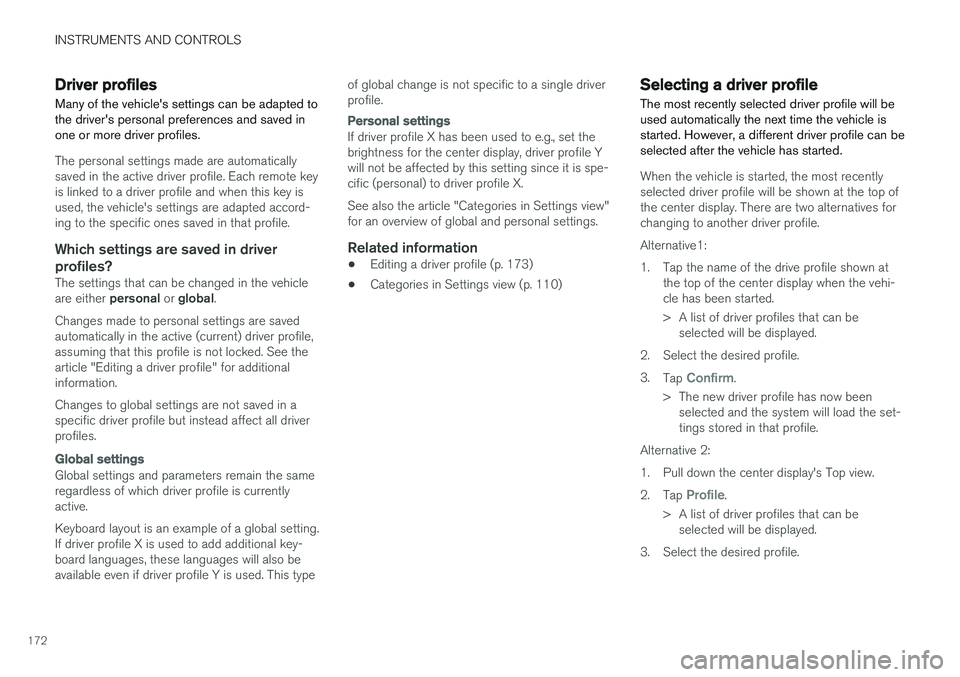
Selecting a driver profile The most recently selected driver profile will be used automatically the next time the vehicle isstarted. However, a different driver profile can beselected after the vehicle has started.
When the vehicle is started, the most recently selected driver profile will be shown at the top ofthe center display. There are two alternatives forchanging to another driver profile. Alternative1:
1. Tap the name of the drive profile shown at
the top of the center display when the vehi- cle has been started.
> A list of driver profiles that can beselected will be displayed.
2. Select the desired profile. 3. Tap
Confirm.
> The new driver profile has now been selected and the system will load the set- tings stored in that profile.
Alternative 2:
1. Pull down the center display's Top view.2. Tap
Profile.
> A list of driver profiles that can be selected will be displayed.
3. Select the desired profile.
Page 424 of 548
||
INFOTAINMENT
* Option/accessory.
422 Play/pause: tap the track's image, press the
symbol on the keypad or press the button under the center display. Change tracks: tap the desired track on the cen- ter display, press the
buttons under the
center display or on the right-side steering wheel keypad. Fast forward/reverse, move within a track: press the time axis on the center display and drag from side to side, press and hold the
buttons
under the center display or on the right-side steering wheel keypad. Change media source: Tap a media source under
Recents, tap the desired app in the center dis-
play's App view or use the
button on the
right-side steering wheel keypad.
Library: tap to play a track from the library.
Shuffle: tap to play tracks in random order.
Similar: tap to use Gracenote to search for simi-
lar music on the USB device and create a playlist based on the results. The playlist can contain upto 50 tracks.
Change device: tap to toggle between USB
devices if more than one is connected.
Video settings
The following can be adjusted with the video player in full screen or by opening the center dis- play's Top view and tapping
SettingsVideo:
Primary Audio Default Language, Subtitleand Primary Subtitle Default Language.
Play DivX®
This DivX device must be registered in order to play purchased DivX Video-on-Demand (VOD)movies.
1. Open the center display's Top view and tap
SettingsVideoDivX
® VOD to get a
registration code.
2. Go to vod.divx.com for additional information and to complete the registration process.
Related information
• CD (media) player
* (p. 420)
• Media player (p. 415)
• Voice control for radio and media (p. 121)
• Apps (applications) (p. 390)
• Connecting a Bluetooth ®
device (p. 414)
• Connecting a device via the AUX/USB socket (p. 414)
• Gracenote (p. 424)
• Connecting to the Internet (p. 427)
• Media searches (p. 422)
• Video (p. 425)
• Apple CarPlay (p. 416)
Media searches
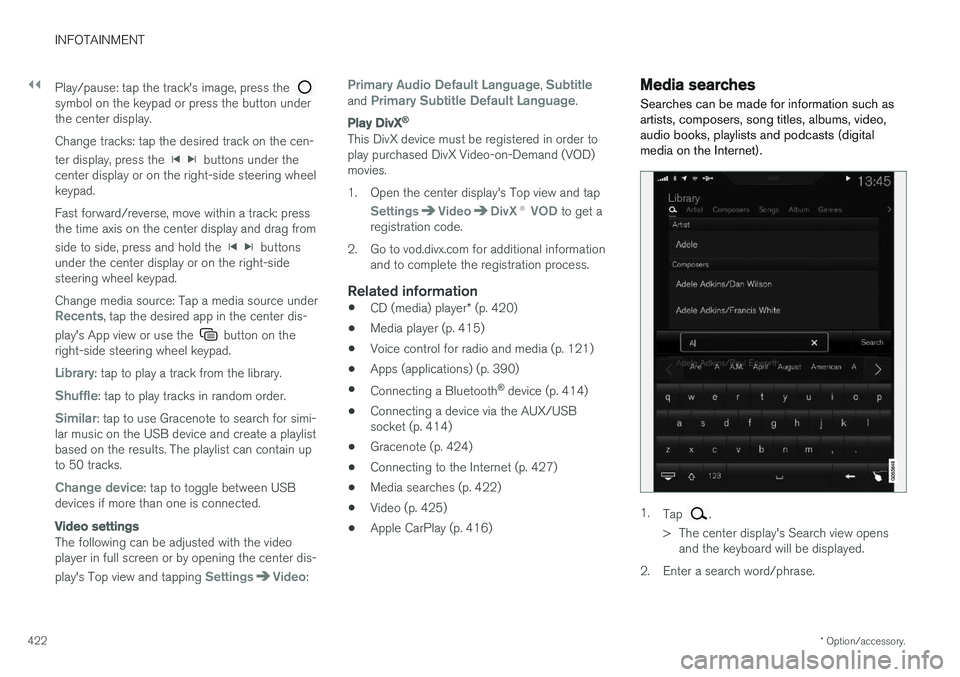
Searches can be made for information such as artists, composers, song titles, albums, video,audio books, playlists and podcasts (digitalmedia on the Internet).
1. Tap .
> The center display's Search view opens and the keyboard will be displayed.
2. Enter a search word/phrase.
Page 538 of 548
INDEX
536Booster cushions 83
Brake assist system 349
Brake lights 146, 350Brakes
auto-hold 348
Brake system Brake pad inspection 347
fluid 527
general information 346, 348, 349
Bulbs 497 replacing 493
specifications 500
C
Cameradriver support systems 292
limitations 293
Camera, Park Assist 332, 334, 336, 337
Capacity weight 446, 525Cargo compartment raising/lowering the level 202
Cargo space 202
Car wash 511
Catalytic converter 364
CD, USB, iPod, AUX, Bluetooth, Recents, Library, Shuffle, Similar, Change device, Pri-mary Audio Default Language, Subtitle, Pri-mary Subtitle Default Language, Video, DivX ® VOD 420
CD player 420 Cell phone hands-free 407
Pairing 408
Cell phone voice control 120 Center display changing settings 30
cleaning 515
keyboard 31
navigating in 38
overview 28
screen in the center console 44
symbols in the status bar 43
Chains 447
Changing a wheel 450Child restraints recalls and registration 77
Child restraint systems 77 booster cushions 83
convertible seats 80
infant seats 78
ISOFIX/LATCH anchors 84
top tether anchors 86Child safety 75
booster cushions 83
child restraint systems 77, 85
convertible seats 80
infant seats 78
Child safety locks 238 Child seats lower attachment points 85
City safety 296, 304City Safety crossing traffic 301
detecting objects 299
limitations 304
rear collision warning 308
symbols and messages 307
troubleshooting 302
City Safety, On/Off 298 City Safety ™
Multi Target 302
Cleaning exterior 511
interior 513
Clean Zone Interior Package 180
Climate system 182 air distribution 196, 198, 199
air filter 181
air vents 197
auto mode 182