sim VOLVO S90 2017 Owner´s Manual
[x] Cancel search | Manufacturer: VOLVO, Model Year: 2017, Model line: S90, Model: VOLVO S90 2017Pages: 548, PDF Size: 11.42 MB
Page 26 of 548
||
INTRODUCTION
24
WARNING
The driver is always responsible for operating the vehicle in a safe manner and adhering tocurrent laws and traffic regulations. It is also important that the vehicle be oper- ated, maintained and serviced according toVolvo's recommendations/instructions in theowner's manual.
Changing the language used in the vehicle's center display
Changing languages in the center display could mean that some of the owner's information provi-ded may not comply with national or local stat-utes and regulations. Changing to a languagethat you do not understand may also make it diffi-cult to change back to the original language.
Related information
•Owner's manual in mobile devices (p. 20)
• Navigating in the digital owner's manual(p. 51)
• On-board digital owner's manual (p. 50)
• Navigating in the digital owner's manual(p. 51)
• Using the owner's manual (p. 48)
• Additional information about your vehicle(p. 14)
Driver distraction
Please keep the following warnings in mind when operating/servicing your vehicle.
A driver has a responsibility to do everything pos- sible to ensure his or her own safety and thesafety of passengers in the vehicle and otherssharing the roadway. Avoiding distractions is partof that responsibility. Driver distraction results from driver activities that are not directly related to controlling the vehiclein the driving environment. Your new Volvo is, orcan be, equipped with many feature-rich enter-tainment and communication systems. Theseinclude hands-free cellular telephones, navigationsystems, and multipurpose audio systems. Youmay also own other portable electronic devicesfor your own convenience. When used properlyand safely, they enrich the driving experience.Improperly used, any of these could cause a dis-traction. For all of these systems, we want to provide the following warning that reflects the strong Volvoconcern for your safety. Never use these devicesor any feature of your vehicle in a way that dis-tracts you from the task of driving safely. Distrac-tion can lead to a serious accident. In addition tothis general warning, we offer the following guid-ance regarding specific newer features that maybe found in your vehicle:
WARNING
• Never use a hand-held cellular telephone while driving. Some jurisdictions prohibitcellular telephone use by a driver whilethe vehicle is moving.
• If your vehicle is equipped with a naviga-tion system, set and make changes toyour travel itinerary only with the vehicleparked.
• Never program your audio system whilethe vehicle is moving. Program radio pre-sets with the vehicle parked, and use yourprogrammed presets to make radio usequicker and simpler.
• Never use portable computers or per-sonal digital assistants while the vehicleis moving.
Accessory installation
•We strongly recommend that Volvo ownersinstall only genuine, Volvo-approved acces-sories, and that accessory installations beperformed only by a trained and qualifiedVolvo service technician.
• Genuine Volvo accessories are tested toensure compatibility with the performance,safety, and emission systems in your vehicle.Additionally, a trained and qualified Volvoservice technician knows where accessoriesmay and may not be safely installed in yourVolvo. In all cases, please consult a trained
Page 38 of 548
INTRODUCTION
36
Function view buttons
The Function view, which is one of the center display's basic views, contains all of the vehicle's on-screen function buttons. From the Homeview, swipe from left to right on the screen tocome to the Function view.Different types of buttonsThere are three different types of vehicle function buttons as listed in the following table.
Type of button
Functions Vehicle function affected
Function buttons Have On/Off modes. An LED indicator light to the left of the button's icon will illuminate when a function is active. Press the button to turn the function on or off. Most of the buttons in the function view arefunction buttons.
Start buttons Do not have On/Off modes. Pressing a start button opens a function's window, e.g., a window for adjusting thedriver's seat. •
Camera.
•
Headrest fold.
• Functions for folding down a seat.
•
Head-up display adjustments.
Parking buttons Have On/Off and scanning modes. Similar to function buttons but have an additional parking scanning mode. •
Park In.
•
Park Out.
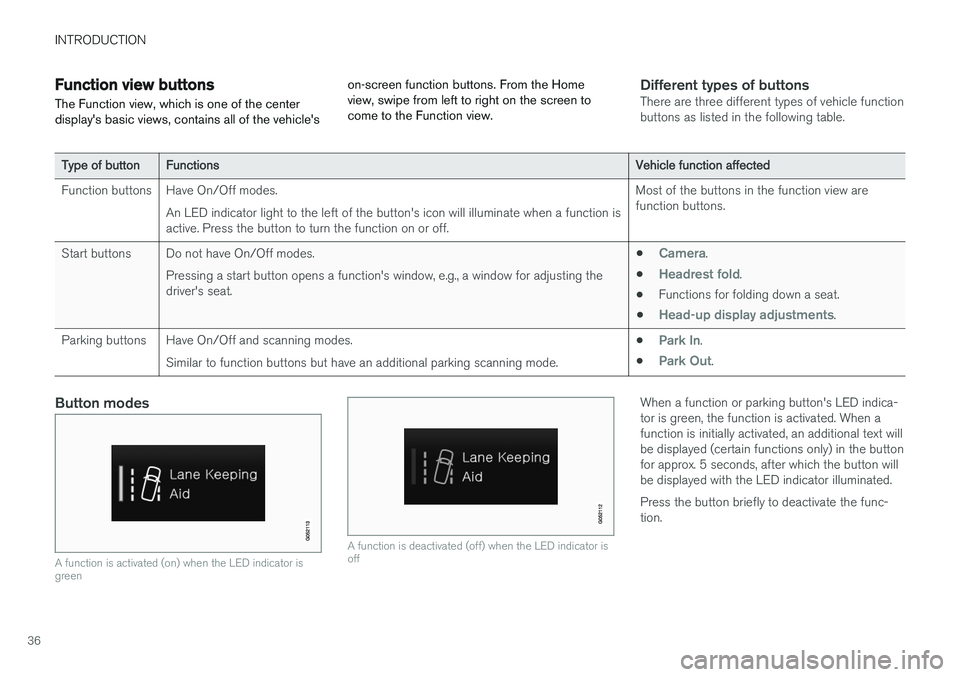
Button modes
A function is activated (on) when the LED indicator is green
A function is deactivated (off) when the LED indicator is off
When a function or parking button's LED indica- tor is green, the function is activated. When afunction is initially activated, an additional text willbe displayed (certain functions only) in the buttonfor approx. 5 seconds, after which the button willbe displayed with the LED indicator illuminated. Press the button briefly to deactivate the func- tion.
Page 59 of 548
SAFETY
}}
57
Occupant safety reminders
How safely you drive doesn't depend on how old you are but rather on:
• How well you see.
• Your ability to concentrate.
• How quickly you make decisions understress to avoid an accident.
The following suggestions are intended to helpyou cope with the ever changing traffic environ-ment.
• Never drink and drive.
• If you are taking any medication, consult yourphysician about its potential effects on yourdriving abilities.
• Take a driver-retraining course.
• Have your eyes checked regularly.
• Keep your windshield and headlights clean.
• Replace wiper blades when they start toleave streaks.
• Take into account the traffic, road, andweather conditions, particularly with regard tostopping distance.
• Never send text messages while driving.
• Refrain from using or minimize the use of acell phone while driving.
Related information
• Recall information (p. 58)
• Reporting safety defects (p. 57)
Reporting safety defects
The following information will help you report any perceived safety-related defects in your vehicle.
Reporting safety defects in the U.S.
If you believe that your vehicle has a defect which could cause a crash orcould cause injury or death, you shouldimmediately inform the National High-way Traffic Safety Administration(NHTSA) in addition to notifying VolvoCar USA, LLC. If NHTSA receives simi-lar complaints, it may open an investi-gation, and if it finds that a safetydefect exists in a group of vehicles, itmay order a recall and remedy cam-paign. However, NHTSA cannotbecome involved in individual problemsbetween you, your retailer, or Volvo CarUSA, LLC. To contact NHTSA, you mayeither call the Auto Safety Hotline toll-free at 1-888-327-4236(TTY: 1-800-424-9153) or write to: NHTSA, U.S. Department of Transpor-tation, Washington D.C. 20590. You can also obtain other informationabout motor vehicle safety from http://www.safercar.gov, where you can alsoenter your vehicle's VIN (Vehicle Identi-fication Number) to see if it has anyopen recalls. Volvo strongly recommends that if your vehicle is covered under a service cam-paign, safety or emission recall or simi-lar action, it should be completed assoon as possible. Please check withyour local retailer or Volvo Car USA,LLC if your vehicle is covered underthese conditions. NHTSA can be reached at:Internet:http://www.nhtsa.govTelephone:1-888-DASH-2-DOT (1-888-327-4236).
Reporting safety defects in CanadaIf you believe your vehicle has a defect that could cause a crash or could cause injury or death, youshould immediately inform Transport Canada inaddition to notifying Volvo Cars of Canada Corp.
Page 75 of 548

SAFETY
}}
73
Inflatable curtainsThe inflatable curtain is designed to help protect the heads of the occupants of the front seatsand the occupant of the outboard rear seatingpositions in certain side impact collisions.
This system consists of inflatable curtains located along the sides of the roof liners, stretching fromthe center of both front side windows to the rearedge of the rear side door windows. In certain side impacts, both the Inflatable Cur-
tain (IC) and the side Impact Airbag System (SIPS airbag) will deploy. The IC and the SIPSairbag deploy simultaneously.
WARNING
• Never try to open or repair any compo- nents of the IC system. This should bedone only by a trained and qualified Volvoservice technician.
• Never hang heavy items from the ceilinghandles. This could impede deploymentof the Inflatable Curtain.
• The cargo area and rear seat should notbe loaded to a level higher than 4 in.(10 cm) below the upper edge of the rearside windows. Objects placed higher thanthis level could impede the function ofthe Inflatable Curtain.
• In order for the IC to provide its best pro-tection, both front seat occupants andboth outboard rear seat occupants shouldsit in an upright position with the seat beltproperly fastened; adults using the seatbelt and children using the proper childrestraint system.
Related information
• Airbag system (p. 65)
• Side impact airbags (p. 72)
• Child safety (p. 75)
• Seat belts (p. 60)
Safety mode As a safety precaution after a collision, the func- tionality of some of the vehicle's systems may bereduced.
If the vehicle has been involved in a collision, the text Safety mode may appear in the information
display.
NOTE
This text can only be shown if the display is undamaged and the vehicle's electrical sys-tem is intact.
Safety mode is a feature that is triggered if one or more of the safety systems such as the front/side airbags inflatable curtain, etc., or one ormore of the seat belt pretensioners has deployed.The collision may have damaged an importantfunction in the vehicle, such as the fuel lines,sensors for one of the safety systems, the brakesystem, etc.
Page 102 of 548
||
INSTRUMENTS AND CONTROLS
1004.
Press the programmed HomeLink ®
button
and check the indicator light. Indicator light glows steadily green: pro-
gramming has been completed. The garage door, gate, etc., should now be activatedwhen the programmed button is pressed. Indicator light flashes 10 times a second: press the HomeLink ®
button that is being
programmed. Hold it for 2 seconds and release it. Repeat the “press/hold/release”sequence a second time, and, depending onthe brand of the garage door opener, repeatthis sequence a third time to complete theprogramming process. Programming shouldnow be completed and the garage door,gate, etc., should now be activated when theprogrammed button is pressed. If the garage door, etc. still does not react: continue with steps 6-8 to complete
programming.
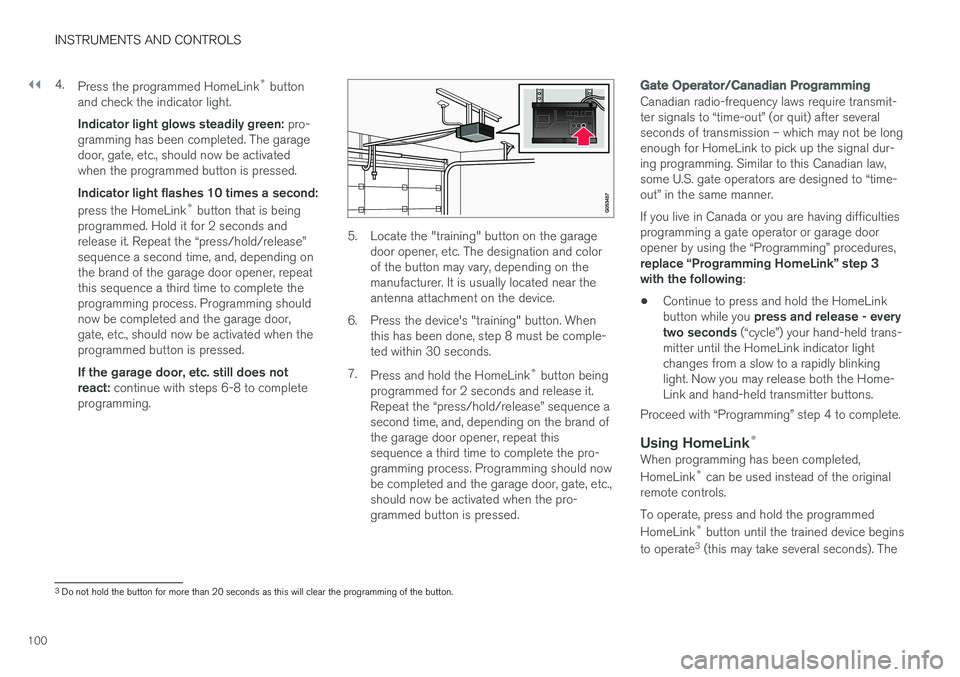
5. Locate the "training" button on the garage door opener, etc. The designation and color of the button may vary, depending on themanufacturer. It is usually located near theantenna attachment on the device.
6. Press the device's "training" button. When this has been done, step 8 must be comple-ted within 30 seconds.
7. Press and hold the HomeLink ®
button being
programmed for 2 seconds and release it.Repeat the “press/hold/release” sequence asecond time, and, depending on the brand ofthe garage door opener, repeat thissequence a third time to complete the pro-gramming process. Programming should nowbe completed and the garage door, gate, etc.,should now be activated when the pro-grammed button is pressed.
Gate Operator/Canadian Programming
Canadian radio-frequency laws require transmit- ter signals to “time-out” (or quit) after severalseconds of transmission – which may not be longenough for HomeLink to pick up the signal dur-ing programming. Similar to this Canadian law,some U.S. gate operators are designed to “time-out” in the same manner. If you live in Canada or you are having difficulties programming a gate operator or garage dooropener by using the “Programming” procedures, replace “Programming HomeLink” step 3 with the following :
• Continue to press and hold the HomeLink button while you
press and release - every
two seconds (“cycle”) your hand-held trans-
mitter until the HomeLink indicator light changes from a slow to a rapidly blinkinglight. Now you may release both the Home-Link and hand-held transmitter buttons.
Proceed with “Programming” step 4 to complete.
Using HomeLink ®When programming has been completed, HomeLink
®
can be used instead of the original
remote controls. To operate, press and hold the programmed HomeLink ®
button until the trained device begins
to operate 3
(this may take several seconds). The
3 Do not hold the button for more than 20 seconds as this will clear the programming of the button.
Page 123 of 548
INSTRUMENTS AND CONTROLS
* Option/accessory.121
Related information
•Voice control (p. 119)
• Using voice commands (p. 119)
• Voice control settings (p. 124)
Voice control for radio and media
The following voice commands can be used for the radio or an external media player.
To use the voice control system, press the on the right-side steering wheel keypad and say one of the following commands after the tone:
• "
Media": initiates a dialog and displays pos-
sible commands.
• "
Play [artist]": plays music by the selected
artist.
• "
Play [song title]": plays the selected song.
• "
Play [song title] from [album]": plays the
selected song from the selected album.
• "
Play [radio station]": starts the selected
radio station.
• "
Tune to [frequency]": tunes to the
selected frequency on the current waveband. If no waveband has been selected, FM is thedefault.
• "
Tune to [frequency] [waveband]": tunes
to the selected station on the selected wave- band.
• "
Radio": starts FM radio.
• "
Radio FM": starts FM radio.
• "
Radio AM": starts AM radio.
• "
SiriusXM": starts SiriusXM radio
*
• "
CD": starts playback from a CD. •
"
USB": starts playback from a USB flash
drive.
• "
iPod": starts playback from an iPod.
• "
Bluetooth": starts playback from a Blue-
tooth-connected device.
• "
Similar music": starts playback from a
USB flash drive with music similar to the type currently playing.
Related information
• Voice control (p. 119)
• Using voice commands (p. 119)
• Voice control settings (p. 124)
Page 133 of 548
INSTRUMENTS AND CONTROLS
}}
131
BSD 2-clause “Simplified” license
Copyright ©)
reserved. Redistribution and use in source and binary forms, with or without modification, are permittedprovided that the following conditions are met:
1. Redistributions of source code must retain the above copyright notice, this list of conditions and the following disclaimer.
2. Redistributions in binary form must reproduce the above copyright notice, this listof conditions and the following disclaimer inthe documentation and/or other materialsprovided with the distribution.
THIS SOFTWARE IS PROVIDED BY THECOPYRIGHT HOLDERS AND CONTRIBUTORS"AS IS" AND ANY EXPRESS OR IMPLIEDWARRANTIES, INCLUDING, BUT NOT LIMITEDTO, THE IMPLIED WARRANTIES OFMERCHANTABILITY AND FITNESS FOR APARTICULAR PURPOSE ARE DISCLAIMED. INNO EVENT SHALL THE COPYRIGHT OWNEROR CONTRIBUTORS BE LIABLE FOR ANYDIRECT, INDIRECT, INCIDENTAL, SPECIAL,EXEMPLARY, OR CONSEQUENTIAL DAMAGES(INCLUDING, BUT NOT LIMITED TO,PROCUREMENT OF SUBSTITUTE GOODS ORSERVICES; LOSS OF USE, DATA, OR PROFITS;OR BUSINESS INTERRUPTION) HOWEVERCAUSED AND ON ANY THEORY OF LIABILITY,WHETHER IN CONTRACT, STRICT LIABILITY, OR TORT (INCLUDING NEGLIGENCE OROTHERWISE) ARISING IN ANY WAY OUT OFTHE USE OF THIS SOFTWARE, EVEN IFADVISED OF THE POSSIBILITY OF SUCHDAMAGE. The views and conclusions contained in the software and documentation are those of theauthors and should not be interpreted asrepresenting official policies, either expressed orimplied, of the FreeBSD Project.
FreeType Project License1. 1 Copyright 1996-1999 by David Turner,
Robert Wilhelm, and Werner LembergIntroduction The FreeType Project isdistributed in several archive packages; someof them may contain, in addition to theFreeType font engine, various tools andcontributions which rely on, or relate to, theFreeType Project. This license applies to allfiles found in such packages, and which donot fall under their own explicit license. Thelicense affects thus the FreeType fontengine, the test programs, documentationand makefiles, at the very least. This licensewas inspired by the BSD, Artistic, and IJG(Independent JPEG Group) licenses, whichall encourage inclusion and use of freesoftware in commercial and freewareproducts alike. As a consequence, its mainpoints are that: o We don't promise that thissoftware works. However, we are beinterested in any kind of bug reports. (`as is' distribution) o You can use this software forwhatever you want, in parts or full form,without having to pay us. (`royalty-free'usage) o You may not pretend that you wrotethis software. If you use it, or only parts of it,in a program, you must acknowledgesomewhere in your documentation thatyou've used the FreeType code. (`credits')We specifically permit and encourage theinclusion of this software, with or withoutmodifications, in commercial products,provided that all warranty or liability claimsare assumed by the product vendor. LegalTerms 0. Definitions Throughout this license,the terms `package', `FreeType Project', and`FreeType archive' refer to the set of filesoriginally distributed by the authors (DavidTurner, Robert Wilhelm, and WernerLemberg) as the `FreeType project', be theynamed as alpha, beta or final release. `You'refers to the licensee, or person using theproject, where `using' is a generic termincluding compiling the project's source codeas well as linking it to form a `program' or`executable'. This program is referred to as `aprogram using the FreeType engine'. Thislicense applies to all files distributed in theoriginal FreeType archive, including all sourcecode, binaries and documentation, unlessotherwise stated in the file in its original,unmodified form as distributed in the originalarchive. If you are unsure whether or not aparticular file is covered by this license, you
Page 135 of 548
INSTRUMENTS AND CONTROLS
}}
133
COPYRIGHT NOTICE, DISCLAIMER, and LICENSE:
If you modify libpng you may insert additional notices immediately following this sentence. libpng versions 1.0.7, July 1, 2000, through 1.0.13, April 15, 2002, are Copyright (c)2000-2002 Glenn Randers-Pehrson and aredistributed according to the same disclaimer andlicense as libpng-1.0.6 with the followingindividuals added to the list of ContributingAuthors Simon-Pierre CadieuxEric S. RaymondGilles Vollantand with the following additions to the disclaimer:There is no warranty against interference with your enjoyment of the library or againstinfringement. There is no warranty that our effortsor the library will fulfill any of your particularpurposes or needs. This library is provided with allfaults, and the entire risk of satisfactory quality,performance, accuracy, and effort is with the user. libpng versions 0.97, January 1998, through 1.0.6, March 20, 2000, are Copyright (c) 1998,1999 Glenn Randers-Pehrson, and aredistributed according to the same disclaimer andlicense as libpng-0.96, with the followingindividuals added to the list of ContributingAuthors:Tom Lane Glenn Randers-PehrsonWillem van Schaiklibpng versions 0.89, June 1996, through 0.96, May 1997, are Copyright (c) 1996, 1997Andreas Dilger Distributed according to the samedisclaimer and license as libpng-0.88, with thefollowing individuals added to the list ofContributing Authors: John BowlerKevin BraceySam BushellMagnus HolmgrenGreg RoelofsTom Tannerlibpng versions 0.5, May 1995, through 0.88, January 1996, are Copyright (c) 1995, 1996 GuyEric Schalnat, Group 42, Inc. For the purposes of this copyright and license, "Contributing Authors" is defined as the followingset of individuals: Andreas DilgerDave MartindaleGuy Eric SchalnatPaul SchmidtTim WegnerThe PNG Reference Library is supplied "AS IS". The Contributing Authors and Group 42, Inc.disclaim all warranties, expressed or implied,including, without limitation, the warranties ofmerchantability and of fitness for any purpose.The Contributing Authors and Group 42, Inc.assume no liability for direct, indirect, incidental,special, exemplary, or consequential damages,which may result from the use of the PNGReference Library, even if advised of thepossibility of such damage. Permission is hereby granted to use, copy, modify, and distribute this source code, orportions hereof, for any purpose, without fee,subject to the following restrictions:
1. The origin of this source code must not be
misrepresented.
2. Altered versions must be plainly marked as such and must not be misrepresented as being the original source.
3. This Copyright notice may not be removed or altered from any source or altered sourcedistribution.
The Contributing Authors and Group 42, Inc.specifically permit, without fee, and encouragethe use of this source code as a component tosupporting the PNG file format in commercialproducts. If you use this source code in a product,acknowledgment is not required but would beappreciated.
Page 138 of 548
||
INSTRUMENTS AND CONTROLS
136
SymbolMeaning
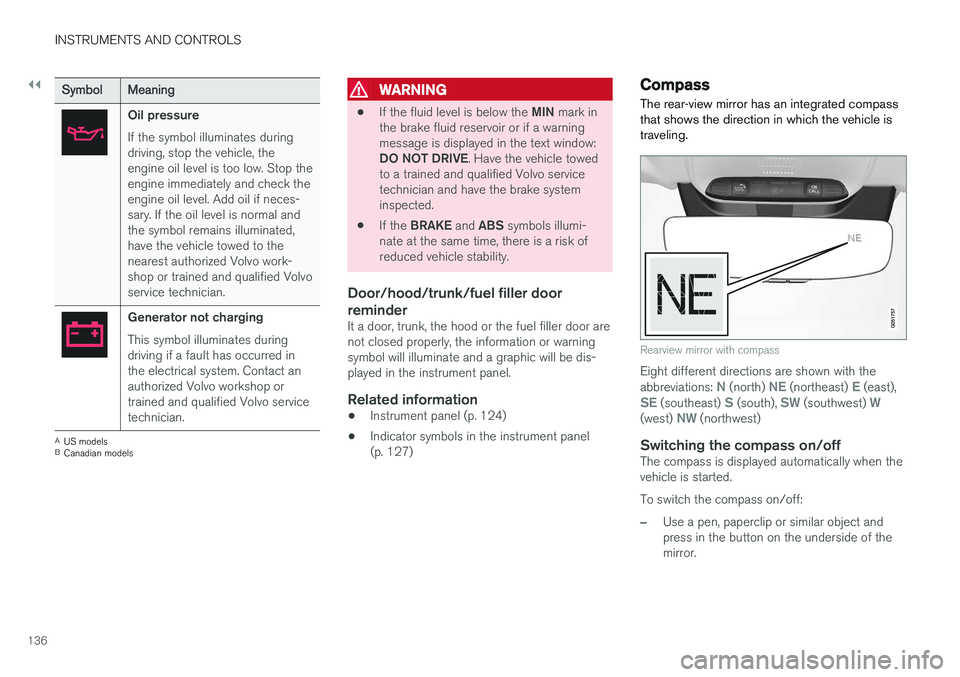
Oil pressure If the symbol illuminates during driving, stop the vehicle, theengine oil level is too low. Stop theengine immediately and check theengine oil level. Add oil if neces-sary. If the oil level is normal andthe symbol remains illuminated,have the vehicle towed to thenearest authorized Volvo work-shop or trained and qualified Volvoservice technician.
Generator not charging This symbol illuminates during driving if a fault has occurred inthe electrical system. Contact anauthorized Volvo workshop ortrained and qualified Volvo servicetechnician.
A
US models
B Canadian models
WARNING
• If the fluid level is below the
MIN mark in
the brake fluid reservoir or if a warning message is displayed in the text window: DO NOT DRIVE . Have the vehicle towed
to a trained and qualified Volvo service technician and have the brake systeminspected.
• If the
BRAKE and ABS symbols illumi-
nate at the same time, there is a risk ofreduced vehicle stability.
Door/hood/trunk/fuel filler door reminder
It a door, trunk, the hood or the fuel filler door are not closed properly, the information or warningsymbol will illuminate and a graphic will be dis-played in the instrument panel.
Related information
• Instrument panel (p. 124)
• Indicator symbols in the instrument panel(p. 127)
Compass
The rear-view mirror has an integrated compass that shows the direction in which the vehicle istraveling.
Rearview mirror with compass
Eight different directions are shown with the abbreviations: N (north) NE (northeast) E (east),SE (southeast) S (south), SW (southwest) W(west) NW (northwest)
Switching the compass on/offThe compass is displayed automatically when the vehicle is started. To switch the compass on/off:
–Use a pen, paperclip or similar object and press in the button on the underside of themirror.
Page 139 of 548
INSTRUMENTS AND CONTROLS
}}
* Option/accessory.137
Related information
•Calibrating the compass (p. 137)
• Ignition modes (p. 370)
Calibrating the compass
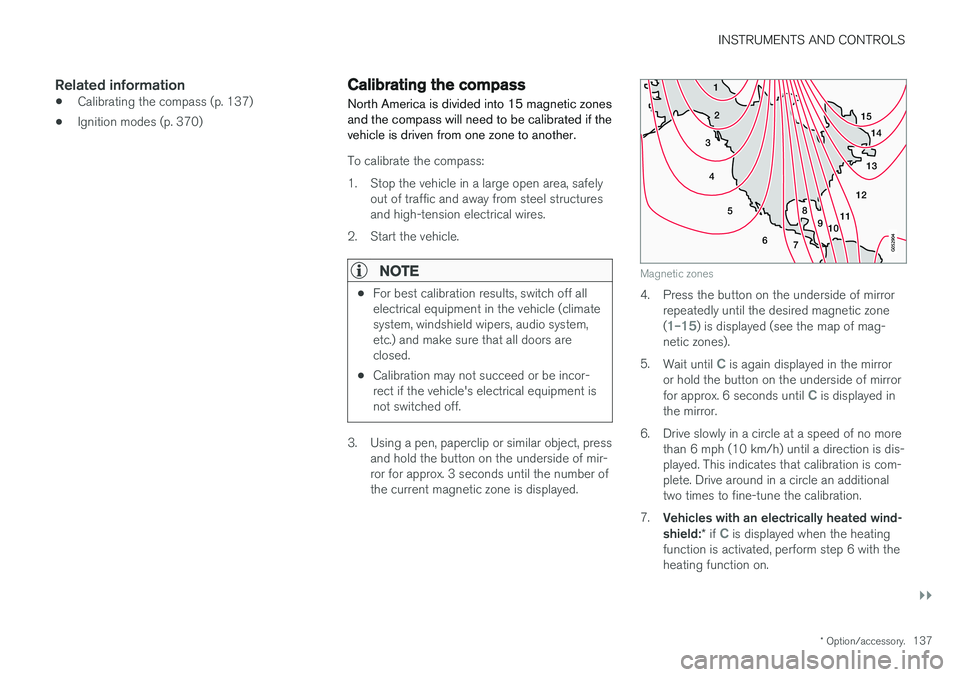
North America is divided into 15 magnetic zones and the compass will need to be calibrated if thevehicle is driven from one zone to another.
To calibrate the compass:
1. Stop the vehicle in a large open area, safely out of traffic and away from steel structures and high-tension electrical wires.
2. Start the vehicle.
NOTE
• For best calibration results, switch off all electrical equipment in the vehicle (climatesystem, windshield wipers, audio system,etc.) and make sure that all doors areclosed.
• Calibration may not succeed or be incor-rect if the vehicle's electrical equipment isnot switched off.
3. Using a pen, paperclip or similar object, press
and hold the button on the underside of mir- ror for approx. 3 seconds until the number ofthe current magnetic zone is displayed.
15
14
13
12
11
9
8
7
6
5
4
3
2
1
10
Magnetic zones
4. Press the button on the underside of mirrorrepeatedly until the desired magnetic zone (
1–15) is displayed (see the map of mag-
netic zones).
5. Wait until
C is again displayed in the mirror
or hold the button on the underside of mirror for approx. 6 seconds until
C is displayed in
the mirror.
6. Drive slowly in a circle at a speed of no more than 6 mph (10 km/h) until a direction is dis- played. This indicates that calibration is com-plete. Drive around in a circle an additionaltwo times to fine-tune the calibration.
7. Vehicles with an electrically heated wind- shield: * if
C is displayed when the heating
function is activated, perform step 6 with the heating function on.