fog light VOLVO S90 2018 Owner´s Manual
[x] Cancel search | Manufacturer: VOLVO, Model Year: 2018, Model line: S90, Model: VOLVO S90 2018Pages: 640, PDF Size: 11.37 MB
Page 161 of 640
LIGHTING
* Option/accessory.159
Press the button for On/Off. The
symbol in
the instrument panel illuminates when the rear fog light is on. The rear fog light turns off automatically when:
• the start knob is turned clockwise to turn off the ignition or when the lighting ring is turned to the
position.
• the lighting ring is in the
position and
the front fog lights are turned off.
NOTE
Regulations concerning rear fog light use vary from country to country.
Related information
• Lighting panel and controls (p. 150)
• Front fog lights/cornering illumination
*
(p. 157)
• Ignition modes (p. 397)
• Replacing the rear fog light bulb (p. 569)
Brake lights The brake lights are automatically illuminated when braking.
The brake lights illuminate when the brake pedal is depressed. They also illuminate when thebrakes are automatically applied by one of thedriver support systems.
Related information
•
Emergency brake lights (p. 159)
• Brake functions (p. 398)
Emergency brake lights
The emergency brake lights are activated to warn following vehicles of hard braking. This function causes an additional taillight on each side of the vehicle to illuminate.
The emergency brake lights are activated in the event of hard braking or if the ABS system isactivated and the vehicle is traveling at a highspeed. After the driver decelerates to a low speed and then releases the brake, the brake lights resumetheir normal brightness.
Related information
• Brake lights (p. 159)
• Brakes (p. 399)
• Hazard warning flashers (p. 160)
Page 218 of 640
CLIMATE CONTROL
216
Activating and deactivatingrecirculation
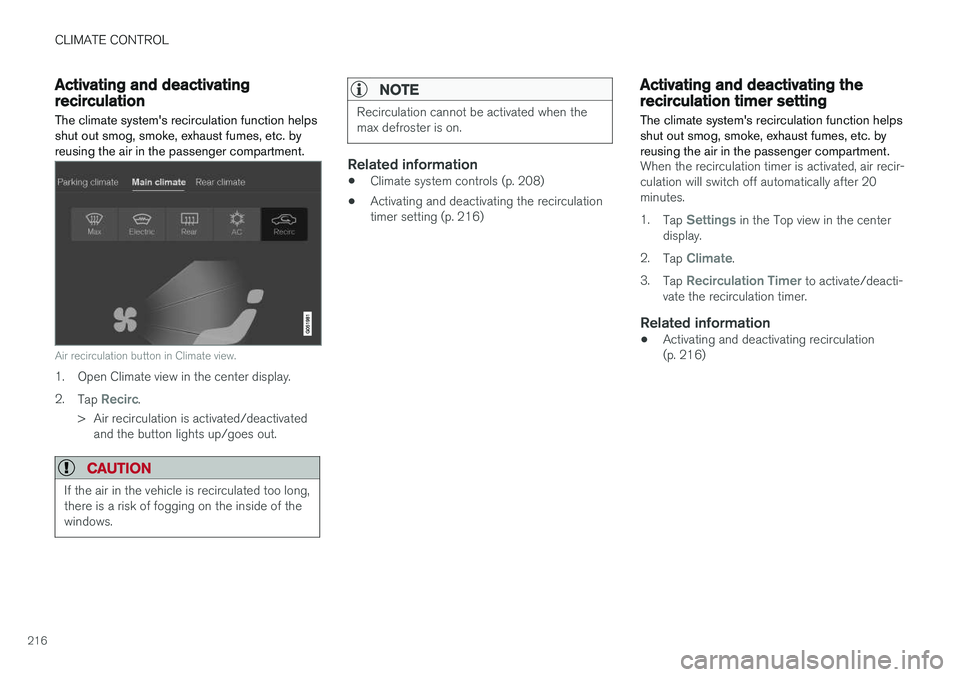
The climate system's recirculation function helps shut out smog, smoke, exhaust fumes, etc. byreusing the air in the passenger compartment.
Air recirculation button in Climate view.
1. Open Climate view in the center display. 2. Tap
Recirc.
> Air recirculation is activated/deactivated and the button lights up/goes out.
CAUTION
If the air in the vehicle is recirculated too long, there is a risk of fogging on the inside of thewindows.
NOTE
Recirculation cannot be activated when the max defroster is on.
Related information
• Climate system controls (p. 208)
• Activating and deactivating the recirculation timer setting (p. 216)
Activating and deactivating therecirculation timer setting
The climate system's recirculation function helps shut out smog, smoke, exhaust fumes, etc. byreusing the air in the passenger compartment.
When the recirculation timer is activated, air recir- culation will switch off automatically after 20minutes. 1. Tap
Settings in the Top view in the center
display.
2. Tap
Climate.
3. Tap
Recirculation Timer to activate/deacti-
vate the recirculation timer.
Related information
• Activating and deactivating recirculation (p. 216)
Page 222 of 640
||
CLIMATE CONTROL
220
Activating and deactivating the heated rear window and door mirrors from thecenter display
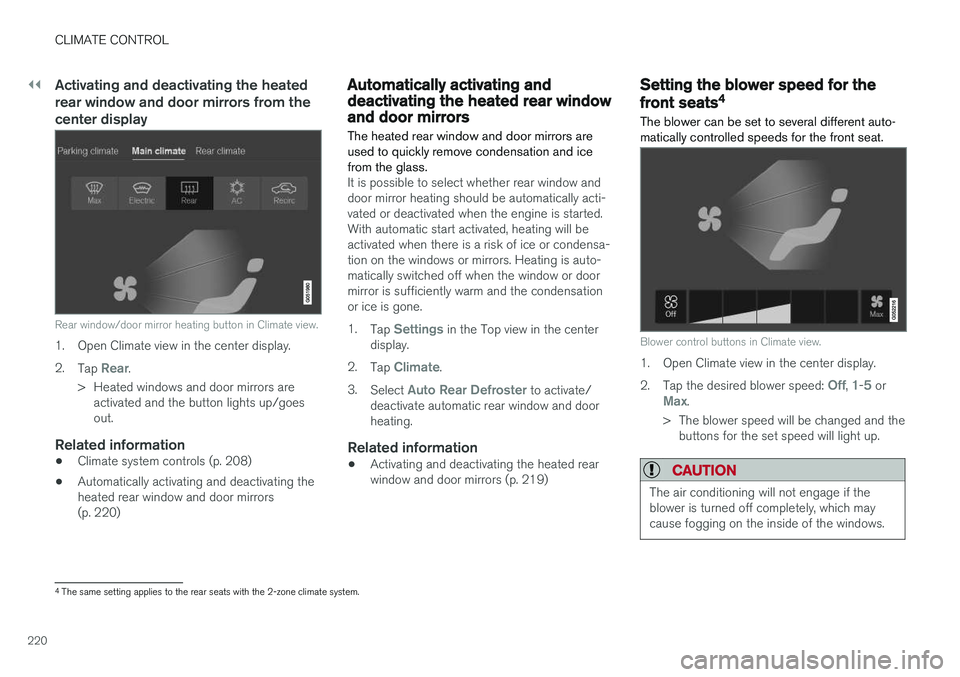
Rear window/door mirror heating button in Climate view.
1. Open Climate view in the center display. 2.Tap
Rear.
> Heated windows and door mirrors are activated and the button lights up/goes out.
Related information
• Climate system controls (p. 208)
• Automatically activating and deactivating theheated rear window and door mirrors(p. 220)
Automatically activating anddeactivating the heated rear windowand door mirrors
The heated rear window and door mirrors are used to quickly remove condensation and icefrom the glass.
It is possible to select whether rear window and door mirror heating should be automatically acti-vated or deactivated when the engine is started.With automatic start activated, heating will beactivated when there is a risk of ice or condensa-tion on the windows or mirrors. Heating is auto-matically switched off when the window or doormirror is sufficiently warm and the condensationor ice is gone. 1. Tap
Settings in the Top view in the center
display.
2. Tap
Climate.
3. Select
Auto Rear Defroster to activate/
deactivate automatic rear window and door heating.
Related information
• Activating and deactivating the heated rearwindow and door mirrors (p. 219)
Setting the blower speed for the
front seats4
The blower can be set to several different auto- matically controlled speeds for the front seat.
Blower control buttons in Climate view.
1. Open Climate view in the center display. 2. Tap the desired blower speed:
Off, 1-5 orMax.
> The blower speed will be changed and the buttons for the set speed will light up.
CAUTION
The air conditioning will not engage if the blower is turned off completely, which maycause fogging on the inside of the windows.
4The same setting applies to the rear seats with the 2-zone climate system.
Page 314 of 640
||
DRIVER SUPPORT
312
Deactivation of the Auto-hold brake function
In certain situations, Auto-hold will be deactivated when the vehicle is at a standstill and Pilot Assistwill go into standby mode. This means that thebrakes will be released and the vehicle couldbegin to roll. The driver must actively apply thebrakes to keep the vehicle stationary. This can occur if:
• the driver depresses the brake pedal
• the parking brake is applied
• the gear selector is moved to the
P, N or R
positions
• the driver puts Pilot Assist in standby mode.
Auto Activate Parking BrakeIn certain situations, the parking brake will be applied to keep the vehicle at a standstill. This occurs if Pilot Assist is keeping the vehicle stationary using the brakes and:
• the driver opens the door or unbuckleshis/her seat belt
• Pilot Assist has kept the vehicle at a stand-still for more than approx. 5 minutes
• the brakes overheat
• the driver switches off the engine manually.
Related information
•Pilot Assist (p. 300)
Pilot Assist limitations
Pilot Assist functionality may be reduced in cer- tain situations.
Pilot Assist is a driver support function designed to simplify driving and assist the driver in manysituations. However, the driver is always responsi-ble for maintaining a suitable distance to vehiclesor objects around it and ensuring that the vehicleis correctly positioned in the traffic lane.
WARNING
In some situations, Pilot Assist may have trou- ble helping the driver properly or may bedeactivated automatically – we advise againstusing Pilot Assist in such cases. Examples ofsuch situations include:
• the lane markings are worn, missing or cross each other.
• lane division is unclear, for example, whenthe lanes divide or merge or at exits orwhen there are multiple sets of markings.
• edges or other lines than lane markingsare present on or near the road, e.g.curbs, joints or repairs to the road sur-face, edges of barriers, roadside edges orstrong shadows.
• the lane is narrow or winding.
• the lane contains ridges or holes.
• weather conditions are poor, e.g. rain,snow or fog or slush or reduced visibilitywith poor light conditions, backlighting,wet road surface, etc.
The driver should also note that Pilot Assist has the following limitations: • High curbs, roadside barriers, temporary obstacles (traffic cones, safety barriers,etc.) are not detected. Alternatively, theymay be detected incorrectly as lane mark-ings, with a subsequent risk of contactbetween the vehicle and such obstacles.
Page 323 of 640
DRIVER SUPPORT
}}
321
Camera limitations
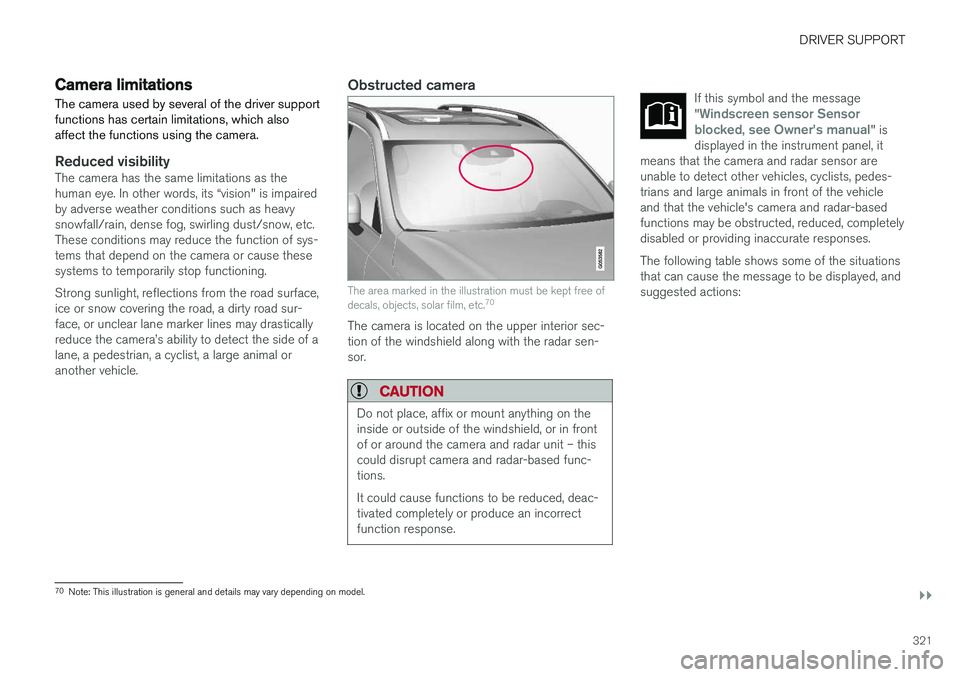
The camera used by several of the driver support functions has certain limitations, which alsoaffect the functions using the camera.
Reduced visibilityThe camera has the same limitations as the human eye. In other words, its “vision" is impairedby adverse weather conditions such as heavysnowfall/rain, dense fog, swirling dust/snow, etc.These conditions may reduce the function of sys-tems that depend on the camera or cause thesesystems to temporarily stop functioning. Strong sunlight, reflections from the road surface, ice or snow covering the road, a dirty road sur- face, or unclear lane marker lines may drastically reduce the camera
Page 324 of 640
||
DRIVER SUPPORT
322
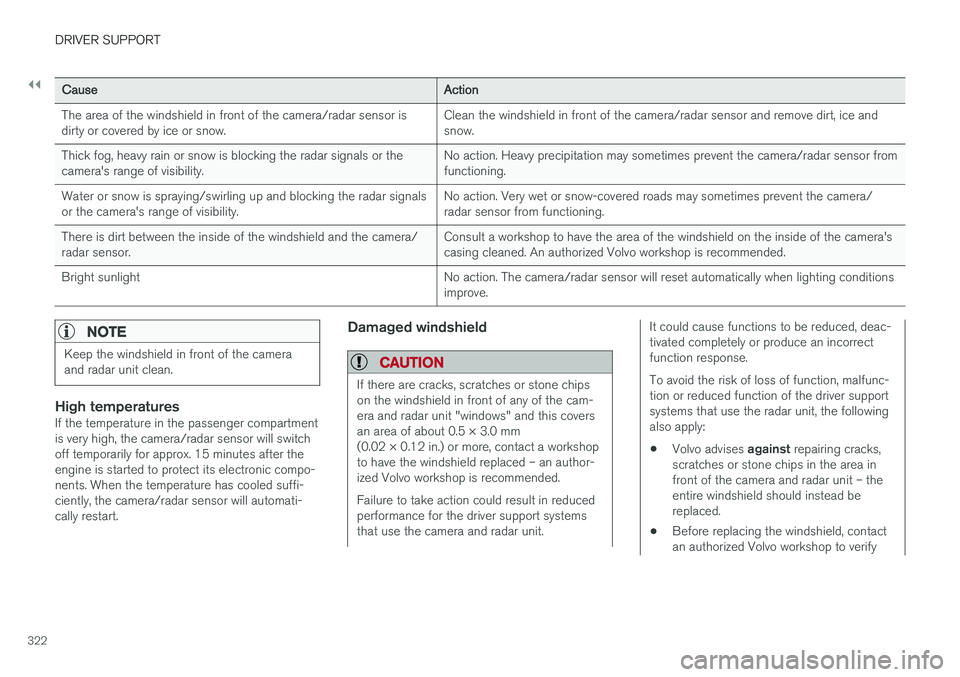
CauseAction
The area of the windshield in front of the camera/radar sensor is dirty or covered by ice or snow. Clean the windshield in front of the camera/radar sensor and remove dirt, ice andsnow.
Thick fog, heavy rain or snow is blocking the radar signals or thecamera's range of visibility. No action. Heavy precipitation may sometimes prevent the camera/radar sensor fromfunctioning.
Water or snow is spraying/swirling up and blocking the radar signalsor the camera's range of visibility. No action. Very wet or snow-covered roads may sometimes prevent the camera/radar sensor from functioning.
There is dirt between the inside of the windshield and the camera/radar sensor. Consult a workshop to have the area of the windshield on the inside of the camera'scasing cleaned. An authorized Volvo workshop is recommended.
Bright sunlight No action. The camera/radar sensor will reset automatically when lighting conditionsimprove.
NOTE
Keep the windshield in front of the camera and radar unit clean.
High temperaturesIf the temperature in the passenger compartment is very high, the camera/radar sensor will switchoff temporarily for approx. 15 minutes after theengine is started to protect its electronic compo-nents. When the temperature has cooled suffi-ciently, the camera/radar sensor will automati-cally restart.
Damaged windshield
CAUTION
If there are cracks, scratches or stone chips on the windshield in front of any of the cam-era and radar unit "windows" and this coversan area of about 0.5 × 3.0 mm(0.02 × 0.12 in.) or more, contact a workshopto have the windshield replaced – an author-ized Volvo workshop is recommended. Failure to take action could result in reduced performance for the driver support systemsthat use the camera and radar unit.
It could cause functions to be reduced, deac- tivated completely or produce an incorrectfunction response. To avoid the risk of loss of function, malfunc- tion or reduced function of the driver supportsystems that use the radar unit, the followingalso apply:
• Volvo advises
against repairing cracks,
scratches or stone chips in the area infront of the camera and radar unit – theentire windshield should instead bereplaced.
• Before replacing the windshield, contactan authorized Volvo workshop to verify
Page 565 of 640
MAINTENANCE AND SERVICE
}}
563
Unscrew the cover in the plastic covering.
Unscrew the expansion tank cap and fill coolant as needed. The level should not exceed the yellow MAX mark inside the
expansion tank.
Put the components back in place in the reverse order.
CAUTION
• Mix the coolant with water of acceptable quality. If you are unsure of the quality ofthe water, use a Volvo-recommendedpremixed coolant.
• Make sure the coolant mixture is 50%water and 50% coolant.
• Only use coolants with corrosion protec-tion recommended by Volvo.
• To help ensure sufficient corrosion pro-tection in the system, only use new cool-ant when replacing larger components inthe cooling system.
• Never run the engine unless the coolingsystem is properly filled. An improperlyfilled cooling system could lead to hightemperatures and cracks in the cylinderheads.
• High levels of chlorine, chlorides andother salts may cause corrosion in thecooling system.
Related information
•Engine compartment overview (p. 559)
• Coolant specifications (p. 619)
Replacing bulbs
The bulbs in the halogen headlights and rear fog light can be changed without the help of a work-shop. Halogen headlights are not available on all mod- els and markets. Contact a Volvo retailer formore information. LED 13
bulbs must be replaced by a workshop.
An authorized Volvo workshop is recommended.
NOTE
For information on lights not mentioned in this article, contact a Volvo dealer or a certi-fied Volvo service technician.
The headlight bulbs can be replaced without the assistance of a workshop, but before a bulb canbe replaced, the plastic cover over the headlightneeds to be removed. If you are experiencing problems with any lights other than light bulbs, contact a workshop 14
. If
there is a problem with an LED 13
light, the entire
lamp unit will normally need to be replaced.
WARNING
The vehicle electrical system must be in igni- tion mode 0 when bulbs are replaced.
Page 566 of 640
||
MAINTENANCE AND SERVICE
* Option/accessory.
564
CAUTION
Never touch the bulb glass with your bare fin- gers. Grease and oils from your fingers vapor-ize in the heat and will leave a deposit on thereflector, which may damage it.
NOTE
If the error message persists after the defec- tive bulb has been replaced, we recommend avisit to an authorized Volvo workshop.
NOTE
Exterior lighting such as headlights and tail- lights may develop temporary condensationon the inside of the lens. This is normal. Allexterior lighting is designed to resist this.Condensation is normally vented out of thelamp housing once the light has been lit forsome period of time.
NOTE
Bulbs for active curve lighting * contain traces
of mercury and should therefore always be submitted to a certified Volvo service techni-cian.
Related information
• Location of exterior lights (p. 565)
• Removing the plastic cover to replace bulbs (p. 564)
• Replacing the low beam headlight bulbs(p. 566)
• Replacing the high beam headlight bulbs(p. 567)
• Replacing daytime running lights/front park-ing light bulbs (p. 567)
• Replacing front turn signal bulbs (p. 568)
• Replacing the rear fog light bulb (p. 569)
• Bulb specifications (p. 572)
Removing the plastic cover toreplace bulbs
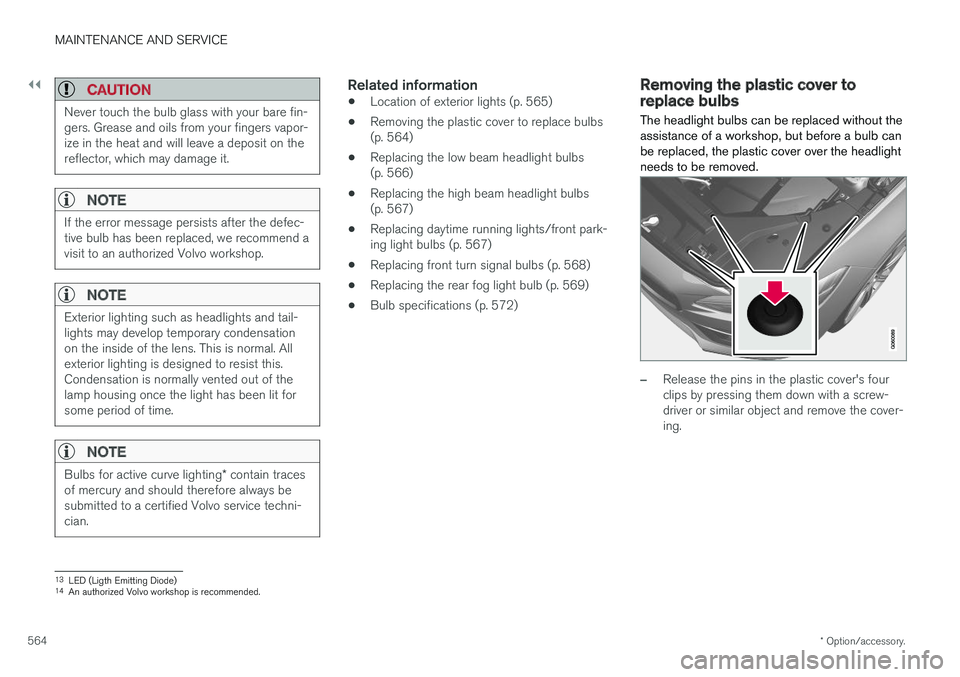
The headlight bulbs can be replaced without the assistance of a workshop, but before a bulb canbe replaced, the plastic cover over the headlightneeds to be removed.
–Release the pins in the plastic cover's four clips by pressing them down with a screw-driver or similar object and remove the cover-ing.
13 LED (Ligth Emitting Diode)
14 An authorized Volvo workshop is recommended.
Page 567 of 640
MAINTENANCE AND SERVICE
}}
* Option/accessory.565
NOTE
To bear in mind when refitting the covering:
• The pin in the clip must be pressed back completely before the clip is reinstalled inthe covering.
• When the covering is reinstalled, the pinmust be pressed in until the end surfaceis level with the surface of the clip.
Related information
• Replacing bulbs (p. 563)
• Replacing the low beam headlight bulbs (p. 566)
• Replacing the high beam headlight bulbs(p. 567)
• Replacing daytime running lights/front park-ing light bulbs (p. 567)
• Replacing front turn signal bulbs (p. 568)
• Bulb specifications (p. 572)
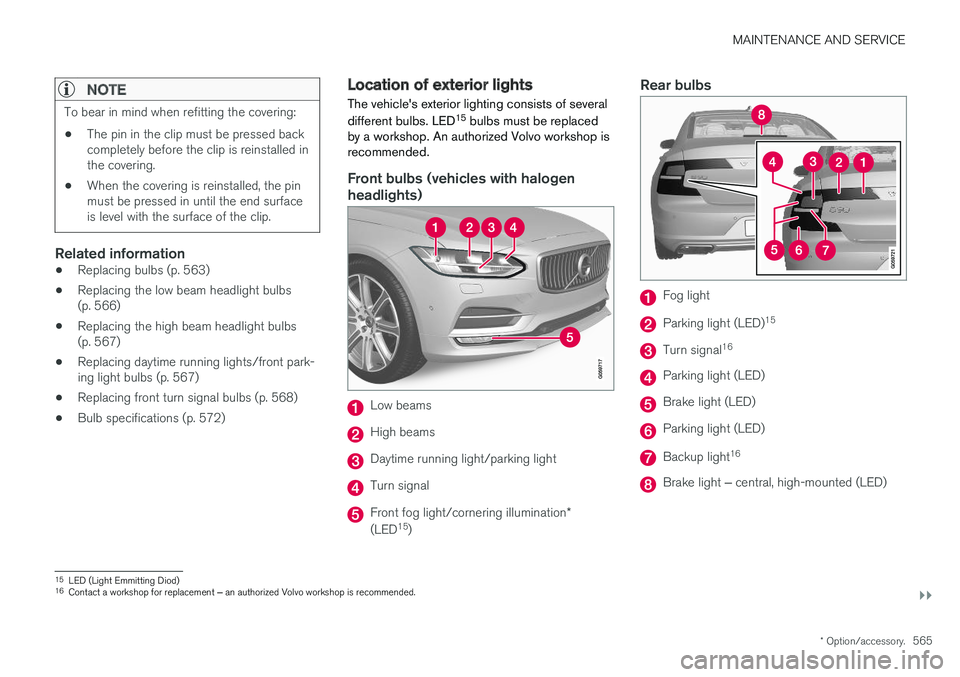
Location of exterior lights
The vehicle's exterior lighting consists of several different bulbs. LED 15
bulbs must be replaced
by a workshop. An authorized Volvo workshop is recommended.
Front bulbs (vehicles with halogen headlights)
Low beams
High beams
Daytime running light/parking light
Turn signal
Front fog light/cornering illumination *
(LED 15
)
Rear bulbs
Fog light
Parking light (LED) 15
Turn signal16
Parking light (LED)
Brake light (LED)
Parking light (LED)
Backup light
16
Brake light
‒ central, high-mounted (LED)
15
LED (Light Emmitting Diod)
16 Contact a workshop for replacement ‒ an authorized Volvo workshop is recommended.
Page 571 of 640
MAINTENANCE AND SERVICE
}}
569
Related information
•Location of exterior lights (p. 565)
• Removing the plastic cover to replace bulbs (p. 564)
• Bulb specifications (p. 572)
Replacing the rear fog light bulb The rear fog light bulb is located behind a panel on the inside of the trunk lid on the driver's side.
NOTE
Replacement of the rear fog light bulb should only be performed by a workshop – anauthorized Volvo workshop is recommended.
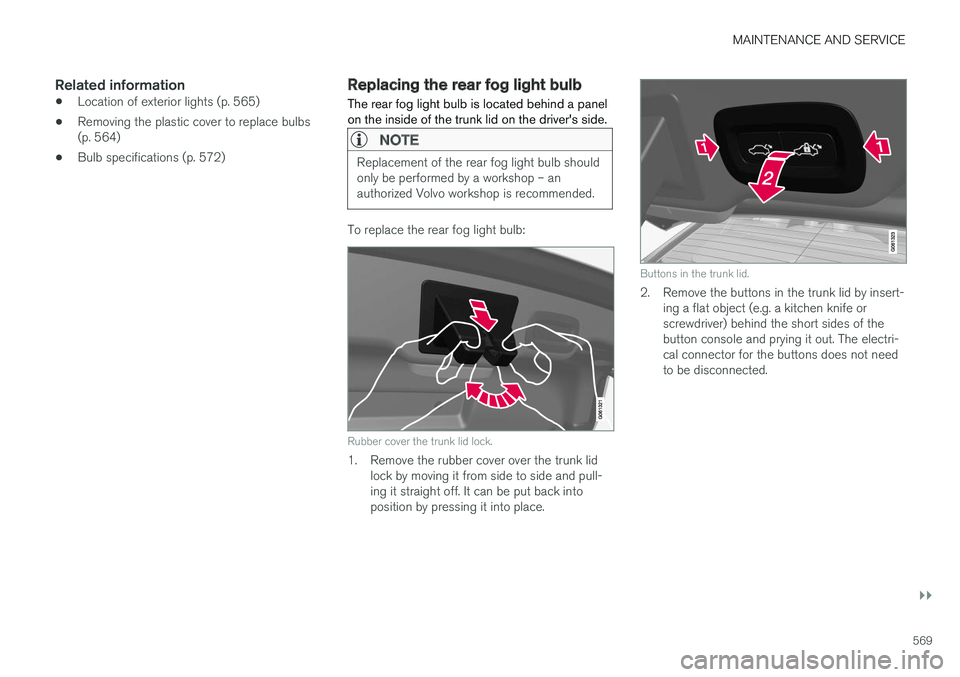
To replace the rear fog light bulb:
Rubber cover the trunk lid lock.
1. Remove the rubber cover over the trunk lid
lock by moving it from side to side and pull- ing it straight off. It can be put back intoposition by pressing it into place.
Buttons in the trunk lid.
2. Remove the buttons in the trunk lid by insert-ing a flat object (e.g. a kitchen knife or screwdriver) behind the short sides of thebutton console and prying it out. The electri-cal connector for the buttons does not needto be disconnected.