tow VOLVO S90 2018 Owner´s Manual
[x] Cancel search | Manufacturer: VOLVO, Model Year: 2018, Model line: S90, Model: VOLVO S90 2018Pages: 640, PDF Size: 11.37 MB
Page 184 of 640
WINDOWS, GLASS AND MIRRORS
* Option/accessory.
182
Using the windshield and headlightwashers
The windshield and headlight washers clean the windshield and headlights. Use the right-sidesteering wheel lever to start the windshield andheadlight washers.
Starting the windshield and headlight washers
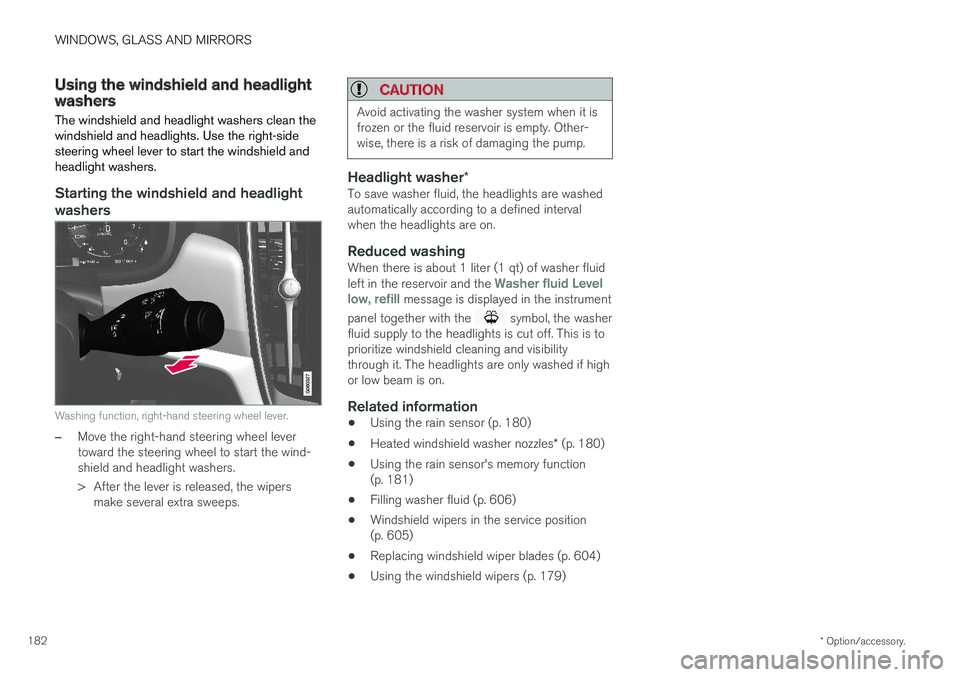
Washing function, right-hand steering wheel lever.
–Move the right-hand steering wheel lever toward the steering wheel to start the wind-shield and headlight washers.
> After the lever is released, the wipers make several extra sweeps.
CAUTION
Avoid activating the washer system when it is frozen or the fluid reservoir is empty. Other-wise, there is a risk of damaging the pump.
Headlight washer *To save washer fluid, the headlights are washed automatically according to a defined intervalwhen the headlights are on.
Reduced washingWhen there is about 1 liter (1 qt) of washer fluid left in the reservoir and the Washer fluid Level
low, refill message is displayed in the instrument
panel together with the
symbol, the washer
fluid supply to the headlights is cut off. This is to prioritize windshield cleaning and visibilitythrough it. The headlights are only washed if highor low beam is on.
Related information
• Using the rain sensor (p. 180)
• Heated windshield washer nozzles
* (p. 180)
• Using the rain sensor's memory function(p. 181)
• Filling washer fluid (p. 606)
• Windshield wipers in the service position(p. 605)
• Replacing windshield wiper blades (p. 604)
• Using the windshield wipers (p. 179)
Page 205 of 640
CLIMATE CONTROL
}}
203
Opening, closing and directing airvents Some of the air vents in the passenger compart- ment can be individually opened, closed anddirected.
Misting can be eliminated by directing the outer air vents towards the door windows. Direct the outer air vents into the passenger compartment to maintain a comfortable tempera-ture in warm weather.
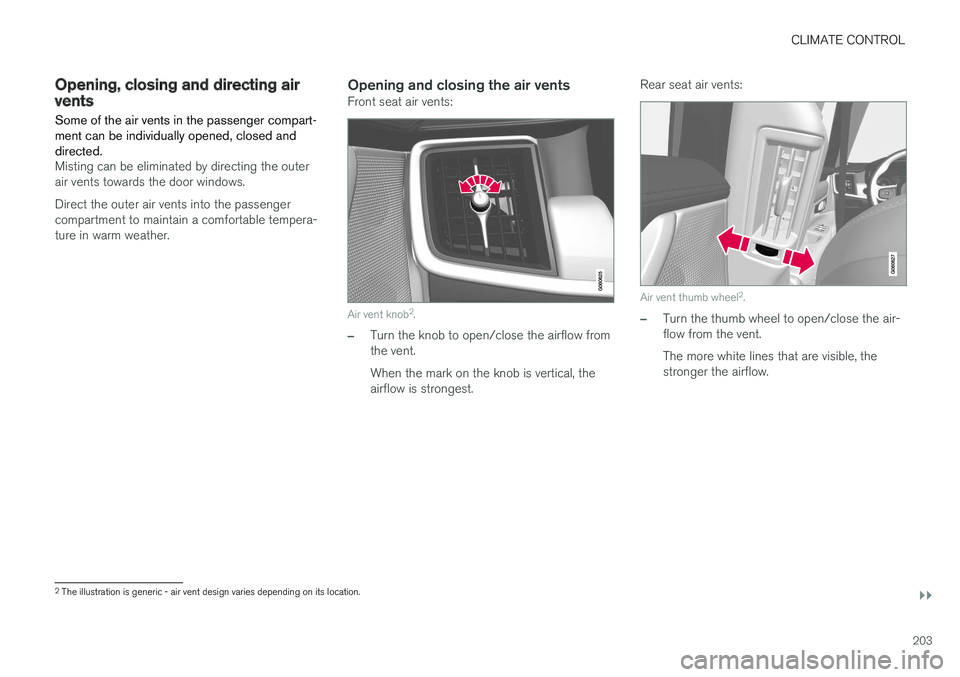
Opening and closing the air ventsFront seat air vents:
Air vent knob2
.
–Turn the knob to open/close the airflow from the vent. When the mark on the knob is vertical, the airflow is strongest. Rear seat air vents:
Air vent thumb wheel
2
.
–Turn the thumb wheel to open/close the air- flow from the vent. The more white lines that are visible, the stronger the airflow.
2 The illustration is generic - air vent design varies depending on its location.
Page 295 of 640
DRIVER SUPPORT
* Option/accessory.293
Passing assistance with AdaptiveCruise Control Adaptive Cruise Control (ACC 47
) can assist the
driver when passing other vehicles.
How passing assistance worksWhen ACC is following another vehicle and you indicate that you intend to pass that vehicle by using the turn signal 48
, Adaptive Cruise Control
will begin accelerating toward the vehicle ahead before your vehicle has moved into the passing
lane. The function will then delay a speed reduction to avoid early braking as your vehicle approaches aslower-moving vehicle. The function remains active until your vehicle has passed the other vehicle.
WARNING
Please note that this function can be acti- vated in more situations than just passinganother vehicle, such as when a direction indi-cator is used to indicate a lane change orbefore exiting to another road – the vehiclewill then briefly accelerate.
Related information
• Adaptive Cruise Control
* (p. 284)
Starting passing assistance withAdaptive Cruise Control
Requirements for passing assistanceIn order to activate passing assistance:
• your vehicle must be following a vehicle ahead (target vehicle)
• your vehicle's
current speed must be
at least 70 km/h (43 mph)
• the set speed
for ACC must be high
enough to safely pass another vehicle.
Starting parking assistanceTo start passing assistance:
–Turn on the left turn signal.
> Passing assistance will start.
Related information
• Adaptive Cruise Control
* (p. 284)
Limitations of passing assistancewith Adaptive Cruise Control
Passing assistance functionality may be reduced in certain situations.
WARNING
The driver should be aware that if conditions suddenly change when using Parking Assis-tance, the function may implement an unde-sired acceleration in certain conditions. Some situations should be avoided, e.g. if: • the vehicle is approaching an exit in the same direction as passing would normallyoccur
• the vehicle ahead slows before your vehi-cle has had time to switch to the passinglane
• traffic in the passing lane slows down
• a vehicle for right-hand traffic is driven ina country with left-hand traffic (or viceversa).
Situations of this type can be avoided by tempo- rarily putting ACC 49
in standby mode.
Related information
• Adaptive Cruise Control
* (p. 284)
47
Adaptive Cruise Control
48 Only the left-hand turn signal for left-hand drive vehicles, or right-hand turn signal for right-hand drive vehicles.
49 Adaptive Cruise Control
Page 297 of 640
DRIVER SUPPORT
}}
* Option/accessory.295
NOTE
ACC can keep the vehicle stationary for no more than 5 minutes – after that time theparking brake is applied and Adaptive CruiseControl is deactivated. The parking brake must be released before Adaptive Cruise Control can be reactivated.
Deactivation of the Auto-hold brake function
In certain situations, Auto-hold will be deactivated when the vehicle is at a standstill and AdaptiveCruise Control will go into standby mode. Thismeans that the brakes will be released and thevehicle could begin to roll. The driver mustactively apply the brakes to keep the vehicle sta-tionary. This can occur if:
• the driver depresses the brake pedal
• the parking brake is applied
• the gear selector is moved to the
P
, N
or R
positions
• the driver puts Adaptive Cruise Control in standby mode.
Auto Activate Parking BrakeIn certain situations, the parking brake will beapplied to keep the vehicle at a standstill. This occurs if Adaptive Cruise Control is keepingthe vehicle stationary using the brakes and:
• the driver opens the door or unbuckleshis/her seat belt
• ACC has kept the vehicle at a standstill formore than approx. 5 minutes
• the brakes overheat
• the driver switches off the engine manually.
Related information
•
Adaptive Cruise Control
* (p. 284)
Adaptive Cruise Control limitations
Adaptive Cruise Control (ACC 52
) may have lim-
ited functionality in certain situations.
Steep roads and/or heavy loadsAdaptive Cruise Control is primarily intended to be driven on flat roads. The function may not beable to maintain the correct time interval to thevehicle ahead when driving down steep hills. Thedriver should be extra attentive and prepared toapply the brakes.
• Do not use Adaptive Cruise Control if thevehicle is carrying a heavy load or towing atrailer.
Other limitations
•
The Off Road drive mode cannot be
selected if Adaptive Cruise Control is acti- vated.
NOTE
The function uses the vehicle's camera unit, which has some general limitations – see thesection "Camera unit limitations".
NOTE
The function uses the vehicle's radar unit, which has some general limitations – see thesection "Radar unit limitations".
52 Adaptive Cruise Control
Page 304 of 640
||
DRIVER SUPPORT
302When the vehicle is approaching an off-ramp or a fork in the road, the driver should steer towardthe desired lane to indicate to Pilot Assist thedesired direction of travel.
Pilot Assist strives to keep the vehicle
in the center of the lane
When Pilot Assist provides steering assistance, itstrives to position the vehicle in the center of thelane between the lane markings. For the smooth-est driving experience possible, the driver shouldpermit the vehicle to find the optimal positioning.The driver should check that the vehicle is posi-tioned safely in the lane and can always adjustthe vehicle's position by applying more force tothe steering wheel. If Pilot Assist does not position the vehicle appro- priately in the lane, the driver should turn off PilotAssist or switch to Adaptive Cruise Control.
Overview
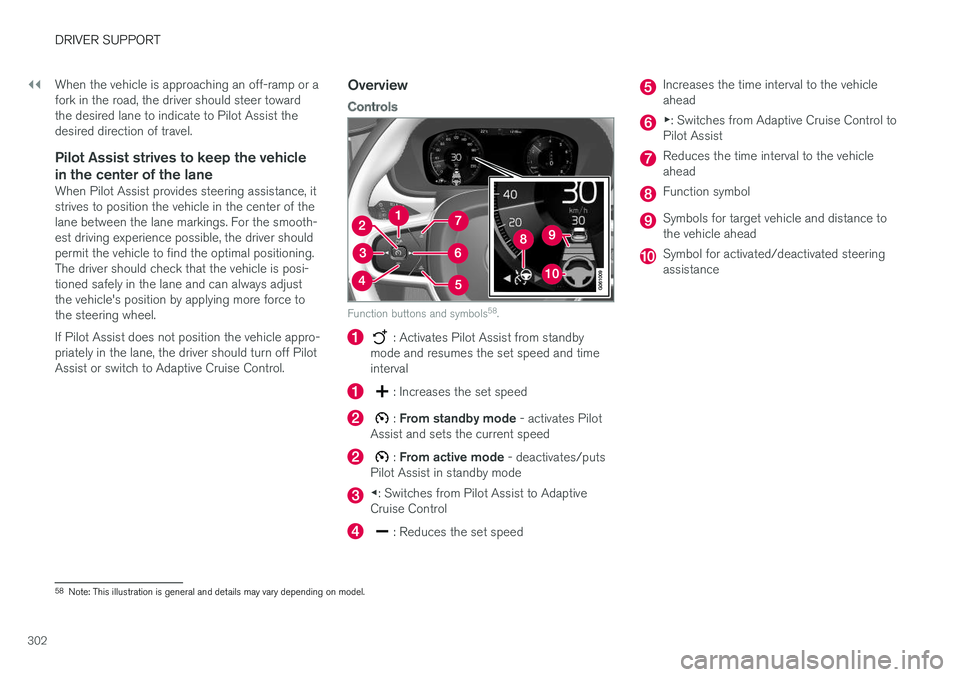
Controls
Function buttons and symbols 58
.
: Activates Pilot Assist from standby
mode and resumes the set speed and time interval
: Increases the set speed
: From standby mode - activates Pilot
Assist and sets the current speed
: From active mode - deactivates/puts
Pilot Assist in standby mode
◀ : Switches from Pilot Assist to Adaptive
Cruise Control
: Reduces the set speed
Increases the time interval to the vehicle ahead
▶ : Switches from Adaptive Cruise Control to
Pilot Assist
Reduces the time interval to the vehicle ahead
Function symbol
Symbols for target vehicle and distance to the vehicle ahead
Symbol for activated/deactivated steering assistance
58 Note: This illustration is general and details may vary depending on model.
Page 312 of 640
DRIVER SUPPORT
310
Passing assistance with Pilot Assist
Pilot Assist can assist the driver when passing other vehicles.
How passing assistance worksWhen Pilot Assist is following another vehicle and you indicate that you intend to pass that vehicle by using the turn signal 63
, Pilot Assist will
begin accelerating toward the vehicle ahead before your vehicle has moved into the passing
lane. The function will then delay a speed reduction to avoid early braking as your vehicle approaches aslower-moving vehicle. The function remains active until your vehicle has passed the other vehicle.
WARNING
Please note that this function can be acti- vated in more situations than just passinganother vehicle, such as when a direction indi-cator is used to indicate a lane change orbefore exiting to another road – the vehiclewill then briefly accelerate.
Related information
• Pilot Assist (p. 300)
Starting passing assistance withPilot Assist
Requirements for passing assistanceIn order to activate passing assistance:
• your vehicle must be following a vehicle ahead (target vehicle)
• your vehicle's
current speed must be
at least 70 km/h (43 mph)
• the set speed
for Pilot Assist must be high
enough to safely pass another vehicle.
Starting parking assistanceTo start passing assistance:
–Turn on the left turn signal.
> Passing assistance will start.
Related information
• Pilot Assist (p. 300)
Passing assistance with Pilot Assistlimitations
Passing assistance functionality may be reduced in certain situations.
WARNING
The driver should be aware that if conditions suddenly change when using Parking Assis-tance, the function may implement an unde-sired acceleration in certain conditions. Some situations should be avoided, e.g. if: • the vehicle is approaching an exit in the same direction as passing would normallyoccur
• the vehicle ahead slows before your vehi-cle has had time to switch to the passinglane
• traffic in the passing lane slows down
• a vehicle for right-hand traffic is driven ina country with left-hand traffic (or viceversa).
Situations of this type can be avoided by tempo-rarily putting Pilot Assist in standby mode.
Related information
• Pilot Assist (p. 300)
63
Only the left-hand turn signal for left-hand drive vehicles, or right-hand turn signal for right-hand drive vehicles.
Page 315 of 640
DRIVER SUPPORT
}}
* Option/accessory.313
The driver is responsible for ensuring that the vehicle maintains a suitable distancefrom such obstacles.
• The camera and radar sensors do nothave the capacity to detect all oncomingobjects and obstacles in traffic environ-ments, e.g. potholes, stationary obstaclesor objects that completely or partiallyblock the route.
• Pilot Assist does not "see" pedestrians,animals, etc.
• The recommended steering input is lim-ited in force, which means that it cannotalways help the driver to steer and keepthe vehicle within the lane.
• Pilot Assist is switched off if the powersteering is working with reduced power -e.g. during cooling due to overheating(see section "Speed-dependent steeringforce").
The driver can always correct or adjust steeringassistance provided by Pilot Assist by turning thesteering wheel to the desired position.
Steep roads and/or heavy loadsPilot Assist is primarily intended to be driven onflat roads. The function may not be able to main-tain the correct time interval to the vehicle aheadwhen driving down steep hills. The driver should be extra attentive and prepared to apply thebrakes.
• Do not use Pilot Assist if the vehicle is carry-ing a heavy load or towing a trailer.
NOTE
Pilot Assist cannot be activated if a trailer, bike carrier or similar is connected to thevehicle electrical system.
Other limitations
•
The Off Road drive mode cannot be
selected when Pilot Assist is activated.
NOTE
The function uses the vehicle's camera unit, which has some general limitations – see thesection "Camera unit limitations".
NOTE
The function uses the vehicle's radar unit, which has some general limitations – see thesection "Radar unit limitations".
Related information
• Pilot Assist (p. 300)
• Speed-dependent steering wheel resistance (p. 262)
Pilot Assist
* symbols and messages
A number of symbols and messages relating to Pilot Assist may be displayed in the instrument panel and/or the head-up display *.
Page 319 of 640
DRIVER SUPPORT
}}
317
CauseAction
Water or snow is spraying/swirling up and blocking the radar signals or the camera's range of visibility. No action. Very wet or snow-covered roads may sometimes prevent the cam-era/radar sensor from functioning.
There is dirt between the inside of the windshield and the camera/radarsensor. Consult a workshop to have the area of the windshield on the inside of the cam-era's casing cleaned. An authorized Volvo workshop is recommended.
NOTE
Keep the windshield in front of the camera and radar unit clean.
Vehicle speedThe radar sensor's ability to detect a vehicle ahead is significantly reduced if:
• the speed of the vehicle ahead differs greatlyfrom your vehicle's speed
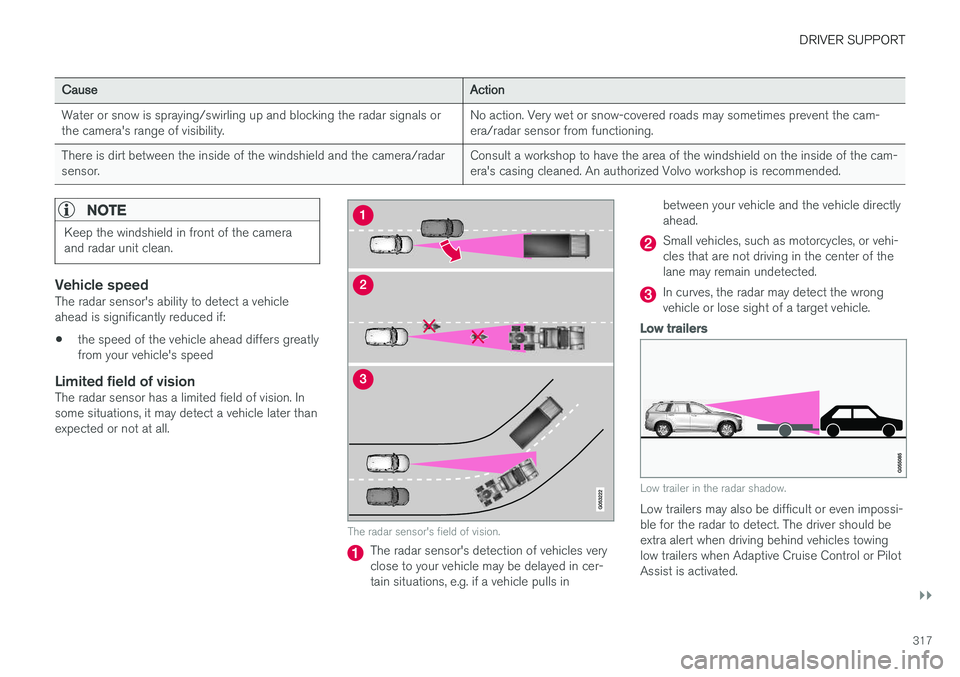
Limited field of visionThe radar sensor has a limited field of vision. Insome situations, it may detect a vehicle later thanexpected or not at all.
The radar sensor's field of vision.
The radar sensor's detection of vehicles very close to your vehicle may be delayed in cer-tain situations, e.g. if a vehicle pulls in between your vehicle and the vehicle directlyahead.
Small vehicles, such as motorcycles, or vehi- cles that are not driving in the center of thelane may remain undetected.
In curves, the radar may detect the wrong vehicle or lose sight of a target vehicle.
Low trailers
Low trailer in the radar shadow.
Low trailers may also be difficult or even impossi- ble for the radar to detect. The driver should beextra alert when driving behind vehicles towing low trailers when Adaptive Cruise Control or Pilot Assist is activated.
Page 341 of 640
DRIVER SUPPORT
* Option/accessory.339
Related information
•BLIS
* (p. 337)
BLIS limitations
BLIS 78
functionality may be reduced in certain
situations.
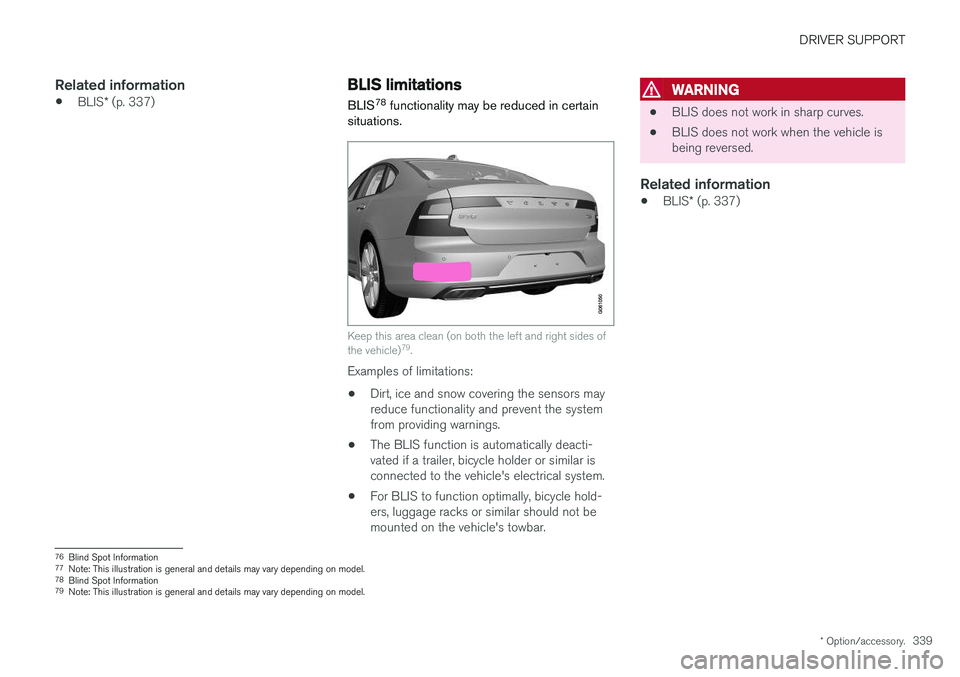
Keep this area clean (on both the left and right sides of the vehicle) 79
.
Examples of limitations:
• Dirt, ice and snow covering the sensors may reduce functionality and prevent the systemfrom providing warnings.
• The BLIS function is automatically deacti-vated if a trailer, bicycle holder or similar isconnected to the vehicle's electrical system.
• For BLIS to function optimally, bicycle hold-ers, luggage racks or similar should not bemounted on the vehicle's towbar.
WARNING
•BLIS does not work in sharp curves.
• BLIS does not work when the vehicle is being reversed.
Related information
•
BLIS
* (p. 337)
76
Blind Spot Information
77 Note: This illustration is general and details may vary depending on model.
78 Blind Spot Information
79 Note: This illustration is general and details may vary depending on model.
Page 346 of 640
||
DRIVER SUPPORT
* Option/accessory.
344
Examples of further limitations
• Dirt, ice and snow covering the sensors may reduce functionality and prevent the systemfrom providing warnings. For additional infor-mation, see the section "Recommendedmaintenance for Cross Traffic Alert".
• CTA is automatically deactivated if a trailer,bicycle holder or similar is connected to thevehicle's electrical system.
• For CTA to function optimally, bicycle hold-ers, luggage racks or similar should not bemounted on the vehicle's towbar.
Related information
•
Cross Traffic Alert
* (p. 342)
Recommended maintenance forCross Traffic Alert
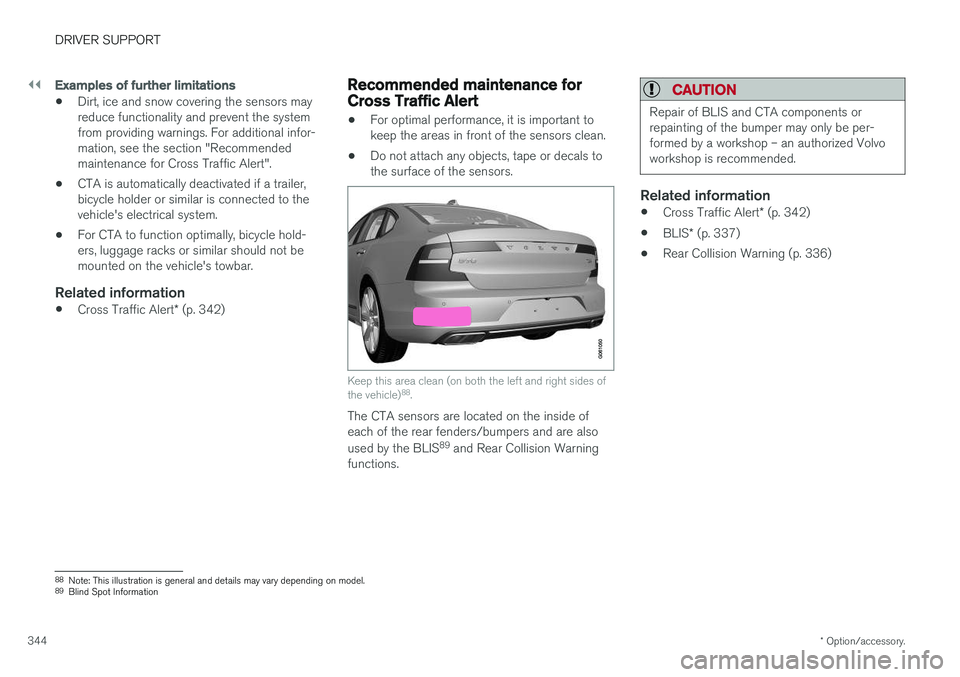
• For optimal performance, it is important to keep the areas in front of the sensors clean.
• Do not attach any objects, tape or decals tothe surface of the sensors.
Keep this area clean (on both the left and right sides of the vehicle) 88
.
The CTA sensors are located on the inside of each of the rear fenders/bumpers and are also used by the BLIS 89
and Rear Collision Warning
functions.
CAUTION
Repair of BLIS and CTA components or repainting of the bumper may only be per-formed by a workshop – an authorized Volvoworkshop is recommended.
Related information
• Cross Traffic Alert
* (p. 342)
• BLIS
* (p. 337)
• Rear Collision Warning (p. 336)
88
Note: This illustration is general and details may vary depending on model.
89 Blind Spot Information