fuel VOLVO S90 2018 Owner´s Manual
[x] Cancel search | Manufacturer: VOLVO, Model Year: 2018, Model line: S90, Model: VOLVO S90 2018Pages: 640, PDF Size: 11.37 MB
Page 293 of 640
DRIVER SUPPORT
}}
* Option/accessory.291
Select one of the following:
•
Eco - ACC will focus on providing optimal
fuel economy, which will increase the time interval to the vehicle ahead.
•
Comfort - ACC will focus on following the
set time interval to the vehicle ahead as smoothly as possible.
•
Dynamic - ACC will focus on following the
set time interval to the vehicle ahead more exactly, which could mean faster accelerationand heavier braking.
For more information, see "Drive modes". Additional information is provided in the sections "Managing Cruise Control speed" and "ECOdrive mode".
Related information
• Adaptive Cruise Control
* (p. 284)
Deactivating/reactivating AdaptiveCruise Control Adaptive Cruise Control (ACC 45
) can be tempo-
rarily put into standby mode and then reactiva- ted.
Deactivating and putting Adaptive Cruise Control in standby mode
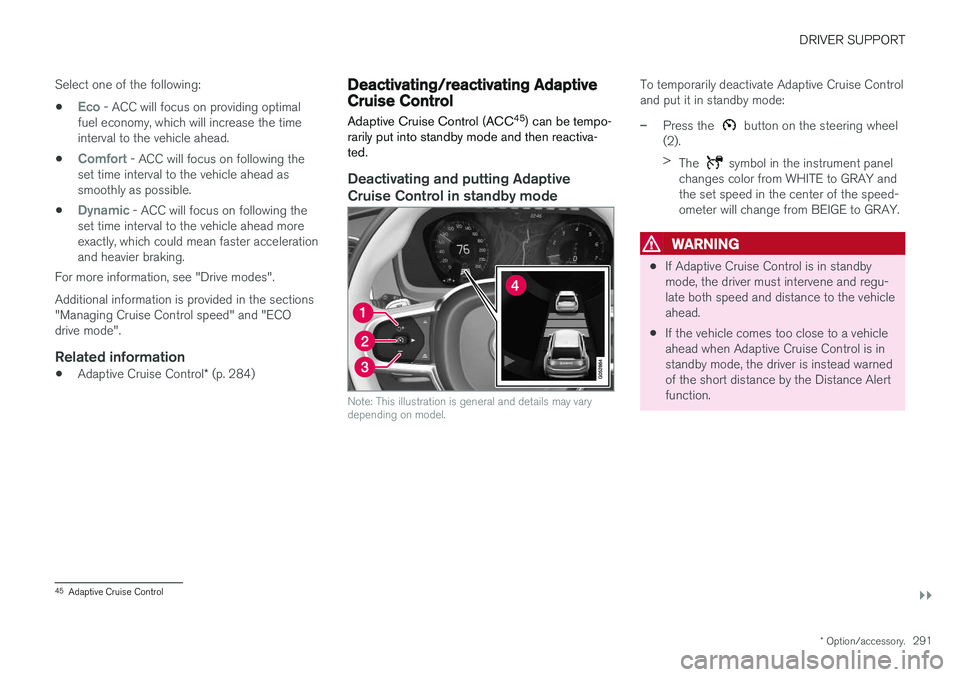
Note: This illustration is general and details may vary depending on model.
To temporarily deactivate Adaptive Cruise Control and put it in standby mode:
–Press the button on the steering wheel
(2). > The
symbol in the instrument panel
changes color from WHITE to GRAY and the set speed in the center of the speed-ometer will change from BEIGE to GRAY.
WARNING
• If Adaptive Cruise Control is in standby mode, the driver must intervene and regu-late both speed and distance to the vehicleahead.
• If the vehicle comes too close to a vehicleahead when Adaptive Cruise Control is instandby mode, the driver is instead warnedof the short distance by the Distance Alertfunction.
45
Adaptive Cruise Control
Page 309 of 640
DRIVER SUPPORT
* Option/accessory.307
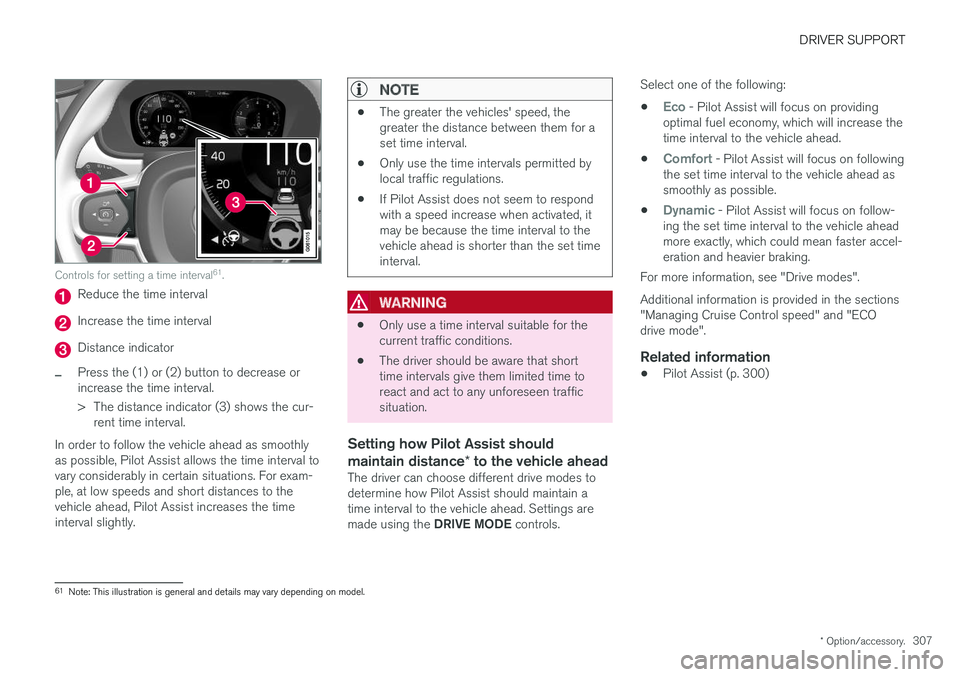
Controls for setting a time interval 61
.
Reduce the time interval
Increase the time interval
Distance indicator
–Press the (1) or (2) button to decrease or increase the time interval.
> The distance indicator (3) shows the cur-
rent time interval.
In order to follow the vehicle ahead as smoothly as possible, Pilot Assist allows the time interval tovary considerably in certain situations. For exam-ple, at low speeds and short distances to thevehicle ahead, Pilot Assist increases the timeinterval slightly.
NOTE
• The greater the vehicles' speed, the greater the distance between them for aset time interval.
• Only use the time intervals permitted bylocal traffic regulations.
• If Pilot Assist does not seem to respondwith a speed increase when activated, itmay be because the time interval to thevehicle ahead is shorter than the set timeinterval.
WARNING
•Only use a time interval suitable for the current traffic conditions.
• The driver should be aware that shorttime intervals give them limited time toreact and act to any unforeseen trafficsituation.
Setting how Pilot Assist should maintain distance
* to the vehicle ahead
The driver can choose different drive modes to determine how Pilot Assist should maintain atime interval to the vehicle ahead. Settings are made using the DRIVE MODE controls. Select one of the following:
•
Eco - Pilot Assist will focus on providing
optimal fuel economy, which will increase the time interval to the vehicle ahead.
•
Comfort - Pilot Assist will focus on following
the set time interval to the vehicle ahead as smoothly as possible.
•
Dynamic - Pilot Assist will focus on follow-
ing the set time interval to the vehicle ahead more exactly, which could mean faster accel-eration and heavier braking.
For more information, see "Drive modes". Additional information is provided in the sections "Managing Cruise Control speed" and "ECOdrive mode".
Related information
• Pilot Assist (p. 300)
61
Note: This illustration is general and details may vary depending on model.
Page 409 of 640
STARTING AND DRIVING
}}
* Option/accessory.407
Braking assist after a collision In a collision in which the activation level is reached for the pyrotechnic seat belt tensionersor airbags, or if a collision with a large animal isdetected, the vehicle's brakes will be automati-cally activated. This function is intended to helpprevent or reduce the effects of any subsequentcollision.
After a serious collision, it may no longer be pos- sible to control and steer the vehicle. In order toavoid or mitigate a possible further collision witha vehicle or an object in the vehicle's path, thebrake assist system is activated automatically tohelp stop the vehicle safely. The brake lights and hazard warning flashers are activated during braking. When the vehicle has stopped, the hazard warning flashers will con-tinue to flash and the parking brake will beapplied. If braking is not appropriate, e.g. if there is a risk of being hit by passing traffic, the driver can over-ride the system by depressing the acceleratorpedal. This function assumes that the brake system is intact after a collision. Brake assist is part of the Rear Collision Warning and Blind Spot Information safety systems.
Related information
•Rear Collision Warning (p. 336)
• BLIS
* (p. 337)
• Brake functions (p. 398)
Transmission The transmission is part of the vehicle's driveline (power transmission) between the engine andthe drive wheels. The function of the transmis-sion is to change gears depending on speedand power needs.
The vehicle has an 8-speed automatic transmis- sion. The number of gears allows the engine'storque and power band to be effectively utilized.Two of the gears are overdrive gears that savefuel when driving at a constant engine speed.Manual shifting is also possible. The instrumentpanel shows the gear currently in use.
CAUTION
Check the operating temperature of the transmission to help avoid damage to any ofthe drive system components. If there is a riskof overheating, a warning symbol will appearin the instrument panel and a text messagewill be displayed. Follow the recommenda-tions given.
Symbols in the instrument panelIf a problem should occur with the transmission, a symbol and a message will appear in the instru-ment panel.
Page 414 of 640
||
STARTING AND DRIVING
* Option/accessory.
412
Related information
• Shiftlock (p. 411)
• Gear selector positions for automatic trans- missions (p. 408)
The kickdown function
Kickdown is used when maximum acceleration is needed, e.g. when passing.
When the accelerator pedal is depressed all the way to the floor (past the normal full acceleratorposition), the transmission will automaticallyengage kickdown, i.e. immediately shift down to alower gear. If the accelerator pedal is released from the kick- down position, the transmission will automaticallyshift up again.
Safety function
The transmission control module is equipped with a downshift protection feature to help prevent theengine from overheating. In some conditions, the transmission will prevent downshifting/kickdown if this would lead to suchhigh engine speed (rpm) that the engine couldbe damaged. If the driver still attempts downshift-ing or kickdown at a high rpm, nothing will hap-pen and the original gear will remain selected. With kickdown, the vehicle can downshift one or more steps at a time depending on the enginespeed. The vehicle upshifts when the engine rea-ches its maximum rpm to prevent engine dam-age.
Related information
• Gear selector positions for automatic trans-missions (p. 408)
Gear indicator
*
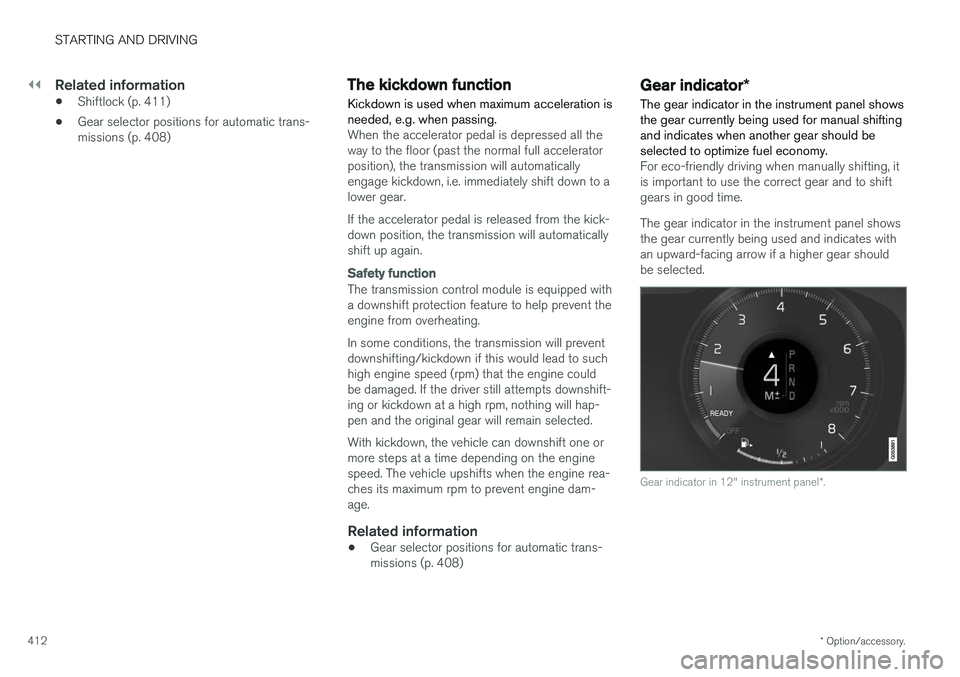
The gear indicator in the instrument panel shows the gear currently being used for manual shiftingand indicates when another gear should beselected to optimize fuel economy.
For eco-friendly driving when manually shifting, it is important to use the correct gear and to shiftgears in good time. The gear indicator in the instrument panel shows the gear currently being used and indicates withan upward-facing arrow if a higher gear shouldbe selected.
Gear indicator in 12" instrument panel *.
Page 416 of 640
||
STARTING AND DRIVING
* Option/accessory.
414
ECO
• Adapt the vehicle for more fuel-efficient and eco-friendly driving with Eco mode.
In this mode, the Start/Stop function is activatedand certain climate settings are reduced. The instrument panel has an ECO gauge to facili- tate fuel-efficient driving.
DYNAMIC
• Dynamic mode is designed to provide sport- ier driving characteristics and a faster accel-eration response.
Gear shifting will be faster and more distinct andthe transmission will prioritize gears with a highertraction force. Steering response is faster and suspension is stiffer 3
to help reduce body roll when cornering.
The Start/Stop function is deactivated.
INDIVIDUAL
• Customizes drive mode to personal preferen- ces.
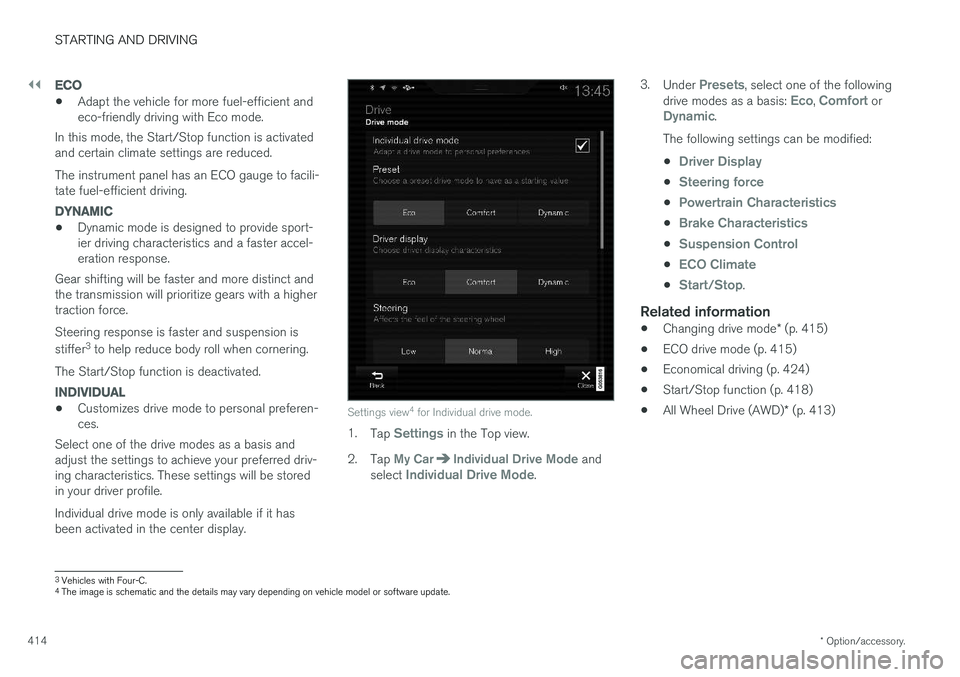
Select one of the drive modes as a basis andadjust the settings to achieve your preferred driv- ing characteristics. These settings will be stored in your driver profile. Individual drive mode is only available if it has been activated in the center display.Settings view 4
for Individual drive mode.
1. Tap Settings in the Top view.
2. Tap
My CarIndividual Drive Mode and
select Individual Drive Mode. 3.
Under
Presets, select one of the following
drive modes as a basis: Eco, Comfort orDynamic.
The following settings can be modified: •
Driver Display
•Steering force
•Powertrain Characteristics
•Brake Characteristics
•Suspension Control
•ECO Climate
•Start/Stop.
Related information
• Changing drive mode
* (p. 415)
• ECO drive mode (p. 415)
• Economical driving (p. 424)
• Start/Stop function (p. 418)
• All Wheel Drive (AWD)
* (p. 413)
3
Vehicles with Four-C.
4 The image is schematic and the details may vary depending on vehicle model or software update.
Page 417 of 640
STARTING AND DRIVING
}}
* Option/accessory.415
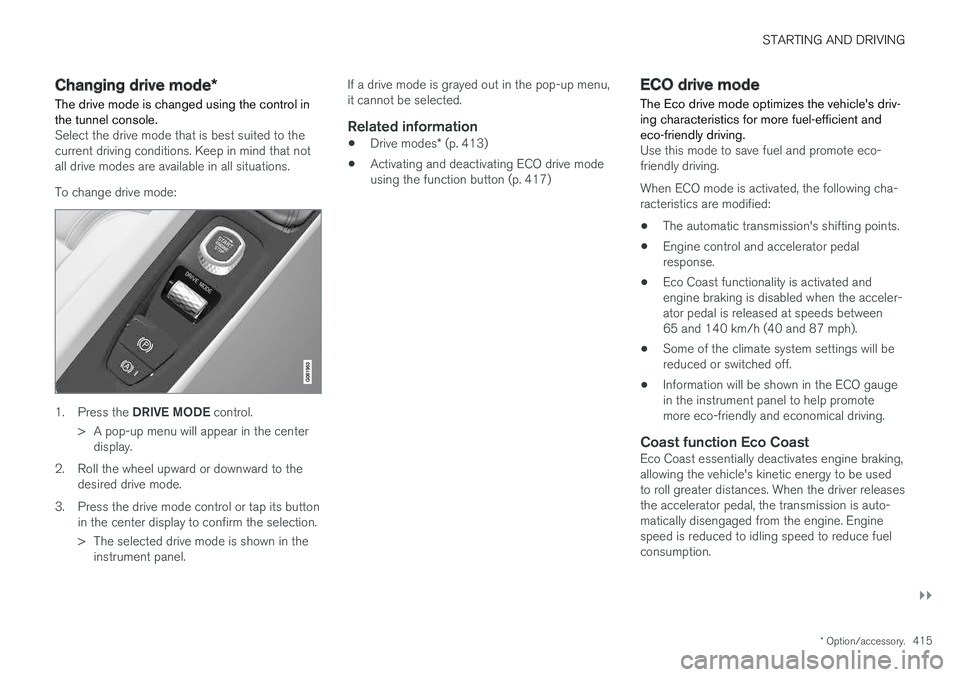
Changing drive mode *
The drive mode is changed using the control in the tunnel console.
Select the drive mode that is best suited to the current driving conditions. Keep in mind that notall drive modes are available in all situations. To change drive mode:
1. Press the DRIVE MODE control.
> A pop-up menu will appear in the center display.
2. Roll the wheel upward or downward to the desired drive mode.
3. Press the drive mode control or tap its button in the center display to confirm the selection.
> The selected drive mode is shown in theinstrument panel. If a drive mode is grayed out in the pop-up menu, it cannot be selected.
Related information
•
Drive modes
* (p. 413)
• Activating and deactivating ECO drive modeusing the function button (p. 417)
ECO drive mode
The Eco drive mode optimizes the vehicle's driv- ing characteristics for more fuel-efficient andeco-friendly driving.
Use this mode to save fuel and promote eco- friendly driving. When ECO mode is activated, the following cha- racteristics are modified:
• The automatic transmission's shifting points.
• Engine control and accelerator pedalresponse.
• Eco Coast functionality is activated andengine braking is disabled when the acceler-ator pedal is released at speeds between65 and 140 km/h (40 and 87 mph).
• Some of the climate system settings will bereduced or switched off.
• Information will be shown in the ECO gaugein the instrument panel to help promotemore eco-friendly and economical driving.
Coast function Eco CoastEco Coast essentially deactivates engine braking,allowing the vehicle's kinetic energy to be used to roll greater distances. When the driver releases the accelerator pedal, the transmission is auto- matically disengaged from the engine. Enginespeed is reduced to idling speed to reduce fuelconsumption.
Page 418 of 640
||
STARTING AND DRIVING
* Option/accessory.
416 This function is most effective in driving situa- tions where the vehicle can roll freely for a longdistance, e.g. on roads with slight downgrades orwhen a decrease in speed is anticipated, such aswhen approaching an area with a lower speedlimit.
Activating Eco Coast
The function is activated when the accelerator pedal is fully released and the following condi-tions are met:
• Eco drive mode is activated.
• The gear selector is in
D.
• The vehicle's speed is approximately65-140 km/h (40-87 mph).
• The gradient of the downgrade is less thanapproximately 6%.
COASTING will be displayed in the instrument
panel when Eco Coast is being used.
Limitations
Eco Coast is not available if:
• The engine and/or transmission are not at normal working temperatures.
• The gear selector is moved from
D to manual
shifting mode.
• The vehicle's speed is not within the65-140 km/h (40-87 mph) range.
• The gradient of the downgrade is more thanapproximately 6%. •
The steering wheel paddles
* are being used
for manual shifting.
Deactivating and turning off Eco Coast
In certain situations, it may be advisable to deac- tivate or turn off Eco Coast so that engine brak-ing can be used. These situations might includedriving down steep hills or before passinganother vehicle to help ensure this can be doneas safely as possible. Deactivate Eco Coast by:
• Pressing the accelerator or brake pedal.
• Moving the gear selector to manual mode.
• Using the steering wheel paddles
* to shift.
Turn off Eco Coast by:
• Switching drive mode
* or switching off drive
mode Eco in Function view.
It is possible to roll short distances even without Eco Coast in order to help conserve fuel. How-ever, for the best fuel economy, Eco Coast shouldbe activated and used to roll longer distances.
Cruise control Eco CruiseWhen cruise control is activated in the Eco drivemode, the vehicle's acceleration and decelerationwill be slower than in other drive modes to helpfurther conserve fuel. Because of this, the vehi-cle's actual speed may be slightly above or belowthe set speed. •
On a level road, the vehicle's actual speedmay differ from the set speed when cruisecontrol is active and the vehicle is coasting.
• On a steep uphill gradient, the vehicle'sspeed is reduced until the transmissiondownshifts. Reduced acceleration is then ini-tiated in order to reach the set speed.
• On a downhill gradient in which the vehicle iscoasting, the vehicle's actual speed may beslightly above or below the set speed. Thefunction uses engine braking to keep the setspeed. If necessary, the normal brakes arealso applied.
ECO gauge in the instrument panelThe ECO gauge indicates how economical cur-rent driving is:
• A low reading in the green area of the gaugeindicates economical driving.
• A high reading is shown when driving is noteconomical, e.g. heavy braking or rapid accel-eration.
The ECO gauge also has an indicator showinghow a reference driver would drive in the samedriving situation. This is shown by the shortpointer in the gauge.
Page 420 of 640
STARTING AND DRIVING
* Option/accessory.
418
Start/Stop function
Start/Stop is a function that temporarily switches off the engine when the vehicle has stopped,e.g. at a traffic light or in heavy traffic, and thenstarts it again automatically when the brakepedal is released.
The Start/Stop function reduces fuel consump- tion, which helps to reduce exhaust emissions. The system makes it possible to drive more eco- nomically and climate-smart by letting the engineauto-stop when appropriate.
Related information
• Driving with the Start/Stop function (p. 418)
• Conditions for the Start/Stop function(p. 420)
• Drive modes
* (p. 413)
Driving with the Start/Stop function
Start/Stop is a function that temporarily turns off the engine when the vehicle is stationary andthen automatically starts it again when the vehi-cle starts moving.
The Start/Stop function is available when the engine is started and can be activated if certainconditions are met. The instrument panel indi-cates if the function is available, active or notavailable. All of the vehicle's ordinary systems, such as lighting, radio, etc. function normally when theengine has been auto-stopped. Certain functionsmay be temporarily reduced, however, such asthe climate system's blower speed or extremelyhigh audio system volume.
Auto-stopTo auto-stop the engine:
• Stop the vehicle by applying the brakes andkeep the brake pedal depressed. The enginewill auto-stop.
In Eco or Comfort 5
drive mode, the engine may
auto-stop before the vehicle has completely stop-ped. With Adaptive Cruise Control or Pilot Assist acti- vated, the engine will auto-stop after approxi-mately three seconds.
Auto-startThe following conditions must be met for theengine to auto-start. • Release the brake pedal. The engine will auto-start and the vehicle can be driven. Onan uphill gradient, Hill Start Assist (HSA) willactivate to help prevent the vehicle from roll-ing backward.
• When Auto-hold is activated, auto-start willbe delayed until the accelerator is pressed.
• When Adaptive Cruise Control or Pilot Assistare activated, the engine will auto-start whenthe accelerator pedal is depressed or the
button on the left-side steering wheel
keypad is pressed.
• Maintain pressure on the brake pedal and press the accelerator pedal. The engine willauto-start.
• On a downhill gradient: Release the brakepedal slightly so that the vehicle begins toroll. The engine will auto-start after a slightincrease in speed.
5
Normal start mode.
Page 426 of 640
STARTING AND DRIVING
* Option/accessory.
424
Leveling control settings *
Turn off leveling control before lifting the vehicle with a jack to help avoid problems with thepneumatic suspension.
Center display settings
Disable Leveling Control
In certain situations, this function must be turned off, e.g. before the vehicle is raised using a jack *.
The level difference caused by raising the vehicle with a jack could cause problems with the pneu-matic suspension. Turning off the function in the center display:1. Tap
Settings in the Top view.
2. Tap
My CarParking Brake and
Suspension.
3. Select
Disable Leveling Control.
Related information
• Leveling control
* and suspension (p. 422)
• Loading recommendations (p. 543)
Economical driving
Drive economically and environmentally con- scious by thinking ahead, avoiding rapid startsand stops and adapting driving style and speedto the current traffic conditions.
Driving economically conserves natural resources
Observe the following rules:
• Do not warm up the engine by idling. It is better to begin driving normally immediately after starting the engine. A cold engine uses more fuel than a warm engine and is subject to increased wear.
• Whenever possible, avoid using the vehicle todrive short distances. The engine does nothave time to reach a normal operating tem-perature and this leads to increased fuelconsumption.
• Maintain a steady speed and a generous fol-lowing distance to traffic ahead to minimizebraking.
• For lower fuel consumption, activate Ecodrive mode.
• Use the Eco Coast function in drive mode Eco - engine braking is deactivated, allowing the vehicle's kinetic energy to be used to rollgreater distances.
• Use gear
D as often as possible and avoid
using the kick-down function. •
Fuel consumption is increased at highspeeds - air resistance increases with speed.
• Remove unnecessary items from the vehicle- the heavier the load, the higher the fuelconsumption.
• Maintain the correct pressure in the tires andcheck pressure regularly.
• The type of tires used could affect fuel con-sumption - consult a retailer for advice onsuitable tires.
• Do not use winter tires after the winter sea-son has ended.
• Roof loads increase air resistance andincrease fuel consumption. Remove roofboxes, ski racks, etc. that are not in use.
• Avoid driving with the windows open.
• Using the trip computer's fuel consumptionindicators can help you learn how to drivemore economically.
Other factors that decrease fuel
consumption
• Dirty air cleaner.
• Dirty engine oil and clogged oil filter.
• Incorrect front-end alignment.
• Incorrect wheel alignment.
Some of the above items and others are checked as part of Volvo's standard maintenance sched-ule.
Page 427 of 640
STARTING AND DRIVING
}}
425
Related information
•Drive-E
‒ purer driving pleasure (p. 27)
• ECO drive mode (p. 415)
• Checking tire pressure (p. 515)
Preparing for a long trip
It is important to have the vehicle's systems and equipment checked carefully before driving longdistances.
Check that:
• the engine is running properly and that fuel consumption is normal
• there are no leaks (fuel, oil or other fluid)
• the brake pedal is functioning optimally
• all lights are working
‒
adjust the headlight
height if the vehicle is carrying a heavy load
• tire tread depth and air pressure are at cor-rect levels. Change to snow tires when driv-ing in areas where there is a risk of snowy oricy roads.
• the start battery is sufficiently charged
• the wiper blades are in good condition
Related information
• Checking tire pressure (p. 515)
• Filling washer fluid (p. 606)
• Winter driving (p. 425)
• Economical driving (p. 424)
• Vehicle modem settings (p. 491)
• Loading recommendations (p. 543)
• Pilot Assist (p. 300)
• Speed limiter (p. 267)
• Tire sealing system (p. 530)
Winter driving
It is important to check the vehicle before driving in cold/snowy conditions to make sure it can bedriven safely.
Before the cold season arrives:
• Make sure the engine coolant contains 50% antifreeze. This mixture helps protect theengine from frost erosion down toapprox. -35 °C (-31 °F). Do not mix differenttypes of antifreeze as this could pose ahealth risk.
• Keep the fuel tank well filled to prevent con-densation from forming.
• Check the viscosity of the engine oil. Oil withlow viscosity (thinner oil) improves cold-weather starting and reduces fuel consump-tion when driving with a cold engine.
CAUTION
Low-viscosity oil should not be used with hard driving or in hot weather.
•
Check the condition and charge level of the start battery. Cold weather places greaterdemands on the start battery and reduces itscapacity.
• Use washer fluid containing antifreeze tohelp prevent ice from forming in the washerfluid reservoir.