fuel VOLVO S90 2018 Owner´s Manual
[x] Cancel search | Manufacturer: VOLVO, Model Year: 2018, Model line: S90, Model: VOLVO S90 2018Pages: 640, PDF Size: 11.37 MB
Page 429 of 640
STARTING AND DRIVING
}}
427
Opening/closing the fuel filler door The vehicle must be unlocked before the fuel filler door can be opened6
.
An arrow next to the fuel pump symbol in the instrument panelindicates the side of the vehicleon which the fuel filler door islocated.
1. Open the fuel filler door by pressing lightly
on its rear edge.
2. After refueling, press the fuel filler door lightly to close it.
Related information
• Refueling (p. 427)
Refueling
The fuel tank is equipped with a fuel filling sys- tem without a cover.
Refueling the vehicle at a service station
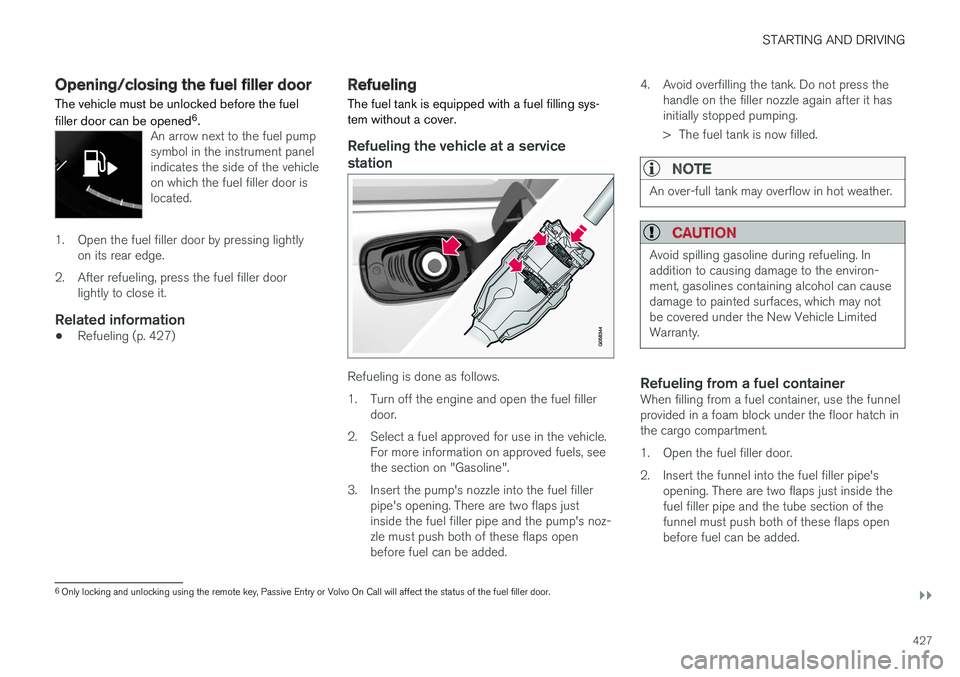
Refueling is done as follows.
1. Turn off the engine and open the fuel filler door.
2. Select a fuel approved for use in the vehicle. For more information on approved fuels, see the section on "Gasoline".
3. Insert the pump's nozzle into the fuel filler pipe's opening. There are two flaps justinside the fuel filler pipe and the pump's noz-zle must push both of these flaps openbefore fuel can be added. 4. Avoid overfilling the tank. Do not press the
handle on the filler nozzle again after it hasinitially stopped pumping.
> The fuel tank is now filled.
NOTE
An over-full tank may overflow in hot weather.
CAUTION
Avoid spilling gasoline during refueling. In addition to causing damage to the environ-ment, gasolines containing alcohol can causedamage to painted surfaces, which may notbe covered under the New Vehicle LimitedWarranty.
Refueling from a fuel containerWhen filling from a fuel container, use the funnel provided in a foam block under the floor hatch inthe cargo compartment.
1. Open the fuel filler door.
2. Insert the funnel into the fuel filler pipe'sopening. There are two flaps just inside the fuel filler pipe and the tube section of thefunnel must push both of these flaps openbefore fuel can be added.
6Only locking and unlocking using the remote key, Passive Entry or Volvo On Call will affect the status of the fuel filler door.
Page 430 of 640
||
STARTING AND DRIVING
428
Related information
•Opening/closing the fuel filler door (p. 427)
Fuel Volvo recommends the use of detergent gaso- line to control engine deposits.
Deposit control gasoline (gasoline with detergent additives)
Detergent gasoline is effective in keeping injec- tors and intake valves clean. Consistent use ofdeposit control gasolines will help ensure gooddriveability and fuel economy. If you are not surewhether the gasoline contains deposit controladditives, check with the service station operator.
NOTE
Volvo recommends not using external fuel injector cleaning systems, e.g. do not adddetergent additives to gasoline before or afterrefueling.
Unleaded fuelAll Volvo vehicles have a three-way catalytic con- verter and must only use unleaded gasoline. USand Canadian regulations require that pumpsdelivering unleaded gasoline are labeled"UNLEADED". Only the nozzles of these pumpswill fit in your vehicle's fuel filler inlet. It is unlaw-ful to dispense leaded fuel into a vehicle labeled"unleaded gasoline only". Leaded gasoline dam-ages the three-way catalytic converter and theheated oxygen sensor system. Repeated use ofleaded gasoline will lessen the effectiveness of the emission control system and could result inloss of emission warranty coverage. State andlocal vehicle inspection programs will makedetection of misfueling easier, possibly resultingin emission test failure for misfueled vehicles.
NOTE
Some U.S. and Canadian gasolines contain an octane enhancing additive called methyl-cyclopentadienyl manganese tricarbonyl(MMT). If such fuels are used, your EmissionControl System performance may be affected,and the Check Engine Light (malfunctionindicator light) located on your instrumentpanel may light. If this occurs, please returnyour vehicle to a trained and qualified Volvoservice technician for service.
Gasoline containing alcohol and ethers, "Oxygenated fuels"
Some fuel suppliers sell gasoline containing "oxygenates" which are usually alcohols orethers. In some areas, state or local laws requirethat the service pump be marked indicating useof alcohols or ethers. However, there are areas inwhich the pumps are unmarked. If you are notsure whether there is alcohol or ethers in thegasoline you buy, check with the service stationoperator. To meet seasonal air quality standards,some areas require the use of "oxygenated" fuel.
Page 431 of 640
STARTING AND DRIVING
}}
429
Volvo permits the use of the following "oxygen- ated" fuels. However, the specified octane ratingsmust still be met.
Alcohol - Ethanol
Fuels containing up to 10% ethanol by volume may be used. Ethanol may also be referred to asEthyl alcohol, or "Gasohol". Ethers - MTBE/ETBE: Fuels containing up to 15% MTBE/ETBE may be used.
MethanolDo not use gasolines containing methanol(methyl alcohol, wood alcohol). This practice canresult in vehicle performance deterioration andcan damage critical parts in the fuel system. Suchdamage may not be covered under the NewVehicle Limited Warranty.
Related information
•
Octane rating (p. 429)
• Opening/closing the fuel filler door (p. 427)
• Refueling (p. 427)
• Emission controls (p. 431)
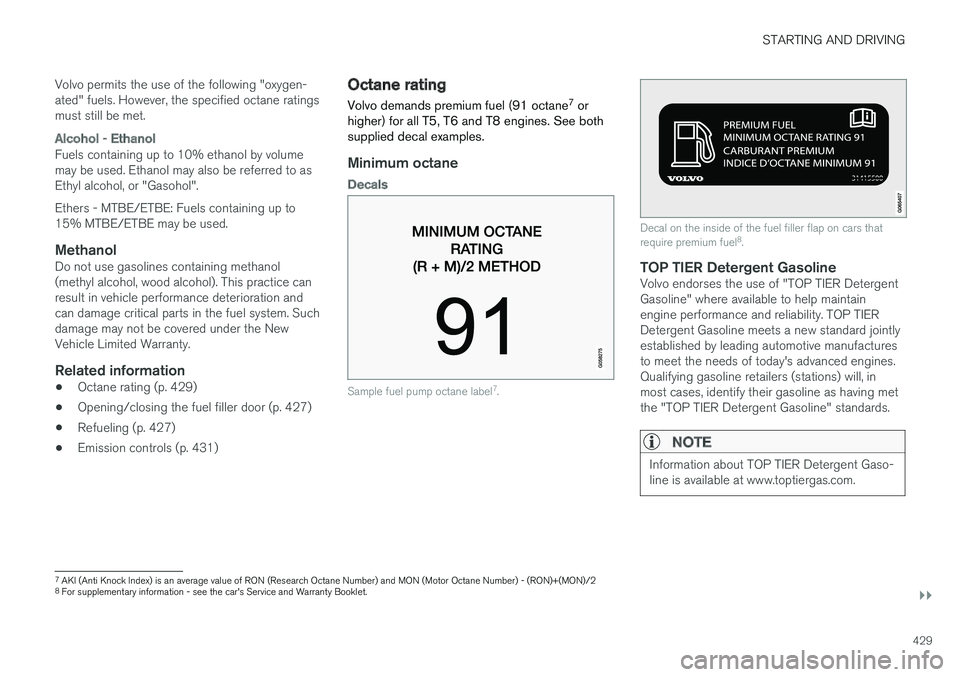
Octane rating Volvo demands premium fuel (91 octane 7
or
higher) for all T5, T6 and T8 engines. See both supplied decal examples.
Minimum octane
Decals
Sample fuel pump octane label 7
.
Decal on the inside of the fuel filler flap on cars that require premium fuel 8
.
TOP TIER Detergent GasolineVolvo endorses the use of "TOP TIER Detergent Gasoline" where available to help maintainengine performance and reliability. TOP TIERDetergent Gasoline meets a new standard jointlyestablished by leading automotive manufacturesto meet the needs of today's advanced engines.Qualifying gasoline retailers (stations) will, inmost cases, identify their gasoline as having metthe "TOP TIER Detergent Gasoline" standards.
NOTE
Information about TOP TIER Detergent Gaso- line is available at www.toptiergas.com.
7 AKI (Anti Knock Index) is an average value of RON (Research Octane Number) and MON (Motor Octane Number) - (RON)+(MON)/2
8 For supplementary information - see the car's Service and Warranty Booklet.
Page 432 of 640
||
STARTING AND DRIVING
430
NOTE
When switching to higher octane fuel or changing gasoline brands, it may be neces-sary to fill the tank more than once before adifference in engine operation is noticeable.
Fuel FormulationsDo not use gasoline that contains lead or manga- nese as a knock inhibitor, and do not use leadadditives. Besides damaging the exhaust emis-sion control systems on your vehicle, lead hasbeen strongly linked to certain forms of cancer. Many fuels contain benzene as a solvent. Unburned benzene has been strongly linked tocertain forms of cancer. If you live in an areawhere you must fill your own gas tank, take pre-cautions. These may include: •standing upwind away from the filler nozzle while refueling
• refueling only at gas stations with vaporrecovery systems that fully seal the mouth ofthe filler neck during refueling
• wearing neoprene gloves while handling afuel filler nozzle.
Use of AdditivesWith the exception of gas line antifreeze duringwinter months, do not add solvents, thickeners, or other store-bought additives to your vehicle'sfuel, cooling, or lubricating systems. Overuse maydamage your engine, and some of these additivescontain organically volatile chemicals. Do notneedlessly expose yourself to these chemicals.
WARNING
Never carry a cell phone that is
switched on
while refueling your vehicle. If the phone rings, this may cause a spark that could ignite gaso-line fumes, resulting in fire and injury.
WARNING
Carbon monoxide is a poisonous, colorless, and odorless gas. It is present in all exhaustgases. If you ever smell exhaust fumes insidethe vehicle, make sure the passenger com-partment is ventilated, and immediately returnthe vehicle to a trained and qualified Volvoservice technician for correction.
Demanding drivingIn demanding driving conditions, e.g. when driving in a hot climates, driving with a trailer or drivingfor longer periods at higher altitudes (mountainlandscapes) than normal, it is recommended switching to a higher octane fuel than AKI 91 7
or
changing gasoline brand to take full advantage of your car's engine capacity and obtain the opti-mum driving force.
Related information
• Fuel (p. 428)
• Emission controls (p. 431)
7
AKI (Anti Knock Index) is an average value of RON (Research Octane Number) and MON (Motor Octane Number) - (RON)+(MON)/2
Page 433 of 640
STARTING AND DRIVING
}}
431
Emission controls
Three-way catalytic converter
•Keep your engine properly tuned. Certain engine malfunctions, particularly involving theelectrical, fuel or distributor ignition systems,may cause unusually high three-way catalyticconverter temperatures. Do not continue tooperate your vehicle if you detect enginemisfire, noticeable loss of power or otherunusual operating conditions, such as engineoverheating or backfiring. A properly tunedengine will help avoid malfunctions thatcould damage the three-way catalytic con-verter.
• Do not park your vehicle over combustiblematerials, such as grass or leaves, which cancome into contact with the hot exhaust sys-tem and cause such materials to ignite undercertain wind and weather conditions.
• Excessive starter cranking (in excess of oneminute), or an intermittently firing or floodedengine can cause three-way catalytic con-verter or exhaust system overheating.
• Remember that tampering or unauthorizedmodifications to the engine, the Engine Con-trol Module, or the vehicle may be illegal andcan cause three-way catalytic converter orexhaust system overheating. This includes:altering fuel injection settings or compo-nents, altering emission system components or location or removing components, and/orrepeated use of leaded fuel.NOTE
Unleaded fuel is required for vehicles with three-way catalytic converters.
Heated oxygen sensorsThe heated oxygen sensors monitor the oxygen content of the exhaust gases. Readings are fedinto a control module that continuously monitorsengine functions and controls fuel injection. Theratio of fuel to air into the engine is continuouslyadjusted for efficient combustion to help reduceharmful emissions.
Related information
•
Octane rating (p. 429)
• Fuel (p. 428)
Overheating of engine andtransmission
In demanding driving conditions, such as driving in mountainous areas or hot weather, there is arisk of the engine or transmission overheating,especially when carrying heavy loads.
• Engine power may be temporarily limited.
• Remove any auxiliary lights mounted in front of the grille when driving in hot weather.
• If the temperature in the engine's coolingsystem becomes too high, a warning symbolwill appear in the instrument panel along with the message
Engine temperature High
temperature Stop safely. Pull over to a
safe location and let the engine idle for a few minutes to cool down.
• If the message
Engine temperature High
temperature Turn off engine or Engine
coolant Level low, turn off engine is dis-
played, stop the vehicle and turn off the engine.
• If the transmission begins to overheat, analternative gear shifting program will beselected. An integrated protective functionwill also be activated, the warning symbol will illuminate and the message
Transmission
warm Reduce speed to lower
temperature or Transmission hot Stop
safely, wait for cooling will be displayed in
the instrument panel. Follow the recommen- dations given by reducing speed or stopping
Page 436 of 640
||
STARTING AND DRIVING
434
WARNING
•Batteries generate hydrogen gas, which is flammable and explosive.
• Do not connect the jumper cable to anypart of the fuel system or to any movingparts. Avoid touching hot manifolds.
• Battery fluid contains sulfuric acid. Do notallow battery fluid to contact eyes, skin,fabrics or painted surfaces.
• If contact occurs, flush the affected areaimmediately with water. Obtain medicalhelp immediately if eyes are affected.
• Never expose the battery to open flameor electric spark. Do not smoke near thebattery. Failure to follow the instructionsfor jump starting can lead to injury.
Related information
• Starting the vehicle (p. 394)
• Ignition modes (p. 397)
• Adjusting the steering wheel (p. 193)
• Selecting ignition mode (p. 398)
Towing using a towline
This section refers to one vehicle being towed behind another using a towline.
Before towing another vehicle, check applicable speed limit regulations.
Preparations and towing
CAUTION
Note that the vehicle must always be towed with the wheels rolling forward.
• Do not tow a vehicle with automatictransmission at a speed greater than80 km/h (50 mph) or for a distancegreater than 80 km (50 miles).
WARNING
•
Ignition mode
II must be active – all air-
bags are deactivated in ignition mode I.
• Always have the remote key in the vehicle when it is towed.
WARNING
The brake and steering servos do not work when the engine is off – it takesabout 5 times more pressure on the brakepedal and steering requires much more effortthan normal. 1. Turn on the hazard warning flashers.
2. Attach the towline to the towing eyelet.3.
Put the vehicle in ignition mode II – without
pressing the brake pedal, turn the start knob clockwise and hold it there for about4 seconds. Release the knob, which willautomatically return to its original position.
4. Move the gear selector to neutral ( N) and
release the parking brake. If the battery charge level is too low, it may not be possible to release the parking brake.Connect an auxiliary battery to the vehicle ifthe battery is discharged.
> The towing vehicle can now start driving.
5. Keep the towline taut when the towing vehi- cle slows down by applying light pressure to the brake pedal. This will help avoid jarringmovements.
6. Be prepared to apply the brakes to stop the vehicle.
Jump startingDo not tow the vehicle to start the engine. Use anauxiliary battery if the start battery's charge levelis so low that the engine cannot be started.
Page 462 of 640
AUDIO, MEDIA AND INTERNET
* Option/accessory.
460
SiriusXM Travel Link®
*
SiriusXM Travel Link is a feature offered by
SiriusXM ®
Satellite radio * that can provide infor-
mation about e.g., weather forecasts, weather alerts, service stations, sports, etc. in the vicinityof the vehicle.
Starting SiriusXM Travel Link
NOTE
SiriusXM Travel Link services are only availa- ble in vehicles equipped with the SensusNavigation system.
From the center display's App view, tap Travel
Link to activate the feature. A disclaimer text will
be displayed. Tap OK to display a list of SiriusXM
Travel Link services: •
Alerts
•Fuel
•Sports
•Weather
•Favorites
In order to use one or more of these services, the user has to subscribe to the ones desired. To subscribe to a SiriusXM Travel Link service:
1. Open the center display's Top view.2. Tap
Settings. 3.
Press
SiriusXM Travel Link andSubscription Status.
> To subscribe, call the phone number listed on the screen.
Any services not subscribed will be grayed out and contain the text
Service not subscribed.
When the services have been activated (subscri- bed), tap the one of your choice to start it. The following applies for all of the
SiriusXM
Travel Link services:
• Pressing the
Back button will take you back
to the previous screen
• Pressing the
Close button will take you to
the SiriusXM Travel Link home screen.
NOTE
If the Close button is used to return to theSiriusXM Travel Link home screen, the fol-
lowing applies (the Weather service is used
here as an example):
• If you have already used the
Weatherfunction, tapping Weather again in theSiriusXM Travel Link home screen
before using any other SiriusXM
Travel Link service will return you to the
point where you left the Weather service.
• If another
SiriusXM Travel Link service
is used (e.g., Fuel, Sports, etc.) before
you return to the Weather service, you
will be returned to the default Weatherview (in this case, Local).
The same principle applies to all of the
SiriusXM Travel Link services.
FavoritesMany SiriusXM Travel Link selections can be saved for easy access as favorites by tapping the"star" icon next to the selection where applicable. To display a list of your favorites, tap the
Favorites application in the SiriusXM Travel Link
home screen.
Related information
• SiriusXM ®
Satellite radio * (p. 456)
• SiriusXM Travel Link ®
* - Fuel (p. 463)
Page 464 of 640
||
AUDIO, MEDIA AND INTERNET
* Option/accessory.
462
5 days
Tap to see weather information for the coming 5 days. Tap
Back to return to the Local screen or Closeto return to the SiriusXM Travel Link home screen.
Ski conditionTap to display a list of ski areas in the vicinity ofthe vehicle. Tap a name in the list for informationsuch as if the ski area is open/closed, tempera-ture, wind conditions, snow conditions, the num-ber of lifts that are in operation, etc.
• Weather locations
• Ski location
Tap Map view to display a map and a weatherlegend. Tap
Map options to display the following alter-
natives. •
Weather radar
•Storm attributes
•Surface features
•Tropical storm tracks
•Winds
Tap the relevant box to the right of the option to select/deselect it. Tap Done to confirm and
return to the previous screen or Cancel.
AreasTap Areas to display a list of areas/locations in
states from the SiriusXM Travel Link database. Scroll to a state and tap to display:
•
Weather locations: tap arrow to the right to
display a list of towns. Scroll to desired town and tap for detailed weather information. Youcan choose Map view, today, 5 days or Favor-ites (star)
•
Ski locations: tap arrow at right to display
local ski areas. Tap an area for detailed info.
For information about storing a location, state, town, etc. as a favorite, see the heading "Favor-ites" in the article "SiriusXM Travel Link."
Related information
• SiriusXM Travel Link ®
* (p. 460)
• SiriusXM Travel Link ®
* - Fuel (p. 463)
• SiriusXM Travel Link ®
* - Sports (p. 464)
• SiriusXM Travel Link ®
* - Notifications
(p. 462)
SiriusXM Travel Link® * -Notifications
This SiriusXM Travel Link service provides notifi- cations of potential weather problems or otheremergency situations in the vicinity of the vehi-cle.
From the SiriusXM Travel Link home screen, to show notifications:
–Tap the Alerts button to display this screen.
• If any notifications are currently available, a message will appear at the top of the screen. They can also be listed from the
Settingsmenu in the center display's Top view.
• If no notifications are available,
No active
alerts will be displayed.
Types of notifications
To select the types of notifications to be dis- played: 1. From the
Alerts screen, tap the Select
alerts button at the bottom of the screen.
2. This displays the types of notifications that can be displayed. Tap the box to the right of each type of notification to select/deselect it.
3. Tap
Done when you have made your selec-
tions. You will return to the Alerts screen.
Page 465 of 640
AUDIO, MEDIA AND INTERNET
}}
* Option/accessory.463
Information about a notification
If any notifications have been displayed on the screen, tap one for more detailed information (i.e.,the location of the weather problem on a mapand a description of the situation). If a phone number is available in a notification, a
Call button will be displayed. Tap this button for
additional information.
Related information
• SiriusXM Travel Link ®
* (p. 460)
• SiriusXM Travel Link ®
* - Fuel (p. 463)
• SiriusXM Travel Link ®
* - Sports (p. 464)
• SiriusXM Travel Link ®
* - Weather (p. 461)
SiriusXM Travel Link®
* - Fuel5
This SiriusXM Travel Link service provides infor- mation and guidance to service stations near thevehicle providing the type of fuel that you prefer/require for your vehicle.
From the SiriusXM Travel Link home screen, to show fuel information:
–Tap the Fuel button to display the main fuel
screen.
The following categories are shown:
• Search (the magnifying glass icon)
•
Nearby
•Recommended
•Favorites
•Brands
Tap one of the alternatives to display its screen.
NOTE
In each of the categories listed, tapping theSelect fuel type button near the bottom of
the screen opens a sub-view where you can specify the type of fuel preferred/required (
Regular, Midrange, Premium, Diesel,Electric 120V, etc.) Tap Done to return to
the previous screen.
SearchTap the magnifying glass icon. If the function is supported in the current context, a keyboard willappear on the screen. Enter the text of your choice and tap
Search for detailed information if
available.
NearbyTap for a list of service stations in the vicinity of the vehicle, with the nearest station at the top ofthe list. The following information will be provided where available:
• For vehicles using gasoline, the price infor-mation for regular gasoline (unless anothergrade/type of fuel has been selected in
Select fuel type)
• For electric vehicles/hybrids, information about charging stations, showing the totalnumber of charging ports and the number ofports currently not in use
• the distance to the station
• a star icon to set the service station as afavorite
Tap the name of a service station to display moredetailed information. For guidance to the service station, tap the
Start
navigation or Add as waypoint buttons. See
5 This service is not available in Canada.
Page 466 of 640
||
AUDIO, MEDIA AND INTERNET
* Option/accessory.
464 the Sensus Navigation
* supplement for additional
information about using the navigation system.
RecommendedTap for a list of service stations near the vehicle, displayed according to the price of regular gaso-line (unless another grade/type of fuel has been selected in
Select fuel type) or of stations
offering the greatest number of available charg- ing ports for electric vehicles/hybrids. The stationoffering the lowest price/most available chargingports will be displayed at the top of the list. Tapthe name of a service station to display moredetailed information.
FavoritesTap for a list of service stations that have beenstored as favorites. See also the heading
Favorites in the article "SiriusXM Travel Link" for
information explaining how to create favorites. Tap the name of a service station to display moredetailed information. In addition to the
Select fuel type button at the
bottom of the screen, tap the Edit button to
delete individual stations from the list or tap
Delete to clear the list. Tap Done to return to
the previous screen.
Brands1. Tap Brands to display a list of service sta-
tion brands in the area. 2. Tap a brand to display a list of service sta-
tions affiliated with that brand (BP, Exxon, etc.).
3. Tap the name of a service station to display more detailed information.
In addition to the
Select fuel type button at the
bottom of the screen, tap the Sort button to
arrange the list according to Nearest orCheapest/Recommended. Tap Done to
return to the previous screen.
Related information
• SiriusXM Travel Link ®
* (p. 460)
• SiriusXM Travel Link ®
* - Notifications
(p. 462)
• SiriusXM Travel Link ®
* - Sports (p. 464)
• SiriusXM Travel Link ®
* - Weather (p. 461)
SiriusXM Travel Link®
* - Sports
This SiriusXM Travel Link service provides infor- mation about sporting events, tournaments,teams, leagues, etc.
From the SiriusXM Travel Link home screen, to display sports information:
–Tap the Sports button to display the main
sports screen.
A number of sports categories will be listed (Football, Baseball, Basketball, etc.) Tap a sport to select a league in that sport (NFL, MLB, etc.) or a sport organization (PGA, LPGA, etc.). The following is an example of the result of tapping Baseball :
1. MLB (Major League Baseball) will be dis- played.
2. Tap MLB to display the two leagues in Major League Baseball (American League orNational League).
3. Tap one of the league names to display the divisions in the league.