warning light VOLVO S90 2018 Owner´s Manual
[x] Cancel search | Manufacturer: VOLVO, Model Year: 2018, Model line: S90, Model: VOLVO S90 2018Pages: 640, PDF Size: 11.37 MB
Page 232 of 640
||
KEY, LOCKS AND ALARM
* Option/accessory.
230 The keyless system for locking/unlocking the doors, trunk lid (Passive Entry
*) and fuel filler
door is available as an option. This system has a range in a semicircle with a radius of approxi-mately 1.5 meter (5 feet) out from the driver'sdoor and approx. 1 meter (3 feet) out from thetrunk lid. With keyless start in combination with keyless locking and unlocking, the remote key can belocated anywhere in the passenger compartmentor trunk in order to start the engine. Each remote key supplied with the vehicle can be linked to a driver profile with unique settings forthe vehicle. When a key with a specific profile isused, the vehicle settings are adjusted accordingto that profile.
Buttonless key, Key TagFor vehicles equipped with keyless locking and unlocking *, a smaller, lighter and button-less key
(Key Tag 3
) is also provided. It works the same
way as the regular remote key as regard keyless start and keyless locking and unlocking 4
. It does
not have a detachable key blade and its battery cannot be replaced.
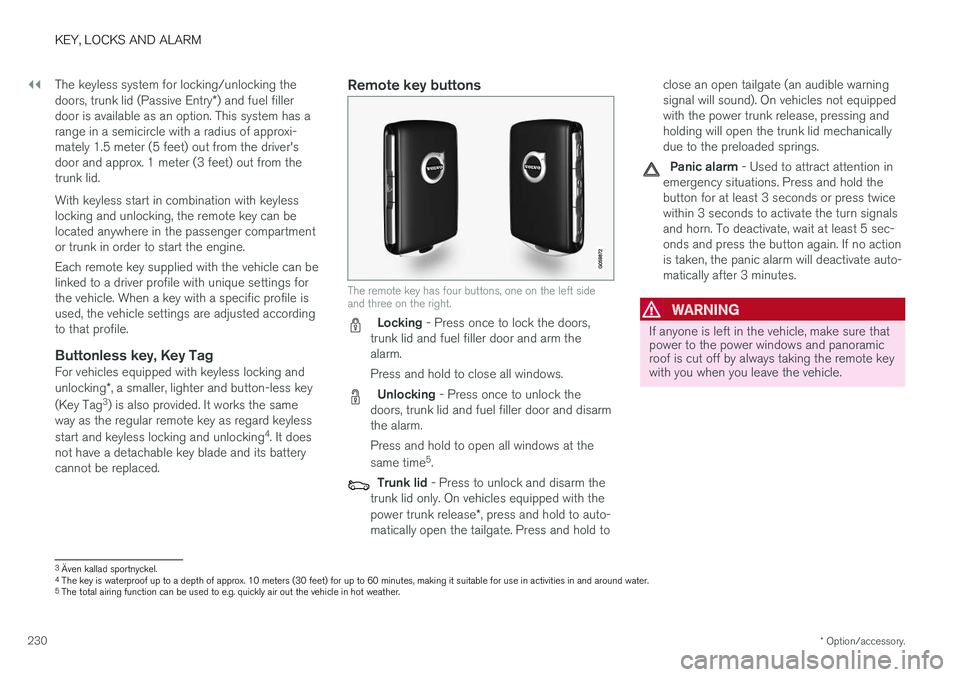
Remote key buttons
The remote key has four buttons, one on the left side and three on the right.
Locking - Press once to lock the doors,
trunk lid and fuel filler door and arm the alarm. Press and hold to close all windows.
Unlocking - Press once to unlock the
doors, trunk lid and fuel filler door and disarm the alarm. Press and hold to open all windows at the same time 5
.
Trunk lid - Press to unlock and disarm the
trunk lid only. On vehicles equipped with the power trunk release *, press and hold to auto-
matically open the tailgate. Press and hold to close an open tailgate (an audible warning signal will sound). On vehicles not equippedwith the power trunk release, pressing andholding will open the trunk lid mechanicallydue to the preloaded springs.
Panic alarm - Used to attract attention in
emergency situations. Press and hold the button for at least 3 seconds or press twicewithin 3 seconds to activate the turn signalsand horn. To deactivate, wait at least 5 sec-onds and press the button again. If no actionis taken, the panic alarm will deactivate auto-matically after 3 minutes.
WARNING
If anyone is left in the vehicle, make sure that power to the power windows and panoramicroof is cut off by always taking the remote keywith you when you leave the vehicle.
3 Även kallad sportnyckel.
4 The key is waterproof up to a depth of approx. 10 meters (30 feet) for up to 60 minutes, making it suitable for use in activities in and around water.
5 The total airing function can be used to e.g. quickly air out the vehicle in hot weather.
Page 248 of 640
KEY, LOCKS AND ALARM
* Option/accessory.
246
Keyless unlock settings *
Several different sequences are available for keyless unlocking.
1. Tap Settings in the center display's Top
view.
2. Tap
My CarLockingKeyless Unlock
3. Select alternative: •
All Doors
- unlocks all doors at the same time.
•
Single Door
- unlocks the selected door.
Related information
• Keyless locking and unlocking
* (p. 244)
• Keyless and touch-sensitive surfaces
*
(p. 243)
Keyless trunk lid unlock *
The trunk lid can be opened using the remote key. The key only needs to be within range, e.g.in a pocket or bag.
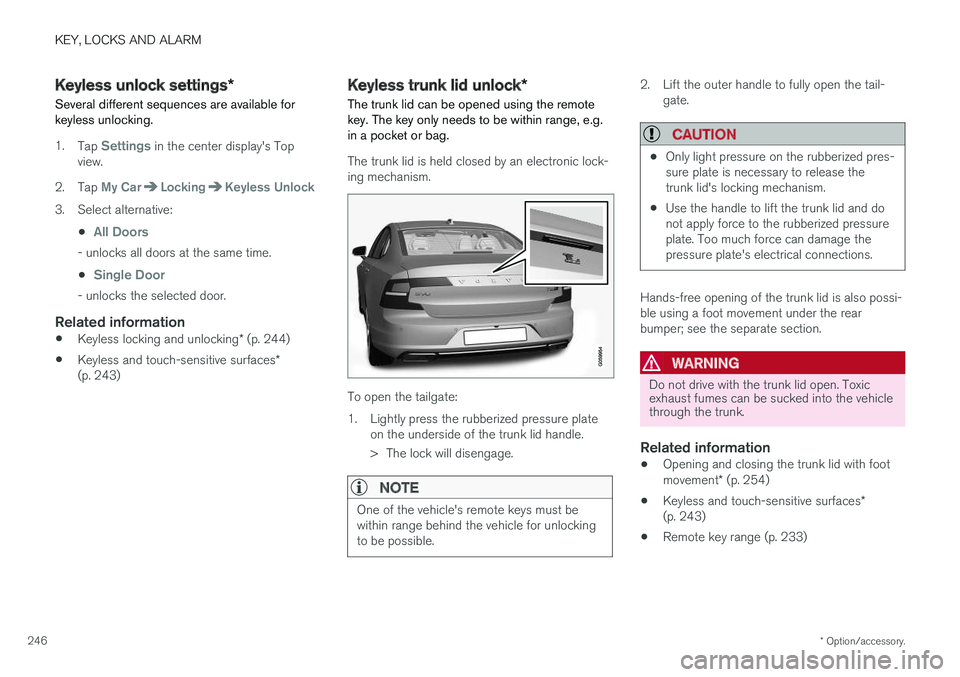
The trunk lid is held closed by an electronic lock- ing mechanism.
To open the tailgate:
1. Lightly press the rubberized pressure plate on the underside of the trunk lid handle.
> The lock will disengage.
NOTE
One of the vehicle's remote keys must be within range behind the vehicle for unlockingto be possible.
2. Lift the outer handle to fully open the tail-gate.
CAUTION
•Only light pressure on the rubberized pres- sure plate is necessary to release thetrunk lid's locking mechanism.
• Use the handle to lift the trunk lid and donot apply force to the rubberized pressureplate. Too much force can damage thepressure plate's electrical connections.
Hands-free opening of the trunk lid is also possi- ble using a foot movement under the rearbumper; see the separate section.
WARNING
Do not drive with the trunk lid open. Toxic exhaust fumes can be sucked into the vehiclethrough the trunk.
Related information
• Opening and closing the trunk lid with foot movement
* (p. 254)
• Keyless and touch-sensitive surfaces
*
(p. 243)
• Remote key range (p. 233)
Page 249 of 640

KEY, LOCKS AND ALARM
}}
* Option/accessory.247
Antenna locations for the start andlock system
The vehicle is equipped with a keyless start and lock system 13
that uses a number of integrated
antennas positioned throughout the vehicle.
Location of the antennas.
Under the cup holder in the front section of the tunnel console
In the upper front section of the left-side rear door 14
In the upper front section of the right-side rear door 14
In the trunk 14
WARNING
Individuals with an implanted pacemaker should not allow the pacemaker to comecloser than 22 cm (9 in.) to the Keyless sys-tem antennas. The aim of this is to preventdisturbances between the pacemaker and theKeyless system.
Related information
•
Keyless and touch-sensitive surfaces
*
(p. 243)
• Remote key range (p. 233)
Locking and unlocking from insidethe vehicle
The doors and trunk lid can be locked and unlocked from inside the vehicle using the cen-tral lock buttons in the front doors. The lock but- tons in the rear doors * can be used to lock/
unlock that particular door.
Central locking
Button with indicator light for locking and unlocking in front door.
Unlocking using the front door buttons
–Press the button to unlock all side doors
and the trunk lid. Press and hold the
button to open all
side windows at the same time 15
.
13 The keyless lock system only applies to vehicles equipped with keyless locking and unlocking (Passive Entry *).
14 Only in vehicles equipped with keyless locking and unlocking (Passive Entry *).
15 The total airing function can be used to e.g. quickly air out the vehicle in hot weather.
Page 275 of 640
DRIVER SUPPORT
273
Activating/deactivating AutomaticSpeed Limiter
The Automatic Speed Limiter (ASL 18
) is a sup-
plement to the Speed Limiter (SL 19
) and can be
activated/deactivated.
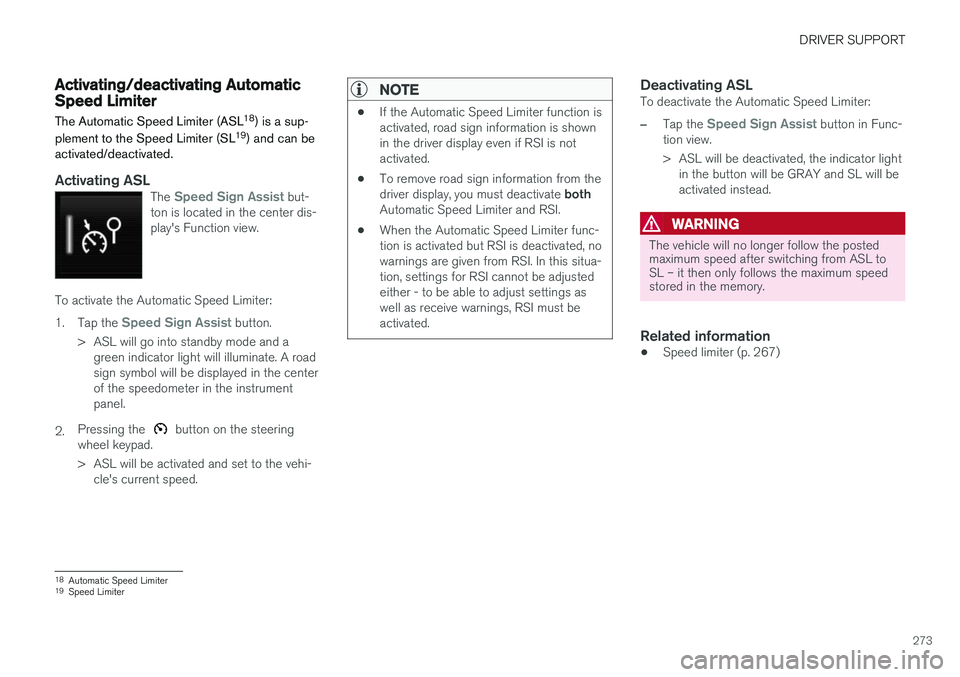
Activating ASLThe Speed Sign Assist but-
ton is located in the center dis- play's Function view.
To activate the Automatic Speed Limiter: 1. Tap the
Speed Sign Assist button.
> ASL will go into standby mode and a green indicator light will illuminate. A road sign symbol will be displayed in the centerof the speedometer in the instrumentpanel.
2. Pressing the
button on the steering
wheel keypad.
> ASL will be activated and set to the vehi- cle's current speed.
NOTE
• If the Automatic Speed Limiter function is activated, road sign information is shownin the driver display even if RSI is notactivated.
• To remove road sign information from the driver display, you must deactivate
both
Automatic Speed Limiter and RSI.
• When the Automatic Speed Limiter func- tion is activated but RSI is deactivated, nowarnings are given from RSI. In this situa-tion, settings for RSI cannot be adjustedeither - to be able to adjust settings aswell as receive warnings, RSI must beactivated.
Deactivating ASLTo deactivate the Automatic Speed Limiter:
–Tap the Speed Sign Assist button in Func-
tion view.
> ASL will be deactivated, the indicator light in the button will be GRAY and SL will be activated instead.
WARNING
The vehicle will no longer follow the posted maximum speed after switching from ASL toSL – it then only follows the maximum speedstored in the memory.
Related information
• Speed limiter (p. 267)
18
Automatic Speed Limiter
19 Speed Limiter
Page 283 of 640
DRIVER SUPPORT
* Option/accessory.281
WARNING
Distance Alert only reacts of the time interval to the vehicle ahead is shorter than the presetvalue – vehicle speed is not affected.
NOTE
Depending on market, this function may be either Standard or Optional.
Related information
•Head-up display for Distance Alert (p. 281)
• Activating/deactivating Distance Alert (p. 282)
• Setting a time interval for Distance Alert(p. 282)
• Distance Alert limitations (p. 283)
Head-up display for Distance Alert32
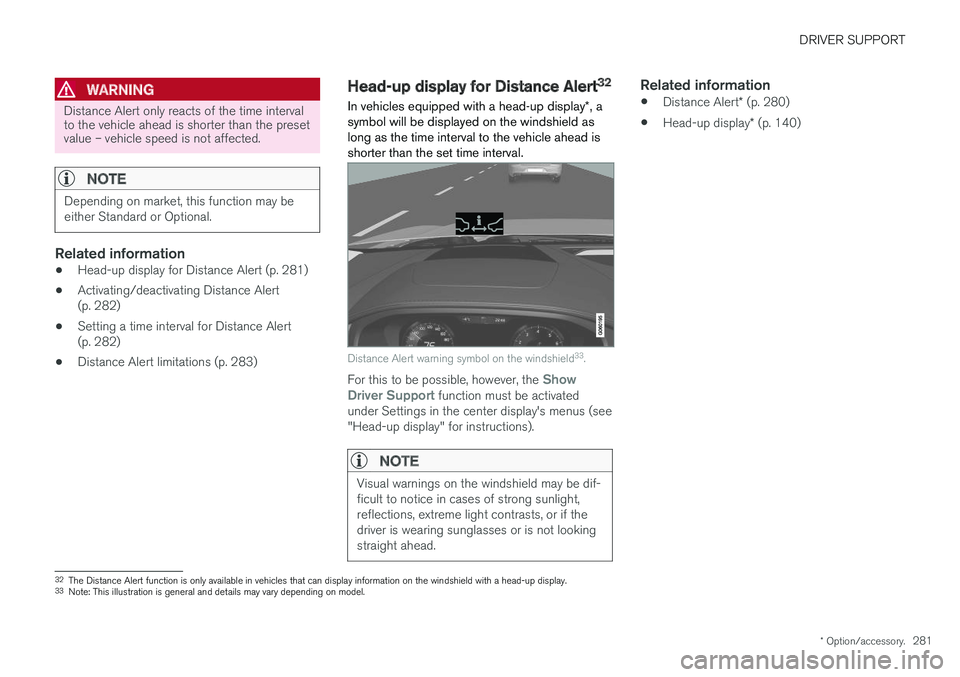
In vehicles equipped with a head-up display *, a
symbol will be displayed on the windshield as long as the time interval to the vehicle ahead isshorter than the set time interval.
Distance Alert warning symbol on the windshield 33
.
For this to be possible, however, the Show
Driver Support function must be activated
under Settings in the center display's menus (see "Head-up display" for instructions).
NOTE
Visual warnings on the windshield may be dif- ficult to notice in cases of strong sunlight,reflections, extreme light contrasts, or if thedriver is wearing sunglasses or is not lookingstraight ahead.
Related information
• Distance Alert
* (p. 280)
• Head-up display
* (p. 140)
32
The Distance Alert function is only available in vehicles that can display information on the windshield with a head-up display.
33 Note: This illustration is general and details may vary depending on model.
Page 285 of 640
DRIVER SUPPORT
}}}}
* Option/accessory.283
NOTE
•The greater the vehicles' speed, the greater the distance between them for aset time interval.
• Only use the time intervals permitted bylocal traffic regulations.
• The set time interval is also used by theAdaptive Cruise Control and Pilot Assistfunctions.
WARNING
•Only use a time interval suitable for the current traffic conditions.
• The driver should be aware that shorttime intervals give them limited time toreact and act to any unforeseen trafficsituation.
Related information
•
Distance Alert
* (p. 280)
Distance Alert limitations36
Distance Alert functionality may be reduced in certain situations.WARNING
• The radar sensor has a limited field of vision. In some situations, it may detect avehicle later than expected or not detectother vehicles at all.
• The radar sensor cannot cover all drivingsituations and traffic, weather and roadconditions.
• The driver is responsible for maintaining asafe distance and speed and must inter-vene if the various driver support systemsdo not maintain a suitable speed or suita-ble distance to the vehicle ahead.
• Maintenance of radar sensor componentsmay only be performed by a trained andqualified Volvo technician.
• Strong sunlight, reflections from the roadsurface, strong lighting contrasts or usingsunglasses may make the warning light inthe windshield difficult to see. Poorweather or winding roads can affect theradar sensor's capacity to detect vehiclesahead.
• A vehicle's size (e.g., a motorcycle) canalso affect the radar sensor's capacity todetect another vehicle. This may result inthe warning light illuminating at a shorter
36
The Distance Alert function is only available in vehicles that can display information on the windshield with a head-up display.
Page 286 of 640
||
DRIVER SUPPORT
* Option/accessory.
284
distance than the one that has been set or not illuminating at all.
• High speeds may also result in the warn-ing light illuminating at a shorter distancethan the one that has been set due tolimitations in the radar sensor's range.
NOTE
The function uses the vehicle's radar unit, which has some general limitations – see thesection "Radar unit limitations".
Related information
•
Distance Alert
* (p. 280)
Adaptive Cruise Control *
Adaptive Cruise Control (ACC 37
) helps the
driver maintain a constant speed with a set time interval to the vehicle ahead.
Adaptive Cruise Control helps provide a more relaxed driving experience on long trips on high-ways or long, straight roads with even trafficflows.
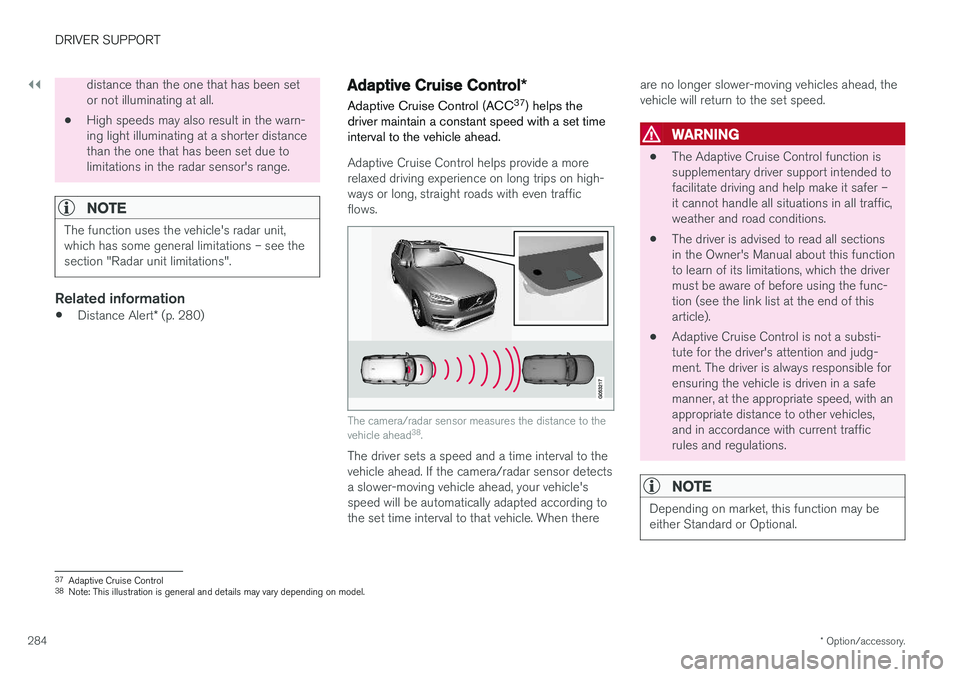
The camera/radar sensor measures the distance to the vehicle ahead 38
.
The driver sets a speed and a time interval to the vehicle ahead. If the camera/radar sensor detects a slower-moving vehicle ahead, your vehicle's speed will be automatically adapted according to the set time interval to that vehicle. When there are no longer slower-moving vehicles ahead, thevehicle will return to the set speed.
WARNING
•
The Adaptive Cruise Control function is supplementary driver support intended tofacilitate driving and help make it safer –it cannot handle all situations in all traffic,weather and road conditions.
• The driver is advised to read all sectionsin the Owner's Manual about this functionto learn of its limitations, which the drivermust be aware of before using the func-tion (see the link list at the end of thisarticle).
• Adaptive Cruise Control is not a substi-tute for the driver's attention and judg-ment. The driver is always responsible forensuring the vehicle is driven in a safemanner, at the appropriate speed, with anappropriate distance to other vehicles,and in accordance with current trafficrules and regulations.
NOTE
Depending on market, this function may be either Standard or Optional.
37
Adaptive Cruise Control
38 Note: This illustration is general and details may vary depending on model.
Page 287 of 640
DRIVER SUPPORT
}}
285
Adaptive Cruise Control regulates speed by accelerating and braking. It is normal for thebrakes to emit a slight sound when they arebeing used to adjust speed. Adaptive Cruise Control always attempts to regu- late speed smoothly. The driver must apply thebrakes in situations requiring immediate braking.For example, when there are great differences inspeed between vehicles or if the vehicle aheadbrakes suddenly. Due to limitations in the radarsensor, braking may occur unexpectedly or not atall. Adaptive Cruise Control is designed to follow a vehicle ahead in the same lane and maintain atime interval to that vehicle set by the driver. If theradar sensor does not detect a vehicle ahead, itwill instead maintain the speed set by the driver.This will also happen if the speed of the vehicleahead exceeds the set speed for your vehicle.
• Adaptive Cruise Control can follow anothervehicle at speeds from a standstill up to200 km/h (125 mph).
WARNING
• Adaptive Cruise Control is not a collision avoidance system. The driver is alwaysresponsible and must intervene if the sys-tem fails to detect a vehicle ahead.
• Adaptive Cruise Control does not brakefor people or animals and does not brakefor small vehicles, such as bikes andmotorcycles. Similarly, it does not brakefor low trailers, oncoming, slow-moving orstationary vehicles and objects.
• Do not use Adaptive Cruise Control indemanding situations, such as in city traf-fic, at intersections, on slippery surfaces,with a lot of water or slush on the road, inheavy rain/snow, in poor visibility, onwinding roads, or on on/off ramps.
CAUTION
Maintenance of Adaptive Cruise Control com- ponents may only be performed by a work-shop – an authorized Volvo workshop is rec-ommended.
Overview
Controls
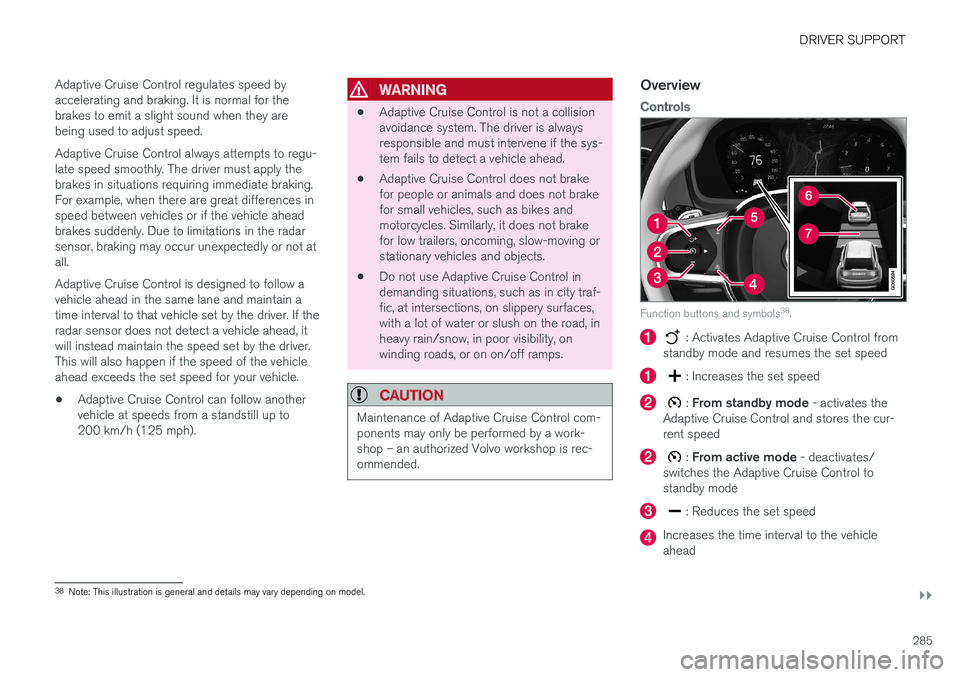
Function buttons and symbols 38
.
: Activates Adaptive Cruise Control from
standby mode and resumes the set speed
: Increases the set speed
: From standby mode - activates the
Adaptive Cruise Control and stores the cur- rent speed
: From active mode - deactivates/
switches the Adaptive Cruise Control to standby mode
: Reduces the set speed
Increases the time interval to the vehicle ahead
38 Note: This illustration is general and details may vary depending on model.
Page 289 of 640
DRIVER SUPPORT
* Option/accessory.287
Adaptive Cruise Control andcollision warning
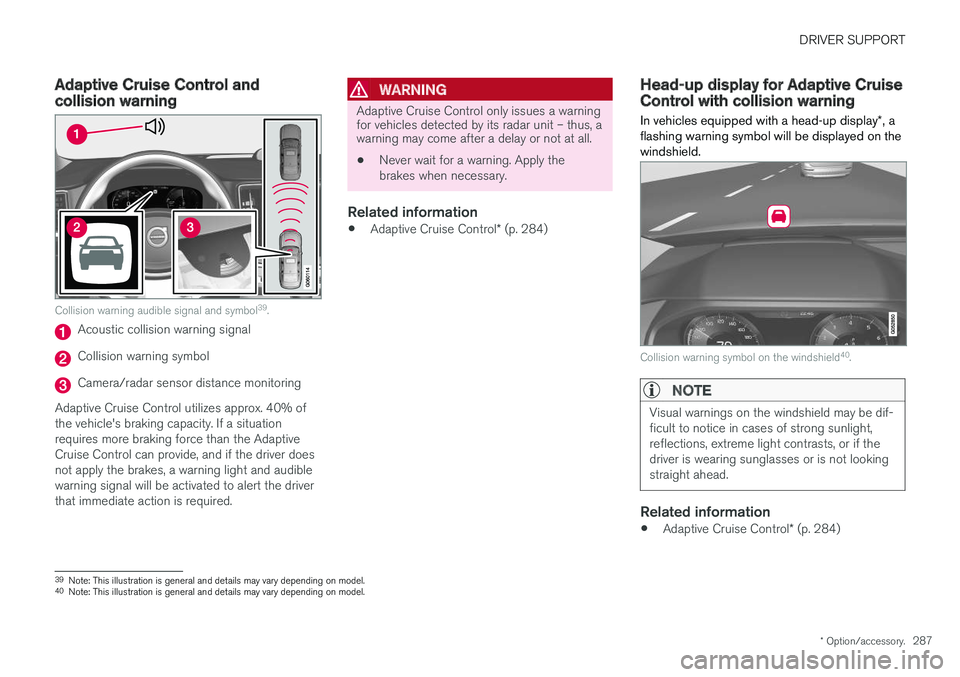
Collision warning audible signal and symbol 39
.
Acoustic collision warning signal
Collision warning symbol
Camera/radar sensor distance monitoring
Adaptive Cruise Control utilizes approx. 40% of the vehicle's braking capacity. If a situationrequires more braking force than the AdaptiveCruise Control can provide, and if the driver doesnot apply the brakes, a warning light and audiblewarning signal will be activated to alert the driverthat immediate action is required.
WARNING
Adaptive Cruise Control only issues a warning for vehicles detected by its radar unit – thus, awarning may come after a delay or not at all.
• Never wait for a warning. Apply the brakes when necessary.
Related information
•
Adaptive Cruise Control
* (p. 284)
Head-up display for Adaptive CruiseControl with collision warning
In vehicles equipped with a head-up display *, a
flashing warning symbol will be displayed on the windshield.
Collision warning symbol on the windshield 40
.
NOTE
Visual warnings on the windshield may be dif- ficult to notice in cases of strong sunlight,reflections, extreme light contrasts, or if thedriver is wearing sunglasses or is not lookingstraight ahead.
Related information
• Adaptive Cruise Control
* (p. 284)
39
Note: This illustration is general and details may vary depending on model.
40 Note: This illustration is general and details may vary depending on model.
Page 292 of 640
DRIVER SUPPORT
* Option/accessory.
290
Setting Adaptive Cruise Controltime intervals Adaptive Cruise Control (ACC 43
) can be set to
various time intervals to the vehicle ahead.
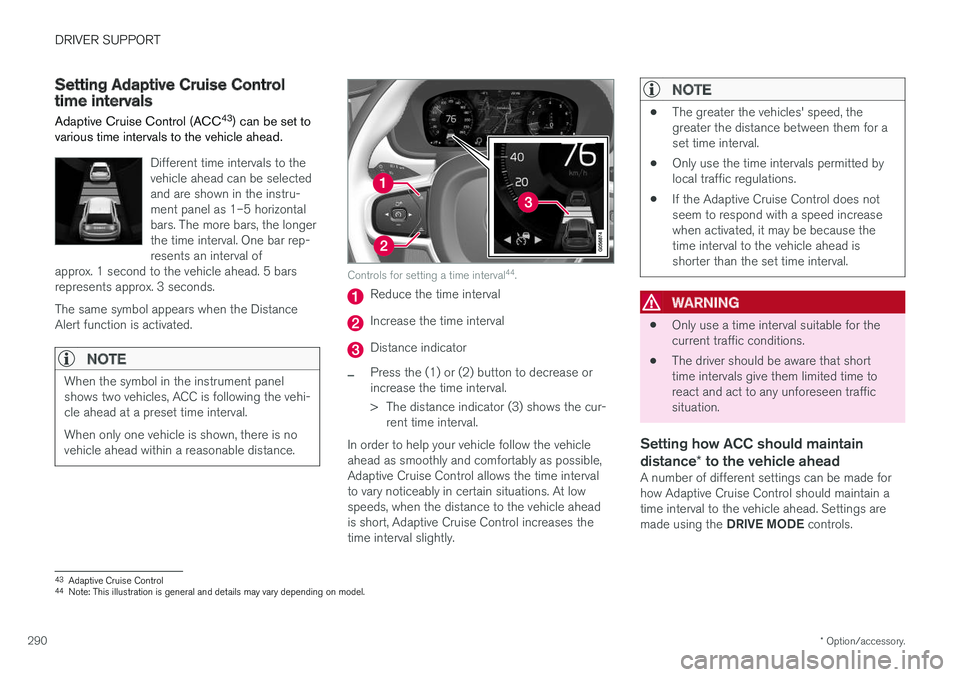
Different time intervals to the vehicle ahead can be selectedand are shown in the instru-ment panel as 1–5 horizontalbars. The more bars, the longerthe time interval. One bar rep-resents an interval of
approx. 1 second to the vehicle ahead. 5 barsrepresents approx. 3 seconds. The same symbol appears when the Distance Alert function is activated.
NOTE
When the symbol in the instrument panel shows two vehicles, ACC is following the vehi-cle ahead at a preset time interval. When only one vehicle is shown, there is no vehicle ahead within a reasonable distance.
Controls for setting a time interval 44
.
Reduce the time interval
Increase the time interval
Distance indicator
–Press the (1) or (2) button to decrease or increase the time interval.
> The distance indicator (3) shows the cur-
rent time interval.
In order to help your vehicle follow the vehicle ahead as smoothly and comfortably as possible,Adaptive Cruise Control allows the time intervalto vary noticeably in certain situations. At lowspeeds, when the distance to the vehicle aheadis short, Adaptive Cruise Control increases thetime interval slightly.
NOTE
• The greater the vehicles' speed, the greater the distance between them for aset time interval.
• Only use the time intervals permitted bylocal traffic regulations.
• If the Adaptive Cruise Control does notseem to respond with a speed increasewhen activated, it may be because thetime interval to the vehicle ahead isshorter than the set time interval.
WARNING
•Only use a time interval suitable for the current traffic conditions.
• The driver should be aware that shorttime intervals give them limited time toreact and act to any unforeseen trafficsituation.
Setting how ACC should maintain distance
* to the vehicle ahead
A number of different settings can be made for how Adaptive Cruise Control should maintain atime interval to the vehicle ahead. Settings are made using the DRIVE MODE controls.
43
Adaptive Cruise Control
44 Note: This illustration is general and details may vary depending on model.