warning light VOLVO S90 2018 Owner´s Manual
[x] Cancel search | Manufacturer: VOLVO, Model Year: 2018, Model line: S90, Model: VOLVO S90 2018Pages: 640, PDF Size: 11.37 MB
Page 358 of 640
DRIVER SUPPORT
356
Activating/deactivating LaneKeeping Aid The Lane Keeping Aid (LKA107
) function can be
switched On or Off.
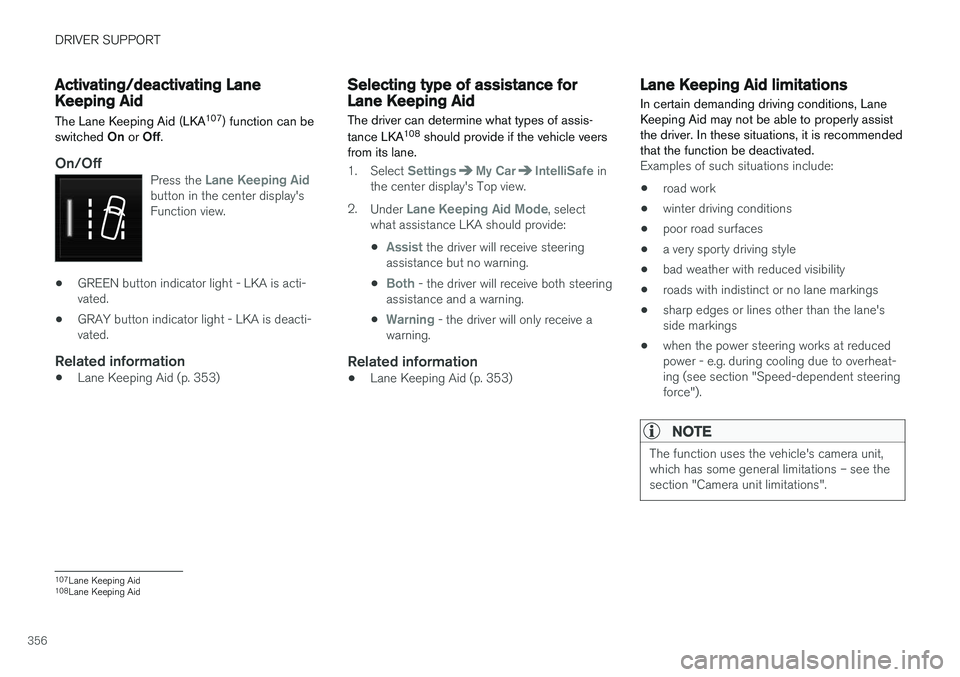
On/OffPress the Lane Keeping Aidbutton in the center display's Function view.
• GREEN button indicator light - LKA is acti- vated.
• GRAY button indicator light - LKA is deacti-vated.
Related information
•Lane Keeping Aid (p. 353)
Selecting type of assistance forLane Keeping Aid
The driver can determine what types of assis- tance LKA 108
should provide if the vehicle veers
from its lane.
1. Select SettingsMy CarIntelliSafe in
the center display's Top view.
2. Under
Lane Keeping Aid Mode, select
what assistance LKA should provide:
•
Assist the driver will receive steering
assistance but no warning.
•
Both - the driver will receive both steering
assistance and a warning.
•
Warning - the driver will only receive a
warning.
Related information
• Lane Keeping Aid (p. 353)
Lane Keeping Aid limitations
In certain demanding driving conditions, Lane Keeping Aid may not be able to properly assistthe driver. In these situations, it is recommendedthat the function be deactivated.
Examples of such situations include:
• road work
• winter driving conditions
• poor road surfaces
• a very sporty driving style
• bad weather with reduced visibility
• roads with indistinct or no lane markings
• sharp edges or lines other than the lane's side markings
• when the power steering works at reducedpower - e.g. during cooling due to overheat-ing (see section "Speed-dependent steeringforce").
NOTE
The function uses the vehicle's camera unit, which has some general limitations – see thesection "Camera unit limitations".
107
Lane Keeping Aid
108 Lane Keeping Aid
Page 374 of 640

||
DRIVER SUPPORT
* Option/accessory.
372
CAUTION
When installing auxiliary lights: Make sure these do not obscure the sensors – the auxili-ary lights could be perceived as an obstacle.
Related information
• Park Assist
* (p. 370)
Activating/deactivating Park Assist
The Park Assist Pilot function can be activated/ deactivated.
On/OffPark Assist's front and side sensors are automat- ically activated when the engine is started. Therear sensors are activated if the vehicle is movingbackward or reverse gear is engaged.
The function can be activated/deactivated in the center dis-play's Function view.
–Tap the Park Assist button in Function view.
> The Park Assist Pilot indicator light shows the status of the function: GREEN (on) or GRAY (off).
In vehicles equipped with Park Assist Camera,Park Assist can also be activated/deactivatedfrom the relevant camera view.
Related information
• Park Assist
* (p. 370)
Park Assist limitations
Park Assist may not be able to detect all condi- tions in all situations and functionality may there-fore be limited in certain cases.
The driver should be aware of the following limi- tations for Park Assist:
WARNING
Be extra cautious when reversing if this symbol isshown when a trailer, bikecarrier or similar is attachedand electrically connectedto the vehicle. The symbol indicates that
the rear parking assist sensors are deacti-
vated and will not warn of any obstacles.
Page 383 of 640
DRIVER SUPPORT
* Option/accessory.381
Blind sectors
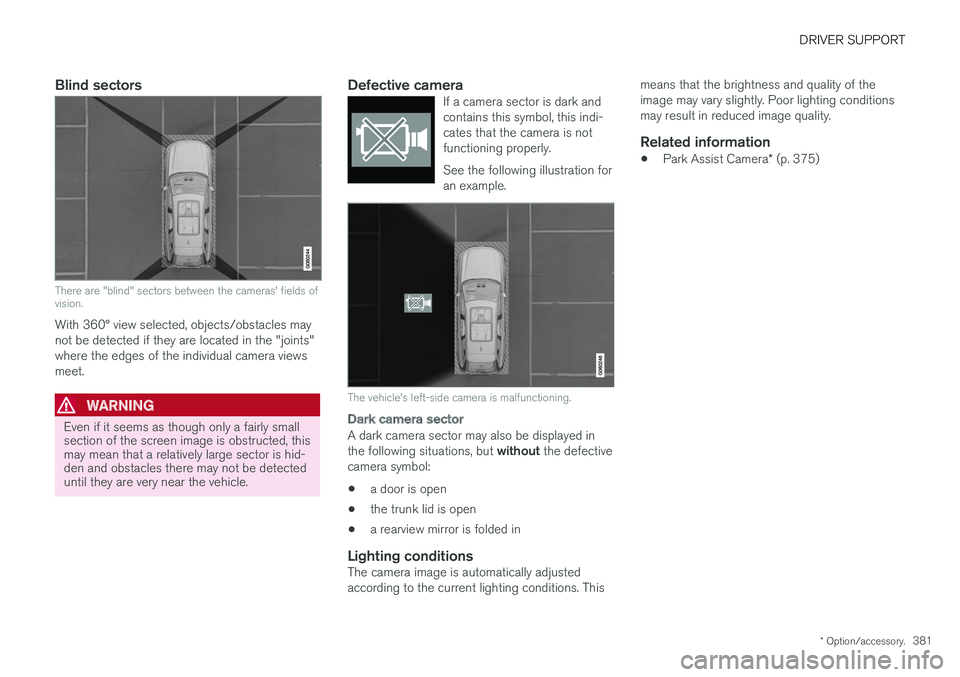
There are "blind" sectors between the cameras' fields of vision.
With 360° view selected, objects/obstacles may not be detected if they are located in the "joints"where the edges of the individual camera viewsmeet.
WARNING
Even if it seems as though only a fairly small section of the screen image is obstructed, thismay mean that a relatively large sector is hid-den and obstacles there may not be detecteduntil they are very near the vehicle.
Defective cameraIf a camera sector is dark and contains this symbol, this indi-cates that the camera is notfunctioning properly. See the following illustration for an example.
The vehicle's left-side camera is malfunctioning.
Dark camera sector
A dark camera sector may also be displayed in the following situations, but without the defective
camera symbol:
• a door is open
• the trunk lid is open
• a rearview mirror is folded in
Lighting conditionsThe camera image is automatically adjusted according to the current lighting conditions. This means that the brightness and quality of theimage may vary slightly. Poor lighting conditionsmay result in reduced image quality.
Related information
•
Park Assist Camera
* (p. 375)
Page 397 of 640
STARTING AND DRIVING
}}
395
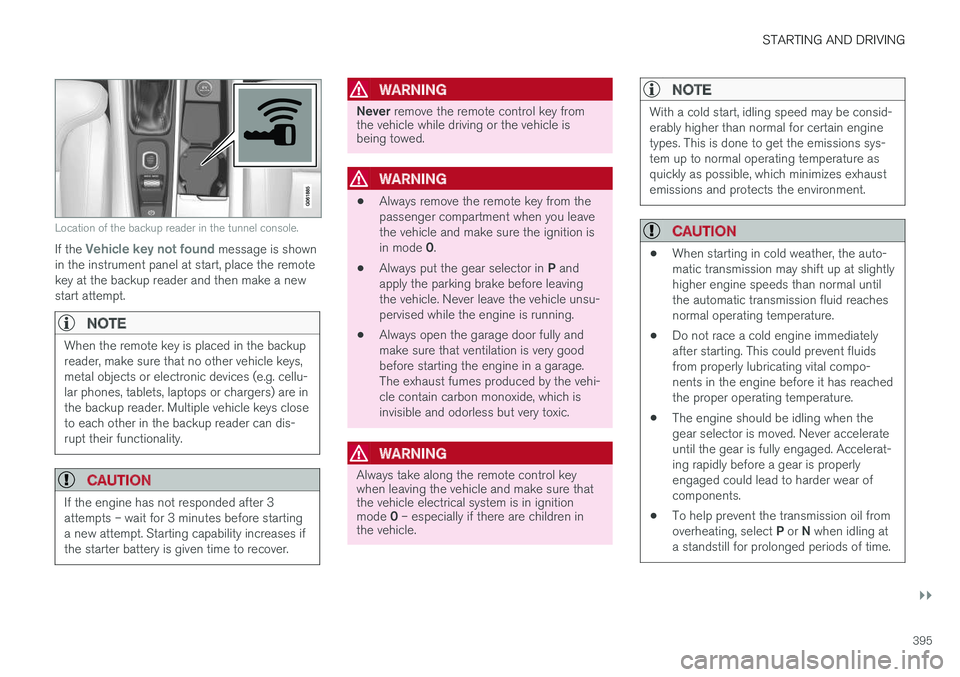
Location of the backup reader in the tunnel console.
If the Vehicle key not found message is shown
in the instrument panel at start, place the remote key at the backup reader and then make a newstart attempt.
NOTE
When the remote key is placed in the backup reader, make sure that no other vehicle keys,metal objects or electronic devices (e.g. cellu-lar phones, tablets, laptops or chargers) are inthe backup reader. Multiple vehicle keys closeto each other in the backup reader can dis-rupt their functionality.
CAUTION
If the engine has not responded after 3 attempts – wait for 3 minutes before startinga new attempt. Starting capability increases ifthe starter battery is given time to recover.
WARNING
Never remove the remote control key from
the vehicle while driving or the vehicle is being towed.
WARNING
• Always remove the remote key from the passenger compartment when you leavethe vehicle and make sure the ignition is in mode
0.
• Always put the gear selector in
P and
apply the parking brake before leaving the vehicle. Never leave the vehicle unsu-pervised while the engine is running.
• Always open the garage door fully andmake sure that ventilation is very goodbefore starting the engine in a garage.The exhaust fumes produced by the vehi-cle contain carbon monoxide, which isinvisible and odorless but very toxic.
WARNING
Always take along the remote control key when leaving the vehicle and make sure thatthe vehicle electrical system is in ignition mode
0 – especially if there are children in
the vehicle.
NOTE
With a cold start, idling speed may be consid- erably higher than normal for certain enginetypes. This is done to get the emissions sys-tem up to normal operating temperature asquickly as possible, which minimizes exhaustemissions and protects the environment.
CAUTION
• When starting in cold weather, the auto- matic transmission may shift up at slightlyhigher engine speeds than normal untilthe automatic transmission fluid reachesnormal operating temperature.
• Do not race a cold engine immediatelyafter starting. This could prevent fluidsfrom properly lubricating vital compo-nents in the engine before it has reachedthe proper operating temperature.
• The engine should be idling when thegear selector is moved. Never accelerateuntil the gear is fully engaged. Accelerat-ing rapidly before a gear is properlyengaged could lead to harder wear ofcomponents.
• To help prevent the transmission oil from overheating, select
P or N when idling at
a standstill for prolonged periods of time.
Page 399 of 640
STARTING AND DRIVING
* Option/accessory.397
Ignition modes
The vehicle's ignition can be put in various modes (levels) to make different functions availa-ble.
To enable the use of a limited number of func- tions when the engine is not running, the ignition can be put in one of three different levels: 0, I
and II. These levels are referred to as "ignition
modes" in the Owner's Manual. The following table shows which functions are available in each ignition mode:
ModeFunctions
0 •The odometer, clock and tem- perature gauge are illuminated A
.
• The power seats
* can be
adjusted.
• The power windows can be used.
• The center display is activatedand can be used A
.
• The 12 V outlet in the trunk
* can
be used.
• The infotainment system can beused A
.
In this ignition mode, the functions are available for a limited time and then switch off automatically.
I •The panoramic roof, power win-dows, 12 V outlet in passengercompartment, Bluetooth, naviga-tion, phone, blower and wind-shield wipers can be used.
• The power seats can be adjusted.
• The 12 V outlet in the cargo com-partment can be used.
Electrical current will be takenfrom the battery in this ignitionmode.ModeFunctions
II •The headlights illuminate.
• Warning/indicator lights illumi- nate for 5 seconds.
• A number of other systems areactivated. However, seat and rearwindow heating can only be acti-vated when the engine is running.
This ignition mode uses a lot ofcurrent from the battery andshould be avoided whenever pos-sible!
A Also activated when the door is opened.
Related information
• Starting the vehicle (p. 394)
• Adjusting the steering wheel (p. 193)
• Jump starting using another battery (p. 433)
• Selecting ignition mode (p. 398)
Page 402 of 640
||
STARTING AND DRIVING
400
WARNING
•If both symbols illuminate at the same time and the brake level is below the
MIN
mark in the reservoir or if a brake system- related message is shown in the instru-ment panel: DO NOT DRIVE. Have thevehicle towed to a trained and qualifiedVolvo service technician and have thebrake system inspected.
• If both symbols illuminate at the sametime and the brake level is normal (notbelow the MIN mark in the reservoir) or ifa brake system-related message isshown in the instrument panel: drive thevehicle carefully to an authorized Volvoworkshop and have the brake systeminspected by a trained and qualified Volvoservice technician.
Related information
• Brake Assist System (p. 400)
• Auto-hold brakes (p. 405)
• Hill Start Assist (p. 406)
• Braking on wet roads (p. 400)
• Braking on salted roads (p. 401)
• Maintenance of the brake system (p. 401)
• Brake lights (p. 159)
Brake Assist System
The brake enhancing system, Brake Assist
System (BAS), helps increase braking force andthereby reduce braking distance.
The system monitors the driver's braking habits and increases braking force when necessary.Braking force can be increased up to the point atwhich the ABS intervenes. The function is deacti-vated when pressure on the brake pedal isdecreased.
NOTE
When BAS is activated, the brake pedal will go down slightly more than usual. Press(hold) down the brake pedal as long as nec-essary. When the brake pedal is released, all braking ceases.
Related information
• Brakes (p. 399)
Braking on wet roads
Prolonged driving in heavy rain without braking may cause braking effect to be slightly delayedthe first time the brakes are applied.
This may also occur after washing the vehicle. It will then be necessary to apply greater pressureto the brake pedal. You should therefore maintaina greater distance to the vehicle ahead. Firmly apply the brakes after washing the vehicle or driving on wet roads. This helps warm up thebrake discs, enabling them to dry more quicklyand protecting them against corrosion. Considerthe current traffic situation when braking.
Related information
• Brakes (p. 399)
• Braking on salted roads (p. 401)
Page 409 of 640
STARTING AND DRIVING
}}
* Option/accessory.407
Braking assist after a collision In a collision in which the activation level is reached for the pyrotechnic seat belt tensionersor airbags, or if a collision with a large animal isdetected, the vehicle's brakes will be automati-cally activated. This function is intended to helpprevent or reduce the effects of any subsequentcollision.
After a serious collision, it may no longer be pos- sible to control and steer the vehicle. In order toavoid or mitigate a possible further collision witha vehicle or an object in the vehicle's path, thebrake assist system is activated automatically tohelp stop the vehicle safely. The brake lights and hazard warning flashers are activated during braking. When the vehicle has stopped, the hazard warning flashers will con-tinue to flash and the parking brake will beapplied. If braking is not appropriate, e.g. if there is a risk of being hit by passing traffic, the driver can over-ride the system by depressing the acceleratorpedal. This function assumes that the brake system is intact after a collision. Brake assist is part of the Rear Collision Warning and Blind Spot Information safety systems.
Related information
•Rear Collision Warning (p. 336)
• BLIS
* (p. 337)
• Brake functions (p. 398)
Transmission The transmission is part of the vehicle's driveline (power transmission) between the engine andthe drive wheels. The function of the transmis-sion is to change gears depending on speedand power needs.
The vehicle has an 8-speed automatic transmis- sion. The number of gears allows the engine'storque and power band to be effectively utilized.Two of the gears are overdrive gears that savefuel when driving at a constant engine speed.Manual shifting is also possible. The instrumentpanel shows the gear currently in use.
CAUTION
Check the operating temperature of the transmission to help avoid damage to any ofthe drive system components. If there is a riskof overheating, a warning symbol will appearin the instrument panel and a text messagewill be displayed. Follow the recommenda-tions given.
Symbols in the instrument panelIf a problem should occur with the transmission, a symbol and a message will appear in the instru-ment panel.
Page 422 of 640
STARTING AND DRIVING
420
Conditions for the Start/Stopfunction Certain conditions must be met for Start/Stop to function.
If any condition is not met, this will be indicated in the instrument panel.
The engine does not auto-stopThe engine will not auto-stop if: •the vehicle has not reached a speed of ca 10 km/h (6 mph) after starting.
• after several auto-stops, the speed mustagain exceed approximately ca 10 km/h(6 mph) before the next auto-stop.
• the driver's seat belt is unbuckled.
• the start battery's charge is below the mini-mum level.
• the engine is not running at its normal oper-ating temperature.
• the ambient temperature is under approxi-mately -5 °C (23 °F) or over approximately30 °C (86 °F).
• windshield heating is activated.
• the climate system settings and the actualclimate in the passenger compartment differ.
• the vehicle is backing up.
• the start battery's temperature is above orbelow the permitted limits.
• the driver is turning the steering wheel hard. •
the road gradient is very steep.
• the hood is open.
• driving at high altitude and the engine hasnot reached its normal operating tempera-ture.
• ABS has been activated.
• hard braking (even if the ABS system hasnot been activated).
• many starts during a short period of timehave triggered the starter motor's overheat-ing protection.
• a trailer's electrical system is connected tothe vehicle's electrical system.
• the transmission is not running at its normaloperating temperature.
• The gear selector is in mode
M (±).
The engine does not auto-startThe engine will not auto-start after an auto-stopif: • the driver is not wearing a seat belt, the gear selector is in the
P position and the driver's
door is open. The engine must be started normally.
The engine auto-starts while the brake
pedal is depressed
In the following situations, the engine will auto-start even if the brake pedal is depressed: •
High levels of condensation on the inside ofthe windows.
• the climate system settings and the actualclimate in the passenger compartment differ.
• Electrical current consumption is temporarilyhigh or the start battery's charge is below theminimum level.
• The brake pedal is pumped repeatedly.
• The hood is open.
• The vehicle begins to roll or increases speedslightly if the engine auto-stopped before thevehicle was at a standstill.
• The driver's seat belt is unbuckled with the gear selector in the
D or N positions.
• The gear selector is moved from
D to R or M
( ± ).
• The driver's door is opened with the gearselector in
D. An audible signal and a text
message informs the driver that the ignition is on.
WARNING
Do not open the hood if the engine has auto- stopped. Turn off the engine by switching offthe ignition before lifting the hood.
Page 433 of 640
STARTING AND DRIVING
}}
431
Emission controls
Three-way catalytic converter
•Keep your engine properly tuned. Certain engine malfunctions, particularly involving theelectrical, fuel or distributor ignition systems,may cause unusually high three-way catalyticconverter temperatures. Do not continue tooperate your vehicle if you detect enginemisfire, noticeable loss of power or otherunusual operating conditions, such as engineoverheating or backfiring. A properly tunedengine will help avoid malfunctions thatcould damage the three-way catalytic con-verter.
• Do not park your vehicle over combustiblematerials, such as grass or leaves, which cancome into contact with the hot exhaust sys-tem and cause such materials to ignite undercertain wind and weather conditions.
• Excessive starter cranking (in excess of oneminute), or an intermittently firing or floodedengine can cause three-way catalytic con-verter or exhaust system overheating.
• Remember that tampering or unauthorizedmodifications to the engine, the Engine Con-trol Module, or the vehicle may be illegal andcan cause three-way catalytic converter orexhaust system overheating. This includes:altering fuel injection settings or compo-nents, altering emission system components or location or removing components, and/orrepeated use of leaded fuel.NOTE
Unleaded fuel is required for vehicles with three-way catalytic converters.
Heated oxygen sensorsThe heated oxygen sensors monitor the oxygen content of the exhaust gases. Readings are fedinto a control module that continuously monitorsengine functions and controls fuel injection. Theratio of fuel to air into the engine is continuouslyadjusted for efficient combustion to help reduceharmful emissions.
Related information
•
Octane rating (p. 429)
• Fuel (p. 428)
Overheating of engine andtransmission
In demanding driving conditions, such as driving in mountainous areas or hot weather, there is arisk of the engine or transmission overheating,especially when carrying heavy loads.
• Engine power may be temporarily limited.
• Remove any auxiliary lights mounted in front of the grille when driving in hot weather.
• If the temperature in the engine's coolingsystem becomes too high, a warning symbolwill appear in the instrument panel along with the message
Engine temperature High
temperature Stop safely. Pull over to a
safe location and let the engine idle for a few minutes to cool down.
• If the message
Engine temperature High
temperature Turn off engine or Engine
coolant Level low, turn off engine is dis-
played, stop the vehicle and turn off the engine.
• If the transmission begins to overheat, analternative gear shifting program will beselected. An integrated protective functionwill also be activated, the warning symbol will illuminate and the message
Transmission
warm Reduce speed to lower
temperature or Transmission hot Stop
safely, wait for cooling will be displayed in
the instrument panel. Follow the recommen- dations given by reducing speed or stopping
Page 436 of 640
||
STARTING AND DRIVING
434
WARNING
•Batteries generate hydrogen gas, which is flammable and explosive.
• Do not connect the jumper cable to anypart of the fuel system or to any movingparts. Avoid touching hot manifolds.
• Battery fluid contains sulfuric acid. Do notallow battery fluid to contact eyes, skin,fabrics or painted surfaces.
• If contact occurs, flush the affected areaimmediately with water. Obtain medicalhelp immediately if eyes are affected.
• Never expose the battery to open flameor electric spark. Do not smoke near thebattery. Failure to follow the instructionsfor jump starting can lead to injury.
Related information
• Starting the vehicle (p. 394)
• Ignition modes (p. 397)
• Adjusting the steering wheel (p. 193)
• Selecting ignition mode (p. 398)
Towing using a towline
This section refers to one vehicle being towed behind another using a towline.
Before towing another vehicle, check applicable speed limit regulations.
Preparations and towing
CAUTION
Note that the vehicle must always be towed with the wheels rolling forward.
• Do not tow a vehicle with automatictransmission at a speed greater than80 km/h (50 mph) or for a distancegreater than 80 km (50 miles).
WARNING
•
Ignition mode
II must be active – all air-
bags are deactivated in ignition mode I.
• Always have the remote key in the vehicle when it is towed.
WARNING
The brake and steering servos do not work when the engine is off – it takesabout 5 times more pressure on the brakepedal and steering requires much more effortthan normal. 1. Turn on the hazard warning flashers.
2. Attach the towline to the towing eyelet.3.
Put the vehicle in ignition mode II – without
pressing the brake pedal, turn the start knob clockwise and hold it there for about4 seconds. Release the knob, which willautomatically return to its original position.
4. Move the gear selector to neutral ( N) and
release the parking brake. If the battery charge level is too low, it may not be possible to release the parking brake.Connect an auxiliary battery to the vehicle ifthe battery is discharged.
> The towing vehicle can now start driving.
5. Keep the towline taut when the towing vehi- cle slows down by applying light pressure to the brake pedal. This will help avoid jarringmovements.
6. Be prepared to apply the brakes to stop the vehicle.
Jump startingDo not tow the vehicle to start the engine. Use anauxiliary battery if the start battery's charge levelis so low that the engine cannot be started.