transmission VOLVO S90 2020 Quick Guide
[x] Cancel search | Manufacturer: VOLVO, Model Year: 2020, Model line: S90, Model: VOLVO S90 2020Pages: 643, PDF Size: 13.68 MB
Page 394 of 643

||
STARTING AND DRIVING
* Option/accessory.
392
Overview of small gear selector and gear shift pat- tern in the instrument panel
The instrument panel shows which gear is cur- rently in use: P , R , N , D or M. For vehicles with the small
gear selector, P position is electric and the
gear shift pattern is instead R, N , D or M.
For manual shifting, the gear indicator in the instrument panel displays the gear currentlybeing used.
CAUTION
Check the operating temperature of the transmission to help avoid damage to anyof the drive system components. If there isa risk of overheating, a warning symbol willappear in the instrument panel and a textmessage will be displayed. Follow the rec-ommendations given.
Symbols in the instrument panelIf a problem should occur with the transmis- sion, a symbol and a message will appear inthe instrument panel.
Symbol Meaning
Information and messages rela- ted to the transmission. Followthe recommendations provided.
Hot or overheated transmission. Follow the recommendationsprovided.
Reduced performance/Accel-
eration performance reduced
In the event of a temporary fault in the driveline, the vehicle maygo into a "limp home" mode withreduced power output to helpavoid damage to the driveline.
Related information
Gear selector positions for automatic transmissions (p. 392)
Using the steering wheel paddles
* to shift
(p. 395)
Shiftlock (p. 397)
The kickdown function (p. 398)
Gear selector positions for automatic transmissions
With an automatic transmission, a suitable gear is selected automatically according tocurrent speed and power requirements.
Selecting gearsThe gear selector is a shift-by-wire selector, where shifting is done electronically instead ofmechanically. This makes shifting easier andthe gear positions more distinct.
Page 395 of 643

STARTING AND DRIVING
}}
393
Large gear selector and gear selector positions over- view.
For the large gear selector, change gear selec- tor position by pressing the gear selector for-ward or rearward, or to the left for manualshifting.
Small gear selector and gear selector positions over- view.
For the small gear selector, change gear posi- tion by pushing the spring-loaded gear selec-tor forward or rearward, or to the side formanual shifting.
Gear selector positions
Park - P
For the small gear selector, Park is activated using the P button next to the gear selector.
For the large gear selector, Park is activatedby moving the gear selector to position P.
In P mode, the transmission is mechanically
locked. Select P when the vehicle is parked or when
starting the engine. The vehicle must be sta- tionary when Park is selected. To move to another gear from Park, the brakepedal must be depressed and the ignition inmode
II. For vehicles with the small gear
selector, the engine must be running. When parking – apply the parking brake before shifting to Park.
WARNING
Always apply the parking brake when park- ing on an incline. Selecting a gear or put-ting the automatic transmission in P may
not be sufficient to keep the vehicle sta-tionary in all situations.
NOTE
The gear selector must be in position P in
order to lock the vehicle and set the alarm.
Page 396 of 643
||
STARTING AND DRIVING
394Help functions
5
For vehicles with the small gear selector, the system will shift to P automatically
if the ignition is switched off while
D or R
is selected.
if the driver unbuckles the seat belt andopens the driver's door while the vehicle isrunning with the gear selector in a gearother than
P.
To park a vehicle with an unbuckled seat beltand open door – end P mode by shifting to R
or D again.
The system will not automatically shift to P if
the ignition is switched off while the gearselector is in the neutral position (N). This is tomake it possible to wash the vehicle in anautomatic car wash in which the vehicle ispulled forward on rolling wheels.
Reverse - R
Select R when backing up. The vehicle must
be stationary when Reverse is selected.
Neutral - N
No gear is selected and the engine can be started. Apply the parking brake if the vehicleis stationary with the gear selector in N.
To move the gear selector from N to another
gear, the brake pedal must be depressed andthe ignition in mode II. For vehicles with the small gear selector, the engine must be run-ning.
D
drive mode
D is the normal driving gear position. The
transmission shifts up or down automatically depending on acceleration and speed. The vehicle must be stationary when the gear selector is moved from R to D.
Manual shifting mode - M
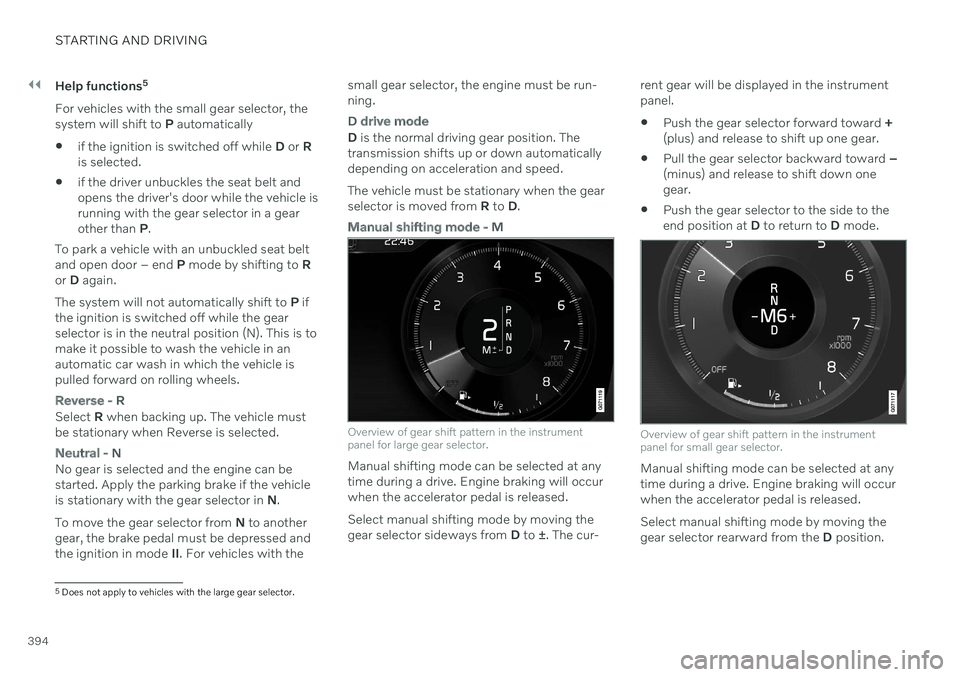
Overview of gear shift pattern in the instrument panel for large gear selector.
Manual shifting mode can be selected at any time during a drive. Engine braking will occurwhen the accelerator pedal is released. Select manual shifting mode by moving the gear selector sideways from D to ±. The cur- rent gear will be displayed in the instrumentpanel.
Push the gear selector forward toward
+
(plus) and release to shift up one gear.
Pull the gear selector backward toward
–
(minus) and release to shift down onegear.
Push the gear selector to the side to theend position at
D to return to D mode.
Overview of gear shift pattern in the instrument panel for small gear selector.
Manual shifting mode can be selected at any time during a drive. Engine braking will occurwhen the accelerator pedal is released. Select manual shifting mode by moving the gear selector rearward from the D position.
5
Does not apply to vehicles with the large gear selector.
Page 397 of 643

STARTING AND DRIVING
}}
* Option/accessory.395
The currently selected gear will be displayed in the instrument panel.
Push the gear selector to the right toward"
+ " (plus) and release to shift up one gear.
Push the gear selector to the left toward"
– " (minus) and release to shift down one
gear.
Push the gear selector rearward to returnto
D mode.
For smooth shifting and engine performance,the transmission will shift down automaticallyif the vehicle's speed becomes too low for theselected gear.
Related information
Automatic transmission (p. 391)
Shiftlock (p. 397)
Using the steering wheel paddles
* to shift
(p. 395)
The kickdown function (p. 398)
Using the steering wheel paddles
*
to shift
The steering wheel paddles are a supplement to the gear selector and make it possible toshift manually without removing your handsfrom the steering wheel.
" -": Shift down one gear.
" + ": Shift up one gear.
Activating the steering wheel paddlesIn order to shift gears using the paddles, they must first be activated:
–Pull one of the paddles toward the steer- ing wheel.
> A number in the instrument panel indi-
cates the current gear being used.
Instrument panel when shifting gears using steering wheel paddles, large gear selector.
Instrument panel when shifting gears using steering wheel paddles, small gear selector.
Page 398 of 643

||
STARTING AND DRIVING
396In shift mode
M, the paddles are automatically
activated.
Instrument panel when the paddles are activated for shifting in manual mode, large gear selector.
Instrument panel when the paddles are activated for shifting in manual mode, small gear selector.
ChangeTo shift one gear:
–Pull one of the paddles toward the steer- ing wheel and then release.
As long as the engine speed (rpm) is withinthe permissible range for the selected gear, agear shift will take place each time a paddle ispulled. After each gear shift, a number indicat-ing the current gear will be displayed in theinstrument panel.
Turning off Start/Stop
Manual deactivation in gear D and M
–Deactivate the paddles by pulling the right paddle ( +) toward the steering wheel and
holding it until the number of the currentgear is no longer displayed in the instru-ment panel.
> The transmission will return to gear selector position D.
On vehicles with the large gear selector, the function can only be switched off in gearselector position D.
Automatic deactivation
In gear position D, the steering wheel paddles
are deactivated after a short period of time if they are not used. The number of the currentgear will no longer be displayed in the instru-ment panel. If engine braking is currentlybeing used, the paddles will remain activeuntil engine braking stops. In gear position
M, the paddles will not acti-
vate automatically.
Related information
Automatic transmission (p. 391)
Gear selector positions for automatictransmissions (p. 392)
Page 399 of 643

STARTING AND DRIVING
397
Shiftlock The automatic transmission's shiftlock func- tion helps prevent inadvertently moving thegear selector between different positions.
There are two types of shiftlocks: mechanical and automatic.
Mechanical shiftlock
Shiftlock for vehicles with large gear selectors.
The gear selector can be moved back and forth between N and D. The other positions
have a shiftlock that is operated using the lockbutton on the gear selector. Press and hold the shiftlock button and move the gear selector forward or backwardbetween P, R , N and D.
Automatic shiftlockThe automatic shiftlock has a separate safetysystem.
From Park - P
To move the gear selector from P to another
gear, the brake pedal must be depressed and the ignition in mode II. For vehicles with the
small gear selector, the engine must be run-ning.
From Neutral - N
If the gear selector is in N and the vehicle has
been stationary for at least 3 seconds (with or without the engine running), the gear selectorwill be locked in that position. To move the gear selector from N to another
gear, the brake pedal must be depressed and the ignition in mode II. For vehicles with the
small gear selector, the engine must be run-ning.
Messages in the instrument panelIf the gear selector is locked in position, amessage will appear in the instrument panel, e.g.
Gear lever Press brake pedal to
activate gear lever.
There is no mechanical shiftlock function. 6
Related information
Automatic transmission (p. 391)
Gear selector positions for automatic transmissions (p. 392)
Deactivating the automatic shiftlock(p. 398)
6
Applies for vehicles with the small gear selector
Page 400 of 643
STARTING AND DRIVING
398
Deactivating the automatic shiftlock7
If the vehicle does not have electrical current, the automatic shiftlock may be disengagedon vehicles equipped with the large gearselector. The shiftlock cannot be disengagedon vehicles equipped with the small gearselector.
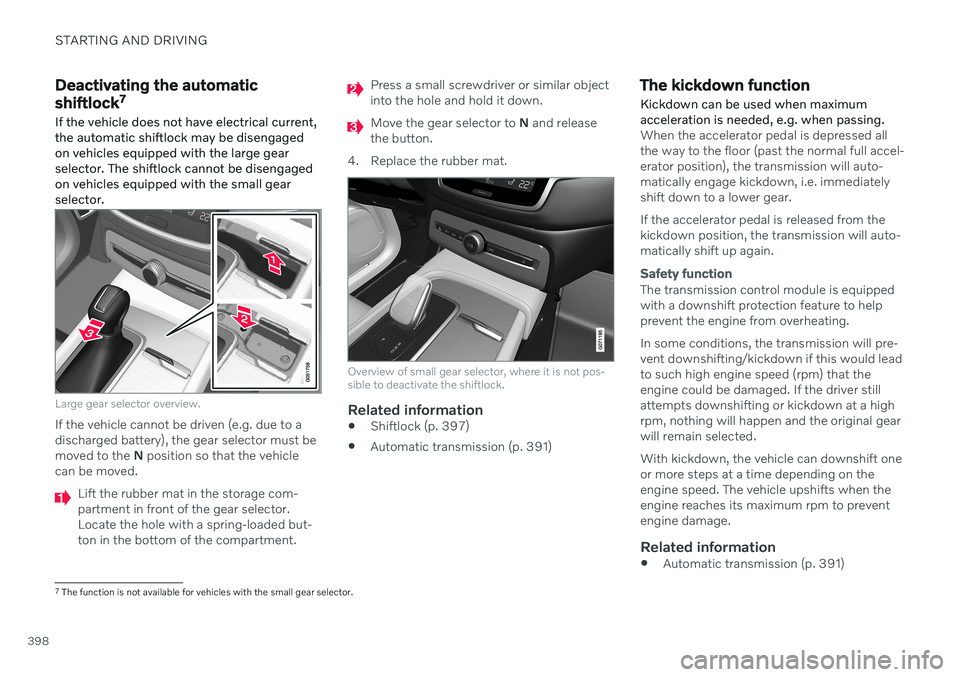
Large gear selector overview.
If the vehicle cannot be driven (e.g. due to a discharged battery), the gear selector must bemoved to the N position so that the vehicle
can be moved.
Lift the rubber mat in the storage com- partment in front of the gear selector.Locate the hole with a spring-loaded but-ton in the bottom of the compartment.
Press a small screwdriver or similar object into the hole and hold it down.
Move the gear selector to N and release
the button.
4. Replace the rubber mat.
Overview of small gear selector, where it is not pos- sible to deactivate the shiftlock.
Related information
Shiftlock (p. 397)
Automatic transmission (p. 391)
The kickdown function Kickdown can be used when maximum acceleration is needed, e.g. when passing.
When the accelerator pedal is depressed all the way to the floor (past the normal full accel-erator position), the transmission will auto-matically engage kickdown, i.e. immediatelyshift down to a lower gear. If the accelerator pedal is released from the kickdown position, the transmission will auto-matically shift up again.
Safety function
The transmission control module is equipped with a downshift protection feature to helpprevent the engine from overheating. In some conditions, the transmission will pre- vent downshifting/kickdown if this would leadto such high engine speed (rpm) that theengine could be damaged. If the driver stillattempts downshifting or kickdown at a highrpm, nothing will happen and the original gearwill remain selected. With kickdown, the vehicle can downshift one or more steps at a time depending on theengine speed. The vehicle upshifts when theengine reaches its maximum rpm to preventengine damage.
Related information
Automatic transmission (p. 391)
7
The function is not available for vehicles with the small gear selector.
Page 401 of 643

STARTING AND DRIVING
}}
* Option/accessory.399
All Wheel Drive (AWD) *
All-wheel drive (AWD 8
), also called four-
wheel drive, means that power is distributed to all four wheels, which improves traction.
To achieve the best traction, power is auto- matically directed to the wheels that have thebest grip. The system continuously calculatesthe need for torque to the rear wheels, andcan immediately redistribute up to half of theengine's torque to the rear wheels. All-wheel drive also has a stabilizing effect at higher speeds. In normal driving conditions,most of the engine's power is directed to thefront wheels. When the vehicle is stationary,all-wheel drive is always activated in prepara-tion for maximum traction during acceleration. All-wheel drive reacts differently depending on which drive mode is selected.
Related information
Drive modes
* (p. 399)
Transmission (p. 391)
Drive modes
*
Drive modes affect the vehicle's driving cha- racteristics in different ways to enhance andsimplify the driving experience in certaintypes of situations.
Drive modes enable easy access to the vehi- cle's many functions and settings in differentdriving situations. The following systems areadapted to help optimize driving characteris-tics in each drive mode: Steering
Engine/transmission/all-wheel drive
*
Brakes
Shock absorbers
Instrument panel
Start/Stop function
Climate control settings
Select the drive mode that is adapted to the current driving conditions. Keep in mind thatnot all drive modes are available in all situa-tions.
Available drive modesWhen the engine is started, the vehicle will be in Comfort mode and the start/stop function
will be activated. Drive mode can be changed once the vehicle is started, e.g. to
Individual
mode. Once Individual mode is selected, you
can adjust settings to personal preferences, e.g. to show the tachometer.
Comfort
Comfort is the vehicle's default mode. This
setting offers driving comfort, light steering and soft suspension. In
Comfort mode, no tachometer will be dis-
played in the instrument panel 9
.
Eco
Adapt the vehicle for more fuel-efficient and eco-friendly driving with Eco mode.
In this mode, the Start/Stop function is acti- vated and certain climate settings arereduced. When driving in
Eco mode, an ECO gauge
indicating how economical the driving is will be displayed in the instrument panel.
8 All Wheel Drive
9 Only applies to vehicles with 8-inch instrument panels.
Page 402 of 643

||
STARTING AND DRIVING
* Option/accessory.
400
Dynamic
Dynamic mode is designed to help pro-
vide sportier driving characteristics and a faster acceleration response.
Gear shifting will be faster and more distinctand the transmission will prioritize gears witha higher traction force. Steering response is faster and suspension is stiffer 10
to help reduce body roll when corner-
ing. The Start/Stop function is deactivated.
Dynamic mode is also available in a Polestar
Engineered* version.
Individual
Customizes drive mode to personal prefer- ences.
Select one of the drive modes as a basis andadjust the settings to achieve your preferreddriving characteristics. These settings will bestored in the active driver profile and will beavailable every time the vehicle is unlockedwith that remote key. Individual drive mode is only available if it has been activated in the center display.
Settings view 11
for Individual drive mode.
1. Tap Settings in the Top view.
2. Tap
My CarIndividual Drive Modeand select Individual Drive Mode. 3.
Under
Presets, select one of the following
drive modes as a basis: Eco, Comfort,Dynamic or Polestar Engineered* .
The following settings can be modified:
Driver Display
Steering Force
Powertrain Characteristics
Brake Characteristics
Suspension Control
ECO Climate
Start/Stop.
Related information
Changing drive mode
* (p. 401)
Eco drive mode (p. 401)
Economical driving (p. 411)
Start/Stop function (p. 404)
All Wheel Drive (AWD)
* (p. 399)
Driver profiles (p. 133)
10
Vehicles with Four-C.
11 The illustration is generic - details may vary according to vehicle model.
Page 403 of 643
STARTING AND DRIVING
}}
* Option/accessory.401
Changing drive mode *
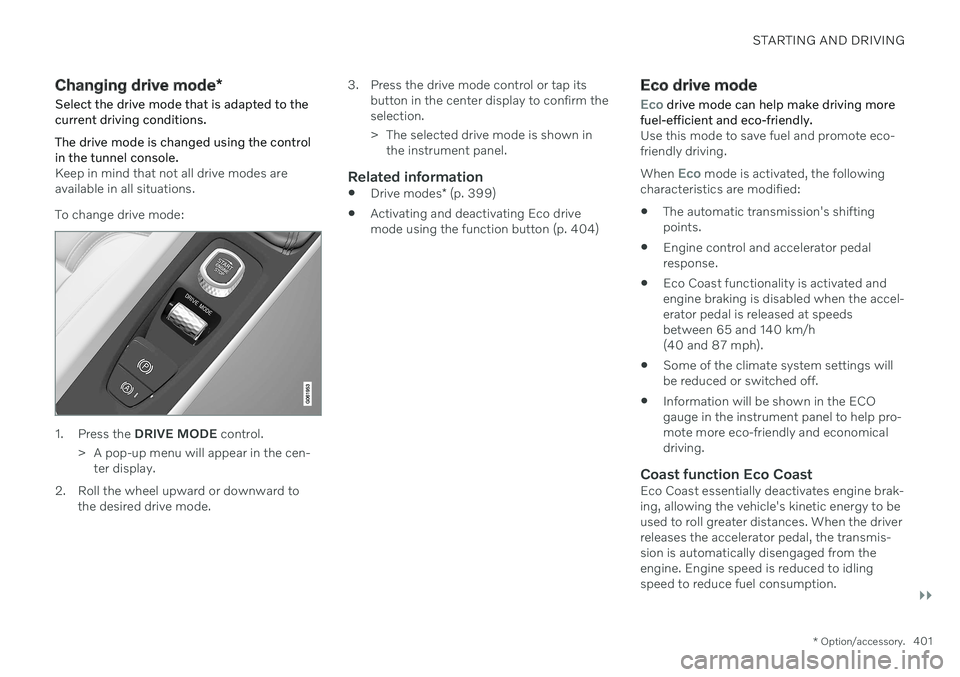
Select the drive mode that is adapted to the current driving conditions. The drive mode is changed using the control in the tunnel console.
Keep in mind that not all drive modes are available in all situations. To change drive mode:
1. Press the DRIVE MODE control.
> A pop-up menu will appear in the cen- ter display.
2. Roll the wheel upward or downward to the desired drive mode. 3. Press the drive mode control or tap its
button in the center display to confirm the selection.
> The selected drive mode is shown inthe instrument panel.
Related information
Drive modes
* (p. 399)
Activating and deactivating Eco drive mode using the function button (p. 404)
Eco drive mode
Eco drive mode can help make driving more
fuel-efficient and eco-friendly.
Use this mode to save fuel and promote eco- friendly driving. When
Eco mode is activated, the following
characteristics are modified:
The automatic transmission's shifting points.
Engine control and accelerator pedalresponse.
Eco Coast functionality is activated andengine braking is disabled when the accel-erator pedal is released at speedsbetween 65 and 140 km/h(40 and 87 mph).
Some of the climate system settings willbe reduced or switched off.
Information will be shown in the ECOgauge in the instrument panel to help pro-mote more eco-friendly and economicaldriving.
Coast function Eco CoastEco Coast essentially deactivates engine brak-ing, allowing the vehicle's kinetic energy to beused to roll greater distances. When the driverreleases the accelerator pedal, the transmis-sion is automatically disengaged from theengine. Engine speed is reduced to idlingspeed to reduce fuel consumption.