parking brake VOLVO S90 2020 Quick Guide
[x] Cancel search | Manufacturer: VOLVO, Model Year: 2020, Model line: S90, Model: VOLVO S90 2020Pages: 643, PDF Size: 13.68 MB
Page 381 of 643

STARTING AND DRIVING
}}
379
Location of the backup reader in the tunnel console.
NOTE
When the remote key is placed in the backup reader, make sure that no othervehicle keys, metal objects or electronicdevices (e.g. cellular phones, tablets, lap-tops or chargers) are in the backup reader.Multiple vehicle keys close to each other inthe backup reader can disrupt their func-tionality.
CAUTION
If the engine has not responded after 3 attempts – wait for 3 minutes before star-ting a new attempt. Starting capabilityincreases if the starter battery is given timeto recover.
WARNING
Never remove the remote control key from
the vehicle while driving or the vehicle is being towed.
WARNING
Always remove the remote key from the passenger compartment when youleave the vehicle and make sure theignition is in mode
0.
Always put the gear selector in
P and
apply the parking brake before leavingthe vehicle. Never leave the vehicleunsupervised while the engine is run-ning.
Always open the garage door fully andmake sure that ventilation is very goodbefore starting the engine in a garage.The exhaust fumes produced by thevehicle contain carbon monoxide,which is invisible and odorless but verytoxic.
CAUTION
When starting in cold weather, the automatic transmission may shift up atslightly higher engine speeds than nor-mal until the automatic transmissionfluid reaches normal operating tem-perature.
Do not race a cold engine immediatelyafter starting. This could prevent fluidsfrom properly lubricating vital compo-nents in the engine before it hasreached the proper operating tempera-ture.
The engine should be idling when thegear selector is moved. Never acceler-ate until the gear is fully engaged.Accelerating rapidly before a gear isproperly engaged could lead to harderwear of components.
To help prevent the transmission oilfrom overheating, select
P or N when
idling at a standstill for prolonged peri-ods of time.
Page 384 of 643
STARTING AND DRIVING
382
Selecting ignition modeThe vehicle's ignition can be put in various modes (levels) to make different functionsavailable.
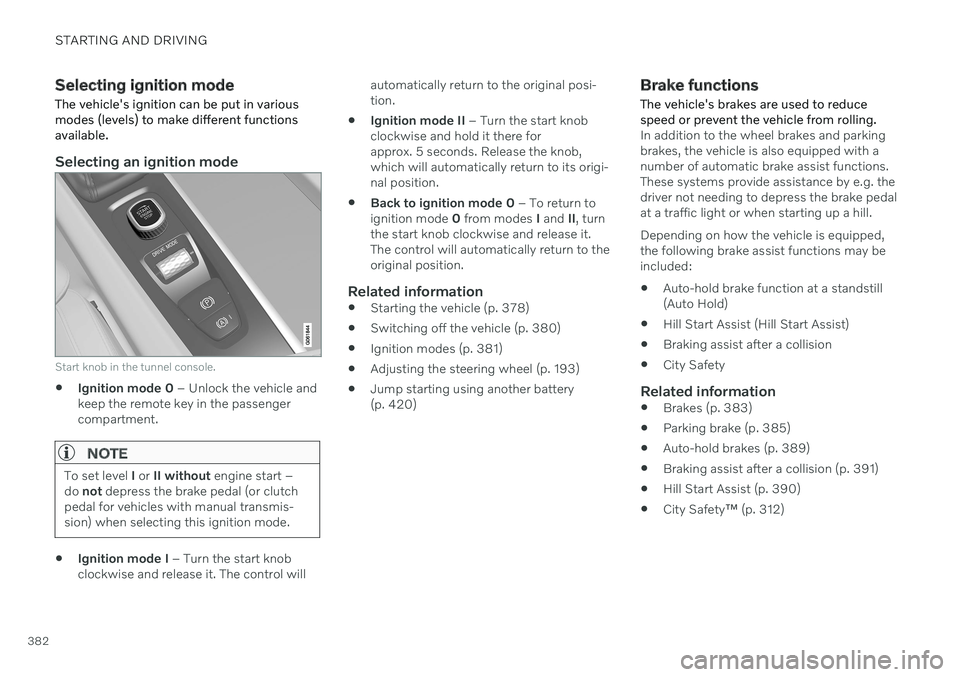
Selecting an ignition mode
Start knob in the tunnel console.
Ignition mode 0
– Unlock the vehicle and
keep the remote key in the passenger compartment.
NOTE
To set level I or II without engine start –
do not depress the brake pedal (or clutch
pedal for vehicles with manual transmis- sion) when selecting this ignition mode.
Ignition mode I
– Turn the start knob
clockwise and release it. The control will automatically return to the original posi- tion.
Ignition mode II
– Turn the start knob
clockwise and hold it there forapprox. 5 seconds. Release the knob,which will automatically return to its origi-nal position.
Back to ignition mode 0
– To return to
ignition mode 0 from modes I and II, turn
the start knob clockwise and release it.The control will automatically return to theoriginal position.
Related information
Starting the vehicle (p. 378)
Switching off the vehicle (p. 380)
Ignition modes (p. 381)
Adjusting the steering wheel (p. 193)
Jump starting using another battery(p. 420)
Brake functions
The vehicle's brakes are used to reduce speed or prevent the vehicle from rolling.
In addition to the wheel brakes and parking brakes, the vehicle is also equipped with anumber of automatic brake assist functions.These systems provide assistance by e.g. thedriver not needing to depress the brake pedalat a traffic light or when starting up a hill. Depending on how the vehicle is equipped, the following brake assist functions may beincluded:
Auto-hold brake function at a standstill(Auto Hold)
Hill Start Assist (Hill Start Assist)
Braking assist after a collision
City Safety
Related information
Brakes (p. 383)
Parking brake (p. 385)
Auto-hold brakes (p. 389)
Braking assist after a collision (p. 391)
Hill Start Assist (p. 390)
City Safety
™ (p. 312)
Page 387 of 643

STARTING AND DRIVING
}}
385
Braking on salted roads
When driving on salted roads, a layer of salt may form on the brake discs and brake pads.
This could increase stopping distance. Main- tain an extra large safety distance to the vehi-cle ahead. Make sure to also:
Apply the brakes from time to time to helpremove salt. Make sure braking does notpose a risk to any other road users.
Gently apply the brakes when you havefinished driving and before driving again.
Related information
Brakes (p. 383)
Braking on wet roads (p. 384)
Maintenance of the brake system
Regularly check the brake system compo- nents for wear.
To keep the vehicle as safe and reliable as possible, follow the Volvo service schedulespecified in the Warranty and MaintenanceRecords Information booklet. After replacingbrake pads and brake discs, braking effect isnot adapted until they are "broken in" by driv-ing a few hundred kilometers (miles). Com-pensate for the reduced braking effect byapplying greater pressure to the brake pedal.Volvo recommends only using brake padsapproved for your Volvo.
CAUTION
The brake system's components should be regularly checked for wear. Contact a workshop for advice on how to do this or let a workshop perform theinspection - an authorized Volvo workshopis recommended.
Related information
Brakes (p. 383)
Parking brake
The parking brake helps keep the vehicle sta- tionary by mechanically locking two wheels.
The parking brake controls are located in the tunnel console between the seats.
When the electric parking brake is being applied, a faint sound can be heard from thebrake's electric motor. This sound can also beheard during the automatic function check ofthe parking brake. If the vehicle is stationary when the parking brake is activated, it will only be applied to therear wheels. If it is activated while the vehicleis moving, the normal brakes will be used onall four wheels. Braking will be transferred toonly the rear wheels when the vehicle isalmost stopped.
Page 388 of 643

||
STARTING AND DRIVING
386
Related information
Activating and deactivating the parking brake (p. 386)
Parking on a hill (p. 388)
Parking brake malfunction (p. 388)
Auto-hold brakes (p. 389)
Activating and deactivating the parking brake
Use the parking brake to help keep the vehi- cle stationary when it is parked.
Activating the parking brake
1. Pull up the control.
> The symbol in the instrument panel willilluminate when the parking brake is activated.
2. Make sure the vehicle is stationary.
Symbol in the instrument panel
Symbol Meaning
A
B The symbol will be illuminated when the parking brake is acti-vated. A flashing symbol indicates that a fault has been detected. Readthe message in the instrumentpanel.
A
Canadian models.
B US models.
Automatic activation
The parking brake is applied automatically when the ignition is switched off and the setting for automatically activating theparking brake is activated in the centerdisplay.
when the gear selector is moved to
P on a
steep hill.
if the auto-hold brake (automatic brake atstandstill) function is activated and
the vehicle has been stationary for aprolonged period of time (5-10minutes).
the vehicle is switched off.
the driver has left the vehicle.
Page 389 of 643

STARTING AND DRIVING
387
Emergency braking
In an emergency, the parking brake can be activated when the vehicle is moving by pull-ing and holding up the control. The brakingprocess is canceled when the control isreleased or if the accelerator pedal isdepressed.
NOTE
In case of emergency braking at high speeds, a signal sounds during the brakeprocedure.
Deactivating the parking brake
Deactivating manually
1. Depress the brake pedal firmly.2. Press the control.
> The parking brake will release and thesymbol in the instrument panel will go out.
Deactivating automatically
1. Start the vehicle.
2. Depress the brake pedal firmly. Move the gear selector to D or R and press the
accelerator pedal.
> The parking brake will release and the symbol in the instrument panel will go out.
NOTE
For automatic deactivation to be possible, the driver's seat belt must be buckled orthe driver's door closed.
Related information
Settings for automatically activating the parking brake (p. 387)
Parking brake malfunction (p. 388)
Parking brake (p. 385)
Parking on a hill (p. 388)
Settings for automatically activating the parking brake Choose whether the parking brake should be activated automatically when the vehicle isswitched off.
To change this setting: 1.
Tap
Settings in the center display's Top
view.
2. Tap
My CarParking Brake and
Suspension and select or deselect theAuto Activate Parking Brake function.
Related information
Activating and deactivating the parking brake (p. 386)
Parking brake (p. 385)
Page 390 of 643

STARTING AND DRIVING
388
Parking on a hillAlways use the parking brake when parking on a hill.
WARNING
Always apply the parking brake when park- ing on an incline. Selecting a gear or put-ting the automatic transmission in P may
not be sufficient to keep the vehicle sta-tionary in all situations.
If the vehicle is pointing uphill:
Turn the front wheels so they are pointing away from
the curb.
If the vehicle is pointing downhill:
Turn the front wheels so they are pointingtoward
the curb.
Heavy load uphill
Heavy loads, such as a trailer, could cause the vehicle to roll backward when the parkingbrake is released automatically on steep uphillgradients. To help avoid this, pull the controlupward while you are driving away. Releasethe control when the vehicle gains traction.
Related information
Activating and deactivating the parkingbrake (p. 386)
Parking brake malfunction
If you are unable to deactivate or activate the parking brake after several attempts, contactan authorized Volvo workshop.
A audible warning signal will sound if the park- ing brake is activated while the vehicle isbeing driven. If the vehicle must be parked before the prob- lem is rectified, turn the wheels as when park-ing on an incline and put the gear selector inP .
Low battery charge levelIf the battery charge level is too low, it will notbe possible to activate or deactivate the park-ing brake. Connect an auxiliary battery to thevehicle if the battery is discharged.
Replacing brake padsDue to the design of the electric parkingbrake, the rear brake pads must be replacedby a workshop. An authorized Volvo workshopis recommended.
Symbols in the instrument panel
Symbol Meaning
A
B A flashing symbol indicates that a fault has been detected. Seethe message in the instrumentpanel.
A
BFault in the brake system. See the message in the instrumentpanel.
Information message in the instrument panel.
A
Canadian models.
B US models.
Page 391 of 643

STARTING AND DRIVING
389
Related information
Activating and deactivating the parking brake (p. 386)
Parking on a hill (p. 388)
Start battery (p. 567)
Volvo's service program (p. 542)
Auto-hold brakes
With the Auto-hold brake function, the driver can release the brake pedal and the brakeswill remain applied, for example, when thevehicle has stopped at a traffic light or inter-section.
When the vehicle stops, the brakes are acti- vated automatically. The function can useeither the normal brakes or the parking brakesto keep the vehicle stationary and works onflat surfaces or hills. If the driver has their seatbelt fastened or if the driver's door is closed,the brakes will disengage automatically whenthe vehicle starts driving.
NOTE
When braking to a stop on an uphill or downhill gradient, depress the brake pedalwith slightly more force than usual beforereleasing to ensure that the vehicle cannotmove at all.
The parking brake is activated if
the vehicle is switched off
the driver's door is opened
the driver's seat belt is removed
the vehicle has been stationary for a pro- longed period of time (5-10 minutes)
Symbols in the instrument panel
Symbol Meaning
This symbol illuminates when the function is using the normalbrakes to keep the vehicle sta-tionary.
A
B This symbol illuminates when the function is using the parkingbrake to keep the vehicle station-ary.
A
Canadian models.
B US models.
Related information
Activating and deactivating Auto-hold at a standstill (p. 390)
Brakes (p. 383)
Parking brake (p. 385)
Hill Start Assist (p. 390)
Page 395 of 643

STARTING AND DRIVING
}}
393
Large gear selector and gear selector positions over- view.
For the large gear selector, change gear selec- tor position by pressing the gear selector for-ward or rearward, or to the left for manualshifting.
Small gear selector and gear selector positions over- view.
For the small gear selector, change gear posi- tion by pushing the spring-loaded gear selec-tor forward or rearward, or to the side formanual shifting.
Gear selector positions
Park - P
For the small gear selector, Park is activated using the P button next to the gear selector.
For the large gear selector, Park is activatedby moving the gear selector to position P.
In P mode, the transmission is mechanically
locked. Select P when the vehicle is parked or when
starting the engine. The vehicle must be sta- tionary when Park is selected. To move to another gear from Park, the brakepedal must be depressed and the ignition inmode
II. For vehicles with the small gear
selector, the engine must be running. When parking – apply the parking brake before shifting to Park.
WARNING
Always apply the parking brake when park- ing on an incline. Selecting a gear or put-ting the automatic transmission in P may
not be sufficient to keep the vehicle sta-tionary in all situations.
NOTE
The gear selector must be in position P in
order to lock the vehicle and set the alarm.
Page 396 of 643
||
STARTING AND DRIVING
394Help functions
5
For vehicles with the small gear selector, the system will shift to P automatically
if the ignition is switched off while
D or R
is selected.
if the driver unbuckles the seat belt andopens the driver's door while the vehicle isrunning with the gear selector in a gearother than
P.
To park a vehicle with an unbuckled seat beltand open door – end P mode by shifting to R
or D again.
The system will not automatically shift to P if
the ignition is switched off while the gearselector is in the neutral position (N). This is tomake it possible to wash the vehicle in anautomatic car wash in which the vehicle ispulled forward on rolling wheels.
Reverse - R
Select R when backing up. The vehicle must
be stationary when Reverse is selected.
Neutral - N
No gear is selected and the engine can be started. Apply the parking brake if the vehicleis stationary with the gear selector in N.
To move the gear selector from N to another
gear, the brake pedal must be depressed andthe ignition in mode II. For vehicles with the small gear selector, the engine must be run-ning.
D
drive mode
D is the normal driving gear position. The
transmission shifts up or down automatically depending on acceleration and speed. The vehicle must be stationary when the gear selector is moved from R to D.
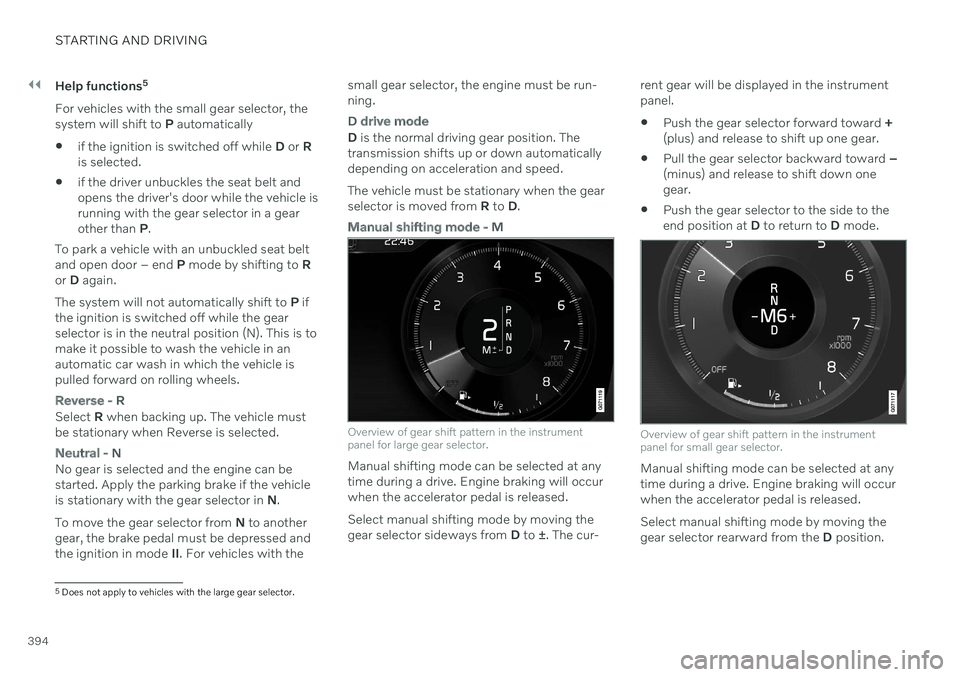
Manual shifting mode - M
Overview of gear shift pattern in the instrument panel for large gear selector.
Manual shifting mode can be selected at any time during a drive. Engine braking will occurwhen the accelerator pedal is released. Select manual shifting mode by moving the gear selector sideways from D to ±. The cur- rent gear will be displayed in the instrumentpanel.
Push the gear selector forward toward
+
(plus) and release to shift up one gear.
Pull the gear selector backward toward
–
(minus) and release to shift down onegear.
Push the gear selector to the side to theend position at
D to return to D mode.
Overview of gear shift pattern in the instrument panel for small gear selector.
Manual shifting mode can be selected at any time during a drive. Engine braking will occurwhen the accelerator pedal is released. Select manual shifting mode by moving the gear selector rearward from the D position.
5
Does not apply to vehicles with the large gear selector.
Page 413 of 643
STARTING AND DRIVING
}}
* Option/accessory.411
Leveling control settings *
Turn off leveling control before lifting the vehicle with a jack to help avoid problemswith the pneumatic suspension.
Center display settings
Disable Leveling Control
In certain situations, this function must be turned off, e.g. before the vehicle is raised using a jack *. The level difference caused by
raising the vehicle with a jack could cause problems with the pneumatic suspension. Turning off the function in the center display:1. Tap
Settings in the Top view.
2. Tap
My CarParking Brake and
Suspension.
3. Select
Disable Leveling Control.
Related information
Leveling control
* and suspension (p. 408)
Loading recommendations (p. 538)
Economical driving
Drive economically and more environmentally conscious by thinking ahead and avoidingrapid starts and stops.
Adapt your driving style and speed to the cur- rent traffic conditions. Observe the following rules:
For lower fuel consumption, activate
Ecodrive mode.
Use the Eco Coast function in drive mode
Eco - engine braking is deactivated, allow-
ing the vehicle's kinetic energy to be used to roll greater distances.
Use gear
D as often as possible and avoid
using the kick-down function.
For manual gear shifting, use the highestpossible gear for the current traffic situa-tion and road conditions - fuel consump-tion is reduced at lower engine speeds (rpm). Use the gear indicator 13
.
Maintain a steady speed and a generous following distance to traffic ahead to mini-mize braking.
Fuel consumption is increased at highspeeds - air resistance increases withspeed.
The trip computer's current fuel consump-tion indicator can help promote more fuel-efficient driving.
Do not warm up the engine by idling. It isbetter to begin driving normally immedi-ately after starting the engine. A coldengine uses more fuel than a warmengine.
Whenever possible, avoid using the vehi-cle to drive short distances. The enginedoes not have time to reach a normaloperating temperature and this leads toincreased fuel consumption.
Use engine braking to brake the vehicle,when this is safe for other road users.
Maintain the correct pressure in the tiresand check pressure regularly.
The type of tires used could affect fuelconsumption - consult a retailer for adviceon suitable tires.
Remove unnecessary items from the vehi-cle - the heavier the load, the higher thefuel consumption.
Roof loads increase air resistance andincrease fuel consumption. Remove roofboxes, ski racks, etc. that are not in use.
Avoid driving with the windows open.
13
Only available in certain markets.