brake light VOLVO S90 2020 Quick Guide
[x] Cancel search | Manufacturer: VOLVO, Model Year: 2020, Model line: S90, Model: VOLVO S90 2020Pages: 643, PDF Size: 13.68 MB
Page 580 of 643

||
MAINTENANCE AND SERVICE
* Option/accessory.
578
Function Ampere Type
Passenger-side headlight, LEDB
15 Micro
– – Micro
––
MCaseA
–
–
MCaseA
Headlight washers
* 25
MCaseA
Washer fluid pump
25
MCaseA
Transmission control module; Electric gear selector
15 Micro
Horn20 Micro
Alarm siren* 5 Micro
Brake system control module (valves, parking brake)
40
MCaseA
Brake control with 48 V battery 30
MCaseA
Wipers
30
MCaseA
–
–
MCaseA
–
–
MCaseA
–
–
MCaseA
Brake system control module (ABS pump)
40
MCaseA
–
–
MCaseA
Page 581 of 643
MAINTENANCE AND SERVICE
579
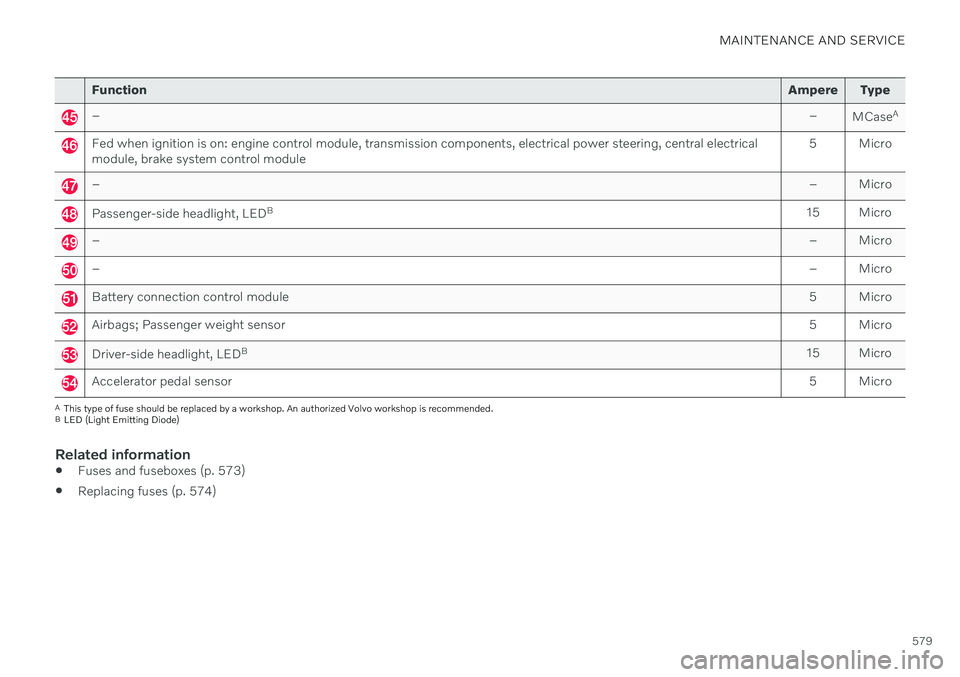
FunctionAmpere Type
– –
MCaseA
Fed when ignition is on: engine control module, transmission components, electrical power steering, central electrical module, brake system control module 5 Micro
–
– Micro
Passenger-side headlight, LEDB
15 Micro
– – Micro
–– Micro
Battery connection control module 5 Micro
Airbags; Passenger weight sensor5 Micro
Driver-side headlight, LEDB
15 Micro
Accelerator pedal sensor 5 Micro
A
This type of fuse should be replaced by a workshop. An authorized Volvo workshop is recommended.
B LED (Light Emitting Diode)
Related information
Fuses and fuseboxes (p. 573)
Replacing fuses (p. 574)
Page 596 of 643

||
MAINTENANCE AND SERVICE
* Option/accessory.
594
WARNING
Never use more than one inlay mat at a time on the driver's floor. If any othertype of floor mat is used, remove theoriginal mat from the driver's seat floorbefore driving. All types of mats mustbe securely anchored in the attach-ment points in the floor. Make sure thefloor mat does not impede the move-ment of the brake pedal or acceleratorpedal in any way, as this could be aserious safety hazard.
Volvo's floor mats are specially manu-factured for your vehicle. They must beproperly secured in the attachmentpoints in the floor to help ensure theycannot slide and become trappedunder the pedals.
Related information
Cleaning the interior (p. 591)
Cleaning the center display (p. 591)
Cleaning fabric upholstery and ceiling liner(p. 593)
Cleaning the seat belt (p. 593)
Cleaning leather upholstery
* (p. 594)
Cleaning the leather steering wheel(p. 595)
Cleaning interior plastic, metal and woodsurfaces (p. 595)
Cleaning leather upholstery
*
Only use cleaning agents and car care prod- ucts recommended by Volvo. Clean regularlyand treat stains immediately. It is importantto vacuum before using a cleaning agent.
Volvo's leather upholstery * is treated to pro-
tect its original appearance. Over time, sun- light, grease, dirt, etc. could break down theprotective layer. This could result in scratchesand cracking. Leather upholstery * is a natural product that
changes and acquires a beautiful patina over time. Regular cleaning and treatments arerequired to preserve the qualities and color ofthe leather. Volvo offers a comprehensiveproduct, Volvo Leather Care KitWipes, forcleaning and treating leather upholstery.When used as directed, it helps preserve theleather's protective coating. For optimal results, Volvo recommends clean- ing and applying protective cream one to fourtimes a year (or more often as needed). VolvoLeather Care Kit 951 0251 and Volvo LeatherSoftener 943 7429 are available for purchaseat Volvo retailers.
Cleaning the leather upholstery1. Apply the leather cleaner to a damp sponge and squeeze it until the cleanerfoams. 2. Move the sponge in circular motions to
apply the foam to the stain.
3. Dampen the stain thoroughly with the sponge. Let the sponge absorb the stainand do not rub.
4. Dry the stain using a soft towel and let the leather dry completely.
Protecting the leather upholstery1. Apply a small amount of leather protectorto a cloth and then apply the protector tothe leather using light circular movements.
2. Let it dry for approximately 20 minutes. > Protecting the leather upholsterymakes it better able to withstand sun-light's harmful UV rays.
Related information
Cleaning the interior (p. 591)
Cleaning the center display (p. 591)
Cleaning fabric upholstery and ceiling liner(p. 593)
Cleaning the seat belt (p. 593)
Cleaning floor mats and inlay mats(p. 593)
Cleaning the leather steering wheel(p. 595)
Cleaning interior plastic, metal and wood surfaces (p. 595)
Page 600 of 643
||
MAINTENANCE AND SERVICE
598
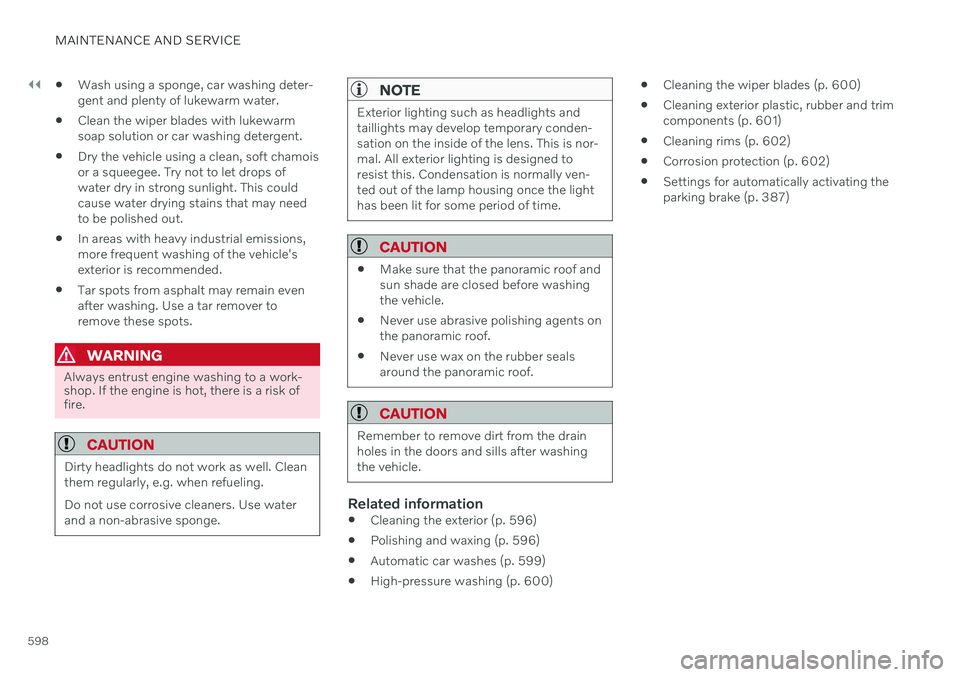
Wash using a sponge, car washing deter- gent and plenty of lukewarm water.
Clean the wiper blades with lukewarmsoap solution or car washing detergent.
Dry the vehicle using a clean, soft chamoisor a squeegee. Try not to let drops ofwater dry in strong sunlight. This couldcause water drying stains that may needto be polished out.
In areas with heavy industrial emissions,more frequent washing of the vehicle'sexterior is recommended.
Tar spots from asphalt may remain evenafter washing. Use a tar remover toremove these spots.
WARNING
Always entrust engine washing to a work- shop. If the engine is hot, there is a risk offire.
CAUTION
Dirty headlights do not work as well. Clean them regularly, e.g. when refueling. Do not use corrosive cleaners. Use water and a non-abrasive sponge.
NOTE
Exterior lighting such as headlights and taillights may develop temporary conden-sation on the inside of the lens. This is nor-mal. All exterior lighting is designed toresist this. Condensation is normally ven-ted out of the lamp housing once the lighthas been lit for some period of time.
CAUTION
Make sure that the panoramic roof and sun shade are closed before washingthe vehicle.
Never use abrasive polishing agents onthe panoramic roof.
Never use wax on the rubber sealsaround the panoramic roof.
CAUTION
Remember to remove dirt from the drain holes in the doors and sills after washingthe vehicle.
Related information
Cleaning the exterior (p. 596)
Polishing and waxing (p. 596)
Automatic car washes (p. 599)
High-pressure washing (p. 600)
Cleaning the wiper blades (p. 600)
Cleaning exterior plastic, rubber and trim components (p. 601)
Cleaning rims (p. 602)
Corrosion protection (p. 602)
Settings for automatically activating theparking brake (p. 387)
Page 601 of 643
MAINTENANCE AND SERVICE
}}
* Option/accessory.599
Automatic car washes
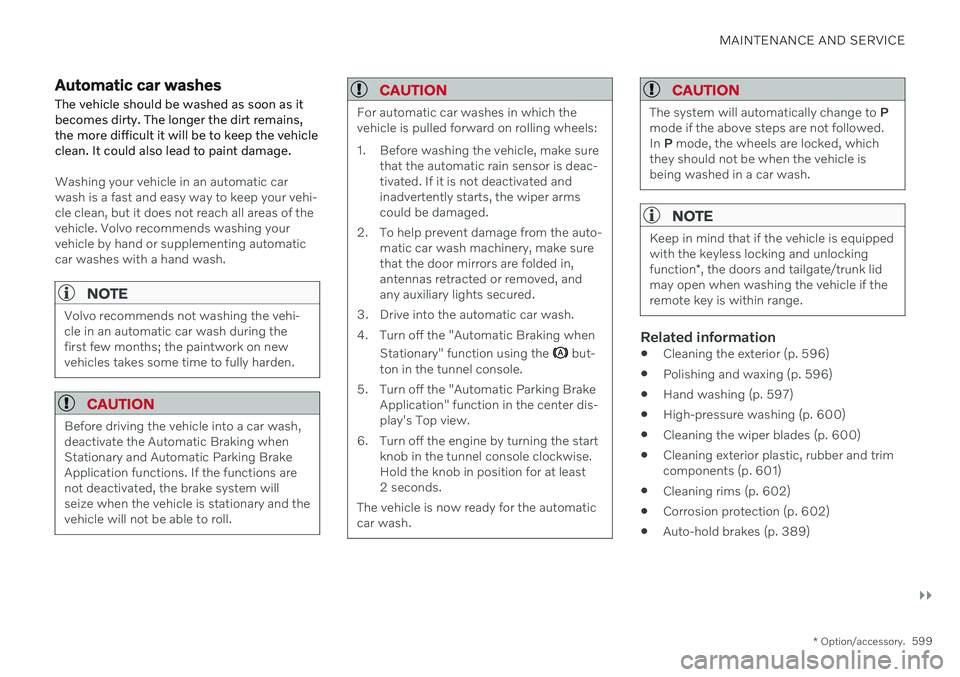
The vehicle should be washed as soon as it becomes dirty. The longer the dirt remains,the more difficult it will be to keep the vehicleclean. It could also lead to paint damage.
Washing your vehicle in an automatic car wash is a fast and easy way to keep your vehi-cle clean, but it does not reach all areas of thevehicle. Volvo recommends washing yourvehicle by hand or supplementing automaticcar washes with a hand wash.
NOTE
Volvo recommends not washing the vehi- cle in an automatic car wash during thefirst few months; the paintwork on newvehicles takes some time to fully harden.
CAUTION
Before driving the vehicle into a car wash, deactivate the Automatic Braking whenStationary and Automatic Parking BrakeApplication functions. If the functions arenot deactivated, the brake system willseize when the vehicle is stationary and thevehicle will not be able to roll.
CAUTION
For automatic car washes in which the vehicle is pulled forward on rolling wheels:
1. Before washing the vehicle, make sure that the automatic rain sensor is deac- tivated. If it is not deactivated andinadvertently starts, the wiper armscould be damaged.
2. To help prevent damage from the auto- matic car wash machinery, make surethat the door mirrors are folded in,antennas retracted or removed, andany auxiliary lights secured.
3. Drive into the automatic car wash.
4. Turn off the "Automatic Braking when Stationary" function using the
but-
ton in the tunnel console.
5. Turn off the "Automatic Parking Brake Application" function in the center dis- play's Top view.
6. Turn off the engine by turning the start knob in the tunnel console clockwise.Hold the knob in position for at least2 seconds.
The vehicle is now ready for the automaticcar wash.
CAUTION
The system will automatically change to P
mode if the above steps are not followed. In P mode, the wheels are locked, which
they should not be when the vehicle isbeing washed in a car wash.
NOTE
Keep in mind that if the vehicle is equipped with the keyless locking and unlocking function *, the doors and tailgate/trunk lid
may open when washing the vehicle if the remote key is within range.
Related information
Cleaning the exterior (p. 596)
Polishing and waxing (p. 596)
Hand washing (p. 597)
High-pressure washing (p. 600)
Cleaning the wiper blades (p. 600)
Cleaning exterior plastic, rubber and trim components (p. 601)
Cleaning rims (p. 602)
Corrosion protection (p. 602)
Auto-hold brakes (p. 389)
Page 625 of 643

INDEX
623
1, 2, 3 ...
4WD 399
A
ABSanti-lock brakes 383
AC (Air conditioning) 223
Accessories and extra equipment 35 installation 36
Accessory installation warning 36, 37
Active Bending Lights 154
Adapting driving characteristics 399
Adaptive Cruise Control 276 activating 278
auto-brake 298
change cruise control functionality 282
limitations 281
manage speed 296
passing 302
set time interval 297
standby mode 280
switching target vehicles 295
Symbols and messages 283
troubleshooting 281
turn off 279
WARNING 294
Adjusting the steering wheel 193
Airbag 52
activation/deactivation 56
driver's side 53
passenger side 53, 56
Air bag, see Airbag 52
Air conditioning 223Air conditioning, fluid volume and grade 619
Air distribution 201 air vents 201, 203
changing 202
defrosting 215
recirculation 214
table showing options 204
Air quality 199, 200 allergy and asthma 200
passenger compartment filter 201
Air recirculation 214
Alarm 261 deactivating 262
Allergy and asthma-inducing sub-
stances 200
All Wheel Drive, AWD 399
All Wheel Drive (AWD) 399
All Wheel Drive (four-wheel drive) 399
Android Auto 468, 469, 470Antenna location 251
Apple CarPlay 464, 465, 467
Approach lighting 158
Apps 436Armrest folding down the rear seats 537
Assistance at risk of collision 349 activating/deactivating 350
at risk of run-off 350
during collision risks from behind 352during collision risks from oncoming
traffic 351
limitations 353
Symbols and messages 354
Audio and media 434 Audio system HD digital radio 445 SiriusXM ®
Satellite radio 446, 447,
449
Auto-climate 214
Auto hold 389
Auto-hold brakes 389 activating/deactivating 390
after collision 391
driver support 266
Automatic car wash 599
INDEX
Page 626 of 643
INDEX
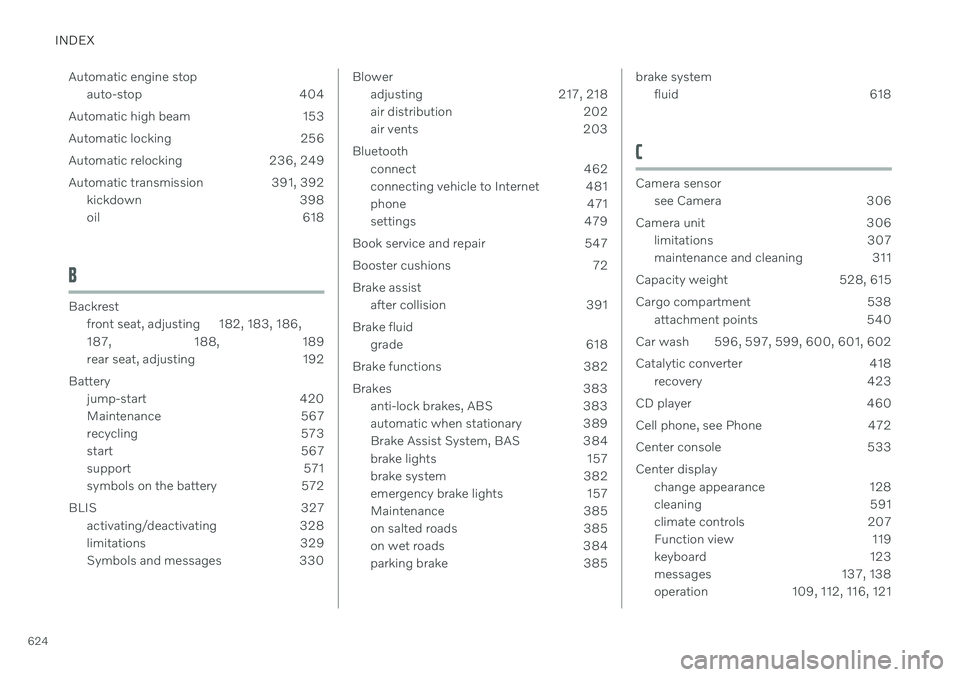
624Automatic engine stop
auto-stop 404
Automatic high beam 153
Automatic locking 256
Automatic relocking 236, 249
Automatic transmission 391, 392 kickdown 398
oil 618
B
Backrestfront seat, adjusting 182, 183, 186, 187 , 188, 189
rear seat, adjusting 192
Battery jump-start 420
Maintenance 567
recycling 573
start 567
support 571
symbols on the battery 572
BLIS 327 activating/deactivating 328
limitations 329
Symbols and messages 330
Bloweradjusting 217, 218
air distribution 202
air vents 203
Bluetooth connect 462
connecting vehicle to Internet 481
phone 471
settings 479
Book service and repair 547
Booster cushions 72 Brake assist after collision 391
Brake fluid grade 618
Brake functions 382
Brakes 383 anti-lock brakes, ABS 383
automatic when stationary 389
Brake Assist System, BAS 384
brake lights 157
brake system 382
emergency brake lights 157
Maintenance 385
on salted roads 385
on wet roads 384
parking brake 385brake systemfluid 618
C
Camera sensorsee Camera 306
Camera unit 306 limitations 307
maintenance and cleaning 311
Capacity weight 528, 615
Cargo compartment 538 attachment points 540
Car wash 596, 597, 599, 600, 601, 602
Catalytic converter 418 recovery 423
CD player 460
Cell phone, see Phone 472
Center console 533 Center display change appearance 128
cleaning 591
climate controls 207
Function view 119
keyboard 123
messages 137, 138
operation 109, 112, 116, 121
Page 629 of 643

INDEX
627
E
ECO climate 401
ECO mode 401activate with function button 404
Economical driving 401, 411
Electrical outlet 534 use 534
Electrical system 567
Electric parking brake 385
Electronic immobilizer 246
emergency brake lights 157
Emission inspection readiness 542 Engine overheating 418
start 378
Start/Stopfunction 404
turn off 380
Engine braking 383 Engine compartment coolant 556
engine oil 554
overview 553
Engine drag control 267
Engine oil 554 filling 555
filter 554
grade and volume 617
Engine shutdown 380
Engine specifications 616Engine temperature high 418
Environment 28Ethanol content max. 10% by volume 415
Exterior dimensions 613
F
Federal Clean Air Act 542
Ferry transport 408
Flooded road 413
Fluids, volumes 607, 619
Fluids and oils 618, 619 Fog lights front 155
rear 156
Four-C 408 Front seat blower 217
climate 207
heating 209, 210
temperature 220
ventilation 211
Front seat manual 182
Front seats, power 183 adjusting passenger seat from driv-
er's seat 191
adjusting seat 183
Lumbar support 189
massage 186, 187, 188
multifunction control 186, 187, 188, 189
Side bolsters 189
store position 184, 185
Fuel 415 Travel Link service 453
Fuel filling 414
Fuel gauge 85
Fuel requirements 415, 416 Fuel tank volume 619
Fuse box 573
Fuses 573 below the glove compartment 580
in engine compartment 575
in trunk 586
replacing 574
Page 630 of 643

INDEX
628
G
Gasoline grade 415 Gaugefuel gauge 85
Gear selector positions automatic transmission 392
Glass, laminated/reinforced 162
Glove compartment 535Gracenote ® 459
Grocery bag holders 540
Gross vehicle weight 615
H
Handbrake 385
Hand wash 597Hard disk space 488
Hazard warning flashers 157
HD radio 443
Head-up display 139 activating/deactivating 140
cleaning 592
Distance Alert 271
replacing windshield 551
settings 141
store position 141, 184, 185
Heated washer nozzles 176 Heating Seats 209, 210
steering wheel 213
windows 216
high beams 152, 153
High engine temperature 418
Hill Start Assist 390 Hill Start Assist (HSA) 390
Hoisting the vehicle 549 HomeLink ®
425
programming 426
type approval 429
use 428
HomeLink ®
remote control
programmable 425
Home safe lighting, Homesafe Lighting, Follow me home lighting, follow-me-
home lighting 158
Honk 192
Hood, opening 552
Horn 192I
IAQS (Interior Air Quality System) 200
IC (Inflatable Curtain) 60
ID, Volvo 26
Identification number 38
Ignition mode 381, 382
Immobilizer 246 Electronic immobilizer 246
Indicator symbols 91
Individual drive mode 399
Infant seats 67
Inflatable curtain 60
Inflatable Curtain 60
Inflating tires 527 Inflation pressure adjusting 508
Checking 507
decal with recommended pressure 509
Inflation pressure monitoring 509 action 513
save new inflation pressure 511
Status 512
Inflation pressure table 621
Information display 80, 84
Infotainment (Audio and media) 434
Page 631 of 643
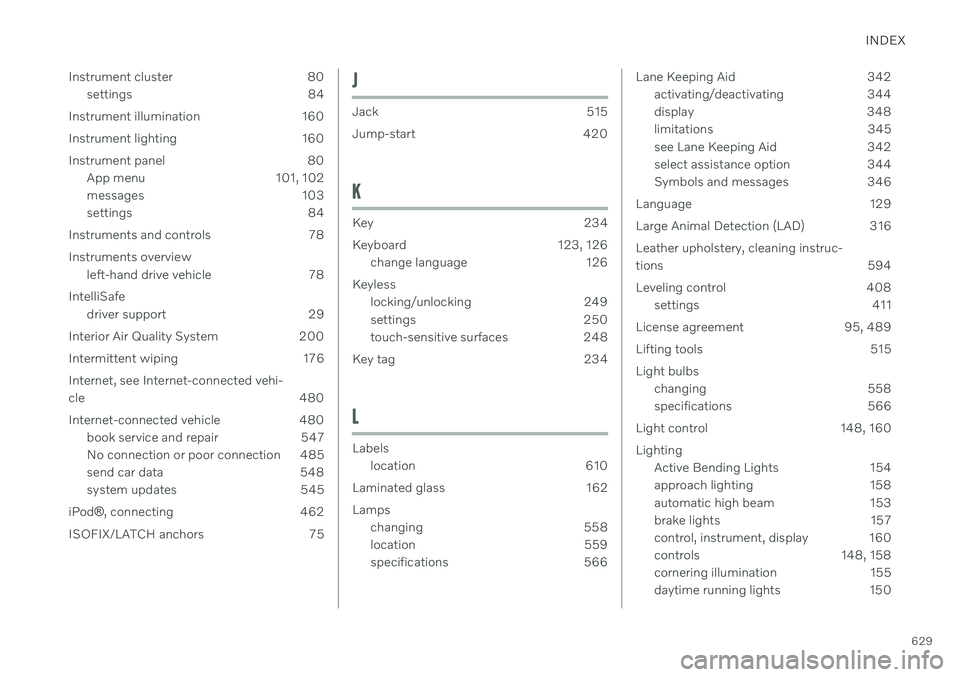
INDEX
629
Instrument cluster 80
settings 84
Instrument illumination 160
Instrument lighting 160
Instrument panel 80 App menu 101, 102
messages 103
settings 84
Instruments and controls 78 Instruments overview left-hand drive vehicle 78
IntelliSafe driver support 29
Interior Air Quality System 200
Intermittent wiping 176 Internet, see Internet-connected vehi- cle 480
Internet-connected vehicle 480 book service and repair 547
No connection or poor connection 485
send car data 548
system updates 545
iPod ®
, connecting 462
ISOFIX/LATCH anchors 75
J
Jack 515
Jump-start 420
K
Key 234
Keyboard 123, 126 change language 126
Keyless locking/unlocking 249
settings 250
touch-sensitive surfaces 248
Key tag 234
L
Labels location 610
Laminated glass 162 Lamps changing 558
location 559
specifications 566
Lane Keeping Aid 342activating/deactivating 344
display 348
limitations 345
see Lane Keeping Aid 342
select assistance option 344
Symbols and messages 346
Language 129
Large Animal Detection (LAD) 316Leather upholstery, cleaning instruc-
tions 594
Leveling control 408 settings 411
License agreement 95, 489
Lifting tools 515 Light bulbs changing 558
specifications 566
Light control 148, 160 Lighting Active Bending Lights 154
approach lighting 158
automatic high beam 153
brake lights 157
control, instrument, display 160
controls 148, 158
cornering illumination 155
daytime running lights 150