horn VOLVO S90 2020 Quick Guide
[x] Cancel search | Manufacturer: VOLVO, Model Year: 2020, Model line: S90, Model: VOLVO S90 2020Pages: 643, PDF Size: 13.68 MB
Page 7 of 643
5
SEATS AND STEERING WHEEL
Manual front seats182
Power * front seats
183
Adjusting the power * front seats
183
Storing positions for seats, mir- rors and head-up display *184
Using stored positions for seats,mirrors and head-up display *185
Front seat massage * settings
186
Adjusting front seat massage set-tings * 187
Adjusting * front seat cushion length
188
Adjusting front seat side bolstersettings * 189
Adjusting front seat lumbar support *
189
Adjusting the passenger seat fromthe driver's seat * 191
Adjusting the passenger seat from the rear seat 192
Steering wheel controls and horn 192
Adjusting the steering wheel 193
CLIMATE CONTROL
Climate 196
Climate zones 196
Climate control sensors 197
Perceived temperature 197
Climate control system voice commands 198
Air quality 199
Clean Zone *
199
Clean Zone Interior Package *
200
Interior Air Quality System *
200
Activating and deactivating the air quality sensor * 201
Passenger compartment air filter 201
Air distribution 201
Adjusting air distribution 202
Opening, closing and directing air vents 203
Air distribution options 204
Climate system controls 207
Activating and deactivating power front seats * 209
Activating and deactivating theheated front seat * 210
Activating and deactivating theheated rear seats * 210
Activating and deactivating frontseat ventilation * 211
Activating and deactivating the ventilated rear seats
* 212
Activating and deactivating theheated steering wheel *213
Activating and deactivating auto-matic steering wheel heating *213
Activating auto climate control 214
Activating and deactivating recir- culation 214
Activating and deactivating therecirculation timer setting 215
Activating and deactivating maxdefroster 215
Activating and deactivating theheated rear window and door mirrors 216
Automatically activating and deac-tivating the heated rear windowand door mirrors 217
Setting the blower speed for thefront seats 217
Setting the blower speed for the rear seats * 218
Setting the temperature for the front seats 220
Setting the temperature for the rear seats * 221
Synchronize temperature 222
Activating and deactivating air conditioning 223
Page 80 of 643
DISPLAYS AND VOICE CONTROL
* Option/accessory.
78
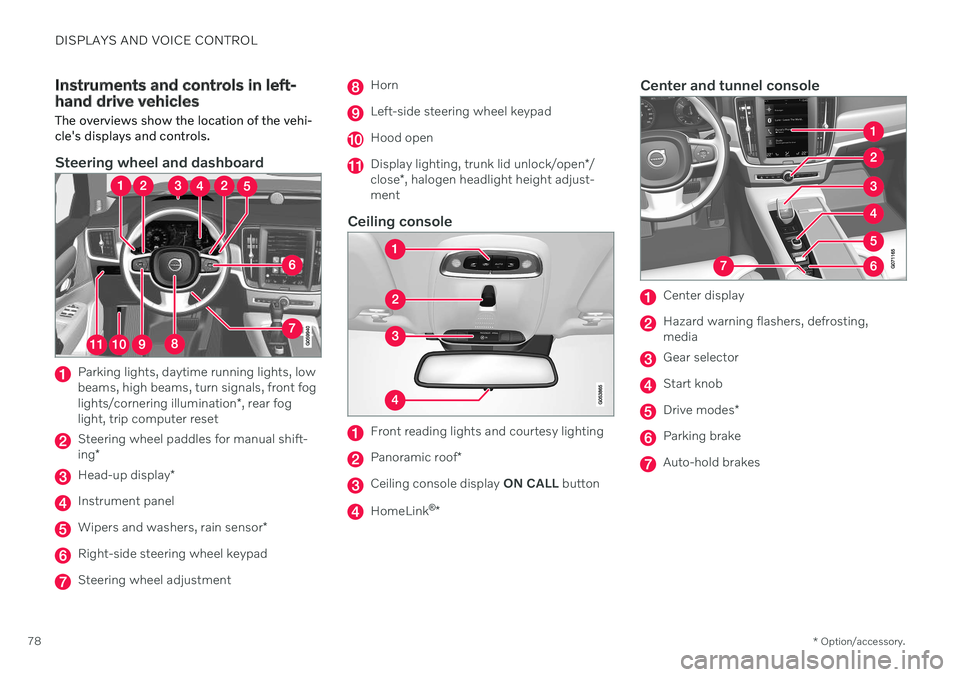
Instruments and controls in left- hand drive vehicles The overviews show the location of the vehi- cle's displays and controls.
Steering wheel and dashboard
Parking lights, daytime running lights, low beams, high beams, turn signals, front fog lights/cornering illumination *, rear fog
light, trip computer reset
Steering wheel paddles for manual shift- ing *
Head-up display *
Instrument panel
Wipers and washers, rain sensor *
Right-side steering wheel keypad
Steering wheel adjustment
Horn
Left-side steering wheel keypad
Hood open
Display lighting, trunk lid unlock/open */
close *, halogen headlight height adjust-
ment
Ceiling console
Front reading lights and courtesy lighting
Panoramic roof *
Ceiling console display ON CALL button
HomeLink ®
*
Center and tunnel console
Center display
Hazard warning flashers, defrosting, media
Gear selector
Start knob
Drive modes *
Parking brake
Auto-hold brakes
Page 194 of 643

SEATS AND STEERING WHEEL
* Option/accessory.
192
Adjusting the passenger seat from the rear seat
The front passenger seat can be adjusted using the control in the right-hand rear door.
Using the functions
Control right-hand rear door.
Move the front passenger seat forward.
Move the front passenger seat backrest rearward.
Move the front passenger seat rearward.
Move the front passenger seat backrest forward.
Steering wheel controls and horn The steering wheel has a horn and controls for e.g. driver support systems and voice con-trol.
Steering wheel keypads and paddles *.
Driver support system controls 5
.
Paddle * for manually shifting gears (auto-
matic transmission).
Controls for voice commands, accessing menus and messages, and handlingphone calls.
Horn
The horn is located in the center of the steering wheel.
Related information
Adjusting the steering wheel (p. 193)
5
Cruise Control, Adaptive Cruise Control *, Distance Alert * and Pilot Assist.
Page 195 of 643

SEATS AND STEERING WHEEL
* Option/accessory.193
Adjusting the steering wheel The steering wheel can be adjusted to various positions.
The steering wheel's reach and height can be adjusted.
WARNING
Adjust the steering wheel and ensure it locks into position before driving. Neveradjust the steering wheel while driving.
Steering wheel force can be adjusted with speed-dependent power steering. Steeringwheel force is adjusted according to the vehi-cle's speed to give the driver an enhancedsense of control and stability.
Steering wheel adjuster lever.
1. Move the lever forward to release the steering wheel.
2. Adjust the steering wheel to the desired position.
3. Pull the lever back to lock the steering wheel into place. If the lever is difficult to move, press the steering wheel lightlywhile pulling the lever.
Related information
Steering wheel controls and horn (p. 192)
Adjusting the power
* front seats (p. 183)
Page 236 of 643

KEY, LOCKS AND ALARM
* Option/accessory.
234
Remote key
The remote key is used to lock and unlock doors, the trunk lid and the fuel filler door.The remote key must be in the vehicle inorder to start the engine.
Remote key 3
and button-less key (Key Tag) *.
The remote key is not physically used to start the ignition because the vehicle is standard-equipped with keyless start (Passive Start).The key only needs to be in the front section ofthe passenger compartment. For vehicles equipped with keyless locking and unlocking (Passive Entry) *, the engine can
be started with the key anywhere in the vehi- cle. A smaller, lighter and button-less key (KeyTag) is also provided. The remote keys can be linked to differentdriver profiles to store personal settings in thevehicle.
Remote key buttons
The remote key has four buttons, one on the left side and three on the right.
Locking - Press once to lock the doors,
trunk lid and fuel filler door and arm the alarm. Press and hold to close all windows.
Unlocking - Press once to unlock the
doors, trunk lid and fuel filler door and dis- arm the alarm. Press and hold to open all windows at the same time. This total airing function canbe used to e.g. quickly air out the vehiclein hot weather.
Trunk lid - Press to unlock and disarm
the trunk lid only. On vehicles equipped with the power trunk release *, press and
hold to automatically open the tailgate. Press and hold to close an open trunk lid(an audible warning signal will be given).On vehicles not equipped with the powertrunk release, pressing and holding willopen the trunk lid mechanically due to thepreloaded springs.
Panic alarm - Used to attract attention in
emergency situations. Press and hold the button for at least 3 seconds or presstwice within 3 seconds to activate theturn signals and horn. To deactivate, waitat least 5 seconds and press the buttonagain. If no action is taken, the panic alarmwill deactivate automatically after 3minutes.
WARNING
If anyone is left in the vehicle, make sure that power to the power windows and pan-oramic roof is cut off by always taking theremote key with you when you leave thevehicle.
3 The illustration is generic - details may vary according to vehicle model.
Page 360 of 643

||
DRIVER SUPPORT
* Option/accessory.
358
CAUTION
Objects such as chains, thin and glossy poles or low obstacles may end up in the"signal shadow" and then go temporarilyundetected by the sensors – the pulsatingtone may then unexpectedly stop insteadof becoming a constant tone as expected. The sensors cannot detect high objects, such as protruding ramps. In such situations, pay extra attention and maneuver/drive the vehicle veryslowly or stop the current parkingmaneuver – there may be a high risk ofdamage to the vehicle or other objectssince information from the sensors isnot always reliable in such situations.
CAUTION
In some circumstances, the Park Assist System may produce false warnings due toexternal sound sources with the sameultrasonic frequencies as those the systemworks with. Examples of such sources are horns, wet tires on asphalt, pneumatic brakes, exhaustnoise from motorcycles, etc.
Related information
Park Assist
* (p. 355)
Page 375 of 643

DRIVER SUPPORT
}}
* Option/accessory.373
3. Be prepared to stop the vehicle when
instructed to do so by a graphic and mes- sage in the center display. Follow theinstructions in the same way as for theparking procedure.
Note that the steering wheel can "spring"back when the procedure is completed andthe driver may need to turn the steering wheelback to the maximum position in order to pullout of the parking space. If the function determines that the driver can pull out of the parking space without any extramaneuvers, the function will be deactivated,even if it seems as though the vehicle is notcompletely out of the parking space.
Related information
Park Assist Pilot
* (p. 368)
Park Assist Pilot
* limitations (p. 373)
Park Assist Pilot * limitations
Park Assist Pilot (PAP 100
) may not be able to
detect all conditions in all situations and func- tionality may therefore be limited.
WARNING
The parking sensors have dead/blind spots where objects cannot bedetected.
Pay particular attention to people andanimals near the vehicle.
Bear in mind that the front end of thevehicle may swing out towards oncom-ing traffic during the parking maneuver.
CAUTION
Objects situated higher than the detection area of the sensors are not included whenthe parking maneuver is calculated, whichcould cause the function to swing into theparking space too early. Such parkingspaces should be avoided for this reason.
The driver should be aware of the following limitations for Park Assist Pilot:
The parking sequence is cancelledA parking sequence will be cancelled if: the driver moves the steering wheel
the vehicle's speed exceeds 7 km/h (4 mph)
the driver taps
Cancel in the center dis-
play
when the anti-lock brakes or the Elec- tronic stability control are engaged - e.g.when a wheel loses grip on a slippery road
when speed-dependent power steeringwheel resistance is working at reducedpower – e.g. during cooling due to over-heating.
A message in the center display will explainwhy the parking sequence was cancelled.
CAUTION
Under certain circumstances, the function may not be able to find parking spaces –one reason may be that the sensors aredisrupted by external sound sources thatemit the same ultrasonic frequencies thatthe system works with. Examples of such sources include horns, wet tires on asphalt, pneumatic brakes,exhaust noise from motorcycles, etc.
100 Park Assist Pilot
Page 580 of 643

||
MAINTENANCE AND SERVICE
* Option/accessory.
578
Function Ampere Type
Passenger-side headlight, LEDB
15 Micro
– – Micro
––
MCaseA
–
–
MCaseA
Headlight washers
* 25
MCaseA
Washer fluid pump
25
MCaseA
Transmission control module; Electric gear selector
15 Micro
Horn20 Micro
Alarm siren* 5 Micro
Brake system control module (valves, parking brake)
40
MCaseA
Brake control with 48 V battery 30
MCaseA
Wipers
30
MCaseA
–
–
MCaseA
–
–
MCaseA
–
–
MCaseA
Brake system control module (ABS pump)
40
MCaseA
–
–
MCaseA
Page 630 of 643

INDEX
628
G
Gasoline grade 415 Gaugefuel gauge 85
Gear selector positions automatic transmission 392
Glass, laminated/reinforced 162
Glove compartment 535Gracenote ® 459
Grocery bag holders 540
Gross vehicle weight 615
H
Handbrake 385
Hand wash 597Hard disk space 488
Hazard warning flashers 157
HD radio 443
Head-up display 139 activating/deactivating 140
cleaning 592
Distance Alert 271
replacing windshield 551
settings 141
store position 141, 184, 185
Heated washer nozzles 176 Heating Seats 209, 210
steering wheel 213
windows 216
high beams 152, 153
High engine temperature 418
Hill Start Assist 390 Hill Start Assist (HSA) 390
Hoisting the vehicle 549 HomeLink ®
425
programming 426
type approval 429
use 428
HomeLink ®
remote control
programmable 425
Home safe lighting, Homesafe Lighting, Follow me home lighting, follow-me-
home lighting 158
Honk 192
Hood, opening 552
Horn 192I
IAQS (Interior Air Quality System) 200
IC (Inflatable Curtain) 60
ID, Volvo 26
Identification number 38
Ignition mode 381, 382
Immobilizer 246 Electronic immobilizer 246
Indicator symbols 91
Individual drive mode 399
Infant seats 67
Inflatable curtain 60
Inflatable Curtain 60
Inflating tires 527 Inflation pressure adjusting 508
Checking 507
decal with recommended pressure 509
Inflation pressure monitoring 509 action 513
save new inflation pressure 511
Status 512
Inflation pressure table 621
Information display 80, 84
Infotainment (Audio and media) 434