overheating VOLVO S90 2020 Quick Guide
[x] Cancel search | Manufacturer: VOLVO, Model Year: 2020, Model line: S90, Model: VOLVO S90 2020Pages: 643, PDF Size: 13.68 MB
Page 11 of 643
9
STARTING AND DRIVING
Starting the vehicle378
Switching off the vehicle 380
Ignition modes 381
Selecting ignition mode 382
Brake functions 382
Brakes 383
Brake Assist System 384
Braking on wet roads 384
Braking on salted roads 385
Maintenance of the brake system 385
Parking brake 385
Activating and deactivating the parking brake 386
Settings for automatically activat-ing the parking brake 387
Parking on a hill 388
Parking brake malfunction 388
Auto-hold brakes 389
Activating and deactivating Auto-hold at a standstill 390
Hill Start Assist 390
Braking assist after a collision 391
Transmission 391
Automatic transmission 391
Gear selector positions for auto-matic transmissions 392
Using the steering wheel paddles
*
to shift 395
Shiftlock 397
Deactivating the automatic shiftlock 398
The kickdown function 398
All Wheel Drive (AWD) *
399
Drive modes *
399
Changing drive mode *
401
Eco drive mode 401
Activating and deactivating Eco drive mode using the function button 404
Start/Stop function 404
Driving with the Start/Stop function 404
Deactivating the Start/Stop function 406
Conditions for the Start/Stop function 406
Leveling control * and suspension
408
Leveling control settings *
411
Economical driving 411
Preparing for a long trip 412
Winter driving 412
Driving through standing water 413
Opening/closing the fuel filler door 414
Refueling 414
Fuel 415
Octane rating 416
Emission controls418
Overheating of engine and trans- mission 418
Battery drain 419
Jump starting using another battery 420
Towing using a towline 422
Attaching and removing the tow-ing eyelet 423
Recovery 425
HomeLink ®
* 425
Programming HomeLink ®
* 426
Using HomeLink ®
* 428
Type approval for HomeLink ®
* 429
Compass *
429
Activating and deactivating the compass * 430
Calibrating the compass *
430
Page 322 of 643

DRIVER SUPPORT
320
City Safety steering assistance for evasive maneuver City Safety steering assistance can help the driver steer away from a vehicle/obstaclewhen it is not possible to avoid a collision bybraking alone. City Safety steering assistanceis always activated and cannot be switchedoff.
Your vehicle swerves away
Slow-moving/stationary vehicle or obsta- cle.
City Safety helps provide assistance bystrengthening the driver's steering move-ments, but only if the driver has begun evasiveaction and the system detects that the driver'ssteering movements are not sufficient to avoida collision. The brake system is used simultaneously to further strengthen steering movements. The function also helps stabilize the vehicle after ithas passed the obstacle. City Safety steering assistance can detect:
vehicles
cyclists
pedestrians
large animals
Related information
City Safety
™ (p. 312)
City Safety limitations (p. 322)
City Safety steering assistance limitations during evasivemaneuvers
City Safety steering assistance may have lim- ited functionality in certain situations and notintervene, e.g.:
at speeds outside the range of 50-100 km/h (30-62 mph)
if the driver does not take evasive action
if speed-dependent power steering wheelresistance is working at reduced power –e.g. during cooling due to overheating.
NOTE
The function uses the vehicle's camera and radar sensor, which has certain generallimitations.
Related information
City Safety steering assistance for evasive maneuver (p. 320)
City Safety limitations (p. 322)
Speed-dependent steering wheel resis-tance (p. 266)
Camera/radar sensor limitations (p. 307)
Page 380 of 643

STARTING AND DRIVING
* Option/accessory.
378
Starting the vehicle
The vehicle can be started using the start knob in the tunnel console when the remotekey is in the passenger compartment.
Start knob in the tunnel console.
WARNING
Before starting:
Buckle your seat belt.
Adjust the seat, steering wheel and mirrors.
Make sure you can fully depress thebrake pedal.
The remote key is not physically used to startthe ignition because the vehicle is equippedwith the keyless Passive Start system. To start the vehicle:
1. The remote key must be inside the vehicle.
For vehicles with Passive Start, the key must be in the front section of the passen-ger compartment. With the optional key- less locking/unlocking function *, the key
can be anywhere in the vehicle.
2. Press and hold down the brake pedal 1
as
far as possible.
3. Turn the start knob clockwise and release. The control will automatically return to the original position.
WARNING
Never use more than one inlay mat at a time on the driver's floor. If any othertype of floor mat is used, remove theoriginal mat from the driver's seat floorbefore driving. All types of mats mustbe securely anchored in the attach-ment points in the floor. Make sure thefloor mat does not impede the move-ment of the brake pedal or acceleratorpedal in any way, as this could be aserious safety hazard.
Volvo's floor mats are specially manu-factured for your vehicle. They must beproperly secured in the attachmentpoints in the floor to help ensure theycannot slide and become trappedunder the pedals.
The starter motor will crank until the enginestarts or until overheating protection is trig-gered.
Error messagesIf the Vehicle key not found message is
shown in the instrument panel at start, place the remote key at the backup reader and thenmake a new start attempt.
1 If the vehicle is moving, it is only necessary to turn the start knob clockwise to start the engine.
Page 381 of 643

STARTING AND DRIVING
}}
379
Location of the backup reader in the tunnel console.
NOTE
When the remote key is placed in the backup reader, make sure that no othervehicle keys, metal objects or electronicdevices (e.g. cellular phones, tablets, lap-tops or chargers) are in the backup reader.Multiple vehicle keys close to each other inthe backup reader can disrupt their func-tionality.
CAUTION
If the engine has not responded after 3 attempts – wait for 3 minutes before star-ting a new attempt. Starting capabilityincreases if the starter battery is given timeto recover.
WARNING
Never remove the remote control key from
the vehicle while driving or the vehicle is being towed.
WARNING
Always remove the remote key from the passenger compartment when youleave the vehicle and make sure theignition is in mode
0.
Always put the gear selector in
P and
apply the parking brake before leavingthe vehicle. Never leave the vehicleunsupervised while the engine is run-ning.
Always open the garage door fully andmake sure that ventilation is very goodbefore starting the engine in a garage.The exhaust fumes produced by thevehicle contain carbon monoxide,which is invisible and odorless but verytoxic.
CAUTION
When starting in cold weather, the automatic transmission may shift up atslightly higher engine speeds than nor-mal until the automatic transmissionfluid reaches normal operating tem-perature.
Do not race a cold engine immediatelyafter starting. This could prevent fluidsfrom properly lubricating vital compo-nents in the engine before it hasreached the proper operating tempera-ture.
The engine should be idling when thegear selector is moved. Never acceler-ate until the gear is fully engaged.Accelerating rapidly before a gear isproperly engaged could lead to harderwear of components.
To help prevent the transmission oilfrom overheating, select
P or N when
idling at a standstill for prolonged peri-ods of time.
Page 394 of 643

||
STARTING AND DRIVING
* Option/accessory.
392
Overview of small gear selector and gear shift pat- tern in the instrument panel
The instrument panel shows which gear is cur- rently in use: P , R , N , D or M. For vehicles with the small
gear selector, P position is electric and the
gear shift pattern is instead R, N , D or M.
For manual shifting, the gear indicator in the instrument panel displays the gear currentlybeing used.
CAUTION
Check the operating temperature of the transmission to help avoid damage to anyof the drive system components. If there isa risk of overheating, a warning symbol willappear in the instrument panel and a textmessage will be displayed. Follow the rec-ommendations given.
Symbols in the instrument panelIf a problem should occur with the transmis- sion, a symbol and a message will appear inthe instrument panel.
Symbol Meaning
Information and messages rela- ted to the transmission. Followthe recommendations provided.
Hot or overheated transmission. Follow the recommendationsprovided.
Reduced performance/Accel-
eration performance reduced
In the event of a temporary fault in the driveline, the vehicle maygo into a "limp home" mode withreduced power output to helpavoid damage to the driveline.
Related information
Gear selector positions for automatic transmissions (p. 392)
Using the steering wheel paddles
* to shift
(p. 395)
Shiftlock (p. 397)
The kickdown function (p. 398)
Gear selector positions for automatic transmissions
With an automatic transmission, a suitable gear is selected automatically according tocurrent speed and power requirements.
Selecting gearsThe gear selector is a shift-by-wire selector, where shifting is done electronically instead ofmechanically. This makes shifting easier andthe gear positions more distinct.
Page 400 of 643
STARTING AND DRIVING
398
Deactivating the automatic shiftlock7
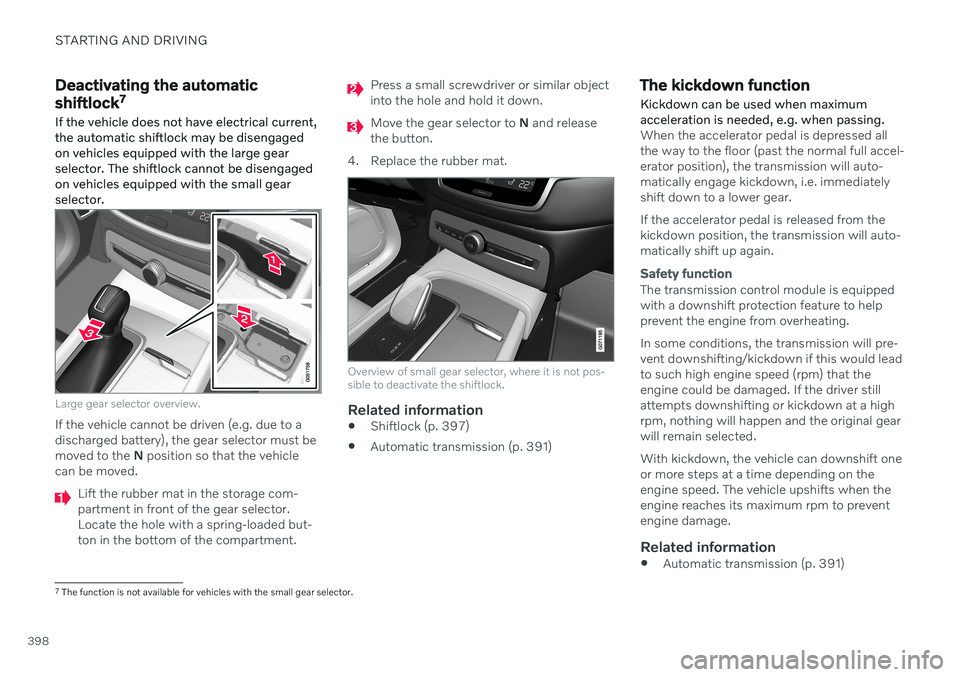
If the vehicle does not have electrical current, the automatic shiftlock may be disengagedon vehicles equipped with the large gearselector. The shiftlock cannot be disengagedon vehicles equipped with the small gearselector.
Large gear selector overview.
If the vehicle cannot be driven (e.g. due to a discharged battery), the gear selector must bemoved to the N position so that the vehicle
can be moved.
Lift the rubber mat in the storage com- partment in front of the gear selector.Locate the hole with a spring-loaded but-ton in the bottom of the compartment.
Press a small screwdriver or similar object into the hole and hold it down.
Move the gear selector to N and release
the button.
4. Replace the rubber mat.
Overview of small gear selector, where it is not pos- sible to deactivate the shiftlock.
Related information
Shiftlock (p. 397)
Automatic transmission (p. 391)
The kickdown function Kickdown can be used when maximum acceleration is needed, e.g. when passing.
When the accelerator pedal is depressed all the way to the floor (past the normal full accel-erator position), the transmission will auto-matically engage kickdown, i.e. immediatelyshift down to a lower gear. If the accelerator pedal is released from the kickdown position, the transmission will auto-matically shift up again.
Safety function
The transmission control module is equipped with a downshift protection feature to helpprevent the engine from overheating. In some conditions, the transmission will pre- vent downshifting/kickdown if this would leadto such high engine speed (rpm) that theengine could be damaged. If the driver stillattempts downshifting or kickdown at a highrpm, nothing will happen and the original gearwill remain selected. With kickdown, the vehicle can downshift one or more steps at a time depending on theengine speed. The vehicle upshifts when theengine reaches its maximum rpm to preventengine damage.
Related information
Automatic transmission (p. 391)
7
The function is not available for vehicles with the small gear selector.
Page 420 of 643

STARTING AND DRIVING
418
Emission controls
Three-way catalytic converter
Keep your engine properly tuned. Certain engine malfunctions, particularly involvingthe electrical, fuel or distributor ignitionsystems, may cause unusually high three-way catalytic converter temperatures. Donot continue to operate your vehicle if youdetect engine misfire, noticeable loss ofpower or other unusual operating condi-tions, such as engine overheating or back-firing. A properly tuned engine will helpavoid malfunctions that could damage thethree-way catalytic converter.
Do not park your vehicle over combustiblematerials, such as grass or leaves, whichcan come into contact with the hotexhaust system and cause such materialsto ignite under certain wind and weatherconditions.
Excessive starter cranking (in excess ofone minute), or an intermittently firing orflooded engine can cause three-way cata-lytic converter or exhaust system over-heating.
Remember that tampering or unauthor-ized modifications to the engine, theEngine Control Module, or the vehicle maybe illegal and can cause three-way cata-lytic converter or exhaust system over-heating. This includes: altering fuel injec- tion settings or components, alteringemission system components or locationor removing components, and/or repeateduse of leaded fuel.
NOTE
Unleaded fuel is required for vehicles with three-way catalytic converters.
Heated oxygen sensorsThe heated oxygen sensors monitor the oxy- gen content of the exhaust gases. Readings are fed into a control module that continuouslymonitors engine functions and controls fuelinjection. The ratio of fuel to air into the engineis continuously adjusted for efficient combus-tion to help reduce harmful emissions.
Related information
Octane rating (p. 416)
Fuel (p. 415)
Overheating of engine and transmission
In certain driving conditions, such as driving in mountainous areas or hot weather, there isa risk of the engine or transmission overheat-ing, especially when carrying heavy loads.
Engine power may be temporarily limited.
Remove any auxiliary lights mounted in front of the grille when driving in hotweather.
If the temperature in the engine's coolingsystem becomes too high, a warning sym-bol will appear in the instrument panel along with the message
Engine
temperature High temperature Stop
safely. Pull over to a safe location and let
the engine idle for a few minutes to cool down.
If the message
Engine temperature
High temperature Turn off engine orEngine coolant Level low, turn off
engine is displayed, stop the vehicle and
turn off the engine.
If the transmission begins to overheat, an alternative gear shifting program will beselected. An integrated protective functionwill also be activated, the warning symbolwill illuminate and the message
Transmission warm Reduce speed to
lower temperature or Transmission hot
Stop safely, wait for cooling will be dis-
Page 528 of 643

||
WHEELS AND TIRES
5268. Start the compressor by moving the
switch to the I (On) position.
WARNING
Never stand next to a tire being inflated with the compressor. If cracks, bulges, etc.form on the tire, switch off the compressorimmediately. The vehicle should not bedriven. Call roadside assistance to have thevehicle towed to a workshop for inspec-tion/replacement of the tire. Volvo recom-mends an authorized workshop.
NOTE
When the compressor first starts, air pres- sure may temporarily increase up to 6 bar(88 psi) but should decrease again afterapproximately 30 seconds.
9. Inflate the tire for 7 minutes.
CAUTION
To help avoid overheating, the compressor should never be used for more than10 minutes at a time.
10. Switch off the compressor and check the
inflation pressure using the air pressure gauge. The inflation pressure should bebetween 1.8 bar (22 psi) and 3.5 bar(51 psi). If the inflation pressure is toohigh, use the air release valve to releaseair.
WARNING
If pressure falls below 1.8 bar (22 psi), the hole in the tire may be too large. The vehi-cle should not be driven. Call roadsideassistance to have the vehicle towed to aworkshop for inspection/replacement ofthe tire. Volvo recommends an authorizedworkshop.
11. Switch off the compressor and remove the electrical cable.
12. Unscrew the hose from the tire's valve and screw the valve cap back on.
NOTE
After inflating a tire, always replace the valve cap to help prevent valve damagecaused by gravel, dirt, etc.
Use plastic valve caps only. Metal capscould corrode and become difficult toremove.
13. Put the protective hose cover onto the
hose to help prevent leakage of any resid- ual sealing compound. Return the equip-ment to the cargo compartment.
14. Immediately drive the vehicle at least 3 km (2 miles) at a maximum speed of80 km/h (50 mph) to allow the sealingcompound to seal the tire, and thenrecheck the inflation pressure.
WARNING
During the tire's first revolution, some seal- ing compound may spray out of the punc-ture hole. Before driving away, make surethat no one is near the vehicle who couldbe sprayed with sealing compound. Makesure no one is within 2 meters(7 feet) ofthe vehicle.
15. Rechecking the inflation pressure Connect the hose to the tire's valve and screw the hose connector onto the valveas far as possible. The compressor mustbe switched off.
Page 530 of 643
||
WHEELS AND TIRES
5284. Start the compressor by moving the
switch to the I (On) position.
CAUTION
Risk of overheating. The compressor should not be running for longer than 10minutes at a time.
5. Inflate the tire to the pressure specified on
the tire pressure decal on the driver's side door pillar. If the inflation pressure is toohigh, use the air release valve to releaseair.
6. Switch off the compressor. Remove the hose and the electrical cable.
7. Screw the valve cap back onto the tire.
NOTE
After inflating a tire, always replace the valve cap to help prevent valve damagecaused by gravel, dirt, etc.
Use plastic valve caps only. Metal capscould corrode and become difficult toremove.
NOTE
The compressor is an electric device. Fol- low local regulations for disposal.
Related information
Recommended tire pressure (p. 509)
Using the tire sealing system (p. 524)
Tire sealing system (p. 523)
Determining the vehicle's permitted weight
Properly loading your vehicle will provide maximum return of vehicle design perform-ance.
Weight designationsBefore loading your vehicle, familiarize your- self with the following terms for determiningyour vehicle's weight ratings, with or without atrailer, from the vehicle's Federal/CanadianMotor Vehicle Safety Standards (FMVSS/CMVSS) label, and the vehicle's tire informa-tion placard:
Curb weight
The weight of the vehicle including a full tank of fuel and all standard equipment. It does notinclude passengers, cargo, or optional equip-ment.
Capacity weight
All weight added to the curb weight, including cargo and optional equipment. When towing,towbar weight is also part of cargo weight.
Permissible axle weight
The maximum allowable weight that can be carried by a single axle (front or rear). Thesenumbers are shown on the Federal/CanadianMotor Vehicle Safety Standards (FMVSS/CMVSS) label. The total load on each axlemust never exceed its maximum permissibleweight.
Page 628 of 643

INDEX
626Cooling system
overheating 418
Cornering assistance 300 activating/deactivating 301
limitations 301
Cornering illumination 155
Corner Traction Control 267
Corrosion protection 602
Crash, see Collision 42
Crash event data 33
Cross Traffic Alert 331 activating/deactivating 332
limitations 332
messages 334
Cruise control 273 activating 274
manage speed 296
standby mode 275
turn off 275
Curb weight 615
Customer Privacy Policy 35
CZIP (Clean Zone Interior Package) 200
D
Data recording 33 transferring between vehicle and
workshop 544
Data sharing 486, 487
Daytime running lights 150 Decals location 610
Defrosting 215 Detecting obstacles City Safety 316
Dimensions 613
Dipstick, electronic 555
Direction of rotation 502
Disengaging the shiftlock 398 Display driver information 80
Display lighting 160
Distance Alert 271 activating/deactivating 272
limitations 272
Set time interval 297
DivX ®
461
Door mirrors 168 compass 429, 430
dimming 168
outer 168
power folding 169
resetting 169
store position 184, 185
Download Center 545 use 545
Driveline transmission 391
Drive mode 399 changing 401
driver support 299
ECO 401, 404
Driver Alert Control 340 activating/deactivating 341
limitations 342
rest stop guidance 341
Driver performance 88 settings 89
Driver profile 133 edit 134, 135, 136
select 134
Driver support system 266 Drive mode 299
Driving cooling system 418
Driving economy 411
Driving through standing water 413