CD player VOLVO S90 TWIN ENGINE 2019 User Guide
[x] Cancel search | Manufacturer: VOLVO, Model Year: 2019, Model line: S90 TWIN ENGINE, Model: VOLVO S90 TWIN ENGINE 2019Pages: 669, PDF Size: 14.33 MB
Page 503 of 669
AUDIO, MEDIA AND INTERNET
* Option/accessory.501
CD *
1. Insert a CD.
2.Open the CD app from App view.
3. Select the track you would like to play.
>Playback will begin.
USB flash drive
1. Inset a USB flash drive.
2.Open the USB app from App view.
3. Select the track you would like to play.
>Playback will begin.
MP3 player and iPod ®
NOTE
To start playback from an iPod, the iPod appmust be used (not USB).
When an iPod is used as source, the car'saudio and media system has a menu struc-ture similar to the iPod player's own menustructure.
1. Connect a media source.
2. Start playback in the connected mediasource.
3.Open the app (iPod, USB) from App view.
>Playback will begin.
Bluetooth-connected device
1. Activate Bluetooth in the media source.
2. Connect a media source.
3. Start playback in the connected mediasource.
4.Open the Bluetooth app from App view.
> Playback will begin.
Media with Internet connection
Medial playback from apps with Internet connec-tion:
1. Connect the vehicle to the Internet.
2. Open the app from the App view.
> Playback will begin.
Read the separate section on how to downloadapps.
Video
1. Connect a media source.
2.Open the USB app from App view.
3. Tap the title you would like to play.
>Playback will begin.
Apple CarPlay
CarPlay is described in a separate section.
Android Auto
Android Auto is described in a separate section.
Related information
Handling the App menu in the instrumentpanel (p. 100)
Radio (p. 483)
Controlling and changing media (p. 502)
Connecting a device via the USB port(p. 507)
Connecting a device via Bluetooth®
(p. 506)
Download apps (p. 481)
Internet-connected vehicle* (p. 523)
Video (p. 504)
Apple® CarPlay®* (p. 509)
Android Auto* (p. 512)
Voice control for radio and media (p. 144)
Compatible file formats for media (p. 508)
Page 504 of 669
AUDIO, MEDIA AND INTERNET
502
Controlling and changing media
Media playback can be controlled using voicecommands, the steering wheel keypad or thecenter display.
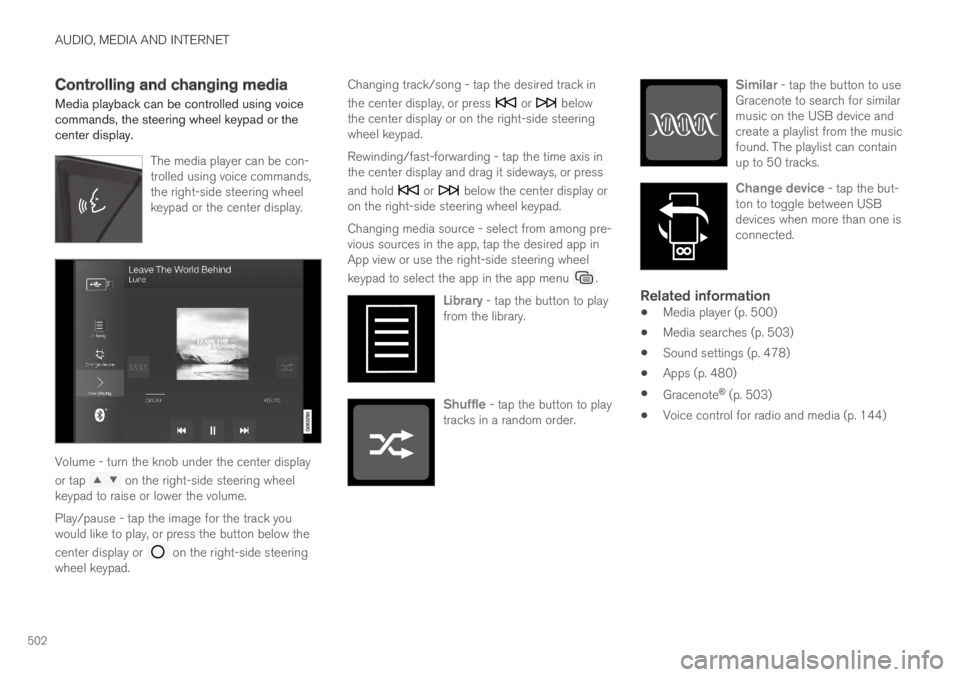
The media player can be con-trolled using voice commands,the right-side steering wheelkeypad or the center display.
Volume - turn the knob under the center display
or tap on the right-side steering wheelkeypad to raise or lower the volume.
Play/pause - tap the image for the track youwould like to play, or press the button below the
center display or on the right-side steeringwheel keypad.
Changing track/song - tap the desired track in
the center display, or press or belowthe center display or on the right-side steeringwheel keypad.
Rewinding/fast-forwarding - tap the time axis inthe center display and drag it sideways, or press
and hold or below the center display oron the right-side steering wheel keypad.
Changing media source - select from among pre-vious sources in the app, tap the desired app inApp view or use the right-side steering wheel
keypad to select the app in the app menu .
Library - tap the button to playfrom the library.
Shuffle - tap the button to playtracks in a random order.
Similar - tap the button to useGracenote to search for similarmusic on the USB device andcreate a playlist from the musicfound. The playlist can containup to 50 tracks.
Change device - tap the but-ton to toggle between USBdevices when more than one isconnected.
Related information
Media player (p. 500)
Media searches (p. 503)
Sound settings (p. 478)
Apps (p. 480)
Gracenote® (p. 503)
Voice control for radio and media (p. 144)
Page 505 of 669
AUDIO, MEDIA AND INTERNET
}}
* Option/accessory.503
Media searches
Searches can be performed to locate a specificartist, composer, song title, album, video, audiobook or playlist. If the vehicle is connected to theInternet, it is also possible to search for pod-casts (online digital media).
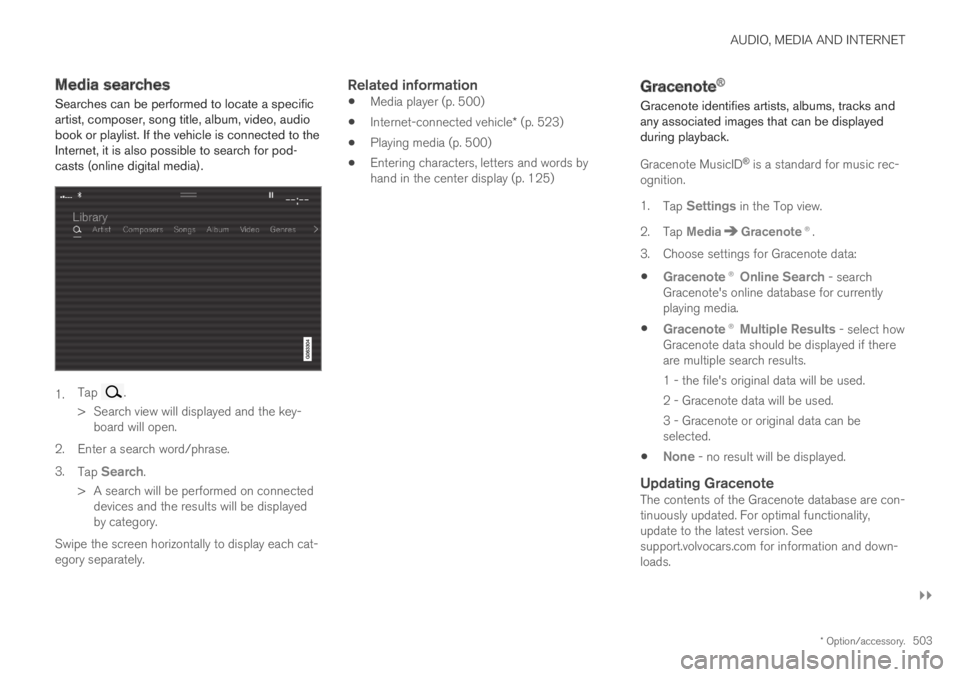
1.Tap .
> Search view will displayed and the key-board will open.
2.Enter a search word/phrase.
3.Tap Search.
> A search will be performed on connecteddevices and the results will be displayedby category.
Swipe the screen horizontally to display each cat-egory separately.
Related information
Media player (p. 500)
Internet-connected vehicle* (p. 523)
Playing media (p. 500)
Entering characters, letters and words byhand in the center display (p. 125)
Gracenote®
Gracenote identifies artists, albums, tracks andany associated images that can be displayedduring playback.
Gracenote MusicID® is a standard for music rec-ognition.
1.Tap Settings in the Top view.
2.Tap MediaGracenote®.
3. Choose settings for Gracenote data:
Gracenote® Online Search - searchGracenote's online database for currentlyplaying media.
Gracenote® Multiple Results - select howGracenote data should be displayed if thereare multiple search results.
1 - the file's original data will be used.
2 - Gracenote data will be used.
3 - Gracenote or original data can beselected.
None - no result will be displayed.
Updating Gracenote
The contents of the Gracenote database are con-tinuously updated. For optimal functionality,update to the latest version. Seesupport.volvocars.com for information and down-loads.
Page 506 of 669
||
AUDIO, MEDIA AND INTERNET
* Option/accessory.504
Related information
Playing media (p. 500)
License agreement for audio and media(p. 531)
CD player*
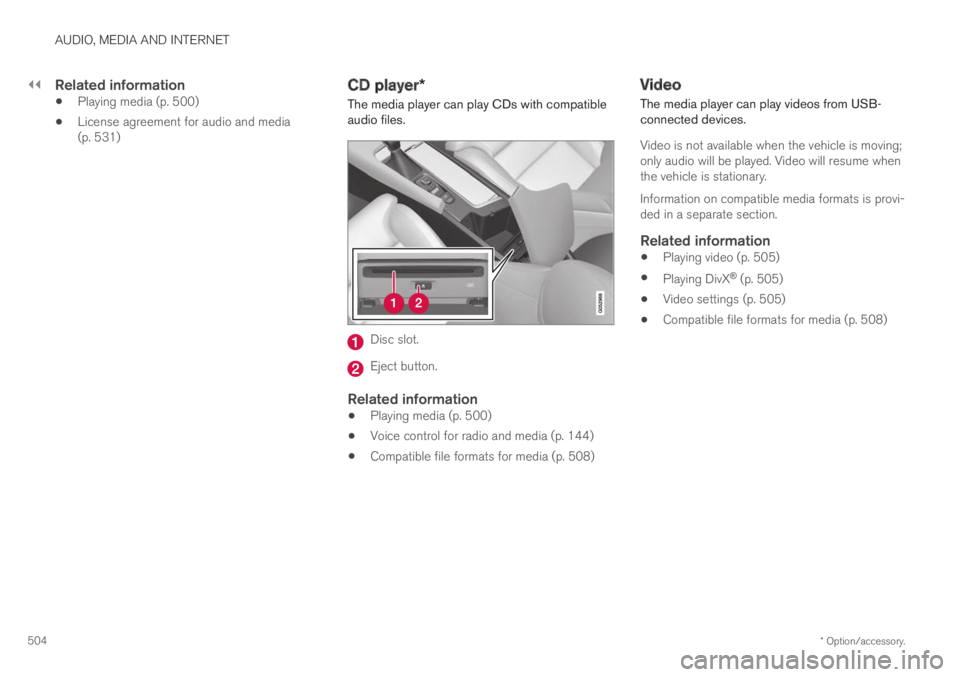
The media player can play CDs with compatibleaudio files.
Disc slot.
Eject button.
Related information
Playing media (p. 500)
Voice control for radio and media (p. 144)
Compatible file formats for media (p. 508)
Video
The media player can play videos from USB-connected devices.
Video is not available when the vehicle is moving;only audio will be played. Video will resume whenthe vehicle is stationary.
Information on compatible media formats is provi-ded in a separate section.
Related information
Playing video (p. 505)
Playing DivX® (p. 505)
Video settings (p. 505)
Compatible file formats for media (p. 508)
Page 507 of 669
AUDIO, MEDIA AND INTERNET
505
Playing video
The USB app in App view is used to play videos.
1. Connecting media source (USB device).
2.Open the USB app from App view.
3. Tap the title you would like to play.
>Playback will begin.
Related information
Video (p. 504)
Playing DivX® (p. 505)
Video settings (p. 505)
Compatible file formats for media (p. 508)
Playing DivX®
The DivX Certified® device must be registered toplay purchased DivX video-on-demand (VOD)movies.
1.Tap Settings in the Top view.
2. Tap VideoDivX® VOD to get a registra-tion code.
3. Go to vod.divx.com for more information andto complete the registration process.
Related information
Video (p. 504)
Playing video (p. 505)
Video settings (p. 505)
Compatible file formats for media (p. 508)
Video settings
Some video playback settings can be adjusted,e.g. language.
The following can be adjusted by opening Top
view and tapping SettingsVideo or with thevideo player in full-screen mode: AudioLanguage, Off and Subtitle Language.
Related information
Video (p. 504)
Page 508 of 669
AUDIO, MEDIA AND INTERNET
* Option/accessory.506
Streaming media via Bluetooth®
The vehicle's media player is equipped withBluetooth and can play audio files fromBluetooth-enabled external devices such as cel-lular phones and tablets.
In order for the media player to be able to wire-lessly play audio files from an external device, thedevice must be connected to the vehicle viaBluetooth.
Related information
Connecting a device via Bluetooth®
(p. 506)
Connecting a phone to the car via Bluetoothfor the first time (p. 515)
Playing media (p. 500)
Compatible file formats for media (p. 508)
Connecting a device via Bluetooth®
Connect a Bluetooth® device to the vehicle towirelessly play media and give the vehicle anInternet connection if it is available.
Many cellular phones on the market currently
offer wireless Bluetooth® technology, but not allphones are fully compatible with the vehicle. Foradditional information on compatibility, seesupport.volvocars.com.
The procedure for connecting a media device isthe same as for connecting a cellular phone to
the vehicle via Bluetooth®.
Related information
Streaming media via Bluetooth® (p. 506)
Connecting a phone to the car via Bluetoothfor the first time (p. 515)
Playing media (p. 500)
Playing media via the USB port
External audio sources, such as an iPod® orMP3 player, can be connected to the audio sys-tem via the vehicle's USB port.
Devices with rechargeable batteries can becharged when they are connected via the USBport and the ignition is in mode I, II or the engineis running.
The content on the external source can be readfaster if it only contains data of a compatible for-mat. Video files can also be played via the USBport.
Some MP3 players have their own file systemthat the vehicle has support for.
Related information
Connecting a device via the USB port(p. 507)
Playing media (p. 500)
Video (p. 504)
Ignition modes (p. 429)
Technical specifications for USB devices(p. 507)
Apple® CarPlay®* (p. 509)
Android Auto* (p. 512)
Page 509 of 669
AUDIO, MEDIA AND INTERNET
* Option/accessory.507
Connecting a device via the USBport
External audio sources, such as an iPod® orMP3 player, can be connected to the audio sys-tem via any of the vehicle's USB ports.
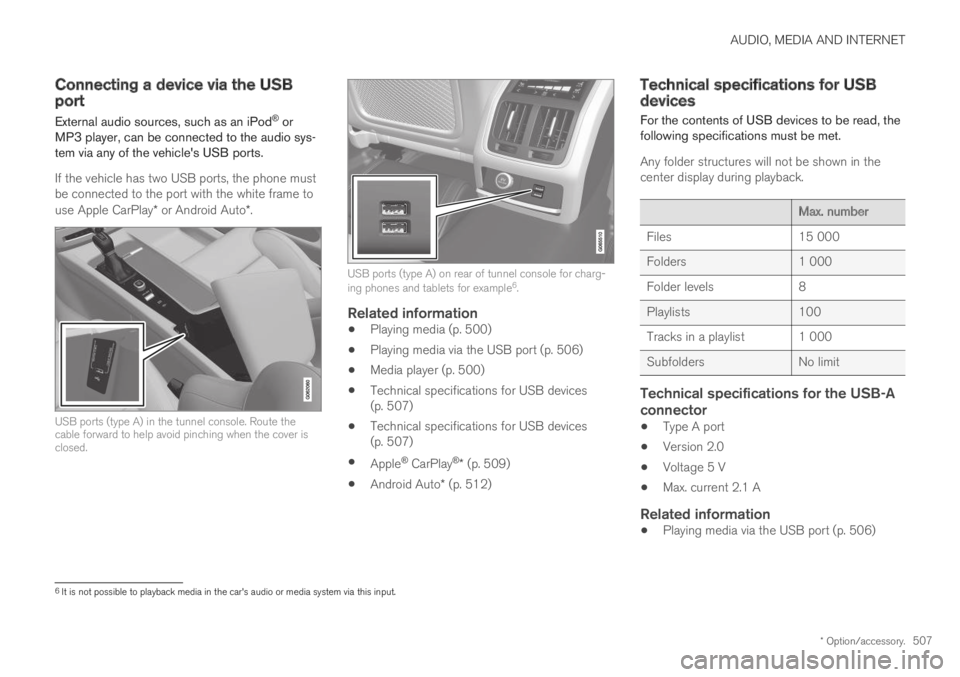
If the vehicle has two USB ports, the phone mustbe connected to the port with the white frame touse Apple CarPlay* or Android Auto*.
USB ports (type A) in the tunnel console. Route thecable forward to help avoid pinching when the cover isclosed.
USB ports (type A) on rear of tunnel console for charg-ing phones and tablets for example6.
Related information
Playing media (p. 500)
Playing media via the USB port (p. 506)
Media player (p. 500)
Technical specifications for USB devices(p. 507)
Technical specifications for USB devices(p. 507)
Apple® CarPlay®* (p. 509)
Android Auto* (p. 512)
Technical specifications for USBdevices
For the contents of USB devices to be read, thefollowing specifications must be met.
Any folder structures will not be shown in thecenter display during playback.
Max. number
Files15 000
Folders1 000
Folder levels8
Playlists100
Tracks in a playlist1 000
SubfoldersNo limit
Technical specifications for the USB-A
connector
Type A port
Version 2.0
Voltage 5 V
Max. current 2.1 A
Related information
Playing media via the USB port (p. 506)
6It is not possible to playback media in the car's audio or media system via this input.
Page 510 of 669
AUDIO, MEDIA AND INTERNET
508
Compatible file formats for media
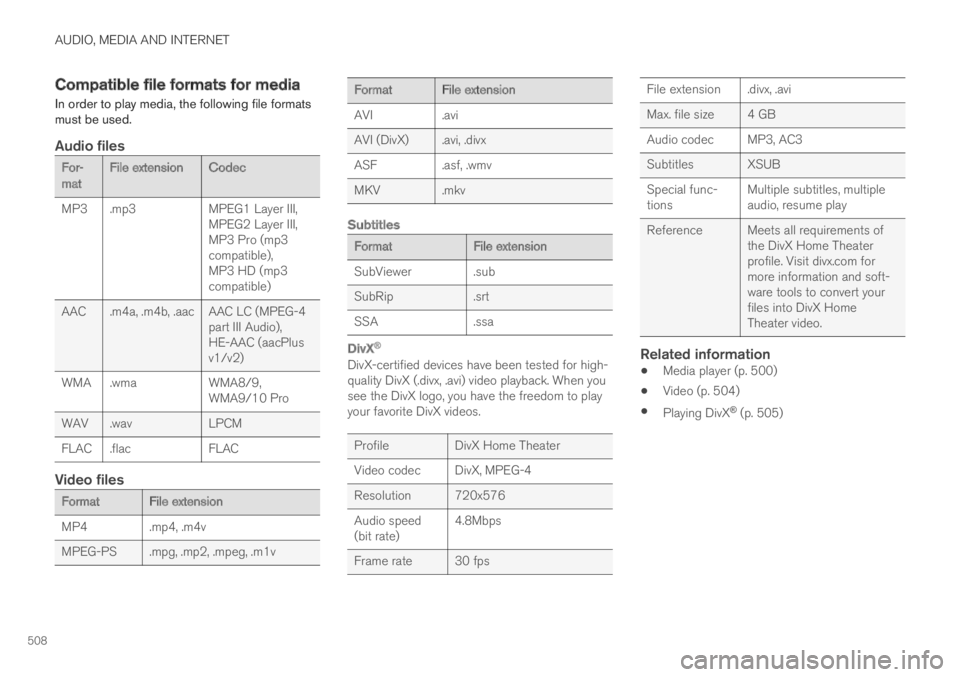
In order to play media, the following file formatsmust be used.
Audio files
For-matFile extension Codec
MP3 .mp3MPEG1 Layer III,MPEG2 Layer III,MP3 Pro (mp3compatible),MP3 HD (mp3compatible)
AAC.m4a, .m4b, .aac AAC LC (MPEG-4part III Audio),HE-AAC (aacPlusv1/v2)
WMA .wmaWMA8/9,WMA9/10 Pro
WAV .wavLPCM
FLAC .flacFLAC
Video files
Format File extension
MP4 .mp4, .m4v
MPEG-PS.mpg, .mp2, .mpeg, .m1v
Format File extension
AVI.avi
AVI (DivX).avi, .divx
ASF.asf, .wmv
MKV .mkv
Subtitles
FormatFile extension
SubViewer .sub
SubRip.srt
SSA.ssa
DivX ®
DivX-certified devices have been tested for high-quality DivX (.divx, .avi) video playback. When yousee the DivX logo, you have the freedom to playyour favorite DivX videos.
ProfileDivX Home Theater
Video codec DivX, MPEG-4
Resolution720x576
Audio speed(bit rate)4.8Mbps
Frame rate 30 fps
File extension .divx, .avi
Max. file size 4 GB
Audio codecMP3, AC3
Subtitles XSUB
Special func-tionsMultiple subtitles, multipleaudio, resume play
Reference Meets all requirements ofthe DivX Home Theaterprofile. Visit divx.com formore information and soft-ware tools to convert yourfiles into DivX HomeTheater video.
Related information
Media player (p. 500)
Video (p. 504)
Playing DivX® (p. 505)
Page 514 of 669
AUDIO, MEDIA AND INTERNET
* Option/accessory.512
Android Auto*
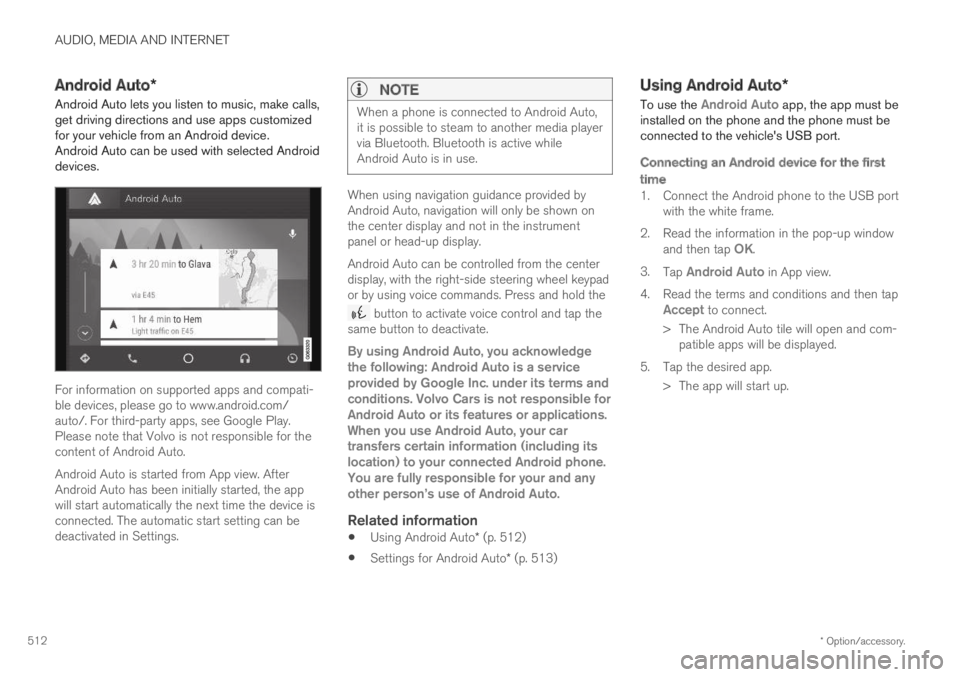
Android Auto lets you listen to music, make calls,get driving directions and use apps customizedfor your vehicle from an Android device.Android Auto can be used with selected Androiddevices.
For information on supported apps and compati-ble devices, please go to www.android.com/auto/. For third-party apps, see Google Play.Please note that Volvo is not responsible for thecontent of Android Auto.
Android Auto is started from App view. AfterAndroid Auto has been initially started, the appwill start automatically the next time the device isconnected. The automatic start setting can bedeactivated in Settings.
NOTE
When a phone is connected to Android Auto,it is possible to steam to another media playervia Bluetooth. Bluetooth is active whileAndroid Auto is in use.
When using navigation guidance provided byAndroid Auto, navigation will only be shown onthe center display and not in the instrumentpanel or head-up display.
Android Auto can be controlled from the centerdisplay, with the right-side steering wheel keypador by using voice commands. Press and hold the
button to activate voice control and tap thesame button to deactivate.
By using Android Auto, you acknowledgethe following: Android Auto is a serviceprovided by Google Inc. under its terms andconditions. Volvo Cars is not responsible forAndroid Auto or its features or applications.When you use Android Auto, your cartransfers certain information (including itslocation) to your connected Android phone.You are fully responsible for your and anyother person
Page 516 of 669
AUDIO, MEDIA AND INTERNET
* Option/accessory.514
Tips for using Android Auto*
Here are some useful tips for when you useAndroid Auto.
Ensure that your apps are updated.
When starting the car, wait until the centerdisplay has started, connect the phone andthen open Android Auto from the app view.
In the event of problems with Android Auto,disconnect your Android phone from theUSB port and then reconnect via USB. Oth-erwise, try closing the app on the phone andthen restarting the app.
When a phone is connected to Android Autoit is still possible to playback media viaBluetooth to another media player. TheBluetooth function is on when Android Autois used.
Related information
Android Auto* (p. 512)
Phone
A phone equipped with Bluetooth can be wire-lessly connected to the vehicle's integratedhands-free system.
The audio and media system offers hands-freefunctionality for remotely controlling a number ofthe phone's features. The phone's integratedcontrols can also be used, even when it is con-nected to the vehicle.
When the phone has been paired and connectedto the vehicle, it can be used as an Internet con-nection or to make or receive calls, send orreceive text messages or wirelessly play music.
The phone is controlled from the center display,and the App menu (accessed using the right-sidesteering wheel keypad) and voice commands canalso be used to control certain functions.
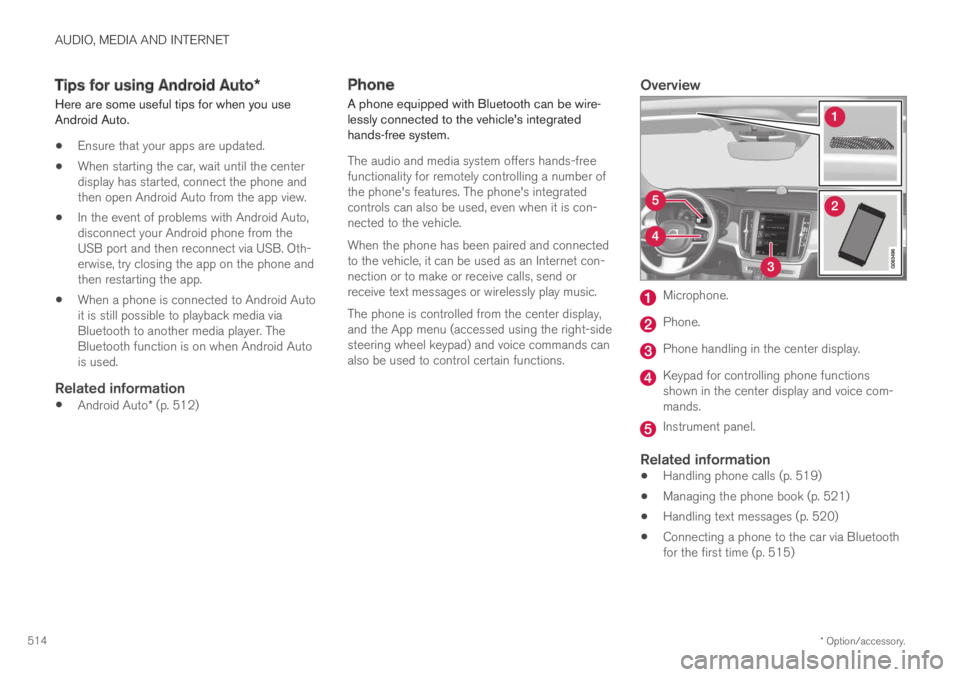
Overview
Microphone.
Phone.
Phone handling in the center display.
Keypad for controlling phone functionsshown in the center display and voice com-mands.
Instrument panel.
Related information
Handling phone calls (p. 519)
Managing the phone book (p. 521)
Handling text messages (p. 520)
Connecting a phone to the car via Bluetoothfor the first time (p. 515)