key battery VOLVO S90 TWIN ENGINE 2019 User Guide
[x] Cancel search | Manufacturer: VOLVO, Model Year: 2019, Model line: S90 TWIN ENGINE, Model: VOLVO S90 TWIN ENGINE 2019Pages: 669, PDF Size: 14.33 MB
Page 268 of 669
KEY, LOCKS AND ALARM
266
Alarm
The alarm emits sound and light signals if any-one without a valid remote key attempts to breakinto the vehicle or interferes with the start batteryor alarm siren.
When armed, the alarm will be triggered if:
the hood, trunk lid or any door is opened.
a battery cable is disconnected.
the alarm siren is disconnected.
Alarm signals
The following occurs if the alarm is triggered:
A siren will sound for 30 seconds or until thealarm is turned off.
All turn signals will flash for 5 minutes oruntil the alarm is turned off.
If the reason the alarm was triggered is not recti-
fied, the alarm cycle will repeat up to 10 times20.
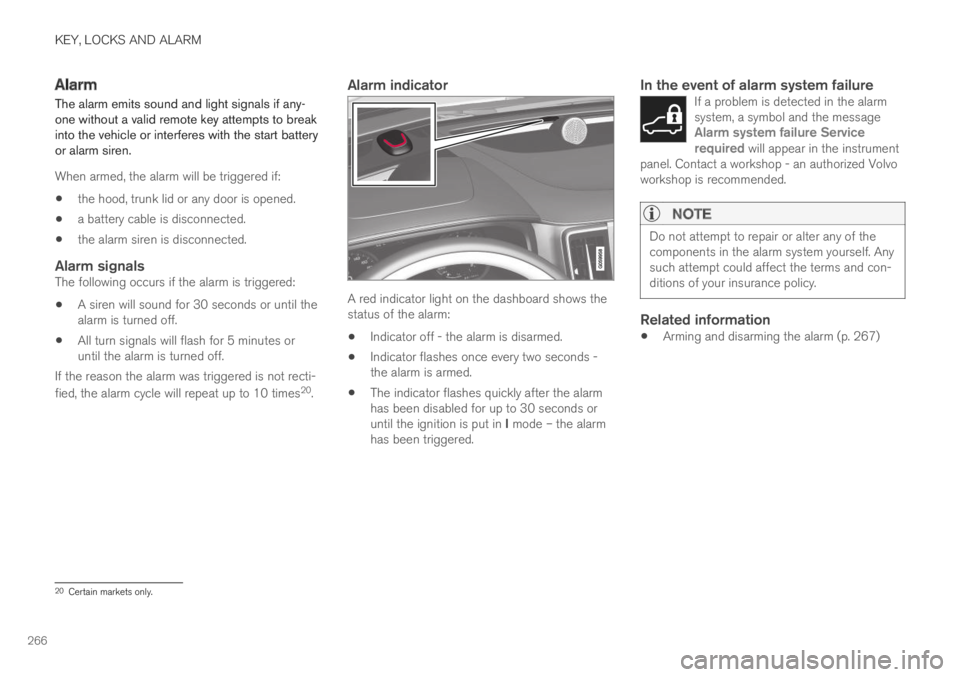
Alarm indicator
A red indicator light on the dashboard shows thestatus of the alarm:
Indicator off - the alarm is disarmed.
Indicator flashes once every two seconds -the alarm is armed.
The indicator flashes quickly after the alarmhas been disabled for up to 30 seconds oruntil the ignition is put in I mode – the alarmhas been triggered.
In the event of alarm system failure
If a problem is detected in the alarmsystem, a symbol and the messageAlarm system failure Servicerequired will appear in the instrumentpanel. Contact a workshop - an authorized Volvoworkshop is recommended.
NOTE
Do not attempt to repair or alter any of thecomponents in the alarm system yourself. Anysuch attempt could affect the terms and con-ditions of your insurance policy.
Related information
Arming and disarming the alarm (p. 267)
20Certain markets only.
Page 269 of 669

KEY, LOCKS AND ALARM
}}
* Option/accessory.267
Arming and disarming the alarm
The alarm is armed when the vehicle is locked.
Arming the alarm
Lock and arm the vehicle by:
pressing the lock button on the remote key
.
touch the marked surface on the outside ofthe door handle or the rubberized pressure
plate on the trunk lid21.
If the vehicle is equipped with both keyless lock-ing/unlocking* and power trunk lid, the button
on the lower edge of the trunk lid can alsobe used to lock and arm the vehicle.
A red LED light on the dashboard will flash every othersecond when the vehicle is locked and the alarm isarmed.
Disarming the alarm
Unlock and disarm the vehicle alarm by:
pressing the unlock button on the remote
key .
grip a door handle or press the trunk lid's
rubberized pressure plate21.
Disarming the alarm without a functioning
remote key
The vehicle can be unlocked and disarmed evenif the remote key is not functioning, e.g. if thebattery is discharged.
1. Open the driver's door using the detachablekey blade.
> This will trigger the alarm.
Location of the backup key reader in the cup holder.
2. Place the remote key on the key symbol inthe backup reader in the tunnel console'scup holder.
3. Turn the start knob clockwise and release.
>The alarm will be disarmed.
Turning off a triggered alarm
–Press the unlock button on the remote keyor put the ignition into mode I by turning thestart knob clockwise and then releasing it.
NOTE
Remember that the alarm is armed whenthe vehicle is locked.
The alarm will be triggered if any of thedoors is opened from the inside.
Automatically arming and disarming the
alarm
Automatically arming the alarm helps preventinadvertently leaving the vehicle without alarmprotection.
If the vehicle is unlocked using the remote key(and the alarm is disarmed) but none of thedoors or trunk lid is opened within two minutes,the alarm will be automatically rearmed. The vehi-cle will also re-lock.
On some markets, the alarm will be automaticallyarmed following a slight delay after the driver'sdoor has been opened and closed without beinglocked.
21Only vehicles with keyless locking and unlocking* (Passive Entry).
Page 416 of 669
HYBRID INFORMATION
414
Charging cable temperaturemonitoring
To help ensure the vehicle's hybrid battery is reli-ably charged each time it is connected, chargingis stopped if the temperature in the chargingcable becomes too high and reaches a criticallimit.
CAUTION
If charging is often inadvertently interrupted,have the charging cable and the vehicle'scharging system inspected by a trained andqualified Volvo service technician.
Related information
Charge cable (p. 411)
Opening and closing the chargingsocket cover
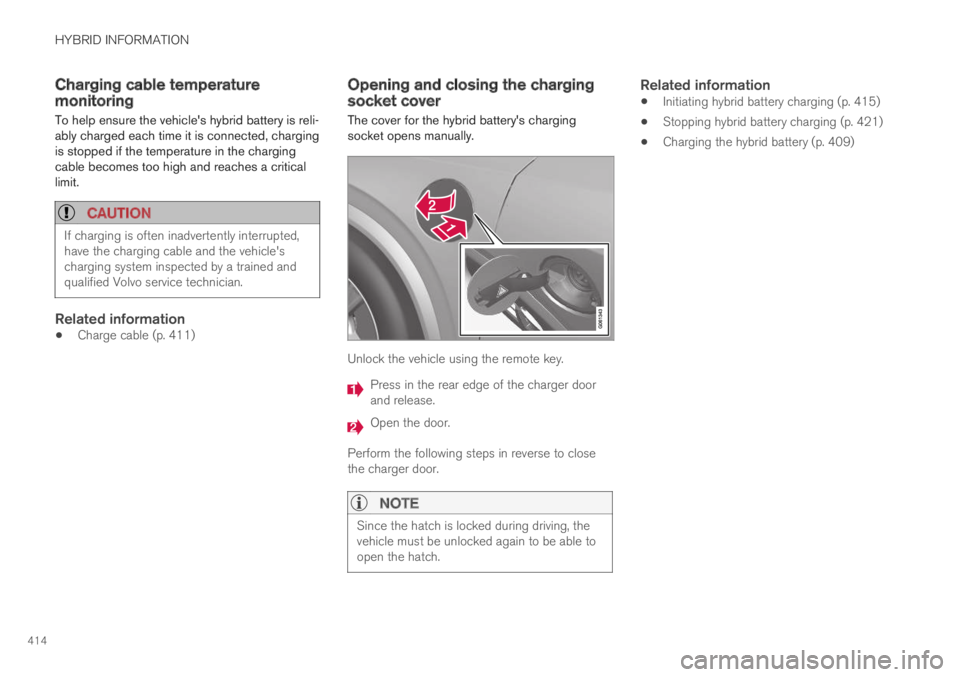
The cover for the hybrid battery's chargingsocket opens manually.
Unlock the vehicle using the remote key.
Press in the rear edge of the charger doorand release.
Open the door.
Perform the following steps in reverse to closethe charger door.
NOTE
Since the hatch is locked during driving, thevehicle must be unlocked again to be able toopen the hatch.
Related information
Initiating hybrid battery charging (p. 415)
Stopping hybrid battery charging (p. 421)
Charging the hybrid battery (p. 409)
Page 423 of 669

HYBRID INFORMATION
* Option/accessory.421
Stopping hybrid battery charging
To stop charging of the hybrid battery, unlockthe vehicle, unplug the charging cable from thevehicle's charging socket and then unplug thecable from the 120/240 V outlet (alternatingcurrent).
CAUTION
Before the charging cable is removed fromthe vehicle's charging socket, the vehiclemust be unlocked using the unlock button onthe remote key. This must be done even if thevehicle's doors are already unlocked. If thevehicle is not unlocked using the unlock but-ton, the charging cable or system may bedamaged.
NOTE
Always unlock the vehicle so that charging iscut off before the connection to the120/240 V outlet (AC, alternating current) isdisconnected. Note that the charging cablemust be disconnected from the vehicle'scharging socket before it is disconnectedfrom the 120/240 V outlet, partly to preventdamage to the system and party to preventunintentional interruption of charging.
Unlock the vehicle with the remote key.Charging will stop.
Press the lock button on the chargingcable's handle. The handle will be released/unlocked. Unplug the cable from the vehi-cle's charging socket and close the chargerdoor.
Unplug the cable from the 120/240 V outlet.
Stow the charging cable in the storage com-partment on the right side of the trunk.
Charging cable automatically locks
If the charging cable cannot be removed from thecharging socket, it will automatically lock intoplace again after unlocking to maximize chargingand range and to enable preconditioning beforedriving. The charging cable can be removed againif the vehicle is unlocked using the remote key.For vehicles with Passive Entry*, the handle canbe used to lock and unlock.
Related information
Opening and closing the charging socketcover (p. 414)
Charge cable (p. 411)
Charging the hybrid battery (p. 409)
Initiating hybrid battery charging (p. 415)
Page 429 of 669

STARTING AND DRIVING
}}
427
In some situations, such as in cold weather or ifthe hybrid battery's charge level is too low, thegasoline engine will start instead.
The vehicle should not be started with the charg-ing cable connected. However, if the cable can-not be pulled out or if the vehicle incorrectlydetects a cable that is not connected, the vehiclecan be started using an override procedure:
1.Press the brake pedal and turn the startknob clockwise.
2.Charge cable Remove before start willappear in the instrument panel.
3. Turn the start knob clockwise again.
4.Removed? Turn and hold start knob 7swill appear. Turn the knob clockwise and holdit for 7 seconds to start the vehicle.
Location of the backup reader in the tunnel console.
If the Vehicle key not found message is shownin the instrument panel at start, place the remotekey at the backup reader and then make a newstart attempt.
NOTE
When the remote key is placed in the backupreader, make sure that no other vehicle keys,metal objects or electronic devices (e.g. cellu-lar phones, tablets, laptops or chargers) are inthe backup reader. Multiple vehicle keys closeto each other in the backup reader can dis-rupt their functionality.
If Vehicle start System check, wait is dis-played in the instrument panel while attemptingto start the vehicle, wait until the message disap-pears and try again to start the vehicle.
CAUTION
If the engine has not responded after 3attempts – wait for 3 minutes before startinga new attempt. Starting capability increases ifthe starter battery is given time to recover.
NOTE
The vehicle cannot be started if the hybridbattery is discharged.
WARNING
Never remove the remote control key fromthe vehicle while driving.
WARNING
Always remove the remote key from thepassenger compartment when you leavethe vehicle and make sure the ignition isin mode 0.
Always put the gear selector in P andapply the parking brake before leavingthe vehicle. Never leave the vehicle unsu-pervised while the engine is running.
Always open the garage door fully andmake sure that ventilation is very goodbefore starting the engine in a garage.The exhaust fumes produced by the vehi-cle contain carbon monoxide, which isinvisible and odorless but very toxic.
NOTE
With a cold start, idling speed may be consid-erably higher than normal for certain enginetypes. This is done to get the emissions sys-tem up to normal operating temperature asquickly as possible, which minimizes exhaustemissions and protects the environment.
Page 432 of 669

STARTING AND DRIVING
430
Selecting ignition mode
The vehicle's ignition can be put in variousmodes (levels) to make different functions availa-ble.
Selecting an ignition mode
Start knob in the tunnel console.
Ignition mode 0 - Unlock the vehicle andkeep the remote key in the passenger com-partment.
NOTE
To set level I or II without engine start – donot depress the brake pedal (or clutch pedalfor vehicles with manual transmission) whenselecting this ignition mode.
Ignition mode I - Turn the start knob clock-wise and release it. The control will automati-cally return to the original position.
Ignition mode II - Turn the start knob clock-wise and hold it there for approx. 5 seconds.Release the knob, which will automaticallyreturn to its original position.
Back to ignition mode 0 - To return to igni-tion mode 0 from mode I and II, turn the startknob clockwise and release it. The controlwill automatically return to the original posi-tion.
Related information
Starting the vehicle (p. 426)
Switching off the vehicle (p. 428)
Ignition modes (p. 429)
Adjusting the steering wheel (p. 193)
Jump starting using another battery (p. 466)
Brake functions
The vehicle's brakes are used to reduce speedor prevent the vehicle from rolling.
In addition to the wheel brakes and parkingbrakes, the vehicle is also equipped with a num-ber of automatic brake assist functions. Thesesystems help the driver by e.g. keeping the vehi-cle stationary when the brake pedal is notdepressed (e.g. at a traffic light or intersection),when starting up a hill or when driving down a hill.
Depending on how the vehicle is equipped, thefollowing brake assist functions may be included:
Auto-hold brakes (Auto Hold)
Hill Start Assist (Hill Start Assist)
Braking assist after a collision
City Safety
Related information
Brakes (p. 431)
Parking brake (p. 434)
Auto-hold brakes (p. 437)
Braking assist after a collision (p. 439)
Hill Start Assist (p. 439)
City Safety™ (p. 333)
Page 588 of 669

||
MAINTENANCE AND SERVICE
586
Monthly:
Check cold tire pressure in all tires. Inspectthe tires for wear.
Check that engine coolant and other fluidlevels are between the indicated "min" and"max" markings.
Clean interior glass surfaces with a glasscleaner and soft paper towels.
Wipe driver information displays with a softcloth.
Visually inspect battery terminals for corro-sion. Corrosion may indicate a loose terminalconnector, or a battery near the end of itsuseful service life. Consult your Volvo retailerfor additional information.
As needed:
Wash the car, including the undercarriage, toreduce wear that can be caused by a buildup ofdirt, and corrosion that can be caused by salt res-idues.
Clean leaves and twigs from air intake vents atthe base of the windshield, and from other placeswhere they may collect.
NOTE
Complete service information for qualifiedtechnicians is available online for purchase orsubscription at www.volvotechinfo.com.
Related information
Vehicle status (p. 588)
Scheduling service and repairs (p. 589)
Connecting equipment to the vehicle's datalink connector (p. 37)
Technician certification (p. 38)
Climate control system service (p. 595)
Maintenance of the brake system (p. 433)
Engine compartment overview (p. 596)
Data transfer between vehicle andworkshop over Wi-Fi
Volvo workshops have a designated Wi-Fi net-work for secure data transfer between your vehi-cle and the workshop. Your visit to the workshopwill be easier and more effective when diagnos-tics information and software can be transferredover the workshop's network.
When you arrive at the workshop, your servicetechnician can connect your vehicle to the work-shop's Wi-Fi network to perform troubleshootingand download software. For this type of commu-nication, the vehicle only connects to a work-shop's network. It is not possible to connect thevehicle to another Wi-Fi network (e.g. your homenetwork) in the same way as to a workshop's net-work.
Connecting with remote key
Connection is usually managed by the servicetechnician, who will use the remote key buttons. Itis therefore important to bring a key with buttonswith you when you visit the workshop. Pressingthe lock button on the remote key three times willconnect the vehicle to the workshop's Wi-Fi net-work.
When the car is connected to a Wi-Fi network,
the symbol appears in the center display.
Page 654 of 669
INDEX
652
B
Backrest
front seat, adjusting 180, 181, 184,
185, 186, 187
rear seat, adjusting192
rear seat, folding189
Battery
Hybrid605
jump-start466
Maintenance601
start601
symbols on the battery606
warning symbols606
BLIS347, 348, 349, 350
Blower
adjusting219, 220
air distribution202
air vents202
Bluetooth
connect506
connecting vehicle to Internet 525
phone514
settings523
Book service and repair589
Booster cushions71
Brake assist
after collision439
Brake fluid
grade647
Brake functions430
Brake light156
Brake position440
Brakes431
anti-lock brakes, ABS431
automatic when stationary437
Brake Assist System, BAS432
brake lights156
brake system430
emergency brake lights156
handbrake434
Maintenance433
on salted roads433
on wet roads433
brake system
fluid647
C
Camera sensor343
Camera unit329, 333
Capacity weight570, 643
Cargo compartment579
attachment points582
Car wash624, 625, 627, 628, 629, 630
Catalytic converter464
recovery468
CD player504
Cell phone, see Phone 515
Center console 575
Center display
change appearance 127
cleaning 619
climate controls 207
Function view 118
keyboard 122
messages 136, 137
operation 108, 111, 115, 120
overview 105
settings 128, 129
switch off and change volume 127
symbols in status bar 120
views 111
Central locking 256
Change of owner 130
Changing a wheel 556
Charge
vehicle function 456
Charge level
vehicle function 456
Page 662 of 669

INDEX
660
R
Radar sensor295, 324
limitations325
Radar unit324
Radio483
changing radio waveband and radio sta-
tion484
HD radio487
RBDS487
search radio station485
settings486
SiriusXM® Satellite radio 490, 491, 493
start483
voice control144
Radio favorites485
Rain sensor176, 177
Rain sensor's memory function177
Rear camera 388, 389, 391, 393, 394,
395, 396, 397
Rear door
sun shade166
Rear seat579
adjusting backrest tilt192
Adjusting passenger seat from rear
seat192
blower220
climate207
folding backrest189
head restraint191
heating210
temperature 221
ventilation 212
Rear sensors 382, 383, 384, 385, 386, 387
Rearview/door mirrors
dimming 168
heating 218
interior 167
Rearview mirror 167
dimming 168
Rear window
heating 218
sun shade 166
Recalls 45
Recommendations when driving 457
Recommendations when loading 580
Recovery 470
Red Key 246
settings 247
Refrigerant 595
climate system 648
Refueling
filling 460
fuel filler door, fuel flap 459
Remote immobilizer 250
Remote key237
battery replacement243
connecting to driver profile134
detachable key blade248
loss246
Range242
Remote updates587
Reporting safety defects44
Resetting door mirrors169
Resetting settings130
change of owner130
Driver profile135
Resetting trip odometer88
Road Sign Information356, 357, 358
limitations361
operation358, 359, 360
Road trip457
Roof load, max. weight643
Run-off Mitigation373, 374, 375
S
Safety42
pregnancy43
Safety belt, see Seat belt47
Safety defects, reporting44