trailer VOLVO S90 TWIN ENGINE 2019 User Guide
[x] Cancel search | Manufacturer: VOLVO, Model Year: 2019, Model line: S90 TWIN ENGINE, Model: VOLVO S90 TWIN ENGINE 2019Pages: 669, PDF Size: 14.33 MB
Page 363 of 669

DRIVER SUPPORT
}}
* Option/accessory.361
For more information on Speed Warnings in con-junction with speed cameras, also see “RoadSign Information with Speed Warning and Set-tings” and “Road Sign Information limitations”.
NOTE
For an audible alert to be provided if thespeed is exceeded, the Speed LimitWarning function must be activated andthe Road Sign Audio Warning sub-function must be On. Audible alerts areprovided if the vehicle's speed exceedsthe speed displayed by RSI in the instru-ment panel.
It is possible to receive an audible alertfor speed cameras regardless of the vehi-cle's speed, whether or not the speedlimit is exceeded, and even if the RoadSign Audio Warning function is deacti-vated: See heading "Speed camerawarning On/Off" in section "Road SignInformation with Speed Warning and set-tings" and select Speed Camera AudioWarning there.
Information about speed cameras on thenavigation map is not available for allmarkets/areas.
Related information
Road Sign Information* (p. 356)
Road Sign Information with Speed Warningand Settings (p. 359)
Road Sign Information limitations (p. 361)
Road Sign Information limitations
Road Sign Information (RSI96) functionality maybe reduced in certain situations.
RSI could have reduced functionality due to e.g.:
faded road signs
signs located in a curve in the road
twisted or damaged signs
signs positioned high above the road
fully/partially obstructed or poorly positionedsigns
signs partially or fully covered by frost, snowand/or dirt
digital road maps97 that are outdated, incor-
rect or do not contain speed information98.
NOTE
Certain types of bike carriers that are con-nected to the trailer socket may be interpre-ted as a connected trailer by the RSI function.In such cases, the instrument panel may indi-cate incorrect speed information.
96Road Sign Information97Vehicles equipped with Sensus Navigation*.98Map data and speed information is not available for all areas.
Page 385 of 669
DRIVER SUPPORT
}}
383
Park Assist front, rear and sides
Park Assist has different parameters dependingon which part of the vehicle is approaching anobstacle.
Front camera
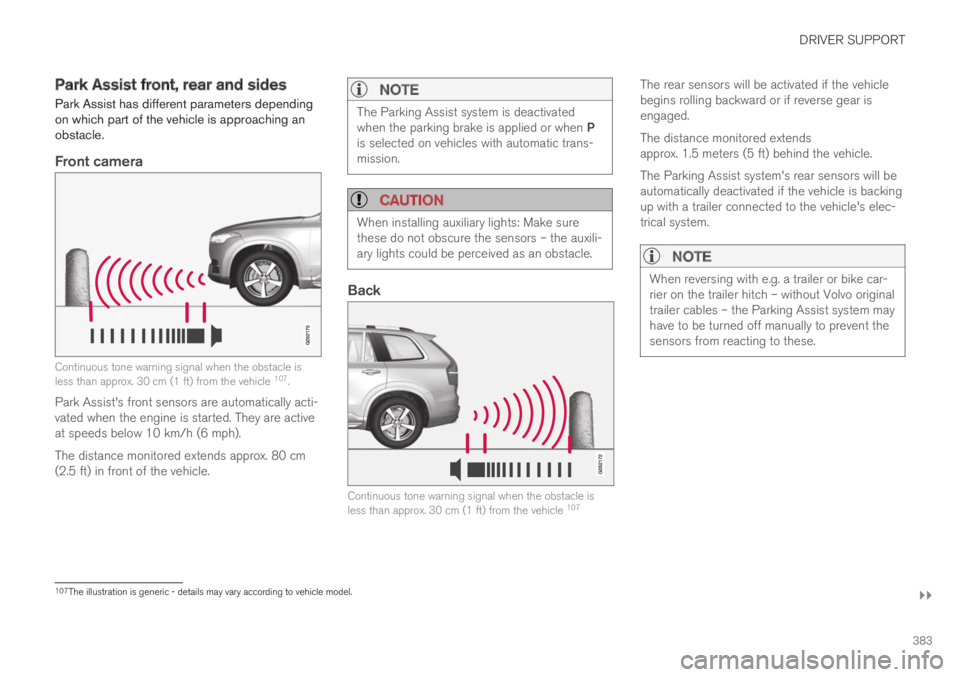
Continuous tone warning signal when the obstacle isless than approx. 30 cm (1 ft) from the vehicle 107.
Park Assist's front sensors are automatically acti-vated when the engine is started. They are activeat speeds below 10 km/h (6 mph).
The distance monitored extends approx. 80 cm(2.5 ft) in front of the vehicle.
NOTE
The Parking Assist system is deactivatedwhen the parking brake is applied or when Pis selected on vehicles with automatic trans-mission.
CAUTION
When installing auxiliary lights: Make surethese do not obscure the sensors – the auxili-ary lights could be perceived as an obstacle.
Back
Continuous tone warning signal when the obstacle isless than approx. 30 cm (1 ft) from the vehicle 107
The rear sensors will be activated if the vehiclebegins rolling backward or if reverse gear isengaged.
The distance monitored extendsapprox. 1.5 meters (5 ft) behind the vehicle.
The Parking Assist system's rear sensors will beautomatically deactivated if the vehicle is backingup with a trailer connected to the vehicle's elec-trical system.
NOTE
When reversing with e.g. a trailer or bike car-rier on the trailer hitch – without Volvo originaltrailer cables – the Parking Assist system mayhave to be turned off manually to prevent thesensors from reacting to these.
107The illustration is generic - details may vary according to vehicle model.
Page 387 of 669

DRIVER SUPPORT
* Option/accessory.385
Park Assist limitations
Park Assist may not be able to detect all condi-tions in all situations and functionality may there-fore be limited in certain cases.
The driver should be aware of the following limi-tations for Park Assist:
WARNING
Be extra cautious whenreversing if this symbol isshown when a trailer, bikecarrier or similar is attachedand electrically connectedto the vehicle.
The symbol indicates thatthe rear parking assist sensors are deacti-vated and will not warn of any obstacles.
CAUTION
Objects such as chains, thin and glossy polesor low obstacles may end up in the "signalshadow" and then go temporarily undetectedby the sensors – the pulsating tone may thenunexpectedly stop instead of becoming aconstant tone as expected.
The sensors cannot detect high objects, suchas protruding ramps.
In such situations, pay extra attention andmaneuver/drive the vehicle very slowly orstop the current parking maneuver –there may be a high risk of damage tothe vehicle or other objects since infor-mation from the sensors is not alwaysreliable in such situations.
CAUTION
In some circumstances, the Park Assist Sys-tem may produce false warnings due to exter-nal sound sources with the same ultrasonicfrequencies as those the system works with.
Examples of such sources are horns, wet tireson asphalt, pneumatic brakes, exhaust noisefrom motorcycles, etc.
NOTE
When a trailer hitch is configured with thevehicle electrical system, the trailer hitch pro-trusion is included when the function meas-ures the distance to objects behind the vehi-cle.
Related information
Park Assist* (p. 382)
Page 393 of 669

DRIVER SUPPORT
}}
391
Park Assist Camera trajectory lines
The Park Assist Camera uses trajectory linesand fields on the screen to indicate the vehicle'sposition in relation to its immediate surround-ings.
Example114 of trajectory lines.
The trajectory lines show the anticipated trajec-tory for the vehicle's outermost dimensions basedon the current position of the steering wheel to
help simplify parallel parking, backing into tightspaces or attaching a trailer.
The lines on the screen are projected as if theywere painted lines on the ground behind thevehicle and are directly affected by the way inwhich the steering wheel is turned. This enablesthe driver to see path the vehicle will take, even ifhe/she turns the steering wheel.
These lines also indicate the outermost limits thatany object (towbar, rearview mirrors, corners ofthe body, etc.) extends out from the vehicle.
NOTE
When reversing with a trailer that is notelectrically connected to the vehicle, thescreen guide lines show the path thevehicle will take – not the trailer.
The screen does not show guide lineswhen a trailer is electrically connected tothe vehicle's electrical system.
Guide lines are not shown when zoomingin.
CAUTION
Bear in mind that when the rearwardcamera view is selected, the screen onlyshows the area behind the vehicle – payattention to the sides and front of thevehicle when steering while reversing.
The same applies to the reverse – payattention to what is happening with therear parts of the vehicle when the frontcamera view is selected.
Note that the guide lines show the short-est path – pay extra attention to ensurethat the vehicle sides do not come incontact with/travel over anything whensteering while driving forward or that thevehicle front moves toward/over anythingwhen steering while reversing.
114The illustration is generic - details may vary according to vehicle model.
Page 394 of 669

||
DRIVER SUPPORT
* Option/accessory.392
Trajectory lines in 360° view *
360° view with trajectory lines114.
In the 360° view, trajectory lines are shownbehind, in front of, or to the sides of the vehicle,depending on the direction of travel.
When driving forward: Front lines
When backing up: Side lines and rear lines.
When the front or rear camera is selected, thetrajectory lines will be shown regardless of thevehicle's direction of travel.
With a side camera selected, the trajectory lineswill only be shown if the vehicle is backing up.
Trajectory lines for a towbar *
Towbar with trajectory line114.
Towbar - activate trajectory lines for towbar.
Zoom - zoom in/out.
The camera can help make hitching a trailer eas-ier by showing an anticipated trajectory line forthe towbar's path toward the trailer.
1.Tap Towbar (1).
> The trajectory line for the towbar's antici-pated path toward the vehicle will appearand the vehicle's trajectory lines will dis-appear.
Trajectory lines cannot be displayed forboth the vehicle and the towbar at thesame time.
2.Tap Zoom (2) for a close-up view for moreprecise maneuvering.
> The camera will zoom in.
Related information
Park Assist Camera* (p. 388)
114The illustration is generic - details may vary according to vehicle model.
Page 397 of 669
DRIVER SUPPORT
}}
395
Park Assist Camera limitations
The Park Assist Camera may not be able todetect all conditions in all situations and func-tionality may therefore be limited.
The driver should be aware of the following limi-tations for the Park Assist Camera:
WARNING
Be extra cautious whenreversing if this symbol isshown when a trailer, bikecarrier or similar is attachedand electrically connectedto the vehicle.
The symbol indicates thatthe rear parking assist sensors are deacti-vated and will not warn of any obstacles.
NOTE
A bike carrier and other accessories mountedon the rear of the vehicle can obscure thecamera's view.
Blind sectors
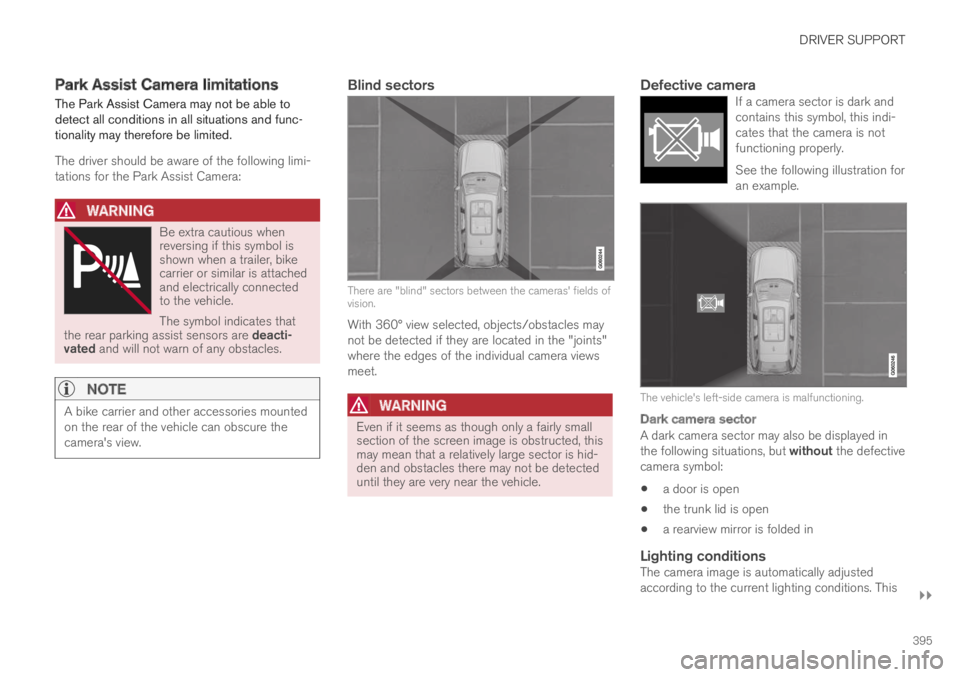
There are "blind" sectors between the cameras' fields ofvision.
With 360° view selected, objects/obstacles maynot be detected if they are located in the "joints"where the edges of the individual camera viewsmeet.
WARNING
Even if it seems as though only a fairly smallsection of the screen image is obstructed, thismay mean that a relatively large sector is hid-den and obstacles there may not be detecteduntil they are very near the vehicle.
Defective camera
If a camera sector is dark andcontains this symbol, this indi-cates that the camera is notfunctioning properly.
See the following illustration foran example.
The vehicle's left-side camera is malfunctioning.
Dark camera sector
A dark camera sector may also be displayed inthe following situations, but without the defectivecamera symbol:
a door is open
the trunk lid is open
a rearview mirror is folded in
Lighting conditions
The camera image is automatically adjustedaccording to the current lighting conditions. This
Page 402 of 669

DRIVER SUPPORT
400
Parking with Park Assist Pilot
Park Assist Pilot (PAP119) helps the driver parkusing three different steps. The function can alsohelp the driver pull out of a parking space.
NOTE
The PAP function measures the space andsteers the vehicle – the driver's role is to:
keep close watch of the area around thevehicle
follow the instructions on the center dis-play
change gears (reverse/forward) – a"ping" sound indicates when the drivershould change gears
regulate and maintain a safe speed
apply the brakes and stop.
Information about the actions required by thedriver are provided in the center display usingsymbols, graphics and/or text.
PAP can be activated if the following criteria havebeen met after the engine is started:
No trailer is hitched to the vehicle
Your vehicle's speed is lower than 30 km/h(20 mph).
NOTE
The distance between the vehicle and parkingspots should be 0.5-1.5 meters (1.6-5.0 ft)when PAP is looking for parking.
Parking
PAP parks the vehicle using the following steps:
1. The system searches for and measurespotential parking spaces.
2. The vehicle is steered while it is backing intothe parking space.
3. The vehicle is positioned in the parkingspace (the driver may be prompted to shiftgears).
Searching for and measuring potential
parking spots
The function can be activatedin the center display's Functionview.
It can also be accessed fromthe camera views.
Parallel parking overview.
Perpendicular parking overview.
To do so:
119Park Assist Pilot
Page 438 of 669
STARTING AND DRIVING
436
Settings for automatically activatingthe parking brake
Choose whether the parking brake should beactivated automatically when the vehicle isswitched off.
This selection is made in the Settings menu inthe center display.
1.Tap Settings in the Top view.
2. Tap My CarParking Brake andSuspension and select or deselect theAuto Activate Parking Brake function.
Related information
Activating and deactivating the parking brake(p. 434)
Parking brake (p. 434)
Parking on a hill
Always use the parking brake when parking on ahill.
WARNING
Always apply the parking brake when parkingon an incline. Selecting a gear or putting theautomatic transmission in P may not be suffi-cient to keep the vehicle stationary in all sit-uations.
If the vehicle is pointing uphill:
Turn the front wheels so they are pointingaway from the curb.
If the vehicle is pointing downhill:
Turn the front wheels so they are pointingtoward the curb.
Heavy load uphill
Heavy loads, such as a trailer, could cause thevehicle to roll backward when the parking brakeis released automatically on steep uphill gradi-ents. To help avoid this, pull the control upwardwhile you are driving away. Release the controlwhen the vehicle gains traction.
Related information
Activating and deactivating the parking brake(p. 434)
Parking brake malfunction
If you are unable to deactivate or activate theparking brake after several attempts, contact anauthorized Volvo workshop.
A audible warning signal will sound if the parkingbrake is applied while the vehicle is being driven.
If the vehicle must be parked before the problemis rectified, turn the wheels as when parking onan incline and put the gear selector in P.
Low battery charge level
If the battery charge level is too low, it will not bepossible to apply or release the parking brake.Connect an auxiliary battery to the vehicle if thebattery is discharged.
Replacing brake pads
Due to the design of the electric parking brake,the rear brake pads must be replaced by a work-shop. An authorized Volvo workshop is recom-mended.
Page 450 of 669

||
STARTING AND DRIVING
448
ECO Climate
In Pure mode, ECO climate is automatically acti-vated in the passenger compartment to helpreduce energy consumption.
NOTE
When the Pure drive mode is activated, set-tings for certain climate system and electricityconsuming functions are reduced. Some ofthese settings can be reset manually, but fullfunctionality will only be restored by leavingPure mode or adapting the Individual drivemode to full climate system functionality.
If condensation forms on the windows, tap themax defroster button, which will function normally.
AWD
Improves the vehicle's traction and handlingby increasing all-wheel drive.
This drive mode locks the vehicle in all-wheeldrive. An optimal distribution between front andrear axle torque helps provide the best possiblecontrol, stability and traction, e.g. on slipperyroads or when towing a heavy trailer or anothervehicle. The AWD drive mode is always availableregardless of the hybrid battery's charge status.
Both the combustion engine and the electricmotor are engaged to enable all-wheel drive,which results in higher fuel consumption.
In the other drive modes, the vehicle automati-cally adapts the need for all-wheel drive accord-ing to the road surface, and can activate the elec-tric motor or start the combustion engine as nee-ded.
POWER
Power mode is designed to provide sportierdriving characteristics and a faster accelera-tion response.
This drive mode maximizes the combined powerfrom the combustion engine and the electricmotor by providing power to both the front andrear wheels. Gear shifting will be faster and moredistinct and the transmission will prioritize gearswith a higher traction force. Steering response isfaster and suspension is stiffer.
Both the combustion engine and the electricmotor are engaged to enable all-wheel drive,which results in higher fuel consumption.
This drive mode is optimized for maximum per-formance and throttle response. It changes thethrottle response, gear shifting program andturbo boost system. Chassis settings and steer-ing and brake response are also optimized. ThePower drive mode is always available regardlessof the hybrid battery's charge status.
INDIVIDUAL
Customizes drive mode to personal preferen-ces.
Select one of the drive modes as a basis andadjust the settings to achieve your preferred driv-ing characteristics. These settings will be storedin your driver profile.
Individual drive mode is only available if it hasbeen activated in the center display.
Settings view3 for Individual drive mode.
1.Tap Settings in the Top view.
3The image is schematic and the details may vary depending on vehicle model or software update.
Page 461 of 669

STARTING AND DRIVING
}}
459
CAUTION
Parts of the vehicle (e.g. engine, transmission,driveline, electrical components, etc.) can bedamaged if the vehicle is driven through waterhigher than its floor level. Damage to anycomponents caused by flooding, vapor lock orinsufficient oil is not covered under warranty.
If the engine stalls while the vehicle is inwater, do not attempt to restart it. Have thevehicle towed on the bed of a tow truck to aworkshop - an authorized Volvo workshop isrecommended.
CAUTION
Because it can be difficult to determine thewater depth, avoid driving through standing orrunning water.
When you have passed the water, press lightly onthe brake pedal and check that the brakes arefunctioning properly. Water, mud, slush, etc. canmake the brake linings slippery, resulting indelayed braking effect.
If the vehicle is equipped with a trailer couplingcontact, clean the contact after driving in water ormud.
Related information
Recovery (p. 470)
Opening/closing the fuel filler door
A button on the instrument panel is used tounlock the fuel filler door.
An arrow next to the fuel pumpsymbol in the instrument panelindicates the side of the vehicleon which the fuel filler door islocated.
1. Press the button on the dashboard.
> Pressure equalization in the fuel tank cau-ses a slight delay before the fuel fillerdoor opens. Fuel tank Fuel lid isopening will be displayed in the instru-ment panel, followed by Fuel tank Readyfor refueling.