ESP VOLVO S90 TWIN ENGINE 2019 Owner's Manual
[x] Cancel search | Manufacturer: VOLVO, Model Year: 2019, Model line: S90 TWIN ENGINE, Model: VOLVO S90 TWIN ENGINE 2019Pages: 669, PDF Size: 14.33 MB
Page 176 of 669
||
WINDOWS, GLASS AND MIRRORS
* Option/accessory.174
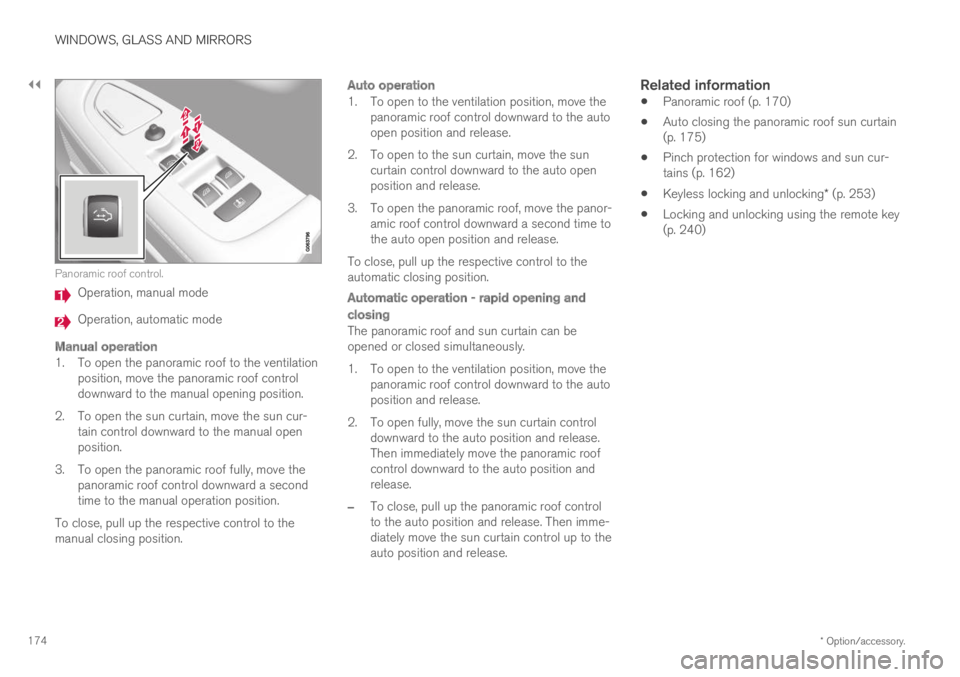
Panoramic roof control.
Operation, manual mode
Operation, automatic mode
Manual operation
1. To open the panoramic roof to the ventilationposition, move the panoramic roof controldownward to the manual opening position.
2. To open the sun curtain, move the sun cur-tain control downward to the manual openposition.
3. To open the panoramic roof fully, move thepanoramic roof control downward a secondtime to the manual operation position.
To close, pull up the respective control to themanual closing position.
Auto operation
1. To open to the ventilation position, move thepanoramic roof control downward to the autoopen position and release.
2. To open to the sun curtain, move the suncurtain control downward to the auto openposition and release.
3. To open the panoramic roof, move the panor-amic roof control downward a second time tothe auto open position and release.
To close, pull up the respective control to theautomatic closing position.
Automatic operation - rapid opening and
closing
The panoramic roof and sun curtain can beopened or closed simultaneously.
1. To open to the ventilation position, move thepanoramic roof control downward to the autoposition and release.
2. To open fully, move the sun curtain controldownward to the auto position and release.Then immediately move the panoramic roofcontrol downward to the auto position andrelease.
–To close, pull up the panoramic roof controlto the auto position and release. Then imme-diately move the sun curtain control up to theauto position and release.
Related information
Panoramic roof (p. 170)
Auto closing the panoramic roof sun curtain(p. 175)
Pinch protection for windows and sun cur-tains (p. 162)
Keyless locking and unlocking* (p. 253)
Locking and unlocking using the remote key(p. 240)
Page 239 of 669
KEY, LOCKS AND ALARM
}}
* Option/accessory.237
In rear door *
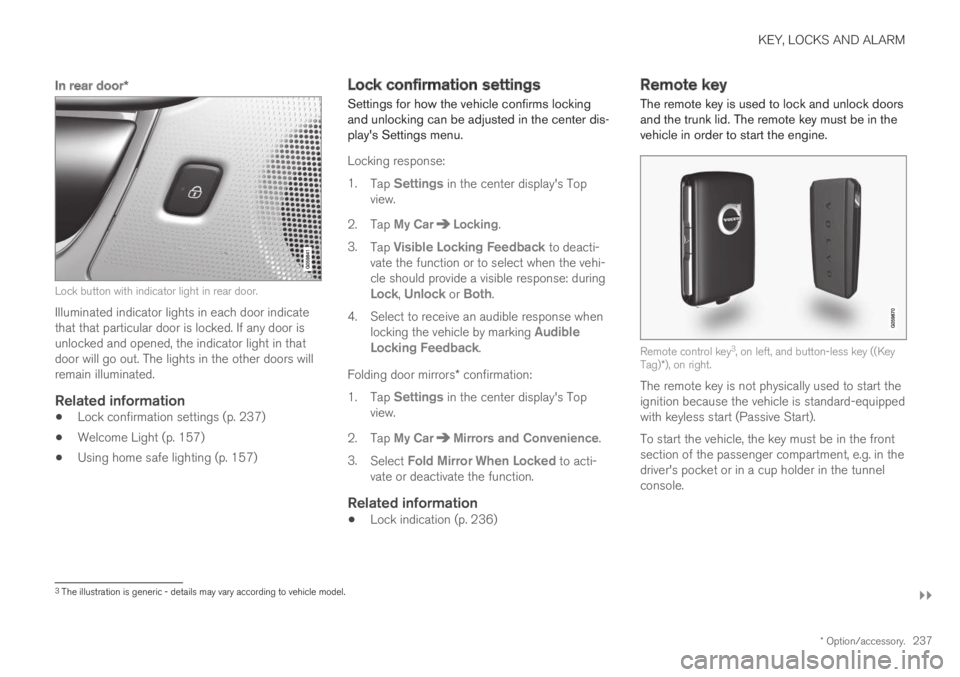
Lock button with indicator light in rear door.
Illuminated indicator lights in each door indicatethat that particular door is locked. If any door isunlocked and opened, the indicator light in thatdoor will go out. The lights in the other doors willremain illuminated.
Related information
Lock confirmation settings (p. 237)
Welcome Light (p. 157)
Using home safe lighting (p. 157)
Lock confirmation settings
Settings for how the vehicle confirms lockingand unlocking can be adjusted in the center dis-play's Settings menu.
Locking response:
1.Tap Settings in the center display's Topview.
2. Tap My CarLocking.
3.Tap Visible Locking Feedback to deacti-vate the function or to select when the vehi-cle should provide a visible response: duringLock, Unlock or Both.
4. Select to receive an audible response whenlocking the vehicle by marking AudibleLocking Feedback.
Folding door mirrors* confirmation:
1.Tap Settings in the center display's Topview.
2. Tap My CarMirrors and Convenience.
3.Select Fold Mirror When Locked to acti-vate or deactivate the function.
Related information
Lock indication (p. 236)
Remote key
The remote key is used to lock and unlock doorsand the trunk lid. The remote key must be in thevehicle in order to start the engine.
Remote control key3, on left, and button-less key ((KeyTag)*), on right.
The remote key is not physically used to start theignition because the vehicle is standard-equippedwith keyless start (Passive Start).
To start the vehicle, the key must be in the frontsection of the passenger compartment, e.g. in thedriver's pocket or in a cup holder in the tunnelconsole.
3The illustration is generic - details may vary according to vehicle model.
Page 253 of 669

KEY, LOCKS AND ALARM
}}
* Option/accessory.251
Remote immobilizer with tracking
system 11
The vehicle is equipped with a system that makesit possible to track and locate the vehicle and toremotely activate the immobilizer to prevent thevehicle from being started. Contact your nearestVolvo retailer for more information and assistanceactivating the system.
The following instrument panel error messagesare related to the remote immobilizer with track-ing system:
Symbol Message Meaning
Remotelyimmobilised
Vehicle notpossible tostart
The remoteimmobilizer withtracking system isactivated. Thevehicle cannot bestarted. ContactVolvo On CallService Center.
Related information
Remote key (p. 237)
Ordering additional remote keys (p. 246)
Start and lock system typedesignations
The following information contains type designa-tions for the start and lock system.
Alarm system
USA FCC ID: MAYDA 5823(3)
This device complies with part 15 of the FCCrules. Operation is subject to the following condi-tions: (1) This device may not cause harmfulinterference, and (2) this device must accept anyinterference received, including interference thatmay cause undesired operation.
Canada IC: 4405A-DA 5823(3)
This device is subject to the following conditions:(1) this device may not cause interference, and(2) this device must accept any interference,including interference that may cause undesiredoperation of the device.
Remote keys (Passive entry/Passive
start * )
USA
Volvo Standard Key FCC ID: YGOHUF8423
Volvo Tag ID FCC ID: YGOHUF8432
This device complies with part 15 of the FCCrules. Operation is subject to the following twoconditions:
(1) This device may not cause harmful interfer-ence, and
(2) this device must accept any interferencereceived, including interference that may causeundesired operation.
Any changes or modification not expresslyapproved by the party responsible for compliancecould void the user's authority to operate thisequipment.
Canada
Volvo Standard Key IC: 4008C-HUF8423
Volvo Tag ID IC: 4008C-HUF8432
This device complies with Industry Canadalicense-exempt RSS standards. Operation is sub-ject to the following two conditions:
(1) This device may not cause harmful interfer-ence, and (2) this device must accept any inter-ference received, including interference that maycause undesired operation.
Immobilizer and Passive entry/Passive
start * systems
USA-FCC ID: LTQVO3134
This device complies with part 15 of the FCCrules. Operation is subject to the following twoconditions:
11
Only certain markets and in combination with Volvo On Call * .
Page 254 of 669
||
KEY, LOCKS AND ALARM
* Option/accessory.252
(1) This device may not cause harmful interfer-ence, and
(2) this device must accept any interferencereceived, including interference that may causeundesired operation.
Any changes or modification not expresslyapproved by the party responsible for compliancecould void the user's authority to operate thisequipment.
Canada-IC:3659A-VO3134
This device complies with Industry Canadalicense-exempt RSS standards. Operation is sub-ject to the following two conditions:
(1) This device may not cause harmful interfer-ence, and (2) this device must accept any inter-ference received, including interference that maycause undesired operation.
Related information
Remote key (p. 237)
Keyless and touch-sensitive
surfaces*
If the vehicle is equipped with keyless lockingand unlocking, it is only necessary to have theremote key within range, e.g. in a pocket or bag,which makes it easier to open the vehicle if yourhands are full.
Pressure-sensitive surfaces
Door handle
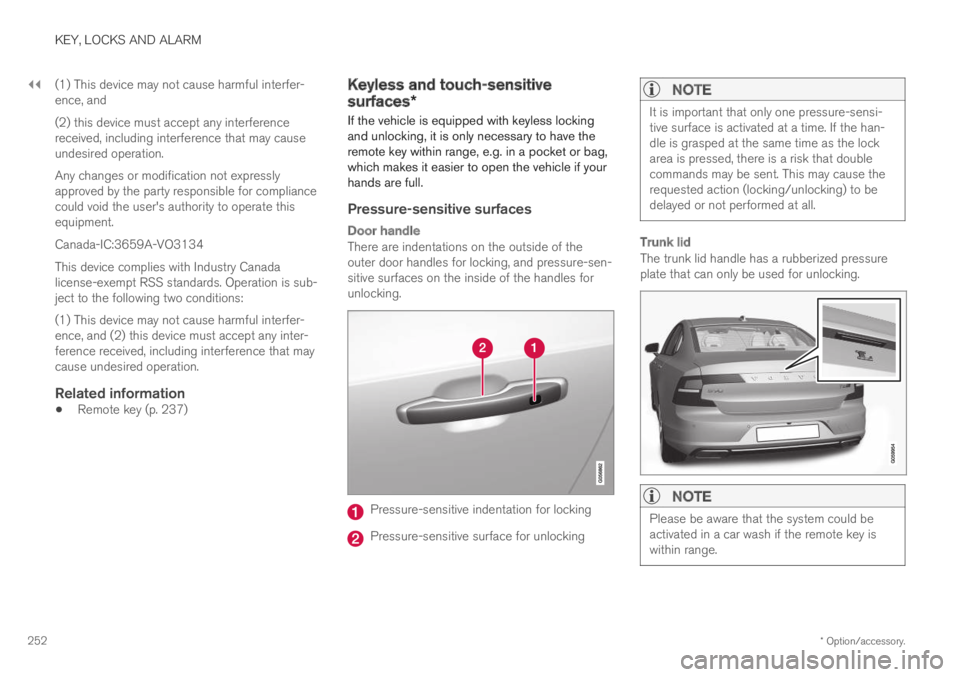
There are indentations on the outside of theouter door handles for locking, and pressure-sen-sitive surfaces on the inside of the handles forunlocking.
Pressure-sensitive indentation for locking
Pressure-sensitive surface for unlocking
NOTE
It is important that only one pressure-sensi-tive surface is activated at a time. If the han-dle is grasped at the same time as the lockarea is pressed, there is a risk that doublecommands may be sent. This may cause therequested action (locking/unlocking) to bedelayed or not performed at all.
Trunk lid
The trunk lid handle has a rubberized pressureplate that can only be used for unlocking.
NOTE
Please be aware that the system could beactivated in a car wash if the remote key iswithin range.
Page 273 of 669

DRIVER SUPPORT
}}
* Option/accessory.271
Changing the level of steering wheel
resistance *
To change the level of steering wheel resistance,see the description of the INDIVIDUAL optionunder "Available drive modes" in the "Drivemodes" section.
On models not equipped with drive mode con-trols and the INDIVIDUAL option, steering wheelresistance can instead be set in the center dis-play's Top view under:
SettingsMy CarDrive ModesSteering Force
Steering wheel resistance settings cannot beaccessed when turning at speeds above10 km/h (6 mph).
Related information
Drive modes (p. 446)
Pilot Assist (p. 308)
Lane Keeping Aid (p. 364)
Steering assistance at risk of collision(p. 372)
Park Assist Pilot* (p. 398)
Electronic Stability Control
The Electronic Stability Control (ESC1) functionhelps the driver avoid skidding and improves thevehicle's directional stability.
This symbol will be displayed inthe instrument panel when theESC system is intervening.
When the ESC has intervenedto apply the brakes, a pulsingsound may be heard and thevehicle may accelerate more slowly than expec-ted when the accelerator pedal is depressed.
The ESC system consists of the following sub-functions:
Stability control2
Spin control and active yaw control
Engine drag control
WARNING
The Electronic Stability Control systemESC is supplementary driver supportintended to facilitate driving and make itsafer – it cannot handle all situations inall traffic, weather and road conditions.
ESC is not a substitute for the driver'sattention and judgment. The driver isalways responsible for ensuring the vehi-cle is driven in a safe manner, at theappropriate speed, with an appropriatedistance to other vehicles, and in accord-ance with current traffic rules and regula-tions.
Stability control 2
This function helps control the driving and brak-ing force of each individual wheel in an attemptto stabilize the vehicle.
Spin control and active yaw control
This function is active at low speeds and brakesthe wheels that are spinning to transfer additionalpower from wheels that are not spinning.
This function also helps prevent the wheels fromspinning while the vehicle is accelerating.
1Electronic Stability Control2Also called traction control.
Page 277 of 669
DRIVER SUPPORT
275
Speed limiter
A Speed Limiter (SL7) could be described as areverse cruise control. The driver regulates thevehicle's speed using the accelerator pedal, butis prevented by the Speed Limiter from inadver-tently exceeding a preset maximum speed.
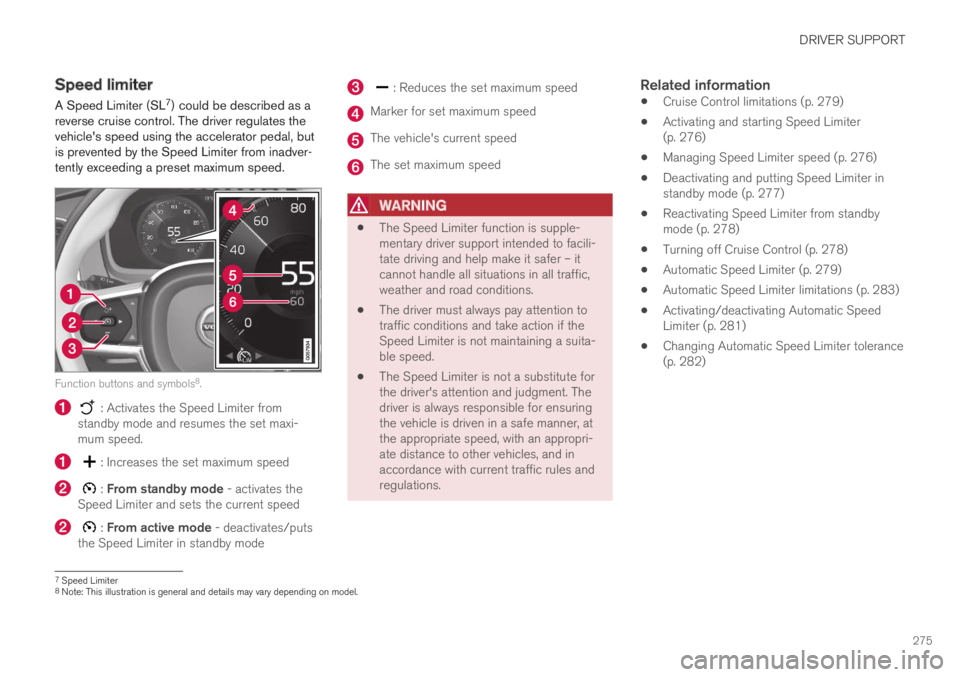
Function buttons and symbols8.
: Activates the Speed Limiter fromstandby mode and resumes the set maxi-mum speed.
: Increases the set maximum speed
: From standby mode - activates theSpeed Limiter and sets the current speed
: From active mode - deactivates/putsthe Speed Limiter in standby mode
: Reduces the set maximum speed
Marker for set maximum speed
The vehicle's current speed
The set maximum speed
WARNING
The Speed Limiter function is supple-mentary driver support intended to facili-tate driving and help make it safer – itcannot handle all situations in all traffic,weather and road conditions.
The driver must always pay attention totraffic conditions and take action if theSpeed Limiter is not maintaining a suita-ble speed.
The Speed Limiter is not a substitute forthe driver's attention and judgment. Thedriver is always responsible for ensuringthe vehicle is driven in a safe manner, atthe appropriate speed, with an appropri-ate distance to other vehicles, and inaccordance with current traffic rules andregulations.
Related information
Cruise Control limitations (p. 279)
Activating and starting Speed Limiter(p. 276)
Managing Speed Limiter speed (p. 276)
Deactivating and putting Speed Limiter instandby mode (p. 277)
Reactivating Speed Limiter from standbymode (p. 278)
Turning off Cruise Control (p. 278)
Automatic Speed Limiter (p. 279)
Automatic Speed Limiter limitations (p. 283)
Activating/deactivating Automatic SpeedLimiter (p. 281)
Changing Automatic Speed Limiter tolerance(p. 282)
7Speed Limiter8Note: This illustration is general and details may vary depending on model.
Page 278 of 669

DRIVER SUPPORT
276
Activating and starting SpeedLimiter
The Speed Limiter (SL9) function must beselected and activated in order to regulatespeed.
Putting Speed Limiter in standby mode
Note: This illustration is general and details may varydepending on model.
–Press ◀ (1) or ▶ (3) and scroll to the Speed
Limiter function (4).
> The symbol (4) will appear, indicating thatthe Speed Limiter is in standby mode.
Starting the Speed Limiter
The Speed Limiter can only be activated whilethe engine is running. The lowest maximumspeed that can be set is 30 km/h (20 mph).
–With the Speed Limiter in standby mode and
the symbol displayed, press the
button (2) on the steering wheel key-pad.
> The Speed Limiter will be started and thevehicle's current speed will be set as themaximum speed.
Related information
Speed limiter (p. 275)
Managing Speed Limiter speed
The Speed Limiter (SL10) can be set to variousspeeds.
Setting/changing set speed
Note: This illustration is general and details may varydepending on model.
–Change a set speed by pressing the (1)
or (3) buttons briefly or by pressing andholding them:
Press briefly: Press briefly: each presschanges the speed in +/- 5 mph(+/- 5 km/h) increments.
Press and hold: Release the button whenthe set speed indicator (4) has moved tothe desired speed.
The most recently set speed will be stored.
9Speed Limiter
Page 279 of 669

DRIVER SUPPORT
277
Related information
Speed limiter (p. 275)Deactivating and putting SpeedLimiter in standby mode
The Speed Limiter (SL11) can be temporarilydeactivated and put in standby mode.
Note: This illustration is general and details may varydepending on model.
To deactivate the Speed Limiter and put it instandby mode:
–Press the button on the steering wheel(2).
> The speed limit markings and symbols inthe instrument panel will change fromWHITE to GRAY. This indicates that theSpeed Limiter is temporarily deactivatedand the driver can exceed the set maxi-mum speed.
Temporarily deactivating using the
accelerator pedal
The set maximum speed can be temporarilydeactivated and exceeded using the acceleratorpedal without first putting the Speed Limiter instandby mode, e.g. when quick acceleration isrequired.
To do so:
1. Depress the accelerator as far as possibleand then release it when the desired speedhas been reached.
> The Speed Limiter will remain activatedand the symbol in the instrument panelwill be WHITE.
2. Release the accelerator pedal fully when thetemporary acceleration is completed.
> The vehicle will use engine braking toautomatically slow down to a speed belowthe most recently set maximum speed.
Related information
Speed limiter (p. 275)
10Speed Limiter11Speed Limiter
Page 282 of 669
||
DRIVER SUPPORT
280
WARNING
The ASL function is supplementary driversupport intended to facilitate driving andhelp make it safer – it cannot handle allsituations in all traffic, weather and roadconditions.
Even if the driver can clearly see thespeed limit sign, the speed informationfrom the Road Sign Information (RSI)function to ASL may be incorrect. In suchcases, the driver must intervene andaccelerate or brake to an appropriatespeed.
ASL is not a substitute for the driver'sattention and judgment. The driver isalways responsible for ensuring the vehi-cle is driven in a safe manner, at theappropriate speed, with an appropriatedistance to other vehicles, and in accord-ance with current traffic rules and regula-tions.
See also the heading "Road Sign Infor-mation limitations".
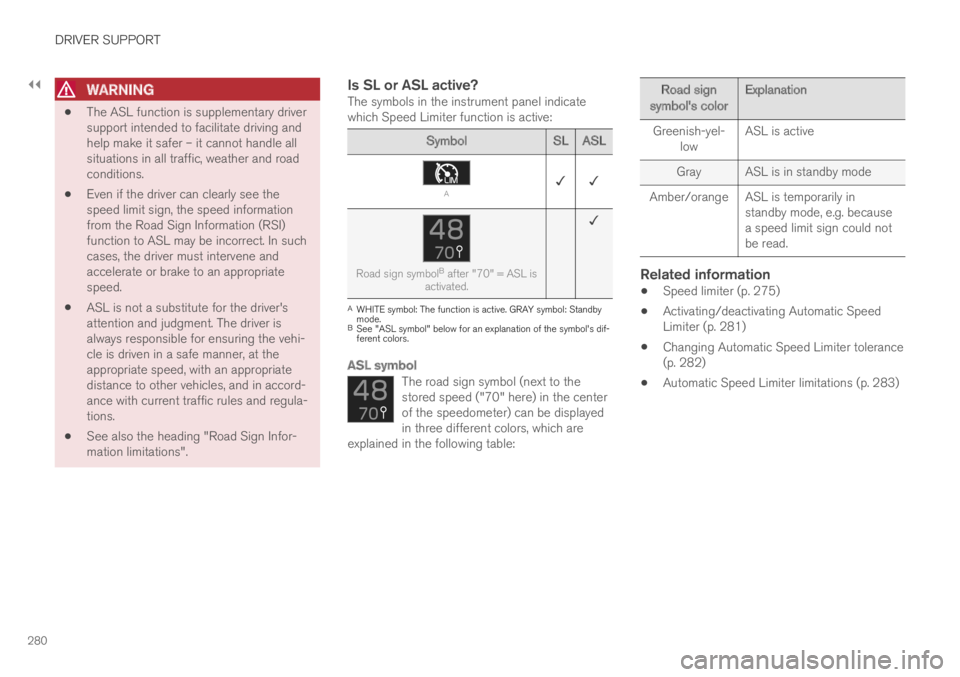
Is SL or ASL active?
The symbols in the instrument panel indicatewhich Speed Limiter function is active:
SymbolSL ASL
A✓ ✓
Road sign symbolB after "70" = ASL isactivated.
✓
AWHITE symbol: The function is active. GRAY symbol: Standbymode.BSee "ASL symbol" below for an explanation of the symbol's dif-ferent colors.
ASL symbol
The road sign symbol (next to thestored speed ("70" here) in the centerof the speedometer) can be displayedin three different colors, which areexplained in the following table:
Road signsymbol's colorExplanation
Greenish-yel-lowASL is active
GrayASL is in standby mode
Amber/orangeASL is temporarily instandby mode, e.g. becausea speed limit sign could notbe read.
Related information
Speed limiter (p. 275)
Activating/deactivating Automatic SpeedLimiter (p. 281)
Changing Automatic Speed Limiter tolerance(p. 282)
Automatic Speed Limiter limitations (p. 283)
Page 286 of 669
||
DRIVER SUPPORT
284
WARNING
The cruise control function is supplemen-tary driver support intended to facilitatedriving and help make it safer – it cannothandle all situations in all traffic, weatherand road conditions.
The driver is advised to read all sectionsin the Owner's Manual about this functionto learn of its limitations, which the drivermust be aware of before using the func-tion (see the link list at the end of thisarticle).
Cruise control is not a substitute for thedriver's attention and judgment. The driveris always responsible for ensuring thevehicle is driven in a safe manner, at theappropriate speed, with an appropriatedistance to other vehicles, and in accord-ance with current traffic rules and regula-tions.
Related information
Activating and starting Cruise Control(p. 284)
Managing Cruise Control speed (p. 285)
Deactivating and putting Cruise Control instandby mode (p. 286)
Reactivating Cruise Control from standbymode (p. 287)
Switching off Cruise Control (p. 288)
Switching between Cruise Control and Adap-tive Cruise Control (p. 305)Activating and starting CruiseControl
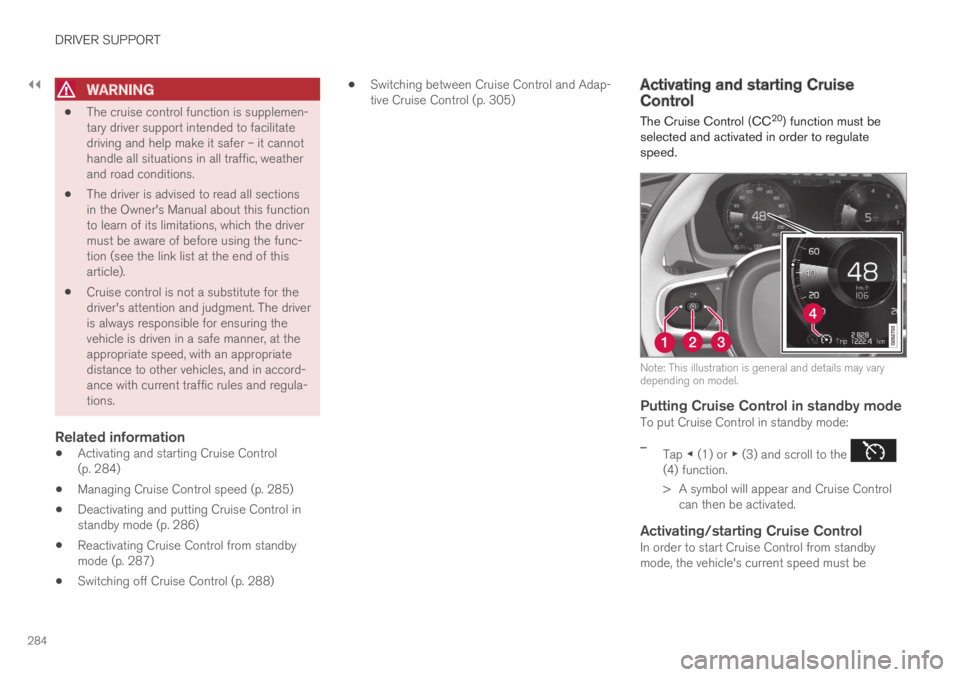
The Cruise Control (CC20) function must beselected and activated in order to regulatespeed.
Note: This illustration is general and details may varydepending on model.
Putting Cruise Control in standby mode
To put Cruise Control in standby mode:
–Tap ◀ (1) or ▶ (3) and scroll to the (4) function.
> A symbol will appear and Cruise Controlcan then be activated.
Activating/starting Cruise Control
In order to start Cruise Control from standbymode, the vehicle's current speed must be