air condition VOLVO S90 TWIN ENGINE 2019 Owner's Manual
[x] Cancel search | Manufacturer: VOLVO, Model Year: 2019, Model line: S90 TWIN ENGINE, Model: VOLVO S90 TWIN ENGINE 2019Pages: 669, PDF Size: 14.33 MB
Page 226 of 669

CLIMATE CONTROL
* Option/accessory.224
Parking climate
Parking climate is an umbrella term for variousfunctions that improve the passenger compart-ment climate when the vehicle is parked, e.g.preconditioning.
Parking climate functions are controlled from theParking climate tab in the center display's Climate view.
Related information
Climate (p. 196)
Preconditioning (p. 224)
Climate comfort retaining function (p. 229)
Parking climate symbols and messages(p. 231)
Preconditioning
Preconditioning the vehicle before driving canhelp reduce wear and reduce energy consump-tion during a trip.
Preconditioning can be started immediately orstarted at a preset time using a timer.
The function utilizes several of the vehicle's sys-tems:
In cold weather, the parking heater heats thepassenger compartment to a comfortabletemperature.
In warm weather, air conditioning cools thepassenger compartment to a comfortabletemperature.
The electrically heated steering wheel* andseats* can be activated.
Heating for the windshield, rear window anddoor mirrors are automatically activated asneeded.
During preconditioning in a hot climate, conden-sation from the air conditions may drip under thevehicle. This is normal.
Page 228 of 669

||
CLIMATE CONTROL
* Option/accessory.226
NOTE
Preconditioning is only available when the caris connected to an electrical outlet. A charg-ing post that is not always active, for examplebecause of a timer, can cause loss of functionfor preconditioning.
If the car is not connected to an electricalsocket it is still possible in a warm climate toachieve brief cooling of the passenger com-partment by direct starting preconditioning.
NOTE
The vehicle doors and windows should beclosed during preconditioning of the passen-ger compartment.
Starting from app *
A device with the Volvo On Call* app can be usedto start preconditioning or check settings. Pre-conditioning heats or cools the passenger com-partment (using the vehicle's air conditioning) toa comfortable temperature.
The passenger compartment can also be precon-
ditioned using the Engine Remote Start (ERS)3
function using the Volvo On Call* app.
Related information
Parking climate (p. 224)
Preconditioning (p. 224)
Preconditioning timer (p. 226)
Preconditioning timer
The timer can be set to finish preconditioning ata predetermined time.
The timer can store up to 8 preset times for:
A time on a particular date
A time on one or more days of the week, withor without the repeat function.
NOTE
Preconditioning is only available when the caris connected to an electrical outlet. A charg-ing post that is not always active, for examplebecause of a timer, can cause loss of functionfor preconditioning.
If the car is not connected to an electricalsocket it is still possible in a warm climate toachieve brief cooling of the passenger com-partment by direct starting preconditioning.
Related information
Preconditioning (p. 224)
Adding and editing timer settings for precon-ditioning (p. 227)
Activating and deactivating preconditioningtimer (p. 228)
Deleting preconditioning timer settings(p. 228)
3Certain markets only.
Page 231 of 669

CLIMATE CONTROL
}}
229
Related information
Preconditioning (p. 224)
Preconditioning timer (p. 226)
Adding and editing timer settings for precon-ditioning (p. 227)
Activating and deactivating preconditioningtimer (p. 228)
Climate comfort retaining function
The climate in the passenger compartment canbe maintained when the vehicle is parked, e.g. ifthe engine is turned off but the driver or passen-gers remain in the vehicle.
This function can only be direct-started.
The function utilizes several of the vehicle's sys-tems:
Residual heat from the engine is used tohelp heat the passenger compartment to acomfortable temperature.
In warm weather, the ventilation system coolsthe passenger compartment by blowing air infrom outside.
NOTE
Climate comfort maintenance will be deacti-vated if the vehicle is locked from the outsidein order to avoid using residual engine heatunnecessarily. This function is intended to beused to maintain climate comfort when thedriver or a passenger remains in the vehicleafter the engine is turned off.
Related information
Parking climate (p. 224)
Starting and switching off the climate retain-ing function when parking (p. 229)
Starting and switching off theclimate retaining function whenparking
The climate retaining function maintains the cli-mate settings in the vehicle after the engine hasbeen switched off. The function can be activatedin the center display.
Button for retaining climate comfort in the Parkingclimate tab in Climate view.
1. Open Climate view in the center display.
2.Select the Parking climate tab.
3.Tap Keep climate comfort.
> The climate comfort retaining function willbe activated/deactivated and the buttonlight will go on/off.
Page 323 of 669

DRIVER SUPPORT
}}
* Option/accessory.321
Pilot Assist limitations
Pilot Assist functionality may be reduced in cer-tain situations.
Pilot Assist is a driver support function designedto simplify driving and assist the driver in manysituations. However, the driver is always responsi-ble for maintaining a suitable distance to vehiclesor objects around it and ensuring that the vehicleis correctly positioned in the traffic lane.
WARNING
In some situations, Pilot Assist may have trou-ble helping the driver properly or may bedeactivated automatically – we advise againstusing Pilot Assist in such cases. Examples ofsuch situations include:
the lane markings are worn, missing orcross each other.
lane division is unclear, for example, whenthe lanes divide or merge or at exits orwhen there are multiple sets of markings.
edges or other lines than lane markingsare present on or near the road, e.g.curbs, joints or repairs to the road sur-face, edges of barriers, roadside edges orstrong shadows.
the lane is narrow or winding.
the lane contains ridges or holes.
weather conditions are poor, e.g. rain,snow or fog or slush or reduced visibilitywith poor light conditions, backlighting,wet road surface, etc.
The driver should also note that Pilot Assisthas the following limitations:
High curbs, roadside barriers, temporaryobstacles (traffic cones, safety barriers,etc.) are not detected. Alternatively, theymay be detected incorrectly as lane mark-ings, with a subsequent risk of contactbetween the vehicle and such obstacles.
The driver is responsible for ensuring thatthe vehicle maintains a suitable distancefrom such obstacles.
The camera and radar sensors do nothave the capacity to detect all oncomingobjects and obstacles in traffic environ-ments, e.g. potholes, stationary obstaclesor objects that completely or partiallyblock the route.
Pilot Assist does not "see" pedestrians,animals, etc.
The recommended steering input is lim-ited in force, which means that it cannotalways help the driver to steer and keepthe vehicle within the lane.
In vehicles equipped with SensusNavigation*, the function is able to useinformation from map data, which couldcause variations in performance.
Pilot Assist is switched off if the powersteering is working with reduced power -e.g. during cooling due to overheating(see section "Speed-dependent steeringforce").
The driver can always correct or adjust steeringassistance provided by Pilot Assist by turning thesteering wheel to the desired position.
Page 332 of 669
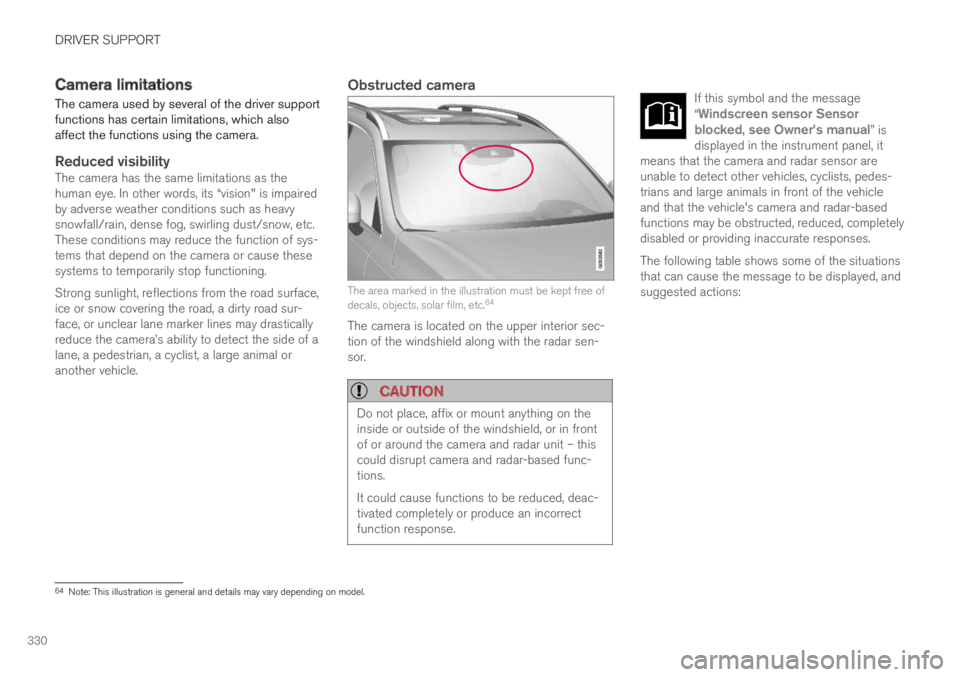
DRIVER SUPPORT
330
Camera limitations
The camera used by several of the driver supportfunctions has certain limitations, which alsoaffect the functions using the camera.
Reduced visibility
The camera has the same limitations as thehuman eye. In other words, its “vision" is impairedby adverse weather conditions such as heavysnowfall/rain, dense fog, swirling dust/snow, etc.These conditions may reduce the function of sys-tems that depend on the camera or cause thesesystems to temporarily stop functioning.
Strong sunlight, reflections from the road surface,ice or snow covering the road, a dirty road sur-face, or unclear lane marker lines may drasticallyreduce the camera
Page 333 of 669

DRIVER SUPPORT
}}}}
331
CauseAction
The area of the windshield in front of the camera/radar sensor isdirty or covered by ice or snow.Clean the windshield in front of the camera/radar sensor and remove dirt, ice andsnow.
Thick fog, heavy rain or snow is blocking the radar signals or thecamera's range of visibility.No action. Heavy precipitation may sometimes prevent the camera/radar sensor fromfunctioning.
Water or snow is spraying/swirling up and blocking the radar signalsor the camera's range of visibility.No action. Very wet or snow-covered roads may sometimes prevent the camera/radar sensor from functioning.
There is dirt between the inside of the windshield and the camera/radar sensor.Consult a workshop to have the area of the windshield on the inside of the camera'scasing cleaned. An authorized Volvo workshop is recommended.
Bright sunlight.No action. The camera/radar sensor will reset automatically when lighting conditionsimprove.
NOTE
Keep the windshield in front of the cameraand radar unit clean.
High temperatures
If the temperature in the passenger compartmentis very high, the camera/radar sensor will switchoff temporarily for approx. 15 minutes after theengine is started to protect its electronic compo-nents. When the temperature has cooled suffi-ciently, the camera/radar sensor will automati-cally restart.
Damaged windshield
CAUTION
If there are cracks, scratches or stone chipson the windshield in front of any of the cam-era and radar unit "windows" and this coversan area of about 0.5 × 3.0 mm(0.02 × 0.12 in.) or more, contact a workshopto have the windshield replaced – an author-ized Volvo workshop is recommended.
Failure to take action could result in reducedperformance for the driver support systemsthat use the camera and radar unit.
It could cause functions to be reduced, deac-tivated completely or produce an incorrectfunction response.
To avoid the risk of loss of function, malfunc-tion or reduced function of the driver supportsystems that use the radar unit, the followingalso apply:
Volvo advises against repairing cracks,scratches or stone chips in the area infront of the camera and radar unit – theentire windshield should instead bereplaced.
Before replacing the windshield, contactan authorized Volvo workshop to verify
Page 397 of 669
DRIVER SUPPORT
}}
395
Park Assist Camera limitations
The Park Assist Camera may not be able todetect all conditions in all situations and func-tionality may therefore be limited.
The driver should be aware of the following limi-tations for the Park Assist Camera:
WARNING
Be extra cautious whenreversing if this symbol isshown when a trailer, bikecarrier or similar is attachedand electrically connectedto the vehicle.
The symbol indicates thatthe rear parking assist sensors are deacti-vated and will not warn of any obstacles.
NOTE
A bike carrier and other accessories mountedon the rear of the vehicle can obscure thecamera's view.
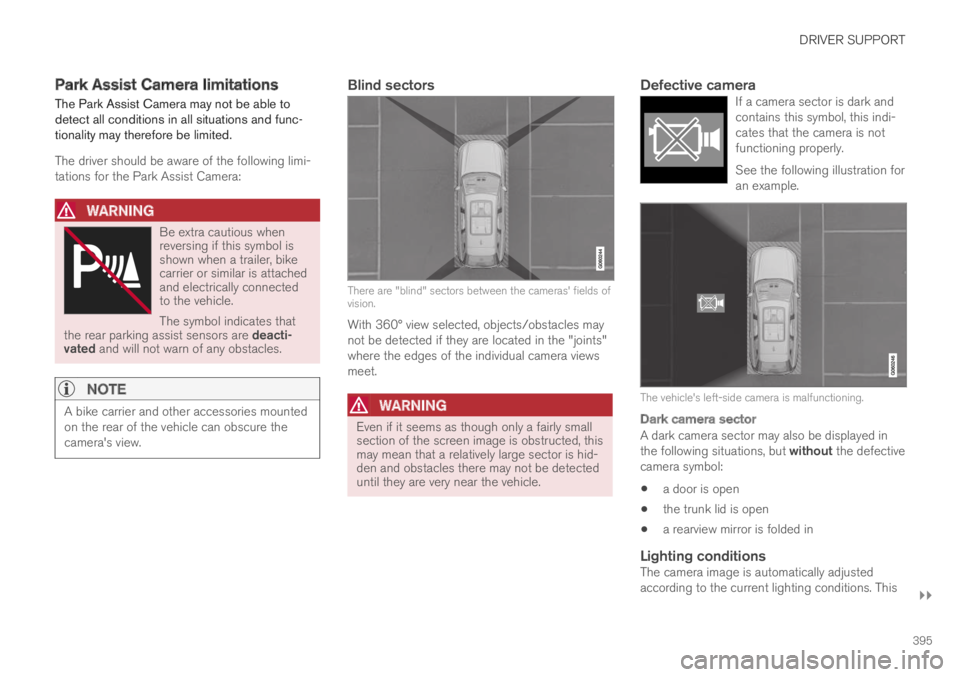
Blind sectors
There are "blind" sectors between the cameras' fields ofvision.
With 360° view selected, objects/obstacles maynot be detected if they are located in the "joints"where the edges of the individual camera viewsmeet.
WARNING
Even if it seems as though only a fairly smallsection of the screen image is obstructed, thismay mean that a relatively large sector is hid-den and obstacles there may not be detecteduntil they are very near the vehicle.
Defective camera
If a camera sector is dark andcontains this symbol, this indi-cates that the camera is notfunctioning properly.
See the following illustration foran example.
The vehicle's left-side camera is malfunctioning.
Dark camera sector
A dark camera sector may also be displayed inthe following situations, but without the defectivecamera symbol:
a door is open
the trunk lid is open
a rearview mirror is folded in
Lighting conditions
The camera image is automatically adjustedaccording to the current lighting conditions. This
Page 447 of 669

STARTING AND DRIVING
}}
445
Hybrid battery - The hybrid battery's functionis to store electrical current. This energy isprovided by plugging the charging cable intoan electrical outlet, through regenerativebraking or from the high-voltage generator.This provides current to power the electricmotor and to temporarily power the electricalair conditioning to precondition the passen-ger compartment.
Combustion engine - The combustion enginestarts when the charge level in the hybridbattery is too low to provide the power outputrequested by the driver.
High-voltage generator2 - Charges the hybridbattery. Starter for the combustion engine.
Can provide the combustion engine withextra electrical current.
Electric motor - Powers the vehicle usingelectricity. Can provide extra torque andpower during acceleration. Provides electricalall-wheel drive functionality. Regeneratesbraking energy into electrical current.
Related information
General information about Twin Engine(p. 408)
Starting and stopping the combustion enginein Twin Engine vehicles (p. 445)
Drive modes (p. 446)
Transmission (p. 440)
Factors affecting electric motor range(p. 455)
Starting and stopping thecombustion engine in Twin Enginevehicles
An advanced control system determines the dis-tance that the vehicle can be driven on the com-bustion engine, electric motor, or both at thesame time. When driving on only the electricmotor, the vehicle may automatically start thecombustion engine due to outside circumstan-ces, e.g. low ambient temperatures. This is com-pletely normal. The combustion engine will alsoalways start when the hybrid battery is nearlyfully discharged.
Climate settings at low temperatures
At low ambient temperatures, the combustionengine will sometimes start automatically to helpachieve the desired passenger compartmenttemperature and air quality. The amount of timethe combustion engine is running can be affec-ted by:
lowering the temperature
reducing blower speed
activating Pure drive mode.
Using the electric motor in hot or cold
weather
At very low or high ambient temperatures, theelectric motor's driving range and power may be
2CISG (Crank Integrated Starter Generator) - Combined high-voltage generator and starter.
Page 455 of 669
STARTING AND DRIVING
}}
* Option/accessory.453
Leveling control settings*
Turn off leveling control before lifting the vehiclewith a jack to help avoid problems with thepneumatic suspension.
Center display settings
Disable Leveling Control
In certain situations, this function must be turnedoff, e.g. before the vehicle is raised using a jack*.The level difference caused by raising the vehiclewith a jack could cause problems with the pneu-matic suspension.
Turning off the function in the center display:
1.Tap Settings in the Top view.
2. Tap My CarParking Brake andSuspension.
3.Select Disable Leveling Control.
Related information
Leveling control* and suspension (p. 451)
Loading recommendations (p. 580)
Economical driving
Drive economically and more environmentallyconscious by thinking ahead, avoiding rapidstarts and stops and adapting driving style andspeed to the current traffic conditions.
To help achieve the greatest distance with thelowest fuel consumption with Twin Engine,observe the following:
Charge
Charge the vehicle regularly by plugging itinto an electrical outlet. Make it a habit toalways begin trips with the hybrid battery fullycharged.
Locate charging stations along your route.
If possible, choose parking spots with charg-ing stations.
NOTE
Charge the vehicle from the electricity grid asoften as possible!
Preconditioning
Whenever possible, precondition the vehiclebefore driving by connecting the chargingcable to an electrical outlet.
Avoid parking the vehicle somewhere wherethe interior will become too hot or too coldwhile the vehicle is parked. If possible, parkthe vehicle in a climate-controlled garage.
During a short drive after passenger com-partment preconditioning, turn off the pas-senger compartment fan or the air condition-ing in a hot climate.
If preconditioning is not possible when it iscold outside, use seat and steering wheelheating first. Avoid heating the entire pas-senger compartment to reduce the amountof current being taken from the hybrid bat-tery.
Page 456 of 669

||
STARTING AND DRIVING
* Option/accessory.454
Driving
Choose the Pure drive mode to help mini-mize electric power consumption.
Maintain a steady speed and a generous fol-lowing distance to traffic ahead to minimizebraking. This drive mode has the lowestpower consumption.
Balance energy requirements using theaccelerator pedal. Use the indicator on theinstrument panel to see available electricpower and avoid starting the combustionengine unnecessarily. The electric motor ismore effective than the combustion engine,especially at low speeds.
When braking is necessary, brake gentlyusing the brake pedal. This will help rechargethe hybrid battery. A regenerative function isintegrated in the brake pedal and can beaugmented by the electric motor's brakingcapacity when the gear selector is in modeB.
Higher speeds increase energy consumption- air resistance increases with speed.
Activate the Hold function in the Functionview at high speeds when traveling fartherthan is possible using the hybrid battery'scapacity.
Whenever possible, avoid using the Chargefunction to charge the hybrid battery. Charg-ing the battery using the combustion engine
increases fuel consumption and carbon diox-ide emissions.
In a cold climate, reduce heating of the wind-shield/rear window, mirrors, seats and thesteering wheel.
Maintain the correct pressure in the tires andcheck pressure regularly.
The type of tires used could affect energyconsumption - consult a retailer for advice onsuitable tires.
Remove unnecessary items from the vehicle- the heavier the load, the higher the fuelconsumption.
Roof loads increase air resistance andincrease fuel consumption. Remove roofboxes, ski racks, etc. that are not in use.
Avoid driving with the windows open.
Do not keep the vehicle still on an upwardgradient by using the accelerator pedal. Usethe brakes instead.
Related information
Drive-E ‒ purer driving pleasure (p. 27)
Energy distribution in hybrid mode using mapdata* (p. 450)
Factors affecting electric motor range(p. 455)
Using the electric motor only (p. 454)
Hybrid gauge (p. 83)
Checking tire pressure (p. 549)
Using the electric motor only
When using the electric motor, Volvo TwinEngine provides a combination of good fueleconomy, low emissions and high performance.
For energy-efficient driving:
Select the Pure drive mode to help maximizedriving range using only the electric motor.
Balance energy requirements using theaccelerator pedal. Use the indicator on theinstrument panel's hybrid gauge to see avail-able electric power and avoid starting thecombustion engine unnecessarily.
When braking is necessary, brake gentlyusing the brake pedal. This will recharge thehybrid battery.
Activate the Hold function in the Functionview at high speeds when traveling fartherthan is possible using the hybrid battery'scapacity.
Reduce current consumption in the passen-ger compartment by reducing e.g. fan speed,electric heating, or air conditioning use.
Also follow the general economical driving adviceregarding speed, tires and load to maximizerange.
Related information
General information about Twin Engine(p. 408)
Economical driving (p. 453)