power steering VOLVO S90 TWIN ENGINE 2019 Owner's Guide
[x] Cancel search | Manufacturer: VOLVO, Model Year: 2019, Model line: S90 TWIN ENGINE, Model: VOLVO S90 TWIN ENGINE 2019Pages: 669, PDF Size: 14.33 MB
Page 442 of 669

STARTING AND DRIVING
* Option/accessory.440
Transmission
The transmission is part of the vehicle's driveline(power transmission) between the engine andthe drive wheels. The function of the transmis-sion is to change gears depending on speedand power needs.
The vehicle has an 8-speed automatic transmis-sion and an electric motor for rear-wheel drive.The number of gears allows the engine's torqueand power band to be effectively utilized. Two ofthe gears are overdrive gears that save fuel whendriving at a constant engine speed. The steeringwheel paddles* can be used to shift up or downmanually. The instrument panel shows the gearcurrently in use.
CAUTION
Check the operating temperature of thetransmission to help avoid damage to any ofthe drive system components. If there is a riskof overheating, a warning symbol will appearin the instrument panel and a text messagewill be displayed. Follow the recommenda-tions given.
Symbols in the instrument panel
If a problem should occur with the transmission, asymbol and a message will appear in the instru-ment panel.
Symbol Meaning
Information and messages relatedto the transmission. Follow the rec-ommendations provided.
Hot or overheated transmission.Follow the recommendations provi-ded.
Reduced performance/Acceler-ation performance reduced
In the event of a temporary fault inthe driveline, the vehicle may gointo a "limp home" mode withreduced power output to help avoiddamage to the driveline.
Related information
Gear selector positions for automatic trans-missions (p. 440)
Gear selector positions forautomatic transmissions
In vehicles with an automatic transmission, thesystem selects the optimal gear for the currentdriving conditions. The transmission also has amanual mode.
The instrument panel shows which gear is cur-rently in use:
P, R, N, D or B.
For manual shifting, the gear indicator in theinstrument panel displays the gear currentlybeing used (1-8).
Selecting gears
The gear selector is a shift-by-wire selector,where shifting is done electronically instead ofmechanically. This makes shifting easier and thegear positions more distinct.
Page 450 of 669

||
STARTING AND DRIVING
448
ECO Climate
In Pure mode, ECO climate is automatically acti-vated in the passenger compartment to helpreduce energy consumption.
NOTE
When the Pure drive mode is activated, set-tings for certain climate system and electricityconsuming functions are reduced. Some ofthese settings can be reset manually, but fullfunctionality will only be restored by leavingPure mode or adapting the Individual drivemode to full climate system functionality.
If condensation forms on the windows, tap themax defroster button, which will function normally.
AWD
Improves the vehicle's traction and handlingby increasing all-wheel drive.
This drive mode locks the vehicle in all-wheeldrive. An optimal distribution between front andrear axle torque helps provide the best possiblecontrol, stability and traction, e.g. on slipperyroads or when towing a heavy trailer or anothervehicle. The AWD drive mode is always availableregardless of the hybrid battery's charge status.
Both the combustion engine and the electricmotor are engaged to enable all-wheel drive,which results in higher fuel consumption.
In the other drive modes, the vehicle automati-cally adapts the need for all-wheel drive accord-ing to the road surface, and can activate the elec-tric motor or start the combustion engine as nee-ded.
POWER
Power mode is designed to provide sportierdriving characteristics and a faster accelera-tion response.
This drive mode maximizes the combined powerfrom the combustion engine and the electricmotor by providing power to both the front andrear wheels. Gear shifting will be faster and moredistinct and the transmission will prioritize gearswith a higher traction force. Steering response isfaster and suspension is stiffer.
Both the combustion engine and the electricmotor are engaged to enable all-wheel drive,which results in higher fuel consumption.
This drive mode is optimized for maximum per-formance and throttle response. It changes thethrottle response, gear shifting program andturbo boost system. Chassis settings and steer-ing and brake response are also optimized. ThePower drive mode is always available regardlessof the hybrid battery's charge status.
INDIVIDUAL
Customizes drive mode to personal preferen-ces.
Select one of the drive modes as a basis andadjust the settings to achieve your preferred driv-ing characteristics. These settings will be storedin your driver profile.
Individual drive mode is only available if it hasbeen activated in the center display.
Settings view3 for Individual drive mode.
1.Tap Settings in the Top view.
3The image is schematic and the details may vary depending on vehicle model or software update.
Page 451 of 669
STARTING AND DRIVING
}}
* Option/accessory.449
2.Tap My CarIndividual Drive Mode andselect Individual Drive Mode.
3.Under Presets, select one of the followingdrive modes as a basis: Pure, Hybrid orPower.
The following settings can be modified:
Driver Display
Steering Force
Powertrain Characteristics
Brake Characteristics
Suspension Control
ECO Climate.
Using the electric or combustion
engine
An advanced control system determines the dis-tance that the vehicle can be driven on the com-bustion engine, electric motor, or both at thesame time.
Its primary function is to use the motor/engineand the current available in the hybrid battery asefficiently as possible based on the characteris-tics of the various drive modes and the poweroutput requested by the driver by pressing theaccelerator pedal.
In certain cases, temporary limitations in the sys-tem or mandatory functions to help maintain alow overall emissions level may result in greateruse of the combustion engine.
Related information
Changing drive mode (p. 449)
Economical driving (p. 453)
Energy distribution in hybrid mode using mapdata* (p. 450)
Hybrid gauge (p. 83)
General information about Twin Engine(p. 408)
Changing drive mode
Select the drive mode that is best suited to thecurrent driving conditions.
The drive mode is changed using the control inthe tunnel console.
Keep in mind that not all drive modes are availa-ble in all situations.
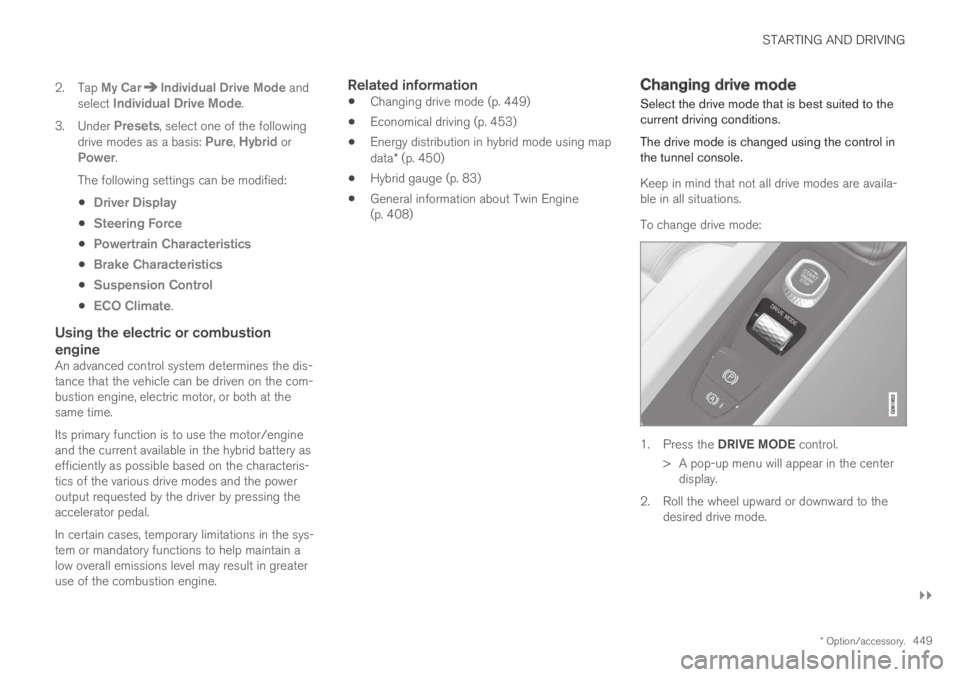
To change drive mode:
1.Press the DRIVE MODE control.
> A pop-up menu will appear in the centerdisplay.
2.Roll the wheel upward or downward to thedesired drive mode.
Page 456 of 669

||
STARTING AND DRIVING
* Option/accessory.454
Driving
Choose the Pure drive mode to help mini-mize electric power consumption.
Maintain a steady speed and a generous fol-lowing distance to traffic ahead to minimizebraking. This drive mode has the lowestpower consumption.
Balance energy requirements using theaccelerator pedal. Use the indicator on theinstrument panel to see available electricpower and avoid starting the combustionengine unnecessarily. The electric motor ismore effective than the combustion engine,especially at low speeds.
When braking is necessary, brake gentlyusing the brake pedal. This will help rechargethe hybrid battery. A regenerative function isintegrated in the brake pedal and can beaugmented by the electric motor's brakingcapacity when the gear selector is in modeB.
Higher speeds increase energy consumption- air resistance increases with speed.
Activate the Hold function in the Functionview at high speeds when traveling fartherthan is possible using the hybrid battery'scapacity.
Whenever possible, avoid using the Chargefunction to charge the hybrid battery. Charg-ing the battery using the combustion engine
increases fuel consumption and carbon diox-ide emissions.
In a cold climate, reduce heating of the wind-shield/rear window, mirrors, seats and thesteering wheel.
Maintain the correct pressure in the tires andcheck pressure regularly.
The type of tires used could affect energyconsumption - consult a retailer for advice onsuitable tires.
Remove unnecessary items from the vehicle- the heavier the load, the higher the fuelconsumption.
Roof loads increase air resistance andincrease fuel consumption. Remove roofboxes, ski racks, etc. that are not in use.
Avoid driving with the windows open.
Do not keep the vehicle still on an upwardgradient by using the accelerator pedal. Usethe brakes instead.
Related information
Drive-E ‒ purer driving pleasure (p. 27)
Energy distribution in hybrid mode using mapdata* (p. 450)
Factors affecting electric motor range(p. 455)
Using the electric motor only (p. 454)
Hybrid gauge (p. 83)
Checking tire pressure (p. 549)
Using the electric motor only
When using the electric motor, Volvo TwinEngine provides a combination of good fueleconomy, low emissions and high performance.
For energy-efficient driving:
Select the Pure drive mode to help maximizedriving range using only the electric motor.
Balance energy requirements using theaccelerator pedal. Use the indicator on theinstrument panel's hybrid gauge to see avail-able electric power and avoid starting thecombustion engine unnecessarily.
When braking is necessary, brake gentlyusing the brake pedal. This will recharge thehybrid battery.
Activate the Hold function in the Functionview at high speeds when traveling fartherthan is possible using the hybrid battery'scapacity.
Reduce current consumption in the passen-ger compartment by reducing e.g. fan speed,electric heating, or air conditioning use.
Also follow the general economical driving adviceregarding speed, tires and load to maximizerange.
Related information
General information about Twin Engine(p. 408)
Economical driving (p. 453)
Page 470 of 669
||
STARTING AND DRIVING
468
If contact occurs, flush the affected areaimmediately with water. Obtain medicalhelp immediately if eyes are affected.
Never expose the battery to open flameor electric spark. Do not smoke near thebattery. Failure to follow the instructionsfor jump starting can lead to injury.
NOTE
The vehicle cannot be started if the hybridbattery is discharged.
Related information
Starting the vehicle (p. 426)
Ignition modes (p. 429)
Adjusting the steering wheel (p. 193)
Selecting ignition mode (p. 430)
Towing using a towline
This section refers to one vehicle being towedbehind another using a towline.
Twin Engine vehicles may not be towed behindanother vehicle due to the risk of damage to theelectric motor. The vehicle must be lifted onto atow truck and transported with all four wheels onthe bed or lifting platform of the truck (no wheelsmay touch the road).
Towing another vehicle
Towing another vehicle requires a lot of power -use the AWD drive mode. This helps charge thehybrid battery and improve the vehicle's drivingand roadholding characteristics.
Before towing another vehicle, check applicablespeed limit regulations.
Jump starting
Do not tow the vehicle to start the engine. Use anauxiliary battery if the start battery's charge levelis so low that the engine cannot be started.
CAUTION
Attempts to tow-start the vehicle could causedamage to the electrical drive motor andthree-way catalytic converter.
Related information
Attaching and removing the towing eyelet(p. 469)
Hazard warning flashers (p. 157)
Recovery (p. 470)
Jump starting using another battery (p. 466)
Selecting ignition mode (p. 430)
Page 612 of 669

||
MAINTENANCE AND SERVICE
* Option/accessory.610
FunctionAmpere
12 V outlet in trunk/cargocompartment*
USB ports for iPad holders
15
––
––
––
––
Heated windshield*, left sideShunt
Heated windshield*, left side40
Headlight washers*25
Windshield washer25
––
Horn20
Alarm siren*5
Brake system control module(valves, parking brake)40
Wipers30
––
FunctionAmpere
Heated windshield*, right side40
––
Brake system control module(ABS pump)40
––
Heated windshield*, right sideShunt
Fed when ignition is on:Engine control module; trans-mission components, electricalpower steering, central electri-cal module
5
Exterior vehicle sound (certainmarkets)5
Right-side headlight7.5
Right-side headlight, some
models with LEDC15
––
––
––
Airbags5
FunctionAmpere
Left-side headlight7.5
Left-side headlight, some
models with LEDC15
Accelerator pedal sensor 5
Transmission control module;gear selector control module15
Engine control module5
––
––
––
––
Engine control module; actua-tor; throttle unit; turbo-chargervalve
20
Solenoids; valve; engine cool-ing system thermostat10
Vacuum regulators; valve 7.5
Spoiler shutter control module;radiator shutter control mod-ule
5
––
Page 615 of 669

MAINTENANCE AND SERVICE
}}
* Option/accessory.613
Fuse pliers are provided on the inside of the fusebox cover to assist in removing and insertingfuses.
There are also spaces for several extra fuses inthe distribution box in the engine compart-ment.
Positions
Fuses 1, 3-21, 23-36, 39-53 and 55-59 are"Micro" fuses.
Fuses 2-22, 37-38 and 54 are "MCase"fuses and should only be replaced by a work-
shop17.
FunctionAmpere
––
––
––
Movement sensor*5
Instrument panel5
Center console buttons5
Sun sensor5
FunctionAmpere
Sensus control module20
––
Steering wheel module5
Module for start knob andparking brake controls5
Heated steering wheel* mod-ule15
––
––
––
––
Climate system control mod-ule10
––
Data link connector OBD-II 10
Center display5
Climate system blower module(front)40
FunctionAmpere
USB HUB5
Instrument lighting; Interiorlighting; Rearview mirror auto-dim function*; Rain and lightsensors*; Rear tunnel consolekeypad, rear seat*; Power frontseats*; Rear door control pan-els; Climate system blowermodule left/right
7.5
Control module for driver sup-port functions5
Panoramic roof with sun cur-tain*20
Head-up display*5
Passenger compartment light-ing5
––
Ceiling console display (seatbelt reminder/front passengerside airbag indicator)
5
––
Humidity sensor5
17An authorized Volvo workshop is recommended.
Page 663 of 669

INDEX
661
Safety mode 61
starting/moving 62
Sealing compound 564
Seat, see Seats 180
Seat belt reminder 51
Seat belts 47
Automatic locking retractor/Emergency
locking retractor 65
buckling/unbuckling 48
pregnancy 43
seat belt reminder 51
seat belt tensioner 50
securing child restraint systems 67, 69, 71
Seat belt tensioner 50
resetting 51
Seats
heating 209, 210
manual front seat 180
power front seats 181
rear seat 579
store position 182, 183
ventilation 211, 212
whiplash protection 46
Sensors
air quality 200
climate 196
Sensus
connection and entertainment 30
Sensus Navigation358
Service position634
Service program584
Set time interval290
settings
Categories131
contextual129
resetting130
Shiftlock443
Side airbag59
Side Impact Protection System59, 60
SIM card527
SIPS (Side Impact Protection System) 59, 60
Sirius Satellite radio
Travel link494
SiriusXM® Satellite radio
traffic information 490, 491, 493
Ski hatch582
Slippery conditions458
Slippery road conditions458
Software updates33
Sound experience479
Sound settings478, 521
phone522
playing media500, 502
text message521
Spare tire561, 562
Speed camera360
Speed Limiter275, 278, 279, 283
getting started276
shut down278
temporary deactivation277
Speed symbols, tires546
Spin control271
Stability and traction control system 271, 274
operation272, 273
Stability system271
Stains619, 621, 622, 623, 624
Start and lock system
type designations251
Start battery466, 601
overload466
Start engine426
Starting the engine
after a collision62
Start the vehicle426
Steering assistance at risk of colli-
sion 372, 373, 374, 375, 376, 377, 378,
379, 381
Steering assistance at risk of rear-end col-
lision378, 379
Page 664 of 669
INDEX
662
Steering power level, see Steering wheel
resistance 270
Steering resistance at risk of head-on colli-
sion 375, 376, 377
Steering wheel 193
heating 213
keypad 193
paddle 193
steering wheel adjustment 193
Steering wheel keypad 193
Steering wheel paddles 442
Steering wheel resistance, speed-depend-
ent270
Stone chips and scratches 631, 632
Storage compartments 574
center console 575
glove compartment 577
sun visor 578
Sunroof
pinch protection 162
Sun shade
panoramic roof 170, 175
pinch protection 162
rear door 166
rear window 166
Sun visor 578
mirror lighting 158
Symbols
indicator symbols90
warning symbols93
Symbols and messages
Adaptive Cruise Control306
center display's status bar120
Collision warner with auto-brake345
hybrid-related422
parking climate231
Symbols and messages for Assistance at
risk of collision381
system updates587
T
Technician certification38
Temperature
adjusting221, 222
perceived197
Temperature monitoring414
Temporary spare
spare tire 561
Temporary tire sealing system
execution, checking 565
Inflating tires 569
location 564
overview564
sealing compound564
Terms and conditions
services35
users530
Tire dimensions546, 556
Tire pressure monitoring
calibrating553
Tires542
direction of rotation544
glossary of terms545
inflation pressure table649
mounting560
pressure649
removal558
rotation543
specifications546, 649
storage542
tire pressure monitoring551
tire sealing564
Tread depth563
tread wear indicator545
winter tires563
Tire sealing system565
Tire tread545
Tools556
Top tether anchors (child restraint sys-
tems)72