fuel VOLVO S90 TWIN ENGINE 2019 Service Manual
[x] Cancel search | Manufacturer: VOLVO, Model Year: 2019, Model line: S90 TWIN ENGINE, Model: VOLVO S90 TWIN ENGINE 2019Pages: 669, PDF Size: 14.33 MB
Page 497 of 669
AUDIO, MEDIA AND INTERNET
* Option/accessory.495
3.Press SiriusXM Travel Link andSubscription Status.
>To subscribe, call the phone number listedon the screen.
Any services not subscribed will be grayed outand contain the text Service not subscribed.
When the services have been activated (subscri-bed), tap the one of your choice to start it.
The following applies for all of the SiriusXMTravel Link services:
Pressing the Back button will take you backto the previous screen
Pressing the Close button will take you tothe SiriusXM Travel Link home screen.
NOTE
If the Close button is used to return to theSiriusXM Travel Link home screen, the fol-lowing applies (the Weather service is usedhere as an example):
If you have already used the Weatherfunction, tapping Weather again in theSiriusXM Travel Link home screenbefore using any other SiriusXMTravel Link service will return you to thepoint where you left the Weather service.
If another SiriusXM Travel Link serviceis used (e.g., Fuel, Sports, etc.) beforeyou return to the Weather service, youwill be returned to the default Weatherview (in this case, Local).
The same principle applies to all of theSiriusXM Travel Link services.
Favorites
Many SiriusXM Travel Link selections can besaved for easy access as favorites by tapping the"star" icon next to the selection where applicable.
To display a list of your favorites, tap theFavorites application in the SiriusXM Travel Linkhome screen.
Related information
SiriusXM® Satellite radio* (p. 490)
SiriusXM Travel Link®* - Fuel (p. 498)
SiriusXM Travel Link®* - Sports (p. 499)
SiriusXM Travel Link®* - Weather (p. 496)
SiriusXM Travel Link®* - Notifications(p. 497)
Page 499 of 669

AUDIO, MEDIA AND INTERNET
* Option/accessory.497
Areas
Tap Areas to display a list of areas/locations instates from the SiriusXM Travel Link database.
Scroll to a state and tap to display:
Weather locations: tap arrow to the right todisplay a list of towns. Scroll to desired townand tap for detailed weather information. Youcan choose Map view, today, 5 days or Favor-ites (star)
Ski locations: tap arrow at right to displaylocal ski areas. Tap an area for detailed info.
For information about storing a location, state,town, etc. as a favorite, see the heading "Favor-ites" in the article "SiriusXM Travel Link."
Related information
SiriusXM Travel Link®* (p. 494)
SiriusXM Travel Link®* - Fuel (p. 498)
SiriusXM Travel Link®* - Sports (p. 499)
SiriusXM Travel Link®* - Notifications(p. 497)
SiriusXM Travel Link®* -Notifications
This SiriusXM Travel Link service provides notifi-cations of potential weather problems or otheremergency situations in the vicinity of the vehi-cle.
From the SiriusXM Travel Link home screen, toshow notifications:
–Tap the Alerts button to display this screen.
If any notifications are currently available, amessage will appear at the top of the screen.They can also be listed from the Settingsmenu in the center display's Top view.
If no notifications are available, No activealerts will be displayed.
Types of notifications
To select the types of notifications to be dis-played:
1.From the Alerts screen, tap the Selectalerts button at the bottom of the screen.
2. This displays the types of notifications thatcan be displayed. Tap the box to the right ofeach type of notification to select/deselect it.
3.Tap Done when you have made your selec-tions. You will return to the Alerts screen.
Information about a notification
If any notifications have been displayed on thescreen, tap one for more detailed information (i.e.,
the location of the weather problem on a mapand a description of the situation).
If a phone number is available in a notification, aCall button will be displayed. Tap this button foradditional information.
Related information
SiriusXM Travel Link®* (p. 494)
SiriusXM Travel Link®* - Fuel (p. 498)
SiriusXM Travel Link®* - Sports (p. 499)
SiriusXM Travel Link®* - Weather (p. 496)
Page 500 of 669

AUDIO, MEDIA AND INTERNET
* Option/accessory.498
SiriusXM Travel Link®* - Fuel5
This SiriusXM Travel Link service provides infor-mation and guidance to service stations near thevehicle providing the type of fuel that you prefer/require for your vehicle.
From the SiriusXM Travel Link home screen, toshow fuel information:
–Tap the Fuel button to display the main fuelscreen.
The following categories are shown:
Search (the magnifying glass icon)
Nearby
Recommended
Favorites
Brands
Tap one of the alternatives to display its screen.
NOTE
In each of the categories listed, tapping theSelect fuel type button near the bottom ofthe screen opens a sub-view where you canspecify the type of fuel preferred/required(Regular, Midrange, Premium, Diesel,Electric 120V, etc.) Tap Done to return tothe previous screen.
Search
Tap the magnifying glass icon. If the function issupported in the current context, a keyboard willappear on the screen. Enter the text of yourchoice and tap Search for detailed information ifavailable.
Nearby
Tap for a list of service stations in the vicinity ofthe vehicle, with the nearest station at the top ofthe list.
The following information will be provided whereavailable:
For vehicles using gasoline, the price infor-mation for regular gasoline (unless anothergrade/type of fuel has been selected inSelect fuel type)
For electric vehicles/hybrids, informationabout charging stations, showing the totalnumber of charging ports and the number ofports currently not in use
the distance to the station
a star icon to set the service station as afavorite
Tap the name of a service station to display moredetailed information.
For guidance to the service station, tap the Startnavigation or Add as waypoint buttons. See
the Sensus Navigation* supplement for additionalinformation about using the navigation system.
Recommended
Tap for a list of service stations near the vehicle,displayed according to the price of regular gaso-line (unless another grade/type of fuel has beenselected in Select fuel type) or of stationsoffering the greatest number of available charg-ing ports for electric vehicles/hybrids. The stationoffering the lowest price/most available chargingports will be displayed at the top of the list. Tapthe name of a service station to display moredetailed information.
Favorites
Tap for a list of service stations that have beenstored as favorites. Tap the name of a servicestation to display more detailed information.
In addition to the Select fuel type button at thebottom of the screen, tap the Edit button todelete individual stations from the list or tapDelete to clear the list. Tap Done to return tothe previous screen.
Brands
1.Tap Brands to display a list of service sta-tion brands in the area.
5This service is not available in Canada.
Page 501 of 669

AUDIO, MEDIA AND INTERNET
* Option/accessory.499
2. Tap a brand to display a list of service sta-tions affiliated with that brand (BP, Exxon,etc.).
3. Tap the name of a service station to displaymore detailed information.
In addition to the Select fuel type button at thebottom of the screen, tap the Sort button toarrange the list according to Nearest orCheapest/Recommended. Tap Done toreturn to the previous screen.
Related information
SiriusXM Travel Link®* (p. 494)
SiriusXM Travel Link®* - Notifications(p. 497)
SiriusXM Travel Link®* - Sports (p. 499)
SiriusXM Travel Link®* - Weather (p. 496)
SiriusXM Travel Link®* - Sports
This SiriusXM Travel Link service provides infor-mation about sporting events, tournaments,teams, leagues, etc.
From the SiriusXM Travel Link home screen, todisplay sports information:
–Tap the Sports button to display the mainsports screen.
A number of sports categories will be listed(Football, Baseball, Basketball, etc.)
Tap a sport to select a league in that sport (NFL,MLB, etc.) or a sport organization (PGA, LPGA,etc.).
The following is an example of the result oftapping Baseball:
1. MLB (Major League Baseball) will be dis-played.
2.Tap MLB to display the two leagues in MajorLeague Baseball (American League orNational League).
3. Tap one of the league names to display thedivisions in the league.
4. Tap one of the divisions to display:
In progress: play-by-play informationabout a match/game/tournament cur-rently in progress. Continue tapping todisplay. In the detailed view, you can alsoselect a radio station that is currentlybroadcasting an ongoing sporting event
Headlines for MLB: Tap to display briefheadline information
Scheduled: schedules for comingmatches, games, etc.
Scores: match/game results
The same principle applies to all sports.
Related information
SiriusXM Travel Link®* (p. 494)
SiriusXM Travel Link®* - Notifications(p. 497)
SiriusXM Travel Link®* - Fuel (p. 498)
SiriusXM Travel Link®* - Weather (p. 496)
Page 544 of 669

WHEELS AND TIRES
542
Tires
The function of the tires is to carry loads, providetraction on road surfaces, reduce vibrations andprotect the wheels from wear.
The tires significantly influence the vehicle's driv-ing characteristics. The type, dimensions, tirepressure and speed rating have a considerableimpact on how the vehicle performs.
Your vehicle is equipped with tires according tothe vehicle's tire information placard on the B-pil-lar (the structural member at the side of the vehi-cle, at the rear of the driver's door opening).
WARNING
A damaged tire could cause the driver to losecontrol of the vehicle.
CAUTION
Some Volvo models are equipped with anUltra High Performance tire and wheel com-bination designed to provide maximum drypavement performance with consideration forhydroplaning resistance. They may be moresusceptible to road hazard damage and,depending on driving conditions, may achievea tread life of less than 30,000 km (20,000miles). Even if this vehicle is equipped withVolvo's advanced AWD or stability system,these tires are not designed for winter driving,and should be replaced with winter tires whenweather conditions dictate.
The tires have good road holding characteristicsand offer good handling on dry and wet surfaces.It should be noted however that the tires havebeen developed to give these features on snow/ice-free surfaces.
Most models are equipped with "all-season" tires,which provide a somewhat higher degree of road-holding on slippery road surfaces than tires with-out the "all-season" rating. However, for optimalroadholding on icy or snow-covered roads, Volvorecommends snow tires on all four wheels.
When replacing tires, be sure that the new tiresare the same size designation, type (radial) andpreferably from the same manufacturer, on all
four wheels. Otherwise there is a risk of alteringthe vehicle's roadholding and handling characte-ristics.
Recommended tires
On delivery, the car is equipped with Volvo origi-
nal tires that have the VOL1 marking on the sideof the tires. These tires have been designed spe-cifically for your vehicle. It is therefore importantwhen replacing tires that the new tires have thissame marking to help maintain the vehicle's driv-ing characteristics, comfort and fuel consumption.
New tires
Tires are perishable goods. After a few years,they will begin to harden and their friction proper-ties will gradually deteriorate. Always replace tireswith the freshest tires possible. This is particularlyimportant for snow tires. A series of numbers is
1This may vary for certain tire dimensions.
Page 551 of 669
WHEELS AND TIRES
* Option/accessory.549
Checking tire pressure
Correct inflation pressure helps improve drivingstability, save fuel and increase the service life ofthe tires.
Tire pressure decreases over time, which is nor-mal. Tire pressure also varies depending on theambient temperature. Driving on under-inflatedtires could cause the vehicle to overheat and leadto damage. Tire pressure affects traveling com-fort, road noise and driving characteristics.
Check the pressure in the tires every month. Usethe recommended inflation pressure for cold tiresfor optimal tire performance and wear. Under-inflated or over-inflated tires could cause uneventread wear.
Use an air pressure gauge and check the infla-tion pressure on all the tires, including the spare
tire4, at least once a month and before long trips.Volvo strongly recommends buying a reliable airpressure gauge, as the automatic gauges provi-ded at service stations may be inaccurate.
WARNING
Under-inflation is the most commoncause of tire failure and may result insevere tire cracking, tread separation, or"blow-out," with unexpected loss of vehi-cle control and increased risk of injury.
Under-inflated tires reduce the load car-rying capacity of your vehicle.
Cold tires
Inflation pressure should be checked when thetires are cold.
The tires are considered to be cold when theyhave the same temperature as the surrounding(ambient) air.
This temperature is normally reached after thevehicle has been parked for at least 3 hours.
After driving for approximately 1.6 km (1 mile),the tires are considered to be warm. If you needto drive longer than that to inflate the tires, checkand record the inflation pressure of the tires firstand inflate accordingly when you arrive at thepump.
When the ambient temperature changes, so doesthe inflation pressure. A 10-degree temperaturedrop causes a corresponding drop in inflationpressure of 1 psi (7 kPa). Check the inflationpressure of the tires regularly and adjust to the
correct pressure, which can be found on the vehi-cle's tire information placard or certification label.
If you check inflation pressure when the tires arewarm, you should never release air. The tiresbecome warm after driving and it is normal forwarm tires to have an inflation pressure abovethe recommended pressure for cold tires. A warmtire with an inflation pressure equal to or underthe recommended pressure for cold tires couldbe significantly under-inflated.
Related information
Adjusting tire pressure (p. 550)
Recommended tire pressure (p. 551)
Tire pressure monitoring system* (p. 551)
Tires (p. 542)
4Not available in all models.
Page 553 of 669

WHEELS AND TIRES
}}
* Option/accessory.551
Recommended tire pressure
The tire pressure placard on the driver's side Bpillar (between the front and the rear door) indi-cates tire pressure for different loads and speedconditions.
The decal specifies the designation for the fac-tory-mounted tires on the vehicle, as well as loadlimits and inflation pressures.
Related information
Checking tire pressure (p. 549)
Approved tire pressure (p. 649)
Tire pressure monitoring system*
The tire pressure monitoring system6 provides awarning symbol in the instrument panel if pres-sure is too low in one or more tires.
Symbol Explanation
This symbol illuminates to indicatelow inflation pressure.
If there is a system malfunction, theinflation pressure warning symbolwill flash for approximately oneminute and then glow steadily.
System description
The tire pressure monitoring system measuresdifferences in rotational speed between thewheels through the ABS system to determine ifthe tires are properly inflated. If inflation pressurein a tire is too low, its diameter (and consequentlyits rotational speed) changes. By comparing thetires with each other, the system can determine ifthe pressure in one or more tires is too low.
General information about the tire pressure
monitoring system
In the following description, the tire monitoringsystem is generally referred to as TPMS.
Each tire, including the spare (if provided)7
should be checked monthly when cold and infla-
ted to the inflation pressure recommended by thevehicle manufacturer on the vehicle placard ortire inflation pressure label. (If your vehicle hastires of a different size than the size indicated onthe vehicle placard or tire inflation pressure label,you should determine the proper tire inflationpressure for those tires.)
As an added safety feature, your vehicle hasbeen equipped with a tire pressure monitoringsystem (TPMS) that illuminates a low tire pres-sure telltale when one or more of your tires issignificantly under-inflated. Accordingly, when thelow tire pressure telltale illuminates, you shouldstop and check your tires as soon as possible,and inflate them to the proper pressure.
Driving on a significantly under-inflated tire cau-ses the tire to overheat and can lead to tire fail-ure. Under-inflation also reduces fuel efficiencyand tire tread life, and may affect the vehicle'shandling and stopping ability. Please note thatthe TPMS is not a substitute for proper tire main-tenance, and it is the driver's responsibility tomaintain correct tire pressure, even if under-infla-tion has not reached the level to trigger illumina-tion of the TPMS low tire pressure telltale.
Your vehicle has also been equipped with aTPMS malfunction indicator to indicate when thesystem is not operating properly. The TPMS mal-function indicator is combined with the low tire
6Tire Pressure Monitoring System (TPMS)7Not available on all models.
Page 572 of 669
||
WHEELS AND TIRES
570
Related information
Recommended tire pressure (p. 551)
Using the tire sealing system (p. 565)
Tire sealing system (p. 564)
Determining the vehicle's permittedweight
Properly loading your vehicle will provide maxi-mum return of vehicle design performance.
Weight designations
Before loading your vehicle, familiarize yourselfwith the following terms for determining yourvehicle's weight ratings, with or without a trailer,from the vehicle's Federal/Canadian Motor Vehi-cle Safety Standards (FMVSS/CMVSS) label, andthe vehicle's tire information placard:
Curb weight
The weight of the vehicle including a full tank offuel and all standard equipment. It does notinclude passengers, cargo, or optional equipment.
Capacity weight
All weight added to the curb weight, includingcargo and optional equipment. When towing, tow-bar weight is also part of cargo weight.
Permissible axle weight
The maximum allowable weight that can be car-ried by a single axle (front or rear). These num-bers are shown on the Federal/Canadian MotorVehicle Safety Standards (FMVSS/CMVSS) label.The total load on each axle must never exceed itsmaximum permissible weight.
Gross vehicle weight (GVW)
The vehicle's curb weight + cargo + passengers.
Steps for Determining Correct Load
Limit
1. Locate the statement "the combined weightof occupants and cargo should never exceedXXX kg or XXX lbs." on your vehicle's plac-ard.
2. Determine the combined weight of the driverand passengers that will be riding in yourvehicle.
3. Subtract the combined weight of the driverand passengers from XXX kg or XXX lbs.
4. The resulting figure equals the availableamount of cargo and luggage load capacity.For example, if the "XXX" amount equals1400 lbs. and there will be five 150 lb. pas-sengers in your vehicle, the amount of availa-ble cargo and luggage load capacity is 650lbs. (1400 - 750 (5 × 150) = 650 lbs.)
5. Determine the combined weight of luggageand cargo being loaded on the vehicle. Thatweight may not safely exceed the availablecargo and luggage load capacity calculatedin Step 4.
6. If your vehicle will be towing a trailer, loadfrom your trailer will be transferred to yourvehicle. Consult this manual to determinehow this reduces the available cargo and lug-gage load capacity of your vehicle.
Page 583 of 669
LOADING, STORAGE AND PASSENGER COMPARTMENT
581
Roof loads and load carriers
Volvo-developed load carriers are recommendedfor carrying loads on the roof of the vehicle.
Volvo load carriers are specially designed to helpprevent damage to your vehicle and help ensuremaximum safety while driving. Volvo load carriersare available from authorized Volvo retailers.
Carefully follow the installation instructions provi-ded with the load carriers.
Distribute the load evenly throughout theload carriers. Place heavier cargo at the bot-tom of the load.
Check periodically to ensure that the loadcarriers and load are properly secured.Secure the load firmly using tie straps orsimilar.
If the load is longer than the vehicle, such asa canoe or kayak, attach the towing eyelet inits front outlet and secure the tie straps in it.
The vehicle's wind resistance and fuel con-sumption increase with the size of the load.
Drive smoothly. Avoid rapid acceleration, hardbraking and fast cornering.
WARNING
The vehicle's center of gravity and drivingcharacteristics are altered by roof loads.
Follow the vehicle's specifications regardingweights and maximum permitted load.
Related information
Loading recommendations (p. 580)
Weights (p. 643)
Grocery bag holders
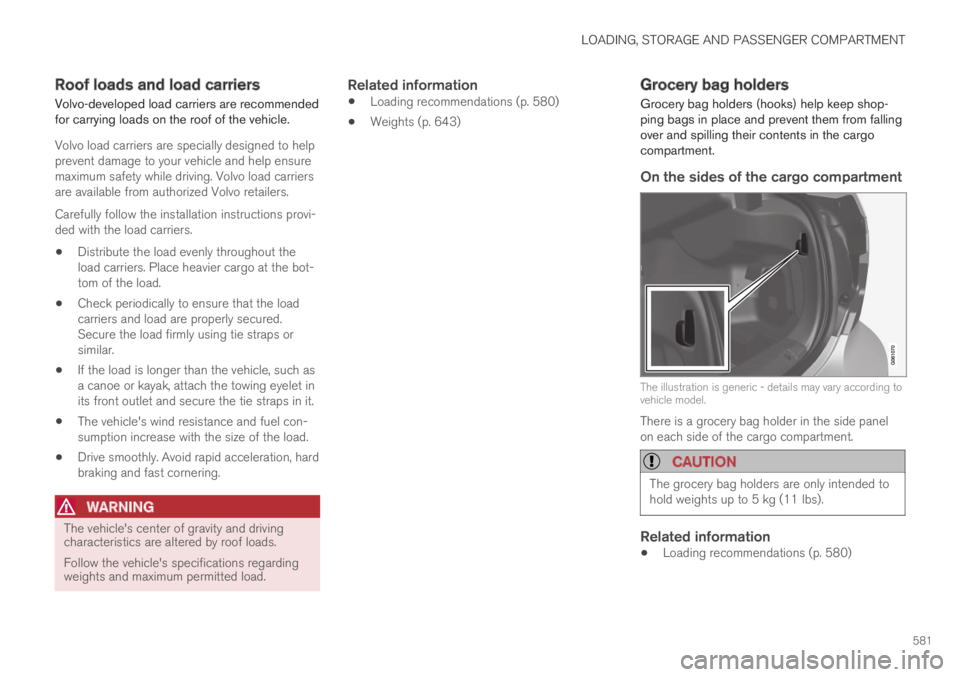
Grocery bag holders (hooks) help keep shop-ping bags in place and prevent them from fallingover and spilling their contents in the cargocompartment.
On the sides of the cargo compartment
The illustration is generic - details may vary according tovehicle model.
There is a grocery bag holder in the side panelon each side of the cargo compartment.
CAUTION
The grocery bag holders are only intended tohold weights up to 5 kg (11 lbs).
Related information
Loading recommendations (p. 580)
Page 587 of 669

MAINTENANCE AND SERVICE
}}
585
Periodic maintenance helps minimize
emissions
NOTE
Refer to your Service and Warranty Book-let for a comprehensive service and main-tenance schedule up to 240,000 km(150,000 miles). This program containsinspections and services necessary forthe proper function of your vehicle andincludes components that affect vehicleemissions.
The Warranty and Service Records Infor-mation booklet also contains detailedinformation concerning the warrantiesthat apply to your vehicle.
On-board Diagnostic System
OBD II is part of your vehicle's computerizedengine management system. It stores diagnosticinformation about your vehicle's emission con-trols. It can light the Check Engine light (MIL) if itdetects an emission control "fault." A "fault" is acomponent or system that is not performingwithin an expected range. A fault may be perma-nent or temporary. OBD II will store a messageabout any fault.
Emission inspection readiness
How do states use OBD II for emission
inspections?
Many states connect a computer directly to avehicle's OBD II system. The inspector can thenread "faults." In some states, this type of inspec-tion has replaced the tailpipe emission test.
How can my vehicle fail OBD II emission
inspection?
Your vehicle can fail OBD II emission inspectionfor any of the following reasons:
If your Check Engine (MIL) light is lit, yourvehicle may fail inspection.
If your vehicle's Check Engine light was lit,but went out without any action on your part,OBD II will still have a recorded fault. Yourvehicle may pass or fail, depending on theinspection practices in your area.
If you had recent service that required dis-connecting the battery, OBD II diagnosticinformation may be incomplete and "notready" for inspection. A vehicle that is notready may fail inspection.
How can I prepare for my next OBD II
emission inspection?
If your Check Engine (MIL) light is lit or waslit but went out without service, have your
vehicle diagnosed and, if necessary, servicedby a qualified Volvo technician.
If you recently had service for a lit CheckEngine light, or if you had service thatrequired disconnecting the battery, a periodof driving is necessary to bring the OBD IIsystem to "ready" for inspection. Two half-hour trips of mixed stop-and-go/highwaydriving are typically needed to allow OBD II toreach readiness. Your Volvo retailer can pro-vide you with more information on planning atrip.
Maintain your vehicle in accordance with yourvehicle's maintenance schedule.
Owner maintenance
Periodic maintenance requirements and intervalsare described in your vehicle's Warranty andService Records Information booklet.
The following points can be carried out betweenthe normally scheduled maintenance services.
Each time the car is refueled:
Check the engine oil level.
Clean the windshield, windshield wipers,headlights, and taillights.