warning light VOLVO S90 TWIN ENGINE 2019 Repair Manual
[x] Cancel search | Manufacturer: VOLVO, Model Year: 2019, Model line: S90 TWIN ENGINE, Model: VOLVO S90 TWIN ENGINE 2019Pages: 669, PDF Size: 14.33 MB
Page 419 of 669
HYBRID INFORMATION
}}
417
Charging status in the vehicle'scharging socket
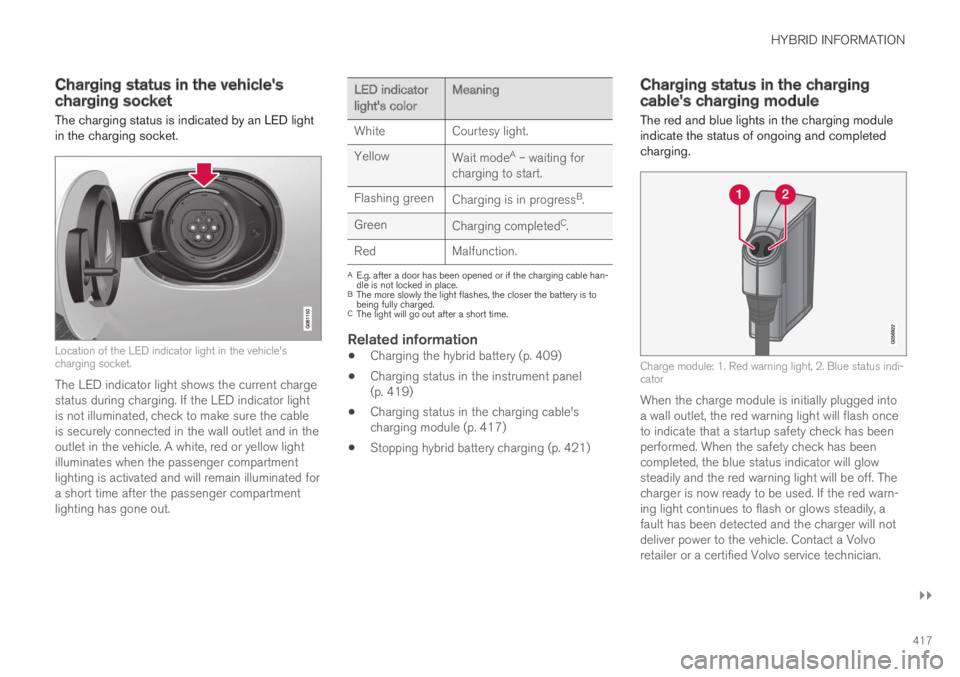
The charging status is indicated by an LED lightin the charging socket.
Location of the LED indicator light in the vehicle'scharging socket.
The LED indicator light shows the current chargestatus during charging. If the LED indicator lightis not illuminated, check to make sure the cableis securely connected in the wall outlet and in theoutlet in the vehicle. A white, red or yellow lightilluminates when the passenger compartmentlighting is activated and will remain illuminated fora short time after the passenger compartmentlighting has gone out.
LED indicatorlight's colorMeaning
WhiteCourtesy light.
YellowWait modeA – waiting forcharging to start.
Flashing greenCharging is in progressB.
GreenCharging completedC.
RedMalfunction.
AE.g. after a door has been opened or if the charging cable han-dle is not locked in place.BThe more slowly the light flashes, the closer the battery is tobeing fully charged.CThe light will go out after a short time.
Related information
Charging the hybrid battery (p. 409)
Charging status in the instrument panel(p. 419)
Charging status in the charging cable'scharging module (p. 417)
Stopping hybrid battery charging (p. 421)
Charging status in the chargingcable's charging module
The red and blue lights in the charging moduleindicate the status of ongoing and completedcharging.
Charge module: 1. Red warning light, 2. Blue status indi-cator
When the charge module is initially plugged intoa wall outlet, the red warning light will flash onceto indicate that a startup safety check has beenperformed. When the safety check has beencompleted, the blue status indicator will glowsteadily and the red warning light will be off. Thecharger is now ready to be used. If the red warn-ing light continues to flash or glows steadily, afault has been detected and the charger will notdeliver power to the vehicle. Contact a Volvoretailer or a certified Volvo service technician.
Page 431 of 669

STARTING AND DRIVING
* Option/accessory.429
Ignition modes
The vehicle's ignition can be put in variousmodes (levels) to make different functions availa-ble.
To enable the use of a limited number of func-tions when the engine is not running, the ignitioncan be put in one of three different levels: 0, Iand II. These levels are referred to as "ignitionmodes" in the Owner's Manual.
The following table shows which functions areavailable in each ignition mode:
Mode Functions
0The odometer, clock and tem-
perature gauge are illuminatedA.
The power* seats can beadjusted.
The power windows can be used.
The center display is activated
and can be usedA.
The infotainment system can be
usedA.
In this mode, the functions are availa-ble for a limited time and then switchoff automatically.
IThe panoramic roof, power win-dows, 12-volt electrical socket inthe passenger compartment,Bluetooth, navigation, phone,blower and windshield wipers canbe used.
The power seats can be adjusted.
The 12-volt electrical socket* inthe trunk can be used.
Electrical current will be takenfrom the battery in this ignitionmode.
Mode Functions
IIThe headlights illuminate.
Warning/indicator lights illumi-nate for 5 seconds.
A number of other systems areactivated. However, seat and rearwindow heating can only be acti-vated when the engine is running.
This ignition mode uses a lot ofcurrent from the battery andshould be avoided whenever pos-sible!
AAlso activated when the door is opened.
Related information
Starting the vehicle (p. 426)
Adjusting the steering wheel (p. 193)
Jump starting using another battery (p. 466)
Selecting ignition mode (p. 430)
Page 433 of 669

STARTING AND DRIVING
}}
431
Brakes
The brake pedal is used to apply the vehicle'sregular brakes, which are part of the brake sys-tem.
The vehicle is equipped with two brake circuits. Ifone brake circuit is damaged, the brake pedal willgo down further when depressed. More pressurewill then be required from the driver for normalbraking effect.
WARNING
The power brakes only work when the electricmotor or combustion engine is running.
If the brake pedal is used when the engine isswitched off, greater pressure must be applied tobrake the vehicle.
In very hilly areas or when driving with a heavyload, gear position B can be used to augment thebrakes with engine braking.
Anti-lock brakes
The vehicle is equipped with an Anti-lock BrakingSystem (ABS), which helps prevent the wheelsfrom locking and helps maintain steering controlwhen braking. Vibrations may be felt from thebrake pedal when ABS is operating, which is nor-mal.
After the vehicle is started, a brief test of theABS system is automatically performed when the
driver releases the brake pedal. An additionalautomatic test of the system may be performedwhen the vehicle is traveling at a low speed. Dur-ing the test, the brake pedal may feel as though itis pulsating.
Light braking charges the hybrid battery
When the brakes are applied lightly, the electricmotor braking function is used. This converts thevehicle's kinetic energy into electrical energy,which is used to charge the hybrid battery. Whenthe battery is being charged with the electricmotor braking function, this will be indicated inthe instrument panel.
When the battery is being charged with the electricmotor braking function, this will be indicated in theinstrument panel.
This function is active at speeds in the range of150-5 km/h (93-3 mph). When braking atspeeds outside of this range, or during harderbraking, the hydraulic braking system is used to
augment braking. This is indicated in the instru-ment panel with the pointer down in the red area.
Symbols in the instrument panel
Symbol Meaning
A
B
Check the brake fluid level. If thelevel is low, fill brake fluid andcheck to determine the reason forthe loss of brake fluid.
A
B
Fault in pedal sensor.
Page 434 of 669

||
STARTING AND DRIVING
432
Symbol Meaning
A
B
Steady glow for 2 seconds afterthe engine is started: Automaticfunction check.
Steady glow for more than 2 sec-onds: Fault in the ABS system. Thevehicle's regular brake system isstill working, but without the ABSfunction.
If the message Brake pedal Cha-racteristics changed Servicerequired is displayed, the "Brake-by-wire" system is not functioningproperly. Greater pressure will berequired to brake the vehicle.
AIn Canada.BIn the US.
WARNING
If the warning symbols for both brake faultand ABS fault are lit simultaneously, theremay be a fault in the brake system.
If the brake fluid reservoir level is normalwhen this occurs, drive carefully to thenearest workshop to have the brake sys-tem checked - an authorized Volvo work-shop is recommended.
If the brake fluid has fallen below the MINlevel in the brake fluid reservoir, the vehi-cle should not be driven until the brakefluid has been filled. The reason for thebrake fluid loss must be checked.
Related information
Brake Assist System (p. 432)
Auto-hold brakes (p. 437)
Hill Start Assist (p. 439)
Braking on wet roads (p. 433)
Braking on salted roads (p. 433)
Maintenance of the brake system (p. 433)
Brake lights (p. 156)
Brake Assist System
The brake enhancing system, Brake AssistSystem (BAS), helps increase braking force andthereby reduce braking distance.
The system monitors the driver's braking habitsand increases braking force when necessary.Braking force can be increased up to the point atwhich the ABS intervenes. The function is deacti-vated when pressure on the brake pedal isdecreased.
Related information
Brakes (p. 431)
Page 441 of 669

STARTING AND DRIVING
* Option/accessory.439
Hill Start Assist
The function for assisting when starting the vehi-cle on inclines, Hill Start Assist (HSA), helpsprevent the vehicle from rolling backward whenstarting on an uphill gradient. When backing upa hill, HSA helps prevent the vehicle from rollingforward.
The function retains pressure from the brakepedal in the brake system for several secondsafter the brake pedal has been released.
This temporary braking effect is released after afew seconds or when the driver begins driving.
Hill Start Assist is available even if the Auto-holdbrake function is switched off.
Related information
Auto-hold brakes (p. 437)
Brakes (p. 431)
Braking assist after a collision
In a collision in which the activation level isreached for the pyrotechnic seat belt tensionersor airbags, or if a collision with a large animal isdetected, the vehicle's brakes will be automati-cally activated. This function is intended to helpprevent or reduce the effects of any subsequentcollision.
After a serious collision, it may no longer be pos-sible to control and steer the vehicle. In order toavoid or mitigate a possible further collision witha vehicle or an object in the vehicle's path, thebrake assist system is activated automatically tohelp stop the vehicle safely.
The brake lights and hazard warning flashers areactivated during braking. When the vehicle hasstopped, the hazard warning flashers will con-tinue to flash and the parking brake will beapplied.
If braking is not appropriate, e.g. if there is a riskof being hit by passing traffic, the driver can over-ride the system by depressing the acceleratorpedal.
This function assumes that the brake system isintact after a collision.
Brake assist is part of the Rear Collision Warningand Blind Spot Information safety systems.
Related information
Rear Collision Warning (p. 346)
BLIS* (p. 347)
Brake functions (p. 430)
Page 467 of 669
STARTING AND DRIVING
465
Overheating of engine andtransmission
In demanding driving conditions, such as drivingin mountainous areas or hot weather, there is arisk of the engine or transmission overheating,especially when carrying heavy loads.
Engine power may be temporarily limited.
Remove any auxiliary lights mounted in frontof the grille when driving in hot weather.
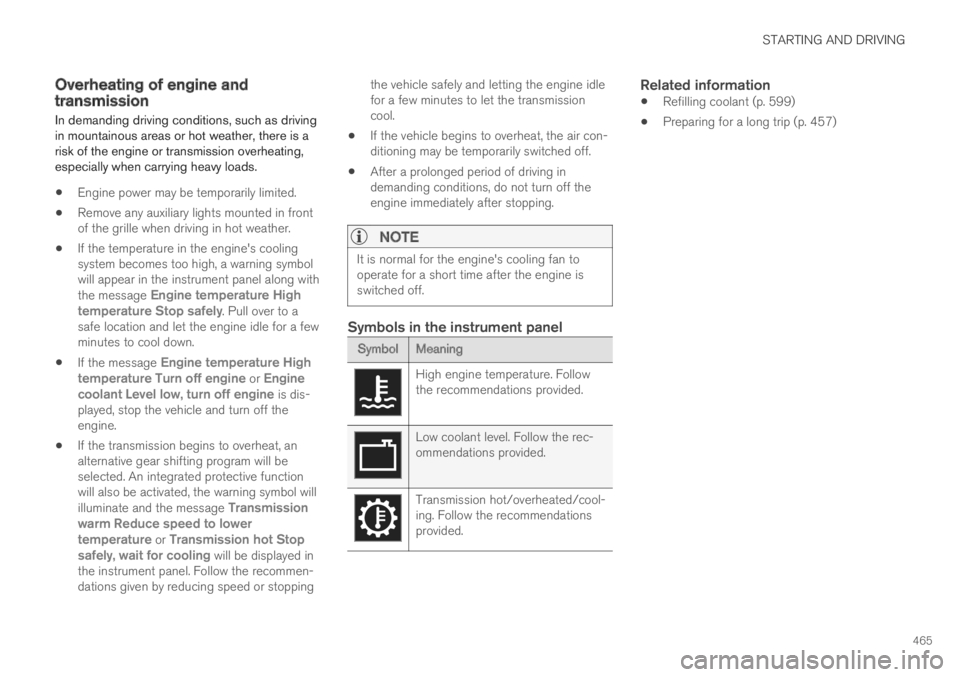
If the temperature in the engine's coolingsystem becomes too high, a warning symbolwill appear in the instrument panel along withthe message Engine temperature Hightemperature Stop safely. Pull over to asafe location and let the engine idle for a fewminutes to cool down.
If the message Engine temperature Hightemperature Turn off engine or Enginecoolant Level low, turn off engine is dis-played, stop the vehicle and turn off theengine.
If the transmission begins to overheat, analternative gear shifting program will beselected. An integrated protective functionwill also be activated, the warning symbol willilluminate and the message Transmissionwarm Reduce speed to lowertemperature or Transmission hot Stopsafely, wait for cooling will be displayed inthe instrument panel. Follow the recommen-dations given by reducing speed or stopping
the vehicle safely and letting the engine idlefor a few minutes to let the transmissioncool.
If the vehicle begins to overheat, the air con-ditioning may be temporarily switched off.
After a prolonged period of driving indemanding conditions, do not turn off theengine immediately after stopping.
NOTE
It is normal for the engine's cooling fan tooperate for a short time after the engine isswitched off.
Symbols in the instrument panel
Symbol Meaning
High engine temperature. Followthe recommendations provided.
Low coolant level. Follow the rec-ommendations provided.
Transmission hot/overheated/cool-ing. Follow the recommendationsprovided.
Related information
Refilling coolant (p. 599)
Preparing for a long trip (p. 457)
Page 469 of 669
STARTING AND DRIVING
}}}}
467
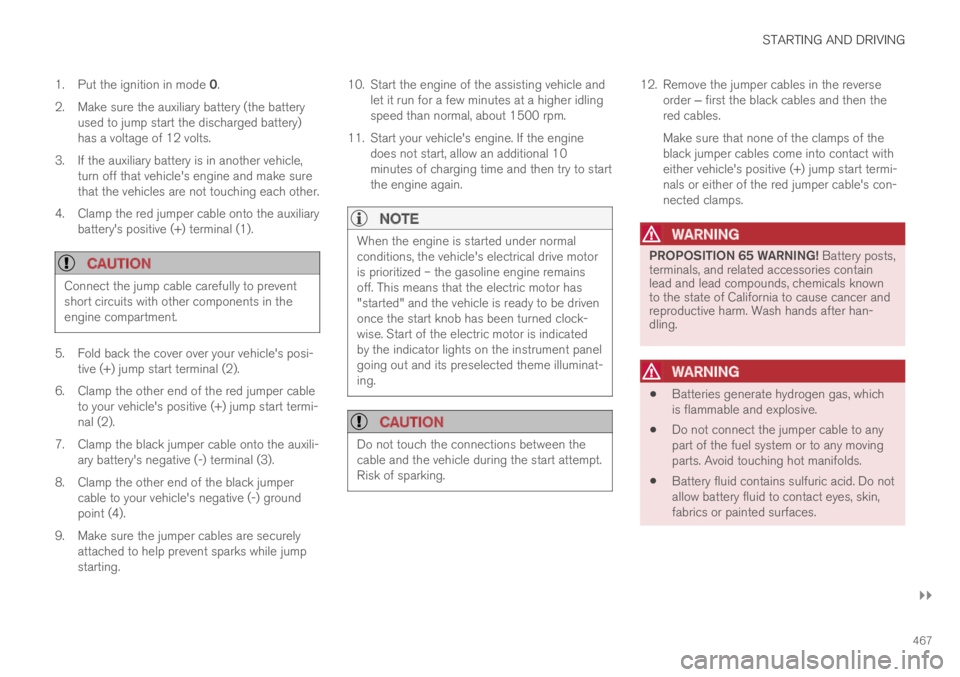
1.Put the ignition in mode 0.
2.Make sure the auxiliary battery (the batteryused to jump start the discharged battery)has a voltage of 12 volts.
3.If the auxiliary battery is in another vehicle,turn off that vehicle's engine and make surethat the vehicles are not touching each other.
4. Clamp the red jumper cable onto the auxiliarybattery's positive (+) terminal (1).
CAUTION
Connect the jump cable carefully to preventshort circuits with other components in theengine compartment.
5. Fold back the cover over your vehicle's posi-tive (+) jump start terminal (2).
6. Clamp the other end of the red jumper cableto your vehicle's positive (+) jump start termi-nal (2).
7.Clamp the black jumper cable onto the auxili-ary battery's negative (-) terminal (3).
8. Clamp the other end of the black jumpercable to your vehicle's negative (-) groundpoint (4).
9. Make sure the jumper cables are securelyattached to help prevent sparks while jumpstarting.
10. Start the engine of the assisting vehicle andlet it run for a few minutes at a higher idlingspeed than normal, about 1500 rpm.
11. Start your vehicle's engine. If the enginedoes not start, allow an additional 10minutes of charging time and then try to startthe engine again.
NOTE
When the engine is started under normalconditions, the vehicle's electrical drive motoris prioritized – the gasoline engine remainsoff. This means that the electric motor has"started" and the vehicle is ready to be drivenonce the start knob has been turned clock-wise. Start of the electric motor is indicatedby the indicator lights on the instrument panelgoing out and its preselected theme illuminat-ing.
CAUTION
Do not touch the connections between thecable and the vehicle during the start attempt.Risk of sparking.
12. Remove the jumper cables in the reverseorder ‒ first the black cables and then thered cables.
Make sure that none of the clamps of theblack jumper cables come into contact witheither vehicle's positive (+) jump start termi-nals or either of the red jumper cable's con-nected clamps.
WARNING
PROPOSITION 65 WARNING! Battery posts,terminals, and related accessories containlead and lead compounds, chemicals knownto the state of California to cause cancer andreproductive harm. Wash hands after han-dling.
WARNING
Batteries generate hydrogen gas, whichis flammable and explosive.
Do not connect the jumper cable to anypart of the fuel system or to any movingparts. Avoid touching hot manifolds.
Battery fluid contains sulfuric acid. Do notallow battery fluid to contact eyes, skin,fabrics or painted surfaces.
Page 473 of 669

STARTING AND DRIVING
}}
* Option/accessory.471
HomeLink®*8
HomeLink®9 is a programmable remote control,integrated in the vehicle electrical system, thatcan control up to three different devices (e.g.garage door opener, alarm system, outdoor andindoor lighting) and thereby replace the remotecontrols for these.
General
The illustration is generic – the design may vary.
Button 1
Button 2
Button 3
Indicator light
HomeLink® is delivered integrated in the rearview
mirror. The HomeLink® panel consists of threeprogrammable buttons and an indicator light inthe mirror.
For more information about HomeLink®, pleasevisit www.HomeLink.com, www.youtube.com/HomeLinkGentex or call 1-800-355-3515.
Save the original remote controls for future pro-gramming (e.g. for use in another vehicle). It isalso advisable to delete the button programmingif the vehicle is sold.
Related information
Using HomeLink®* (p. 473)
Programming HomeLink®* (p. 471)
Type approval for HomeLink®* (p. 473)
Programming HomeLink®*10
Follow these instructions to program
HomeLink®, reset all programming, or programindividual buttons.
NOTE
In some vehicles, the ignition must be on or in
the "accessory position" before HomeLink®
can be programmed or used. It can be a goodidea to put new batteries in the remote con-
trol being replaced by HomeLink® for fasterprogramming and better radio signal trans-
mission. The HomeLink® buttons should bereset before programming.
WARNING
While HomeLink® is being programmed, thegarage door or gate being programmed maybe activated. Make sure that no one is nearthe door or gate during programming. Whenprogramming a garage door opener, it isadvised to park outside of the garage.
8Certain markets only.9HomeLink and the HomeLink house symbol are registered trademarks of Gentex Corporation.10Certain markets only.
Page 475 of 669

STARTING AND DRIVING
}}
* Option/accessory.473
Using HomeLink®*12
Once HomeLink® is programmed, it can beused instead of the separate remote controls.
Press and hold the programming button. Thegarage door, gate, alarm system, etc. will be acti-vated (this may take several seconds). If the but-ton is held down for more than 20 seconds,reprogramming will begin. The indicator light willglow steadily or flash when the button has beenpressed. The original remote controls may be
used concurrently with HomeLink® if desired.
NOTE
If the ignition is off, HomeLink® works for30 minutes after the driver's door has beenopened.
WARNING
If you use HomeLink® to open a garagedoor or gate, be sure no one is near thegate or door while it is in motion.
Do not use HomeLink® with any garagedoor opener that lacks safety stop andreverse features as required by US fed-eral safety standards (this includes anygarage door opener model manufacturedbefore April 1, 1982). A garage door thatcannot detect an object - signaling thedoor to stop and reverse - does not meetcurrent U.S. federal safety standards. Formore information, contact HomeLink at:www.homelink.com.
Related information
HomeLink®* (p. 471)
Programming HomeLink®* (p. 471)
Type approval for HomeLink®* (p. 473)
Type approval for HomeLink®*13
FCC (USA) and IC (Canada)
This device complies with FCC rules part 15 andIndustry Canada RSS-210. Operation is subjectto the following two conditions: (1) This devicemay not cause harmful interference, and (2) Thisdevice must accept any interference that may bereceived including interference that may causeundesired operation.
WARNING
The transmitter has been tested and complieswith FCC and IC rules. Changes or modifica-tions not expressly approved by the partyresponsible for compliance could void theuser's authority to operate the device.14
Type approval for EU
Gentex Corporation hereby declares that
HomeLink® Model UAHL5 complies with theRadio equipment directive 2014/53/EU.
Wavelengths within which the radio equipmentoperates:
433.05MHz-434.79MHz <10mW E.R.P.
868.00MHz-868.60MHz <25mW E.R.P.
868.70MHz-868.20MHz <25mW E.R.P.
12Certain markets only.13Certain markets only.14The term "IC:" before the certification/registration number only signifies that Industry Canada technical specifications were met.
Page 556 of 669

||
WHEELS AND TIRES
* Option/accessory.554
NOTE
Always remember to calibrate the Tire Pres-sure Monitoring System when the wheelshave been changed or the tire inflation pres-sure has been corrected according to the tirepressure decal or tire inflation pressure table.
If correct reference values have not been set,the system cannot issue low tire pressurealerts correctly.
The vehicle must be stationary with theengine running to access the calibration but-ton and to start the calibration process.
WARNING
The exhaust gases contain carbon monoxide,which is invisible and odorless but very poi-sonous. For this reason, always perform thecalibration procedure outdoors or in a work-shop with exhaust gas evacuation equipment.
Related information
Recommended tire pressure (p. 551)
Adjusting tire pressure (p. 550)
Viewing tire pressure status in the centerdisplay* (p. 554)
Action when warned of low tire pressure(p. 555)
Tire pressure monitoring system* (p. 551)
Viewing tire pressure status in the
center display*
With the system for tire pressure monitoring 10,tire pressure status can be viewed in the centerdisplay.
Checking status
1.Open the Car Status app in App view.
2.Tap TPMS to display the status of the tires.
Status indicator light
The graphic in the center display shows the sta-
tus of each tire11.
Green tire:
Inflation pressure is above the warningthreshold.
Yellow tire:
The tire's inflation pressure is too low. Stopand check/inflate the tire as soon as possi-ble. Recalibrate the system after adjustingthe tire pressure.
All tires yellow:
The inflation pressure is too low in one ormore tires. Stop and check/inflate the tiresas soon as possible. Recalibrate the systemafter adjusting tire pressure.
10Tire Pressure Monitoring System (TPMS)