ESP VOLVO S90 TWIN ENGINE 2019 Manual Online
[x] Cancel search | Manufacturer: VOLVO, Model Year: 2019, Model line: S90 TWIN ENGINE, Model: VOLVO S90 TWIN ENGINE 2019Pages: 669, PDF Size: 14.33 MB
Page 474 of 669

||
STARTING AND DRIVING
* Option/accessory.472
1.Point the remote control at the HomeLink®
button to be programmed and hold it about2-8 cm (1-3 inches) from the button. Do not
obstruct the HomeLink® indicator light.
Note: Some remote controls are more effec-
tive at programming HomeLink® from a dis-tance of about 15-20 cm (6-12 inches). Trymoving the remote control closer or furtheraway if you are experiencing any difficultiesprogramming.
2. Press and hold both the remote control but-
ton and the HomeLink® button to be pro-grammed.
3. Do not release the buttons until the indicatorlight has stopped flashing slowly (about oncea second) and either flashes quickly (about10 times a second) or glows steadily.
>Steady glow: Indication that program-ming is complete. Press the programmedbutton twice to activate.
Flashing quickly: The device being pro-
grammed with HomeLink® may have asecurity function that requires an extrastep. Try pressing the programmed buttontwice to see whether the programmingworks. Otherwise, continue with the fol-lowing steps.
4. Locate the "training" button11 on thereceiver for the e.g. garage door opener. It isusually located near the antenna bracket onthe receiver.
5. Press and release the "training" button once.Programming must be completed within 30seconds after pressing the button.
6.Press and release the HomeLink® button tobe programmed. Repeat the press/hold/release sequence a second time. For somereceivers, the sequence may need to berepeated a third time.
>Programming is now completed and thegarage door, gate, etc. should now beactivated when the programmed button ispressed.
If you experience any difficulties programming,
please contact HomeLink® at:www.HomeLink.com, www.youtube.com/HomeLinkGentex or call 1-800-355-3515.
Programming individual buttons
To program an individual HomeLink® button:
1. Press and hold the desired button for about20 seconds.
2.When the indicator light on HomeLink®
starts flashing slowly, it is possible to pro-gram as usual.
Note: If the button you are reprogrammingdoes not program with a new device, it willreturn to the previously saved programming.
Resetting the HomeLink ®
buttons
It is only possible to reset all HomeLink® buttonsat once. It is not possible to reset individual but-tons. Individual buttons can only be reprogram-med.
–Press and hold the outer buttons (1 and 3)
on HomeLink® for about 10 seconds.
> When the indicator light goes from asteady glow to flashing, the buttons havebeen reset and are ready for reprogram-ming.
Related information
Using HomeLink®* (p. 473)
HomeLink®* (p. 471)
Type approval for HomeLink®* (p. 473)
11The name and color of the button varies depending on the manufacturer.
Page 475 of 669

STARTING AND DRIVING
}}
* Option/accessory.473
Using HomeLink®*12
Once HomeLink® is programmed, it can beused instead of the separate remote controls.
Press and hold the programming button. Thegarage door, gate, alarm system, etc. will be acti-vated (this may take several seconds). If the but-ton is held down for more than 20 seconds,reprogramming will begin. The indicator light willglow steadily or flash when the button has beenpressed. The original remote controls may be
used concurrently with HomeLink® if desired.
NOTE
If the ignition is off, HomeLink® works for30 minutes after the driver's door has beenopened.
WARNING
If you use HomeLink® to open a garagedoor or gate, be sure no one is near thegate or door while it is in motion.
Do not use HomeLink® with any garagedoor opener that lacks safety stop andreverse features as required by US fed-eral safety standards (this includes anygarage door opener model manufacturedbefore April 1, 1982). A garage door thatcannot detect an object - signaling thedoor to stop and reverse - does not meetcurrent U.S. federal safety standards. Formore information, contact HomeLink at:www.homelink.com.
Related information
HomeLink®* (p. 471)
Programming HomeLink®* (p. 471)
Type approval for HomeLink®* (p. 473)
Type approval for HomeLink®*13
FCC (USA) and IC (Canada)
This device complies with FCC rules part 15 andIndustry Canada RSS-210. Operation is subjectto the following two conditions: (1) This devicemay not cause harmful interference, and (2) Thisdevice must accept any interference that may bereceived including interference that may causeundesired operation.
WARNING
The transmitter has been tested and complieswith FCC and IC rules. Changes or modifica-tions not expressly approved by the partyresponsible for compliance could void theuser's authority to operate the device.14
Type approval for EU
Gentex Corporation hereby declares that
HomeLink® Model UAHL5 complies with theRadio equipment directive 2014/53/EU.
Wavelengths within which the radio equipmentoperates:
433.05MHz-434.79MHz <10mW E.R.P.
868.00MHz-868.60MHz <25mW E.R.P.
868.70MHz-868.20MHz <25mW E.R.P.
12Certain markets only.13Certain markets only.14The term "IC:" before the certification/registration number only signifies that Industry Canada technical specifications were met.
Page 511 of 669

AUDIO, MEDIA AND INTERNET
}}
* Option/accessory.509
Apple® CarPlay®*
With CarPlay, you can listen to music, makephone calls, get driving instructions, send/receive messages and use Siri, all while remain-ing focused on driving.
CarPlay works with selectApple devices. If the car doesnot already support CarPlay,this can be retrofitted. Contacta Volvo retailer to installCarPlay.
Information about supported apps and compati-ble phones is available on the Apple website:www.apple.com/ios/carplay/. Using apps that arenot compatible with CarPlay could cause the con-nection between iPhone and the vehicle to belost. Please note that Volvo is not responsible forthe content of CarPlay.
When using map navigation via CarPlay, guidancewill only be shown on the center display and notin the instrument panel or head-up display.
CarPlay apps can be controlled from the centerdisplay, a phone or with the right-side steeringwheel keypad (for certain functions). The appscan also be voice-controlled using Siri. Press and
hold the button on the steering wheel tostart voice control with Siri. Press briefly to acti-vate the vehicle's own voice control system. If Siri
cuts off too soon, press and hold the 7 but-ton on the steering wheel.
By using Apple CarPlay you acknowledgethe following: Apple CarPlay is a serviceprovided by Apple Inc. under its terms andconditions. Volvo Cars is thus notresponsible for Apple CarPlay or itsfeatures/applications. When using AppleCarPlay, certain information from your car(including its position) is transferred to youriPhone. In relation to Volvo Cars, you arefully responsible for your and any othersperson
Page 514 of 669
AUDIO, MEDIA AND INTERNET
* Option/accessory.512
Android Auto*
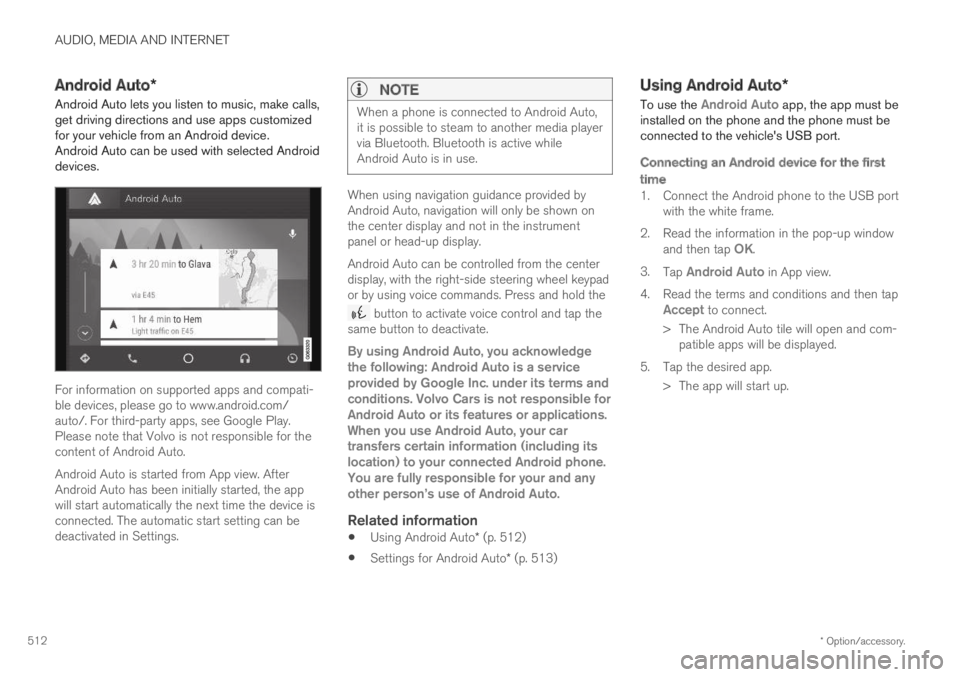
Android Auto lets you listen to music, make calls,get driving directions and use apps customizedfor your vehicle from an Android device.Android Auto can be used with selected Androiddevices.
For information on supported apps and compati-ble devices, please go to www.android.com/auto/. For third-party apps, see Google Play.Please note that Volvo is not responsible for thecontent of Android Auto.
Android Auto is started from App view. AfterAndroid Auto has been initially started, the appwill start automatically the next time the device isconnected. The automatic start setting can bedeactivated in Settings.
NOTE
When a phone is connected to Android Auto,it is possible to steam to another media playervia Bluetooth. Bluetooth is active whileAndroid Auto is in use.
When using navigation guidance provided byAndroid Auto, navigation will only be shown onthe center display and not in the instrumentpanel or head-up display.
Android Auto can be controlled from the centerdisplay, with the right-side steering wheel keypador by using voice commands. Press and hold the
button to activate voice control and tap thesame button to deactivate.
By using Android Auto, you acknowledgethe following: Android Auto is a serviceprovided by Google Inc. under its terms andconditions. Volvo Cars is not responsible forAndroid Auto or its features or applications.When you use Android Auto, your cartransfers certain information (including itslocation) to your connected Android phone.You are fully responsible for your and anyother person
Page 525 of 669
AUDIO, MEDIA AND INTERNET
}}
* Option/accessory.523
Settings for Bluetooth devices
Settings for Bluetooth-connected devices.
1.Tap Settings in the Top view.
2.Tap CommunicationBluetoothDevices and select settings:
Add device - start the procedure for pairinga new device.
Previously paired devices - lists regis-tered/paired devices.
Remove device - remove a connecteddevice.
Allowed services for this device - selectwhat the device will be used for: makingcalls, sending/receiving messages, stream-ing media, Internet connection.
Internet connection connect the vehicle tothe Internet using the device's Bluetoothconnection.
Bluetooth ®
declaration of conformity
USA
FCC CAUTION
Changes or modifications not expressly approvedby the party responsible for compliance couldvoid the user's authority to operate the equip-ment. This transmitter must not be co-located oroperated in conjunction with any other antennaor transmitter.
Canada
This device complies with Industry Canadalicense-exempt RSS standard(s). Operation issubject to the following two conditions:
(1) this device may not cause interference, and
(2) this device must accept any interference,including interference that may cause undesiredoperation of the device.
Related information
Phone (p. 514)
Phone settings (p. 522)
Internet-connected vehicle* (p. 523)
Connecting a phone to the car via Bluetoothfor the first time (p. 515)
Internet-connected vehicle*
When the vehicle is connected to the Internet, itis possible to use web radio and music servicesvia apps, download software and contact retail-ers from the vehicle.
The vehicle can be connected to the Internetusing Bluetooth, Wi-Fi or the vehicle's integratedmodem (SIM card).
When the vehicle is connected to the Internet, itis possible to share the vehicle's Internet connec-
Page 536 of 669
||
AUDIO, MEDIA AND INTERNET
534
The website provides the Source Code "As Is"and without warranty of any kind.
By downloading Source Code, you expresslyassume all risk and liability associated withdownloading and using the Source Code andcomplying with the user agreements thataccompany each Source Code.
Please note that we cannot respond to anyinquiries regarding the source code.
camellia:1.2.0
Copyright (c) 2006, 2007
NTT (Nippon Telegraph and TelephoneCorporation). All rights reserved.
Redistribution and use in source and binaryforms, with or without modification, are permittedprovided that the following conditions are met:
1. Redistributions of source code must retainthe above copyright notice, this list ofconditions and the following disclaimer asthe first lines of this file unmodified.
2. Redistributions in binary form mustreproduce the above copyright notice, this listof conditions and the following disclaimer inthe documentation and/or other materialsprovided with the distribution.
THIS SOFTWARE IS PROVIDED BY NTT ``ASIS'' AND ANY EXPRESS OR IMPLIEDWARRANTIES, INCLUDING, BUT NOT LIMITEDTO, THE IMPLIED WARRANTIES OFMERCHANTABILITY AND FITNESS FOR A
PARTICULAR PURPOSE ARE DISCLAIMED. INNO EVENT SHALL NTT BE LIABLE FOR ANYDIRECT, INDIRECT, INCIDENTAL, SPECIAL,EXEMPLARY, OR CONSEQUENTIAL DAMAGES(INCLUDING, BUT NOT LIMITED TO,PROCUREMENT OF SUBSTITUTE GOODS ORSERVICES; LOSS OF USE, DATA, OR PROFITS;OR BUSINESS INTERRUPTION) HOWEVERCAUSED AND ON ANY THEORY OF LIABILITY,WHETHER IN CONTRACT, STRICT LIABILITY,OR TORT (INCLUDING NEGLIGENCE OROTHERWISE) ARISING IN ANY WAY OUT OFTHE USE OF THIS SOFTWARE, EVEN IFADVISED OF THE POSSIBILITY OF SUCHDAMAGE.
Unicode: 5.1.0
COPYRIGHT AND PERMISSION NOTICE
Copyright c 1991-2013 Unicode, Inc. All rightsreserved. Distributed under the Terms of Use inhttp://www.unicode.org/copyright.html.
Permission is hereby granted, free of charge, toany person obtaining a copy of the Unicode datafiles and any associated documentation (the"Data Files") or Unicode software and anyassociated documentation (the "Software") todeal in the Data Files or Software withoutrestriction, including without limitation the rightsto use, copy, modify, merge, publish, distribute,and/or sell copies of the Data Files or Software,and to permit persons to whom the Data Files orSoftware are furnished to do so, provided that (a)
the above copyright notice(s) and this permissionnotice appear with all copies of the Data Files orSoftware, (b) both the above copyright notice(s)and this permission notice appear in associateddocumentation, and (c) there is clear notice ineach modified Data File or in the Software aswell as in the documentation associated with theData File(s) or Software that the data or softwarehas been modified.
THE DATA FILES AND SOFTWARE AREPROVIDED "AS IS", WITHOUT WARRANTY OFANY KIND, EXPRESS OR IMPLIED, INCLUDINGBUT NOT LIMITED TO THE WARRANTIES OFMERCHANTABILITY, FITNESS FOR APARTICULAR PURPOSE ANDNONINFRINGEMENT OF THIRD PARTYRIGHTS. IN NO EVENT SHALL THECOPYRIGHT HOLDER OR HOLDERSINCLUDED IN THIS NOTICE BE LIABLE FORANY CLAIM, OR ANY SPECIAL INDIRECT ORCONSEQUENTIAL DAMAGES, OR ANYDAMAGES WHATSOEVER RESULTING FROMLOSS OF USE, DATA OR PROFITS, WHETHERIN AN ACTION OF CONTRACT, NEGLIGENCEOR OTHER TORTIOUS ACTION, ARISING OUTOF OR IN CONNECTION WITH THE USE ORPERFORMANCE OF THE DATA FILES ORSOFTWARE.
Except as contained in this notice, the name of acopyright holder shall not be used in advertisingor otherwise to promote the sale, use or other
Page 537 of 669
AUDIO, MEDIA AND INTERNET
}}
535
dealings in these Data Files or Software withoutprior written authorization of the copyright holder.
Declaration of Conformity
USA
FCC CAUTION
Changes or modifications not expressly approvedby the party responsible for compliance couldvoid the user's authority to operate the equip-ment. This transmitter must not be co-located oroperated in conjunction with any other antennaor transmitter.
Canada
This device complies with Industry Canadalicense-exempt RSS standards. Operation is sub-ject to the following two conditions: (1) thisdevice may not cause interference, and (2) thisdevice must accept any interference, includinginterference that may cause undesired operationof the device.
Page 546 of 669
||
WHEELS AND TIRES
* Option/accessory.544
WARNING
The wheel and tire sizes for your Volvoare specified to meet stringent stabilityand handling requirements. Unapprovedwheel/tire size combinations can nega-tively affect your vehicle's stability andhandling.
Any damage caused by installation ofunapproved wheel/tire size combinationswill not be covered by your new vehiclewarranty. Volvo assumes no responsibilityfor death, injury, or expenses that mayresult from such installations.
Related information
Checking tire pressure (p. 549)
Tire direction of rotation (p. 544)
Tread wear indicator (p. 545)
Tire pressure monitoring system* (p. 551)
Tire sealing system (p. 564)
Uniform Tire Quality Grading (p. 548)
Tire terminology (p. 545)
Tire sidewall designations (p. 546)
Loading recommendations (p. 580)
Tire direction of rotation
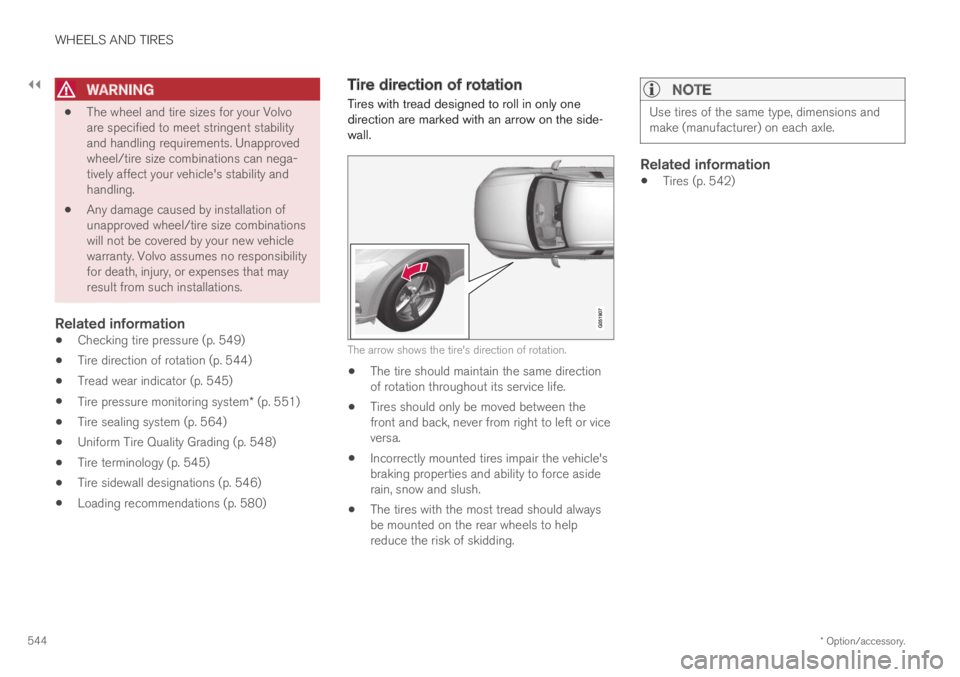
Tires with tread designed to roll in only onedirection are marked with an arrow on the side-wall.
The arrow shows the tire's direction of rotation.
The tire should maintain the same directionof rotation throughout its service life.
Tires should only be moved between thefront and back, never from right to left or viceversa.
Incorrectly mounted tires impair the vehicle'sbraking properties and ability to force asiderain, snow and slush.
The tires with the most tread should alwaysbe mounted on the rear wheels to helpreduce the risk of skidding.
NOTE
Use tires of the same type, dimensions andmake (manufacturer) on each axle.
Related information
Tires (p. 542)
Page 549 of 669
WHEELS AND TIRES
547
NOTE
The tire's load index and speed rating maynot appear on the sidewall because they arenot required by law.
7.M+S or M/S = Mud and Snow, AT = All Ter-rain, AS = All Season
8.U.S. DOT Tire Identification Number(TIN): This begins with the letters "DOT" andindicates that the tire meets all federalstandards. The next two numbers are thefactory code where the tire was manufac-tured, the next two are the tire size code andthe last four numbers represent the weekand year the tire was made. For example,0717 means that the tire was manufacturedduring week 7 of 2017. The numbers inbetween are marketing codes used at themanufacturer's discretion. This informationhelps a tire manufacturer identify a tire forsafety recall purposes.
9.Tire Ply Composition and Material Used:Indicates the number of plies indicates or thenumber of layers of rubber-coated fabric inthe tire tread and sidewall. Tire manufactur-ers also must indicate the ply materials in thetire and the sidewall, which include steel,nylon, polyester, and others.
10.Maximum Load: Indicates the maximumload in pounds and kilograms that can becarried by the tire. Refer to the vehicle's tire
information placard located on the B-Pillarfor the correct tire pressure for your vehicle.
11.Treadwear, Traction, and Temperaturegrades.
12.Maximum permissible inflation pressure:the greatest amount of air pressure thatshould ever be put in the tire. This limit is setby the tire manufacturer.
Speed Symbol
A tire's Speed Symbol (SS) indicates the maxi-mum speed for which the tire has been certifiedand should be at least equivalent to the vehicle'stop speed.
Winter tires, with or without studs, are exceptionsand may use a lower SS. When winter tires areinstalled, the vehicle may not be driven fasterthan the tires' SS.
The vehicle's speed should always be determinedby the posted speed limit and traffic and roadconditions, not the tire's SS.
The following table indicates the maximum per-missible speed for each SS.
M 130 km/h (81 mph)
Q 160 km/h (100 mph)
T190 km/h (118 mph)
H 210 km/h (130 mph)
V 240 km/h (149 mph)
W 270 km/h (168 mph)
Y300 km/h (186 mph)
WARNING
The wheel and tire sizes for your Volvoare specified to meet stringent stabilityand handling requirements. Unapprovedwheel/tire size combinations can nega-tively affect your vehicle's stability andhandling.
Any damage caused by installation ofunapproved wheel/tire size combinationswill not be covered by your new vehiclewarranty. Volvo assumes no responsibilityfor death, injury, or expenses that mayresult from such installations.
Related information
Tires (p. 542)
Page 550 of 669

WHEELS AND TIRES
548
Uniform Tire Quality Grading
ALL PASSENGER VEHICLE TIRES MUSTCONFORM TO FEDERAL SAFETY REQUIRE-MENTS IN ADDITION TO THESE GRADES.
Quality grades can be found, where applica-ble, on the tire sidewall between the treadshoulder and maximum section width. Forexample:
Treadwear 200 Traction AA Temperature A
TREADWEAR
The treadwear grade is a comparative ratingbased on the wear rate of the tire when testedunder controlled conditions on a specified gov-ernment test course. For example, a tire graded150 would wear one and one half (1 ½) times aswell on the government course as a tire graded100. The relative performance of tires dependsupon the actual conditions of their use, however,and many depart significantly from the norm dueto variation in driving habits, maintenance practi-ces and differences in road characteristics andclimate.
TRACTION
The traction grades, from highest to lowest, areAA, A, B, and C, as measured under controlledconditions on specified government test surfacesof asphalt and concrete. A tire marked C mayhave poor traction performance.
WARNING
The traction grade assigned to this tire isbased on braking (straight-ahead) tractiontests and is not a measure of cornering (turn-ing) traction.
TEMPERATURE
The temperature grades are A (the highest), B,and C, representing the tire's resistance to thegeneration of heat and its ability to dissipate heatwhen tested under controlled conditions on aspecified indoor laboratory test wheel. Sustainedhigh temperature can cause the material of thetire to degenerate and reduce tire life, and exces-sive temperature can lead to sudden tire failure.The grade C corresponds to a minimum level ofperformance that all passenger vehicle tires mustmeet under the Federal Motor Safety StandardNo. 109. Grades B and A represent higher levelsof performance on the laboratory test wheel thanthe minimum required by law.
WARNING
The temperature grade for this tire is estab-lished for a tire that is properly inflated andnot overloaded. Excessive speed, under-infla-tion, or excessive loading, either separately orin combination, can cause heat buildup andtire failure.
Related information
Tires (p. 542)
Tire sidewall designations (p. 546)