brake VOLVO S90 TWIN ENGINE 2020 User Guide
[x] Cancel search | Manufacturer: VOLVO, Model Year: 2020, Model line: S90 TWIN ENGINE, Model: VOLVO S90 TWIN ENGINE 2020Pages: 655, PDF Size: 12.54 MB
Page 85 of 655

DISPLAYS AND VOICE CONTROL
}}
83
Fuel gauge The fuel gauge in the instrument panel shows the fuel level in the tank.
The illustration is generic - details may vary accord- ing to vehicle model.
The beige area in the fuel gauge indicates the amount of fuel left in the tank. When the fuel level is low and it is time to refuel, the fuel pump symbol will illuminate with an amber-colored light. The trip computer also indicates the approximate distance drivenon the fuel remaining in the tank.
Related information
Instrument panel (p. 80)
Hybrid battery gauge (p. 84)
Refueling (p. 435)
Fuel tank volume (p. 633)
Hybrid gauge In Hybrid and Pure drive modes, the instru- ment panel will display a hybrid gauge, whichcan help the driver achieve optimal drivingeconomy.
The hybrid gauge shows the ratio between the electric motor's current power consumptionand the remaining available power. This infor-mation is shown in various ways.
Symbols in the hybrid gaugeIndicates the current available powerfrom the electric motor. A solid sym-bol indicates that the electric motoris being used.
A hollow symbol indicates that the electric motor is not being used.
Indicates the power level when the internal combustion engine starts. Asolid symbol indicates that the inter-nal combustion engine is being used.
Indicates the power level when the internal combustion engine will start.A hollow symbol indicates that theinternal combustion engine is not
being used.
Indicates that the hybrid battery is being charged, e.g. by lightly press-ing the brake pedal.
Driver-requested powerThe hybrid gauge displays the amount of power requested (utilized) by the driverthrough pressure on the accelerator pedal. Thehigher the reading on the scale, the morepower utilized in the current gear. The markbetween the lightning symbol and the dropsymbol indicates the point at which the com-bustion engine will start.
Page 86 of 655

||
DISPLAYS AND VOICE CONTROL
84
For example:
The vehicle has been started, but is stationary and no power is being requested.
The electric motor cannot supply the requested power and the internal combustion engine will start.
The vehicle is generating current to recharge the bat- tery, e.g. during light braking or engine braking on adownslope.
Related information
Drive modes (p. 419)
Instrument panel (p. 80)
Brakes (p. 403)
Starting and stopping the combustion engine in Twin Engine vehicles (p. 419)
Hybrid battery gauge
The hybrid battery gauge shows how much current is left in the hybrid battery.
The current in the hybrid battery is used to power the electric motor, but can also be usedto heat or cool the vehicle. The trip computercalculates an approximate driving distancewith the remaining current in the hybrid bat-tery.
Page 93 of 655

DISPLAYS AND VOICE CONTROL
}}
91
Related information
Instrument panel (p. 80)
Changing system units of measurement (p. 129)
Indicator symbols in the instrument panel
The indicator symbols alert the driver that a function has been activated, that a system isrunning, or that a fault or error may haveoccurred.
Symbol Meaning
Information, see the message in the display The information symbol illumi- nates and a message is displayedin the instrument panel if one ofthe vehicle's systems requiresthe driver's attention. The infor-mation symbol may also illumi-nate in combination with othersymbols.
A
B Fault in brake system This symbol illuminates if there is a problem with the parkingbrake.
Symbol Meaning
A
BFault in ABS system If this symbol is illuminated, the ABS system is malfunctioning.The vehicle's regular brakes willstill work, but without the ABSfunction.
A
BAuto-brake on This symbol illuminates when the function is activated and thebrakes or parking brakes arebeing used. The brakes hold thevehicle at a standstill after it hasstopped.
Page 96 of 655

DISPLAYS AND VOICE CONTROL
94
Warning symbols in the instrument panelThe warning symbols alert the driver that an important function is activated or that a seri-ous fault or error has occurred.
Symbol Meaning
WARNING The red warning symbol illumi- nates to indicate that a fault hasbeen detected that could affectsafety or driveability. An explana-tory message will be simultane-ously displayed in the instrumentpanel. The warning symbol mayalso illuminate in combinationwith other symbols.
Seat belt reminder This symbol will glow steadily or flash if the driver or front seatpassenger has not fastened theirseat belt or if anyone in the rearseat has removed their seat belt.
Symbol Meaning
Airbags If this symbol remains illumi- nated or comes on while driving,a fault has been detected in oneof the vehicle's safety systems.Read the message in the instru-ment panel. Volvo recommendscontacting an authorized Volvoworkshop.
A
B Fault in brake system If this symbol illuminates, the brake fluid level may be too low.Contact your nearest authorizedworkshop to have the brake fluidlevel checked and adjusted.
Symbol Meaning
A
B
Parking brake on This symbol glows steadily when the parking brake is applied. A flashing symbol indicates that a fault has occurred. Read themessage in the instrument panel.
Low oil pressure If this symbol illuminates while driving when the engine oil pres-sure is too low. Stop the engineimmediately and check theengine oil level. Add oil if neces-sary. If the symbol illuminatesand the oil level is normal, con-tact a workshop. Volvo recom-mends contacting an authorizedVolvo workshop.
Generator not charging This symbol illuminates during driving if a fault is detected in theelectrical system. Contact aworkshop. Volvo recommendscontacting an authorized Volvoworkshop.
Page 134 of 655
DISPLAYS AND VOICE CONTROL
* Option/accessory.
132
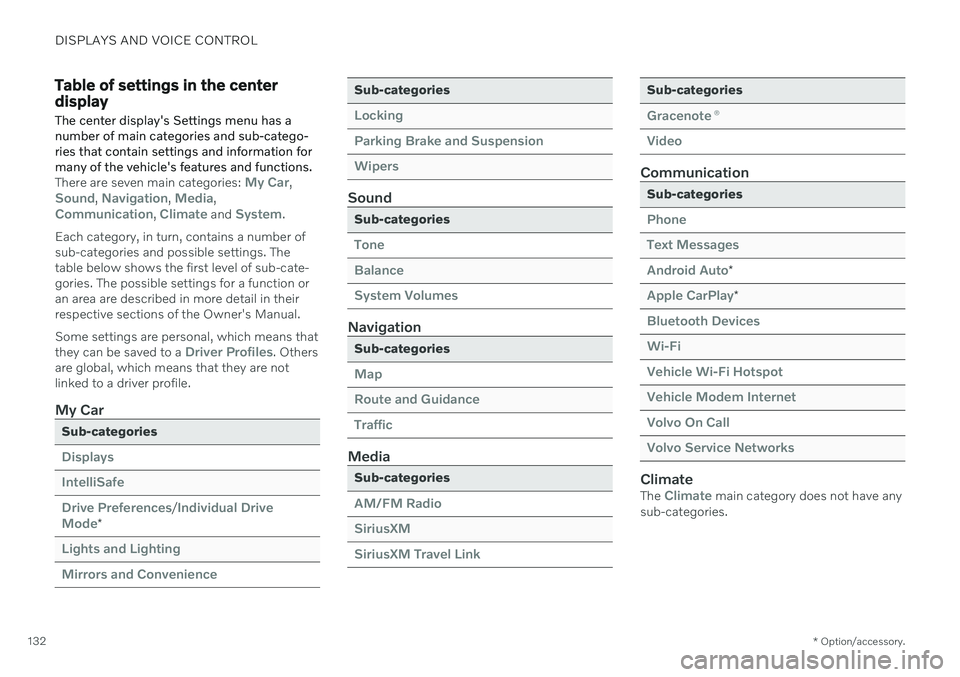
Table of settings in the center display
The center display's Settings menu has a number of main categories and sub-catego-ries that contain settings and information formany of the vehicle's features and functions.
There are seven main categories: My Car,Sound, Navigation, Media,Communication, Climate and System.
Each category, in turn, contains a number of sub-categories and possible settings. Thetable below shows the first level of sub-cate-gories. The possible settings for a function oran area are described in more detail in theirrespective sections of the Owner's Manual. Some settings are personal, which means that they can be saved to a
Driver Profiles. Others
are global, which means that they are not linked to a driver profile.
My Car
Sub-categories
Displays IntelliSafeDrive Preferences
/Individual Drive
Mode*
Lights and Lighting Mirrors and Convenience
Sub-categories
Locking Parking Brake and SuspensionWipers
Sound
Sub-categories
Tone BalanceSystem Volumes
Navigation
Sub-categories
Map Route and GuidanceTraffic
Media
Sub-categories
AM/FM Radio SiriusXMSiriusXM Travel Link
Sub-categories
Gracenote ®
Video
Communication
Sub-categories
Phone Text MessagesAndroid Auto
*
Apple CarPlay*
Bluetooth Devices Wi-FiVehicle Wi-Fi Hotspot Vehicle Modem Internet Volvo On Call Volvo Service Networks
ClimateThe Climate main category does not have any
sub-categories.
Page 153 of 655

LIGHTING
* Option/accessory.151
WARNING
The vehicle lighting system cannot in all sit- uations determine when the daylight is tooweak or not strong enough, e.g. whenthere is fog or rain. The driver is always responsible for driving the vehicle with lighting that is safe for thetraffic conditions and as specified by appli-cable traffic regulations.
Thumbwheel in instrument panel
Thumb wheel (to the left) for adjusting interior bright- ness.
Related information
Adjusting light functions via the center display (p. 151)
Interior Lighting (p. 159)
Parking lights (p. 152)
Using turn signals (p. 156)
Using high beam (p. 154)
Low beams (p. 153)
Rear fog light (p. 157)
Active Bending Lights
* (p. 156)
Brake lights (p. 158)
Emergency brake lights (p. 158)
Hazard warning flashers (p. 158)
Adjusting light functions via the center display A number of light functions can be adjusted and activated via the center display. Theseinclude active high beams, home safe lightingand approach lighting.
1.
Tap Settings in the center display's Top
view.
2. Tap
My CarLights and Lighting.
3. Select
Exterior Lights or Interior
Lighting and then select the function that
you would like to adjust.
Related information
Lighting control and panel (p. 150)
Active high beam (p. 155)
Using home safe lighting (p. 159)
Welcome Light (p. 159)
Using turn signals (p. 156)
Changing settings in the center display's Top view (p. 129)
Function view in the center display (p. 119)
Page 160 of 655

LIGHTING
158
Brake lights
The brake lights are automatically illuminated when braking.
The brake lights are illuminated when the brake pedal is depressed and when the brakesare automatically applied by a driver supportsystem.
Related information
Emergency brake lights (p. 158)
Brake functions (p. 403)
Driver support systems (p. 268)
Emergency brake lights
The emergency brake lights are activated to warn following vehicles of hard braking. This function causes an additional taillight on each side of the vehicle to illuminate.
The emergency brake lights are activated in the event of hard braking or if the ABS systemis activated and the vehicle is traveling at ahigh speed. After the driver decelerates to a low speed and then releases the brake, the brake lightsresume their normal brightness.
Related information
Brake lights (p. 158)
Brakes (p. 403)
Hazard warning flashers (p. 158)
Hazard warning flashers
Hazard warning flashers warn other road users by all of the vehicle's turn signals beingactivated at the same time. The function canbe used to warn about a traffic hazard.
Hazard warning flashers button.
Press the button to activate the hazard warn- ing flashers.
NOTE
Regulations concerning the use of hazard warning flashers may vary from country tocountry.
Related information
Emergency brake lights (p. 158)
Using turn signals (p. 156)
Page 186 of 655

SEATS AND STEERING WHEEL
* Option/accessory.
184
Manual front seats
The front seats can be adjusted in a number of different ways to help enhance your seat-ing comfort.
Raise/lower the front edge of the seat cushion * by moving the control up/down. 1
Change the length of the seat cushion
* by
pulling up the lever and moving the cush- ion forward/backward.
Move the seat forward/backing by lifting the handle and moving the seat to a suita-ble distance from the steering wheel andpedals. Check to make sure the seat issecurely locked into place after its settinghas been changed.
Adjust lumbar support by pressing the button up/down/forward/rearward 2
.
Raise/lower the seat by moving the con- trol up/down.
Change the backrest tilt by turning the knob on the backrest.
WARNING
Do not adjust the seat while driving. The seat should be adjusted so that thebrake pedal can be depressed fully. Inaddition, position the seat as far rear-ward as comfort and control allow.
Check that the seat is securely lockedinto position after adjusting.
Related information
Power
* front seats (p. 185)
Adjusting the power
* front seats (p. 185)
Storing positions for seats, mirrors and head-up display
* (p. 186)
Using stored positions for seats, mirrorsand head-up display
* (p. 187)
Adjusting front seat massage settings
*
(p. 189)
Adjusting
* front seat cushion length
(p. 190)
Front seat massage
* settings (p. 188)
Adjusting front seat side bolster settings
*
(p. 191)
Adjusting front seat lumbar support
*
(p. 191)
Adjusting the passenger seat from thedriver's seat
* (p. 193)
1
Only applies to the driver's seat.
2 Applies for four-way lumbar support *. Two-way lumbar support * is adjusted forward/rearward.
Page 190 of 655

||
SEATS AND STEERING WHEEL
* Option/accessory.
188
Front door closed
–Press and hold one of the memory buttons 1 (
) or 2 () until the seat, door mirrors
and head-up display stop in the positions stored in that memory button.
If the memory button is released, the seat,door mirrors and head-up display will stopmoving.
WARNING
This list point needs to be translated exactly to: "Because the driver's seatcan be adjusted with the ignition off,children should never be left unatten-ded in the vehicle.
Movement of the seat can be STOP-PED at any time by pressing any but-ton on the power seat control panel.
Do not adjust the seat while driving.
The seat should be adjusted so that thebrake pedal can be depressed fully. Inaddition, position the seat as far rear-ward as comfort and control allow.
The seat rails on the floor must not beobstructed in any way when the seat isin motion.
Related information
Manual front seats (p. 184)
Power
* front seats (p. 185)
Adjusting the power
* front seats (p. 185)
Storing positions for seats, mirrors and head-up display
* (p. 186)
Adjusting front seat massage settings
*
(p. 189)
Adjusting
* front seat cushion length
(p. 190)
Front seat massage
* settings (p. 188)
Adjusting front seat side bolster settings
*
(p. 191)
Adjusting front seat lumbar support
*
(p. 191)
Adjusting the passenger seat from thedriver's seat
* (p. 193)
Adjusting the door mirrors (p. 171)
Head-up display settings
* (p. 141)
Front seat massage * settings
The settings for the multifunctional seats can be adjusted using either the mutifunctioncontrol on the side of the seat or the centerdisplay. The adjustment settings are shown inthe center display.
Multifunction control, located on the side of the seat cushion.
Massage settingsThe following massage settings are available:
On/Off: Select On/Off to turn on/off the
massage function.
Programs 1-5: There are 5 preset mas-
sage programs. Select Swell, Tread,Advanced, Lumbar or Shoulder.
Intensity: Select Low, Normal or High.
Speed: Select Slow, Normal or Fast.
Page 270 of 655

DRIVER SUPPORT
* Option/accessory.
268
Driver support systems
The vehicle is equipped with a number of driver support systems that can provide thedriver with active or passive assistance in var-ious situations.
The systems can, for example, help the driver:
maintain a set speed
maintain a set time interval to the vehicle ahead
help prevent a collision by warning thedriver and applying the brakes
park the vehicle.
Some of the systems are standard and othersare options. This also varies from market tomarket.
Related information
IntelliSafe – driver support and safety(p. 29)
Speed-dependent steering wheel resis-tance (p. 268)
Curve Speed Assist (CSA)
* (p. 302)
Electronic Stability Control (p. 269)
Distance Alert
* (p. 273)
Cruise control (p. 275)
Adaptive Cruise Control
* (p. 278)
Pilot Assist
* (p. 287)
Radar sensor (p. 305)
Camera (p. 308)
City Safety
™ (p. 314)
Rear Collision Warning
* (p. 328)
BLIS
* (p. 329)
Cross Traffic Alert
* (p. 333)
Road Sign Information
* (p. 337)
Driver Alert Control (p. 342)
Lane Keeping Aid (p. 344)
Steering assistance at risk of collision(p. 351)
Park Assist
* (p. 357)
Park Assist Camera
* (p. 362)
Park Assist Pilot
* (p. 370)
Speed-dependent steering wheel resistance Speed-dependent power steering increases the steering wheel resistance in pace withthe vehicle's speed, which can help give thedriver an enhanced feeling of control and sta-bility.
Steering is stiffer on highways. When parking and at low speeds, it will be easier to movethe steering wheel.
NOTE
In rare situations, the power steering may become too hot andrequire temporary cooling – dur-ing such time the power steering
will work at reduced output and the steer-ing wheel may feel more difficult to move. The message
Power steering Assistance
temporarily reduced will be displayed
along with this symbol in the instrument panel.
While the power steering is working at reduced power, the driver support func-tions and systems with steering assistanceare not available.