brake VOLVO S90 TWIN ENGINE 2020 Workshop Manual
[x] Cancel search | Manufacturer: VOLVO, Model Year: 2020, Model line: S90 TWIN ENGINE, Model: VOLVO S90 TWIN ENGINE 2020Pages: 655, PDF Size: 12.54 MB
Page 335 of 655
DRIVER SUPPORT
}}
* Option/accessory.333
Cross Traffic Alert *67
Cross Traffic Alert(CTA) is a supplementary driver support system to BLIS 68
that is
intended to help the driver detect vehicles crossing behind the vehicle while backing up. The auto-brake subfunction can help the
driver stop the car if there is a risk of collision with an unobserved vehicle.
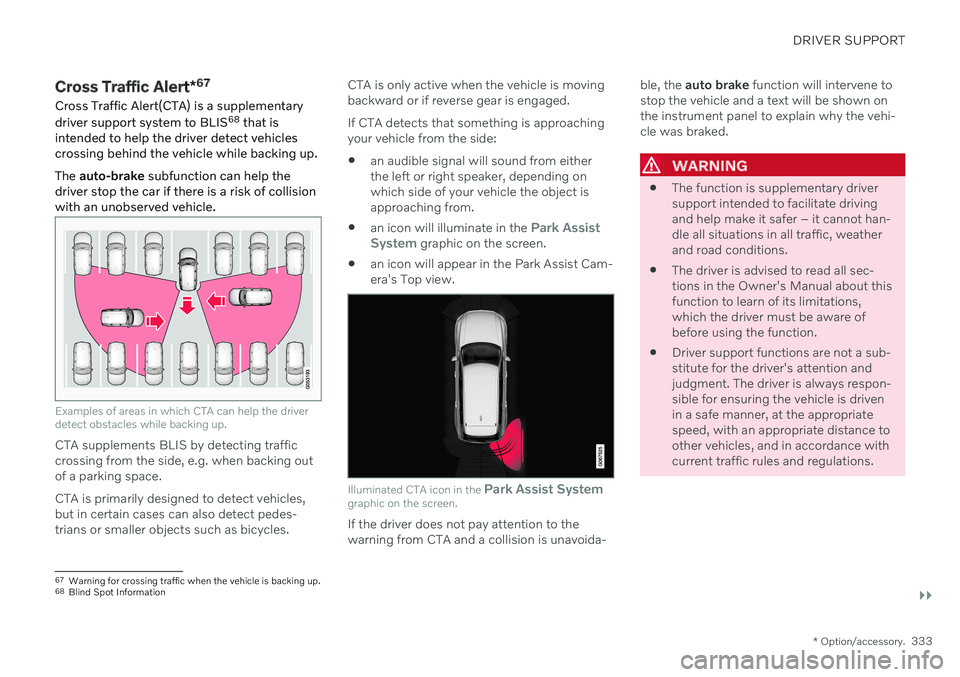
Examples of areas in which CTA can help the driver detect obstacles while backing up.
CTA supplements BLIS by detecting traffic crossing from the side, e.g. when backing outof a parking space. CTA is primarily designed to detect vehicles, but in certain cases can also detect pedes-trians or smaller objects such as bicycles. CTA is only active when the vehicle is movingbackward or if reverse gear is engaged. If CTA detects that something is approaching your vehicle from the side:
an audible signal will sound from eitherthe left or right speaker, depending onwhich side of your vehicle the object isapproaching from.
an icon will illuminate in the
Park Assist
System graphic on the screen.
an icon will appear in the Park Assist Cam- era's Top view.
Illuminated CTA icon in the
Park Assist System
graphic on the screen.
If the driver does not pay attention to the warning from CTA and a collision is unavoida- ble, the
auto brake function will intervene to
stop the vehicle and a text will be shown onthe instrument panel to explain why the vehi-cle was braked.
WARNING
The function is supplementary driver support intended to facilitate drivingand help make it safer – it cannot han-dle all situations in all traffic, weatherand road conditions.
The driver is advised to read all sec-tions in the Owner's Manual about thisfunction to learn of its limitations,which the driver must be aware ofbefore using the function.
Driver support functions are not a sub-stitute for the driver's attention andjudgment. The driver is always respon-sible for ensuring the vehicle is drivenin a safe manner, at the appropriatespeed, with an appropriate distance toother vehicles, and in accordance withcurrent traffic rules and regulations.
67
Warning for crossing traffic when the vehicle is backing up.
68 Blind Spot Information
Page 336 of 655

||
DRIVER SUPPORT
* Option/accessory.
334
Related information
Driver support systems (p. 268)
Activating or deactivating Cross Traffic Alert
* (p. 334)
Cross Traffic Alert
* limitations (p. 334)
Cross Traffic Alert
* messages (p. 336)
BLIS
* (p. 329)
Park Assist
* (p. 357)
Activating or deactivating Cross Traffic Alert *69
The driver can select to switch off the warn-
ing in the function Cross Traffic Alert (CTA) –
the sub-function auto brake cannot be
switched off and continues to be active.
Activate or deactivate the function using this button inthe center display's Functionview.
GREEN button indicator light – the func- tion is activated.
GRAY button indication – warning signaland indication on display for the functionis deactivated.
The function is automatically activated eachtime the engine is started.
Related information
Cross Traffic Alert
* (p. 333)
Cross Traffic Alert
* limitations (p. 334)
Cross Traffic Alert *70
limitations
The Cross Traffic Alert (CTA) function with auto brake may have limited functionality in
certain situations. Auto-brake is active atspeeds under 15 km/h (9.3 mph).
WARNING
The auto-brake sub-function can only
detect and apply the brakes for other mov- ing vehicles – not for e.g. stationary obsta-
cles, cyclists or pedestrians.
CTA has certain limitations – The CTA sen- sors, for example, cannot "see" through otherparked vehicles or objects blocking the vehi-cle. Below are a few examples of situations in which CTA's field of vision may be initially lim-ited and approaching vehicles may thereforenot be detected until they are very close toyour vehicle:
69 Warning for crossing traffic when the vehicle is backing up.
70 Warning for crossing traffic when the vehicle is backing up.
Page 337 of 655

DRIVER SUPPORT
* Option/accessory.335
The vehicle is parked very far into a parking space.
In a diagonal parking space, CTA may be completely "blind" on one side of your vehicle.
CTA's blind zone.
CTA's field of vision.
However, as you back your vehicle slowly out of a parking space, CTA's field of vision changes in relation to the obstructing vehicle/object and its blind zone is reduced.
Examples of further limitations
The
auto brake sub-function only detects
vehicles in motion and may therefore not
"see" and brake for e.g. stationary obsta- cles, a cyclists or a pedestrian.
Dirt, ice and snow covering the sensorsmay reduce functionality and prevent thesystem from providing warnings.
NOTE
The function uses the vehicle's camera and radar sensor, which has certain generallimitations.
Related information
Cross Traffic Alert
* (p. 333)
Camera/radar sensor limitations (p. 309)
Page 355 of 655

DRIVER SUPPORT
}}
353
Steering assistance with braking
Intervention with steering assistance and braking.
Braking intervention assists in situations where steering assistance alone is not suffi-cient. Braking force is automatically adaptedaccording to the situation at the moment thevehicle begins to run off the road. The function is active at speeds between 65-140 km/h (40-87 mph) on roads withclearly visible traffic lane markings/lines. The system uses a camera to monitor the edges of the road and the painted side markerlines. If the vehicle is about to cross the edgeof the road, the function will attempt to steerthe vehicle back onto the road. If this is notsufficient to keep the vehicle on the road, thebrakes will also be applied. However, the function will not provide either
steering assistance or braking if the turn signal is used. The function will also not be activated if it detects that the driver is actively operatingthe vehicle.
Related information
Steering assistance at risk of collision(p. 351)
Steering assistance during collision riskslimitations (p. 355)
Steering assistance during collision risks from oncomingtraffic Steering assistance has several sub-func- tions. Steering assistance during collisionrisks from oncoming traffic can help a dis-tracted driver who has not noticed that thevehicle is veering out of the lane.
The function provides assistance by swerving your vehicle back into your own lane.
Oncoming vehicles
Own vehicle
When steering assistance is activated, colli- sion warning for driver support will also beactivated. However, the brake pedal pulsa-tions that are part of collision warning will notbe activated.
Page 360 of 655

DRIVER SUPPORT
* Option/accessory.
358
Park Assist front, rear and sides *
Park Assist behaves differently depending on which part of the vehicle is approaching anobstacle.
Front camera
The warning signal has a continuous tone when the obstacle is less than approx. 30 cm (1 ft) from thevehicle.
The Park Assist system's front sensors are automatically activated when the engine isstarted. They are active at speedsbelow 10 km/h (6 mph). The distance monitored extends approx. 80 cm (2.5 ft) in front of the vehicle.
NOTE
The Park Assist system is deactivated when the parking brake is used or when P
is selected on vehicles with automatictransmission.
CAUTION
When installing auxiliary lights: Make sure these do not obscure the sensors – theauxiliary lights could be perceived as anobstacle.
Back
The warning signal has a continuous tone when the obstacle is less than approx. 30 cm (1 ft) from thevehicle.
The rear sensors will be activated if the vehicle begins rolling backward or if reverse gear isengaged. The distance monitored extends approx. 1.5 meters (5 ft) behind the vehicle.
Side sensors
The warning signal will begin pulsating rapidly when the obstacle is less than approx. 25 cm (0.8 ft) fromthe vehicle.
Park Assist's side sensors are automatically activated when the engine is started. They areactive at speeds below 10 km/h (6 mph). The distance monitored is approx. 25 cm (0.8 ft) out from the sides. The detection area of the side sensors increa- ses significantly, however, when the steering angle of the front wheel increases and depending on the position of the steeringwheel, obstacles up to approx. 90 cm (3 ft)
Page 362 of 655

||
DRIVER SUPPORT
* Option/accessory.
360
CAUTION
Objects such as chains, thin and glossy poles or low obstacles may end up in the"signal shadow" and then go temporarilyundetected by the sensors – the pulsatingtone may then unexpectedly stop insteadof becoming a constant tone as expected. The sensors cannot detect high objects, such as protruding ramps. In such situations, pay extra attention and maneuver/drive the vehicle veryslowly or stop the current parkingmaneuver – there may be a high risk ofdamage to the vehicle or other objectssince information from the sensors isnot always reliable in such situations.
CAUTION
In some circumstances, the Park Assist System may produce false warnings due toexternal sound sources with the sameultrasonic frequencies as those the systemworks with. Examples of such sources are horns, wet tires on asphalt, pneumatic brakes, exhaustnoise from motorcycles, etc.
Related information
Park Assist
* (p. 357)
Page 374 of 655

DRIVER SUPPORT
* Option/accessory.
372
Using Park Assist Pilot *
Park Assist Pilot (PAP 98
) helps the driver park
using three different steps. The function can also help the driver pull out of a parkingspace.
The function measures the space and steers the vehicle. The driver's role is to:
keep close watch of the area around thevehicle
follow the instructions on the center dis-play
change gears (reverse/forward) – an audi-ble signal indicates when the driver needsto change gears
regulating and maintaining a safe speed
applying the brakes and stopping the vehi-cle.
Information about the actions required by thedriver are provided in the center display usingsymbols, graphics and/or text. The function can be activated if the following criteria have been met after the engine isstarted:
Your vehicle's speed is lower than30 km/h (20 mph).
NOTE
The distance between the vehicle and parking spots should be 0.5–1.5 meters(1.6–5.0 ft) when the function is lookingfor parking.
Parking with Park Assist PilotThe function helps park the vehicle using the following steps:
1. The system searches for and measures
potential parking spaces.
2. The vehicle is steered while it is backing into the parking space.
3. The vehicle is positioned in the parking space (the driver may be prompted to shift gears and apply the brakes).
Searching and measuring potential parking spots
The function can be activated in the center display's Func-tion view. It can also be accessed from the camera views.
GREEN button indicator light – the func- tion is activated.
GRAY button indicator light – the functionis deactivated.
Parallel parking search overview.
Perpendicular parking search overview.
The vehicle's speed may not exceed 30 km/h (20 mph) when parallel parking or 20 km/h(12 mph) when perpendicular parking.
98
Park Assist Pilot
Page 376 of 655

||
DRIVER SUPPORT
* Option/accessory.
374
Positioning the vehicle in the parking space
Parallel parking positioning overview.
Perpendicular parking positioning overview.
1. Move the gear selector to the gear instruc-
ted by the system. Wait until the steering wheel turns and then drive slowly forward.
2. Be prepared to stop the vehicle when instructed to do so by a graphic and mes-sage in the center display.
3. Engage reverse gear and back up slowly.
4. Be prepared to apply the brakes when instructed to do so by a graphic and mes- sage in the center display.
The function will switch off automatically anda graphic and message will appear to indicatethat parking has been completed. Adjust-ments can always be made be the driver after-ward. Only the driver can determine when thevehicle is correctly parked.
CAUTION
The warning distance is shorter when the sensors are used by Park Assist Pilot (PAP 99
) compared to when they are used
by the Parking Assist system.
Related information
Park Assist Pilot
* (p. 370)
Park Assist Pilot
* limitations (p. 375)
Leaving a parallel parking space with Park Assist Pilot *
The
Park Out function can help the driver to
pull out of a parking space when the vehicle is parallel-parked.
NOTE
Leaving a parking space with the Park Outfunction should only be used in connection with parallel parking – it does not work forperpendicular parking.
The Park Out function is acti-
vated in the center display's Function view or in Cameraview.
GREEN button indicator light – the func- tion is activated.
GRAY button indicator light – the functionis deactivated.
1. Tap
Park Out in Function view or in Cam-
era view.
2. Move the gear selector to the suitable position (e.g. D or R) for the direction in which you will be pulling out of the park-ing space.
99Park Assist Pilot
Page 377 of 655

DRIVER SUPPORT
}}
* Option/accessory.375
3. Be prepared to stop the vehicle when
instructed to do so by a graphic and mes- sage in the center display. Follow theinstructions in the same way as for theparking procedure.
Note that the steering wheel can "spring"back when the procedure is completed andthe driver may need to turn the steering wheelback to the maximum position in order to pullout of the parking space. If the function determines that the driver can pull out of the parking space without any extramaneuvers, the function will be deactivated,even if it seems as though the vehicle is notcompletely out of the parking space.
Related information
Park Assist Pilot
* (p. 370)
Park Assist Pilot
* limitations (p. 375)
Park Assist Pilot * limitations
Park Assist Pilot (PAP 100
) may not be able to
detect all conditions in all situations and func- tionality may therefore be limited.
WARNING
The parking sensors have dead/blind spots where objects cannot bedetected.
Pay particular attention to people andanimals near the vehicle.
Bear in mind that the front end of thevehicle may swing out towards oncom-ing traffic during the parking maneuver.
CAUTION
Objects situated higher than the detection area of the sensors are not included whenthe parking maneuver is calculated, whichcould cause the function to swing into theparking space too early. Such parkingspaces should be avoided for this reason.
The driver should be aware of the following limitations for Park Assist Pilot:
The parking sequence is cancelledA parking sequence will be cancelled if: the driver moves the steering wheel
the vehicle's speed exceeds 7 km/h (4 mph)
the driver taps
Cancel in the center dis-
play
when the anti-lock brakes or the Elec- tronic stability control are engaged - e.g.when a wheel loses grip on a slippery road
when speed-dependent power steeringwheel resistance is working at reducedpower – e.g. during cooling due to over-heating.
A message in the center display will explainwhy the parking sequence was cancelled.
CAUTION
Under certain circumstances, the function may not be able to find parking spaces –one reason may be that the sensors aredisrupted by external sound sources thatemit the same ultrasonic frequencies thatthe system works with. Examples of such sources include horns, wet tires on asphalt, pneumatic brakes,exhaust noise from motorcycles, etc.
100 Park Assist Pilot
Page 382 of 655

HYBRID INFORMATION
380
General information about Twin Engine Twin Engine vehicles are driven just like any other vehicle, but certain functions differ froma vehicle powered exclusively by gasoline.The electric motor powers the vehicle primar-ily at low speeds; the gasoline engine is usedat higher speeds or during more active driv-ing.
The instrument panel displays Twin Engine- specific information - charging information,selected drive mode, distance to dischargedbattery and hybrid battery charge level. Different drive modes can be selected while driving, e.g. electric power only or, if morepower is needed, a combination of electric andgasoline power. The vehicle calculates a com-bination of driveability, driving experience,environmental impact and fuel economy forthe selected drive mode. In order to function optimally, the hybrid bat- tery (and its electrical drive systems) and thegasoline engine (and its drive systems) mustbe at the correct operating temperature. Bat-tery capacity can be considerably reduced ifthe battery is too cold or too hot. Precondi-tioning prepares the vehicle's drive systemsand passenger compartment before driving tohelp reduce both wear and energy consump-tion. It also helps increase the hybrid battery'srange.The hybrid battery which powers the electricmotor is recharged using the charging cable. Itcan also be recharged during light braking andthrough engine braking in gear position
B. The
combustion engine can also help recharge thehybrid battery.
Important
No electrical current
Keep in mind that if there is no electrical cur- rent to the vehicle, i.e. the ignition is switchedoff or the start battery is discharged, certainfunctions such as brakes, power steering, etc.will not work.
WARNING
If the vehicle does not have electrical cur- rent and both the electric motor and thegasoline engine are switched off, thebrakes cannot be used to stop the vehicle.
Towing not permitted
Never tow a Twin Engine vehicle behind another vehicle, as this could damage theelectric motor.
Exterior engine noise
Because there is no sound from the engine when only the electric motor is running, thevehicle is equipped with artificial exteriorbackground noise. This sound is intended tohelp warn children, pedestrians, cyclists, ani- mals, etc. outside the vehicle of the vehicle'sapproach.
High-voltage electrical current
WARNING
A number of electrical components in Twin Engine Plug-in Hybrid vehicles use high-voltage current and can be extremely dan-gerous if handled incorrectly. These com-ponents and any orange wiring in the vehi-cle may only be handled by trained andqualified Volvo service technicians.
Do not touch anything that is not clearly described in this Owner's Manual.
Related information
Charging the hybrid battery (p. 381)
Hybrid gauge (p. 83)
Drive modes (p. 419)
Starting and stopping preconditioning(p. 225)
Hybrid battery (p. 583)