change wheel VOLVO S90 TWIN ENGINE 2020 Owner's Manual
[x] Cancel search | Manufacturer: VOLVO, Model Year: 2020, Model line: S90 TWIN ENGINE, Model: VOLVO S90 TWIN ENGINE 2020Pages: 655, PDF Size: 12.54 MB
Page 300 of 655
DRIVER SUPPORT
* Option/accessory.
298
Adjusting set speed for driver support
It is possible to adjust set speeds for the Adaptive Cruise Control * and Pilot Assist *
functions.
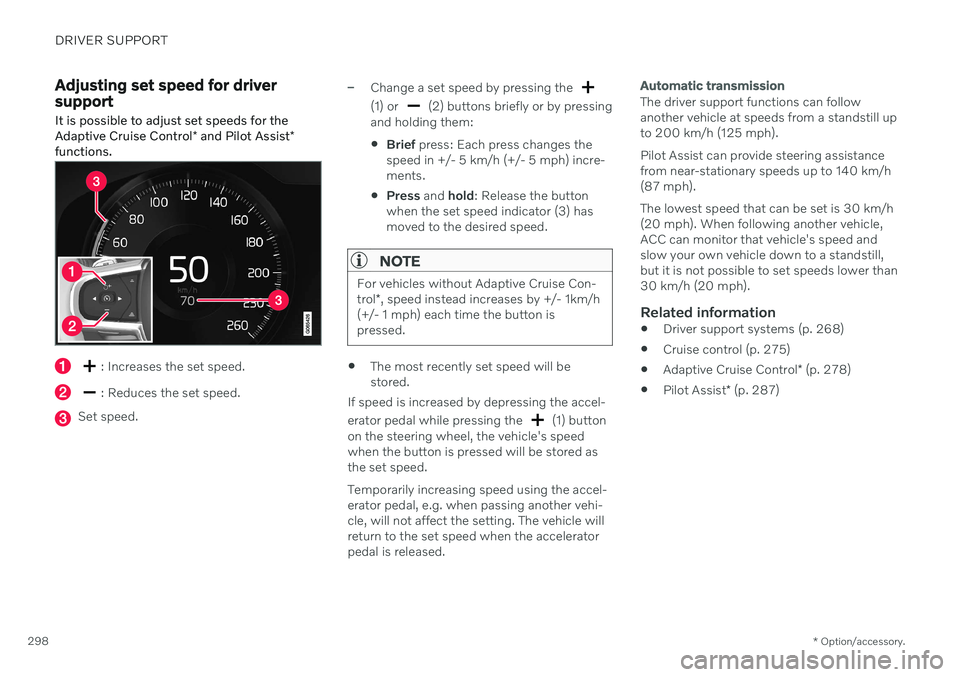
: Increases the set speed.
: Reduces the set speed.
Set speed.
–Change a set speed by pressing the
(1) or (2) buttons briefly or by pressing
and holding them:
Brief
press: Each press changes the
speed in +/- 5 km/h (+/- 5 mph) incre- ments.
Press
and hold: Release the button
when the set speed indicator (3) hasmoved to the desired speed.
NOTE
For vehicles without Adaptive Cruise Con- trol *, speed instead increases by +/- 1km/h
(+/- 1 mph) each time the button is pressed.
The most recently set speed will be stored.
If speed is increased by depressing the accel- erator pedal while pressing the
(1) button
on the steering wheel, the vehicle's speed when the button is pressed will be stored as the set speed. Temporarily increasing speed using the accel- erator pedal, e.g. when passing another vehi-cle, will not affect the setting. The vehicle willreturn to the set speed when the acceleratorpedal is released.
Automatic transmission
The driver support functions can follow another vehicle at speeds from a standstill upto 200 km/h (125 mph). Pilot Assist can provide steering assistance from near-stationary speeds up to 140 km/h(87 mph). The lowest speed that can be set is 30 km/h (20 mph). When following another vehicle,ACC can monitor that vehicle's speed andslow your own vehicle down to a standstill,but it is not possible to set speeds lower than30 km/h (20 mph).
Related information
Driver support systems (p. 268)
Cruise control (p. 275)
Adaptive Cruise Control
* (p. 278)
Pilot Assist
* (p. 287)
Page 346 of 655
DRIVER SUPPORT
* Option/accessory.
344
Driver Alert Control limitations
Driver Alert Control (DAC) functionality may be reduced in certain situations.
In certain situations, the system may provide a warning even if it has not detected a change indriving behavior, e.g.: in strong crosswinds
on grooved road surfaces.
WARNING
In certain cases, driving behavior might not be affected despite the driver's fatigue – when using the Pilot Assist
* function –
resulting in the driver not getting a warning from DAC. It is therefore very important to always stop and take a break at the slightest signof fatigue, regardless of whether the func-tion has issued a warning or not.
NOTE
The function uses the vehicle's camera and radar sensor, which has certain generallimitations.
Related information
Driver Alert Control (p. 342)
Camera/radar sensor limitations (p. 309)
Lane Keeping Aid
Lane Keeping Aid (LKA 85
) is designed to
actively steer the vehicle on freeways, high- ways and other major roads to help the driverreduce the risk of the vehicle unintentionallyveering out of the lane.
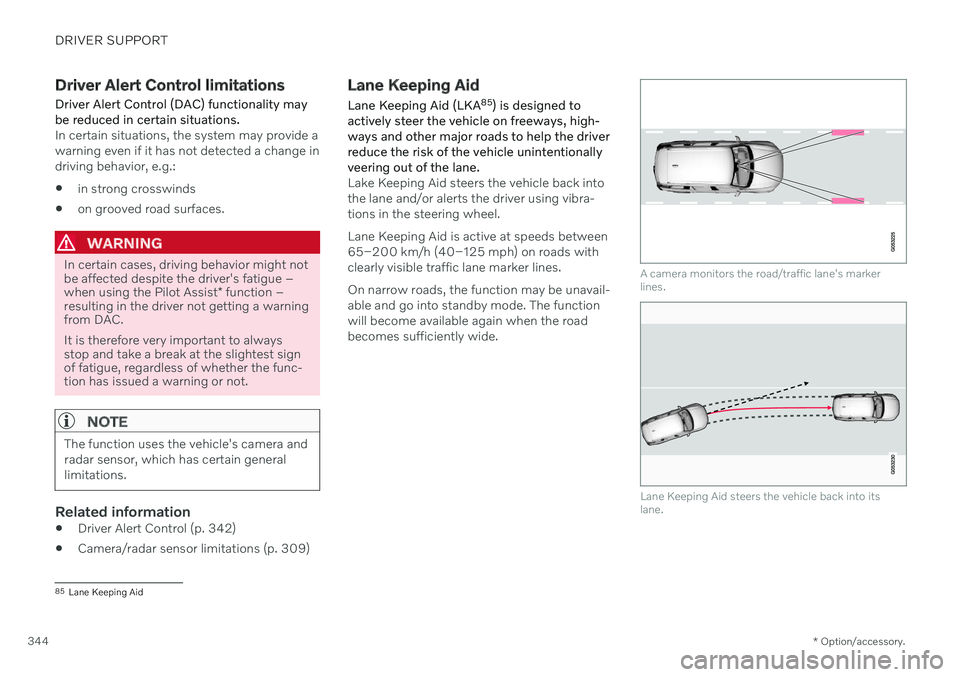
Lake Keeping Aid steers the vehicle back into the lane and/or alerts the driver using vibra-tions in the steering wheel. Lane Keeping Aid is active at speeds between 65–200 km/h (40–125 mph) on roads withclearly visible traffic lane marker lines. On narrow roads, the function may be unavail- able and go into standby mode. The functionwill become available again when the roadbecomes sufficiently wide.
A camera monitors the road/traffic lane's marker lines.
Lane Keeping Aid steers the vehicle back into its lane.
85 Lane Keeping Aid
Page 369 of 655

DRIVER SUPPORT
}}
367
Front and rear sensors
The screen can display colored sensor fields on the vehicle symbol.
The front and rear fields change colors (from YELLOW to ORANGE to RED) as the vehiclemoves closer to an obstacle.
Field colorrearward Distance in meters
(feet)
Yellow 0.6-1.5 (2.0-4.9)
Orange 0.3–0.6 (1.0–2.0) Red 0-0.3 (0-1.0)
Field color for- ward Distance in meters
(feet)
Yellow 0.6–0.8 (2.0–2.6)
Orange 0.3–0.6 (1.0–2.0)
Red 0-0.3 (0-1.0)
When the sensor field color is red, the audible pulsing sounds will change to a continuoustone.
Side sensor fields
Warning signals vary depending on the vehi- cle's intended direction of travel. Dependingon the steering wheel position, warnings maybe given for obstacles diagonally in front of orbehind the vehicle, not only directly behind thevehicle.
Parking sensor sectors where obstacles can be detected.
Left-side front sensor field
Obstacle sector in the vehicle's intended direction of travel forward – varies accord-ing to steering wheel position
Sector with RED field color and rapidly pulsing tone
Right-side rear sensor field
Obstacle sector in the vehicle's intended direction of travel rearward – variesaccording to steering wheel position.
Page 414 of 655

STARTING AND DRIVING
* Option/accessory.
412
Braking assist after a collision
In a collision in which the activation level is reached for the pyrotechnic seat belt tension-ers or airbags, or if a collision with a large ani-mal is detected, the vehicle's brakes will beautomatically activated. This function isintended to help prevent or reduce the effectsof any subsequent collision.
After a serious collision, it may no longer be possible to control and steer the vehicle. Inorder to avoid or mitigate a possible furthercollision with a vehicle or an object in the vehi-cle's path, the brake assist system is activatedautomatically to help stop the vehicle safely. If braking is not appropriate, e.g. if there is a risk of being hit by passing traffic, the drivercan override the system by depressing theaccelerator pedal. This function assumes that the brake system is intact after a collision.
Related information
Rear Collision Warning
* (p. 328)
BLIS
* (p. 329)
Brake functions (p. 403)
Transmission
The transmission is part of the vehicle's drive- line (power transmission) between the engineand the drive wheels. The function of thetransmission is to change gears dependingon speed and power needs.
The vehicle has an 8-speed automatic trans- mission and an electric motor for rear-wheeldrive. The number of gears allows the engine'storque and power band to be effectively uti-lized. Two of the gears are overdrive gears thatsave fuel when driving at a constant enginespeed. Manual shifting is also possible. Theinstrument panel shows the gear currently inuse.
Related information
Automatic transmission (p. 412)
Automatic transmission
In vehicles with an automatic transmission, the system selects the gear so that drivingwill be as energy-efficient as possible. Thetransmission also has a manual mode.
Overview of gear selector and gear shift pattern in the instrument panel
The instrument panel shows which gear is cur- rently in use: R , N , D or B. P position is electric.
For manual shifting, the gear indicator in the instrument panel displays the gear currentlybeing used.
4 Hill Start Assist
Page 415 of 655

STARTING AND DRIVING
}}
* Option/accessory.413
CAUTION
Check the operating temperature of the transmission to help avoid damage to anyof the drive system components. If there isa risk of overheating, a warning symbol willappear in the instrument panel and a textmessage will be displayed. Follow the rec-ommendations given.
Symbols in the instrument panelIf a problem should occur with the transmis- sion, a symbol and a message will appear inthe instrument panel.
Symbol Meaning
Information and messages rela- ted to the transmission. Followthe recommendations provided.
Hot or overheated transmission. Follow the recommendationsprovided.
Reduced performance/Accel-
eration performance reduced
In the event of a temporary fault in the driveline, the vehicle maygo into a "limp home" mode withreduced power output to helpavoid damage to the driveline.
Related information
Gear selector positions for automatic transmissions (p. 413)
Using the steering wheel paddles
* to shift
(p. 415)
Shiftlock (p. 416)
The kickdown function (p. 417)
Gear selector positions for automatic transmissions
With an automatic transmission, a suitable gear is selected automatically according tocurrent speed and power requirements.
Selecting gearsThe gear selector is a shift-by-wire selector, where shifting is done electronically instead ofmechanically. This makes shifting easier andthe gear positions more distinct.
Gear selector and gear selector positions overview.
Change gear position by pushing the spring- loaded gear selector forward or rearward, or tothe side for manual shifting.
Page 418 of 655

||
STARTING AND DRIVING
416
Instrument panel when the paddles are activated for shifting.
Instrument panel when the paddles are activated for shifting in manual mode.
ChangeTo shift one gear:
–Pull one of the paddles toward the steer- ing wheel and then release.As long as the engine speed (rpm) is withinthe permissible range for the selected gear, agear shift will take place each time a paddle ispulled. After each gear shift, a number indicat-ing the current gear will be displayed in theinstrument panel.
Turning off Start/Stop
Manual deactivation in gear
D and B
–Deactivate the paddles by pulling the right paddle ( +) toward the steering wheel and
holding it until the number of the currentgear is no longer displayed in the instru-ment panel.
> The transmission will revert to gear D
or B depending on which gear was
selected before the paddles were acti- vated.
Automatic deactivation
In gear position D, the steering wheel paddles
are deactivated after a short period of time if they are not used. The number of the currentgear will no longer be displayed in the instru-ment panel. In gear position B, the paddles will not acti-
vate automatically.
Related information
Automatic transmission (p. 412)
Gear selector positions for automatic transmissions (p. 413)
Shiftlock The automatic transmission's shiftlock func- tion helps prevent inadvertently moving thegear selector between different positions.
Automatic shiftlockThe automatic shiftlock has a separate safety system.
From Park -
P
To move the gear selector from P to another
gear, the brake pedal must be depressed and the ignition in mode II.
From Neutral - N
If the gear selector is in N and the vehicle has
been stationary for at least 3 seconds (with or without the engine running), the gear selectorwill be locked in that position. To move the gear selector from N to another
gear, the brake pedal must be depressed and the ignition in mode II.
Messages in the instrument panelIf the gear selector is locked in position, amessage will appear in the instrument panel, e.g.
Gear lever Press brake pedal to
activate gear lever.
There is no mechanical shiftlock function.
Page 425 of 655

STARTING AND DRIVING
* Option/accessory.423
Related information
Changing drive mode (p. 423)
Economical driving (p. 428)
Energy distribution in hybrid mode using map data
* (p. 424)
Hybrid gauge (p. 83)
General information about Twin Engine (p. 380)
Changing drive mode Select the drive mode that is adapted to the current driving conditions. The drive mode is changed using the control in the tunnel console.
Keep in mind that not all drive modes are available in all situations. To change drive mode:
1. Press the
DRIVE MODE control.
> A pop-up menu will appear in the cen- ter display.
2. Roll the wheel upward or downward to the desired drive mode. 3. Press the drive mode control or tap its
button in the center display to confirm the selection.
> The selected drive mode is shown inthe instrument panel.
Related information
Drive modes (p. 419)
Page 434 of 655

STARTING AND DRIVING
* Option/accessory.
432
Preparing for a long trip
It is important to have the vehicle's systems and equipment checked carefully before driv-ing long distances.
Check that
the engine is running properly and that fuel consumption is normal
there are no leaks (fuel, oil or other fluid)
the brake pedal is functioning properly
all lights are working
‒ adjust the head-
light height if the vehicle is carrying aheavy load
tire tread depth and air pressure are atcorrect levels. Change to snow tires whendriving in areas where there is a risk ofsnowy or icy roads
the start battery is sufficiently charged
the wiper blades are in good condition
Related information
Checking tire pressure (p. 527)
Filling washer fluid (p. 621)
Winter driving (p. 432)
Economical driving (p. 428)
Vehicle modem settings (p. 501)
Loading recommendations (p. 558)
Pilot Assist
* (p. 287)
Tire sealing system (p. 542)
Winter driving
It is important to check the vehicle before driving in cold/snowy conditions to makesure it can be driven safely.
Before the cold season arrives: Make sure the engine coolant contains 50% antifreeze. This mixture helps pro-tect the engine from frost erosion down toapprox. –35 °C (–31 °F). Do not mix dif-ferent types of antifreeze as this couldpose a health risk.
Keep the fuel tank well filled to preventcondensation from forming.
Check the viscosity of the engine oil. Oilwith low viscosity (thinner oil) improvescold-weather starting and reduces fuelconsumption when driving with a coldengine.
CAUTION
Low-viscosity oil should not be used with hard driving or in hot weather.
Check the condition and charge level of the start battery. Cold weather placesgreater demands on the start battery andreduces its capacity.
Use washer fluid containing antifreeze tohelp prevent ice from forming in thewasher fluid reservoir.
Slippery driving conditionsTo help optimize traction and roadholding,Volvo recommends using snow tires on allwheels whenever there is a risk of snow or iceon the road.
NOTE
Certain countries require use of winter tires by law. Not all countries permit the use ofstudded tires.
Practice driving on slippery surfaces under controlled conditions to learn how the vehiclereacts.
Related information
Snow tires (p. 541)
Snow chains (p. 541)
Braking on salted roads (p. 406)
Braking on wet roads (p. 405)
Filling washer fluid (p. 621)
Start battery (p. 579)
Replacing windshield wiper blades(p. 619)
Refilling coolant (p. 576)
Page 460 of 655
AUDIO, MEDIA AND INTERNET
458
Changing waveband and radio station
Instructions for changing wavebands, wave- band lists and radio stations in the selectedlist are provided here.
Changing wavebandsSwipe from App view on the center display and select the desired waveband (e.g. FM) or
open the App menu in the instrument panel with the right-side steering wheel keypad andmake your selection there.
Changing a list in a waveband
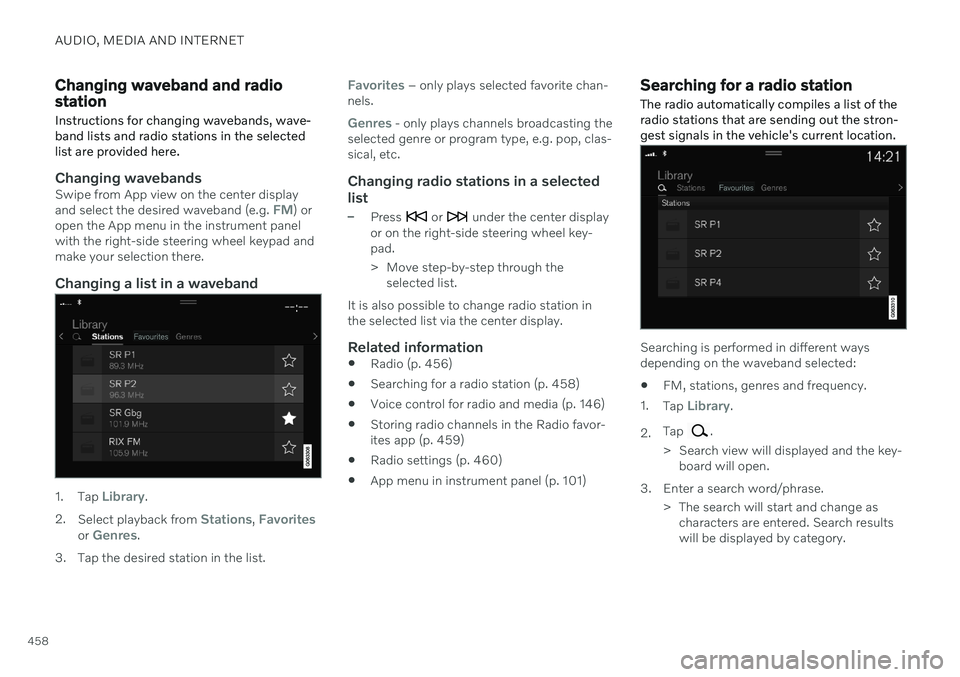
1. Tap Library.
2. Select playback from
Stations, Favoritesor Genres.
3. Tap the desired station in the list.
Favorites – only plays selected favorite chan-
nels.
Genres - only plays channels broadcasting the
selected genre or program type, e.g. pop, clas- sical, etc.
Changing radio stations in a selected
list
–Press or under the center display
or on the right-side steering wheel key- pad.
> Move step-by-step through the selected list.
It is also possible to change radio station in the selected list via the center display.
Related information
Radio (p. 456)
Searching for a radio station (p. 458)
Voice control for radio and media (p. 146)
Storing radio channels in the Radio favor-ites app (p. 459)
Radio settings (p. 460)
App menu in instrument panel (p. 101)
Searching for a radio station
The radio automatically compiles a list of the radio stations that are sending out the stron-gest signals in the vehicle's current location.
Searching is performed in different ways depending on the waveband selected:
FM, stations, genres and frequency.
1. Tap
Library.
2. Tap
.
> Search view will displayed and the key- board will open.
3. Enter a search word/phrase. > The search will start and change ascharacters are entered. Search results will be displayed by category.
Page 465 of 655
AUDIO, MEDIA AND INTERNET
463
Selecting sub-channels
To listen to a station's sub-channel(s), tap the station on the screen or press the forward/back arrow keys on the right-side steeringwheel keypad or below the screen. Sub-channels can also be saved as radio favorites. If you tap a sub-channel favorite, it may take up to 6 seconds before the channel becomes
audible. If you tap a station while you are out of digital range of the transmitter,
No
reception will be displayed.
Related information
HD Radio
™
(p. 461)
Activating and deactivating the HD Radio
™ (p. 462)
Changing waveband and radio station(p. 458)
Searching for a radio station (p. 458)
HD Radio
™
limitations (p. 463)
HD Radio ™ limitations
Limitations
Main channel vs. sub-channels (FM only)
: The main channel is the only chan-
nel that can receive in hybrid mode (bothdigital and analog). If a frequency has sub-channels, they are broadcast in digitalmode only. The main FM channel will bedisplayed as, for example, "WRIF-FMHD1". The sub-FM channels will be dis-played as"WRIF-FM HD2", "WRIF-FMHD3", etc.
Reception coverage area
: Due to current
IBOC transmitter power limitations, thereception coverage area in digital mode issomewhat more limited than the station'sanalog coverage area. Be aware that, likeall radio transmission technology, terrain,time of day, vegetation and buildings canhave a positive or negative effect on radioreception.
Analog to digital/digital to analogblending
: Analog to digital blending will
occur as the signal strength reaches a pre-set threshold in the receiver. This will benoticeable in fringe areas (areas with weakreception) and is normal.
NOTE
There may be a noticeable difference in sound quality when a change from ana-logue to digital or digital to analogueoccurs, such as:
Volume increase or decrease
Equalizer settings, i.e., Bass/ Mid-range/Treble cut or boost
Time alignment (Digital program mate-rial in extreme cases can be as muchas 8 seconds behind the analogue).This will noticeable as a "stuttering"effect.
The above items are dependant on thebroadcaster's equipment settings anddo not indicate a fault in the vehicle'sradio receiver or antenna systems .
Related information
HD Radio
™ (p. 461)
Activating and deactivating the HD Radio
™ (p. 462)
HD Radio
™ sub-channels (p. 462)