lock VOLVO S90 TWIN ENGINE 2020 Service Manual
[x] Cancel search | Manufacturer: VOLVO, Model Year: 2020, Model line: S90 TWIN ENGINE, Model: VOLVO S90 TWIN ENGINE 2020Pages: 655, PDF Size: 12.54 MB
Page 175 of 655

WINDOWS, GLASS AND MIRRORS
}}
173
The panoramic roof and sun curtain can also be operated with the controls in the right-siderear door. To operate the panoramic roof and sun cur- tain, the ignition must be in mode I or II.
WARNING
Children, other passengers or objects can be trapped by the moving parts.
Always operate the windows with cau- tion.
Do not allow children to play with theoperating controls.
Never leave a child alone in the vehicle.
Remember to always cut the current tothe power windows by setting thevehicle's electrical system to ignitionmode
0 and then taking the remote
key with you when leaving the vehicle.
Never stick objects or body parts outthrough the windows, even if the vehi-cle electrical system is completelyturned off.
CAUTION
Do not open the panoramic roof when load carriers are installed.
Never place heavy objects on the pan-oramic roof.
CAUTION
Remove ice and snow before opening the panoramic roof. Be careful not toscratch any surfaces or damage thetrim.
Do not operate the panoramic roof if itis frozen in place.
Wind blocker
The panoramic roof is equipped with a wind blocker that folds up when the roof is open.
Related information
Operating the panoramic roof (p. 174)
Auto closing the panoramic roof sun cur-tain (p. 177)
Pinch protection for windows and sun cur- tains (p. 164)
Page 176 of 655

WINDOWS, GLASS AND MIRRORS
* Option/accessory.
174
Keyless locking and unlocking
* (p. 251)
Locking and unlocking using the remote key (p. 238)
Operating the panoramic roof
The panoramic roof and sun curtain are oper- ated using a control in the ceiling panel, andboth are equipped with pinch protection. The control in the right rear door can also be used for operation.
WARNING
Children, other passengers or objects can be trapped by the moving parts.
Always operate the windows with cau- tion.
Do not allow children to play with theoperating controls.
Never leave a child alone in the vehicle.
Remember to always cut the current tothe power windows by setting thevehicle's electrical system to ignitionmode
0 and then taking the remote
key with you when leaving the vehicle.
Never stick objects or body parts outthrough the windows, even if the vehi-cle electrical system is completelyturned off.
CAUTION
Do not open the panoramic roof when load carriers are installed.
Never place heavy objects on the pan-oramic roof.
CAUTION
Remove ice and snow before opening the panoramic roof. Be careful not toscratch any surfaces or damage thetrim.
Do not operate the panoramic roof if itis frozen in place.
To operate the panoramic roof and sun cur- tain, the ignition must be in mode
I or II.
It can also be operated using keyless opening *
with the door handle.
WARNING
Make sure that no child or other passenger comes into contact with the windows as they are closing with keyless closing *.
CAUTION
Check that the panoramic roof is properly closed when closing.
Page 179 of 655

WINDOWS, GLASS AND MIRRORS
* Option/accessory.177
Auto operation
1. To open to the ventilation position, move
the panoramic roof control downward to the auto open position and release.
2. To open to the sun curtain, move the sun curtain control downward to the autoopen position and release.
3. To open the panoramic roof, move the panoramic roof control downward a sec-ond time to the auto open position andrelease.
To close, pull up the respective control to theautomatic closing position.
Automatic operation - rapid opening and closing
The panoramic roof and sun curtain can be opened or closed simultaneously.
1. To open to the ventilation position, move the panoramic roof control downward to the auto position and release.
2. To open fully, move the sun curtain control downward to the auto position andrelease. Then immediately move the pan-oramic roof control downward to the autoposition and release.
3. To close, pull up the panoramic roof con- trol to the auto position and release. Thenimmediately move the sun curtain controlup to the auto position and release.
Related information
Panoramic roof (p. 172)
Auto closing the panoramic roof sun cur-tain (p. 177)
Pinch protection for windows and sun cur-tains (p. 164)
Keyless locking and unlocking
* (p. 251)
Locking and unlocking using the remotekey (p. 238)
Auto closing the panoramic roof sun curtain
With this function, the sun curtain closes
automatically 15 minutes after the vehicle hasbeen locked if it is parked in hot weather. Thisis done to lower the passenger compartmenttemperature and protect the upholsteryagainst being bleached by the sun.
The function is deactivated as the default fac- tory setting and can be activated or deacti-vated using the center display. 1. Tap
Settings in the Top view in the center
display.
2. Tap
My CarLocking.
Select
Auto Close Sunroof Curtain to
activate/deactivate.
NOTE
The sun curtain also closes when all win- dows are closed with keyless closing *.
Related information
Panoramic roof (p. 172)
Operating the panoramic roof (p. 174)
Pinch protection for windows and sun cur- tains (p. 164)
Keyless locking and unlocking
* (p. 251)
Locking and unlocking using the remotekey (p. 238)
Page 186 of 655

SEATS AND STEERING WHEEL
* Option/accessory.
184
Manual front seats
The front seats can be adjusted in a number of different ways to help enhance your seat-ing comfort.
Raise/lower the front edge of the seat cushion * by moving the control up/down. 1
Change the length of the seat cushion
* by
pulling up the lever and moving the cush- ion forward/backward.
Move the seat forward/backing by lifting the handle and moving the seat to a suita-ble distance from the steering wheel andpedals. Check to make sure the seat issecurely locked into place after its settinghas been changed.
Adjust lumbar support by pressing the button up/down/forward/rearward 2
.
Raise/lower the seat by moving the con- trol up/down.
Change the backrest tilt by turning the knob on the backrest.
WARNING
Do not adjust the seat while driving. The seat should be adjusted so that thebrake pedal can be depressed fully. Inaddition, position the seat as far rear-ward as comfort and control allow.
Check that the seat is securely lockedinto position after adjusting.
Related information
Power
* front seats (p. 185)
Adjusting the power
* front seats (p. 185)
Storing positions for seats, mirrors and head-up display
* (p. 186)
Using stored positions for seats, mirrorsand head-up display
* (p. 187)
Adjusting front seat massage settings
*
(p. 189)
Adjusting
* front seat cushion length
(p. 190)
Front seat massage
* settings (p. 188)
Adjusting front seat side bolster settings
*
(p. 191)
Adjusting front seat lumbar support
*
(p. 191)
Adjusting the passenger seat from thedriver's seat
* (p. 193)
1
Only applies to the driver's seat.
2 Applies for four-way lumbar support *. Two-way lumbar support * is adjusted forward/rearward.
Page 187 of 655

SEATS AND STEERING WHEEL
}}
* Option/accessory.185
Power* front seats
The front seats can be adjusted in a number of different ways to help enhance your seat-ing comfort. The power seat can be movedforward/backward and up/down. The height and length * of the seat cushion and the tilt of
the backrest can be adjusted. Lumbar sup-port * can be adjusted up, down, forward and
backward 3
.
The seats can be adjusted when the engine is running and for a certain period of time afterthe door has been unlocked without theengine running. They can also be adjusted fora short period after the engine is turned off.
CAUTION
The power seats have an overload protec- tor that is triggered if a seat is blocked byany object. If this occurs, remove theobject and attempt to adjust the seatagain.
Related information
Manual front seats (p. 184)
Adjusting the power
* front seats (p. 185)
Storing positions for seats, mirrors and head-up display
* (p. 186)
Using stored positions for seats, mirrorsand head-up display
* (p. 187)
Adjusting front seat massage settings
*
(p. 189)
Adjusting
* front seat cushion length
(p. 190)
Front seat massage
* settings (p. 188)
Adjusting front seat side bolster settings
*
(p. 191)
Adjusting front seat lumbar support
*
(p. 191)
Adjusting the passenger seat from thedriver's seat
* (p. 193)
Adjusting the power * front seats
Set the desired seating position using the controls on the front seat cushion. To set theconvenience functions, turn the multifunction control 4
upward/downward.
The illustration shows the controls in a vehicle with four-way lumbar support *. Vehicles with two-way
lumbar support * do not have the rotary multifunction
control.
In vehicles with four-way lumbar support *,
turn the multifunction control 4
up/down to
set the convenience functions. In vehicles with two-way lumbar support *, use the
round button to adjust the lumbar support forward/rearward.
Raise/lower the front edge of the seat cushion by moving the control up/down.
3 Applies for four-way lumbar support *. Two-way lumbar support * is adjusted forward/rearward.
Page 192 of 655

SEATS AND STEERING WHEEL
* Option/accessory.
190
Adjusting * front seat cushion
length Depending on the selected equipment level, the length of the seat cushion can either be adjusted using the multifunction control * on
the side of the seat cushion, or manually adjusted using the control on the front of theseat cushion.
Adjusting seat cushion length using the multifunction control
The multifunction control, located on the side of the seat cushion.
1. Activate the multifunction control by turn-
ing the control
upward/downward. The
seat settings view will appear in the center display. 2.
Select
Cushion extension in the seat set-
tings view.
Push in the front part of the four-way button
to extend the seat cushion.
Press the rear part of the four-way but- ton
to shorten the seat cushion.
Manually adjusting seat cushion length
Control for adjusting seat cushion.
1. Grasp the handle on the front of the
seat and pull upward.
2. Adjust the length of the seat cushion.
3. Release the handle and make sure the seat cushion locks into position.
Related information
Manual front seats (p. 184)
Power
* front seats (p. 185)
Adjusting the power
* front seats (p. 185)
Storing positions for seats, mirrors and head-up display
* (p. 186)
Using stored positions for seats, mirrorsand head-up display
* (p. 187)
Adjusting front seat massage settings
*
(p. 189)
Front seat massage
* settings (p. 188)
Adjusting front seat side bolster settings
*
(p. 191)
Adjusting front seat lumbar support
*
(p. 191)
Adjusting the passenger seat from thedriver's seat
* (p. 193)
Page 197 of 655
SEATS AND STEERING WHEEL
* Option/accessory.195
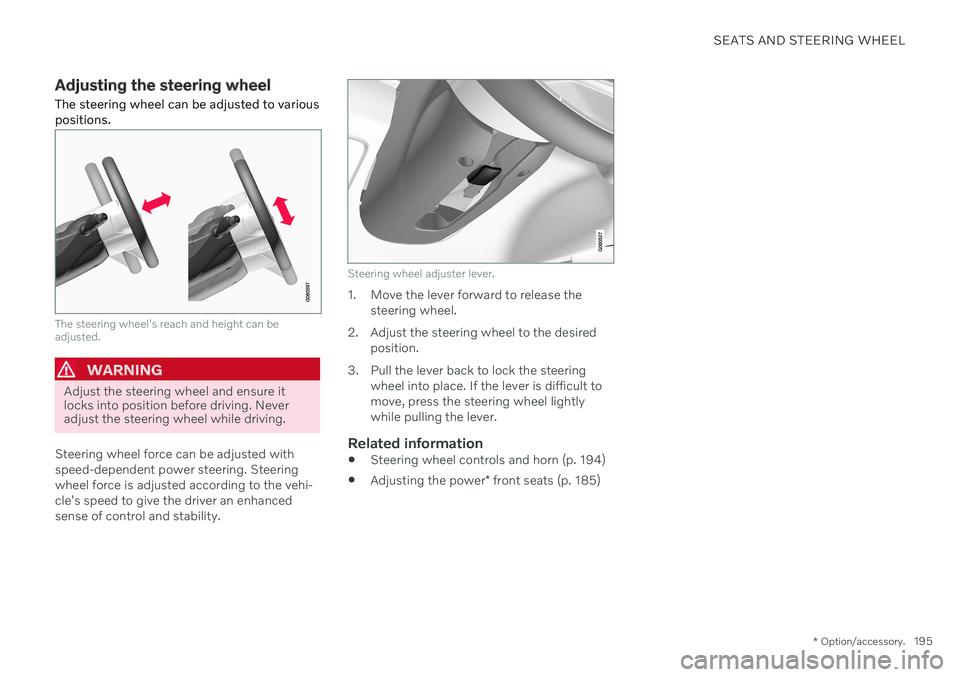
Adjusting the steering wheel The steering wheel can be adjusted to various positions.
The steering wheel's reach and height can be adjusted.
WARNING
Adjust the steering wheel and ensure it locks into position before driving. Neveradjust the steering wheel while driving.
Steering wheel force can be adjusted with speed-dependent power steering. Steeringwheel force is adjusted according to the vehi-cle's speed to give the driver an enhancedsense of control and stability.
Steering wheel adjuster lever.
1. Move the lever forward to release the steering wheel.
2. Adjust the steering wheel to the desired position.
3. Pull the lever back to lock the steering wheel into place. If the lever is difficult to move, press the steering wheel lightlywhile pulling the lever.
Related information
Steering wheel controls and horn (p. 194)
Adjusting the power
* front seats (p. 185)
Page 201 of 655
CLIMATE CONTROL
}}
* Option/accessory.199
NOTE
Do not cover or block the sensors with clothing or other objects.
On vehicles equipped with the Interior Air Quality System*, there is also an air quality
sensor in the climate system's air intake.
Related information
Climate (p. 198)
Interior Air Quality System
* (p. 202)
Perceived temperature
The climate control system regulates the cli- mate in the passenger compartment basedon perceived temperature, not actual tem-perature.
The selected passenger compartment tem- perature is based on the physical perception ofthe current ambient temperature, airflowspeed, humidity, sunlight in the passengercompartment, etc. The system has a sunlight sensor that detects which side of the vehicle the sunlight is shin-ing on and adjusts the temperature accord-ingly. This means that the temperature of theair coming out of the vents may be differentfor the left and right sides, even if the tem-perature setting is the same for both sides.
Related information
Climate (p. 198)
Climate control system voice commands 1
Voice commands can be used for the climate control system to e.g. change temperature, activate seat heating * or change blower
speed.
Tap and say one of the following com-
mands: "
Climate" - starts a command dialog for
climate controls and provides examples of commands that can be used.
"
Set temperature to X degrees" - sets
desired temperature.
"
Raise temperature"/"Lower
temperature" - raises/lowers the set tem-
perature.
"
Sync temperature" - synchronizes the
temperature for all climate zones in the vehicle with the temperature set for thedriver's side.
"
Air on feet"/"Air on body" - opens the
desired air vent.
"
Air on feet off"/"Air on body off" -
closes the desired air vent.
"
Set fan to max"/"Turn off fan" -
changes blower speed to Max/Off.
"
Raise fan speed"/"Lower fan speed" -
raises/lowers the set blower speed.
1 Certain markets only.
Page 203 of 655

CLIMATE CONTROL
* Option/accessory.201
Clean Zone*
The Clean Zone function monitors the condi- tions affecting good air quality in the passen-ger compartment and indicates whether theyare fulfilled or not.
The indicator is shown in the center dis- play's Climate view.
The indicator is shown in the climate bar when Climate view is not open.
If the conditions are not met, the text
Clean
Zone will be shown in white. When all the
conditions are met, the text will change to blue. The same indicator will also be shown in the climate panel on the rear side of the tunnelconsole. The following conditions must be met:
All doors and trunk lid are closed.
All side windows and panoramic roof areclosed.
The Interior Air Quality System
* is acti-
vated.
The blower is activated.
Air recirculation is deactivated.
NOTE
Clean Zone does not indicate that the air quality is good, but only that the conditionsfor good air quality have been met.
Related information
Air quality (p. 200)
Clean Zone Interior Package
* (p. 201)
Interior Air Quality System
* (p. 202)
Passenger compartment air filter (p. 203)
Clean Zone Interior Package
*
Clean Zone Interior Package (CZIP) is a series of modifications that filters even more allergyand asthma-inducing substances from thepassenger compartment.
CZIP includes the following:
An enhanced function that starts the blower when the vehicle is unlocked usingthe remote key. The blower will then fillthe passenger compartment with fresh air.The function starts when required andswitches off automatically after a period oftime or when one of the passenger com-partment doors is opened. The amount oftime the blower runs gradually decreasesdue to reduced need up until the vehicle is4 years old.
The fully automatic Interior Air QualitySystem (IAQS).
Related information
Air quality (p. 200)
Clean Zone
* (p. 201)
Interior Air Quality System
* (p. 202)
Passenger compartment air filter (p. 203)
Page 212 of 655
||
CLIMATE CONTROL
* Option/accessory.
210
Blower control for front seats.
AUTO - Automatic climate control.
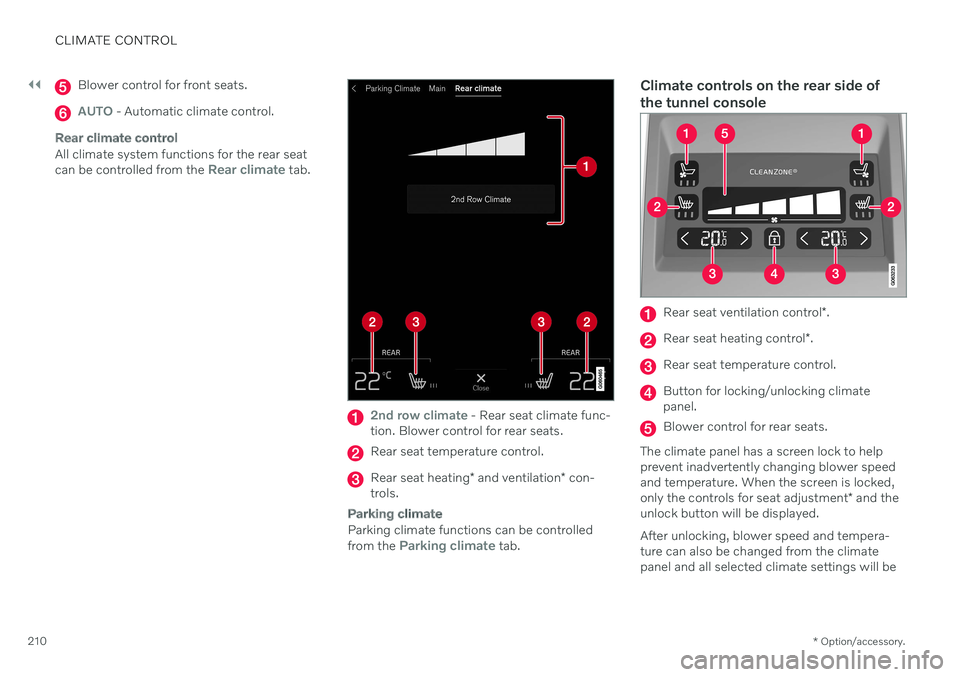
Rear climate control
All climate system functions for the rear seat can be controlled from the Rear climate tab.
2nd row climate - Rear seat climate func-
tion. Blower control for rear seats.
Rear seat temperature control.
Rear seat heating * and ventilation * con-
trols.
Parking climate
Parking climate functions can be controlled from the Parking climate tab.
Climate controls on the rear side of the tunnel console
Rear seat ventilation control *.
Rear seat heating control *.
Rear seat temperature control.
Button for locking/unlocking climate panel.
Blower control for rear seats.
The climate panel has a screen lock to help prevent inadvertently changing blower speedand temperature. When the screen is locked, only the controls for seat adjustment * and the
unlock button will be displayed. After unlocking, blower speed and tempera- ture can also be changed from the climatepanel and all selected climate settings will be